sat nav BMW Z4 SDRIVE35I 2009 Owners Manual
[x] Cancel search | Manufacturer: BMW, Model Year: 2009, Model line: Z4 SDRIVE35I, Model: BMW Z4 SDRIVE35I 2009Pages: 248, PDF Size: 7.63 MB
Page 5 of 248
Reference
At a glance
Controls
Driving tips
Communications
Navigation
Entertainment
Mobility
Contents
The fastest way to find information on a partic-
ular topic or item is by using the index, refer to
page230.
Using this Owner's Manual
4 Notes
7 Reporting safety defects
At a glance
10Cockpit
16 iDrive
22 Letters and numbers
23 Voice activation system
Controls
28Opening and closing
41 Adjustments
48 Transporting children safely
50 Driving
64 Everything under control
77 Technology for driving comfort and
safety
88 Lamps
92 Climate
98 Practical interior accessories
Driving tips
110Things to remember when driving
Navigation
118Navigation system
119 Destination entry
128 Destination guidance
134 What to do if …
Entertainment
138On/off and tone
141 Radio
144 Satellite radio
146 CD/DVD player and CD/DVD changer
153 Music collection
158 External devices
Communications
164Telephone
176 Contacts
178 BMW Assist
Mobility
188Refueling
190 Wheels and tires
197 Under the hood
202 Maintenance
204 Care
208 Replacing components
213 Giving and rece iving assistance
Reference
220Technical data
223 Short commands for the voice activation
system
230 Everything from A to Z
Page 95 of 248
Controls
93Reference
At a glance
Driving tips
Communications
Navigation
Entertainment
Mobility
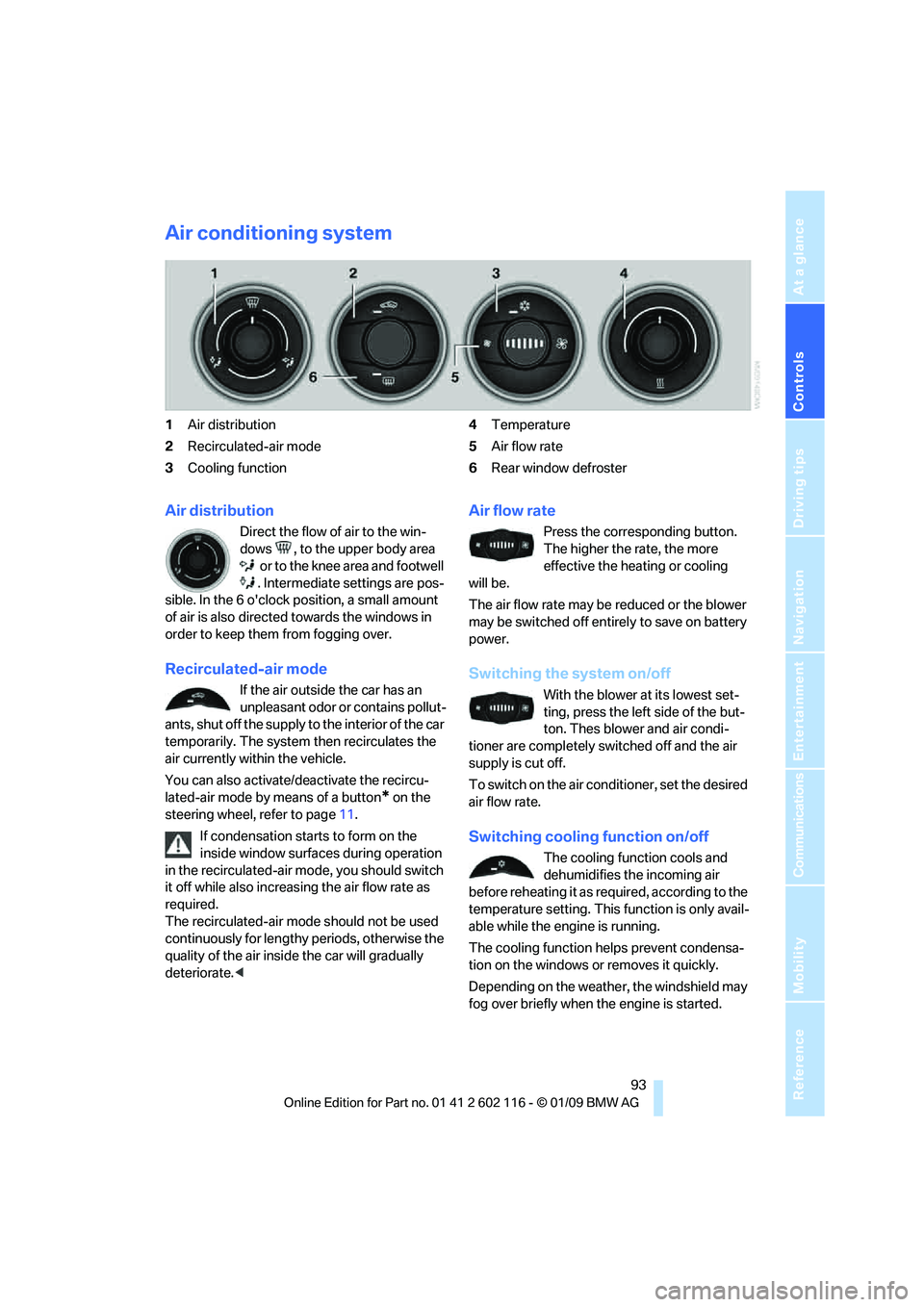
Air conditioning system
1Air distribution
2 Recirculated-air mode
3 Cooling function 4
Temperature
5 Air flow rate
6 Rear window defroster
Air distribution
Direct the flow of air to the win-
dows , to the upper body area
or to the knee area and footwell
. Intermediate settings are pos-
sible. In the 6 o'clock position, a small amount
of air is also directed towards the windows in
order to keep them from fogging over.
Recirculated-air mode
If the air outside the car has an
unpleasant odor or contains pollut-
ants, shut off the supply to the interior of the car
temporarily. The system then recirculates the
air currently within the vehicle.
You can also activate/d eactivate the recircu-
lated-air mode by means of a button
* on the
steering wheel, refer to page 11.
If condensation starts to form on the
inside window surfaces during operation
in the recirculated-air mode, you should switch
it off while also increasing the air flow rate as
required.
The recirculated-air mode should not be used
continuously for lengthy periods, otherwise the
quality of the air inside the car will gradually
deteriorate. <
Air flow rate
Press the corresponding button.
The higher the rate, the more
effective the heating or cooling
will be.
The air flow rate may be reduced or the blower
may be switched off entire ly to save on battery
power.
Switching the system on/off
With the blower at its lowest set-
ting, press the left side of the but-
ton. Thes blower and air condi-
tioner are completely switched off and the air
supply is cut off.
To switch on the air cond itioner, set the desired
air flow rate.
Switching cooling function on/off
The cooling function cools and
dehumidifies the incoming air
before reheating it as re quired, according to the
temperature setting. This function is only avail-
able while the engine is running.
The cooling function helps prevent condensa-
tion on the windows or removes it quickly.
Depending on the weathe r, the windshield may
fog over briefly when the engine is started.
Page 97 of 248
Controls
95Reference
At a glance
Driving tips
Communications
Navigation
Entertainment
Mobility
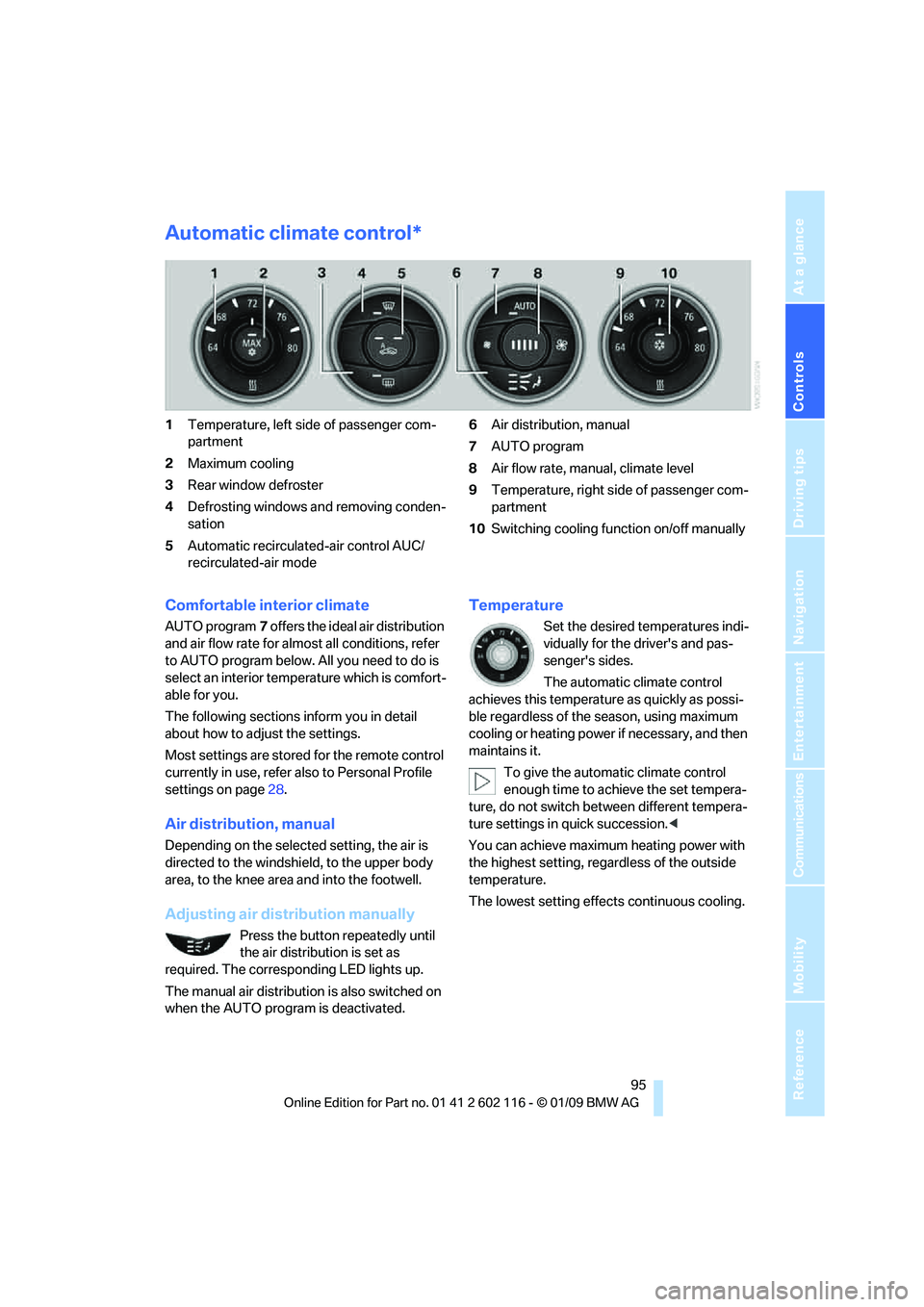
Automatic climate control*
1Temperature, left side of passenger com-
partment
2 Maximum cooling
3 Rear window defroster
4 Defrosting windows and removing conden-
sation
5 Automatic recirculated-air control AUC/
recirculated-air mode 6
Air distribution, manual
7 AUTO program
8 Air flow rate, manual, climate level
9 Temperature, right side of passenger com-
partment
10 Switching cooling function on/off manually
Comfortable interior climate
AUTO program 7 offers the ideal air distribution
and air flow rate for almost all conditions, refer
to AUTO program below. All you need to do is
select an interior temp erature which is comfort-
able for you.
The following sections inform you in detail
about how to adjust the settings.
Most settings are stored for the remote control
currently in use, refer al so to Personal Profile
settings on page 28.
Air distribution, manual
Depending on the selected setting, the air is
directed to the windshie ld, to the upper body
area, to the knee area and into the footwell.
Adjusting air distribution manually
Press the button repeatedly until
the air distribution is set as
required. The corresponding LED lights up.
The manual air distribution is also switched on
when the AUTO program is deactivated.
Temperature
Set the desired temperatures indi-
vidually for the driver's and pas-
senger's sides.
The automatic climate control
achieves this temperature as quickly as possi-
ble regardless of the season, using maximum
cooling or heating power if necessary, and then
maintains it.
To give the automatic climate control
enough time to achieve the set tempera-
ture, do not switch be tween different tempera-
ture settings in quick succession. <
You can achieve maximum heating power with
the highest setting, rega rdless of the outside
temperature.
The lowest setting effe cts continuous cooling.
Page 99 of 248
Controls
97Reference
At a glance
Driving tips
Communications
Navigation
Entertainment
Mobility
This function can be switched on
using the right button under the
following conditions:
> Up to 15 minutes after the engine has been
switched off
> Radio readiness is switched on.
> While the engine is at operating
temperature
> As long as battery voltage is sufficient
> At an outside temperature below
777/25 6
The middle LED is lit when the function is on.
Automatic recirculated-air control
AUC/recirculated-air mode
Switch on the desired operating
mode by pressing this button
repeatedly:
> LED off: outside air flows in continuously.
> Left-hand LED on, AUC mode: a sensor
detects pollutants in th e outside air. If nec-
essary, the system blocks the supply of out-
side air and recirculates the inside air. As
soon as the concentration of pollutants in
the outside air has decreased sufficiently,
the system automatically switches back to
outside air supply.
> Right-hand LED on, recirculated-air mode:
the supply of outside air is permanently
shut off. The system then recirculates the
air currently within the vehicle.
If condensation starts to form on the
inside window surfaces during operation
in the recirculated-air mode, you should switch
it off while also increasing the air flow rate as
required.
The recirculated-air mode should not be used
over an extended period of time, otherwise the
air quality inside the ca r will deteriorate contin-
uously. <
Defrosting windows and removing
condensation
Quickly removes ice and conden-
sation from the windshield and
front side windows.
Switch on the cooling function as well.
Rear window defroster
The defroster switches off auto-
matically after a certain time or
when the hardtop is opened.
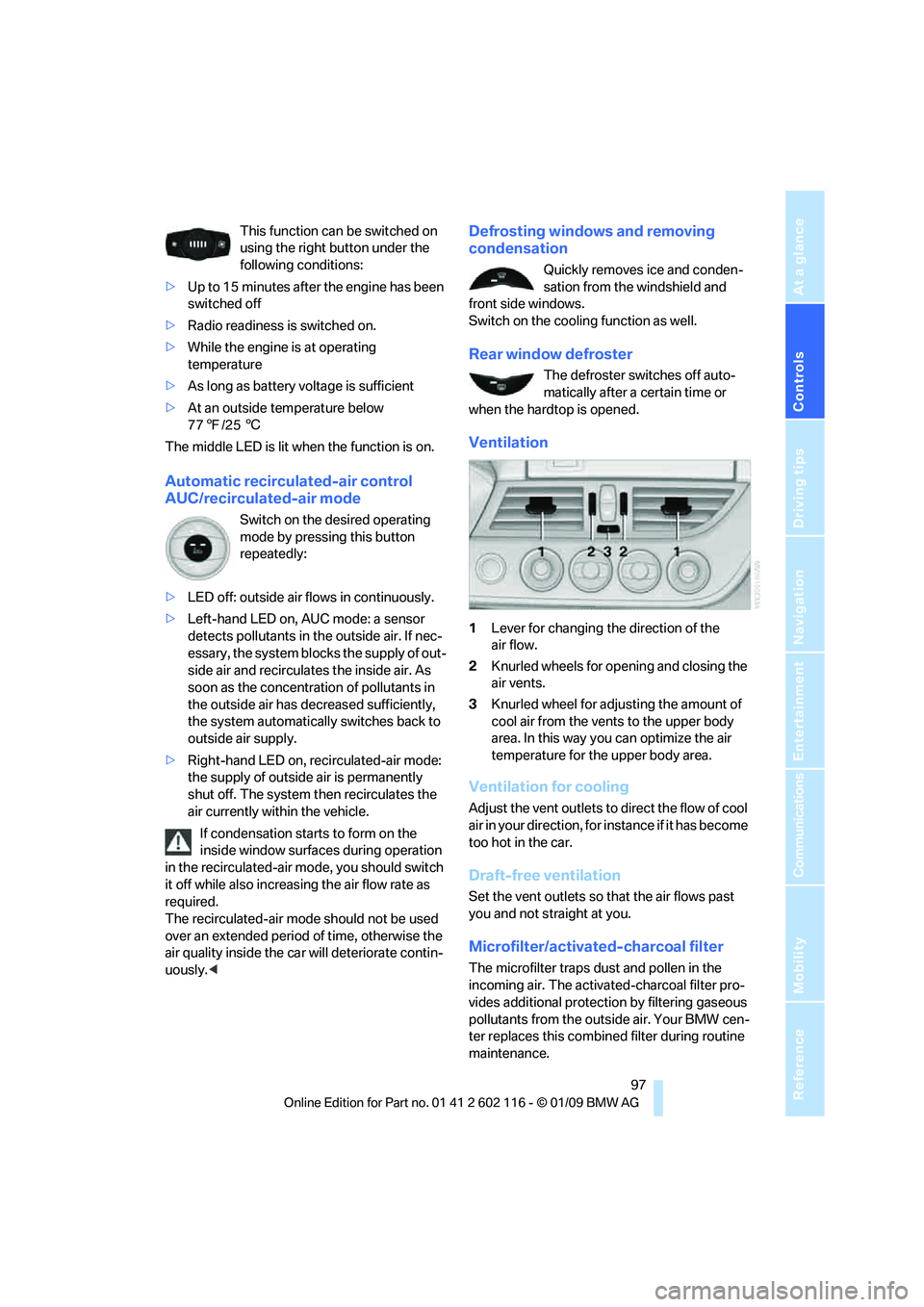
Ventilation
1 Lever for changing the direction of the
air flow.
2 Knurled wheels for opening and closing the
air vents.
3 Knurled wheel for adju sting the amount of
cool air from the vents to the upper body
area. In this way you can optimize the air
temperature for the upper body area.
Ventilation for cooling
Adjust the vent outlets to direct the flow of cool
air in your direction, for instance if it has become
too hot in the car.
Draft-free ventilation
Set the vent outlets so that the air flows past
you and not straight at you.
Microfilter/activated-charcoal filter
The microfilter traps dust and pollen in the
incoming air. The activated-charcoal filter pro-
vides additional protection by filtering gaseous
pollutants from the outs ide air. Your BMW cen-
ter replaces this combined filter during routine
maintenance.
Page 120 of 248
Navigation system
118
Navigation system
General information
With the help of satellites, the navigation sys-
tem is able to ascertain the precise position of
the vehicle and guide you reliably to any desti-
nation you enter.
The navigation data is st ored in the vehicle and
can be updated using navigation DVDs.
Enter data only when the vehicle is sta-
tionary, and always give priority to the
applicable traffic regulati ons in the event of any
contradiction between traffic and road condi-
tions and the instructions issued by the naviga-
tion system. Failure to ta ke to this precaution
can place you in violation of the law and put
vehicle occupants and other road users in
danger. <
Updating the navigation data
The navigation data is st ored in the vehicle and
can be updated using a na vigation DVD. Please
contact the BMW center if you have any ques-
tions.
Inserting navigation DVD
1. Insert the navigation DVD into the DVD
player with the labe led side facing up.
2. Follow the instructio ns on the display.
3. Enter the authorization code of the naviga-
tion DVD and change the DVD if needed.
Displaying information on the version
1. "Navigation"
2. Open "Options".
3. "Navigation system version".
Information on the data version is displayed.
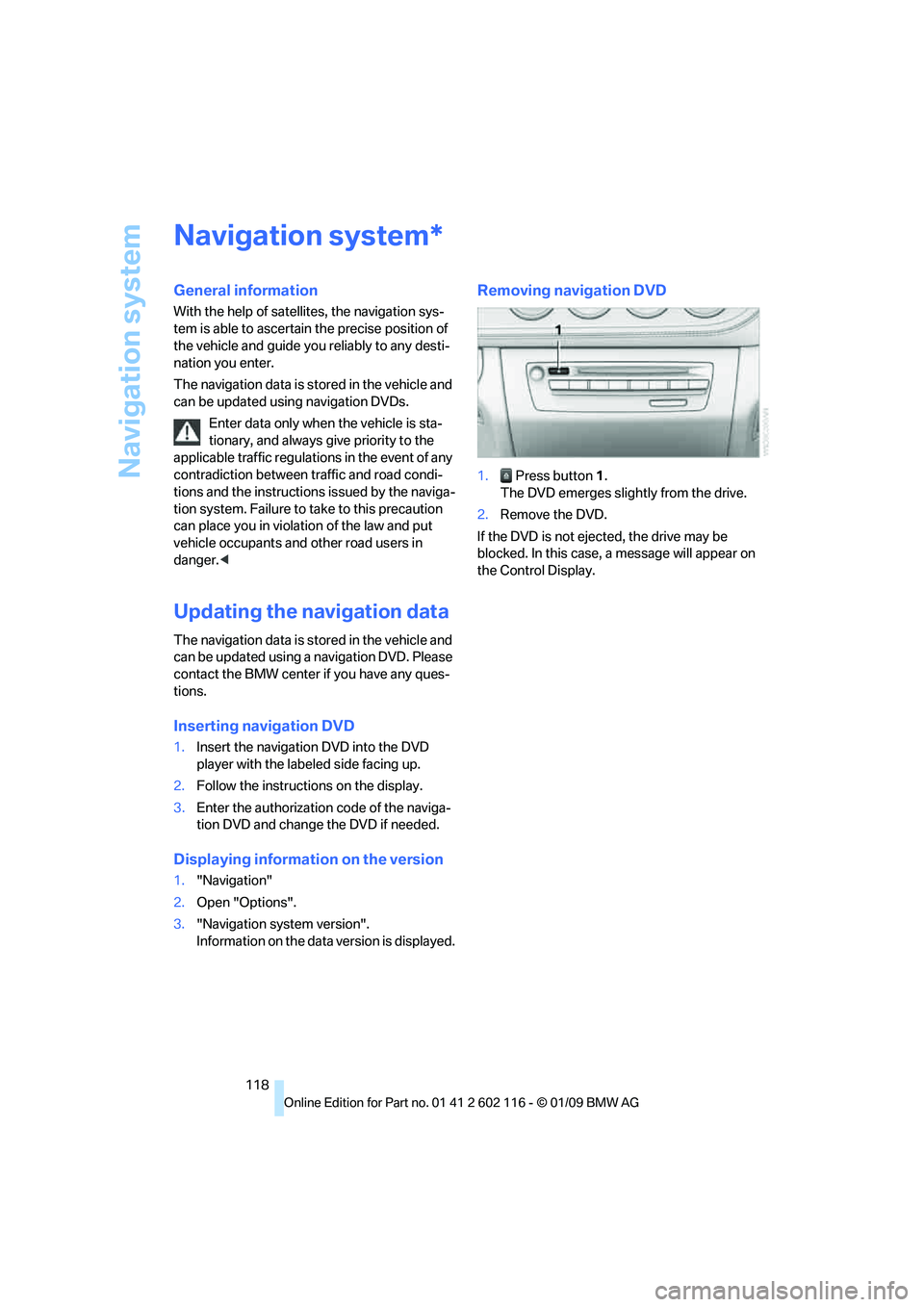
Removing navigation DVD
1. Press button 1.
The DVD emerges slightly from the drive.
2. Remove the DVD.
If the DVD is not ejected, the drive may be
blocked. In this case, a message will appear on
the Control Display.
*
Page 143 of 248
Navigation
Entertainment
Driving tips
141Reference
At a glance
Controls
Communications
Mobility
Radio
Your radio is designed for reception of the fol-
lowing stations:
>FM and AM
> HD radio
*
>Satellite radio*
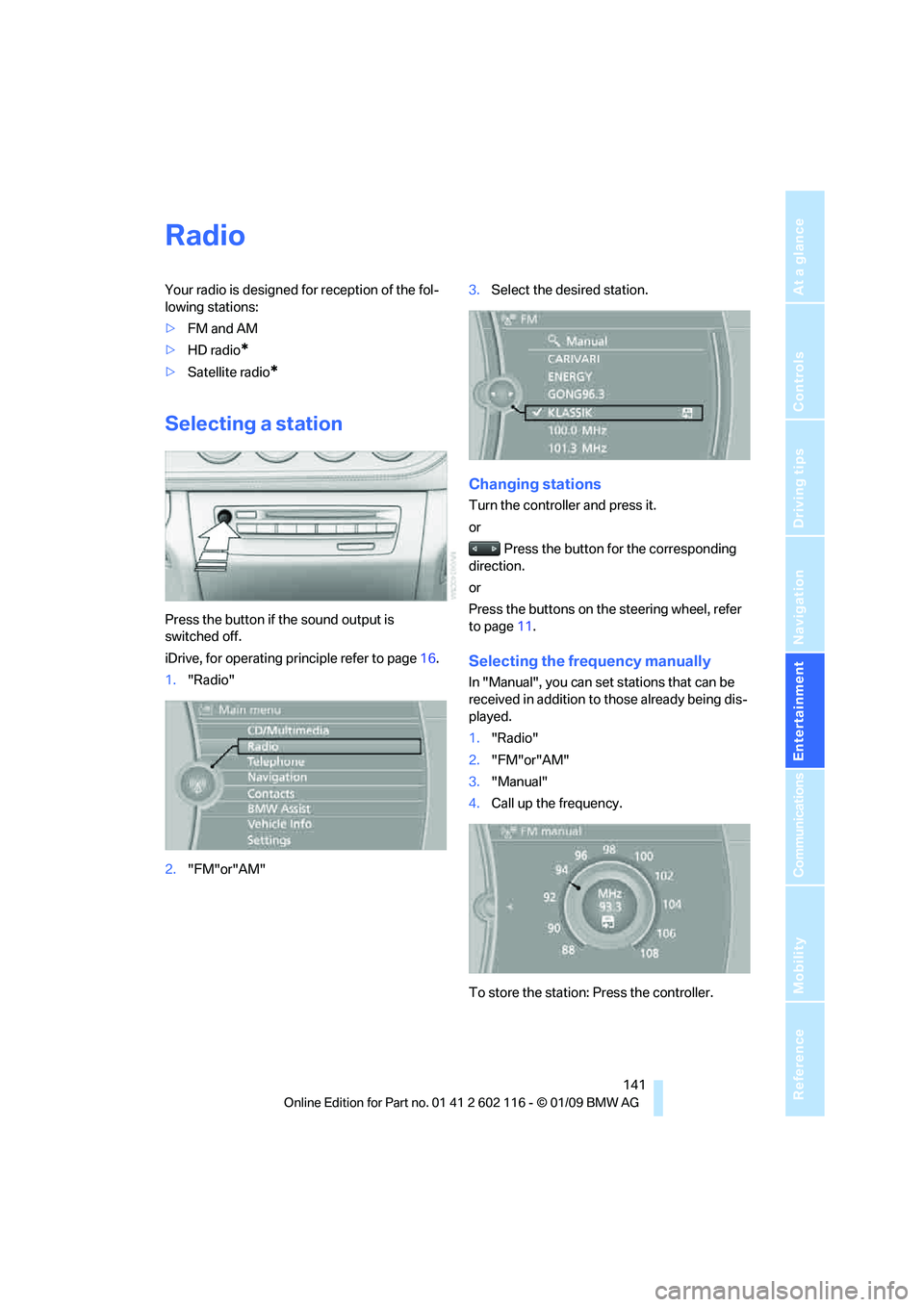
Selecting a station
Press the button if the sound output is
switched off.
iDrive, for operating principle refer to page 16.
1. "Radio"
2. "FM"or"AM" 3.
Select the desired station.
Changing stations
Turn the controller and press it.
or
Press the button for the corresponding
direction.
or
Press the buttons on the steering wheel, refer
to page 11.
Selecting the frequency manually
In "Manual", you can set stations that can be
received in addition to those already being dis-
played.
1. "Radio"
2. "FM"or"AM"
3. "Manual"
4. Call up the frequency.
To store the station: Press the controller.
Page 147 of 248
Navigation
Entertainment
Driving tips
145Reference
At a glance
Controls
Communications
Mobility
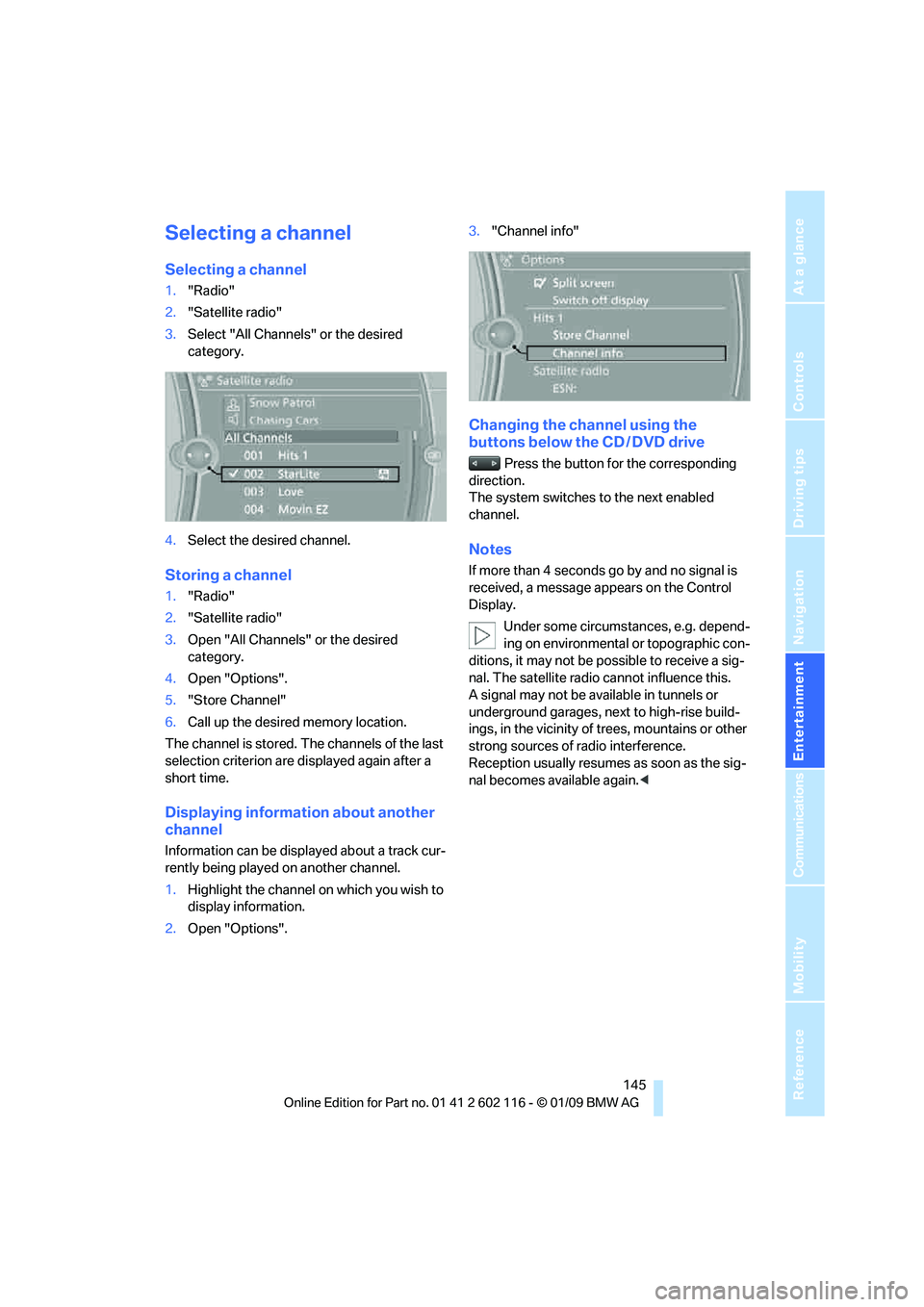
Selecting a channel
Selecting a channel
1."Radio"
2. "Satellite radio"
3. Select "All Channels" or the desired
category.
4. Select the desired channel.
Storing a channel
1."Radio"
2. "Satellite radio"
3. Open "All Channels" or the desired
category.
4. Open "Options".
5. "Store Channel"
6. Call up the desired memory location.
The channel is stored. The channels of the last
selection criterion are displayed again after a
short time.
Displaying information about another
channel
Information can be displayed about a track cur-
rently being played on another channel.
1. Highlight the channel on which you wish to
display information.
2. Open "Options". 3.
"Channel info"
Changing the channel using the
buttons below the CD / DVD drive
Press the button for the corresponding
direction.
The system switches to the next enabled
channel.
Notes
If more than 4 seconds go by and no signal is
received, a message appears on the Control
Display.
Under some circumstances, e.g. depend-
ing on environmental or topographic con-
ditions, it may not be possible to receive a sig-
nal. The satellite radio cannot influence this.
A signal may not be av ailable in tunnels or
underground garages, ne xt to high-rise build-
ings, in the vicinity of trees, mountains or other
strong sources of radio interference.
Reception usually resumes as soon as the sig-
nal becomes available again. <
Page 169 of 248
167
Entertainment
Reference
At a glance
Controls
Driving tips
Communications
Navigation
Mobility
can be used in combin ation with the mobile
phone, e.g. a laptop. <
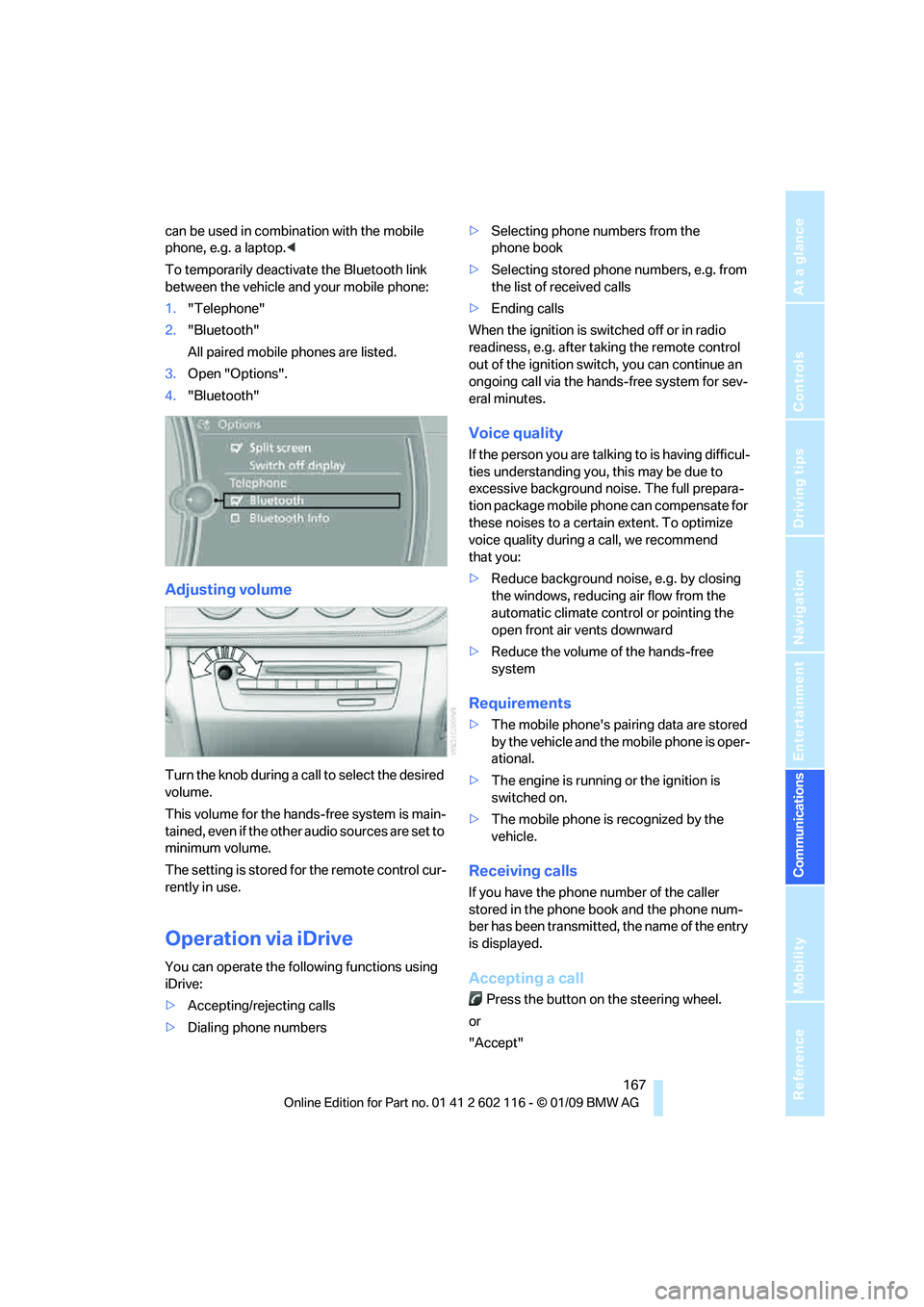
To temporarily deactiva te the Bluetooth link
between the vehicle and your mobile phone:
1. "Telephone"
2. "Bluetooth"
All paired mobile phones are listed.
3. Open "Options".
4. "Bluetooth"
Adjusting volume
Turn the knob during a call to select the desired
volume.
This volume for the hands-free system is main-
tained, even if the other audio sources are set to
minimum volume.
The setting is stored for the remote control cur-
rently in use.
Operation via iDrive
You can operate the following functions using
iDrive:
> Accepting/rejecting calls
> Dialing phone numbers >
Selecting phone numbers from the
phone book
> Selecting stored phone numbers, e.g. from
the list of received calls
> Ending calls
When the ignition is switched off or in radio
readiness, e.g. after ta king the remote control
out of the ignition switch, you can continue an
ongoing call via the hands-free system for sev-
eral minutes.
Voice quality
If the person you are talk ing to is having difficul-
ties understanding you, this may be due to
excessive background noise. The full prepara-
tion package mobile phone can compensate for
these noises to a certain extent. To optimize
voice quality during a call, we recommend
that you:
> Reduce background noise, e.g. by closing
the windows, reducing air flow from the
automatic climate cont rol or pointing the
open front air vents downward
> Reduce the volume of the hands-free
system
Requirements
>The mobile phone's pair ing data are stored
by the vehicle and the mobile phone is oper-
ational.
> The engine is running or the ignition is
switched on.
> The mobile phone is recognized by the
vehicle.
Receiving calls
If you have the phone number of the caller
stored in the phone b ook and the phone num-
ber has been transmitted, the name of the entry
is displayed.
Accepting a call
Press the button on the steering wheel.
or
"Accept"
Page 227 of 248
Reference 225
At a glance
Controls
Driving tips
Communications
Navigation
Entertainment
Mobility
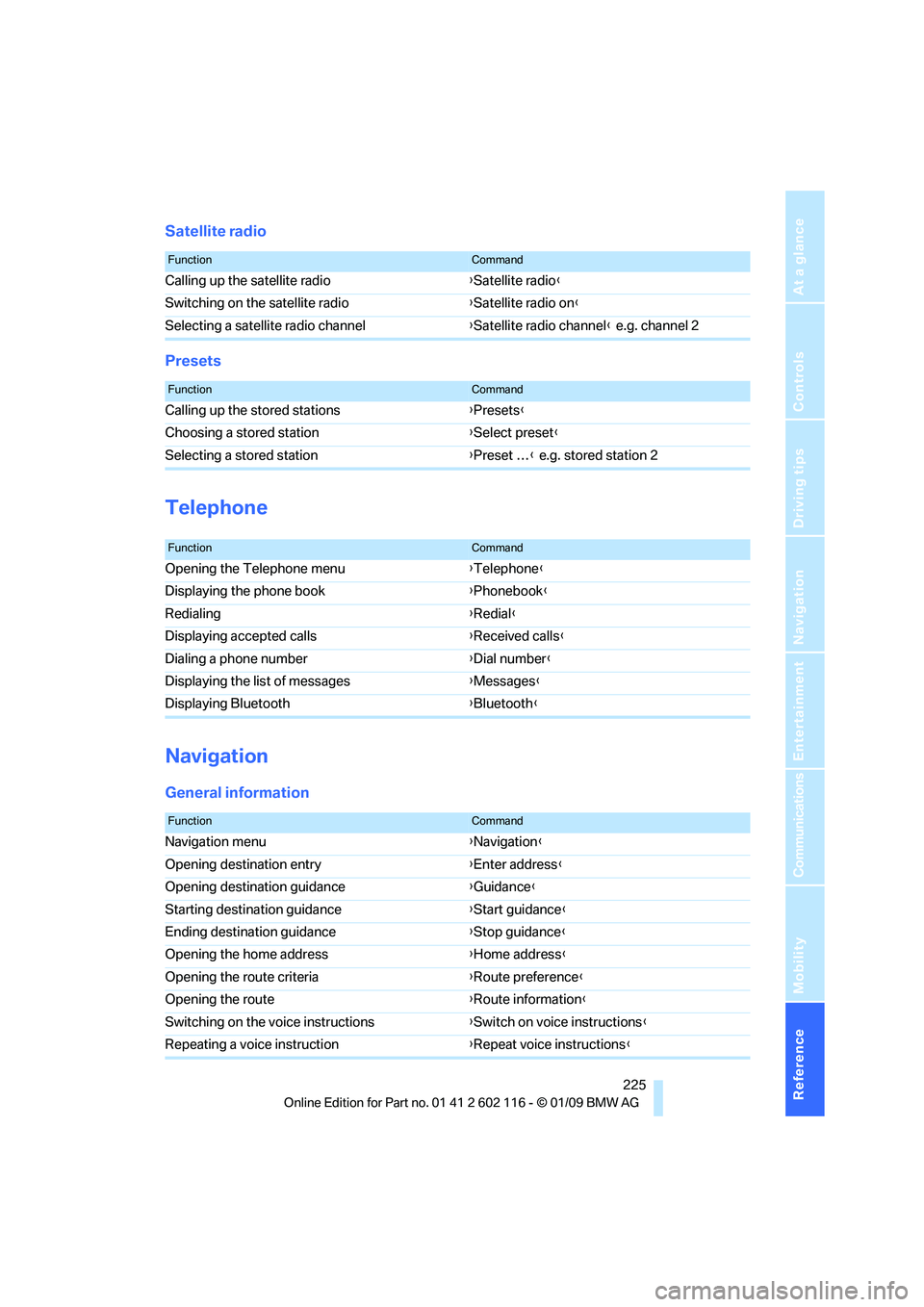
Satellite radio
Presets
Telephone
Navigation
General information
FunctionCommand
Calling up the satellite radio{Satellite radio}
Switching on the satellite radio {Satellite radio on }
Selecting a satellite radio channel {Satellite radio channel } e.g. channel 2
FunctionCommand
Calling up the stored stations {Presets }
Choosing a stored station {Select preset }
Selecting a stored station {Preset … } e.g. stored station 2
FunctionCommand
Opening the Telephone menu {Telephone }
Displaying the phone book {Phonebook }
Redialing {Redial }
Displaying accepted calls {Received calls }
Dialing a phone number {Dial number }
Displaying the list of messages {Messages}
Displaying Bluetooth {Bluetooth }
FunctionCommand
Navigation menu {Navigation }
Opening destination entry {Enter address }
Opening destination guidance {Guidance}
Starting destination guidance {Start guidance }
Ending destination guidance {Stop guidance }
Opening the home address {Home address }
Opening the route criteria {Route preference }
Opening the route {Route information }
Switching on the voice instructions {Switch on voice instructions }
Repeating a voice instruction {Repeat voice instructions }
Page 241 of 248
Reference 239
At a glance
Controls
Driving tips
Communications
Navigation
Entertainment
Mobility
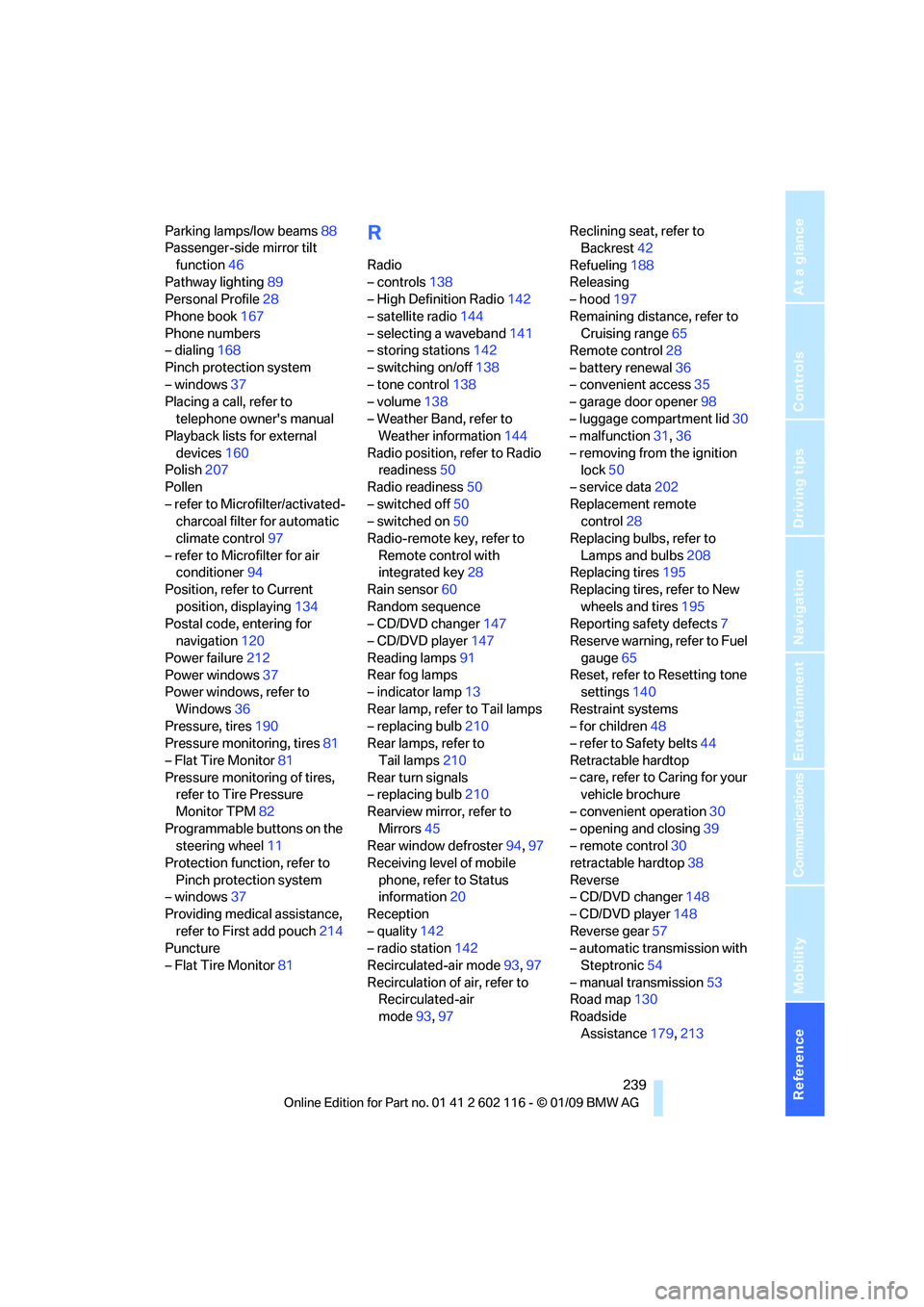
Parking lamps/low beams88
Passenger-side mirror tilt
function 46
Pathway lighting 89
Personal Profile 28
Phone book 167
Phone numbers
– dialing 168
Pinch protection system
– windows 37
Placing a call, refer to
telephone owner's manual
Playback lists for external
devices 160
Polish 207
Pollen
– refer to Microfilter/activated- charcoal filter for automatic
climate control 97
– refer to Microfilter for air conditioner 94
Position, refer to Current
position, displaying 134
Postal code, entering for navigation 120
Power failure 212
Power windows 37
Power windows, refer to
Windows 36
Pressure, tires 190
Pressure monitoring, tires 81
– Flat Tire Monitor 81
Pressure monitoring of tires, refer to Tire Pressure
Monitor TPM 82
Programmable buttons on the steering wheel 11
Protection function, refer to Pinch protection system
– windows 37
Providing medical assistance, refer to First add pouch 214
Puncture
– Flat Tire Monitor 81R
Radio
– controls138
– High Definition Radio 142
– satellite radio 144
– selecting a waveband 141
– storing stations 142
– switching on/off 138
– tone control 138
– volume 138
– Weather Band, refer to Weather information 144
Radio position, refer to Radio readiness 50
Radio readiness 50
– switched off 50
– switched on 50
Radio-remote key, refer to
Remote control with
integrated key 28
Rain sensor 60
Random sequence
– CD/DVD changer 147
– CD/DVD player 147
Reading lamps 91
Rear fog lamps
– indicator lamp 13
Rear lamp, refer to Tail lamps
– replacing bulb 210
Rear lamps, refer to
Tail lamps 210
Rear turn signals
– replacing bulb 210
Rearview mirror, refer to Mirrors 45
Rear window defroster 94,97
Receiving level of mobile phone, refer to Status
information 20
Reception
– quality 142
– radio station 142
Recirculated-air mode 93,97
Recirculation of air, refer to Recirculated-air
mode 93,97 Reclining seat, refer to
Backrest 42
Refueling 188
Releasing
– hood 197
Remaining distance, refer to Cruising range 65
Remote control 28
– battery renewal 36
– convenient access 35
– garage door opener 98
– luggage compartment lid 30
– malfunction 31,36
– removing from the ignition lo
ck50
– service data 202
Replacement remote control 28
Replacing bulbs, refer to
Lamps and bulbs 208
Replacing tires 195
Replacing tires, refer to New
wheels and tires 195
Reporting safety defects 7
Reserve warning, refer to Fuel
gauge 65
Reset, refer to Resetting tone settings 140
Restraint systems
– for children 48
– refer to Safety belts 44
Retractable hardtop
– care, refer to Caring for your vehicle brochure
– convenient operation 30
– opening and closing 39
– remote control 30
retractable hardtop 38
Reverse
– CD/DVD changer 148
– CD/DVD player 148
Reverse gear 57
– automatic transmission with
Steptronic 54
– manual transmission 53
Road map 130
Roadside Assistance 179,213