ESP BMW Z4 SDRIVE35IS 2015 User Guide
[x] Cancel search | Manufacturer: BMW, Model Year: 2015, Model line: Z4 SDRIVE35IS, Model: BMW Z4 SDRIVE35IS 2015Pages: 289, PDF Size: 7.16 MB
Page 50 of 289
AdjustingVehicle equipment
This chapter describes all series equipment as
well as country-specific and special equipment
offered for this model series. Therefore, it also
describes equipment that may not be found in
your vehicle, for instance due to the selected
special equipment or the country version. This
also applies to safety-related functions and
systems.
When using the features and systems descri‐
bed here, adhere to local regulations.
Sitting safely The ideal seating position can make a vital
contribution to relaxed, fatigue-free driving.
The seating position plays an important role in
an accident in combination with:▷Safety belts, refer to page 50.▷Head restraints.▷Airbags, refer to page 92.
Seats
Note before adjusting Do not adjust the seat while driving
Never attempt to adjust the driver's seat
while driving.
The seat could respond with unexpected
movement and the ensuing loss of vehicle
control could lead to an accident.◀
Do not incline the backrest too far to the
rear
Do not incline the backrest on the front pas‐
senger side too far to the rear during driving.
Otherwise, there is the danger of sliding under
the safety belt in an accident. This would elimi‐
nate the protection normally provided by the
belt.◀
Also note the information on safety belt dam‐
age, refer to page 51.
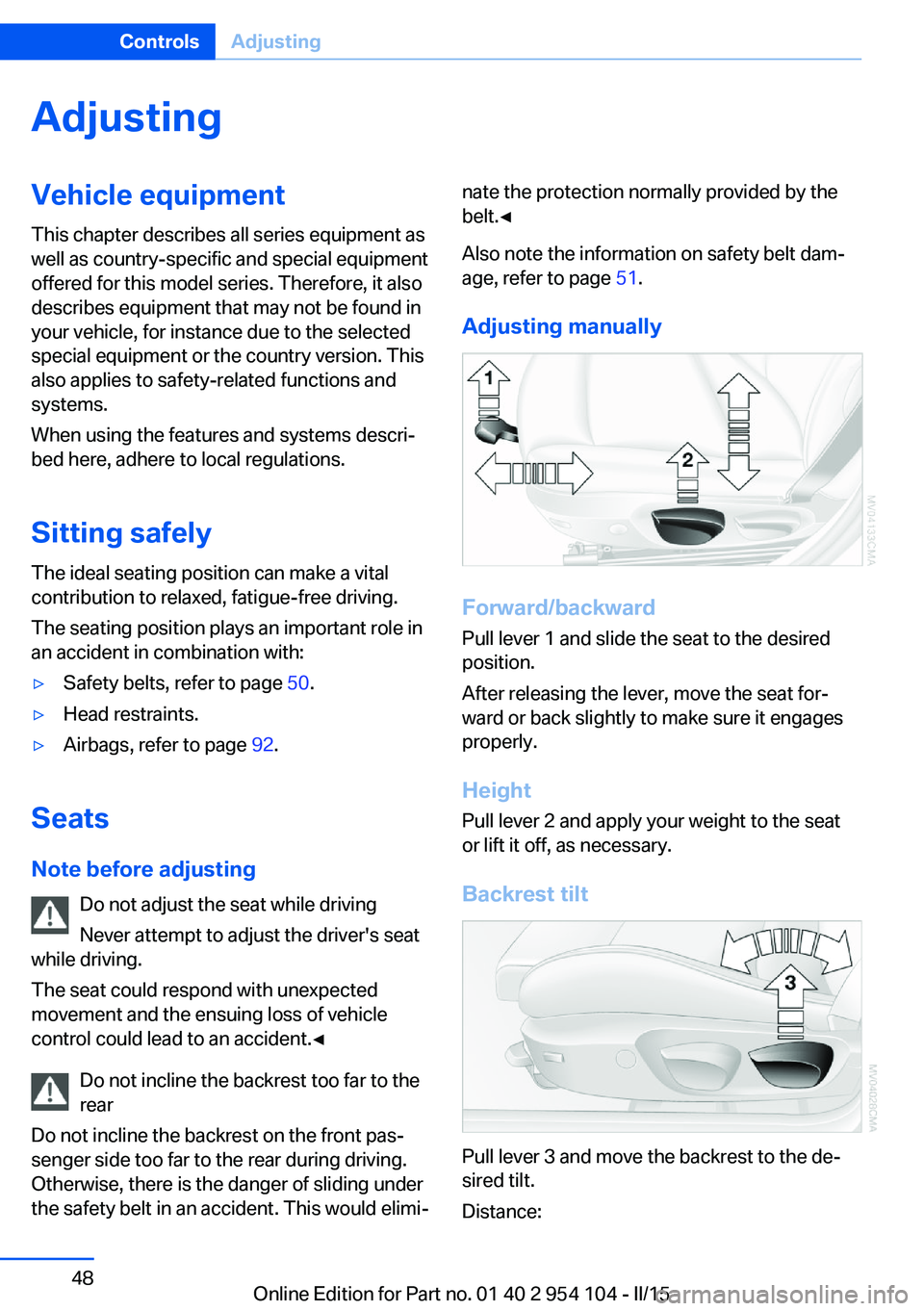
Adjusting manually
Forward/backward Pull lever 1 and slide the seat to the desired
position.
After releasing the lever, move the seat for‐
ward or back slightly to make sure it engages
properly.
Height
Pull lever 2 and apply your weight to the seat
or lift it off, as necessary.
Backrest tilt
Pull lever 3 and move the backrest to the de‐
sired tilt.
Distance:
Seite 48ControlsAdjusting48
Online Edition for Part no. 01 40 2 954 104 - II/15
Page 54 of 289
Comfort function1.Open the driver's door or switch on the
radio ready state, refer to page 57.2.Briefly press the desired memory but‐
ton 1 or 2.
The seat is automatically moved to the stored
position.
The procedure stops when a switch for adjust‐
ing the seat or one of the buttons is pressed.
Safety mode
1.Close the driver's door and switch the igni‐
tion on or off, refer to page 57.2.Press and hold the desired button 1 or 2
until the adjustment procedure is com‐
pleted.
Mirrors
Exterior mirrors
General information The mirror on the passenger side is more
curved than the driver's mirror.
Estimating distances correctly
Objects reflected in the mirror are closer
than they appear. Do not estimate the distance
to the traffic behind you based on what you
see in the mirror, as this will increase your risk
of an accident.◀
The setting for the exterior mirrors is stored for
the remote control currently in use. The stored
position is called up automatically when the
vehicle is unlocked.
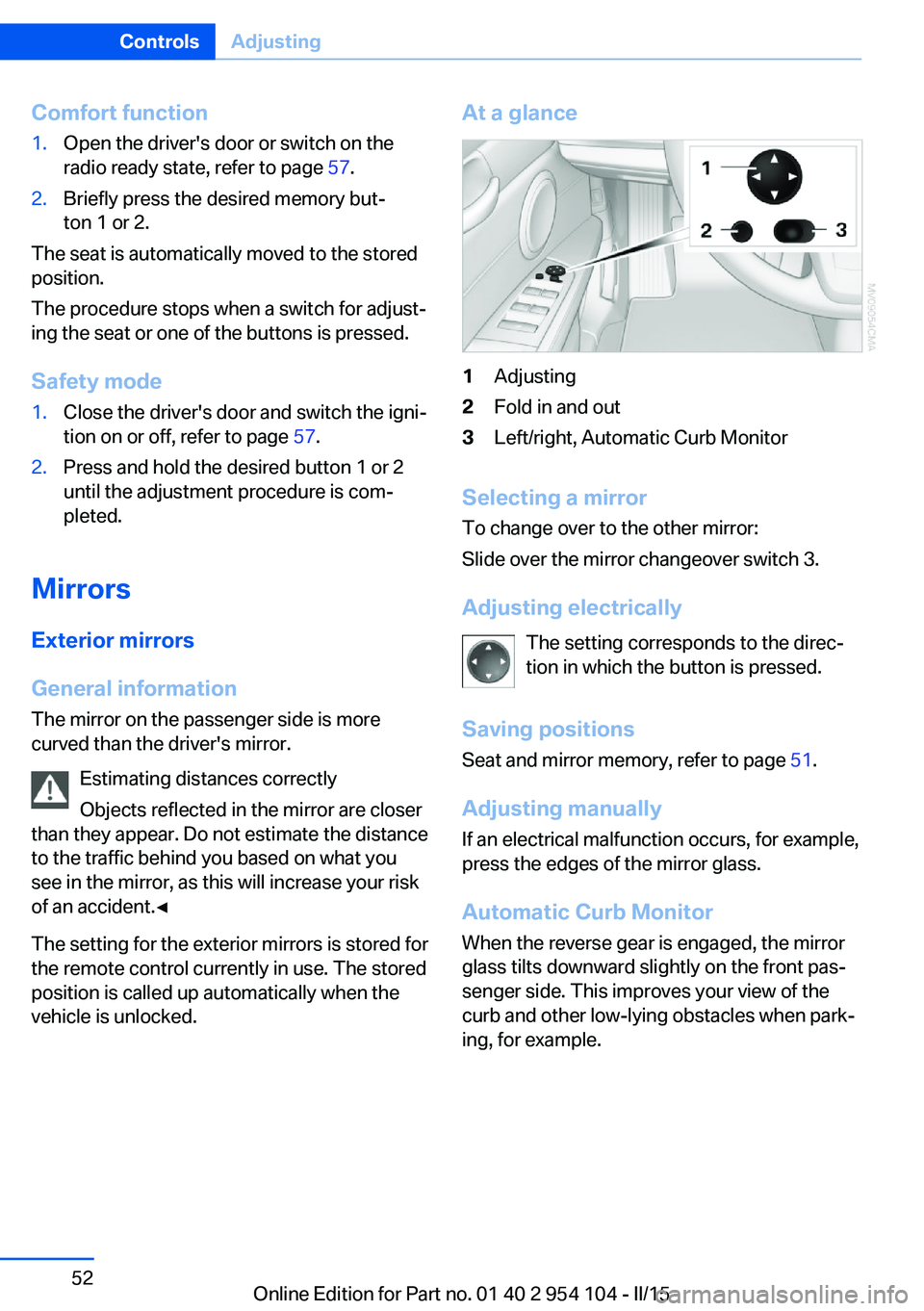
At a glance1Adjusting2Fold in and out3Left/right, Automatic Curb Monitor
Selecting a mirror
To change over to the other mirror:
Slide over the mirror changeover switch 3.
Adjusting electrically The setting corresponds to the direc‐
tion in which the button is pressed.
Saving positions Seat and mirror memory, refer to page 51.
Adjusting manually If an electrical malfunction occurs, for example,
press the edges of the mirror glass.
Automatic Curb Monitor When the reverse gear is engaged, the mirror
glass tilts downward slightly on the front pas‐
senger side. This improves your view of the
curb and other low-lying obstacles when park‐
ing, for example.
Seite 52ControlsAdjusting52
Online Edition for Part no. 01 40 2 954 104 - II/15
Page 75 of 289
DisplaysVehicle equipmentThis chapter describes all series equipment as
well as country-specific and special equipment
offered for this model series. Therefore, it also
describes equipment that may not be found in
your vehicle, for instance due to the selected
special equipment or the country version. This
also applies to safety-related functions and
systems.
When using the features and systems descri‐
bed here, adhere to local regulations.
Odometer, external
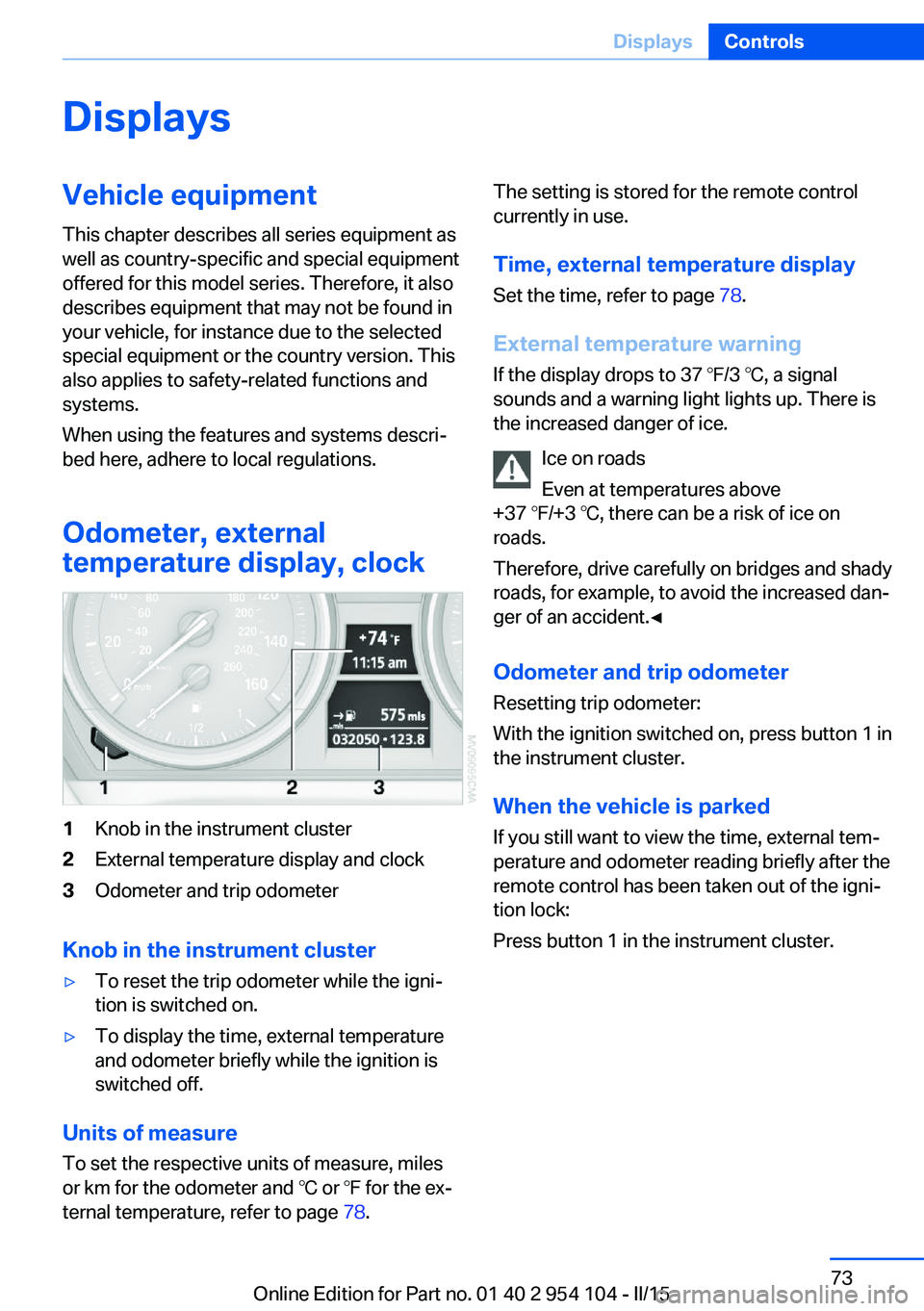
temperature display, clock1Knob in the instrument cluster2External temperature display and clock3Odometer and trip odometer
Knob in the instrument cluster
▷To reset the trip odometer while the igni‐
tion is switched on.▷To display the time, external temperature
and odometer briefly while the ignition is
switched off.
Units of measure
To set the respective units of measure, miles
or km for the odometer and ℃ or ℉ for the ex‐
ternal temperature, refer to page 78.
The setting is stored for the remote control
currently in use.
Time, external temperature display Set the time, refer to page 78.
External temperature warning
If the display drops to 37 ℉/3 ℃, a signal
sounds and a warning light lights up. There is
the increased danger of ice.
Ice on roads
Even at temperatures above
+37 ℉/+3 ℃, there can be a risk of ice on
roads.
Therefore, drive carefully on bridges and shady
roads, for example, to avoid the increased dan‐
ger of an accident.◀
Odometer and trip odometer
Resetting trip odometer:
With the ignition switched on, press button 1 in
the instrument cluster.
When the vehicle is parked
If you still want to view the time, external tem‐
perature and odometer reading briefly after the
remote control has been taken out of the igni‐
tion lock:
Press button 1 in the instrument cluster.Seite 73DisplaysControls73
Online Edition for Part no. 01 40 2 954 104 - II/15
Page 77 of 289
▷The remaining range is shown on the com‐
puter.▷When a dynamic driving style is used, such
as when corners are taken rapidly, engine
functions are not ensured.
Below a range of approx. 30 miles/50 km, the
message is displayed continuously.
Refuel promptly
At the latest, refuel at a range of
30 miles/50 km; otherwise, the engine function
is not ensured and damage may occur.◀
Computer Displays in the instrument cluster
Calling up information
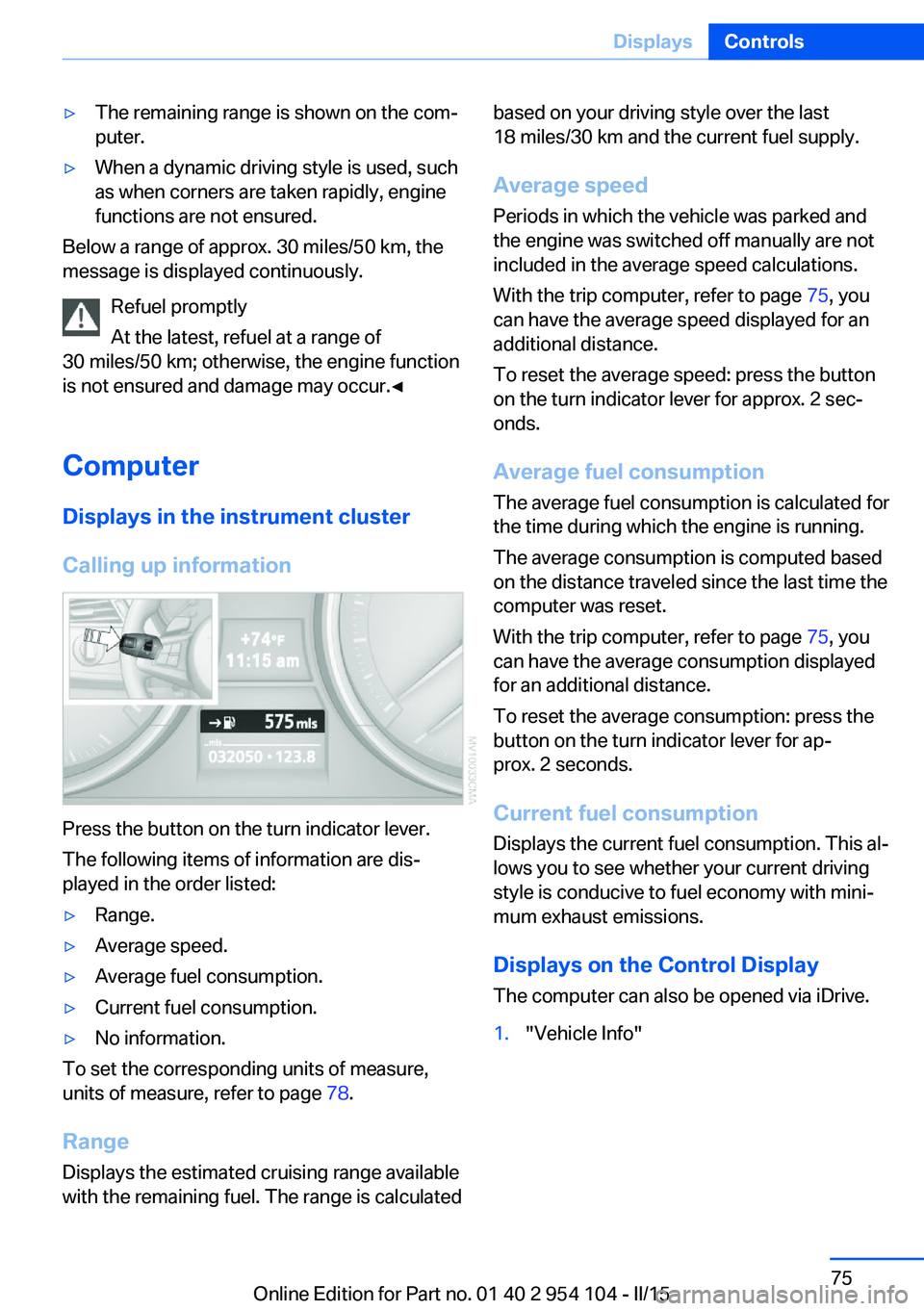
Press the button on the turn indicator lever.
The following items of information are dis‐
played in the order listed:
▷Range.▷Average speed.▷Average fuel consumption.▷Current fuel consumption.▷No information.
To set the corresponding units of measure,
units of measure, refer to page 78.
Range
Displays the estimated cruising range available
with the remaining fuel. The range is calculated
based on your driving style over the last
18 miles/30 km and the current fuel supply.
Average speed
Periods in which the vehicle was parked and
the engine was switched off manually are not
included in the average speed calculations.
With the trip computer, refer to page 75, you
can have the average speed displayed for an
additional distance.
To reset the average speed: press the button
on the turn indicator lever for approx. 2 sec‐
onds.
Average fuel consumption
The average fuel consumption is calculated for
the time during which the engine is running.
The average consumption is computed based
on the distance traveled since the last time the
computer was reset.
With the trip computer, refer to page 75, you
can have the average consumption displayed
for an additional distance.
To reset the average consumption: press the
button on the turn indicator lever for ap‐
prox. 2 seconds.
Current fuel consumption Displays the current fuel consumption. This al‐
lows you to see whether your current driving
style is conducive to fuel economy with mini‐
mum exhaust emissions.
Displays on the Control Display
The computer can also be opened via iDrive.1."Vehicle Info"Seite 75DisplaysControls75
Online Edition for Part no. 01 40 2 954 104 - II/15
Page 78 of 289
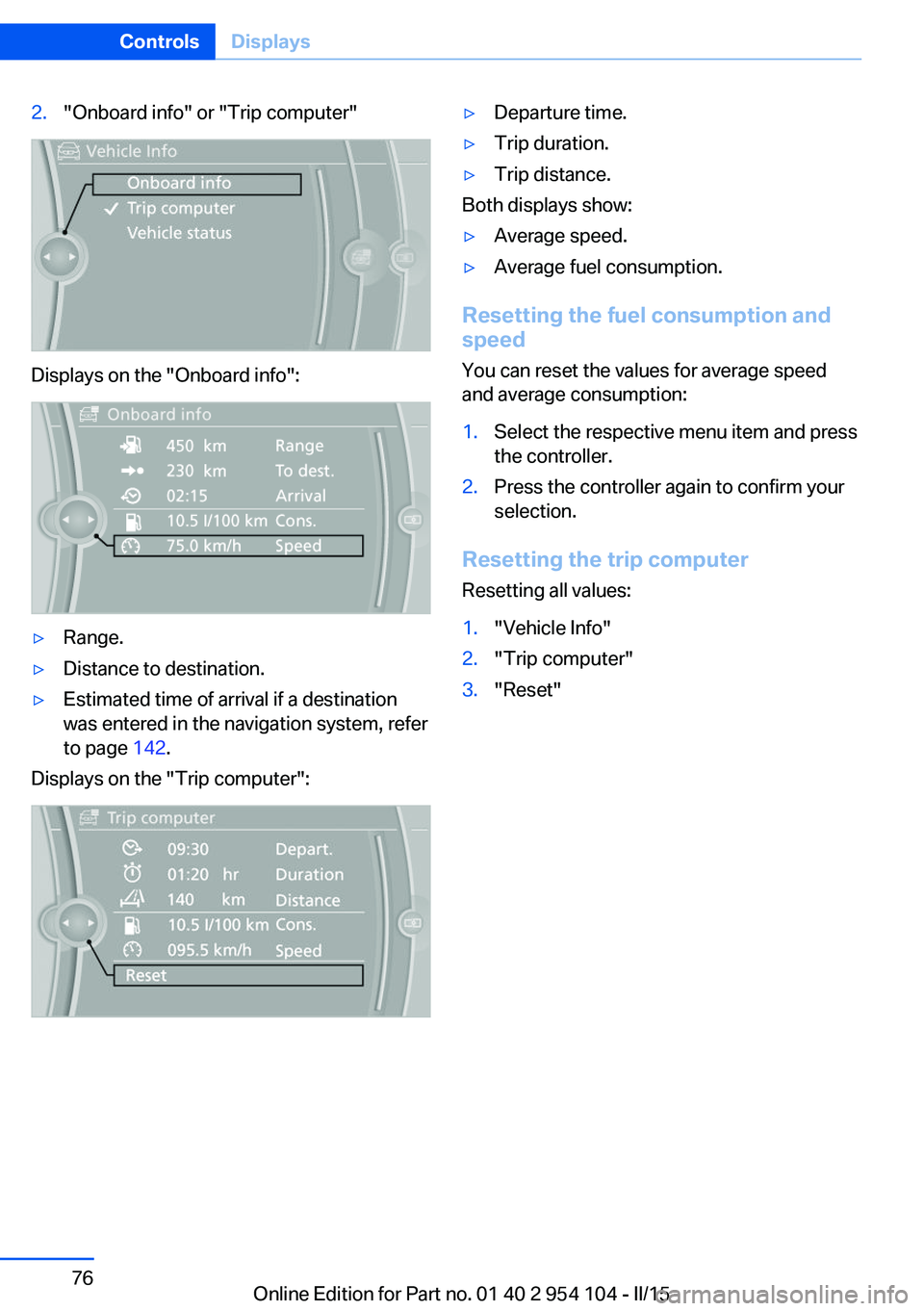
2."Onboard info" or "Trip computer"
Displays on the "Onboard info":
▷Range.▷Distance to destination.▷Estimated time of arrival if a destination
was entered in the navigation system, refer
to page 142.
Displays on the "Trip computer":
▷Departure time.▷Trip duration.▷Trip distance.
Both displays show:
▷Average speed.▷Average fuel consumption.
Resetting the fuel consumption and
speed
You can reset the values for average speed
and average consumption:
1.Select the respective menu item and press
the controller.2.Press the controller again to confirm your
selection.
Resetting the trip computer
Resetting all values:
1."Vehicle Info"2."Trip computer"3."Reset"Seite 76ControlsDisplays76
Online Edition for Part no. 01 40 2 954 104 - II/15
Page 86 of 289
6.Create the settings.7.Confirm.
The entered date is stored.
Automatic Service Request
Data regarding the maintenance status or le‐
gally mandated inspections of the vehicle are
automatically transmitted to your service cen‐
ter before a service due date.
You can check when your service center was
notified.
1."Vehicle Info"2."Vehicle status"3.Open "Options".4."Last Service Request"
Check Control
The concept The Check Control monitors vehicle functions
and alerts you to any malfunctions in the sys‐
tems monitored.
Such Check Control messages involve indica‐
tor or warning lamps in the instrument cluster
and, in some circumstances, an acoustic signal
and text messages at the bottom of the Con‐
trol Display.
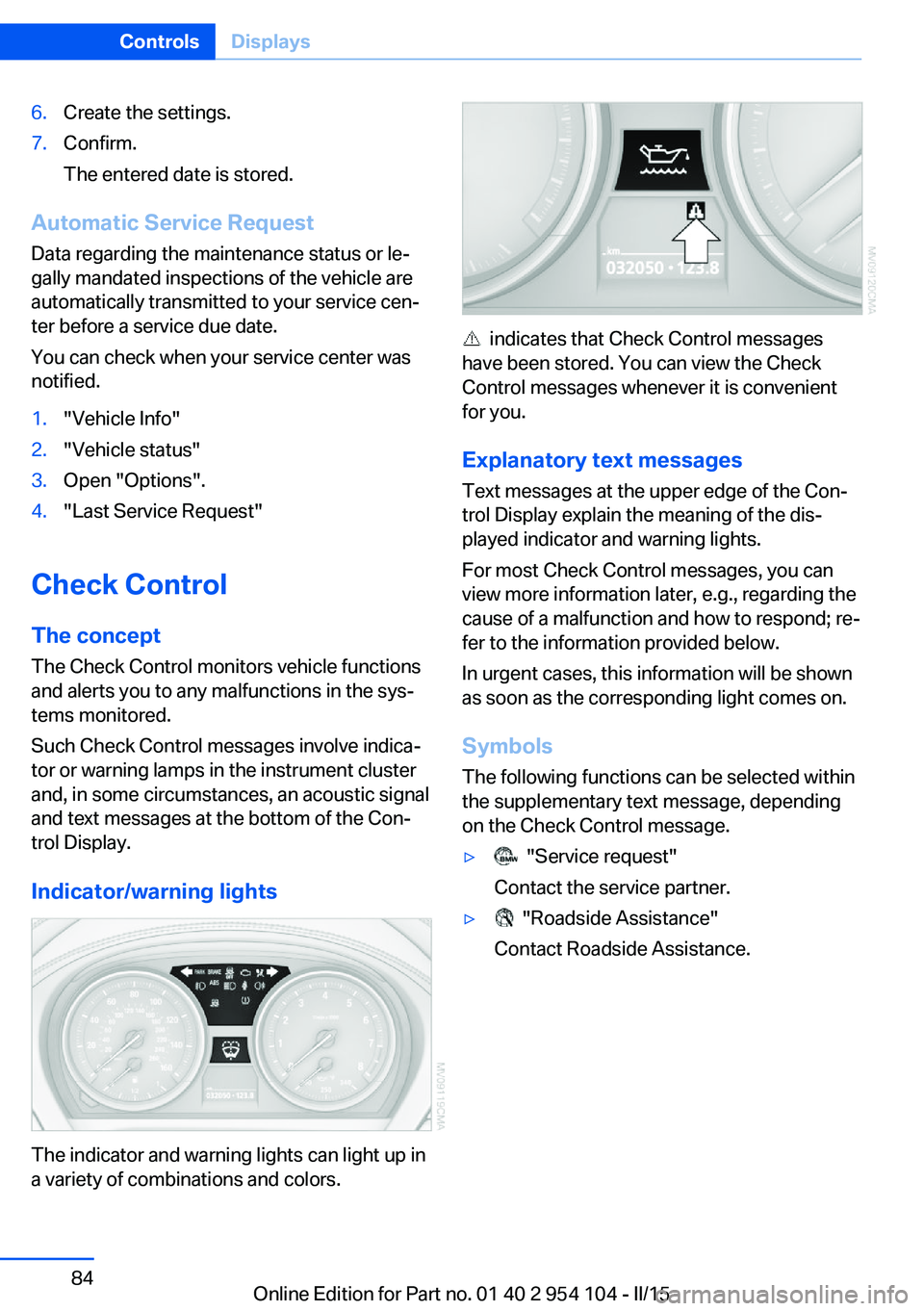
Indicator/warning lights
The indicator and warning lights can light up in
a variety of combinations and colors.
indicates that Check Control messages
have been stored. You can view the Check
Control messages whenever it is convenient
for you.
Explanatory text messages Text messages at the upper edge of the Con‐
trol Display explain the meaning of the dis‐
played indicator and warning lights.
For most Check Control messages, you can
view more information later, e.g., regarding the
cause of a malfunction and how to respond; re‐
fer to the information provided below.
In urgent cases, this information will be shown
as soon as the corresponding light comes on.
Symbols The following functions can be selected within
the supplementary text message, depending
on the Check Control message.
▷ "Service request"
Contact the service partner.▷ "Roadside Assistance"
Contact Roadside Assistance.Seite 84ControlsDisplays84
Online Edition for Part no. 01 40 2 954 104 - II/15
Page 87 of 289
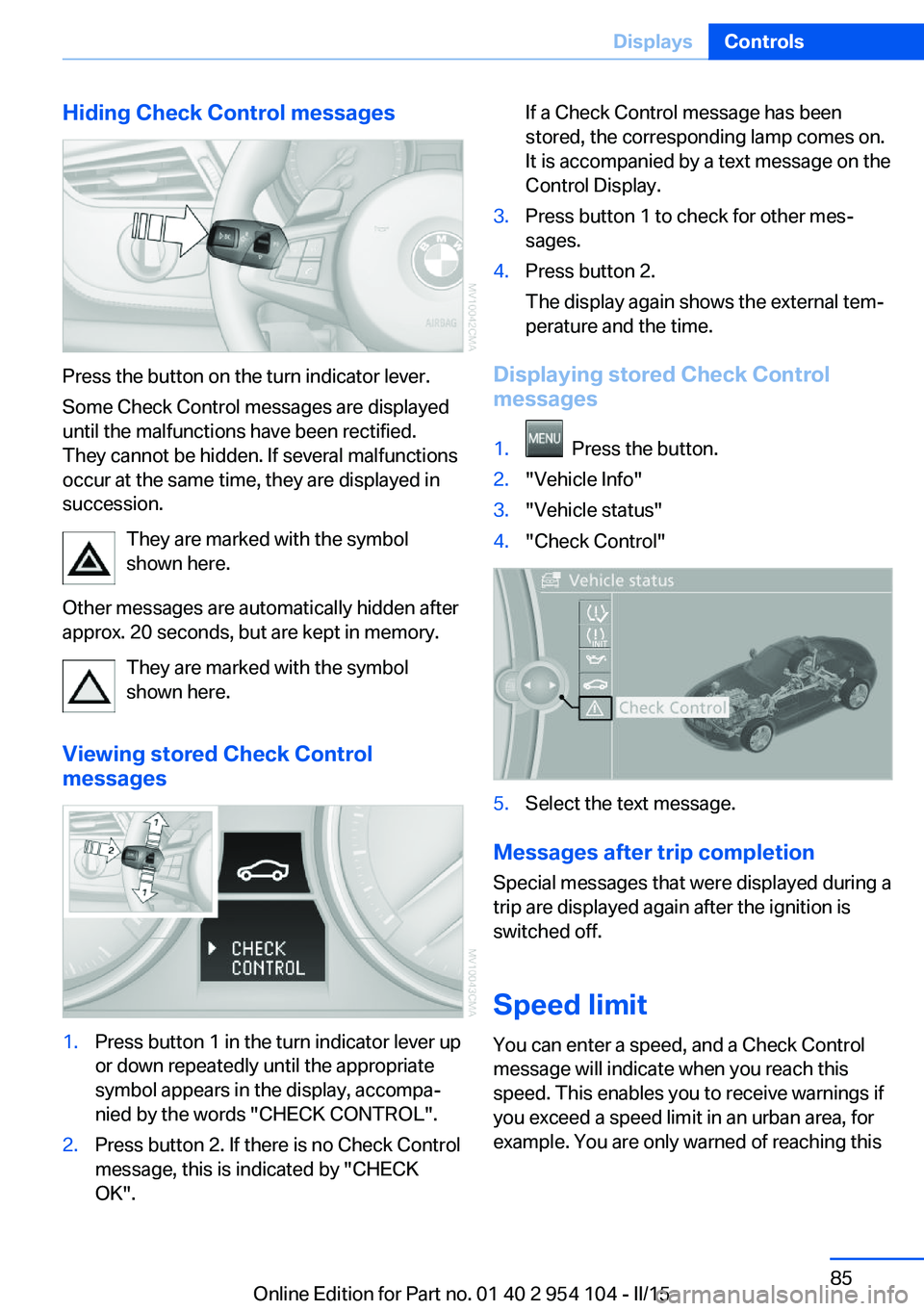
Hiding Check Control messages
Press the button on the turn indicator lever.
Some Check Control messages are displayed
until the malfunctions have been rectified.
They cannot be hidden. If several malfunctions
occur at the same time, they are displayed in
succession.
They are marked with the symbol
shown here.
Other messages are automatically hidden after
approx. 20 seconds, but are kept in memory.
They are marked with the symbol
shown here.
Viewing stored Check Control
messages
1.Press button 1 in the turn indicator lever up
or down repeatedly until the appropriate
symbol appears in the display, accompa‐
nied by the words "CHECK CONTROL".2.Press button 2. If there is no Check Control
message, this is indicated by "CHECK
OK".If a Check Control message has been
stored, the corresponding lamp comes on.
It is accompanied by a text message on the
Control Display.3.Press button 1 to check for other mes‐
sages.4.Press button 2.
The display again shows the external tem‐
perature and the time.
Displaying stored Check Control
messages
1. Press the button.2."Vehicle Info"3."Vehicle status"4."Check Control"5.Select the text message.
Messages after trip completion
Special messages that were displayed during a
trip are displayed again after the ignition is
switched off.
Speed limit
You can enter a speed, and a Check Control
message will indicate when you reach this
speed. This enables you to receive warnings if
you exceed a speed limit in an urban area, for
example. You are only warned of reaching this
Seite 85DisplaysControls85
Online Edition for Part no. 01 40 2 954 104 - II/15
Page 90 of 289
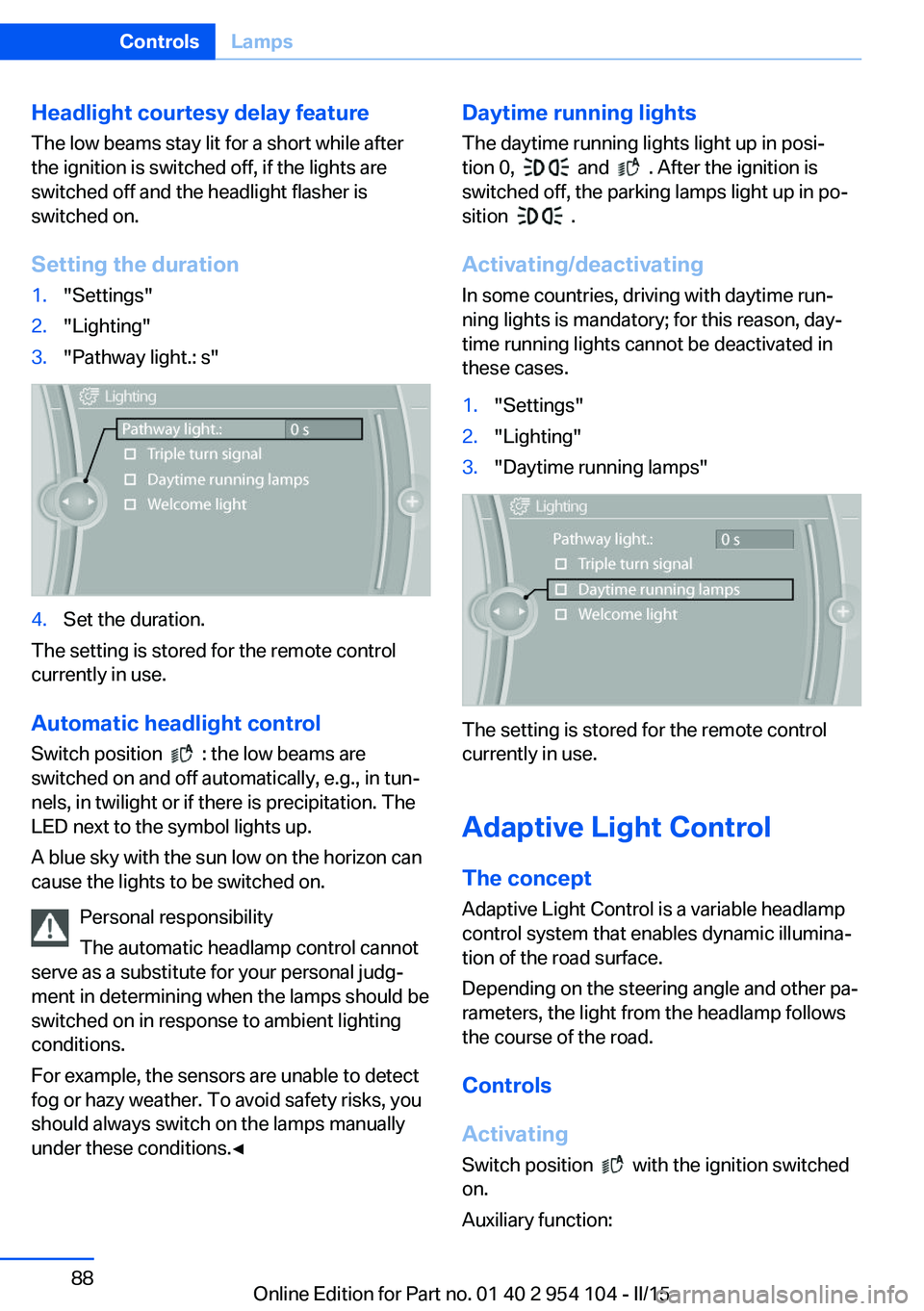
Headlight courtesy delay featureThe low beams stay lit for a short while after
the ignition is switched off, if the lights are
switched off and the headlight flasher is
switched on.
Setting the duration1."Settings"2."Lighting"3."Pathway light.: s"4.Set the duration.
The setting is stored for the remote control
currently in use.
Automatic headlight control
Switch position
: the low beams are
switched on and off automatically, e.g., in tun‐
nels, in twilight or if there is precipitation. The
LED next to the symbol lights up.
A blue sky with the sun low on the horizon can
cause the lights to be switched on.
Personal responsibility
The automatic headlamp control cannot
serve as a substitute for your personal judg‐
ment in determining when the lamps should be
switched on in response to ambient lighting
conditions.
For example, the sensors are unable to detect
fog or hazy weather. To avoid safety risks, you
should always switch on the lamps manually
under these conditions.◀
Daytime running lights
The daytime running lights light up in posi‐tion 0,
and . After the ignition is
switched off, the parking lamps light up in po‐
sition
.
Activating/deactivating
In some countries, driving with daytime run‐
ning lights is mandatory; for this reason, day‐
time running lights cannot be deactivated in
these cases.
1."Settings"2."Lighting"3."Daytime running lamps"
The setting is stored for the remote control
currently in use.
Adaptive Light Control
The concept Adaptive Light Control is a variable headlamp
control system that enables dynamic illumina‐
tion of the road surface.
Depending on the steering angle and other pa‐
rameters, the light from the headlamp follows
the course of the road.
Controls
Activating Switch position
with the ignition switched
on.
Auxiliary function:
Seite 88ControlsLamps88
Online Edition for Part no. 01 40 2 954 104 - II/15
Page 91 of 289
To avoid blinding oncoming traffic, the Adap‐
tive Light Control does not swivel to the driv‐
er's side when the vehicle is at a standstill.
Malfunction The warning lamp lights up. A mes‐
sage appears on the Control Display.
Adaptive Light Control is malfunc‐
tioning or has failed. Have the system checked
as soon as possible.
High-beams/roadside
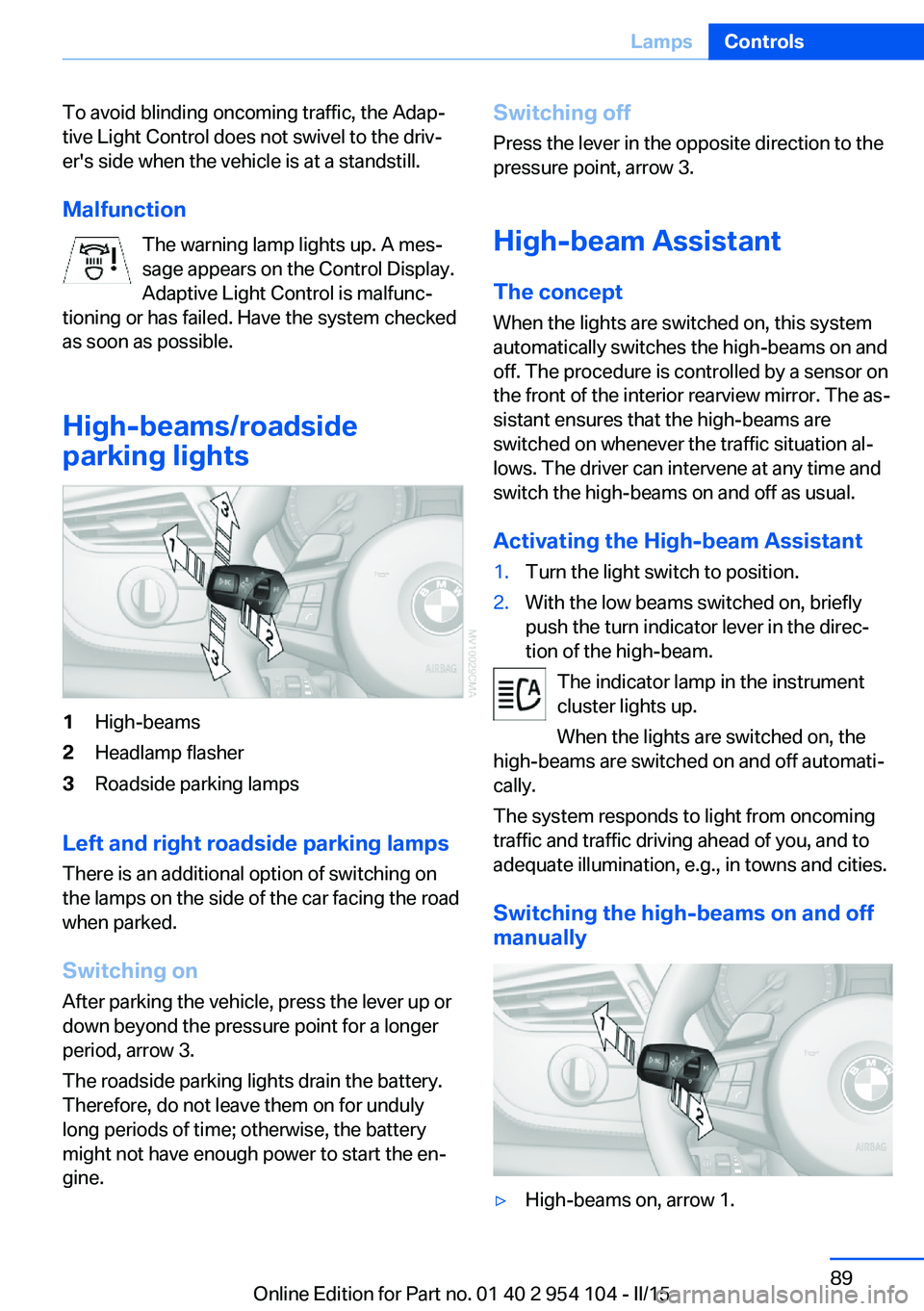
parking lights1High-beams2Headlamp flasher3Roadside parking lamps
Left and right roadside parking lamps
There is an additional option of switching on
the lamps on the side of the car facing the road
when parked.
Switching on After parking the vehicle, press the lever up or
down beyond the pressure point for a longer
period, arrow 3.
The roadside parking lights drain the battery.
Therefore, do not leave them on for unduly
long periods of time; otherwise, the battery
might not have enough power to start the en‐
gine.
Switching off
Press the lever in the opposite direction to the
pressure point, arrow 3.
High-beam Assistant The concept
When the lights are switched on, this system
automatically switches the high-beams on and
off. The procedure is controlled by a sensor on
the front of the interior rearview mirror. The as‐
sistant ensures that the high-beams are
switched on whenever the traffic situation al‐
lows. The driver can intervene at any time and
switch the high-beams on and off as usual.
Activating the High-beam Assistant1.Turn the light switch to position.2.With the low beams switched on, briefly
push the turn indicator lever in the direc‐
tion of the high-beam.
The indicator lamp in the instrument
cluster lights up.
When the lights are switched on, the
high-beams are switched on and off automati‐
cally.
The system responds to light from oncoming
traffic and traffic driving ahead of you, and to
adequate illumination, e.g., in towns and cities.
Switching the high-beams on and off
manually
▷High-beams on, arrow 1.Seite 89LampsControls89
Online Edition for Part no. 01 40 2 954 104 - II/15
Page 92 of 289
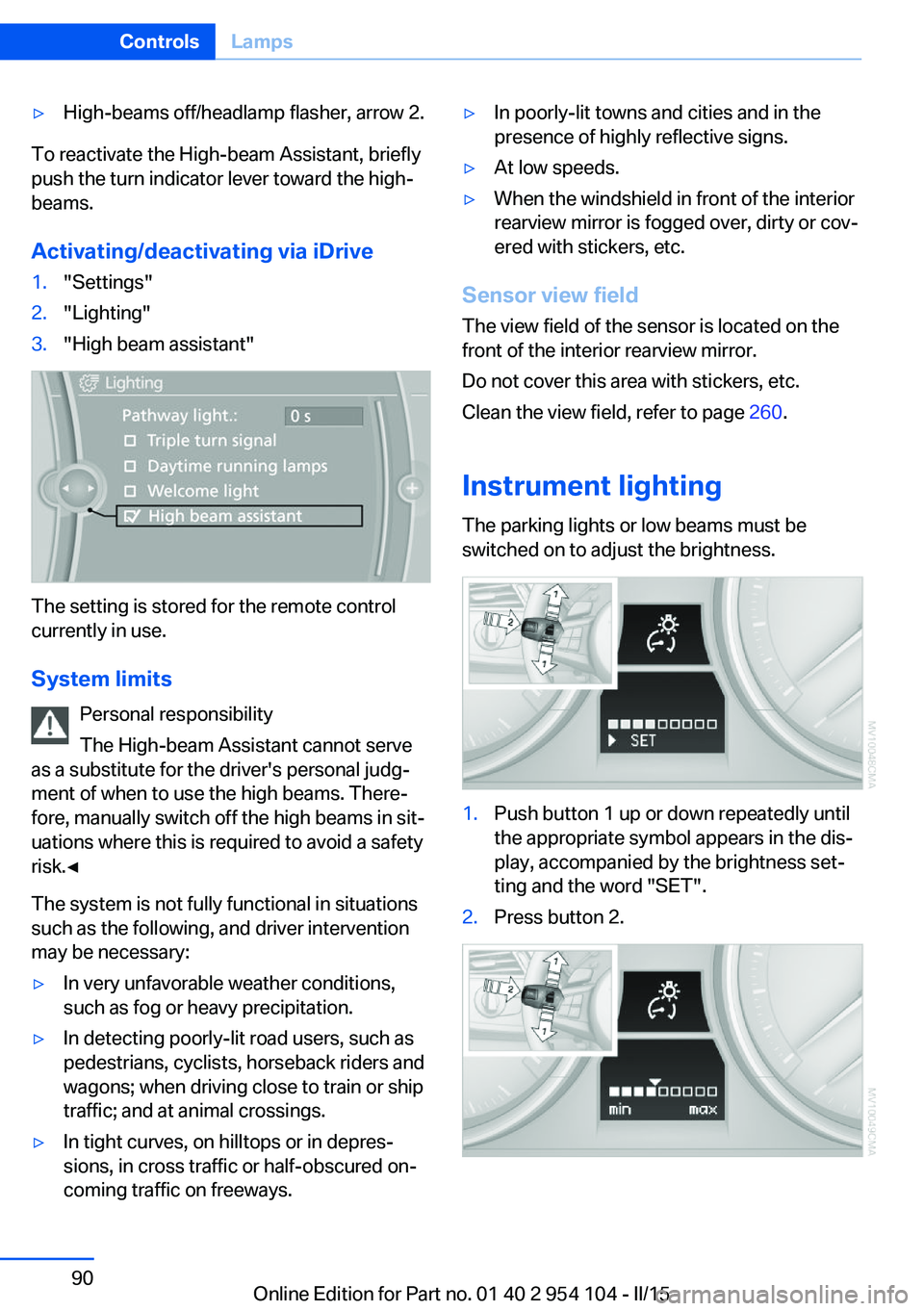
▷High-beams off/headlamp flasher, arrow 2.
To reactivate the High-beam Assistant, briefly
push the turn indicator lever toward the high-
beams.
Activating/deactivating via iDrive
1."Settings"2."Lighting"3."High beam assistant"
The setting is stored for the remote control
currently in use.
System limits Personal responsibility
The High-beam Assistant cannot serve
as a substitute for the driver's personal judg‐
ment of when to use the high beams. There‐
fore, manually switch off the high beams in sit‐
uations where this is required to avoid a safety
risk.◀
The system is not fully functional in situations
such as the following, and driver intervention
may be necessary:
▷In very unfavorable weather conditions,
such as fog or heavy precipitation.▷In detecting poorly-lit road users, such as
pedestrians, cyclists, horseback riders and
wagons; when driving close to train or ship
traffic; and at animal crossings.▷In tight curves, on hilltops or in depres‐
sions, in cross traffic or half-obscured on‐
coming traffic on freeways.▷In poorly-lit towns and cities and in the
presence of highly reflective signs.▷At low speeds.▷When the windshield in front of the interior
rearview mirror is fogged over, dirty or cov‐
ered with stickers, etc.
Sensor view field
The view field of the sensor is located on thefront of the interior rearview mirror.
Do not cover this area with stickers, etc.
Clean the view field, refer to page 260.
Instrument lighting The parking lights or low beams must be
switched on to adjust the brightness.
1.Push button 1 up or down repeatedly until
the appropriate symbol appears in the dis‐
play, accompanied by the brightness set‐
ting and the word "SET".2.Press button 2.Seite 90ControlsLamps90
Online Edition for Part no. 01 40 2 954 104 - II/15