Vents BUICK CASCADA 2016 User Guide
[x] Cancel search | Manufacturer: BUICK, Model Year: 2016, Model line: CASCADA, Model: BUICK CASCADA 2016Pages: 381, PDF Size: 5.52 MB
Page 187 of 381

Buick Cascada Owner Manual (GMNA-Localizing-U.S-9186636) - 2016 - crc -
3/9/16
186 Infotainment System
Route Based on Traffic
Conditions :Touch to display a
submenu of options.
. Route Based on Traffic
Conditions: Touch to enable or
disable the route feature.
. Automatic Recalculation: Touch
to enable automatic route
recalculation.
. Recalculation after Confirmation:
Touch to enable route
recalculation after confirmation.
Sort Method : Touch to display a
submenu of sort options.
. Sort by Distance: Touch to
display traffic events in order of
distance with the closest event
shown first.
. Sort byRoad Name: Touch to
display traffic events in
alphabetical order.
Show Traffic Events on Map :
Touch to display traffic icons on
the map.
. Show All: Touch to enable
display of all traffic icons on
the map.
. Hide All: Touch to disable
display of all traffic icons on
the map.
. User Defined: Touch to define
the individual types of icons that
are displayed for traffic flow and
traffic conditions.
Traffic Flow Status
The traffic flow status will display in
green, yellow, or red lines beside
the road.
. Red indicates significantly
impaired traffic flow with average
speed less than 40 km/h
(25 mph). .
Yellow indicates slightly impaired
traffic flow with average speed
between 40 and 73 km/h (25 and
45 mph).
. Green indicates normal traffic
flow with average speed above
73 km/h (45 mph).
Closed Roads, Traffic Delays,
Roadworks, Incidents, and
Advisories
Select the traffic event group for
display on the map screen. Some
events may cover more than one
traffic condition. See the following
traffic conditions.
Traffic Conditions
The following traffic condition icons
may display:
Stopped TrafficTraffic Jam
Page 213 of 381
Buick Cascada Owner Manual (GMNA-Localizing-U.S-9186636) - 2016 - crc -
3/9/16
212 Climate Controls
Climate Controls
Climate Control Systems
Dual Automatic ClimateControl System . . . . . . . . . . . . . 212
Air Vents
Air Vents . . . . . . . . . . . . . . . . . . . . . 214
Maintenance
Passenger Compartment AirFilter . . . . . . . . . . . . . . . . . . . . . . . . 215
Climate Control
Systems
Dual Automatic Climate
Control System
The heating, cooling, and ventilation
for the vehicle can be controlled
with this system.
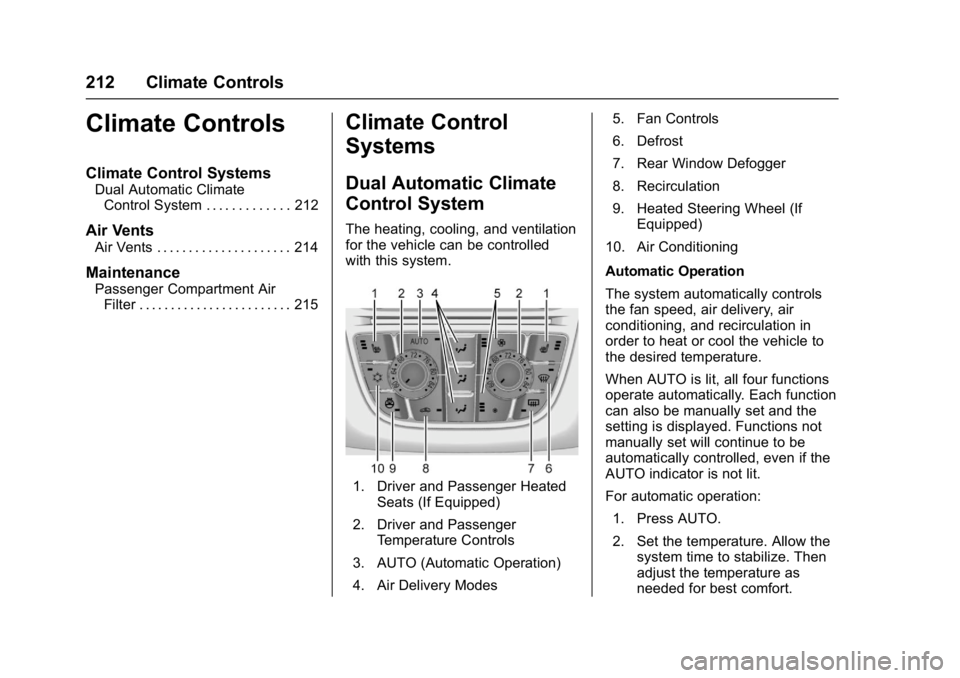
1. Driver and Passenger Heated
Seats (If Equipped)
2. Driver and Passenger Temperature Controls
3. AUTO (Automatic Operation)
4. Air Delivery Modes 5. Fan Controls
6. Defrost
7. Rear Window Defogger
8. Recirculation
9. Heated Steering Wheel (If
Equipped)
10. Air Conditioning
Automatic Operation
The system automatically controls
the fan speed, air delivery, air
conditioning, and recirculation in
order to heat or cool the vehicle to
the desired temperature.
When AUTO is lit, all four functions
operate automatically. Each function
can also be manually set and the
setting is displayed. Functions not
manually set will continue to be
automatically controlled, even if the
AUTO indicator is not lit.
For automatic operation: 1. Press AUTO.
2. Set the temperature. Allow the system time to stabilize. Then
adjust the temperature as
needed for best comfort.
Page 214 of 381
Buick Cascada Owner Manual (GMNA-Localizing-U.S-9186636) - 2016 - crc -
3/9/16
Climate Controls 213
To improve fuel efficiency and
to cool the vehicle faster,
recirculation may be
automatically selected in warm
weather. The recirculation light
will not come on. Press
L
to select recirculation; press it
again to select outside air.
English units can be changed to
metric units through the Driver
Information Center (DIC). See
Driver Information Center
(DIC) 0110.
Manual Operation
9: Press the lower9button to
decrease the fan speed. Pressing
the lower button longer turns the fan
and cooling off. Press the upper
9
button to increase the fan speed.
The selected fan speed is indicated
by the number of segments on the
display screen. Press AUTO to
return to automatic operation.
Air Delivery Modes : Press
%,Y,
or
[to change the direction of the
airflow. Any combination of the three
buttons can be selected. The
indicator light in the button will turn on. The current mode appears in
the display screen. Pressing any of
the three buttons cancels automatic
air delivery control and the direction
of the airflow is controlled manually.
Press AUTO to return to automatic
operation.
To change the current mode, select
one or more of the following:
%:
Air is directed to the
windshield and side window vents.
Y: Air is directed to the instrument
panel outlets.
[: Air is directed to the floor
outlets.
0: Press to clear the windshield
of fog or frost more quickly. Air is
directed to the windshield.
For best results, clear all snow and
ice from the windshield before
defrosting.
#: Press to turn the air
conditioning on or off. If the fan is
turned off or the outside
temperature falls below freezing, the
air conditioning compressor will
not run. Press AUTO to return to automatic
operation and the air conditioner
runs as needed. When the indicator
light is on, the air conditioner runs
automatically to cool the air inside
the vehicle or to dry the air needed
to defog the windshield faster.
L:
Press to turn recirculation on
or off. An indicator light comes on.
Air is recirculated to quickly cool the
inside of the vehicle or reduce entry
of outside air and odors.
Rear Window Defogger
=: Press to turn the rear window
defogger on or off. An indicator light
on the button comes on to show that
the rear window defogger is on.
The defogger only works when the
ignition is in ON/RUN. The defogger
turns off if the ignition is in the ACC/
ACCESSORY or LOCK/OFF
position.
The rear window defogger can be
set to automatic operation; see
“Climate and Air Quality” under
Vehicle Personalization 0113.
When Auto Rear Defog is selected,
the rear window defogger turns on
Page 215 of 381
Buick Cascada Owner Manual (GMNA-Localizing-U.S-9186636) - 2016 - crc -
3/9/16
214 Climate Controls
automatically when the interior
temperature is cold and the outside
temperature is about 4 °C (40 °F)
and below. The auto rear defogger
turns off automatically after about
10 minutes. At higher speeds, the
rear window defogger may stay on
continuously.
If equipped with heated outside
rearview mirrors, they turn on when
the rear window defogger button is
on and help to clear fog or frost from
the surface of the mirrors. See
Heated Mirrors033.
Caution
Do not try to clear frost or other
material from the inside of the
front windshield and rear window
with a razor blade or anything
else that is sharp. This may
damage the rear window
defogger grid and affect the
radio's ability to pick up stations
clearly. The repairs would not be
covered by the vehicle warranty.
MorL:Press to turn the heated
seats on or off. See Heated Front
Seats 049.
(:If equipped, press to turn the
heated steering wheel on or off. See
Heated Steering Wheel 094.
Remote Start Climate Control
Operation : If equipped with the
remote vehicle start feature, the
climate control system may run
when the vehicle is started remotely.
The system uses the driver ’s
previous settings to heat or cool the
inside of the vehicle. The rear defog
may come on during remote start
based on cold ambient conditions.
The rear defog indicator light does
not come on during a remote start.
If the vehicle has front heated seats,
they may come on during a remote
start. The heated seat indicator
lights do not come on during a
remote start. See Remote Vehicle
Start 049 and Heated Front
Seats 049.
Air Vents
Adjustable Air Vents
1. Slider Knob
Page 216 of 381
Buick Cascada Owner Manual (GMNA-Localizing-U.S-9186636) - 2016 - crc -
3/9/16
Climate Controls 215
2. Thumbwheel
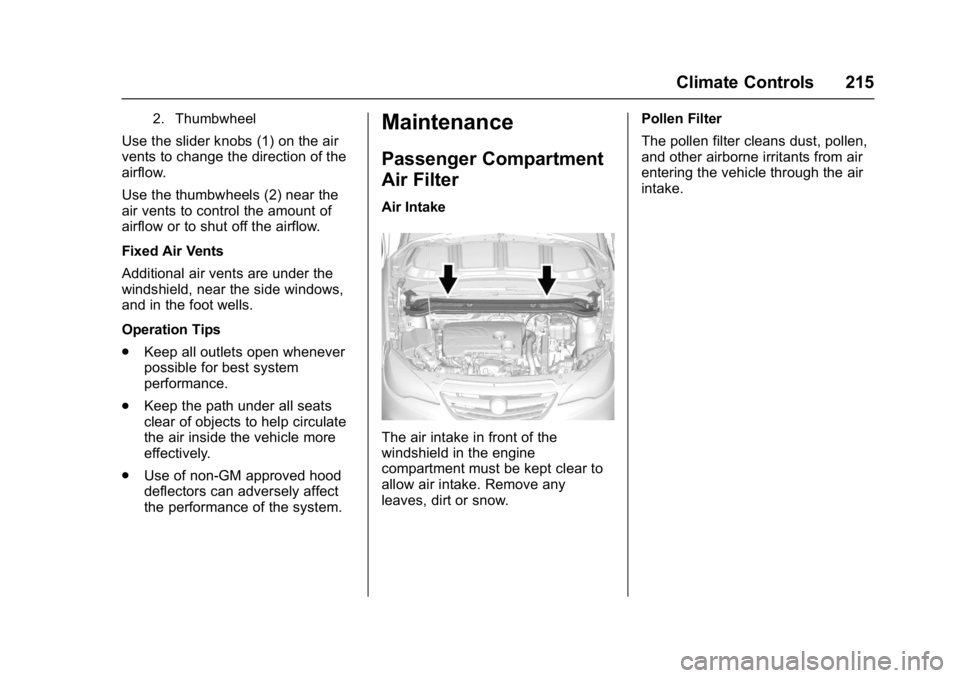
Use the slider knobs (1) on the air
vents to change the direction of the
airflow.
Use the thumbwheels (2) near the
air vents to control the amount of
airflow or to shut off the airflow.
Fixed Air Vents
Additional air vents are under the
windshield, near the side windows,
and in the foot wells.
Operation Tips
.Keep all outlets open whenever
possible for best system
performance.
. Keep the path under all seats
clear of objects to help circulate
the air inside the vehicle more
effectively.
. Use of non-GM approved hood
deflectors can adversely affect
the performance of the system.
Maintenance
Passenger Compartment
Air Filter
Air Intake
The air intake in front of the
windshield in the engine
compartment must be kept clear to
allow air intake. Remove any
leaves, dirt or snow. Pollen Filter
The pollen filter cleans dust, pollen,
and other airborne irritants from air
entering the vehicle through the air
intake.
Page 324 of 381
Buick Cascada Owner Manual (GMNA-Localizing-U.S-9186636) - 2016 - crc -
3/9/16
Vehicle Care 323
The bright metal moldings on the
vehicle are aluminum, chrome or
stainless steel. To prevent damage
always follow these cleaning
instructions:
.Be sure the molding is cool to
the touch before applying any
cleaning solution.
. Use only approved cleaning
solutions for aluminum, chrome
or stainless steel. Some
cleaners are highly acidic or
contain alkaline substances and
can damage the moldings.
. Always dilute a concentrated
cleaner according to the
manufacturer ’s instructions.
. Do not use cleaners that are not
intended for automotive use.
. Use a nonabrasive wax on the
vehicle after washing to protect
and extend the molding finish.Cleaning Exterior Lamps/
Lenses, Emblems, Decals, and
Stripes
Use only lukewarm or cold water, a
soft cloth, and a car washing soap
to clean exterior lamps, lenses,
emblems, decals, and stripes.
Follow instructions under "Washing
the Vehicle" previously in this
section.
Lamp covers are made of plastic,
and some have a UV protective
coating. Do not clean or wipe them
when dry.
Do not use any of the following on
lamp covers:
.
Abrasive or caustic agents.
. Washer fluids and other cleaning
agents in higher concentrations
than suggested by the
manufacturer.
. Solvents, alcohols, fuels,
or other harsh cleaners.
. Ice scrapers or other hard items. .
Aftermarket appearance caps or
covers while the lamps are
illuminated, due to excessive
heat generated.
Caution
Failure to clean lamps properly
can cause damage to the lamp
cover that would not be covered
by the vehicle warranty.
Caution
Using wax on low gloss black
finish stripes can increase the
gloss level and create a
non-uniform finish. Clean low
gloss stripes with soap and
water only.
Air Intakes
Clear debris from the air intakes,
between the hood and windshield,
when washing the vehicle.
Page 327 of 381
Buick Cascada Owner Manual (GMNA-Localizing-U.S-9186636) - 2016 - crc -
3/9/16
326 Vehicle Care
Interior Care
To prevent dirt particle abrasions,
regularly clean the vehicle's interior.
Immediately remove any soils.
Newspapers or dark garments can
transfer color to the vehicle’s
interior.
Use a soft bristle brush to remove
dust from knobs and crevices on the
instrument cluster. Using a mild
soap solution, immediately remove
hand lotions, sunscreen, and insect
repellent from all interior surfaces or
permanent damage may result.
Use cleaners specifically designed
for the surfaces being cleaned to
prevent permanent damage. Apply
all cleaners directly to the cleaning
cloth. Do not spray cleaners on any
switches or controls. Remove
cleaners quickly.
Before using cleaners, read and
follow all safety instructions on the
label. While cleaning the interior,
open the doors and windows to get
proper ventilation.To prevent damage, do not clean
the interior using the following
cleaners or techniques:
.
Never use a razor or any other
sharp object to remove soil from
any interior surface.
. Never use a brush with stiff
bristles.
. Never rub any surface
aggressively or with too much
pressure.
. Do not use laundry detergents or
dishwashing soaps with
degreasers. For liquid cleaners,
use approximately 20 drops per
3.8 L (1 gal) of water.
A concentrated soap solution will
create streaks and attract dirt.
Do not use solutions that contain
strong or caustic soap.
. Do not heavily saturate the
upholstery when cleaning.
. Do not use solvents or cleaners
containing solvents.
Interior Glass
To clean, use a terry cloth fabric
dampened with water. Wipe droplets
left behind with a clean dry cloth.
If necessary, use a commercial
glass cleaner after cleaning with
plain water.
Caution
To prevent scratching, never use
abrasive cleaners on automotive
glass. Abrasive cleaners or
aggressive cleaning may damage
the rear window defogger.
Cleaning the windshield with water
during the first three to six months
of ownership will reduce tendency
to fog.
Speaker Covers
Vacuum around a speaker cover
gently, so that the speaker will not
be damaged. Clean spots with water
and mild soap.
Page 328 of 381
Buick Cascada Owner Manual (GMNA-Localizing-U.S-9186636) - 2016 - crc -
3/9/16
Vehicle Care 327
Coated Moldings
Coated moldings should be cleaned.
.When lightly soiled, wipe with a
sponge or soft, lint-free cloth
dampened with water.
. When heavily soiled, use warm
soapy water.
Fabric/Carpet/Suede
Start by vacuuming the surface
using a soft brush attachment. If a
rotating vacuum brush attachment is
being used, only use it on the floor
carpet. Before cleaning, gently
remove as much of the soil as
possible:
.Gently blot liquids with a paper
towel. Continue blotting until no
more soil can be removed.
. For solid soils, remove as much
as possible prior to vacuuming.
To clean:
1. Saturate a clean, lint-free colorfast cloth with water.
Microfiber cloth is
recommended to prevent lint
transfer to the fabric or carpet. 2. Remove excess moisture by
gently wringing until water does
not drip from the cleaning cloth.
3. Start on the outside edge of the soil and gently rub toward the
center. Fold the cleaning cloth
to a clean area frequently to
prevent forcing the soil in to the
fabric.
4. Continue gently rubbing the soiled area until there is no
longer any color transfer from
the soil to the cleaning cloth.
5. If the soil is not completely removed, use a mild soap
solution followed only by plain
water.
If the soil is not completely
removed, it may be necessary to
use a commercial upholstery
cleaner or spot lifter. Test a small
hidden area for colorfastness before
using a commercial upholstery
cleaner or spot lifter. If ring
formation occurs, clean the entire
fabric or carpet.
After cleaning, use a paper towel to
blot excess moisture.
Cleaning High Gloss Surfaces
and Vehicle Information and
Radio Displays
Use a microfiber cloth on high gloss
surfaces or vehicle displays. First,
use a soft bristle brush to remove
dirt that can scratch the surface.
Then gently clean by rubbing with a
microfiber cloth. Never use window
cleaners or solvents. Periodically
hand wash the microfiber cloth
separately, using mild soap. Do not
use bleach or fabric softener. Rinse
thoroughly and air dry before
next use.
Caution
Do not attach a device with a
suction cup to the display. This
may cause damage and would
not be covered by the vehicle
warranty.
Page 329 of 381

Buick Cascada Owner Manual (GMNA-Localizing-U.S-9186636) - 2016 - crc -
3/9/16
328 Vehicle Care
Instrument Panel, Leather,
Vinyl, Other Plastic Surfaces,
Low Gloss Paint Surfaces, and
Natural Open Pore Wood
Surfaces
Use a soft microfiber cloth
dampened with water to remove
dust and loose dirt. For a more
thorough cleaning, use a soft
microfiber cloth dampened with a
mild soap solution.
Caution
Soaking or saturating leather,
especially perforated leather, as
well as other interior surfaces,
may cause permanent damage.
Wipe excess moisture from these
surfaces after cleaning and allow
them to dry naturally. Never use
heat, steam, or spot removers. Do
not use cleaners that contain
silicone or wax-based products.
Cleaners containing these
solvents can permanently change(Continued)
Caution (Continued)
the appearance and feel of
leather or soft trim, and are not
recommended.
Do not use cleaners that increase
gloss, especially on the instrument
panel. Reflected glare can decrease
visibility through the windshield
under certain conditions.
Caution
Use of air fresheners may cause
permanent damage to plastics
and painted surfaces. If an air
freshener comes in contact with
any plastic or painted surface in
the vehicle, blot immediately and
clean with a soft cloth dampened
with a mild soap solution.
Damage caused by air fresheners
would not be covered by the
vehicle warranty.
Cargo Cover and
Convenience Net
Wash with warm water and mild
detergent. Do not use chlorine
bleach. Rinse with cold water, and
then dry completely.
Care of Safety Belts
Keep belts clean and dry.
{Warning
Do not bleach or dye safety belt
webbing. It may severely weaken
the webbing. In a crash, they
might not be able to provide
adequate protection. Clean and
rinse safety belt webbing only
with mild soap and lukewarm
water. Allow the webbing to dry.
Page 371 of 381

Buick Cascada Owner Manual (GMNA-Localizing-U.S-9186636) - 2016 - crc -
3/9/16
370 Index
IndexA
Accessories andModifications . . . . . . . . . . . . . . . . . . 255
Accessory Power . . . . . . . . . . . . . . . 230
Adaptive Forward Lighting (AFL) . . . . . . . . . . . . . . . . . 121
Adaptive Forward Lighting (AFL) Light . . . . . . . . . . . . . . . . . . . . 109
Adaptive Forward Lighting Lamps . . . . . . . . . . . . . . . . . . . . . . . . 275
Add-On Electrical Equipment . . . 252
Additional Information OnStar
®. . . . . . . . . . . . . . . . . . . . . . 364
Additional Maintenance
and Care . . . . . . . . . . . . . . . . . . . . . . 337
Adjustments Lumbar, Front Seats . . . . . . . . . . . . 48
Agreements Trademarks and License . . . . . 206
Air Cleaner/Filter, Engine . . . . . . . 263
Air Filter, Passenger Compartment . . . . . . . . . . . . . . . . . 215
Air Vents . . . . . . . . . . . . . . . . . . . . . . . 214
Airbag System Check . . . . . . . . . . . . . . . . . . . . . . . . . . 68
How Does an AirbagRestrain? . . . . . . . . . . . . . . . . . . . . . 61
Passenger Sensing System . . . . 63 Airbag System (cont'd)
What Makes an Airbag
Inflate? . . . . . . . . . . . . . . . . . . . . . . . . 61
What Will You See after an
Airbag Inflates? . . . . . . . . . . . . . . . 62
When Should an Airbag Inflate? . . . . . . . . . . . . . . . . . . . . . . . . 60
Where Are the Airbags? . . . . . . . . 59
Airbags
Adding Equipment to theVehicle . . . . . . . . . . . . . . . . . . . . . . . . 68
Passenger Status Indicator . . . 101
Readiness Light . . . . . . . . . . . . . . 101
Servicing Airbag-Equipped Vehicles . . . . . . . . . . . . . . . . . . . . . . . 67
System Check . . . . . . . . . . . . . . . . . . 58
Alarm Vehicle Security . . . . . . . . . . . . . . . . 31
All-Season Tires . . . . . . . . . . . . . . . . 289
AM-FM Radio . . . . . . . . . . . . . . . . . . . 136
Antenna Multi-band . . . . . . . . . . . . . . . . . . . . 145
Antilock Brake System (ABS) . . . 236
Warning Light . . . . . . . . . . . . . . . . . 105
Appearance Care Exterior . . . . . . . . . . . . . . . . . . . . . . . 321
Interior . . . . . . . . . . . . . . . . . . . . . . . . 326