change wheel BUICK CASCADA 2017 User Guide
[x] Cancel search | Manufacturer: BUICK, Model Year: 2017, Model line: CASCADA, Model: BUICK CASCADA 2017Pages: 381, PDF Size: 6.58 MB
Page 193 of 381
Buick Cascada Owner Manual (GMNA-Localizing-U.S.-9967834) - 2017 - crc -
7/18/16
192 Infotainment System
sure the vehicle is parked in a
location that is safe and has a clear
view of the sky and away from large
obstructions.
If the System Needs
Service
If the navigation system needs
service and the steps listed here
have been followed but there are
still problems, seeProblems with
Route Guidance 0191.
Map Data Updates
The map data in the vehicle is the
most up-to-date information
available when the vehicle was
produced. The map data is updated
periodically, provided that the map
information has changed.
For questions about the operation of
the navigation system or the update
process, contact the GM Nav Disc
Center toll-free phone number,
1-877-NAV-DISC (1-877-628-3472)
or go to the center ’s website,
www.gmnavdisc.com. If updates are
needed, call the GM Nav Disc
Center or order a new Map Update online. To order map data, have the
vehicle’s Vehicle Identification
Number (VIN) available. See
Vehicle Identification Number
(VIN)
0344.
After receiving the updated map
data, see Maps0172.
Database Coverage
Explanations
Coverage areas vary with respect to
the level of map detail available for
any given area. Some areas feature
greater levels of detail than others.
If this happens, it does not mean
there is a problem with the system.
As the map data is updated, more
detail can become available for
areas that previously had limited
detail. See Map Data
Updates 0192.
Voice Recognition
Voice recognition allows for
hands-free operation of the system
features.
Voice recognition can be used when
the radio is on or when Retained
Accessory Power (RAP) is active.
See Retained Accessory Power
(RAP) 0231. The system maintains
a minimum volume level.
Using Voice Recognition
1. Pressb/gon the steering
wheel. The audio system
mutes. A voice prompt states,
“Please say a command.” Wait
until the tone is heard before
speaking.
If there is no tone, make sure
that the volume is turned up.
While voice recognition is
active, the system displays a
g
symbol in the top right of the
screen.
2. Clearly speak one of the commands listed later in this
section.
Page 194 of 381
Buick Cascada Owner Manual (GMNA-Localizing-U.S.-9967834) - 2017 - crc -
7/18/16
Infotainment System 193
Pressb/gtwice on the steering
wheel to skip the voice prompt
messages.
Canceling Voice Recognition
1. Press and release$/ion
the steering wheel control to
cancel a command, if the
system response does not
match the voice command,
or say “Goodbye” or“Cancel.”
2. The system replies, “Goodbye.”
Helpful Hints for Speaking
Commands
.
When multiple commands are
available, choose the command
that works best for you.
. Words in parentheses are
optional. For example, for the
command “Tune FM
(frequency),” saying“Tune FM
87.7” or“Tune FM” are both
valid commands.
. When the command is
recognized, the system will
either perform the function or
ask to confirm the choice. .
When the system does not
recognize the command, the
system says “Pardon.”
. If experiencing difficulty with the
system recognizing a command,
confirm that the command is
correct. Try saying the command
clearly or wait for a brief moment
after the tone.
. Background noise such as a
climate control fan positioned on
high, open windows, and very
loud outside noises, even if the
windows are closed, can cause
voice commands to be
misunderstood.
. The system is able to recognize
commands in different
languages, such as English,
Canadian French, and Spanish.
The system only recognizes
commands based on the
language selected.
. To increase or decrease the
voice volume during a voice
recognition session, turn the
volume knob of the radio,
or press the volume steering
wheel control. If the volume is adjusted during a voice
recognition session, a Volume
bar appears on the screen
showing the voice volume level
as it is being adjusted. This also
changes the volume of the
guidance prompts.
. When using navigation
commands, take the time to
become familiar with the
address. Long delays when
giving the address can result in
the system not recognizing the
address or routing to a different
location than intended.
. When providing the house
number portion of the address,
the system recognizes both digit
format and numerical text. An
example would be to say,
“3-0-0-0-1” or“Thirty
Thousand One.”
. If the system provides the
destination in another country on
several attempts, say the
“Change Country” command and
say the country of interest. The
country default is the United
States. To enter a destination in
Page 197 of 381
Buick Cascada Owner Manual (GMNA-Localizing-U.S.-9967834) - 2017 - crc -
7/18/16
196 Infotainment System
Main Menu :Instructs the system to
go to the main menu.
Yes, Yep, Yup, Ya, Sure, Right,
Correct, OK, Positive, You Got it,
Probably, You Bet : These can be
used to say “Yes.”
No, Nope, Na, No way, Wrong,
Incorrect, Negative, Not really, No
I said, No I Did Not, No I Do Not :
These can be used to say “No.”
Next Page, Page Down : Instructs
the system to scroll forward one
page in a list.
Previous Page, Page Up : Instructs
the system to scroll back one page
in a list.
Navigation Commands (If
Equipped)
To activate the navigation voice
recognition:
1. Press
b/gon the steering
wheel. The audio system
mutes. A voice prompt says,
“Please say a command.” Wait
until the tone is heard before
speaking. If there is no tone, make sure
the volume is turned up.
While voice recognition is
active, the system displays a
symbol in the top right of the
screen.
2. Clearly speak the command “Navigation.”
3. Clearly speak one of the commands in this section.
The following commands only apply
once the Navigation command is
given.
Change Country : Changes the
country origin to input a destination
from that region. The system will
accept United States, Canada,
or Mexico.
Address or Destination : Allows
an address to be stated as a
one-shot method. The system will
recognize the address if stated all at
once or say a city center. An
example is to say, “200
Renaissance Street, Detroit,
Michigan” or“Detroit, Michigan.” Directed Address :
Allows an
address to be stated one step at a
time. The format will be State, City,
Street, then House Number.
Intersection : Allows an
Intersection to be stated as the
destination. The format will be
State, City, Street, then Intersection.
Contact : When a phone is paired
to the system, which contains
Address Information stored for
contacts, the address associated
with that contact can become a
route. If the system cannot resolve
the address, an error displays.
Home : Instructs the system to start
guidance to the address saved as
My Home.
Points of Interest or POI : Allows a
Point of Interest to be stated as a
destination.
Say the name or list item number of
the category and subcategory to
return a list of POIs. Say the item
number to select a POI from the list.
Page 198 of 381
Buick Cascada Owner Manual (GMNA-Localizing-U.S.-9967834) - 2017 - crc -
7/18/16
Infotainment System 197
POI commands for Nearby, Along
Route, and Around Destination will
be available if route guidance is
active.
Add Waypoint :Allows addition of
individual waypoints or the
destination. The system will ask for
the choice of entry method to
continue. An example is to say, “POI
Along Route” or“Intersection.”
Delete Waypoint : When guidance
is active, this command allows the
deletion of individual waypoints or
the destination. If guidance is not
active, the system will indicate the
destination list is empty.
Where Am I?, My Location,
or Current Position : Instructs the
system to give the current position
of the vehicle.
Help : The system plays back more
specific help commands associated
with Navigation or a Navigation
sub-feature.
Cancel Guidance or Cancel
Route : Instructs the system to
cancel guidance. Entering a Destination in Other
Countries
For the voice recognition to respond
to a local address, the
corresponding country needs to be
set in the navigation system.
The country can also be set using
voice commands. However, the
country will change back to the
default country when the vehicle is
keyed off.
1. Press
b/gon the steering
wheel.
2. Say “Navigation.”
3. Say “Change Country.”
4. Say the country name. For example, say “Canada.”
OnStar Command (If
Equipped)
To activate OnStar voice
recognition, press
=on the mirror
or press
b/gon the steering
wheel and say “OnStar”after the
beep. This will active the OnStar
voice control. See OnStar
Overview 0360. OnStar :
These commands can be
used after OnStar is pressed.
Help Commands
. Help
. Hands-Free Calling (if available)
. Turn-by-Turn Directions
. OnStar Info
After each list of help commands,
the following are available:
. Go Back
. Repeat
. Cancel
. Help
. Goodbye
Hands-Free Calling (if available)
. Call
. Store
. Commands
‐Call
‐ Store
‐ My Number
‐ Minutes
Page 200 of 381
Buick Cascada Owner Manual (GMNA-Localizing-U.S.-9967834) - 2017 - crc -
7/18/16
Infotainment System 199
Bluetooth-enabled phones.
Available features and functions
may be dependent on the device.
On a current phone call screen, an
image of the contact from your
phone's contact list can be
displayed. Not all phones are
compatible with this feature.
Bluetooth Controls
Use the controls on the center stack
and the steering wheel to operate
the Bluetooth system.
Steering Wheel Controls
b/g:Press to answer incoming
calls and start voice recognition.
$/i: Press to end a call,
decline an incoming call, or cancel
voice recognition.
+
x− :Press + or −to increase or
decrease the volume.
Infotainment System Controls
For information about how to
navigate the menu system using the
infotainment controls, see
Overview 0128. Phone :
Press to enter the Phone
main menu. Press and hold to mute
or unmute.
Voice Recognition
The voice recognition system uses
commands to control the system
and dial phone numbers.
When using voice recognition:
. The system may not recognize
voice commands if there is too
much background noise.
. A tone sounds to indicate that
the system is ready for a voice
command. Wait for the tone and
then speak.
. Speak clearly in a calm and
natural voice.
See Voice Recognition 0192.
Audio System
Sound comes through the vehicle's
front audio system speakers and
overrides the audio system. Use the
VOL/
nknob during a call to
change the volume level. The adjusted volume level remains in
memory for later calls. The system
maintains a minimum volume level.
See
Voice Recognition 0192.
Bluetooth Audio
See Bluetooth Audio 0166.
Pairing with Infotainment
Controls
A Bluetooth-enabled cell phone
must be paired and then connected
to the vehicle before it can be used.
See the cell phone manufacturer's
user guide for Bluetooth functions
before pairing the cell phone. If a
Bluetooth phone is not connected,
calls will be made using OnStar
Hands-Free Calling, if available.
See OnStar Overview 0360.
Pairing Information
. A Bluetooth-enabled phone and
an audio playback device can be
paired to the system at the
same time.
. Up to five devices can be paired
to the Bluetooth system.
Page 203 of 381

Buick Cascada Owner Manual (GMNA-Localizing-U.S.-9967834) - 2017 - crc -
7/18/16
202 Infotainment System
To cancel this command, press$/
ion the steering wheel control or
press BACK on the center stack.
Connecting to a Different Phone
or Device
To connect to a different cell phone,
the system looks for the next
available cell phone. Depending on
the cell phone to be connected, this
command may need to be repeated.
1. Press
b/g. The system
responds “Please say a
command,” followed by a tone.
2. Say “Change Phone.”
. To select a device, touch
the name on the display.
. If another cell phone is not
found, the original phone
remains connected.
Making a Call Using Phone
Book and Infotainment
Controls
For cell phones that support the
phone book feature, the Bluetooth
system can use the contacts stored
on the cell phone to make calls. See the cell phone manufacturer‘s user
guide or contact the wireless
provider to find out if this feature is
supported.
When a cell phone supports the
phone book feature, the Phone
Book and Call Lists menus are
automatically available.
The Phone Book menu allows
access to the phone book stored in
the cell phone to make a call.
The Call Lists menu allows access
to the phone numbers from the
Incoming Calls, Outgoing Calls, and
Missed Calls menus on the cell
phone to make a call.
The radio will display the first
1,000 contacts and the phone
numbers for each contact including
Home, Work, Mobile, and Other.
To make a call using the Phone
Book menu:
1. Press PHONE on the center stack or touch the Phone icon
on the Home Page.
2. Select Phone Book. 3. Select the letter group of the
phone book entry to scroll
through the list of names/
numbers.
4. Select the name.
5. Select the number to call.
To make a call using the Call
Lists menu: 1. Press PHONE on the center stack or touch the Phone icon
on the Home Page.
2. Select Call Lists.
3. Select the Incoming Calls, Outgoing Calls, or Missed
Calls list.
4. Select the name or number to call.
Making a Call Using the
Infotainment Controls
To make a call:
1. Press PHONE on the center stack or touch the Phone icon
on the Home Page.
2. Touch Enter Number.
3. Enter the phone number.
Page 205 of 381
Buick Cascada Owner Manual (GMNA-Localizing-U.S.-9967834) - 2017 - crc -
7/18/16
204 Infotainment System
Ending a Call
Using the Infotainment Controls
Turn and press the outer ring of the
Zknob and select Hang Up or
touch Hang Up on the screen.
Using Steering Wheel Controls
Press
$/ito end or decline an
incoming call.
Muting a Call
During a call, all sounds from inside
the vehicle can be muted so that the
person on the other end of the call
cannot hear them.
Using the Infotainment Controls
Turn and press the outer ring of the
Zknob and select Mute Call.
Press again to cancel mute.
Transferring a Call
Audio can be transferred between
the Bluetooth system and the cell
phone.
The cell phone must be paired and
connected with the Bluetooth
system before a call can be
transferred. To Transfer Audio from the
Bluetooth System to a Cell Phone
During a call with the audio in the
vehicle, touch the Transfer Call
option on the screen or press and
hold
b/gon the steering wheel
controls.
To Transfer Audio to the Bluetooth
System from a Cell Phone
Use the audio transfer feature on
the cell phone. See your cell phone
manufacturer's user guide for more
information. Touch the Transfer Call
option on the screen or press and
hold
b/gon the steering wheel
controls.
Dual Tone Multi-Frequency
(DTMF) Tones
The in-vehicle Bluetooth system can
send numbers during a call. This is
used when calling a menu-driven
phone system.
Using the Infotainment Controls
1. Turn and press the outer ring of the
Zknob and select
Enter Number. 2. Enter the phone number,
or select Enter Number on the
display and select digits, then
touch OK.
Hands-Free Phone
Using Bluetooth Voice
Recognition
To use voice recognition, press
b/
gon the steering wheel controls.
Use the commands below for the
various voice features. For
additional information, say “Help”
while in a voice recognition menu.
Making a Call
Calls can be made using the
following commands.
Dial or Call : These commands can
be used interchangeably to dial a
phone number.
Digit Dial : This command allows a
phone number to be dialed by
entering the digits one at a time.
Redial : This command dials the
last number used on the cell phone.
Page 217 of 381
Buick Cascada Owner Manual (GMNA-Localizing-U.S.-9967834) - 2017 - crc -
7/18/16
216 Climate Controls
2. Thumbwheel
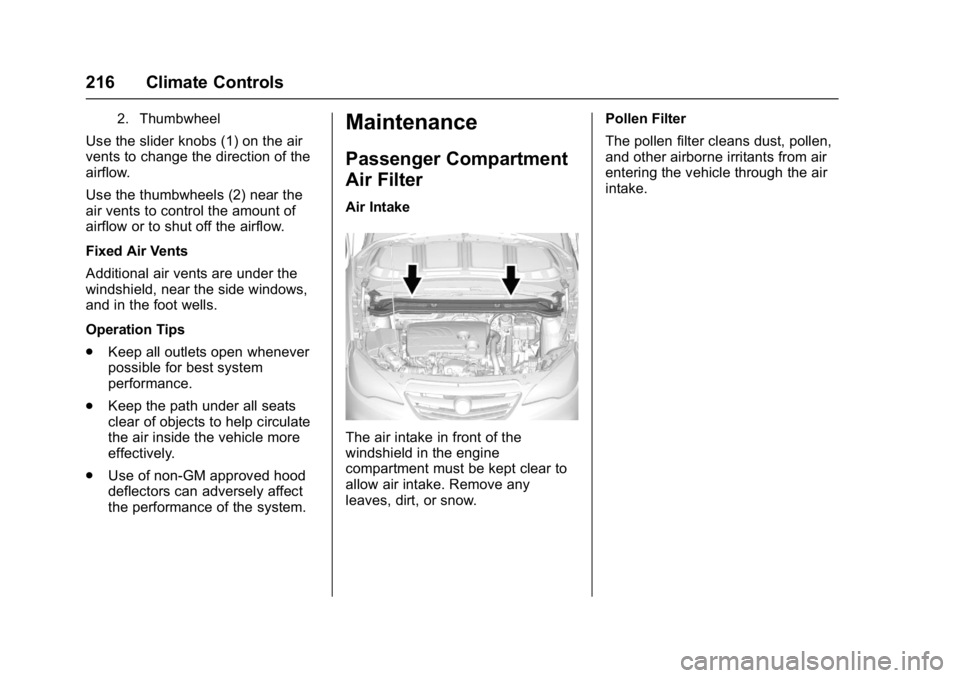
Use the slider knobs (1) on the air
vents to change the direction of the
airflow.
Use the thumbwheels (2) near the
air vents to control the amount of
airflow or to shut off the airflow.
Fixed Air Vents
Additional air vents are under the
windshield, near the side windows,
and in the foot wells.
Operation Tips
.Keep all outlets open whenever
possible for best system
performance.
. Keep the path under all seats
clear of objects to help circulate
the air inside the vehicle more
effectively.
. Use of non-GM approved hood
deflectors can adversely affect
the performance of the system.
Maintenance
Passenger Compartment
Air Filter
Air Intake
The air intake in front of the
windshield in the engine
compartment must be kept clear to
allow air intake. Remove any
leaves, dirt, or snow. Pollen Filter
The pollen filter cleans dust, pollen,
and other airborne irritants from air
entering the vehicle through the air
intake.
Page 225 of 381
Buick Cascada Owner Manual (GMNA-Localizing-U.S.-9967834) - 2017 - crc -
7/18/16
224 Driving and Operating
If stuck too severely for the traction
system to free the vehicle, turn the
traction system off and use the
rocking method. SeeTraction
Control/Electronic Stability
Control 0240.
{Warning
If the vehicle's tires spin at high
speed, they can explode, and you
or others could be injured. The
vehicle can overheat, causing an
engine compartment fire or other
damage. Spin the wheels as little
as possible and avoid going
above 56 km/h (35 mph).
Rocking the Vehicle to Get
it Out
Turn the steering wheel left and
right to clear the area around the
front wheels. Turn off any traction
system. Shift back and forth
between R (Reverse) and a low
forward gear, spinning the wheels
as little as possible. To prevent
transmission wear, wait until the
wheels stop spinning before shifting gears. Release the accelerator
pedal while shifting, and press
lightly on the accelerator pedal
when the transmission is in gear.
Slowly spinning the wheels in the
forward and reverse directions
causes a rocking motion that could
free the vehicle. If that does not get
the vehicle out after a few tries, it
might need to be towed out. If the
vehicle does need to be towed out,
see
Towing the Vehicle 0318.
Vehicle Load Limits
It is very important to know how
much weight the vehicle can
carry. This weight is called the
vehicle capacity weight and
includes the weight of all
occupants, cargo, and all
nonfactory-installed options.
Two labels on the vehicle may
show how much weight it may
properly carry: the Tire and
Loading Information label and
the Certification label.
{Warning
Do not load the vehicle any
heavier than the Gross
Vehicle Weight Rating
(GVWR), or either the
maximum front or rear Gross
Axle Weight Rating (GAWR).
This can cause systems to
break and change the way the
vehicle handles. This could
cause loss of control and a
crash. Overloading can also
reduce stopping distance,
damage the tires, and shorten
the life of the vehicle.
Page 231 of 381
Buick Cascada Owner Manual (GMNA-Localizing-U.S.-9967834) - 2017 - crc -
7/18/16
230 Driving and Operating
Starting the Engine
Move the shift lever to P (Park) or
N (Neutral). To restart the vehicle
when it is already moving, use
N (Neutral) only.
Caution
Do not try to shift to P (Park) if the
vehicle is moving. If you do, you
could damage the transmission.
Shift to P (Park) only when the
vehicle is stopped.
Caution
If you add electrical parts or
accessories, you could change
the way the engine operates. Any
resulting damage would not be
covered by the vehicle warranty.
SeeAdd-On Electrical
Equipment 0253.
Caution
If the steering wheel is turned
until it reaches the end of its
travel, and is held in that position
while starting the vehicle, damage
may occur to the hydraulic power
steering system and there may be
loss of power steering assist.
Starting Procedure 1. With your foot off the accelerator pedal, turn the
ignition key to START. When
the engine starts, let go of the
key. The idle speed will go
down as the engine warms. Do
not race the engine
immediately after starting it.
Operate the engine and
transmission gently to allow the
oil to warm up and lubricate all
moving parts.
Caution
Cranking the engine for long
periods of time, by returning the
ignition to the START position
immediately after cranking has
ended, can overheat and damage
the cranking motor, and drain the
battery. Wait at least 15 seconds
between each try, to let the
cranking motor cool down.
2. If the engine does not start after five to 10 seconds,
especially in very cold weather
(below −18 °C or 0 °F), it could
be flooded with too much
gasoline. Push the accelerator
pedal all the way to the floor
and hold it there as you hold
the key in START for a
maximum of 15 seconds. Wait
at least 15 seconds between
each try, to allow the cranking
motor to cool. When the engine
starts, let go of the key and
accelerator. If the vehicle starts
briefly but then stops again,
repeat the procedure. This