instrument cluster BUICK CASCADA 2017 Owner's Guide
[x] Cancel search | Manufacturer: BUICK, Model Year: 2017, Model line: CASCADA, Model: BUICK CASCADA 2017Pages: 381, PDF Size: 6.58 MB
Page 244 of 381

Buick Cascada Owner Manual (GMNA-Localizing-U.S.-9967834) - 2017 - crc -
7/18/16
Driving and Operating 243
4. Remove your foot from theaccelerator.
The cruise control indicator on the
instrument cluster turns green after
cruise control has been set to the
desired speed. See Instrument
Cluster 098.
Resuming a Set Speed
If the cruise control is set at a
desired speed and then the brakes
are applied or
*is pressed, the
cruise control is disengaged without
erasing the set speed from memory.
Once the vehicle speed is about
40 km/h (25 mph) or greater, move
the thumbwheel up toward RES/+
briefly. The vehicle returns to the
previously set speed.
Increasing Speed While Using
Cruise Control
If the cruise control system is
already activated:
. Move the thumbwheel up toward
RES/+ and hold it until the
desired speed is reached, then
release it. .
To increase vehicle speed in
small increments, move the
thumbwheel up toward RES/+
briefly. For each press, the
vehicle goes about 1.6 km/h
(1 mph) faster.
The speedometer reading can be
displayed in either English or metric
units. See Driver Information Center
(DIC) 0110. The increment value
used depends on the units
displayed.
Reducing Speed While Using
Cruise Control
If the cruise control system is
already activated:
. Move the thumbwheel toward
SET/− and hold until the desired
lower speed is reached, then
release it.
. To decrease the vehicle speed in
small increments, move the
thumbwheel toward SET/−
briefly. For each press, the
vehicle goes about 1.6 km/h
(1 mph) slower. The speedometer reading can be
displayed in either English or metric
units. See
Driver Information Center
(DIC) 0110. The increment value
used depends on the units
displayed.
Passing Another Vehicle While
Using Cruise Control
Use the accelerator pedal to
increase the vehicle speed. When
you take your foot off the pedal, the
vehicle slows down to the previous
set cruise control speed. While
pressing the accelerator pedal or
shortly following the release to
override cruise control, briefly
moving the thumbwheel toward
SET/− will result in cruise set to the
current vehicle speed.
Using Cruise Control on Hills
How well cruise control works on
hills depends on the vehicle speed,
load, and the steepness of the hills.
When going up steep hills, you
might have to step on the
accelerator pedal to maintain the
vehicle speed. When going
downhill, you might have to brake or
shift to a lower gear to keep your
Page 247 of 381

Buick Cascada Owner Manual (GMNA-Localizing-U.S.-9967834) - 2017 - crc -
7/18/16
246 Driving and Operating
The instrument cluster may have a
parking assist display with bars that
show“distance to object” and object
location information for RPA, and on
some vehicles, for the FPA system.
As the object gets closer, more bars
light up, and the bars change color
from yellow to amber to red.
When an object is first detected in
the rear, one beep will be heard
from the rear. When an object is
very close (<0.6 m (2 ft) in the
vehicle rear, or <0.3 m (1 ft) in the
vehicle front), five beeps will sound
from the rear or front depending on
object location. Beeps for FPA are
higher pitched than for RPA.
Turning the Features On or Off
TheXbutton on the center stack
is used to turn on or off Parking
Assist. The indicator light next to the button comes on when the features
are on and turns off when the
features have been disabled.
The parking assist symbols and
guidance lines can be turned on or
off through the infotainment system.
See
“Rear Camera Options” in
Vehicle Personalization 0113
Forward Collision Alert
(FCA) System
If equipped, the FCA system may
help to avoid or reduce the harm
caused by front-end crashes. FCA
provides a visual alert and beeps
when approaching a vehicle directly
ahead too quickly.
The forward-looking FCA camera
sensor is on the windshield ahead
of the rearview mirror. FCA detects
vehicles within a distance of
approximately 60 m (197 ft) and
operates at speeds above 40 km/h
(25 mph).
{Warning
FCA is a warning system and
does not apply the brakes. When
approaching a slower-moving or
stopped vehicle ahead too rapidly,
or when following a vehicle too
closely, FCA may not provide a
warning with enough time to help
avoid a crash. It also may not
provide any warning at all. FCA
does not warn of pedestrians,
animals, signs, guardrails,
bridges, construction barrels,
or other objects. Be ready to take
action and apply the brakes. See
Defensive Driving 0218.
Detecting the Vehicle Ahead
Page 285 of 381
Buick Cascada Owner Manual (GMNA-Localizing-U.S.-9967834) - 2017 - crc -
7/18/16
284 Vehicle Care
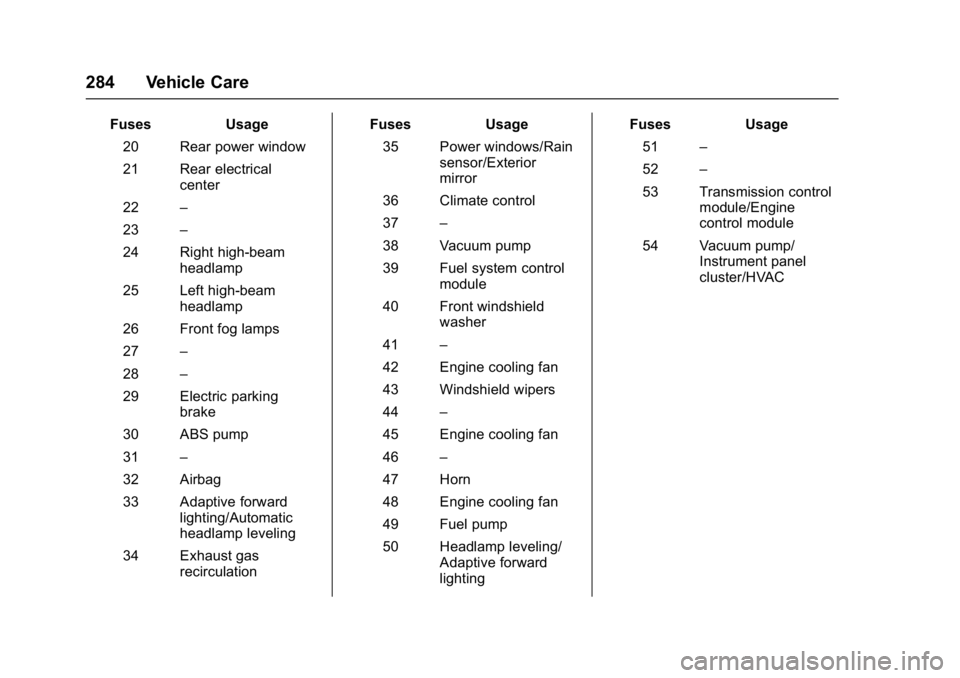
FusesUsage
20 Rear power window
21 Rear electrical center
22 –
23 –
24 Right high-beam headlamp
25 Left high-beam headlamp
26 Front fog lamps
27 –
28 –
29 Electric parking brake
30 ABS pump
31 –
32 Airbag
33 Adaptive forward lighting/Automatic
headlamp leveling
34 Exhaust gas recirculation Fuses
Usage
35 Power windows/Rain sensor/Exterior
mirror
36 Climate control
37 –
38 Vacuum pump
39 Fuel system control module
40 Front windshield washer
41 –
42 Engine cooling fan
43 Windshield wipers
44 –
45 Engine cooling fan
46 –
47 Horn
48 Engine cooling fan
49 Fuel pump
50 Headlamp leveling/ Adaptive forward
lighting Fuses
Usage
51 –
52 –
53 Transmission control module/Engine
control module
54 Vacuum pump/ Instrument panel
cluster/HVAC
Page 299 of 381

Buick Cascada Owner Manual (GMNA-Localizing-U.S.-9967834) - 2017 - crc -
7/18/16
298 Vehicle Care
When a low tire pressure condition
is detected, the TPMS illuminates
the low tire pressure warning light
on the instrument cluster. If the
warning light comes on, stop as
soon as possible and inflate the
tires to the recommended pressure
shown on the Tire and Loading
Information label. SeeVehicle Load
Limits 0224.
A message to check the pressure in
a specific tire displays in the Driver
Information Center (DIC). The low
tire pressure warning light and the
DIC warning message come on at
each ignition cycle until the tires are
inflated to the correct inflation
pressure. Using the DIC, tire
pressure levels can be viewed. For
additional information and details
about the DIC operation and
displays see Driver Information
Center (DIC) 0110. The low tire pressure warning light
may come on in cool weather when
the vehicle is first started, and then
turn off as the vehicle is driven. This
could be an early indicator that the
air pressure is getting low and
needs to be inflated to the proper
pressure.
A Tire and Loading Information
label, attached to your vehicle,
shows the size of the original
equipment tires and the correct
inflation pressure for the tires when
they are cold. See
Vehicle Load
Limits 0224, for an example of the
Tire and Loading Information label
and its location. Also see Tire
Pressure 0295.
The TPMS can warn about a low
tire pressure condition but it does
not replace normal tire
maintenance. See Tire Inspection
0 300, Tire Rotation 0301 and
Tires 0288.
Caution
Tire sealant materials are not all
the same. A non-approved tire
sealant could damage the TPMS
sensors. TPMS sensor damage
caused by using an incorrect tire
sealant is not covered by the
vehicle warranty. Always use only
the GM approved tire sealant
available through your dealer or
included in the vehicle.
TPMS Malfunction Light and
Message
The TPMS will not function properly
if one or more of the TPMS sensors
are missing or inoperable. When the
system detects a malfunction, the
low tire warning light flashes for
about one minute and then stays on
for the remainder of the ignition
cycle. A DIC warning message also
displays. The malfunction light and
DIC warning message come on at
each ignition cycle until the problem
Page 327 of 381
Buick Cascada Owner Manual (GMNA-Localizing-U.S.-9967834) - 2017 - crc -
7/18/16
326 Vehicle Care
Sheet Metal Damage
If the vehicle is damaged and
requires sheet metal repair or
replacement, make sure the body
repair shop applies anti-corrosion
material to parts repaired or
replaced to restore corrosion
protection.
Original manufacturer replacement
parts will provide the corrosion
protection while maintaining the
vehicle warranty.
Finish Damage
Quickly repair minor chips and
scratches with touch-up materials
available from your dealer to avoid
corrosion. Larger areas of finish
damage can be corrected in your
dealer's body and paint shop.
Chemical Paint Spotting
Airborne pollutants can fall upon
and attack painted vehicle surfaces
causing blotchy, ring-shaped
discolorations, and small, irregular
dark spots etched into the paint
surface. See“Finish Care”
previously in this section.
Interior Care
To prevent dirt particle abrasions,
regularly clean the vehicle's interior.
Immediately remove any soils.
Newspapers or dark garments can
transfer color to the vehicle’s
interior.
Use a soft bristle brush to remove
dust from knobs and crevices on the
instrument cluster. Using a mild
soap solution, immediately remove
hand lotions, sunscreen, and insect
repellent from all interior surfaces or
permanent damage may result.
Use cleaners specifically designed
for the surfaces being cleaned to
prevent permanent damage. Apply
all cleaners directly to the cleaning
cloth. Do not spray cleaners on any
switches or controls. Remove
cleaners quickly.
Before using cleaners, read and
follow all safety instructions on the
label. While cleaning the interior,
open the doors and windows to get
proper ventilation. To prevent damage, do not clean
the interior using the following
cleaners or techniques:
.
Never use a razor or any other
sharp object to remove soil from
any interior surface.
. Never use a brush with stiff
bristles.
. Never rub any surface
aggressively or with too much
pressure.
. Do not use laundry detergents or
dishwashing soaps with
degreasers. For liquid cleaners,
use approximately 20 drops per
3.8 L (1 gal) of water.
A concentrated soap solution will
create streaks and attract dirt.
Do not use solutions that contain
strong or caustic soap.
. Do not heavily saturate the
upholstery when cleaning.
. Do not use solvents or cleaners
containing solvents.
Page 340 of 381
Buick Cascada Owner Manual (GMNA-Localizing-U.S.-9967834) - 2017 - crc -
7/18/16
Service and Maintenance 339
.To avoid break-down or failure to
start the vehicle, maintain a
battery with full cranking power.
. Trained dealer technicians have
the diagnostic equipment to test
the battery and ensure that the
connections and cables are
corrosion-free.
Belts
. Belts may need replacing if they
squeak or show signs of
cracking or splitting.
. Trained dealer technicians have
access to tools and equipment
to inspect the belts and
recommend adjustment or
replacement when necessary.
Brakes
Brakes stop the vehicle and are
crucial to safe driving.
. Signs of brake wear may include
chirping, grinding, or squealing
noises, or difficulty stopping. .
Trained dealer technicians have
access to tools and equipment
to inspect the brakes and
recommend quality parts
engineered for the vehicle.
Fluids
Proper fluid levels and approved
fluids protect the vehicle’s systems
and components. See
Recommended Fluids and
Lubricants 0341 for GM approved
fluids.
. Engine oil and windshield
washer fluid levels should be
checked at every fuel fill.
. Instrument cluster lights may
come on to indicate that fluids
may be low and need to be
filled.
Hoses
Hoses transport fluids and should
be regularly inspected to ensure
that there are no cracks or leaks.
With a multi-point inspection, your
dealer can inspect the hoses and
advise if replacement is needed. Lamps
Properly working headlamps,
taillamps, and brake lamps are
important to see and be seen on
the road.
.
Signs that the headlamps need
attention include dimming, failure
to light, cracking, or damage.
The brake lamps need to be
checked periodically to ensure
that they light when braking.
. With a multi-point inspection,
your dealer can check the lamps
and note any concerns.
Shocks and Struts
Shocks and struts help aid in control
for a smoother ride.
. Signs of wear may include
steering wheel vibration, bounce/
sway while braking, longer
stopping distance, or uneven
tire wear.
. As part of the multi-point
inspection, trained dealer
technicians can visually inspect
the shocks and struts for signs
Page 373 of 381

Buick Cascada Owner Manual (GMNA-Localizing-U.S.-9967834) - 2017 - crc -
7/18/16
372 Index
Child Restraints (cont'd)Securing . . . . . . . . . . . . . . . . . . . . 83, 85
Systems . . . . . . . . . . . . . . . . . . . . . . . . 73
Circuit Breakers . . . . . . . . . . . . . . . . 282
Cleaning
Exterior Care . . . . . . . . . . . . . . . . . 321
Interior Care . . . . . . . . . . . . . . . . . . 326
Climate Control Systems Dual Automatic . . . . . . . . . . . . . . . 213
Clock . . . . . . . . . . . . . . . . . . . . . . . . . . . . 96
Cluster, Instrument . . . . . . . . . . . . . . 98
Collision Damage Repair . . . . . . . 354
Compact Spare Tire . . . . . . . . . . . . 314
Compartments Storage . . . . . . . . . . . . . . . . . . . . . . . . . 89
Compass . . . . . . . . . . . . . . . . . . . . . . . . 95
Configure Menu . . . . . . . . . . . . . . . . 185
Connections OnStar
®. . . . . . . . . . . . . . . . . . . . . . 362
Control Traction and ElectronicStability . . . . . . . . . . . . . . . . . . . . . 240
Control of a Vehicle . . . . . . . . . . . . . 219
Controls
Steering Wheel . . . . . . . . . . . . . . . 132
Convertible Top . . . . . . . . . . . . . . . . . . 37 Roll Bars . . . . . . . . . . . . . . . . . . . . . . . 63
Convex Mirrors . . . . . . . . . . . . . . . . . . 33 Coolant
Engine . . . . . . . . . . . . . . . . . . . . . . . . 265
Engine Temperature Gauge . . 100
Cooling . . . . . . . . . . . . . . . . . . . . . . . . . 213
Cooling System . . . . . . . . . . . . . . . . . 264
Courtesy Lamps . . . . . . . . . . . . . . . . 124
Courtesy Transportation Program . . . . . . . . . . . . . . . . . . . . . . . 353
Coverage Explanations . . . . . . . . . 192
Cruise Control . . . . . . . . . . . . . . . . . . 242 Light . . . . . . . . . . . . . . . . . . . . . . . . . . 109
Customer Assistance . . . . . . . . . . . 349 Offices . . . . . . . . . . . . . . . . . . . . . . . . 349
Text Telephone (TTY)Users . . . . . . . . . . . . . . . . . . . . . . . 349
Customer Information
Service PublicationsOrdering Information . . . . . . . . 356
Customer Satisfaction Procedure . . . . . . . . . . . . . . . . . . . . . 347
D
Damage Repair, Collision . . . . . . . 354
Data CollectionInfotainment System . . . . . . . . . . 359
OnStar . . . . . . . . . . . . . . . . . . . . . . . 359
Data Recorders, Event . . . . . . . . . 358
Database Coverage Explanations . . . . . . . . . . . . . . . . . . 192 Daytime Running
Lamps (DRL) . . . . . . . . . . . . . . . . . . 120
Defensive Driving . . . . . . . . . . . . . . . 218
Delayed Locking . . . . . . . . . . . . . . . . . 28
Destination . . . . . . . . . . . . . . . . . . . . . 174
Destination Download OnStar
®. . . . . . . . . . . . . . . . . . . . . . 184
Devices Auxiliary . . . . . . . . . . . . . . . . . . . . . . 165
USB . . . . . . . . . . . . . . . . . . . . . . . . . . 160
Diagnostics
OnStar
®. . . . . . . . . . . . . . . . . . . . . . 364
Distracted Driving . . . . . . . . . . . . . . . 218
Dome Lamps . . . . . . . . . . . . . . . . . . . 124
Door Ajar Light . . . . . . . . . . . . . . . . . . . . . 109
Delayed Locking . . . . . . . . . . . . . . . . 28
Locks . . . . . . . . . . . . . . . . . . . . . . . . . . . 27
Power Locks . . . . . . . . . . . . . . . . . . . . 28
Drive Belt Routing, Engine . . . . . . 346
Driver Information Center (DIC) . . . . . . . . . . . . . . . . . . 110
Driving Defensive . . . . . . . . . . . . . . . . . . . . . 218
Drunk . . . . . . . . . . . . . . . . . . . . . . . . . 218
For Better Fuel Economy . . . 20, 19
Hill and Mountain Roads . . . . . . 222
If the Vehicle is Stuck . . . . . . . . . 223
Page 375 of 381

Buick Cascada Owner Manual (GMNA-Localizing-U.S.-9967834) - 2017 - crc -
7/18/16
374 Index
FusesEngine Compartment Fuse
Block . . . . . . . . . . . . . . . . . . . . . . . . 282
Fuses and Circuit Breakers . . . 282
Instrument Panel Fuse Block . . . . . . . . . . . . . . . . . . . . . . . . 285
Rear Compartment Fuse
Block . . . . . . . . . . . . . . . . . . . . . . . . 286
G
GaugesEngine Coolant
Temperature . . . . . . . . . . . . . . . . 100
Fuel . . . . . . . . . . . . . . . . . . . . . . . . . . . . 99
Odometer . . . . . . . . . . . . . . . . . . . . . . . 99
Speedometer . . . . . . . . . . . . . . . . . . . 99
Tachometer . . . . . . . . . . . . . . . . . . . . . 99
Trip Odometer . . . . . . . . . . . . . . . . . . 99
Warning Lights and Indicators . . . . . . . . . . . . . . . . . . . . . 97
General Information
Service and Maintenance . . . . . 331
Towing . . . . . . . . . . . . . . . . . . . . . . . . 253
Vehicle Care . . . . . . . . . . . . . . . . . . 255
Global Positioning System (GPS) . . . . . . . . . . . . . . . . . 190
Glove Box . . . . . . . . . . . . . . . . . . . . . . . 89
GM Mobility Reimbursement Program . . . . . . . . . . . . . . . . . . . . . . . 350 Guidance
Problems with the Route . . . . . . 191
H
Hazard Warning Flashers . . . . . . . 122
Head Restraints . . . . . . . . . . . . . . . . . 46
Headlamp Leveling Control . . . . . 122
Headlamps
Adaptive ForwardLighting (AFL) . . . . . . . . . . . . . . . 121
Aiming . . . . . . . . . . . . . . . . . . . . . . . . 274
Automatic . . . . . . . . . . . . . . . . . . . . . 121
Bulb Replacement . . . . . . . . . . . . 275
Daytime Running Lamps (DRL) . . . . . . . . . . . . . . . . 120
Flash-to-Pass . . . . . . . . . . . . . . . . . 120
High Intensity Discharge (HID) Lighting . . . . . . . . . . . . . . . 275
High-Beam On Light . . . . . . . . . . 108
High/Low Beam Changer . . . . . 120
Lamps On Reminder . . . . . . . . . 109
Heated Steering Wheel . . . . . . . . . . . . . . . . . 94
Heated Front Seats . . . . . . . . . . . . . . 49
Heated Mirrors . . . . . . . . . . . . . . . . . . . 33
Heating . . . . . . . . . . . . . . . . . . . . . . . . . 213
High-Beam On Light . . . . . . . . . . . . 108
Hill and Mountain Roads . . . . . . . . 222
Hill Start Assist (HSA) . . . . . . . . . . 239 Hood . . . . . . . . . . . . . . . . . . . . . . . . . . . 257
Horn . . . . . . . . . . . . . . . . . . . . . . . . . . . . . 94
How to Wear Safety Belts
Properly . . . . . . . . . . . . . . . . . . . . . . . . 53
HVAC . . . . . . . . . . . . . . . . . . . . . . . . . . . 213
I
If the System Needs Service . . . . 192
Ignition Positions . . . . . . . . . . . . . . . 228
Ignition Transmission Lock Check . . . . . . . . . . . . . . . . . . . . . . . . . 273
Immobilizer . . . . . . . . . . . . . . . . . . . . . . 32
Indicator
Vehicle Ahead . . . . . . . . . . . . . . . . 106
Infants and Young Children, Restraints . . . . . . . . . . . . . . . . . . . . . . 71
Information
Quick . . . . . . . . . . . . . . . . . . . . . . . . . 147
Infotainment System . . . . . . . . . . . . 359
Instrument Cluster . . . . . . . . . . . . . . . 98
Instrument Panel Storage Area . . . . . . . . . . . . . . . . . . . 89
Instrument Panel Overview . . . . . 7, 6
Interior Rearview Mirrors . . . . . . . . . 34
Internet Radio Pandora . . . . . . . . . . . . . . . . . . . . . . 147
Stitcher . . . . . . . . . . . . . . . . . . . . . . . 152