Rear O2 sensor BUICK CASCADA 2017 Owner's Manual
[x] Cancel search | Manufacturer: BUICK, Model Year: 2017, Model line: CASCADA, Model: BUICK CASCADA 2017Pages: 381, PDF Size: 6.58 MB
Page 18 of 381
Buick Cascada Owner Manual (GMNA-Localizing-U.S.-9967834) - 2017 - crc -
7/18/16
In Brief 17
2.w/x:Use the band to
scroll through the items in
each menu.
3. MENU: Press to display the
DIC menus. This button is also
used to return to or exit the last
screen displayed on the DIC.
See Driver Information Center
(DIC) 0110.
Forward Collision Alert
(FCA) System
If equipped, FCA may help avoid or
reduce the harm caused by
front-end crashes. FCA provides a
green indicator,
V, when a vehicle
is detected ahead. When
approaching a vehicle ahead too
quickly, FCA provides a visual alert
and rapidly beeps.
See Forward Collision Alert (FCA)
System 0246.
Lane Departure
Warning (LDW)
If equipped, LDW may help avoid
unintentional lane departures at
speeds of 56 km/h (35 mph) or
greater. LDW uses a camera sensor
to detect the lane markings. The
LDW light,
@, is green if a lane
marking is detected. If the vehicle
departs the lane without using a turn
signal in that direction, the light will
change to amber and flash. In
addition, beeps will sound.
See Lane Departure Warning
(LDW) 0248.
Rear Vision
Camera (RVC)
If equipped, RVC displays a view of
the area behind the vehicle on the
infotainment display when the
vehicle is shifted into R (Reverse) to
aid with parking and low-speed
backing maneuvers.
See Assistance Systems for Parking
or Backing 0244.
Parking Assist
If equipped, Rear Parking Assist
(RPA) uses sensors on the rear
bumper to assist with parking and
avoiding objects while in
R (Reverse). It operates at speeds
less than 8 km/h (5 mph). RPA may
display a warning triangle on the
RVC screen and a graphic on the
instrument cluster to provide the
object distance. In addition, multiple
beeps may occur if very close to an
object.
The vehicle may also have the Front
Parking Assist system.
See Assistance Systems for Parking
or Backing 0244.
Power Outlets
The accessory power outlets can be
used to plug in electrical equipment,
such as a cell phone or MP3 player.
There is one accessory power outlet
on the center stack below the
climate controls and one on the rear
of the center floor console. These
Page 65 of 381
Buick Cascada Owner Manual (GMNA-Localizing-U.S.-9967834) - 2017 - crc -
7/18/16
64 Seats and Restraints
The words ON and OFF will be
visible during the system check.
When the system check is
complete, either the word ON or the
word OFF will be visible. See
Passenger Airbag Status
Indicator0101.
The passenger sensing system
turns off the front outboard
passenger frontal airbag and knee
airbag under certain conditions. No
other airbag is affected by the
passenger sensing system.
The passenger sensing system
works with sensors that are part of
the front outboard passenger seat.
The sensors are designed to detect
the presence of a properly seated
occupant and determine if the front
outboard passenger frontal airbag
and knee airbag should be allowed
to inflate or not.
According to accident statistics,
children are safer when properly
secured in a rear seat in the correct
child restraint for their weight
and size. Whenever possible, children age
12 and under should be secured in
a rear seating position.
Never put a rear-facing child seat in
the front. This is because the risk to
the rear-facing child is so great,
if the airbag inflates.
{Warning
A child in a rear-facing child
restraint can be seriously injured
or killed if the passenger frontal
airbag inflates. This is because
the back of the rear-facing child
restraint would be very close to
the inflating airbag. A child in a
forward-facing child restraint can
be seriously injured or killed if the
passenger frontal airbag inflates
and the passenger seat is in a
forward position.
Even if the passenger sensing
system has turned off the front
outboard passenger airbag(s), no
system is fail-safe. No one can
guarantee that an airbag will not
(Continued)
Warning (Continued)
deploy under some unusual
circumstance, even though the
airbag(s) are off.
Never put a rear-facing child
restraint in the front seat, even if
the airbag is off. If securing a
forward-facing child restraint in
the front outboard passenger
seat, always move the seat as far
back as it will go. It is better to
secure child restraints in the rear
seat. Consider using another
vehicle to transport the child
when a rear seat is not available.
The passenger sensing system is
designed to turn off the front
outboard passenger frontal airbag
and knee airbag if:
. The front outboard passenger
seat is unoccupied.
. The system determines that an
infant is present in a child
restraint.
Page 246 of 381

Buick Cascada Owner Manual (GMNA-Localizing-U.S.-9967834) - 2017 - crc -
7/18/16
Driving and Operating 245
Displayed images may be farther or
closer than they appear. The area
displayed is limited and objects that
are close to either corner of the
bumper or under the bumper do not
display.
Touch MENU on the infotainment
screen to adjust the display
brightness while viewing the rear
camera display.
A warning triangle may display on
the RVC screen to show that RPA
has detected an object. This triangle
changes from amber to red and
increases in size the closer the
object.
{Warning
The camera(s) do not display
children, pedestrians, bicyclists,
crossing traffic, animals, or any
other object outside of the
cameras’field of view, below the
bumper, or under the vehicle.
Shown distances may be different
from actual distances. Do not
drive or park the vehicle using
(Continued)
Warning (Continued)
only these camera(s). Always
check behind and around the
vehicle before driving. Failure to
use proper care may result in
injury, death, or vehicle damage.
Parking Assist
With RPA, as the vehicle backs up
at speeds of less than 8 km/h
(5 mph), the sensors on the rear
bumper detect objects up to 2.5 m
(8 ft) behind the vehicle that are
within a zone 25 cm (10 in) high off
the ground and below bumper level.
If the vehicle has Front Parking
Assist (FPA), it also detects objects
1.2 m (4 ft) in front of the vehicle.
These detection distances may be
shorter during warmer or humid
weather. Blocked sensors will not
detect objects and can also cause
false detections. Keep the sensors
clean of mud, dirt, snow, ice, and
slush; and clean sensors after a car
wash in freezing temperatures.
{Warning
The Parking Assist system does
not detect children, pedestrians,
bicyclists, animals, or objects
located below the bumper or that
are too close or too far from the
vehicle. It is not available at
speeds greater than 8 km/h
(5 mph). To prevent injury, death,
or vehicle damage, even with
Parking Assist, always check the
area around the vehicle and
check all mirrors before moving
forward or backing.
Page 247 of 381

Buick Cascada Owner Manual (GMNA-Localizing-U.S.-9967834) - 2017 - crc -
7/18/16
246 Driving and Operating
The instrument cluster may have a
parking assist display with bars that
show“distance to object” and object
location information for RPA, and on
some vehicles, for the FPA system.
As the object gets closer, more bars
light up, and the bars change color
from yellow to amber to red.
When an object is first detected in
the rear, one beep will be heard
from the rear. When an object is
very close (<0.6 m (2 ft) in the
vehicle rear, or <0.3 m (1 ft) in the
vehicle front), five beeps will sound
from the rear or front depending on
object location. Beeps for FPA are
higher pitched than for RPA.
Turning the Features On or Off
TheXbutton on the center stack
is used to turn on or off Parking
Assist. The indicator light next to the button comes on when the features
are on and turns off when the
features have been disabled.
The parking assist symbols and
guidance lines can be turned on or
off through the infotainment system.
See
“Rear Camera Options” in
Vehicle Personalization 0113
Forward Collision Alert
(FCA) System
If equipped, the FCA system may
help to avoid or reduce the harm
caused by front-end crashes. FCA
provides a visual alert and beeps
when approaching a vehicle directly
ahead too quickly.
The forward-looking FCA camera
sensor is on the windshield ahead
of the rearview mirror. FCA detects
vehicles within a distance of
approximately 60 m (197 ft) and
operates at speeds above 40 km/h
(25 mph).
{Warning
FCA is a warning system and
does not apply the brakes. When
approaching a slower-moving or
stopped vehicle ahead too rapidly,
or when following a vehicle too
closely, FCA may not provide a
warning with enough time to help
avoid a crash. It also may not
provide any warning at all. FCA
does not warn of pedestrians,
animals, signs, guardrails,
bridges, construction barrels,
or other objects. Be ready to take
action and apply the brakes. See
Defensive Driving 0218.
Detecting the Vehicle Ahead
Page 249 of 381

Buick Cascada Owner Manual (GMNA-Localizing-U.S.-9967834) - 2017 - crc -
7/18/16
248 Driving and Operating
Cleaning the System
If the FCA system does not seem to
operate properly, clean the outside
of the windshield area in front of the
camera sensor before considering
taking the vehicle in for service.
Lane Departure
Warning (LDW)
If equipped, LDW may help avoid
crashes due to unintentional lane
departures. It may provide an alert if
the vehicle is crossing a lane
without using a turn signal in that
direction. LDW uses a camera
sensor to detect the lane markings
at speeds of 56 km/h (35 mph) or
greater.
{Warning
The LDW system does not steer
the vehicle. The LDW system
may not:. Provide enough time to
avoid a crash.
(Continued)
Warning (Continued)
.Detect lane markings under
poor weather or visibility
conditions. This can occur if
the windshield or
headlamps are blocked by
dirt, snow, or ice; if they are
not in proper condition; or if
the sun shines directly into
the camera.
. Detect road edges.
. Detect lanes on winding or
hilly roads.
If LDW only detects lane
markings on one side of the road,
it will only warn you when
departing the lane on the side
where it has detected a lane
marking. Always keep your
attention on the road and
maintain proper vehicle position
within the lane, or vehicle
damage, injury, or death could
occur. Always keep the
windshield, headlamps, and (Continued)
Warning (Continued)
camera sensors clean and in
good repair. Do not use LDW in
bad weather conditions.
How the System Works
The LDW camera sensor is on the
windshield ahead of the rearview
mirror.
To turn LDW on and off, press
@on
the center stack. The control
indicator will light when LDW is on.
When LDW is on,@is green if
LDW is available to warn of a lane
departure. If the vehicle crosses a
detected lane marking without using
the turn signal in that direction,
@
changes to amber and flashes.
Page 284 of 381
Buick Cascada Owner Manual (GMNA-Localizing-U.S.-9967834) - 2017 - crc -
7/18/16
Vehicle Care 283
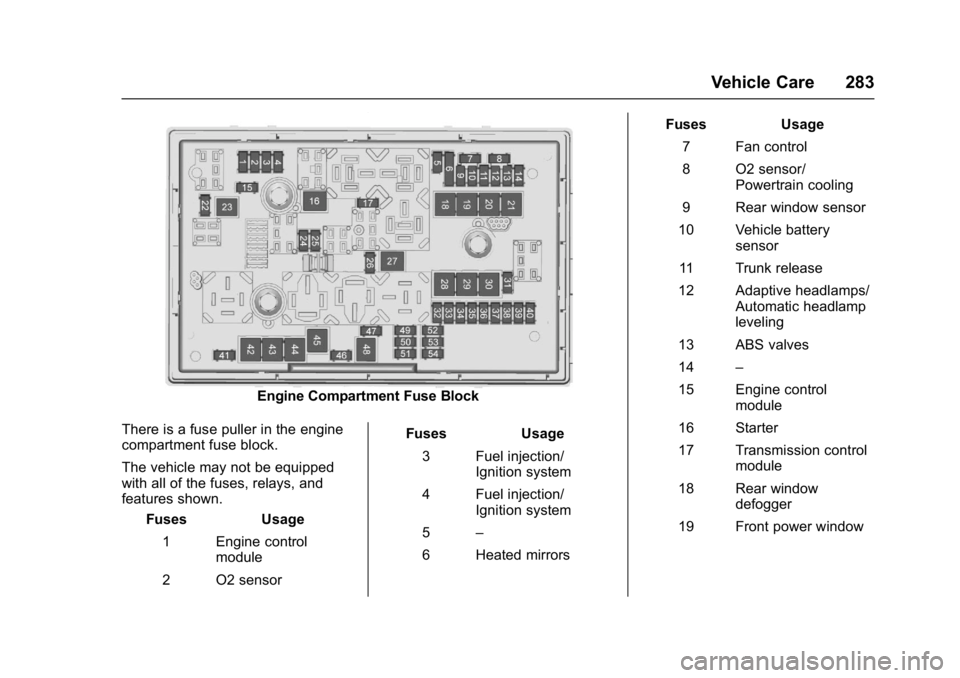
Engine Compartment Fuse Block
There is a fuse puller in the engine
compartment fuse block.
The vehicle may not be equipped
with all of the fuses, relays, and
features shown. Fuses Usage
1 Engine control module
2 O2 sensor Fuses Usage
3 Fuel injection/ Ignition system
4 Fuel injection/ Ignition system
5 –
6 Heated mirrors Fuses Usage
7 Fan control
8 O2 sensor/ Powertrain cooling
9 Rear window sensor
10 Vehicle battery sensor
11 Trunk release
12 Adaptive headlamps/ Automatic headlamp
leveling
13 ABS valves
14 –
15 Engine control module
16 Starter
17 Transmission control module
18 Rear window defogger
19 Front power window
Page 285 of 381
Buick Cascada Owner Manual (GMNA-Localizing-U.S.-9967834) - 2017 - crc -
7/18/16
284 Vehicle Care
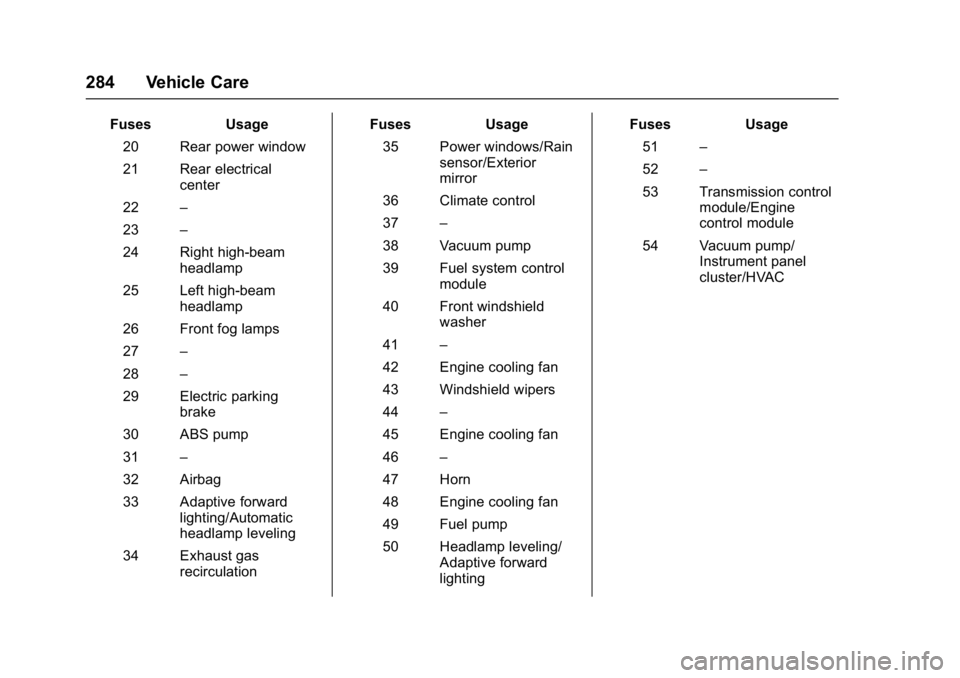
FusesUsage
20 Rear power window
21 Rear electrical center
22 –
23 –
24 Right high-beam headlamp
25 Left high-beam headlamp
26 Front fog lamps
27 –
28 –
29 Electric parking brake
30 ABS pump
31 –
32 Airbag
33 Adaptive forward lighting/Automatic
headlamp leveling
34 Exhaust gas recirculation Fuses
Usage
35 Power windows/Rain sensor/Exterior
mirror
36 Climate control
37 –
38 Vacuum pump
39 Fuel system control module
40 Front windshield washer
41 –
42 Engine cooling fan
43 Windshield wipers
44 –
45 Engine cooling fan
46 –
47 Horn
48 Engine cooling fan
49 Fuel pump
50 Headlamp leveling/ Adaptive forward
lighting Fuses
Usage
51 –
52 –
53 Transmission control module/Engine
control module
54 Vacuum pump/ Instrument panel
cluster/HVAC
Page 300 of 381
Buick Cascada Owner Manual (GMNA-Localizing-U.S.-9967834) - 2017 - crc -
7/18/16
Vehicle Care 299
is corrected. Some of the conditions
that can cause these to come
on are:
.One of the road tires has been
replaced with the spare tire. The
spare tire does not have a
TPMS sensor. The malfunction
light and DIC message should
go off after the road tire is
replaced and the sensor
matching process is performed
successfully. See “TPMS Sensor
Matching Process” following.
. The TPMS sensor matching
process was not done or not
completed successfully after
rotating the tires. The
malfunction light and the DIC
message should go off after
successfully completing the
sensor matching process. See
"TPMS Sensor Matching
Process" following.
. One or more TPMS sensors are
missing or damaged. The
malfunction light and the DIC
message should go off when the
TPMS sensors are installed and the sensor matching process is
performed successfully. See
your dealer for service.
. Replacement tires or wheels do
not match the original equipment
tires or wheels. Tires and wheels
other than those recommended
could prevent the TPMS from
functioning properly. See Buying
New Tires 0302.
. Operating electronic devices or
being near facilities using radio
wave frequencies similar to the
TPMS could cause the TPMS
sensors to malfunction.
If the TPMS is not functioning
properly it cannot detect or signal a
low tire condition. See your dealer
for service if the TPMS malfunction
light and DIC message comes on
and stays on.
TPMS Sensor Matching
Process
Each TPMS sensor has a unique
identification code. The identification
code needs to be matched to a new
tire/wheel position after rotating the
vehicle’s tires or replacing one or more of the TPMS sensors. The
TPMS sensor matching process
should also be performed after
replacing a spare tire with a road
tire containing the TPMS sensor.
The malfunction light and the DIC
message should go off at the next
ignition cycle. The sensors are
matched to the tire/wheel positions,
using a TPMS relearn tool, in the
following order: driver side front tire,
passenger side front tire, passenger
side rear tire, and driver side rear.
See your dealer for service or to
purchase a relearn tool. A TPMS
relearn tool can also be purchased.
See Tire Pressure Monitor
Sensor Activation Tool at
www.gmtoolsandequipment.com or
call 1-800-GM TOOLS
(1-800-468-6657).
There are two minutes to match the
first tire/wheel position, and
five minutes overall to match all four
tire/wheel positions. If it takes
longer, the matching process stops
and must be restarted.
Page 301 of 381
Buick Cascada Owner Manual (GMNA-Localizing-U.S.-9967834) - 2017 - crc -
7/18/16
300 Vehicle Care
The TPMS sensor matching
process is:1. Set the parking brake.
2. Put an automatic transmission in P (Park) or a manual
transmission in 1 (First) or
R (Reverse).
3. Turn the ignition to ON/RUN with the engine off. See Ignition
Positions 0228.
4. Press MENU to select the Vehicle Information Menu in
the Driver Information
Center (DIC).
5. Use the thumbwheel to scroll to the Tire Pressure Menu Item
screen.
6. Press SET/CLR to begin the sensor matching process.
A message asking if the
process should begin should
appear.
7. Press SET/CLR again to confirm the selection. The horn sounds twice to
signal the receiver is in relearn
mode and the TIRE
LEARNING ACTIVE message
displays on the DIC screen.
8. Start with the driver side front tire.
9. Place the relearn tool against the tire sidewall, near the valve
stem. Then press the button to
activate the TPMS sensor.
A horn chirp confirms that the
sensor identification code has
been matched to this tire and
wheel position.
10. Proceed to the passenger side front tire, and repeat the
procedure in Step 8.
11. Proceed to the passenger side rear tire, and repeat the
procedure in Step 8.
12. Proceed to the driver side rear tire, and repeat the procedure
in Step 8. The horn sounds two
times to indicate the sensor
identification code has been
matched to the driver side rear
tire, and the TPMS sensor matching process is no longer
active. The TIRE LEARNING
ACTIVE message on the DIC
display screen goes off.
13. Turn the ignition to LOCK/OFF.
14. Set all four tires to the recommended air pressure
level as indicated on the Tire
and Loading Information label.
Tire Inspection
We recommend that the tires,
including the spare tire, if the
vehicle has one, be inspected
for signs of wear or damage at
least once a month.
Replace the tire if:
.The indicators at three or
more places around the tire
can be seen.
.There is cord or fabric
showing through the tire's
rubber.