ignition BUICK CASCADA 2017 Owner's Manual
[x] Cancel search | Manufacturer: BUICK, Model Year: 2017, Model line: CASCADA, Model: BUICK CASCADA 2017Pages: 381, PDF Size: 6.58 MB
Page 8 of 381

Buick Cascada Owner Manual (GMNA-Localizing-U.S.-9967834) - 2017 - crc -
7/18/16
In Brief 7
1.Air Vents 0215.
2. Headlamp High/Low-Beam
Changer 0120.
Turn Signal Lever. See Turn
and Lane-Change
Signals 0122.
Driver Information Center (DIC)
Buttons. See Driver Information
Center (DIC) 0110.
3. Cruise Control 0242.
Forward Collision Alert (FCA)
System 0246 (If Equipped).
4. Instrument Cluster 098.
5. Driver Information Center
(DIC) 0110.
6. Steering Wheel Controls 093.
7. Windshield Wiper/Washer 094.
8. Central Locking Switch. See Power Door Locks 028.
Hazard Warning
Flashers 0122.
Passenger Airbag Status
Indicator 0101.
9. AM-FM Radio 0138. 10. Anti-Theft Alarm System
Indicator Light. See Vehicle
Alarm System 031.
11. Traction Control/Electronic
Stability Control 0240.
Lane Departure Warning
(LDW) 0248.
Assistance Systems for
Parking or Backing 0244.
12. Dual Automatic Climate Control
System 0213.
Heated Front Seats 049 (If
Equipped).
Heated Steering Wheel 094 (If
Equipped).
13. USB Port. See USB0160.
Input Jack. See Auxiliary
Devices 0165.
14. Convertible Top 037.
Central Power Window Switch.
See Power Windows 034.
15. Electric Parking Brake 0237.
16. Shift Lever. See Automatic
Transmission 0234.
17. Power Outlets 096. 18. Ignition Switch. See
Ignition
Positions 0228.
19. Horn 094.
20. Steering Wheel
Adjustment 093.
21. Instrument Panel Storage 089.
Instrument Panel Fuse
Block 0285.
22. Hood Release. See Hood 0257.
23. Exterior Lamp Controls 0119.
Fog Lamps 0123 (If
Equipped).
Instrument Panel Illumination
Control 0123.
24. Data Link Connector (DLC) (Out of View). See Malfunction
Indicator Lamp (Check Engine
Light) 0102.
Page 9 of 381
Buick Cascada Owner Manual (GMNA-Localizing-U.S.-9967834) - 2017 - crc -
7/18/16
8 In Brief
Initial Drive
Information
This section provides a brief
overview about some of the
important features that may or may
not be on your specific vehicle.
For more detailed information, refer
to each of the features which can be
found later in this owner’s manual.
Remote Keyless Entry
(RKE) System
The Remote Keyless Entry (RKE)
transmitter may work up to 60 m
(197 ft) away from the vehicle.
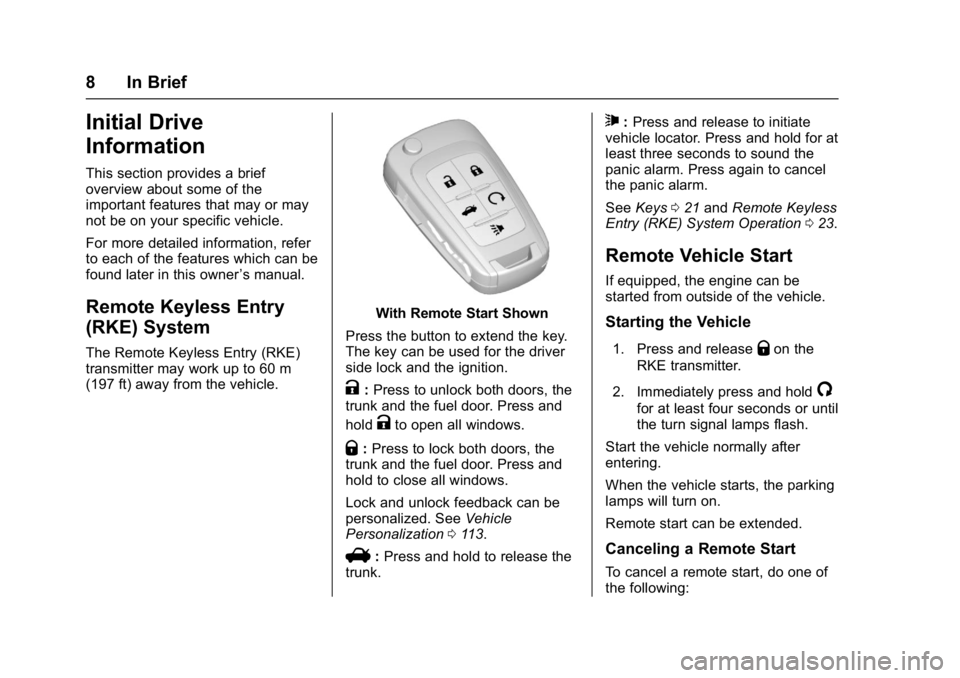
With Remote Start Shown
Press the button to extend the key.
The key can be used for the driver
side lock and the ignition.
K: Press to unlock both doors, the
trunk and the fuel door. Press and
hold
Kto open all windows.
Q: Press to lock both doors, the
trunk and the fuel door. Press and
hold to close all windows.
Lock and unlock feedback can be
personalized. See Vehicle
Personalization 0113.
V:Press and hold to release the
trunk.
7: Press and release to initiate
vehicle locator. Press and hold for at
least three seconds to sound the
panic alarm. Press again to cancel
the panic alarm.
See Keys 021 and Remote Keyless
Entry (RKE) System Operation 023.
Remote Vehicle Start
If equipped, the engine can be
started from outside of the vehicle.
Starting the Vehicle
1. Press and releaseQon the
RKE transmitter.
2. Immediately press and hold
/
for at least four seconds or until
the turn signal lamps flash.
Start the vehicle normally after
entering.
When the vehicle starts, the parking
lamps will turn on.
Remote start can be extended.
Canceling a Remote Start
To cancel a remote start, do one of
the following:
Page 11 of 381
Buick Cascada Owner Manual (GMNA-Localizing-U.S.-9967834) - 2017 - crc -
7/18/16
10 In Brief
Windows
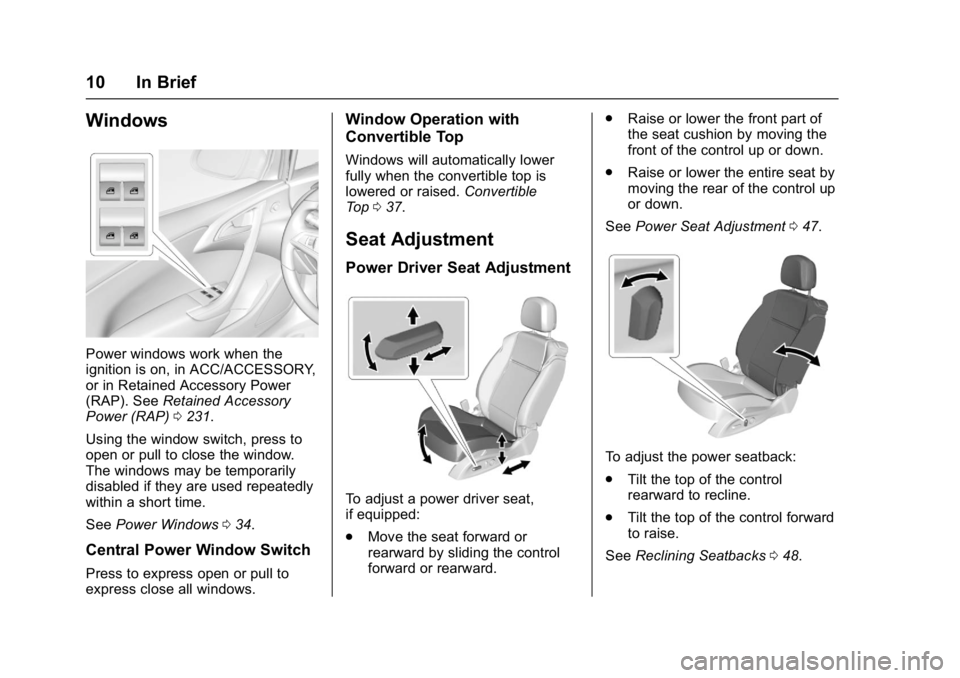
Power windows work when the
ignition is on, in ACC/ACCESSORY,
or in Retained Accessory Power
(RAP). SeeRetained Accessory
Power (RAP) 0231.
Using the window switch, press to
open or pull to close the window.
The windows may be temporarily
disabled if they are used repeatedly
within a short time.
See Power Windows 034.
Central Power Window Switch
Press to express open or pull to
express close all windows.
Window Operation with
Convertible Top
Windows will automatically lower
fully when the convertible top is
lowered or raised. Convertible
Top 037.
Seat Adjustment
Power Driver Seat Adjustment
To adjust a power driver seat,
if equipped:
.
Move the seat forward or
rearward by sliding the control
forward or rearward. .
Raise or lower the front part of
the seat cushion by moving the
front of the control up or down.
. Raise or lower the entire seat by
moving the rear of the control up
or down.
See Power Seat Adjustment 047.
To adjust the power seatback:
.
Tilt the top of the control
rearward to recline.
. Tilt the top of the control forward
to raise.
See Reclining Seatbacks 048.
Page 15 of 381
Buick Cascada Owner Manual (GMNA-Localizing-U.S.-9967834) - 2017 - crc -
7/18/16
14 In Brief
':Press to turn on the dome
lamps.
Reading Lamps
The front reading lamps are in the
overhead console.
#or$: Press the button near
each lamp to turn it on or off.
Exterior Lighting
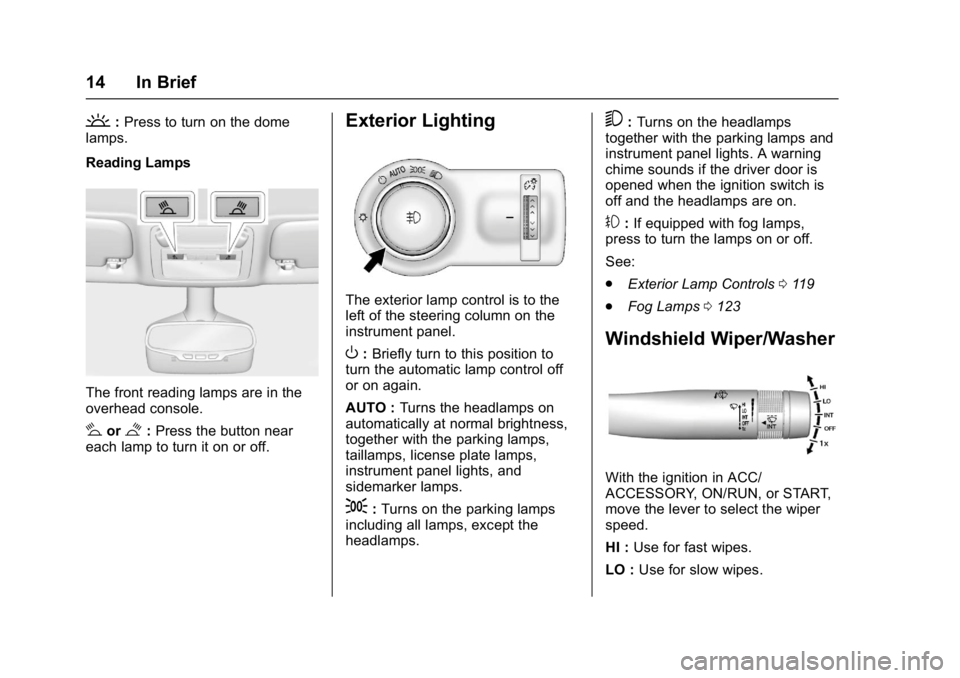
The exterior lamp control is to the
left of the steering column on the
instrument panel.
O: Briefly turn to this position to
turn the automatic lamp control off
or on again.
AUTO : Turns the headlamps on
automatically at normal brightness,
together with the parking lamps,
taillamps, license plate lamps,
instrument panel lights, and
sidemarker lamps.
;: Turns on the parking lamps
including all lamps, except the
headlamps.
5: Turns on the headlamps
together with the parking lamps and
instrument panel lights. A warning
chime sounds if the driver door is
opened when the ignition switch is
off and the headlamps are on.
#: If equipped with fog lamps,
press to turn the lamps on or off.
See:
. Exterior Lamp Controls 0119
. Fog Lamps 0123
Windshield Wiper/Washer
With the ignition in ACC/
ACCESSORY, ON/RUN, or START,
move the lever to select the wiper
speed.
HI : Use for fast wipes.
LO : Use for slow wipes.
Page 20 of 381
Buick Cascada Owner Manual (GMNA-Localizing-U.S.-9967834) - 2017 - crc -
7/18/16
In Brief 19
Loading Information label. See
Vehicle Load Limits0224. The
warning light will remain on until the
tire pressure is corrected.
The low tire pressure warning light
may come on in cool weather when
the vehicle is first started, and then
turn off as the vehicle is driven. This
may be an early indicator that the
tire pressures are getting low and
the tires need to be inflated to the
proper pressure.
The TPMS does not replace normal
monthly tire maintenance. Maintain
the correct tire pressures.
See Tire Pressure Monitor
System 0296.
Fuel
Premium Recommended Fuel
Use premium 93 octane unleaded
gasoline in your vehicle. Unleaded
gasoline with an octane rating as
low as 87 may be used, but it will
reduce performance and fuel
economy. See Fuel0249.
E85 or FlexFuel
No E85 or FlexFuel
Gasoline-ethanol fuel blends greater
than E15 (15% ethanol by volume),
such as E85, cannot be used in this
vehicle.
Engine Oil Life System
The engine oil life system calculates
engine oil life based on vehicle use
and displays the CHANGE ENGINE
OIL SOON message when it is time
to change the engine oil and filter. The oil life system should be reset
to 100% only following an oil
change.
Resetting the Oil Life System
1. Display REMAINING OIL LIFE on the Driver Information
Center (DIC). See Driver
Information Center (DIC) 0110.
2. Press and hold SET/CLR to reset the oil life at 100%.
3. Turn the ignition to LOCK/OFF.
See Engine Oil Life System 0262.
Driving for Better Fuel
Economy
Driving habits can affect fuel
mileage. Here are some driving tips
to get the best fuel economy
possible.
.
Avoid fast starts and accelerate
smoothly.
. Brake gradually and avoid
abrupt stops.
. Avoid idling the engine for long
periods of time.
Page 22 of 381
Buick Cascada Owner Manual (GMNA-Localizing-U.S.-9967834) - 2017 - crc -
7/18/16
Keys, Doors, and Windows 21
Keys, Doors, and
Windows
Keys and Locks
Keys . . . . . . . . . . . . . . . . . . . . . . . . . . . 21
Remote Keyless Entry (RKE)System . . . . . . . . . . . . . . . . . . . . . . . 23
Remote Keyless Entry (RKE) System Operation . . . . . . . . . . . . 23
Remote Vehicle Start . . . . . . . . . . 26
Door Locks . . . . . . . . . . . . . . . . . . . . 27
Power Door Locks . . . . . . . . . . . . . 28
Delayed Locking . . . . . . . . . . . . . . . 28
Automatic Door Locks . . . . . . . . . 28
Lockout Protection . . . . . . . . . . . . . 29
Doors
Trunk . . . . . . . . . . . . . . . . . . . . . . . . . . 29
Vehicle Security
Vehicle Security . . . . . . . . . . . . . . . . 31
Vehicle Alarm System . . . . . . . . . 31
Immobilizer . . . . . . . . . . . . . . . . . . . . 32
Immobilizer Operation . . . . . . . . . 32
Exterior Mirrors
Convex Mirrors . . . . . . . . . . . . . . . . 33
Power Mirrors . . . . . . . . . . . . . . . . . . 33
Folding Mirrors . . . . . . . . . . . . . . . . . 33
Heated Mirrors . . . . . . . . . . . . . . . . . 33
Interior Mirrors
Interior Rearview Mirrors . . . . . . . 34
Automatic Dimming Rearview Mirror . . . . . . . . . . . . . . . . . . . . . . . . . 34
Windows
Windows . . . . . . . . . . . . . . . . . . . . . . . 34
Power Windows . . . . . . . . . . . . . . . 34
Sun Visors . . . . . . . . . . . . . . . . . . . . . 36
Roof
Convertible Top . . . . . . . . . . . . . . . . 37
Keys and Locks
Keys
{Warning
Leaving children in a vehicle with
an ignition key or Remote
Keyless Entry (RKE) transmitter is
dangerous and children or others
could be seriously injured or
killed. They could operate the
power window or other controls or
make the vehicle move. The
windows will function with the key
in the ignition or with the RKE
transmitter in the vehicle, and
children or others could be caught
in the path of a closing window.
Do not leave children in a vehicle
with the ignition key or an RKE
transmitter.
Page 23 of 381
Buick Cascada Owner Manual (GMNA-Localizing-U.S.-9967834) - 2017 - crc -
7/18/16
22 Keys, Doors, and Windows
{Warning
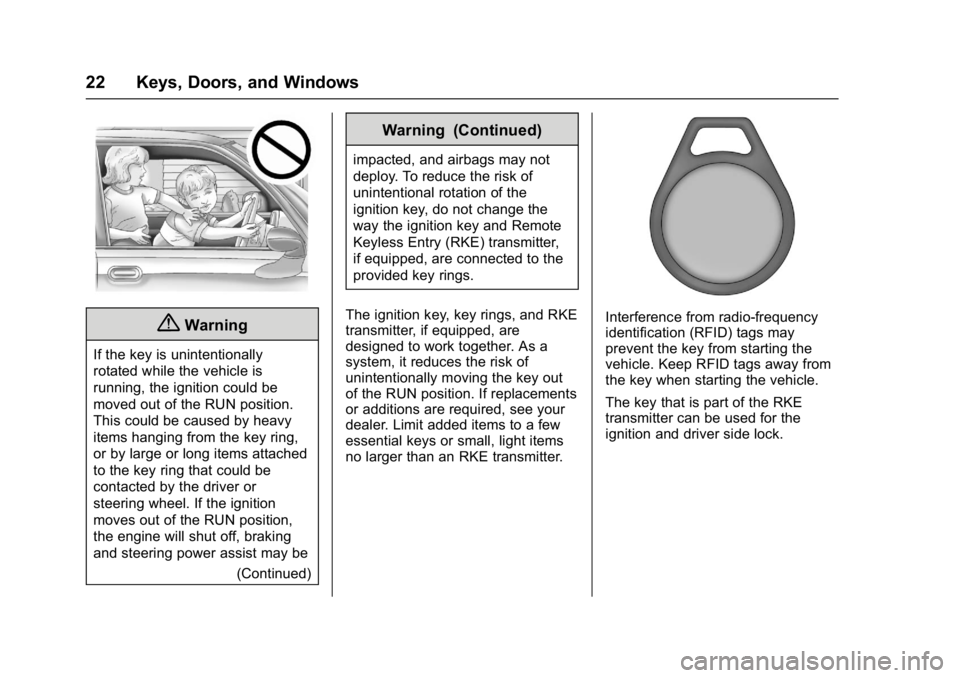
If the key is unintentionally
rotated while the vehicle is
running, the ignition could be
moved out of the RUN position.
This could be caused by heavy
items hanging from the key ring,
or by large or long items attached
to the key ring that could be
contacted by the driver or
steering wheel. If the ignition
moves out of the RUN position,
the engine will shut off, braking
and steering power assist may be(Continued)
Warning (Continued)
impacted, and airbags may not
deploy. To reduce the risk of
unintentional rotation of the
ignition key, do not change the
way the ignition key and Remote
Keyless Entry (RKE) transmitter,
if equipped, are connected to the
provided key rings.
The ignition key, key rings, and RKE
transmitter, if equipped, are
designed to work together. As a
system, it reduces the risk of
unintentionally moving the key out
of the RUN position. If replacements
or additions are required, see your
dealer. Limit added items to a few
essential keys or small, light items
no larger than an RKE transmitter.
Interference from radio-frequency
identification (RFID) tags may
prevent the key from starting the
vehicle. Keep RFID tags away from
the key when starting the vehicle.
The key that is part of the RKE
transmitter can be used for the
ignition and driver side lock.
Page 25 of 381

Buick Cascada Owner Manual (GMNA-Localizing-U.S.-9967834) - 2017 - crc -
7/18/16
24 Keys, Doors, and Windows
The turn signal indicators may flash
to indicate unlocking. SeeVehicle
Personalization 0113.
Pressing
Kwill disarm the alarm
system. See Vehicle Alarm
System 031.
Q:Press to lock both doors, the
trunk, and the fuel door. Press and
hold
Qto close all windows.
The turn signal indicators may flash
and/or the horn may sound to
indicate locking.
If the driver door is open when
Qis
pressed, all doors lock and the
driver door will immediately unlock,
if enabled through vehicle
personalization. See Vehicle
Personalization 0113.
If the passenger door is open when
Qis pressed, all doors lock.
Pressing
Qmay also arm the alarm
system. See Vehicle Alarm
System 031.
V:Press and hold to release the
trunk.
7: Press and release one time to
initiate vehicle locator. The exterior
lamps flash and the horn chirps
three times.
Press and hold
7for at least
three seconds to sound the panic
alarm. The horn sounds and the
turn signals flash for 30 seconds,
or until
7is pressed again or the
vehicle is started.
/: If equipped, press to operate
the remote start feature. See
Remote Vehicle Start 026.
The buttons on the transmitter are
disabled when there is a key in the
ignition.
Programming Keys to the
Vehicle
Only keys programmed to the
vehicle will work. If a key is lost or
stolen, a replacement can be
purchased and programmed through
your dealer. The vehicle can be
reprogrammed so that lost or stolen
keys no longer work. Any remaining keys will need to be reprogrammed.
Each vehicle can have up to eight
keys matched to it.
Programming with two
Recognized Keys
To program a new key:
1. Insert the original, already programmed key in the ignition
and turn the key to the ON/
RUN position.
2. Turn the key to LOCK/OFF, and remove the key.
3. Quickly, within five seconds, insert the second original
already programmed key in the
ignition and turn it to the ON/
RUN position.
4. Insert the new key to be programmed and turn it to the
ON/RUN position within
five seconds.
The security light will turn off
once the key has been
programmed.
5. Repeat Steps 1–5 if additional keys are to be programmed.
Page 26 of 381
Buick Cascada Owner Manual (GMNA-Localizing-U.S.-9967834) - 2017 - crc -
7/18/16
Keys, Doors, and Windows 25
If a key is lost or damaged, see your
dealer to have a new key made.
Programming without two
Recognized Keys
Program a new key to the vehicle
when a recognized key is not
available. Canadian regulations
require that owners see their dealer.
If two currently recognized keys are
not available, follow this procedure
to program the first key.
This procedure will take
approximately 30 minutes to
complete for the first key. The
vehicle must be off and all of the
keys you wish to program must be
with you.1. Insert the new vehicle key into the ignition.
2. Turn to ON/RUN. The security light will come on.
3. Wait 10 minutes until the security light turns off.
4. Turn the ignition to LOCK/OFF.
5. Repeat Steps 2–4 two more times. After the third time, turn
to ON/RUN; the key is learned and all previously known keys
will no longer work with the
vehicle.
6. To learn the second key, turn to OFF and insert the second key
to be learned and rotate to
ON/RUN.
After the two keys are learned,
remaining keys can be learned by
following the procedure in
“Programming with two
Recognized Keys.”
Battery Replacement
Caution
When replacing the battery, do
not touch any of the circuitry on
the transmitter. Static from your
body could damage the
transmitter.
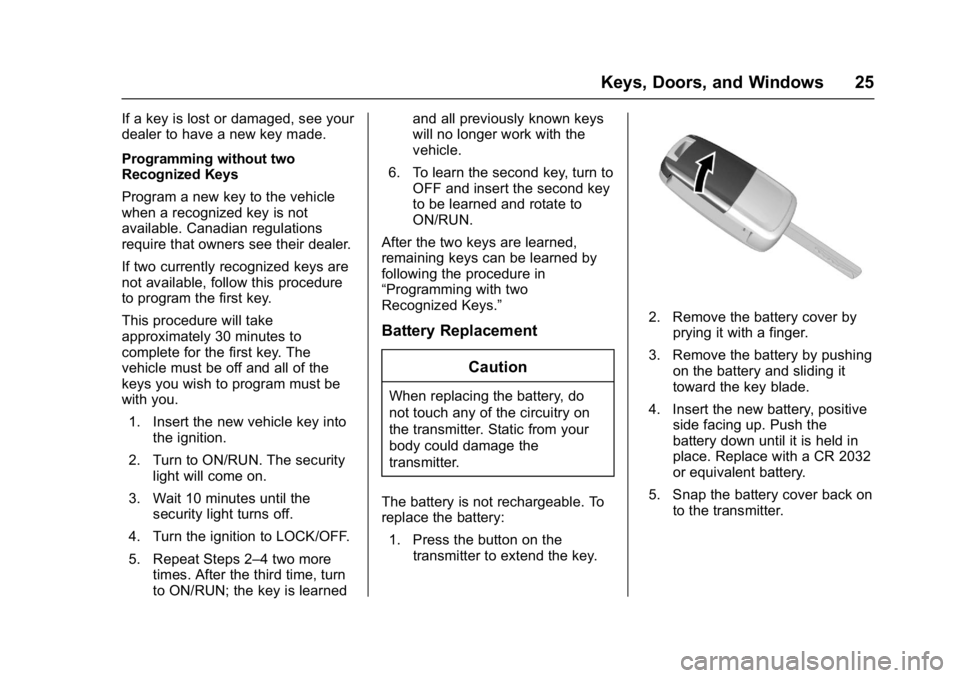
The battery is not rechargeable. To
replace the battery: 1. Press the button on the transmitter to extend the key.
2. Remove the battery cover byprying it with a finger.
3. Remove the battery by pushing on the battery and sliding it
toward the key blade.
4. Insert the new battery, positive side facing up. Push the
battery down until it is held in
place. Replace with a CR 2032
or equivalent battery.
5. Snap the battery cover back on to the transmitter.
Page 27 of 381
Buick Cascada Owner Manual (GMNA-Localizing-U.S.-9967834) - 2017 - crc -
7/18/16
26 Keys, Doors, and Windows
Remote Vehicle Start
If equipped, this feature allows the
engine to be started from outside
the vehicle.
/:This button will be on the RKE
transmitter if the vehicle has remote
start.
The climate control system will use
the previous settings during a
remote start. The rear defogger and
heated seats may come on during
remote start based on cold ambient
conditions. See Heated Front Seats
0 49 and Vehicle
Personalization 0113.
Laws in some local communities
may restrict the use of remote
starters. For example, some laws
require a person using remote start
to have the vehicle in view. Check
local regulations for any
requirements.
If the vehicle is low on fuel, do not
use the remote start feature. The
vehicle may run out of fuel. Other conditions can affect the
performance of the transmitter. See
Remote Keyless Entry (RKE)
System
023.
Starting the Vehicle
To start the engine using the remote
start feature:
1. Press and release
Q.
2. Immediately after completing Step 1, press and hold
/for at
least four seconds or until the
turn signal lamps flash. The
turn signal lamps flashing
confirms the request to remote
start the vehicle has been
received.
When the vehicle starts, the parking
lamps will turn on and remain on as
long as the engine is running. The
doors will be locked and the climate
control system may come on.
The engine will continue to run for
10 minutes unless a time extension
is done or the ignition is turned on.
After 30 seconds, repeat the steps if a 10-minute extension is desired.
Remote start can be extended
only once.
The key must be turned to ON/RUN
before driving.
Extending Engine Run Time
For a 10-minute extension, repeat
Steps 1 and 2 while the engine is
still running. An extension can be
requested 30 seconds after starting.
The remote start can be
extended once.
When the remote start is extended,
the second 10 minutes will start
immediately.
For example, if the engine has been
running for five minutes, and
10 minutes are added, the engine
will run for a total of 15 minutes.
A maximum of two remote starts,
or a single start with an extension,
is allowed between ignition cycles.
The vehicle's ignition must be
turned on and then back off before
the remote start procedure can be
used again.