transmission BUICK CASCADA 2019 Owner's Manual
[x] Cancel search | Manufacturer: BUICK, Model Year: 2019, Model line: CASCADA, Model: BUICK CASCADA 2019Pages: 307, PDF Size: 5.12 MB
Page 6 of 307
Buick Cascada Owner Manual (GMNA-Localizing-U.S.-12461774) - 2019 -
CRC - 3/26/18
In Brief 5
In Brief
Instrument Panel
Instrument Panel Overview . . . . . . 6
Initial Drive Information
Initial Drive Information . . . . . . . . . . 8
Remote Keyless Entry (RKE)System . . . . . . . . . . . . . . . . . . . . . . . . 8
Remote Vehicle Start . . . . . . . . . . . 8
Door Locks . . . . . . . . . . . . . . . . . . . . . 9
Trunk Release . . . . . . . . . . . . . . . . . . 9
Windows . . . . . . . . . . . . . . . . . . . . . . . 10
Seat Adjustment . . . . . . . . . . . . . . . 10
Heated Seats . . . . . . . . . . . . . . . . . . 11
Head Restraint Adjustment . . . . 11
Seat Belts . . . . . . . . . . . . . . . . . . . . . 12
Passenger Sensing System . . . 12
Mirror Adjustment . . . . . . . . . . . . . . 12
Steering Wheel Adjustment . . . . 13
Interior Lighting . . . . . . . . . . . . . . . . 13
Exterior Lighting . . . . . . . . . . . . . . . 14
Windshield Wiper/Washer . . . . . . 14
Climate Controls . . . . . . . . . . . . . . . 15
Transmission . . . . . . . . . . . . . . . . . . 15
Vehicle Features
Infotainment System . . . . . . . . . . . 16
Steering Wheel Controls . . . . . . . 16 Cruise Control . . . . . . . . . . . . . . . . . 16
Driver Information
Center (DIC) . . . . . . . . . . . . . . . . . 16
Forward Collision Alert (FCA) System . . . . . . . . . . . . . . . . . . . . . . . 17
Lane Departure Warning (LDW) . . . . . . . . . . . . . . . 17
Rear Vision Camera (RVC) . . . . 17
Park Assist . . . . . . . . . . . . . . . . . . . . 17
Power Outlets . . . . . . . . . . . . . . . . . 18
Convertible . . . . . . . . . . . . . . . . . . . . 18
Performance and Maintenance
Traction Control/Electronic Stability Control . . . . . . . . . . . . . . 18
Tire Pressure Monitor . . . . . . . . . . 18
Fuel . . . . . . . . . . . . . . . . . . . . . . . . . . . 19
E85 or FlexFuel . . . . . . . . . . . . . . . . 19
Engine Oil Life System . . . . . . . . 19
Driving for Better Fuel Economy . . . . . . . . . . . . . . . . . . . . . 20
Roadside Assistance Program . . . . . . . . . . . . . . . . . . . . . . 20
Page 8 of 307

Buick Cascada Owner Manual (GMNA-Localizing-U.S.-12461774) - 2019 -
CRC - 3/26/18
In Brief 7
1.Air Vents 0133.
2. Headlamp High/Low-Beam
Changer 0122.
Turn Signal Lever. See Turn
and Lane-Change Signals
0 124.
Driver Information Center (DIC)
Buttons. See Driver Information
Center (DIC) 0112.
3. Cruise Control 0160.
Forward Collision Alert (FCA)
System 0167 (If Equipped).
4. Instrument Cluster 0100.
5. Driver Information Center (DIC)
0112.
6. Steering Wheel Controls 096.
7. Windshield Wiper/Washer 096.
8. Central Locking Switch. See Power Door Locks 028.
Hazard Warning Flashers
0 124.
Passenger Airbag Status
Indicator 0103. 9. AM-FM Radio. See the
infotainment manual.
10. Anti-Theft Alarm System Indicator Light. See Vehicle
Alarm System 031.
11. Traction Control/Electronic
Stability Control 0158.
Lane Departure Warning
(LDW) 0168.
Assistance Systems for
Parking or Backing 0164.
12. Dual Automatic Climate Control
System 0130.
Heated Front Seats 051 (If
Equipped).
Heated Steering Wheel 096 (If
Equipped).
13. USB Port. See the infotainment manual.
Input Jack. See the
infotainment manual.
14. Convertible Top 037.
All Window Switch. See Power
Windows 035.
15. Electric Parking Brake 0156. 16. Shift Lever. See
Automatic
Transmission 0152.
17. Power Outlets 098.
18. Ignition Switch. See Ignition
Positions 0146.
19. Horn 096.
20. Steering Wheel Adjustment
096 (Out of View).
21. Instrument Panel Storage 092.
Instrument Panel Fuse Block
0 207.
22. Hood Release. See Hood
0 178.
23. Exterior Lamp Controls 0121.
Fog Lamps 0125 (If
Equipped).
Instrument Panel Illumination
Control 0125.
24. Data Link Connector (DLC) (Out of View). See Malfunction
Indicator Lamp (Check Engine
Light) 0104.
Page 16 of 307
Buick Cascada Owner Manual (GMNA-Localizing-U.S.-12461774) - 2019 -
CRC - 3/26/18
In Brief 15
HI :Use for fast wipes.
LO : Use for slow wipes.
INT : Move the lever up to INT, then
turn the
xINT band up or down
for more or less sensitivity to
moisture.
OFF : Use to turn the wipers off.
1X : For a single wipe, briefly move
the lever down. For several wipes,
hold the lever down.
n L: Pull the lever toward you to
spray windshield washer fluid and
activate the wipers.
See Windshield Wiper/Washer 096.
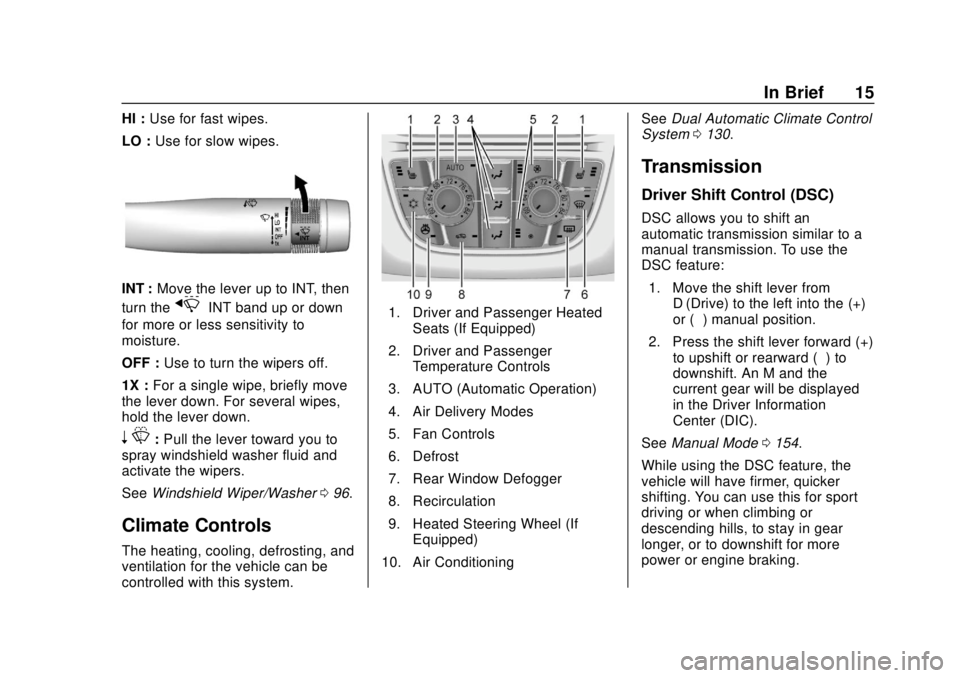
Climate Controls
The heating, cooling, defrosting, and
ventilation for the vehicle can be
controlled with this system.
1. Driver and Passenger Heated
Seats (If Equipped)
2. Driver and Passenger Temperature Controls
3. AUTO (Automatic Operation)
4. Air Delivery Modes
5. Fan Controls
6. Defrost
7. Rear Window Defogger
8. Recirculation
9. Heated Steering Wheel (If Equipped)
10. Air Conditioning See
Dual Automatic Climate Control
System 0130.
Transmission
Driver Shift Control (DSC)
DSC allows you to shift an
automatic transmission similar to a
manual transmission. To use the
DSC feature:
1. Move the shift lever from D (Drive) to the left into the (+)
or (−) manual position.
2. Press the shift lever forward (+) to upshift or rearward (−) to
downshift. An M and the
current gear will be displayed
in the Driver Information
Center (DIC).
See Manual Mode 0154.
While using the DSC feature, the
vehicle will have firmer, quicker
shifting. You can use this for sport
driving or when climbing or
descending hills, to stay in gear
longer, or to downshift for more
power or engine braking.
Page 30 of 307
Buick Cascada Owner Manual (GMNA-Localizing-U.S.-12461774) - 2019 -
CRC - 3/26/18
Keys, Doors, and Windows 29
Automatic Door Locks
The doors will lock automatically
when all doors are closed, the
ignition is on, and the vehicle is
shifted out of P (Park).
If a vehicle door is unlocked and
then opened and closed, the doors
will lock either when your foot is
removed from the brake or the
vehicle speed becomes faster than
13 km/h (8 mph).
To unlock the doors:
.Press
Kon the power door lock
switch.
. Shift the transmission into
P (Park).
Automatic door locking cannot be
disabled. Automatic door unlocking
can be programmed. See Vehicle
Personalization 0116.
Lockout Protection
When locking is requested with the
driver door open and the key in the
ignition, all the doors will lock and
then the driver door will unlock. This
can be manually overridden by
pressing and holding
Qon the
power door lock switch.
If Open Door Anti-Lockout is turned
on and the vehicle is off, the driver
door is open, and locking is
requested, all the doors will lock and
the driver door will remain open.
Press the button again to lock the
driver door. The Open Door
Anti-Lockout feature can be turned
on or off. See Vehicle
Personalization 0116.
Doors
Trunk
{Warning
Exhaust gases can enter the
vehicle if it is driven with the
liftgate or trunk/hatch open,
or with any objects that pass
through the seal between the
body and the trunk/hatch or
liftgate. Engine exhaust contains
carbon monoxide (CO) which
cannot be seen or smelled. It can
cause unconsciousness and even
death.
If the vehicle must be driven with
the liftgate or trunk/hatch open:
. Close all of the windows.
. Fully open the air outlets on
or under the instrument
panel.
(Continued)
Page 99 of 307
Buick Cascada Owner Manual (GMNA-Localizing-U.S.-12461774) - 2019 -
CRC - 3/26/18
98 Instruments and Controls
With Rainsense, if the transmission
is in N (Neutral) and the vehicle
speed is very slow, the wipers will
automatically stop at the base of the
windshield.
The wiper operations return to
normal when the transmission is no
longer in N (Neutral) or the vehicle
speed has increased.
nL: Pull the windshield wiper
lever toward you to spray windshield
washer fluid and activate the wipers.
The wipers will continue until the
lever is released or the maximum
wash time is reached. When the
windshield wiper lever is released,
additional wipes may occur
depending on how long the
windshield washer had been
activated. See Washer Fluid0190
for information on filling the
windshield washer fluid reservoir.
{Warning
In freezing weather, do not use
the washer until the windshield is
warmed. Otherwise the washer
fluid can form ice on the
windshield, blocking your vision.
Compass
The vehicle may have a compass
display on the Driver Information
Center (DIC). The compass receives
its heading and other information
from the Global Positioning
System (GPS) antenna, StabiliTrak/
Electronic Stability Control (ESC),
and vehicle speed information.
The compass system is designed to
operate for a certain number of
miles or degrees of turn before
needing a signal from the GPS
satellites. When the compass
display shows CAL, drive the
vehicle for a short distance in an
open area where it can receive a
GPS signal. The compass system will automatically determine when a
GPS signal is restored and provide
a heading again.
Clock
The infotainment system controls
are used to access the time and
date settings through the menu
system. The clock menu can only
be used with the radio while the
ignition is turned on or in ACC/
ACCESSORY. See
“Time and Date
Settings” under“Configuration
Menu” in the infotainment manual.
Power Outlets
The accessory power outlets can be
used to plug in electrical equipment,
such as a cell phone or MP3 player.
There is one accessory power outlet
on the center stack below the
climate controls and one on the rear
of the center console. These outlets
are powered when the ignition is on
or in ACC/ACCESSORY, or until the
driver door is opened within
10 minutes of turning off the vehicle.
SeeRetained Accessory Power
(RAP) 0149.
Page 106 of 307
Buick Cascada Owner Manual (GMNA-Localizing-U.S.-12461774) - 2019 -
CRC - 3/26/18
Instruments and Controls 105
Caution
Modifications to the engine,
transmission, exhaust, intake,
or fuel system, or the use of
replacement tires that do not
meet the original tire
specifications, can cause this light
to come on. This could lead to
costly repairs not covered by the
vehicle warranty. This could also
affect the vehicle’s ability to pass
an Emissions Inspection/
Maintenance test. See
Accessories and Modifications
0177.
If the light is flashing : A
malfunction has been detected that
could damage the emission control
system and increase vehicle
emissions. Diagnosis and service
may be required.
To help prevent damage, reduce
vehicle speed and avoid hard
accelerations and uphill grades. If the light continues to flash, find a
safe place to park. Turn the vehicle
off and wait at least 10 seconds
before restarting the engine. If the
light is still flashing, follow the
previous guidelines and see your
dealer for service as soon as
possible.
If the light is on steady :
A
malfunction has been detected.
Diagnosis and service may be
required.
Check the following:
. A loose or missing fuel cap may
cause the light to come on. See
Filling the Tank 0171. A few
driving trips with the cap
properly installed may turn the
light off.
. Poor fuel quality can cause
inefficient engine operation and
poor driveability, which may go
away once the engine is warmed
up. If this occurs, change the
fuel brand. It may require at
least one full tank of the proper
fuel to turn the light off. See
Recommended Fuel 0170. If the light remains on, see your
dealer.Emissions Inspection and
Maintenance Programs
If the vehicle requires an Emissions
Inspection/Maintenance test, the
test equipment will likely connect to
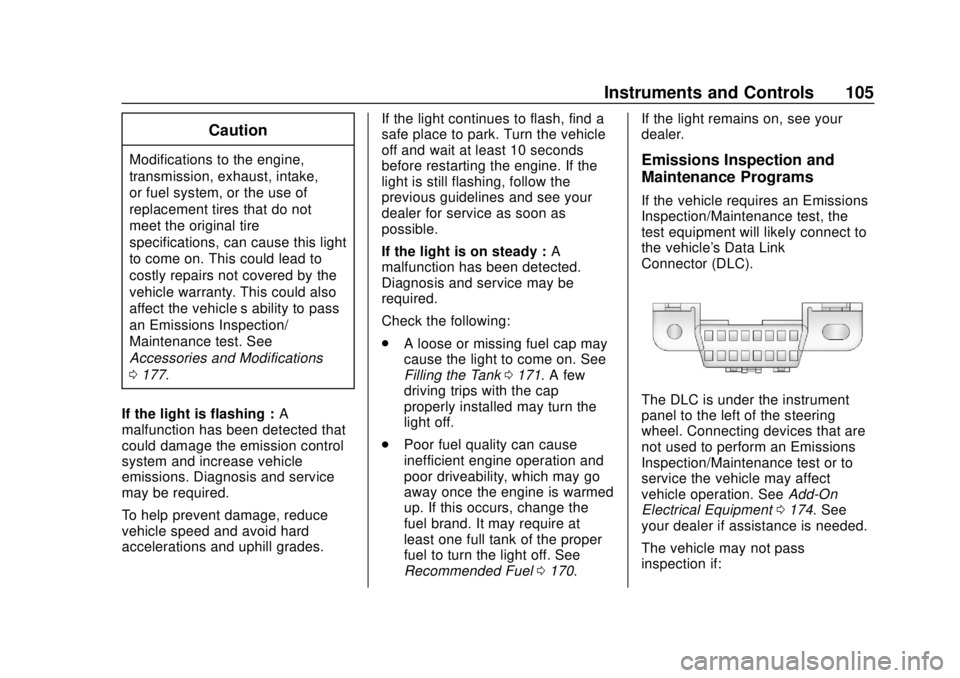
the vehicle's Data Link
Connector (DLC).
The DLC is under the instrument
panel to the left of the steering
wheel. Connecting devices that are
not used to perform an Emissions
Inspection/Maintenance test or to
service the vehicle may affect
vehicle operation. See
Add-On
Electrical Equipment 0174. See
your dealer if assistance is needed.
The vehicle may not pass
inspection if:
Page 116 of 307
Buick Cascada Owner Manual (GMNA-Localizing-U.S.-12461774) - 2019 -
CRC - 3/26/18
Instruments and Controls 115
Remember, the Remaining Oil Life
display must be reset after each oil
change. It will not reset itself. Also,
be careful not to reset the
Remaining Oil Life display
accidentally at any time other than
when the oil has just been changed.
It cannot be reset accurately until
the next oil change. To reset the
engine oil life system, press SET/
CLR while the Remaining Oil Life
display is active. SeeEngine Oil
Life System 0183.
Battery Voltage
This display shows the current
battery voltage. If the voltage is in
the normal range, the value will
display. For example, the display
may read Battery Voltage 15.0
Volts. The vehicle's charging system
regulates voltage based on the state
of the battery. The battery voltage
can fluctuate while viewing this
information on the DIC. This is
normal. See Charging System Light
0 104.Vehicle Messages
Messages displayed on the DIC
indicate the status of the vehicle or
some action that may be needed to
correct a condition. Multiple
messages may display one after the
other.
The messages that do not require
immediate action can be
acknowledged and cleared by
pressing SET/CLR. The messages
that require immediate action cannot
be cleared until that action is
performed. All messages should be
taken seriously and clearing the
messages does not correct the
problem.
Follow the instructions given in the
messages. The system displays
messages regarding the following
topics:
.
Service Messages
. Fluid Levels
. Vehicle Security
. Brakes
. Ride Control Systems .
Driver Assistance Systems
. Cruise Control
. Lighting and Bulb Replacement
. Wiper/Washer Systems
. Doors and Windows
. Convertible Top
. Seat Belts
. Airbag Systems
. Engine and Transmission
. Tire Pressure
. Battery
Engine Power Messages
ENGINE POWER IS REDUCED
This message displays when the
vehicle's propulsion power is
reduced. Reduced propulsion power
can affect the vehicle's ability to
accelerate. If this message is on,
but there is no observed reduction
in performance, proceed to your
destination. The performance may
be reduced the next time the vehicle
is driven. The vehicle may be driven
Page 124 of 307
Buick Cascada Owner Manual (GMNA-Localizing-U.S.-12461774) - 2019 -
CRC - 3/26/18
Lighting 123
sensor. The other lamps that come
on with the headlamps will also
come on.
When it is bright enough outside,
the headlamps go off and the DRL
come on.
The DRL turn off when the
headlamps are turned to
Oor the
ignition is off.
For vehicles first sold in Canada,
the DRL can only be turned off
when the vehicle is parked.
Automatic Headlamp
System
When it is dark enough outside and
the exterior lamp control is in the
automatic position and the engine is
running, the headlamps come on
automatically. See Exterior Lamp
Controls 0121.
The system may also turn on the
headlamps when driving through a
parking garage or tunnel. If the vehicle is started in a dark
garage, the automatic headlamp
system comes on immediately. If it
is light outside when the vehicle
leaves the garage, there is a slight
delay before the automatic
headlamp system changes to the
DRL. During that delay, the
instrument cluster may not be as
bright as usual. Make sure the
instrument panel brightness control
is in the full bright position. See
Instrument Panel Illumination
Control
0125.
Lights On with Wipers
If the windshield wipers are
activated in daylight with the engine
on, and the exterior lamp control is
in AUTO, the headlamps, parking
lamps, and other exterior lamps
come on. The transition time for the
lamps coming on varies based on
wiper speed. When the wipers are
not operating, these lamps turn off.
Move the exterior lamp control to
P
or;to disable this feature.
Adaptive Forward
Lighting (AFL)
The AFL system adjusts the
headlamps to provide greater road
illumination in various driving
conditions.
To enable AFL, set the exterior lamp
control to the AUTO position.
Moving the control out of the AUTO
position will deactivate the system.
AFL will operate when the vehicle
speed is greater than 3 km/h
(2 mph). AFL will not operate when
the transmission is in R (Reverse).
AFL is not immediately operable
after starting the vehicle; driving a
short distance is required to
calibrate the AFL. See Exterior
Lamp Controls 0121.
Curve Lighting
The light beam pivots based on the
steering wheel position and vehicle
speed of at least 10 km/h (6 mph).
The headlamps shine at an angle of
up to 15 degrees to the right or left
of the direction of travel.
Page 136 of 307
Buick Cascada Owner Manual (GMNA-Localizing-U.S.-12461774) - 2019 -
CRC - 3/26/18
Driving and Operating 135
Driving and
Operating
Driving Information
Distracted Driving . . . . . . . . . . . . 136
Defensive Driving . . . . . . . . . . . . . 136
Drunk Driving . . . . . . . . . . . . . . . . . 137
Control of a Vehicle . . . . . . . . . . . 137
Braking . . . . . . . . . . . . . . . . . . . . . . . 137
Steering . . . . . . . . . . . . . . . . . . . . . . 137
Off-Road Recovery . . . . . . . . . . . 138
Loss of Control . . . . . . . . . . . . . . . 138
Driving on Wet Roads . . . . . . . . 139
Hill and Mountain Roads . . . . . 140
Winter Driving . . . . . . . . . . . . . . . . 140
If the Vehicle Is Stuck . . . . . . . . 142
Vehicle Load Limits . . . . . . . . . . . 142
Starting and Operating
New Vehicle Break-In . . . . . . . . . 146
Ignition Positions . . . . . . . . . . . . . 146
Starting the Engine . . . . . . . . . . . 148
Retained AccessoryPower (RAP) . . . . . . . . . . . . . . . . 149
Shifting Into Park . . . . . . . . . . . . . 150
Shifting out of Park . . . . . . . . . . . 150
Parking over Things That Burn . . . . . . . . . . . . . . . . . . . 151
Engine Exhaust
Engine Exhaust . . . . . . . . . . . . . . 151
Running the Vehicle WhileParked . . . . . . . . . . . . . . . . . . . . . . 152
Automatic Transmission
Automatic Transmission . . . . . . 152
Manual Mode . . . . . . . . . . . . . . . . . 154
Brakes
Antilock BrakeSystem (ABS) . . . . . . . . . . . . . . . 155
Electric Parking Brake . . . . . . . . 156
Brake Assist . . . . . . . . . . . . . . . . . . 157
Hill Start Assist (HSA) . . . . . . . . 158
Ride Control Systems
Traction Control/Electronic Stability Control . . . . . . . . . . . . . 158
Cruise Control
Cruise Control . . . . . . . . . . . . . . . . 160
Driver Assistance Systems
Driver Assistance Systems . . . 163
Assistance Systems forParking or Backing . . . . . . . . . . 164
Forward Collision Alert (FCA) System . . . . . . . . . . . . . . . . . . . . . . 167
Lane Departure Warning (LDW) . . . . . . . . . . . . . 168
Fuel
Top Tier Fuel . . . . . . . . . . . . . . . . . 170
Recommended Fuel . . . . . . . . . . 170
Prohibited Fuels . . . . . . . . . . . . . . 170
Fuels in Foreign Countries . . . 171
Fuel Additives . . . . . . . . . . . . . . . . 171
Filling the Tank . . . . . . . . . . . . . . . 171
Filling a Portable FuelContainer . . . . . . . . . . . . . . . . . . . 173
Trailer Towing
General TowingInformation . . . . . . . . . . . . . . . . . . 173
Conversions and Add-Ons
Add-On ElectricalEquipment . . . . . . . . . . . . . . . . . . 174
Page 141 of 307
Buick Cascada Owner Manual (GMNA-Localizing-U.S.-12461774) - 2019 -
CRC - 3/26/18
140 Driving and Operating
Other Rainy Weather Tips
Besides slowing down, other wet
weather driving tips include:
.Allow extra following distance.
. Pass with caution.
. Keep windshield wiping
equipment in good shape.
. Keep the windshield washer fluid
reservoir filled.
. Have good tires with proper
tread depth. See Tires0211.
. Turn off cruise control.
Hill and Mountain Roads
Driving on steep hills or through
mountains is different than driving
on flat or rolling terrain. Tips include:
.Keep the vehicle serviced and in
good shape.
. Check all fluid levels and brakes,
tires, cooling system, and
transmission.
. Shift to a lower gear when going
down steep or long hills.
{Warning
Using the brakes to slow the
vehicle on a long downhill slope
can cause brake overheating, can
reduce brake performance, and
could result in a loss of braking.
Shift the transmission to a lower
gear to let the engine assist the
brakes on a steep downhill slope.
{Warning
Coasting downhill in N (Neutral)
or with the ignition off is
dangerous. This can cause
overheating of the brakes and
loss of steering assist. Always
have the engine running and the
vehicle in gear.
. Drive at speeds that keep the
vehicle in its own lane. Do not
swing wide or cross the
center line. .
Be alert on top of hills;
something could be in your lane
(e.g., stalled car, crash).
. Pay attention to special road
signs (e.g., falling rocks area,
winding roads, long grades,
passing or no-passing zones)
and take appropriate action.
Winter Driving
Driving on Snow or Ice
Snow or ice between the tires and
the road creates less traction or
grip, so drive carefully. Wet ice can
occur at about 0 °C (32 °F) when
freezing rain begins to fall. Avoid
driving on wet ice or in freezing rain
until roads can be treated.
For Slippery Road Driving:
.Accelerate gently. Accelerating
too quickly causes the wheels to
spin and makes the surface
under the tires slick.
. Turn on Traction Control. See
Traction Control/Electronic
Stability Control 0158.