ECU BUICK CENTURY 1997 User Guide
[x] Cancel search | Manufacturer: BUICK, Model Year: 1997, Model line: CENTURY, Model: BUICK CENTURY 1997Pages: 406, PDF Size: 20.64 MB
Page 65 of 406
If your child restraint has a top strap, your dealer can
obtain a kit with anchor hardware and installation
instructions specifically designed for this vehicle. The
dealer can then install the anchor for
you. In Canada,
this work will be done for you free
of charge. Or, you
may install the anchor yourself using the instructions
provided
in the kit.
Securing a Child Restraint in a Rear
Outside Seat Position
U
You’ll be using the lap-shoulder belt. See the earlier part
about the top strap
if the child restraint has one.
1. Put the restraint on the seat. Follow the instructions
for the child restraint.
2. Secure the child in the child restraint as the
instructions say.
3. Pick up the latch plate, and run the lap and shoulder
portions of the vehicle’s safety belt through or
around the restraint. The child restraint instructions
will show
you how.
If the shoulder belt goes
in front of the child’s face or
neck, put it behind the child restraint.
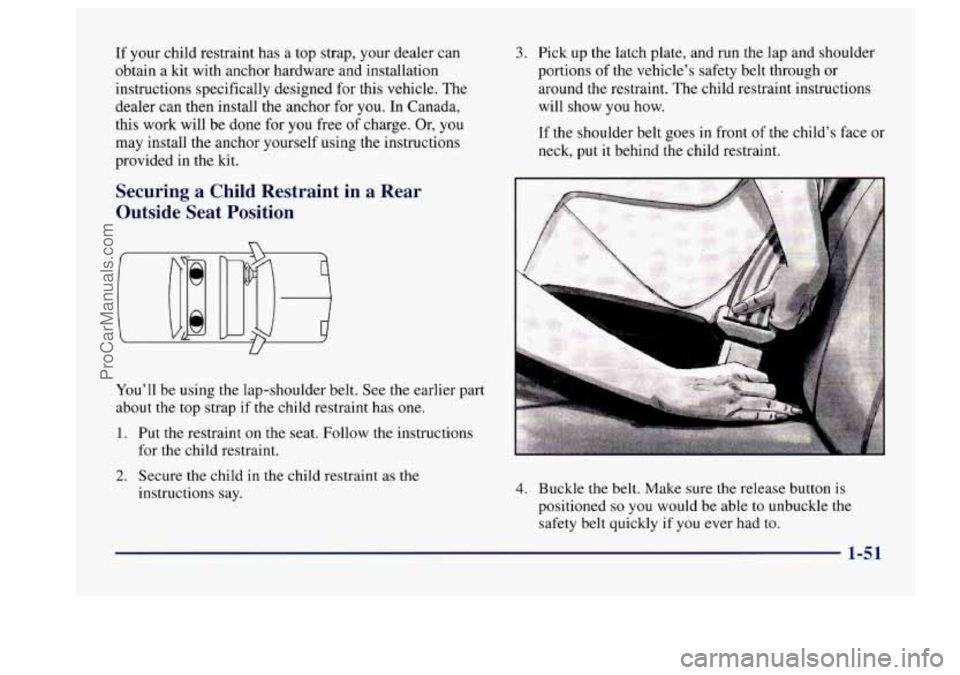
4. Buckle the belt. Make sure the release button is
positioned
so you would be able to unbuckle the
safety belt quickly if you ever had to.
1-51
ProCarManuals.com
Page 66 of 406
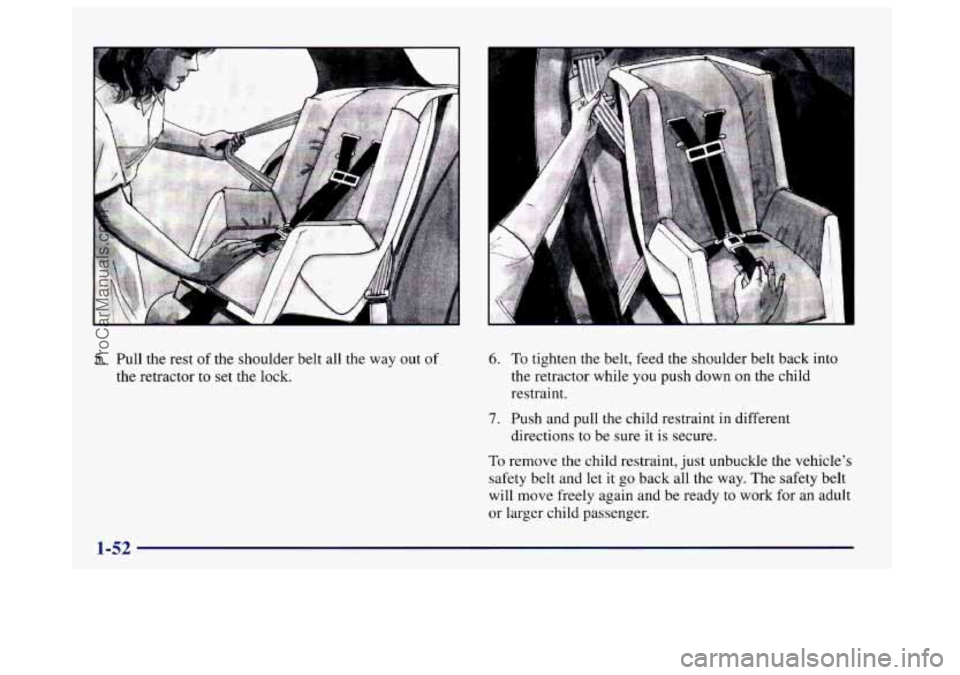
5. Pull the rest of the shoulder belt all the way out of
the retractor to set the lock.
6. To tighten the belt, feed the shoulder belt back into
the retractor while you push down on the child
restraint.
7. Push and pull the child restraint in different
To remove the child restraint, just unbuckle the vehicle’s
safety belt and let it
go back all the way. The safety belt
will move freely again and be ready to work for an adult
or larger child passenger. directions
to be sure
it is secure.
ProCarManuals.com
Page 67 of 406
Securing a Child Restraint in the Center
Rear Seat Position
U
You’ll be using the lap belt.
A child in a child restraint in the center front seat
can be badly injured by the right front passenger
air bag if it inflates. Never secure a child restraint
in the center front seat.
It’s always better to
secure a child restraint in the rear seat. You may,
however, secure a forward-facing child restraint
I
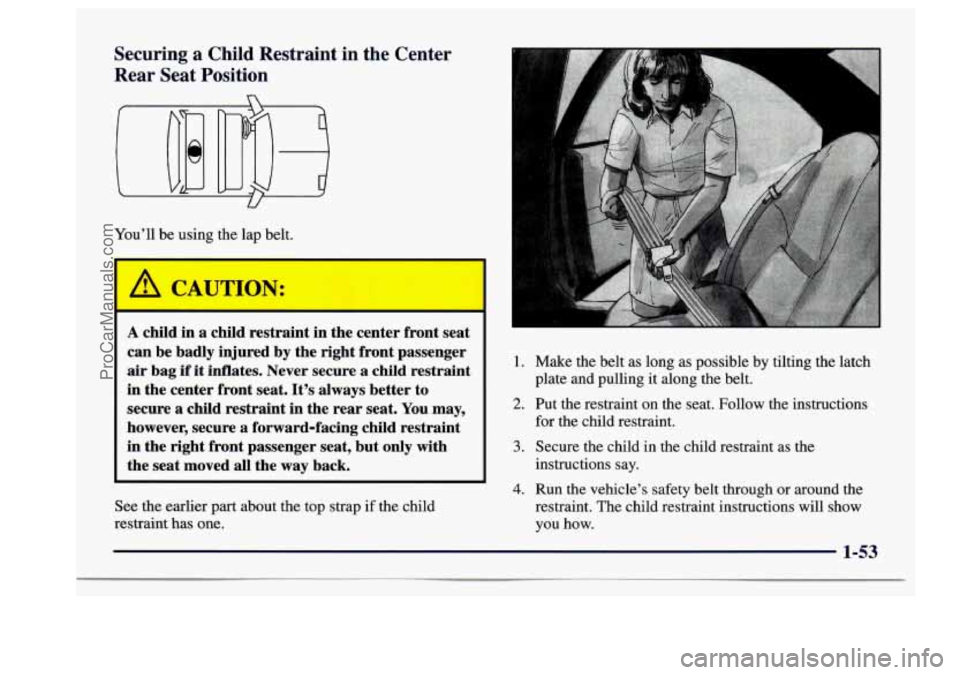
1. Make the belt as long as possible by tilting the latch
plate and pulling it along the belt.
2. Put the restraint on the seat. Follow the instructions
for the child restraint.
in the right front passenger seat, but only with
instructions say. the seat moved all the way back.
3. Secure the child in the child restraint as the
4. Run the vehicle’s safety belt through or around the
See the earlier part about the top strap if the child restraint. The child restraint instructions will show
restraint has one. you how.
1-53
ProCarManuals.com
Page 68 of 406
7. Push and pull the child restraint in different
directions to be sure it
is secure. If it isn’t, secure
the restraint in
a different place in the vehicle and
contact the child restraint maker for their advice
about how to attach the child restraint properly.
To remove the child restraint, just unbuckle the vehicle’s
safety belt.
It will be ready to work for an adult or larger
child passenger.
Securing a Child Restraint in the Right
Front Seat Position
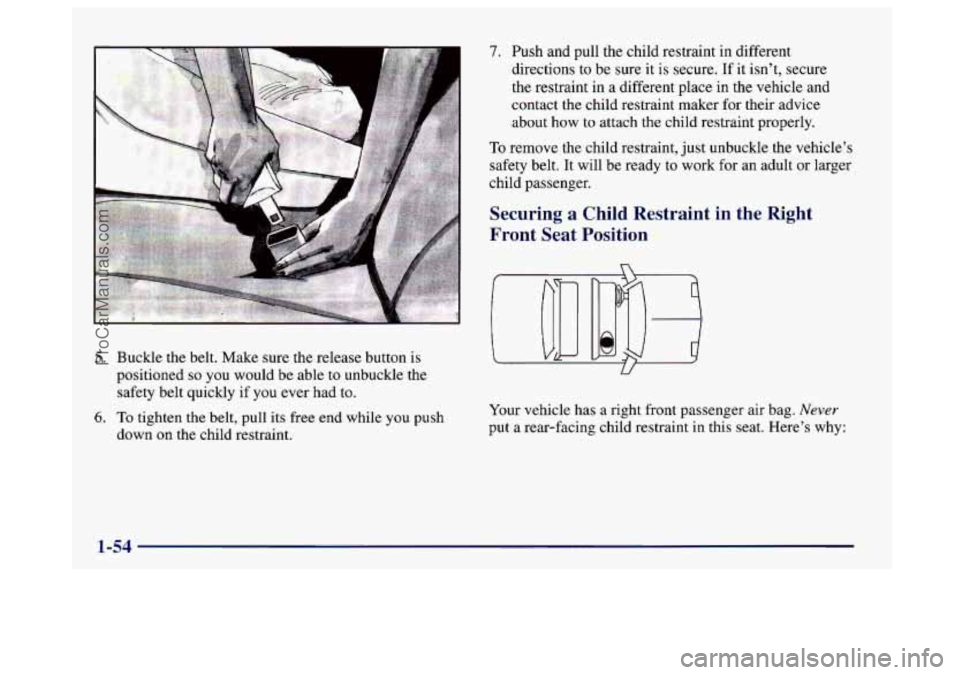
5. Buckle the belt. Make sure the release button is
positioned
so you would be able to unbuckle the
safety belt quickly if
you ever had to.
6. To tighten the belt, pull its free end while you push
down on the child restraint. Your
vehicle has a right front passenger air bag.
Never
put a rear-facing child restraint in this seat. Here’s why:
1-54
ProCarManuals.com
Page 69 of 406
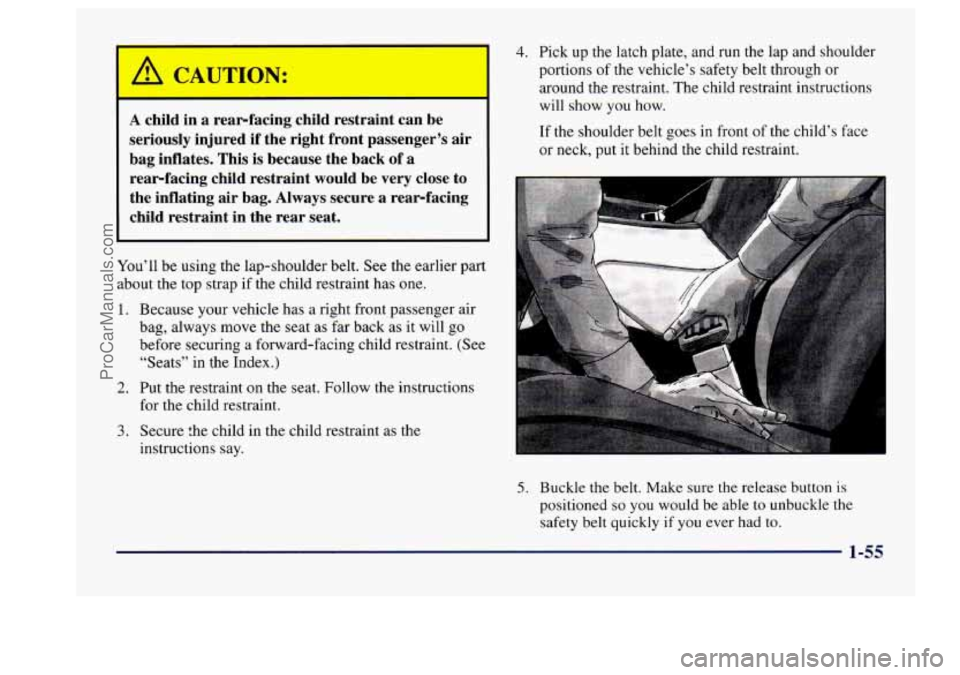
A child in a rear-facing child restraint can be
seriously injured if the right front passenger’s air
bag inflates. This
is because the back of a
rear-facing child restraint would be very close to
the inflating air bag. Always secure a rear-facing
child restraint in the rear seat.
You’ll be using the lap-shoulder belt. See the earlier part
about the top strap if the child restraint has
one.
1.
2.
3.
Because your vehicle has a right front passenger air
bag, always move the seat as far back as it will
go
before securing a forward-facing child restraint. (See
“Seats” in the Index.)
Put the restraint on the seat. Follow the instructions
for the child restraint.
Secure the child in the child restraint as the
instructions say.
4. Pick up the latch plate, and run the lap and shoulder
portions
of the vehicle’s safety belt through or
around the restraint. The child restraint instructions
will show
you how.
If the shoulder belt goes in front of the child’s face
or neck, put it behind the child restraint.
5. Buckle the belt. Make sure the release button is
positioned so you would be able to unbuckle the
safety belt quickly if you ever had to.
1-55
ProCarManuals.com
Page 70 of 406
r I
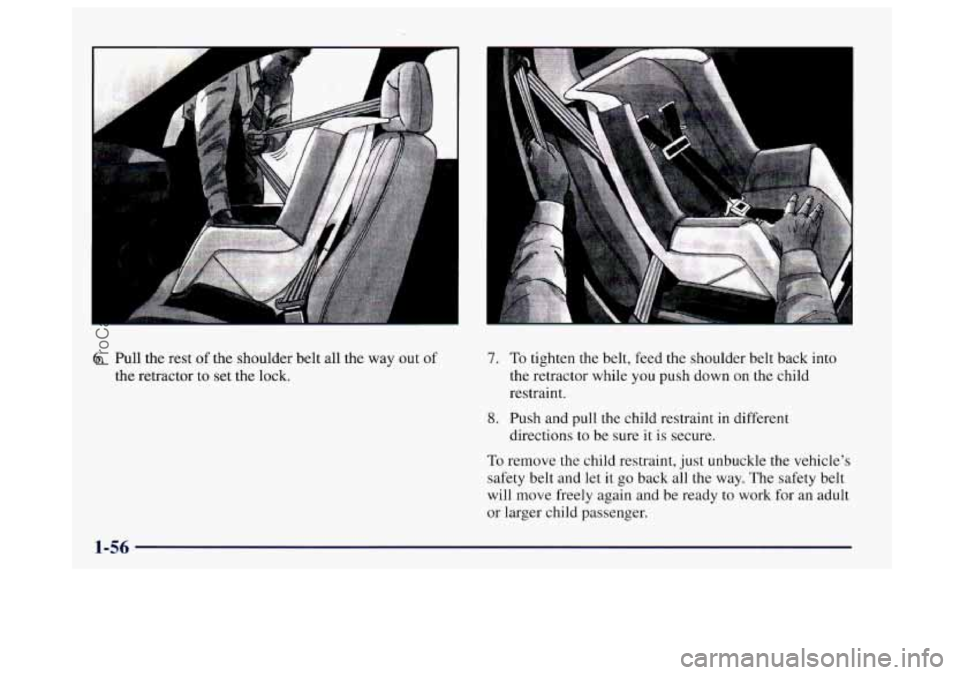
6. Pull the rest of the shoulder belt all the way out of
the retractor to set the lock.
7. To tighten the belt, feed the shoulder belt back into
the retractor while you push down on the child
restraint.
8. Push and pull the child restraint in different
directions to be sure it is secure.
To remove the child restraint, just unbuckle the vehicle's
safety belt and let
it go back all the way. The safety belt
will move freely again and be ready to work for an adult
or larger child passenger.
1-56
ProCarManuals.com
Page 82 of 406
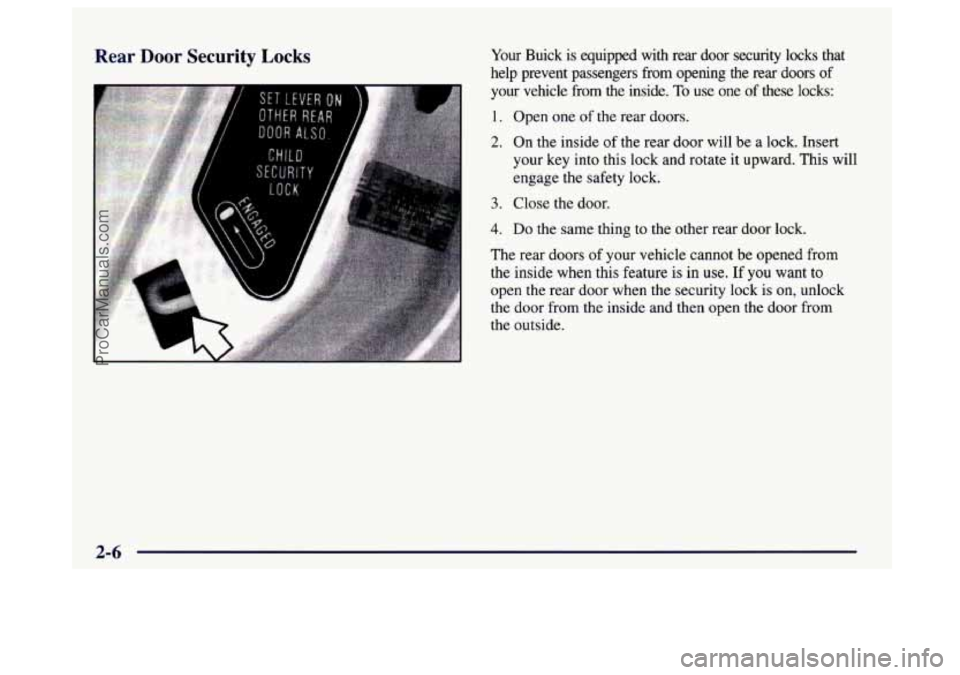
Rear Door Security Locks Your Buick is equipped with rear door security locks that
help prevent passengers
from opening the rear doors of
your vehicle from the inside. To use one of these locks:
1. Open one of the rear doors.
2. On the inside of the rear door will be a lock. Insert
your key into this lock and rotate it upward. This will
engage the safety lock.
3. Close the door.
4. Do the same thing to the other rear door lock.
The rear doors
of your vehicle cannot be opened from
the inside when this feature is in
use. If you want to
open the rear door when the security lock is on, unlock
the door from the inside and then open the door from
the outside.
2-6
ProCarManuals.com
Page 83 of 406
Automatic Power Door Locks
Programmable Automatic Power Door Locks is a
standard feature that is intended to provide enhanced
security and convenience by automatically locking and
unlocking doors. This feature provides four operating
modes. For your vehicle, you may select and program
one of the following four operating modes:
Mode 1: No automatic door lock or unlock.
Mode 2: Automatic all-door lock when the transmission
is shifted out of PARK
(P).
No automatic door unlock.
Automatic door relock when any door is unlocked,
opened and then all doors are again closed while the
vehicle is not in PARK (P) or NEUTRAL (N) and the
driver’s foot is
on the brake pedal.
Mode 3: Automatic all-door lock when the transmission
is shifted out of PARK (P).
Automatic all-door unlock when the transmission
is
shifted into PARK (P).
Automatic door relock when any door is unlocked,
opened and then all doors are again closed while the
vehicle
is not in PARK (P) or NEUTRAL (N) and the
driver’s foot is
on the brake pedal.
Mode 4: Automatic all-door lock when the transmission
is shifted out of PARK (P).
Automatic driver’s door only unlock when the
transmission is shifted into PARK (P).
Automatic door relock when any door
is unlocked,
opened and then all doors are again closed while the
vehicle is not in PARK (P)
or NEUTRAL (N) and the
driver’s foot is
on the brake pedal.
The operating mode of the Programmable Automatic
Power Door Locks will be changed when the driver
performs the following sequence with the doors closed
and the ignition key in the RUN position:
Press and hold the power door lock switch. While
holding the door lock switch, cycle
the transmission out
of and back into PARK (P). After an initial transmission
cycle, each additional cycle will advance the operating
mode by one, starting from
the current operating mode.
During this procedure, the Automatic Door Lock and
Unlock functions will operate as defined by each mode
above, providing the driver with feedback of the current
operating mode. If cycled beyond Mode
4, the vehicle
will enter operating Mode
1. When the door lock switch
is released, the vehicle will remain in the most recent
operating mode.
2-7
ProCarManuals.com
Page 87 of 406
Security Feedback
Security Feedback provides audible and/or visible
feedback that a remote keyless entry lock or unlock
command has been received and executed. Your
vehicle’s ignition must be off for this feature to work.
You may select one of four operating modes for
reception
of a lock command. You may also select one
of four operating modes for reception of an unlock
command. The selection and programming of the lock
and unlock operating modes are independent of each
other. The following modes are available for either lock
or unlock verification:
Mode
1 : No Verification
Mode
2: Horn Chirp only
Mode
3: Headlamp Flash only
Mode
4: Horn Chirp and Headlamp Flash
The operating mode
of the Security Feedback lock
function will be changed when you perform the following
sequence with your vehicle’s doors closed and the ignition
key in
RUN:
Press and hold the power’door lock switch. While
holding the door lock switch, press and release the
remote keyless entry
(RKE) transmitter lock switch.
This will initialize the customization mode. While in the customization
mode, the chime will sound the number
of chimes corresponding to the current Security
Feedback lock mode. Each additional press of the
RKE
transmitter lock switch will cause your vehicle to
advance the lock mode by one, starting from the current
Security Feedback lock mode. If cycled beyond lock
Mode
4, the vehicle will enter lock Mode 1. During this
procedure, the chime will sound the number
of chimes
corresponding
to the current lock mode, providing you
with feedback. When the door lock switch is released,
the vehicle will remain in the most recent lock mode.
The operating mode
of the Security Feedback unlock
function will
be changed when you perform the
following sequence with your vehicle’s doors closed and
the ignition key in
RUN:
Press and hold the power door unlock switch. While
holding the door unlock switch, press and release the
RKE
transmitter unlock switch. This will initialize the
customization mode. While in the customization mode, the
chime will sound the number
of chimes corresponding to
the current unlock mode. Each additional press of the
RKE transmitter unlock switch will cause your vehicle to
advance the unlock mode by one, starting from the current
unlock mode. If cycled beyond unlock Mode
4, the vehicle
will enter unlock Mode
1. During this procedure, the
chime will sound the number
of chimes corresponding to
2-11
ProCarManuals.com
Page 88 of 406
the current unlock mode, providing you with feedback.
When the door unlock switch is released, the vehicle will
remain in the most recent unlock mode.
Both the lock and unlock Security Feedback functions
will be in operating Mode
4 when the vehicle is shipped
from the factory.
Disconnecting the vehicle’s battery for up to a year will
not change the programmed mode of the lock and
unlock Security Feedback functions.
Illumination on Remote Activation
This feature provides interior illumination when a
remote keyless entry door unlock command is received
and executed by your vehicle. Your vehicle’s ignition
must be off for the Illumination on Remote Activation
feature
to work. The interior lamps will illuminate until
your vehicle’s ignition is turned to the
RUN position or
until an illumination period
of 40 seconds has elapsed. If
a door
is opened during the illumination period, the
timed illumination will be canceled, and
the interior
lamps will remain on since a door is open.
Instant Alarm
This feature allows you to activate an alarm by pressing a
switch on the remote keyless entry transmitter.
Your vehicle’s ignition must be
off for the Instant Alarm to
work. When
you press the special horn button on the remote
keyless entry transmitter, your vehicle’s headlamps will flash, the horn will
honk repeatedly, and your interior lamps
will illuminate, attracting attention if you need it. The alarm
will continue until:
1. You press the alarm button on the RKE transmitter a
second time.
2. The vehicle’s ignition is turned to the RUN position.
3. An alarm period of about two minutes has elapsed.
Matching Transmitter(s) To Your Vehicle
Each remote keyless entry transmitter is coded to
prevent another transmitter from unlocking your vehicle.
If a transmitter is lost or stolen, a replacement can be
purchased through your dealer. Remember
to bring any
remaining transmitters with you when you go
to your
dealer. When the dealer matches the replacement
transmitter to your vehicle, any remaining transmitters
must also be matched. Once your dealer has coded the
new transmitter, the lost transmitter will not unlock your
vehicle. Each vehicle can have only four transmitters
matched
to it.
2-12
ProCarManuals.com