Instrument panel BUICK ENCLAVE 2008 Owner's Guide
[x] Cancel search | Manufacturer: BUICK, Model Year: 2008, Model line: ENCLAVE, Model: BUICK ENCLAVE 2008Pages: 436
Page 153 of 436
Exterior Lamps
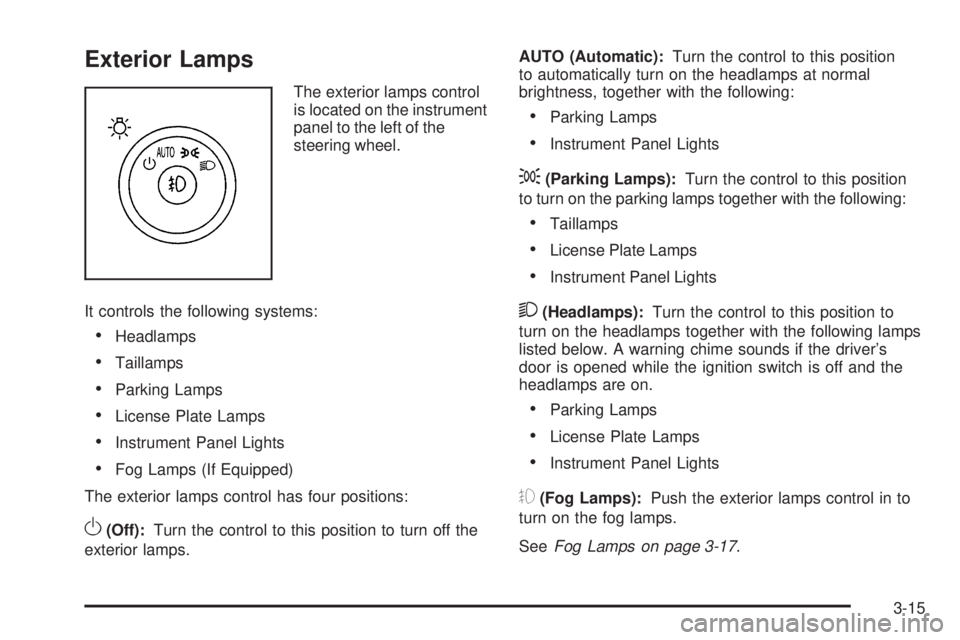
The exterior lamps control
is located on the instrument
panel to the left of the
steering wheel.
It controls the following systems:
Headlamps
Taillamps
Parking Lamps
License Plate Lamps
Instrument Panel Lights
Fog Lamps (If Equipped)
The exterior lamps control has four positions:
O(Off):Turn the control to this position to turn off the
exterior lamps.AUTO (Automatic):Turn the control to this position
to automatically turn on the headlamps at normal
brightness, together with the following:
Parking Lamps
Instrument Panel Lights
;(Parking Lamps):Turn the control to this position
to turn on the parking lamps together with the following:
Taillamps
License Plate Lamps
Instrument Panel Lights
2(Headlamps):Turn the control to this position to
turn on the headlamps together with the following lamps
listed below. A warning chime sounds if the driver’s
door is opened while the ignition switch is off and the
headlamps are on.
Parking Lamps
License Plate Lamps
Instrument Panel Lights
#(Fog Lamps):Push the exterior lamps control in to
turn on the fog lamps.
SeeFog Lamps on page 3-17.
3-15
Page 154 of 436
Wiper Activated Headlamps
This feature activates the headlamps and parking lamps
after the windshield wipers are turned on and have
completed eight wipe cycles within four minutes.
When the ignition is turned to LOCK/OFF, the
wiper-activated headlamps immediately turn off.
The wiper-activated headlamps also turn off if the
windshield wipers are turned off.
Headlamps on Reminder
If you leave the exterior lamp buttons for the headlamps
or parking lamps on, remove the key from the ignition
and open the driver’s door, you will hear a continuous
warning chime. The chime will turn off when the
lamps are turned off.
Daytime Running Lamps (DRL)
Daytime Running Lamps (DRL) can make it easier for
others to see the front of your vehicle during the day.
Fully functional daytime running lamps are required
on all vehicles rst sold in Canada.
A light sensor on top of the instrument panel monitors
the exterior light level for the operation of DRL, so
be sure it is not covered.The DRL system makes the low-beam headlamps
turn on at reduced brightness in daylight when
the following conditions are met:
The ignition is on.
The exterior lamp button for the headlamps is off.
The automatic transmission is not in P (Park).
When the DRL are on, only the low-beam headlamps
will be on. The parking lamps, taillamps, sidemarker and
other lamps will not be on.
When it is dark enough outside, the low-beam
headlamps will come on. The other lamps that turn
on with the headlamps will also turn on. When it is bright
enough outside, the regular lamps will go off, and the
low-beam headlamps change to the reduced brightness
of DRL.
To turn off all exterior lighting at night when the vehicle
is parked, turn the exterior lamp control to the off position.
The exterior lamps will turn back on automatically when
the transmission is moved out of P (Park). SeeExterior
Lamps on page 3-15for more information.
The regular headlamp system should be turned on
when needed.
3-16
Page 155 of 436
Fog Lamps
For vehicles with fog lamps, the button is located on
the exterior lamps control. The exterior lamps control is
located on the instrument panel to the left of the steering
column.
#(Fog Lamps):Press the exterior lamps button
to turn the fog lamps on or off. A light comes on in the
instrument panel cluster to show that the fog lamps
are on. SeeInstrument Panel Cluster on page 3-33.
The ignition must be in the ON/RUN position and
the parking lamps must be on for the fog lamps to
illuminate.
The fog lamps will go off while you change to high-beam
headlamps.
Some localities have laws that require the headlamps to
be on along with the fog lamps.
Cornering Lamps
For vehicles with this feature, the cornering lamps come
on when: the headlamps or parking lamps are on, the
vehicle is not in P (Park), and you signal a turn with
the turn signal/multifunction lever. They provide
more light for cornering.
Exterior Lighting Battery Saver
If the exterior lamp button has been left on, the exterior
lamps will turn off about 10 minutes after the ignition is
turned to LOCK/OFF and a door has been opened. This
protects against draining the battery if the headlamps or
parking lamps are accidentally left on. If you need to
leave the lamps on for more than 10 minutes, use the
exterior lamp control to turn the lamps back on after the
ignition is turned to LOCK/OFF and any door is opened.
Instrument Panel Brightness
D(Instrument Panel Brightness):This feature
controls the brightness of the instrument panel lights.
The knob for this control is located next to the exterior
lamps control.
Push the knob in and release when it pops out.
Turn the knob clockwise to increase the brightness
of the instrument panel lights and counter clockwise to
decrease the brightness. Turning the knob completely
clockwise to the detent will turn on the courtesy lamps.
3-17
Page 156 of 436
Courtesy Lamps
When any door is opened, several lamps turn on
making it easier for you to enter and exit the vehicle.
Turn the instrument panel brightness control completely
clockwise to manually turn on these lamps.
Entry Lighting
If it is dark enough outside when you press the unlock
button on the remote keyless entry transmitter, the
interior courtesy lamps will turn on and stay on for about
40 seconds. The lamps can be turned off immediately by
pressing the lock button on the remote keyless entry
transmitter, turning the ignition key to ON/RUN or
activating the power door locks.
Delayed Entry Lighting
The interior lamps will turn on if you open the door when
it is dark enough outside. When you close the door with
the ignition off, the interior lamps will stay on for up to
25 seconds or until the ignition is turned to an on position.
When the lamps turn off as a result of the 25 second timer
or the ignition switch being turned on, the lighting will
deactivate by way of the theater dimming effect. Locking
the doors will override the delayed entry lighting feature
and the lamps will turn off right away.
Theater Dimming
This feature allows for a three to ve second fade out of
the courtesy lamps instead of immediate turn off.
Delayed Exit Lighting
If it is dark enough outside when you remove the key
from the ignition, the interior lamps will turn on and stay
on for about 25 seconds. This will give you time to nd
the door pull handle or lock switches. Once the key is
inserted into the ignition, the exit lighting will be cancelled
and the lighting will fade out.
Perimeter Lighting
If it is dark enough outside when the unlock button on
the remote keyless entry transmitter is pressed, the
DRL, parking lamps and back-up lamps will come on.
This feature can be programmed on for various amounts
of time in seconds for each transmitter.
SeeDIC Vehicle Customization on page 3-66for
information on programming.
Front Reading Lamps
The front reading lamps are located on the headliner.
Press the button near each lamp to turn them on or off.
3-18
Page 160 of 436
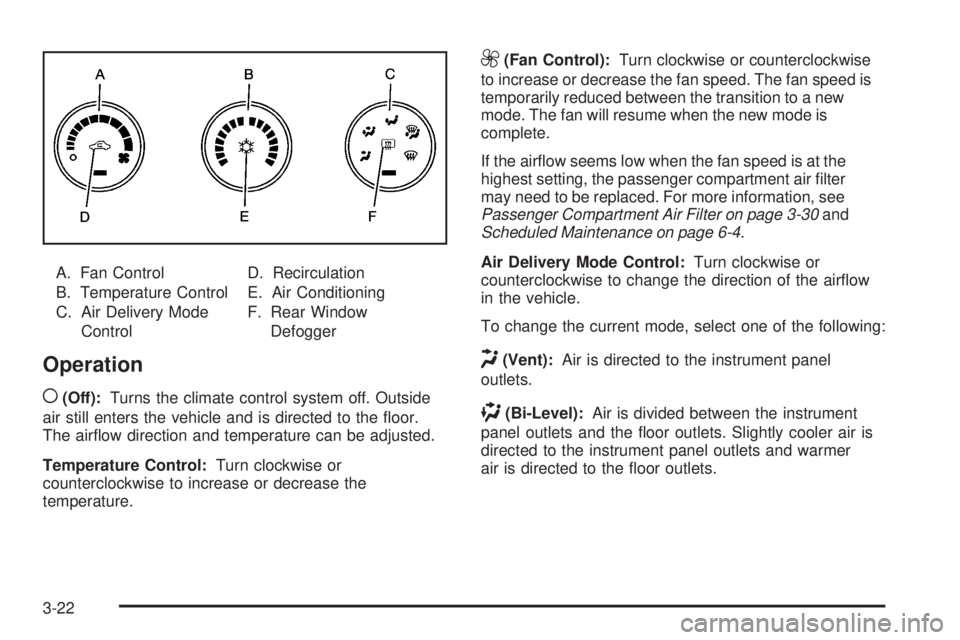
A. Fan Control
B. Temperature Control
C. Air Delivery Mode
ControlD. Recirculation
E. Air Conditioning
F. Rear Window
Defogger
Operation
(
(Off):Turns the climate control system off. Outside
air still enters the vehicle and is directed to the oor.
The airow direction and temperature can be adjusted.
Temperature Control:Turn clockwise or
counterclockwise to increase or decrease the
temperature.
9(Fan Control):Turn clockwise or counterclockwise
to increase or decrease the fan speed. The fan speed is
temporarily reduced between the transition to a new
mode. The fan will resume when the new mode is
complete.
If the airow seems low when the fan speed is at the
highest setting, the passenger compartment air lter
may need to be replaced. For more information, see
Passenger Compartment Air Filter on page 3-30and
Scheduled Maintenance on page 6-4.
Air Delivery Mode Control:Turn clockwise or
counterclockwise to change the direction of the airow
in the vehicle.
To change the current mode, select one of the following:
H(Vent):Air is directed to the instrument panel
outlets.
)(Bi-Level):Air is divided between the instrument
panel outlets and the oor outlets. Slightly cooler air is
directed to the instrument panel outlets and warmer
air is directed to the oor outlets.
3-22
Page 163 of 436
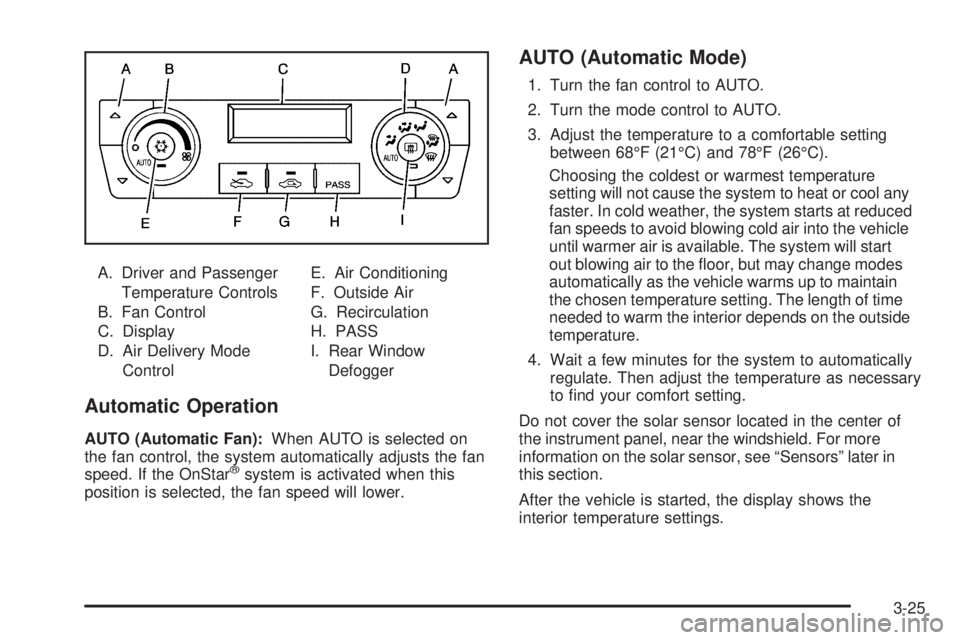
A. Driver and Passenger
Temperature Controls
B. Fan Control
C. Display
D. Air Delivery Mode
ControlE. Air Conditioning
F. Outside Air
G. Recirculation
H. PASS
I. Rear Window
Defogger
Automatic Operation
AUTO (Automatic Fan):When AUTO is selected on
the fan control, the system automatically adjusts the fan
speed. If the OnStar
®system is activated when this
position is selected, the fan speed will lower.
AUTO (Automatic Mode)
1. Turn the fan control to AUTO.
2. Turn the mode control to AUTO.
3. Adjust the temperature to a comfortable setting
between 68°F (21°C) and 78°F (26°C).
Choosing the coldest or warmest temperature
setting will not cause the system to heat or cool any
faster. In cold weather, the system starts at reduced
fan speeds to avoid blowing cold air into the vehicle
until warmer air is available. The system will start
out blowing air to the oor, but may change modes
automatically as the vehicle warms up to maintain
the chosen temperature setting. The length of time
needed to warm the interior depends on the outside
temperature.
4. Wait a few minutes for the system to automatically
regulate. Then adjust the temperature as necessary
to nd your comfort setting.
Do not cover the solar sensor located in the center of
the instrument panel, near the windshield. For more
information on the solar sensor, see “Sensors” later in
this section.
After the vehicle is started, the display shows the
interior temperature settings.
3-25
Page 165 of 436

Air Delivery Mode Control:Turn clockwise or
counterclockwise to change the direction of the airow
in the vehicle.
To change the current mode, select one of the following:
F(Vent):Air is directed to the instrument panel
outlets.
*(Bi-Level):Air is divided between the instrument
panel outlets and the oor outlets. In automatic operation,
cooler air is directed to the upper outlets and warmer air
to the oor outlets.
7(Floor):Air is directed to the oor outlets, with some
air directed to the windshield and side window outlets.
If recirculation is selected while in this mode, it stays on
for three minutes to reduce windshield fogging.
W(Floor/Defog):This mode clears the windows of
fog or moisture. Air is directed to the oor outlets, with
some air directed to the windshield and side window
outlets. The system turns off recirculation and runs
the air-conditioning compressor unless the outside
temperature is at or below freezing. The recirculation
mode cannot be selected while in the oor/defog mode.
0(Defrost):This mode removes fog or frost from the
windshield more quickly. Air is directed to the windshield
and the side window outlets. The system automatically
turns off recirculation and runs the air-conditioning
compressor, unless the outside temperature is at or
below freezing. Recirculation cannot be selected while
in the defrost mode.
#(Air Conditioning):Press to turn the air conditioning
system on or off and override the automatic system.
An indicator light below the button comes on to
show that this mode is on.
The air conditioning system removes moisture from the
air, so a small amount of water might drip under the
vehicle while idling or after turning off the engine.
This is normal.
:(Outside Air):Press to let outside air enter the
vehicle. An indicator light comes on to show this mode
is on. Pressing
?cancels this mode.
3-27
Page 166 of 436

?(Recirculation):Press to turn the recirculation
mode on. An indicator light below the button comes on to
show that this mode is on. This mode recirculates and
helps to quickly cool the air inside the vehicle. It can be
used to prevent outside air and odors from entering the
vehicle. This mode cannot be selected while in the defog
or defrost modes. If you try to select the recirculation
mode, the indicator light ashes three times and turns off.
Operation in this mode during periods of high humidity
and cool outside temperatures may result in increased
window fogging. If window fogging is experienced, select
the defrost mode.
PASS (Passenger Climate Control):Press to turn the
passenger climate control systems on or off.
When the passenger climate control system is on, the
passenger temperature setting is displayed.
If the PASS button is pressed to turn the passenger
temperature setting off, the driver temperature setting
controls the temperature for the entire vehicle.Sensors
The solar sensor, located in the defrost grille, in the
middle of the instrument panel, monitors the solar
radiation. Do not cover the solar sensor or the system
will not work properly.
3-28
Page 171 of 436
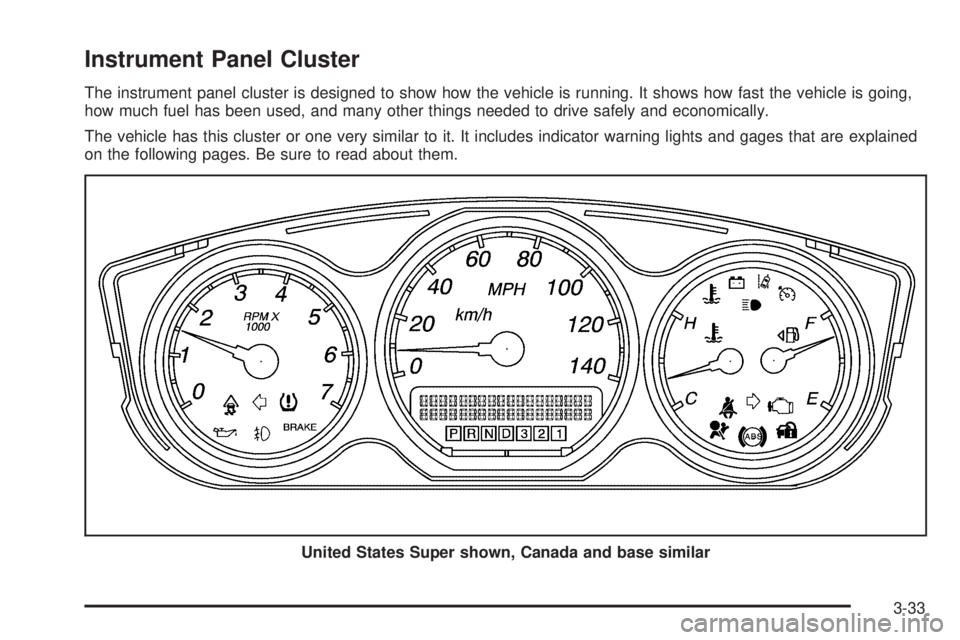
Instrument Panel Cluster
The instrument panel cluster is designed to show how the vehicle is running. It shows how fast the vehicle is going,
how much fuel has been used, and many other things needed to drive safely and economically.
The vehicle has this cluster or one very similar to it. It includes indicator warning lights and gages that are explained
on the following pages. Be sure to read about them.
United States Super shown, Canada and base similar
3-33
Page 173 of 436

Safety Belt Reminders
Driver Safety Belt Reminder Light
When the engine is started, a chime sounds for
several seconds to remind the driver to fasten the safety
belt, unless the driver safety belt is already buckled.
The driver safety belt light
comes on and stays on
for several seconds, then
ashes for several more.
This chime and light are repeated if the driver remains
unbuckled and the vehicle is in motion. If the driver’s
safety belt is already buckled, neither the chime nor
the light comes on.
Passenger Safety Belt Reminder Light
Several seconds after the engine is started,
a chime sounds for several seconds to remind the
front passenger to buckle their safety belt. This only
occurs if the passenger airbag is enabled. See
Passenger Sensing System on page 1-67for more
information. The passenger safety belt light, located
on the instrument panel, comes on and stays on for
several seconds and then ashes for several more.
This chime and light are
repeated if the passenger
remains unbuckled and
the vehicle is in motion.
If the passenger safety belt is buckled, neither the
chime nor the light comes on.
3-35