door lock BUICK ENCLAVE 2008 Owner's Guide
[x] Cancel search | Manufacturer: BUICK, Model Year: 2008, Model line: ENCLAVE, Model: BUICK ENCLAVE 2008Pages: 436
Page 156 of 436
Courtesy Lamps
When any door is opened, several lamps turn on
making it easier for you to enter and exit the vehicle.
Turn the instrument panel brightness control completely
clockwise to manually turn on these lamps.
Entry Lighting
If it is dark enough outside when you press the unlock
button on the remote keyless entry transmitter, the
interior courtesy lamps will turn on and stay on for about
40 seconds. The lamps can be turned off immediately by
pressing the lock button on the remote keyless entry
transmitter, turning the ignition key to ON/RUN or
activating the power door locks.
Delayed Entry Lighting
The interior lamps will turn on if you open the door when
it is dark enough outside. When you close the door with
the ignition off, the interior lamps will stay on for up to
25 seconds or until the ignition is turned to an on position.
When the lamps turn off as a result of the 25 second timer
or the ignition switch being turned on, the lighting will
deactivate by way of the theater dimming effect. Locking
the doors will override the delayed entry lighting feature
and the lamps will turn off right away.
Theater Dimming
This feature allows for a three to ve second fade out of
the courtesy lamps instead of immediate turn off.
Delayed Exit Lighting
If it is dark enough outside when you remove the key
from the ignition, the interior lamps will turn on and stay
on for about 25 seconds. This will give you time to nd
the door pull handle or lock switches. Once the key is
inserted into the ignition, the exit lighting will be cancelled
and the lighting will fade out.
Perimeter Lighting
If it is dark enough outside when the unlock button on
the remote keyless entry transmitter is pressed, the
DRL, parking lamps and back-up lamps will come on.
This feature can be programmed on for various amounts
of time in seconds for each transmitter.
SeeDIC Vehicle Customization on page 3-66for
information on programming.
Front Reading Lamps
The front reading lamps are located on the headliner.
Press the button near each lamp to turn them on or off.
3-18
Page 199 of 436
REMOTE KEY LEARNING ACTIVE
This message displays while you are matching a
Remote Keyless Entry (RKE) transmitter to your vehicle.
See “Matching Transmitter(s) to Your Vehicle” under
Remote Keyless Entry (RKE) System Operation on
page 2-5andDIC Operation and Displays on page 3-49
for more information.
REPLACE BATTERY IN REMOTE KEY
This message displays when the battery in the Remote
Keyless Entry (RKE) transmitter needs to be replaced.
To replace the battery, see “Battery Replacement” under
Remote Keyless Entry (RKE) System Operation on
page 2-5.
RIGHT REAR DOOR OPEN
This message displays when the passenger side rear
door is not closed properly. Make sure that the door
is closed completely.
SERVICE A/C (Air Conditioning)
SYSTEM
This message displays when the electronic sensors that
control the air conditioning and heating systems are
no longer working. Have the climate control system
serviced by your dealer/retailer if you notice a drop
in heating and air conditioning efficiency.
SERVICE AIR BAG
This message displays when there is a problem with
the airbag system. Have your vehicle serviced by your
dealer/retailer immediately. SeeAirbag Readiness Light
on page 3-36for more information.
SERVICE BATTERY CHARGING
SYSTEM
This message displays when there is a problem with the
generator and battery charging systems. Driving with this
problem could drain the battery. Turn off all unnecessary
accessories. Stop and turn off the vehicle as soon as it is
safe to do so. Have the electrical system checked by your
dealer/retailer immediately.
SERVICE BRAKE ASSIST
This message displays if there is a problem with the
brake system. The brake system warning light and
the antilock brake system warning light may also be
displayed on the instrument panel cluster. SeeBrake
System Warning Light on page 3-38andAntilock Brake
System (ABS) Warning Light on page 3-39for more
information. If this happens, stop as soon as possible and
turn off the vehicle. Restart the vehicle and check for the
message on the DIC display. If the message is displayed
or appears again when you begin driving, the brake
system needs service. See your dealer/retailer as
soon as possible. SeeBrakes on page 5-40for more
information.
3-61
Page 205 of 436
Feature Settings Menu Items
The following are customization features that allow you
to program settings to the vehicle:
DISPLAY IN ENGLISH
This feature will only display if a language other than
English has been set. This feature allows you to change
the language in which the DIC messages appear to
English.
Press the customization button until the PRESS
VTO
DISPLAY IN ENGLISH screen appears on the DIC
display. Press the set/reset button once to display all
DIC messages in English.
DISPLAY LANGUAGE
This feature allows you to select the language in which
the DIC messages will appear.
Press the customization button until the DISPLAY
LANGUAGE screen appears on the DIC display.
Press the set/reset button once to access the settings
for this feature. Then press the customization button
to scroll through the following settings:
ENGLISH (default):All messages will appear in
English.
FRANCAIS:All messages will appear in French.ESPANOL:All messages will appear in Spanish.
NO CHANGE:No change will be made to this feature.
The current setting will remain.
To select a setting, press the set/reset button while the
desired setting is displayed on the DIC.
AUTO DOOR LOCK
This feature allows you to select when the vehicle’s
doors will automatically lock. SeeProgrammable
Automatic Door Locks on page 2-11for more
information.
Press the customization button until AUTO DOOR
LOCK appears on the DIC display. Press the set/reset
button once to access the settings for this feature.
Then press the customization button to scroll through
the following settings:
SHIFT OUT OF PARK (default):The doors
automatically lock when the doors are closed and
the vehicle is shifted out of P (Park).
AT VEHICLE SPEED:The doors automatically lock
when the vehicle speed is above 5 mph (8 km/h)
for three seconds.
NO CHANGE:No change will be made to this feature.
The current setting will remain.
To select a setting, press the set/reset button while the
desired setting is displayed on the DIC.
3-67
Page 206 of 436
AUTO DOOR UNLOCK
This feature allows you to select whether or not to
turn off the automatic door unlocking feature. It also
allows you to select which doors and when the doors
will automatically unlock. SeeProgrammable Automatic
Door Locks on page 2-11for more information.
Press the customization button until AUTO DOOR
UNLOCK appears on the DIC display. Press the
set/reset button once to access the settings for this
feature. Then press the customization button to scroll
through the following settings:
OFF:None of the doors will automatically unlock.
DRIVER AT KEY OUT:Only the driver’s door will
unlock when the key is taken out of the ignition.
DRIVER IN PARK:Only the driver’s door will unlock
when the vehicle is shifted into P (Park).
ALL AT KEY OUT:All of the doors will unlock when
the key is taken out of the ignition.
ALL IN PARK (default):All of the doors will unlock
when the vehicle is shifted into P (Park).
NO CHANGE:No change will be made to this feature.
The current setting will remain.
To select a setting, press the set/reset button while the
desired setting is displayed on the DIC.
REMOTE DOOR LOCK
This feature allows you to select the type of feedback
you will receive when locking the vehicle with the
Remote Keyless Entry (RKE) transmitter. You will not
receive feedback when locking the vehicle with the RKE
transmitter if the doors are open. SeeRemote Keyless
Entry (RKE) System Operation on page 2-5for more
information.
Press the customization button until REMOTE DOOR
LOCK appears on the DIC display. Press the set/reset
button once to access the settings for this feature.
Then press the customization button to scroll through
the following settings:
HORN & LIGHTS OFF:There will be no feedback
when you press the lock button on the RKE transmitter.
LIGHTS ONLY:The exterior lamps will ash when
you press the lock button on the RKE transmitter.
HORN ONLY:The horn will sound on the second press
of the lock button on the RKE transmitter.
HORN & LIGHTS ON (default):The exterior lamps
will ash when you press the lock button on the RKE
transmitter, and the horn will sound when the lock button
is pressed again within ve seconds of the previous
command.
3-68
Page 207 of 436
NO CHANGE:No change will be made to this feature.
The current setting will remain.
To select a setting, press the set/reset button while the
desired setting is displayed on the DIC.
REMOTE DOOR UNLOCK
This feature allows you to select the type of feedback
you will receive when unlocking the vehicle with the
Remote Keyless Entry (RKE) transmitter. You will not
receive feedback when unlocking the vehicle with the
RKE transmitter if the doors are open. SeeRemote
Keyless Entry (RKE) System Operation on page 2-5
for more information.
Press the customization button until REMOTE DOOR
UNLOCK appears on the DIC display. Press the
set/reset button once to access the settings for this
feature. Then press the customization button to scroll
through the following settings:
LIGHTS OFF:The exterior lamps will not ash when
you press the unlock button on the RKE transmitter.
LIGHTS ON (default):The exterior lamps will
ash when you press the unlock button on the
RKE transmitter.
NO CHANGE:No change will be made to this feature.
The current setting will remain.
To select a setting, press the set/reset button while the
desired setting is displayed on the DIC.
DELAY DOOR LOCK
This feature allows you to select whether or not the
locking of the vehicle’s doors will be delayed. When
locking the doors with the power door lock switch and a
door is open, this feature will delay locking the doors until
ve seconds after the last door is closed. You will hear
three chimes to signal that the delayed locking feature is
in use. The key must be out of the ignition for this feature
to work. You can temporarily override delayed locking by
pressing the power door lock switch twice or the lock
button on the RKE transmitter twice. SeeDelayed
Locking on page 2-11for more information.
Press the customization button until DELAY DOOR
LOCK appears on the DIC display. Press the set/reset
button once to access the settings for this feature.
Then press the customization button to scroll through
the following settings:
OFF:There will be no delayed locking of the vehicle’s
doors.
ON (default):The doors will not lock until ve seconds
after the last door is closed.
NO CHANGE:No change will be made to this feature.
The current setting will remain.
To select a setting, press the set/reset button while the
desired setting is displayed on the DIC.
3-69
Page 263 of 436
Tire and Loading Information Label
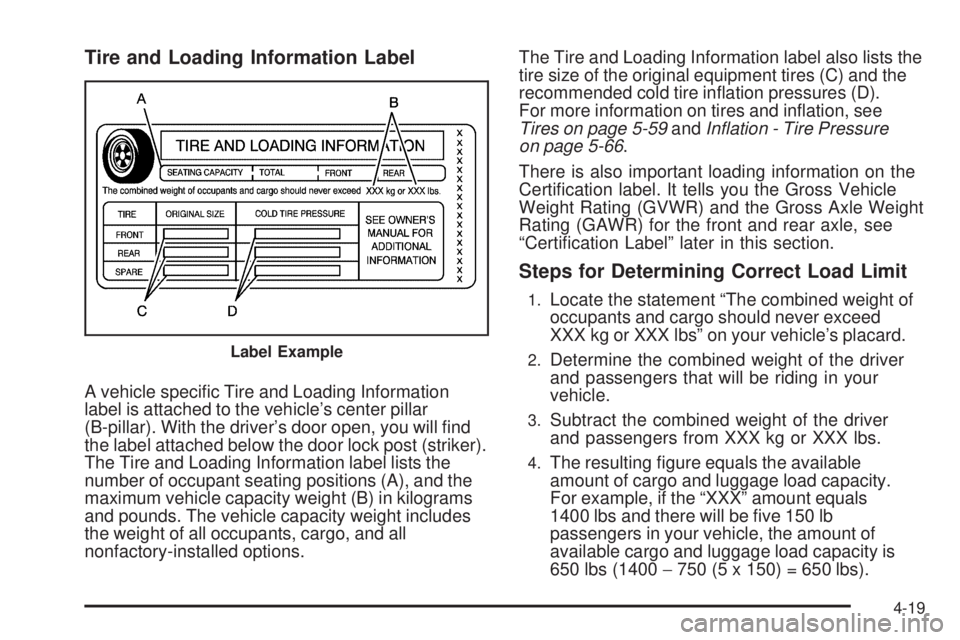
A vehicle specic Tire and Loading Information
label is attached to the vehicle’s center pillar
(B-pillar). With the driver’s door open, you will nd
the label attached below the door lock post (striker).
The Tire and Loading Information label lists the
number of occupant seating positions (A), and the
maximum vehicle capacity weight (B) in kilograms
and pounds. The vehicle capacity weight includes
the weight of all occupants, cargo, and all
nonfactory-installed options.The Tire and Loading Information label also lists the
tire size of the original equipment tires (C) and the
recommended cold tire ination pressures (D).
For more information on tires and ination, see
Tires on page 5-59andInflation - Tire Pressure
on page 5-66.
There is also important loading information on the
Certication label. It tells you the Gross Vehicle
Weight Rating (GVWR) and the Gross Axle Weight
Rating (GAWR) for the front and rear axle, see
“Certication Label” later in this section.
Steps for Determining Correct Load Limit
1.Locate the statement “The combined weight of
occupants and cargo should never exceed
XXX kg or XXX lbs” on your vehicle’s placard.
2.Determine the combined weight of the driver
and passengers that will be riding in your
vehicle.
3.Subtract the combined weight of the driver
and passengers from XXX kg or XXX lbs.
4.The resulting gure equals the available
amount of cargo and luggage load capacity.
For example, if the “XXX” amount equals
1400 lbs and there will be ve 150 lb
passengers in your vehicle, the amount of
available cargo and luggage load capacity is
650 lbs (1400−750 (5 x 150) = 650 lbs).
Label Example
4-19
Page 286 of 436
Filling the Tank
{CAUTION:
Fuel vapor burns violently and a fuel re can
cause bad injuries. To help avoid injuries to you
and others, read and follow all the instructions on
the pump island. Turn off the engine when you are
refueling. Do not smoke if you are near fuel or
refueling the vehicle. Do not use cellular phones.
Keep sparks, ames, and smoking materials away
from fuel. Do not leave the fuel pump unattended
when refueling the vehicle. This is against the law
in some places. Do not re-enter the vehicle while
pumping fuel. Keep children away from the fuel
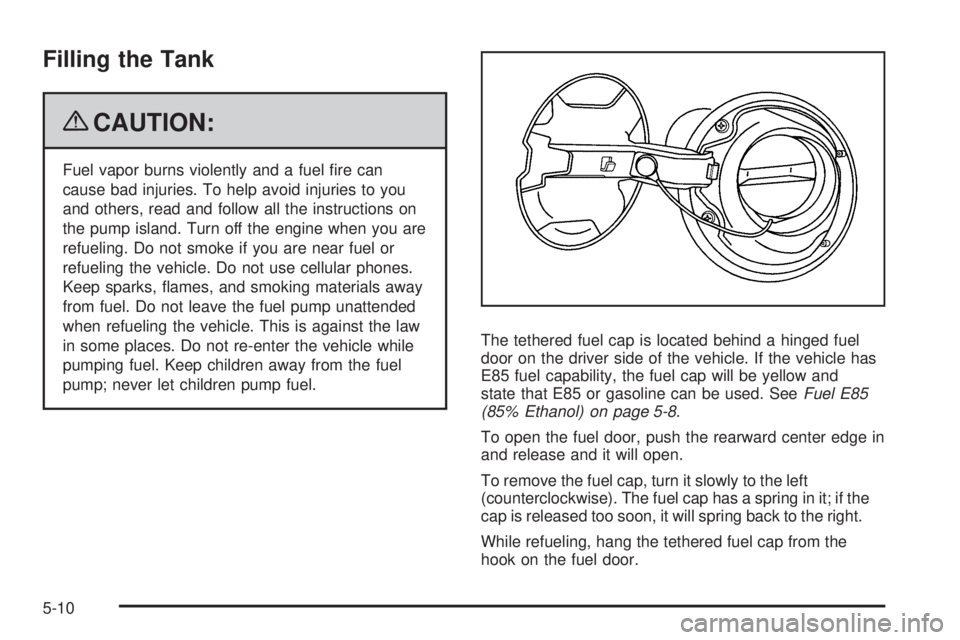
pump; never let children pump fuel.The tethered fuel cap is located behind a hinged fuel
door on the driver side of the vehicle. If the vehicle has
E85 fuel capability, the fuel cap will be yellow and
state that E85 or gasoline can be used. SeeFuel E85
(85% Ethanol) on page 5-8.
To open the fuel door, push the rearward center edge in
and release and it will open.
To remove the fuel cap, turn it slowly to the left
(counterclockwise). The fuel cap has a spring in it; if the
cap is released too soon, it will spring back to the right.
While refueling, hang the tethered fuel cap from the
hook on the fuel door.
5-10
Page 383 of 436

Fuses Usage
5Engine Control Module
(ECM)/Transmission Control
Module (TCM)
6 Memory Module
7 Not Used
8 Steering Wheel Illumination
9 Front Heated/Cooled Seat Module
10Run 2 - Heated/Cooled Seats,
Heated Washer Fluid
11 Not Used
12 RPA Module
13 PASS-Key
®III System
14 Unlock/Lock Module
15 Magnetic Ride Control
16 Daytime Running Lamps (DRL)
17 Sunroof
18 Body Control Module (BCM) Dim
19 Body Control Module (BCM)
20 Run 1-Heated Steering Wheel
Fuses Usage
21 Ignition Switch
22 Driver Door Module
23 Not Used
24 Electronic Leveling Control Module
25Body Control Module
(Left Turn Signal)
26Cigarette Lighter, Auxiliary Power
Outlet
27 Not Used
28 Retained Accessory Power 1 (RAP)
29 Passenger Door Module
30 Sensing and Diagnostic Module
31 Accessory Power Outlets
32Body Control Module (BCM)
(Inadvertent)
33 Retained Accessory Power 2 (RAP)
34 CanisterVent Solenoid
35 Body Control Module (Courtesy)
36Body Control Module
(Right Turn Signal)
5-107
Page 394 of 436
(e)Make sure the safety belt reminder light and safety
belt assemblies are working properly. Look for any other
loose or damaged safety belt system parts. If you see
anything that might keep a safety belt system from doing
its job, have it repaired. Have any torn or frayed safety
belts replaced. Also see Checking the Restraint Systems
on page 1-74.
(f)Lubricate all key lock cylinders. Lubricate all
hinges and latches, including those for the hood, rear
compartment, glove box door, and console door. More
frequent lubrication may be required when exposed to
a corrosive environment. Applying silicone grease on
weatherstrips with a clean cloth will make them last
longer, seal better, and not stick or squeak.
(g)If driving regularly under dusty conditions, the filter
may require replacement more often.
(h)Change automatic transmission fluid and filter if the
vehicle is mainly driven under one or more of these
conditions:
In heavy city traffic where the outside temperature
regularly reaches 90°F (32°C) or higher.
In hilly or mountainous terrain.
When doing frequent trailer towing.
Uses such as found in taxi, police, or delivery
service.(j)Drain, flush, and refill cooling system. This service
can be complex; you should have your dealer/retailer
perform this service. See Engine Coolant (4.6L Engine)
on page 5-28 or Engine Coolant (3.9L Engine) on
page 5-32 for what to use. Inspect hoses. Clean
radiator, condenser, pressure cap, and filler neck.
Pressure test the cooling system and pressure cap.
(k)A fluid loss in any vehicle system could indicate a
problem. Have the system inspected and repaired
and the fluid level checked. Add fluid if needed.
(l)Visually inspect belt for fraying, excessive cracks, or
obvious damage. Replace belt if necessary.
(m)If driving regularly under dusty conditions, inspect
the filter at each engine oil change.
Owner Checks and Services
These owner checks and services should be performed
at the intervals specied to help ensure vehicle safety,
dependability, and emission control performance. Your
dealer/retailer can assist with these checks and services.
Be sure any necessary repairs are completed at once.
Whenever any uids or lubricants are added to the
vehicle, make sure they are the proper ones, as shown
inRecommended Fluids and Lubricants on page 6-12.
6-8
Page 398 of 436
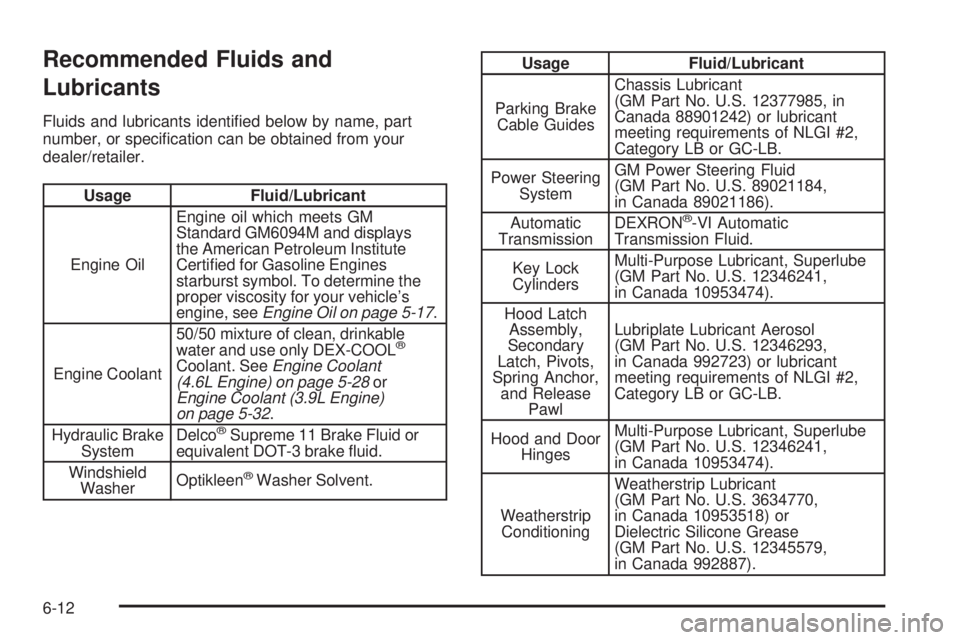
Recommended Fluids and
Lubricants
Fluids and lubricants identied below by name, part
number, or specication can be obtained from your
dealer/retailer.
Usage Fluid/Lubricant
Engine OilEngine oil which meets GM
Standard GM6094M and displays
the American Petroleum Institute
Certied for Gasoline Engines
starburst symbol. To determine the
proper viscosity for your vehicle’s
engine, seeEngine Oil on page 5-17.
Engine Coolant50/50 mixture of clean, drinkable
water and use only DEX-COOL
®
Coolant. SeeEngine Coolant
(4.6L Engine) on page 5-28or
Engine Coolant (3.9L Engine)
on page 5-32.
Hydraulic Brake
SystemDelco
®Supreme 11 Brake Fluid or
equivalent DOT-3 brake uid.
Windshield
WasherOptikleen
®Washer Solvent.
Usage Fluid/Lubricant
Parking Brake
Cable GuidesChassis Lubricant
(GM Part No. U.S. 12377985, in
Canada 88901242) or lubricant
meeting requirements of NLGI #2,
Category LB or GC-LB.
Power Steering
SystemGM Power Steering Fluid
(GM Part No. U.S. 89021184,
in Canada 89021186).
Automatic
TransmissionDEXRON
®-VI Automatic
Transmission Fluid.
Key Lock
CylindersMulti-Purpose Lubricant, Superlube
(GM Part No. U.S. 12346241,
in Canada 10953474).
Hood Latch
Assembly,
Secondary
Latch, Pivots,
Spring Anchor,
and Release
PawlLubriplate Lubricant Aerosol
(GM Part No. U.S. 12346293,
in Canada 992723) or lubricant
meeting requirements of NLGI #2,
Category LB or GC-LB.
Hood and Door
HingesMulti-Purpose Lubricant, Superlube
(GM Part No. U.S. 12346241,
in Canada 10953474).
Weatherstrip
ConditioningWeatherstrip Lubricant
(GM Part No. U.S. 3634770,
in Canada 10953518) or
Dielectric Silicone Grease
(GM Part No. U.S. 12345579,
in Canada 992887).
6-12