engine BUICK ENCLAVE 2009 User Guide
[x] Cancel search | Manufacturer: BUICK, Model Year: 2009, Model line: ENCLAVE, Model: BUICK ENCLAVE 2009Pages: 412
Page 85 of 412
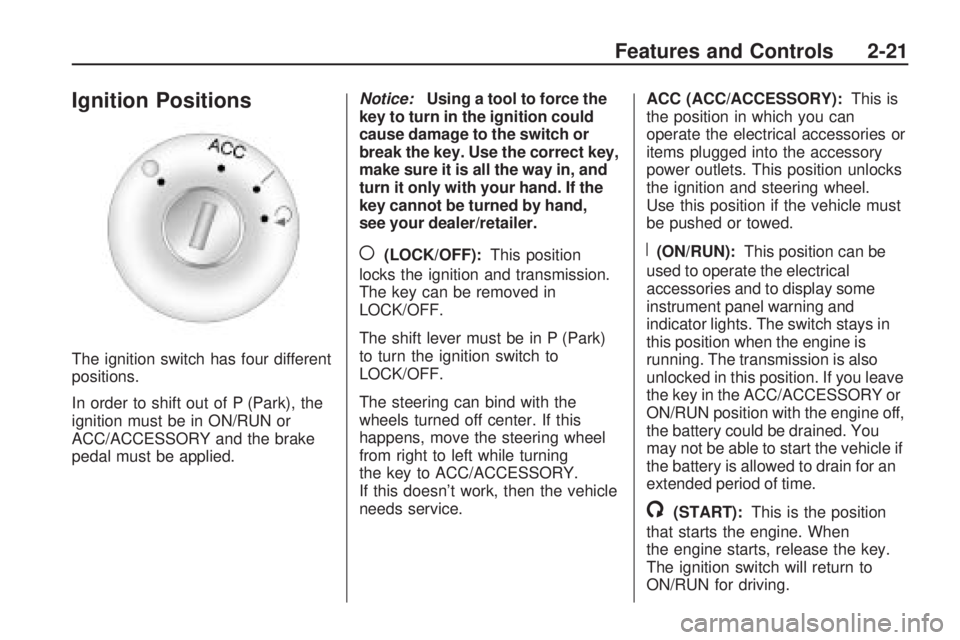
Ignition Positions
The ignition switch has four different
positions.
In order to shift out of P (Park), the
ignition must be in ON/RUN or
ACC/ACCESSORY and the brake
pedal must be applied.Notice:Using a tool to force the
key to turn in the ignition could
cause damage to the switch or
break the key. Use the correct key,
make sure it is all the way in, and
turn it only with your hand. If the
key cannot be turned by hand,
see your dealer/retailer.
((LOCK/OFF):This position
locks the ignition and transmission.
The key can be removed in
LOCK/OFF.
The shift lever must be in P (Park)
to turn the ignition switch to
LOCK/OFF.
The steering can bind with the
wheels turned off center. If this
happens, move the steering wheel
from right to left while turning
the key to ACC/ACCESSORY.
If this doesn’t work, then the vehicle
needs service.ACC (ACC/ACCESSORY):This is
the position in which you can
operate the electrical accessories or
items plugged into the accessory
power outlets. This position unlocks
the ignition and steering wheel.
Use this position if the vehicle must
be pushed or towed.R(ON/RUN):This position can be
used to operate the electrical
accessories and to display some
instrument panel warning and
indicator lights. The switch stays in
this position when the engine is
running. The transmission is also
unlocked in this position. If you leave
the key in the ACC/ACCESSORY or
ON/RUN position with the engine off,
the battery could be drained. You
may not be able to start the vehicle if
the battery is allowed to drain for an
extended period of time.
/(START):This is the position
that starts the engine. When
the engine starts, release the key.
The ignition switch will return to
ON/RUN for driving.
Features and Controls 2-21
Page 86 of 412
Retained Accessory
Power (RAP)
These vehicle accessories can be
used for up to 10 minutes after
the ignition key is turned off:
Audio System
Power Windows
Sunroof (if equipped)
Power to the windows and sunroof
will work up to 10 minutes or
until a door is opened.
The radio continues to work for
10 minutes or until the driver’s door
is opened.
For an additional 10 minutes of
operation, close all the doors and
turn the key to ON/RUN and
then back to LOCK/OFF.
All these features will work when
the key is in the ON/RUN or
ACC/ACCESSORY positions.
Starting the Engine
Move the shift lever to P (Park) or
N (Neutral). The engine will not start
in any other position. To restart the
engine when the vehicle is already
moving, use N (Neutral) only.
Notice:Do not try to shift to
P (Park) if the vehicle is moving.
If you do, you could damage
the transmission. Shift to P (Park)
only when the vehicle is stopped.
Starting Procedure
1. With your foot off the accelerator
pedal, turn the ignition to START.
When the engine starts, let go of
the key. The idle speed will slow
down as the engine warms. Do
not race the engine immediately
after starting it. Operate the
engine and transmission gently to
allow the oil to warm up and
lubricate all moving parts.
The vehicle has a
Computer-Controlled Cranking
System. This feature assists
in starting the engine andprotects components. If the
ignition key is turned to
the START position, and then
released when the engine begins
cranking, the engine will
continue cranking for a
few seconds or until the vehicle
starts. If the engine does not
start and the key is held in
START, cranking will be stopped
after 15 seconds to prevent
cranking motor damage.
To prevent gear damage, this
system also prevents cranking if
the engine is already running.
Engine cranking can be stopped
by turning the ignition switch
to the ACC/ACCESSORY
or LOCK/OFF position.
Notice:Cranking the engine for
long periods of time, by returning
the key to the START position
immediately after cranking has
ended, can overheat and damage
the cranking motor, and drain the
battery. Wait at least 15 seconds
between each try, to let the
cranking motor cool down.
2-22 Features and Controls
Page 87 of 412

2. If the engine does not start after
5-10 seconds, especially in
very cold weather (below 0°F
or−18°C), it could be ooded with
too much gasoline. Try pushing
the accelerator pedal all the way
to the oor and holding it there as
you hold the key in START for up
to a maximum of 15 seconds.
Wait at least 15 seconds between
each try, to allow the cranking
motor to cool down. When the
engine starts, let go of the key
and accelerator. If the vehicle
starts briey but then stops again,
repeat these steps. This clears
the extra gasoline from the
engine. Do not race the engine
immediately after starting it.
Operate the engine and
transmission gently until the oil
warms up and lubricates all
moving parts.Notice:The engine is designed
to work with the electronics
in the vehicle. If you add electrical
parts or accessories, you could
change the way the engine
operates. Before adding electrical
equipment, check with your
dealer/retailer. If you do not, the
engine might not perform
properly. Any resulting damage
would not be covered by the
vehicle warranty.
Engine Coolant Heater
The engine coolant heater can
provide easier starting and better
fuel economy during engine
warm-up in cold weather conditions
at or below 0°F (−18°C). Vehicles
with an engine coolant heater should
be plugged in at least four hours
before starting. Some models
may have an internal thermostat
in the cord which will prevent engine
coolant heater operation at
temperatures above 0°F (−18°C).
To Use the Engine Coolant
Heater
1. Turn off the engine.
2. Open the hood and unwrap the
electrical cord. The cord is
located on the driver side of the
engine compartment. It is
routed around the windshield
washer uid reservoir.
3. Plug the cord into a normal,
grounded 110-volt AC outlet.
{CAUTION
Plugging the cord into an
ungrounded outlet could cause an
electrical shock. Also, the wrong
kind of extension cord could
overheat and cause a re. You
could be seriously injured. Plug
the cord into a properly grounded
three-prong 110-volt AC outlet.
If the cord will not reach, use a
heavy-duty three-prong extension
cord rated for at least 15 amps.
Features and Controls 2-23
Page 88 of 412

4. Before starting the engine, be
sure to unplug and store the
cord as it was before to keep it
away from moving engine
parts. If you do not, it could be
damaged.
The length of time the heater should
remain plugged in depends on
several factors. Ask a dealer/retailer
in the area where you will be
parking the vehicle for the best
advice on this.Automatic Transmission
Operation
The automatic transmission has a
shift lever located on the console
between the seats.
P (Park):This position locks the
front wheels. It is the best position
to use when starting the engine
because the vehicle cannot
move easily.
{CAUTION
It is dangerous to get out of the
vehicle if the shift lever is not fully
in P (Park) with the parking brake
rmly set. The vehicle can roll.
Do not leave the vehicle when the
engine is running unless you have
to. If you have left the engine
running, the vehicle can move
suddenly. You or others could be
injured. To be sure the vehicle will
not move, even when you are on
fairly level ground, always set the
parking brake and move the shift
lever to P (Park). SeeShifting Into
Park on page 2-28. If you are
pulling a trailer, seeTowing a
Trailer on page 4-24.
Make sure the shift lever is fully in
P (Park) before starting the engine.
The vehicle has an automatic
transmission shift lock control
system. You must fully apply the
regular brake rst and then press the
2-24 Features and Controls
Page 89 of 412
shift lever button before shifting from
P (Park) when the ignition key is in
ON/RUN. If you cannot shift out of
P (Park), ease pressure on the shift
lever, then push the shift lever all the
way into P (Park) as you maintain
brake application. Then press the
shift lever button and move the shift
lever into another gear. SeeShifting
Out of Park on page 2-29.
R (Reverse):Use this gear to
back up.
Notice:Shifting to R (Reverse)
while the vehicle is moving
forward could damage the
transmission. The repairs would
not be covered by the vehicle
warranty. Shift to R (Reverse)
only after the vehicle is stopped.
To rock the vehicle back and
forth to get out of snow, ice or sand
without damaging the transmission,
seeIf Your Vehicle is Stuck in
Sand, Mud, Ice, or Snow on
page 4-15.N (Neutral):In this position, the
engine does not connect with
the wheels. To restart the engine
when the vehicle is already moving,
use N (Neutral) only. Also, use
N (Neutral) when the vehicle
is being towed.
{CAUTION
Shifting into a drive gear while the
engine is running at high speed is
dangerous. Unless your foot is
rmly on the brake pedal, the
vehicle could move very rapidly.
You could lose control and hit
people or objects. Do not shift into
a drive gear while the engine is
running at high speed.
Notice:Shifting out of P (Park)
or N (Neutral) with the engine
running at high speed may
damage the transmission. The
repairs would not be covered by
the vehicle warranty. Be sure
the engine is not running at high
speed when shifting the vehicle.D (Drive):This position is for
normal driving. It provides the best
fuel economy. If you need more
power for passing, and you are:
Going less than 35 mph
(56 km/h), push the accelerator
pedal about halfway down.
Going about 35 mph (56 km/h) or
more, push the accelerator all
the way down.
Notice:If your vehicle seems to
accelerate slowly or not shift
gears when you go faster, and you
continue to drive your vehicle that
way, you could damage the
transmission. Have your vehicle
serviced right away. You can drive
in LOW (L) when you are driving
less than 35 mph (56 km/h) and
DRIVE (D) for higher speeds
until then.
L (Low):This position gives you
access to gear ranges. This
provides more engine braking but
lower fuel economy than D (Drive).
You can use it on very steep
hills, or in deep snow or mud.
Features and Controls 2-25
Page 90 of 412

Electronic Range Select
(ERS) Mode
ERS mode allows you to choose the
top-gear limit of the transmission
and the vehicle’s speed while
driving down hill or towing a trailer.
The vehicle has an electronic
shift position indicator within the
instrument panel cluster. When
using the ERS Mode a number will
display next to the L, indicating
the current gear that has been
selected.
To use this feature:
1. Move the shift lever to L (Low).
2. Press the plus/minus button
located on the shift lever, to
increase or decrease the gear
range available.
When you shift from D (Drive) to
L (Low), the transmission will shift to
a pre-determined lower gear range.
The highest gear available for
this pre-determined range is
displayed next to the L in the DIC.SeeDriver Information Center (DIC)
on page 3-41andDIC Operation
and Displays on page 3-41for more
information. The number displayed
in the DIC is the highest gear
that the transmission will be allowed
to operate in. This means that all
gears below that number are
available. For example, when
4 (Fourth) is shown next to the L,
1 (First) through 4 (Fourth) gears
are automatically shifted by
the vehicle. The transmission will
not shift into 5 (Fifth) until the
+ (Plus) button is used or you shift
back into D (Drive).
While in L (Low), the transmission
will prevent shifting to a lower
gear range if the engine speed is
too high. You have a brief period of
time to slow the vehicle. If vehicle
speed is not reduced within the time
allowed, the lower gear range
shift will not be completed. You must
further slow the vehicle, then
press the−(Minus) button to the
desired lower gear range.Automatic Engine Grade braking is
not available when the ERS is
active. It is available in D (Drive) for
both normal and Tow/Haul mode.
While using the ERS, cruise control
and the tow/haul mode can be
used. See Tow/Haul Mode following.
Tow/Haul Mode
_
(Tow/Haul):The vehicle may
have a Tow/Haul mode.
The button is located on the
instrument panel under the climate
controls.
Push the button to activate the
system. Push it again to deactivate
the system. You can use this
feature to assist when towing or
hauling a heavy load.
When Tow/Haul is activated the
Tow/Haul symbol will come on the
instrument panel cluster. See
“Tow/Haul Mode” underTowing a
Trailer on page 4-24for more
information.
2-26 Features and Controls
Page 91 of 412
Automatic Engine Grade
Braking
Automatic Engine Grade Braking
assists when driving on a downhill
grade. It maintains vehicle speed by
automatically implementing a shift
schedule that uses the engine and
the transmission to slow the vehicle.
The system will automatically
command downshifts to reduce
vehicle speed, until the brake pedal
is no longer being pressed.
While in the Electronic Range
Select (ERS) mode, grade braking
is deactivated, allowing the
driver to select a range and limiting
the highest gear available. Grade
braking is available for normal
driving and in Tow/Haul mode.
SeeAutomatic Transmission
Operation on page 2-24.
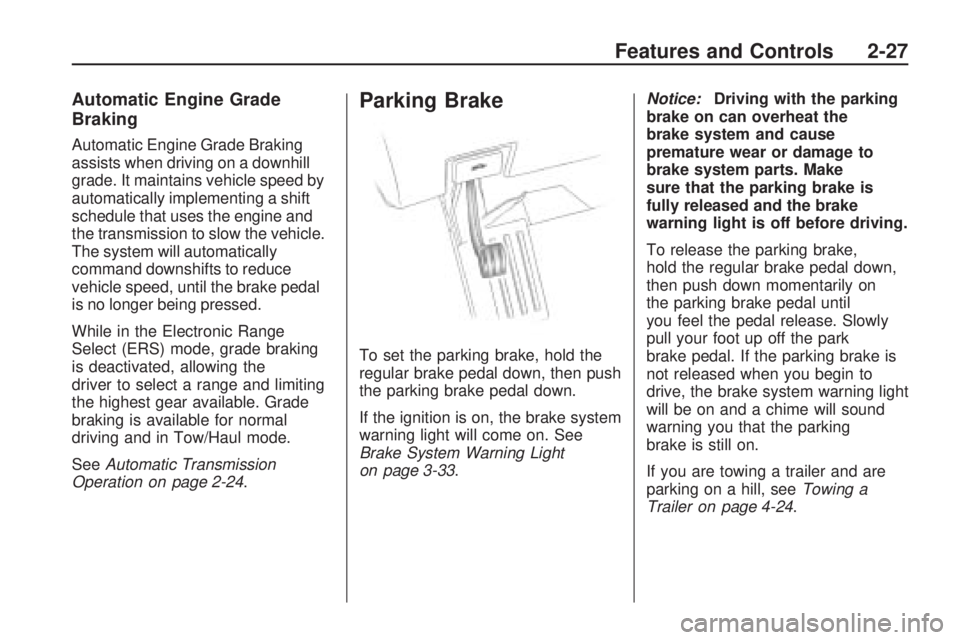
Parking Brake
To set the parking brake, hold the
regular brake pedal down, then push
the parking brake pedal down.
If the ignition is on, the brake system
warning light will come on. See
Brake System Warning Light
on page 3-33.Notice:Driving with the parking
brake on can overheat the
brake system and cause
premature wear or damage to
brake system parts. Make
sure that the parking brake is
fully released and the brake
warning light is off before driving.
To release the parking brake,
hold the regular brake pedal down,
then push down momentarily on
the parking brake pedal until
you feel the pedal release. Slowly
pull your foot up off the park
brake pedal. If the parking brake is
not released when you begin to
drive, the brake system warning light
will be on and a chime will sound
warning you that the parking
brake is still on.
If you are towing a trailer and are
parking on a hill, seeTowing a
Trailer on page 4-24.
Features and Controls 2-27
Page 92 of 412

Shifting Into Park
{CAUTION
It can be dangerous to get out of
the vehicle if the shift lever is not
fully in P (Park) with the parking
brake rmly set. The vehicle can
roll. If you have left the engine
running, the vehicle can move
suddenly. You or others could be
injured. To be sure the vehicle will
not move, even when you are on
fairly level ground, use the steps
that follow. If you are pulling a
trailer, seeTowing a Trailer on
page 4-24.
1. Hold the brake pedal down and
set the parking brake. See
Parking Brake on page 2-27for
more information.
2. Move the shift lever into P (Park)
by holding in the button on the
shift lever and pushing the
shift lever all the way toward the
front of the vehicle.3. Turn the ignition key to
LOCK/OFF.
4. Remove the key and take it with
you. If you can leave the vehicle
with the ignition key in your
hand, the vehicle is in P (Park).
Leaving the Vehicle with the
Engine Running
{CAUTION
It can be dangerous to leave the
vehicle with the engine running.
The vehicle could move suddenly
if the shift lever is not fully in
P (Park) with the parking brake
rmly set. And, if you leave the
vehicle with the engine running, it
could overheat and even catch
re. You or others could be
injured. Do not leave the vehicle
with the engine running.If you have to leave the vehicle with
the engine running, be sure the
vehicle is in P (Park) and the parking
brake is rmly set before you
leave it. After you have moved the
shift lever into P (Park), hold
the regular brake pedal down.
Then, see if you can move the shift
lever away from P (Park) without
rst pushing the button.
If you can, it means that the shift
lever was not fully locked in
P (Park).
2-28 Features and Controls
Page 94 of 412

Parking Over Things
That Burn
{CAUTION
Things that can burn could touch
hot exhaust parts under the
vehicle and ignite. Do not park
over papers, leaves, dry grass, or
other things that can burn.
Engine Exhaust
{CAUTION
Engine exhaust contains Carbon
Monoxide (CO) which cannot be
seen or smelled. Exposure to CO
can cause unconsciousness and
even death.
Exhaust may enter the vehicle if:
The vehicle idles in areas
with poor ventilation (parking
garages, tunnels, deep snow
that may block underbody
airow or tail pipes).
The exhaust smells or
sounds strange or different.
The exhaust system leaks
due to corrosion or damage.
(Continued)
CAUTION (Continued)
The vehicle’s exhaust system
has been modied, damaged
or improperly repaired.
There are holes or openings
in the vehicle body from
damage or after-market
modications that are not
completely sealed.
If unusual fumes are detected or if
it is suspected that exhaust is
coming into the vehicle:
Drive it only with the windows
completely down.
Have the vehicle repaired
immediately.
Never park the vehicle with the
engine running in an enclosed
area such as a garage or a
building that has no fresh air
ventilation.
2-30 Features and Controls
Page 95 of 412

Running the Vehicle
While Parked
It is better not to park with the
engine running. But if you ever have
to, here are some things to know.
{CAUTION
Idling a vehicle in an enclosed
area with poor ventilation is
dangerous. Engine exhaust may
enter the vehicle. Engine exhaust
contains Carbon Monoxide (CO)
which cannot be seen or smelled.
It can cause unconsciousness
and even death. Never run the
engine in an enclosed area that
has no fresh air ventilation.
For more information, seeEngine
Exhaust on page 2-30.
{CAUTION
It can be dangerous to get out of
the vehicle if the automatic
transmission shift lever is not fully
in P (Park) with the parking brake
rmly set. The vehicle can roll.
Do not leave the vehicle when the
engine is running unless you have
to. If you have left the engine
running, the vehicle can move
suddenly. You or others could be
injured. To be sure the vehicle will
not move, even when you are on
fairly level ground, always set the
parking brake and move the shift
lever to P (Park).
Follow the proper steps to be sure
the vehicle will not move. See
Shifting Into Park on page 2-28.
If parking on a hill and pulling
a trailer, seeTowing a Trailer on
page 4-24.
Mirrors
Automatic Dimming
Rearview Mirror
The vehicle has an automatic
dimming inside rearview mirror.
Vehicles with OnStar
®have
three additional control buttons for
the OnStar
®system. See your
dealer/retailer for more information
about OnStar
®and how to subscribe
to it. SeeOnStar®System on
page 2-41for more information about
the services OnStar
®provides.
O(On/Off):Press to turn the
dimming feature on or off.
The vehicle may also have a Rear
Vision Camera (RVC). SeeRear
Vision Camera (RVC) on page 2-37
for more information.
If the vehicle has RVC, the
O(On/Off) button for turning
the automatic dimming feature on
or off will not be available.
Features and Controls 2-31