ABS BUICK ENCLAVE 2009 Owner's Manual
[x] Cancel search | Manufacturer: BUICK, Model Year: 2009, Model line: ENCLAVE, Model: BUICK ENCLAVE 2009Pages: 412
Page 4 of 412
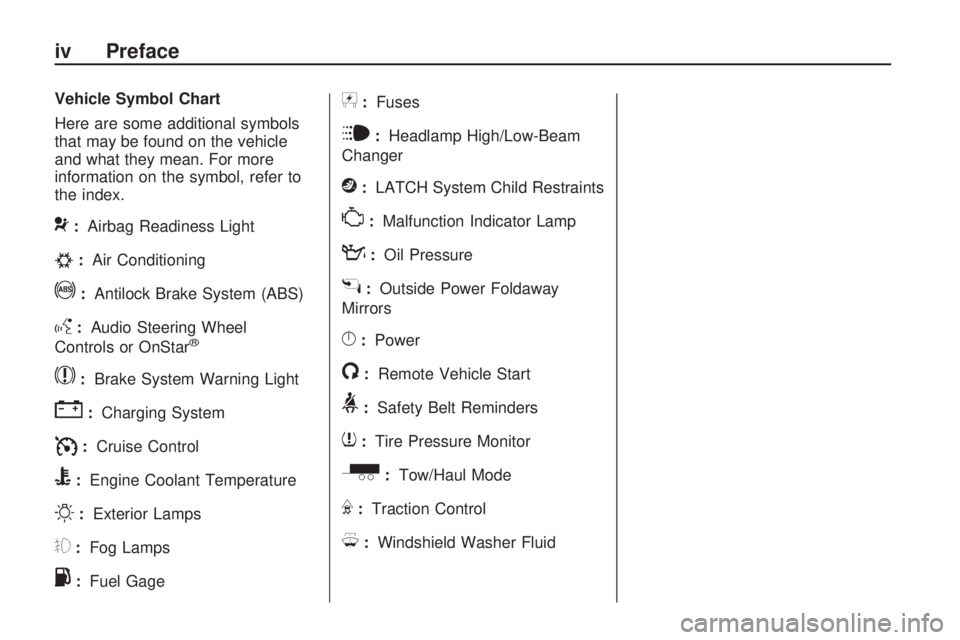
Vehicle Symbol Chart
Here are some additional symbols
that may be found on the vehicle
and what they mean. For more
information on the symbol, refer to
the index.
9:Airbag Readiness Light
#:Air Conditioning
!:Antilock Brake System (ABS)
g:Audio Steering Wheel
Controls or OnStar®
$:Brake System Warning Light
":Charging System
I:Cruise Control
B:Engine Coolant Temperature
O:Exterior Lamps
#:Fog Lamps
.:Fuel Gage
+:Fuses
i:Headlamp High/Low-Beam
Changer
j:LATCH System Child Restraints
*:Malfunction Indicator Lamp
::Oil Pressure
g:Outside Power Foldaway
Mirrors
}:Power
/:Remote Vehicle Start
>:Safety Belt Reminders
7:Tire Pressure Monitor
_:Tow/Haul Mode
F:Traction Control
M:Windshield Washer Fluid
iv Preface
Page 120 of 412
Antilock Brake System
(ABS) Warning Light.......3-34
StabiliTrak®Indicator
Light................................3-35
Engine Coolant
Temperature Warning
Light
................................3-35
Engine Coolant
Temperature Gage..........3-35
Tire Pressure Light...........3-36
Malfunction Indicator
Lamp..............................3-36
Oil Pressure Light.............3-39
Security Light....................3-39
Fog Lamp Light................3-39
Cruise Control Light..........3-40
Highbeam On Light...........3-40
Tow/Haul Mode Light........3-40
Fuel Gage........................3-40
Driver Information
Center (DIC)
Driver Information
Center (DIC)...................3-41
DIC Operation and
Displays..........................3-41
DIC Compass...................3-46
DIC Warnings and
Messages........................3-48
DIC Vehicle
Customization..................3-57
Audio System(s)
Audio System(s)................3-64
Setting the Clock..............3-65
Radio(s)............................3-67
Using an MP3 (Radio
with CD)..........................3-82
Using an MP3 (Radio
with CD and DVD
Player)
............................3-86
XM Radio Messages.........3-91
Navigation/Radio
System............................3-92
Bluetooth®........................3-92
Rear Seat Entertainment
(RSE) System................3-102
Rear Seat Audio (RSA).....3-111
Theft-Deterrent
Feature..........................3-113
Audio Steering Wheel
Controls.........................3-113
Radio Reception..............3-114
Multi-Band Antenna.........3-115
3-2 Instrument Panel
Page 152 of 412

When the ignition is on, the brake
system warning light will also
come on when the parking brake is
set. The light will stay on if the
parking brake does not release fully.
If it stays on after the parking
brake is fully released, it means
there is a brake problem.
If the light comes on while driving,
pull off the road and stop carefully.
Make sure the parking brake is
fully released. The pedal may be
harder to push or, the pedal may go
closer to the oor. It may take
longer to stop. If the light is still on,
have the vehicle towed for
service. SeeTowing Your Vehicle
on page 4-21.{CAUTION
The brake system might not be
working properly if the brake
system warning light is on. Driving
with the brake system warning
light on can lead to a crash. If the
light is still on after the vehicle
has been pulled off the road and
carefully stopped, have the
vehicle towed for service.
Antilock Brake System
(ABS) Warning Light
For vehicles with the Antilock Brake
System (ABS), this light comes
on briey when the engine is started.That is normal. If the light does not
come on then, have it xed so it
will be ready to warn if there
is a problem.
If the ABS light stays on, turn the
ignition off. If the light comes
on while driving, stop as soon as it
is safely possible and turn the
ignition off. A chime may also sound
when the light comes on steady.
Then start the engine again to reset
the system. If the ABS light stays
on, or comes on again while driving,
the vehicle needs service. If the
regular brake system warning light
is not on, the vehicle still has
brakes, but not antilock brakes. If
the regular brake system warning
light is also on, the vehicle does not
have antilock brakes and there is
a problem with the regular brakes.
SeeBrake System Warning Light on
page 3-33.
For vehicles with a Driver
Information Center (DIC), seeDIC
Warnings and Messages on
page 3-48for all brake related DIC
messages.
3-34 Instrument Panel
Page 166 of 412
To calibrate the compass, use the
following procedure:
Compass Calibration Procedure
1. Before calibrating the compass,
make sure the compass zone is
set to the variance zone in
which the vehicle is located. See
“Compass Variance (Zone)
Procedure” earlier in this section.
Do not operate any switches
such as window, sunroof, climate
controls, seats, etc. during the
calibration procedure.
2. Press the vehicle information
button until PRESS
VTO
CALIBRATE COMPASS
displays.
3. Press the set/reset button to start
the compass calibration.
4. The DIC will display
CALIBRATING: DRIVE IN
CIRCLES. Drive the vehicle in
tight circles at less than
5 mph (8 km/h) to complete the
calibration. The DIC willdisplay CALIBRATION
COMPLETE for a few seconds
when the calibration is complete.
The DIC display will then
return to the previous menu.
DIC Warnings and
Messages
Messages are displayed on the DIC
to notify the driver that the status
of the vehicle has changed and that
some action may be needed by
the driver to correct the condition.
Multiple messages may appear one
after another.
Some messages may not require
immediate action, but you can press
any of the DIC buttons on the
instrument panel to acknowledge
that you received the messages and
to clear them from the display.
Some messages cannot be cleared
from the DIC display because
they are more urgent. These
messages require action before they
can be cleared. You should take
any messages that appear onthe display seriously and remember
that clearing the messages will
only make the messages disappear,
not correct the problem.
The following are the possible
messages that can be displayed
and some information about them.ALL WHEEL DRIVE OFF
If your vehicle has the All-Wheel
Drive (AWD) system, this message
displays when there is a compact
spare tire on the vehicle, when
the Antilock Brake System (ABS)
warning light comes on, or when the
rear differential uid is overheating.
This message turns off when
the differential uid cools.
The AWD system is disabled until
the compact spare tire is replaced
by a full-size tire. If the warning
message is still on after putting on
the full-size tire, you need to
reset the warning message. To
reset the warning message, turn the
ignition off and then back on
again after 30 seconds. If the
3-48 Instrument Panel
Page 235 of 412

Driving Your
Vehicle
Your Driving, the Road,
and the Vehicle
Driving for Better Fuel
Economy...........................4-1
Defensive Driving................4-2
Drunk Driving.....................4-2
Control of a Vehicle............4-3
Braking...............................4-3
Antilock Brake
System (ABS)...................4-4
Braking in Emergencies......4-5
StabiliTrak®System............4-5
All-Wheel Drive (AWD)
System.............................4-7
Steering..............................4-8
Off-Road Recovery.............4-9
Passing..............................4-9
Loss of Control.................4-10
Driving at Night.................4-10
Driving in Rain and on
Wet Roads......................4-11
Before Leaving on a
Long Trip........................4-12
Highway Hypnosis.............4-12
Hill and Mountain
Roads.............................4-13
Winter Driving...................4-13
If Your Vehicle is Stuck
in Sand, Mud, Ice,
or Snow
..........................4-15
Rocking Your Vehicle to
Get It Out.......................4-16
Loading the Vehicle..........4-16
Towing
Towing Your Vehicle.........4-21
Recreational Vehicle
Towing............................4-21
Towing a Trailer................4-24
Your Driving, the
Road, and the Vehicle
Driving for Better Fuel
Economy
Driving habits can affect fuel
mileage. Here are some driving tips
to get the best fuel economy
possible.
Avoid fast starts and accelerate
smoothly.
Brake gradually and avoid
abrupt stops.
Avoid idling the engine for long
periods of time.
When road and weather
conditions are appropriate, use
cruise control, if equipped.
Always follow posted speed limits
or drive more slowly when
conditions require.
Keep vehicle tires properly
inated.
Driving Your Vehicle 4-1
Page 238 of 412

And, of course, actual stopping
distances vary greatly with the
surface of the road, whether it is
pavement or gravel; the condition of
the road, whether it is wet, dry, or
icy; tire tread; the condition of
the brakes; the weight of the vehicle;
and the amount of brake force
applied.
Avoid needless heavy braking.
Some people drive in
spurts — heavy acceleration
followed by heavy braking — rather
than keeping pace with traffic.
This is a mistake. The brakes might
not have time to cool between
hard stops. The brakes will wear out
much faster with a lot of heavy
braking. Keeping pace with
the traffic and allowing realistic
following distances eliminates a lot
of unnecessary braking. That
means better braking and longer
brake life.
If the engine ever stops while the
vehicle is being driven, brake
normally but do not pump the
brakes. If the brakes are pumped,the pedal could get harder to push
down. If the engine stops, there
will still be some power brake assist
but it will be used when the brake
is applied. Once the power assist is
used up, it can take longer to
stop and the brake pedal will be
harder to push.
Adding non-dealer/non-retailer
accessories can affect vehicle’
performance. SeeAccessories and
Modifications on page 5-3.
Antilock Brake
System (ABS)
This vehicle has the Antilock Brake
System (ABS), an advanced
electronic braking system that will
help prevent a braking skid.
When the engine is started and the
vehicle begins to drive away,
ABS checks itself. A momentary
motor or clicking noise might
be heard while this test is going on,
and it might even be noticed that
the brake pedal moves a little. This
is normal.If there is a problem with ABS, this
warning light stays on. See
Antilock Brake System (ABS)
Warning Light on page 3-34.
Let us say the road is wet and you
are driving safely. Suddenly, an
animal jumps out in front of you. You
slam on the brakes and continue
braking. Here is what happens
with ABS:
A computer senses that the wheels
are slowing down. If one of the
wheels is about to stop rolling, the
computer will separately work
the brakes at each wheel.
ABS can change the brake pressure
to each wheel, as required, faster
than any driver could. This can help
the driver steer around the
obstacle while braking hard.
4-4 Driving Your Vehicle
Page 239 of 412

As the brakes are applied, the
computer keeps receiving updates
on wheel speed and controls braking
pressure accordingly.
Remember: ABS does not change
the time needed to get a foot
up to the brake pedal or always
decrease stopping distance. If you
get too close to the vehicle in
front of you, there will not be enough
time to apply the brakes if that
vehicle suddenly slows or stops.
Always leave enough room up
ahead to stop, even with ABS.
Using ABS
Do not pump the brakes. Just hold
the brake pedal down rmly and
let antilock work. The antilock pump
or motor operating might be
heard and the brake pedal might be
felt to pulsate, but this is normal.
Braking in Emergencies
ABS allows the driver to steer and
brake at the same time. In many
emergencies, steering can help more
than even the very best braking.
Brake Assist
This vehicle has a Brake Assist
feature designed to assist the driver
in stopping or decreasing vehicle
speed in emergency driving
conditions. This feature uses the
stability system hydraulic brake
control module to supplement the
power brake system under
conditions where the driver has
quickly and forcefully applied
the brake pedal in an attempt to
quickly stop or slow down the
vehicle. The stability system
hydraulic brake control module
increases brake pressure at each
corner of the vehicle until the
ABS activates. Minor brake pedal
pulsations or pedal movement
during this time is normal and the
driver should continue to apply
the brake pedal as the drivingsituation dictates The Brake Assist
feature will automatically disengage
when the brake pedal is released
or brake pedal pressure is quickly
decreased.
StabiliTrak®System
The vehicle has the StabiliTrak
system which combines antilock
brake, traction and stability control
systems and helps the driver
maintain directional control of the
vehicle in most driving conditions.
When you rst start the vehicle and
begin to drive away, the system
performs several diagnostic checks
to ensure there are no problems.
The system may be heard or
felt while it is working. This is normal
and does not mean there is a
problem with the vehicle. The
system should initialize before the
vehicle reaches 20 mph (32 km/h).
In some cases, it may take
approximately two miles of driving
before the system initializes.
Driving Your Vehicle 4-5
Page 241 of 412

necessary to turn off the system
when driving in extreme off-road
conditions where high wheel spin is
required. SeeIf Your Vehicle is Stuck
in Sand, Mud, Ice, or Snow on
page 4-15.
Traction Control Operation
The traction control system is part of
the StabiliTrak system. Traction
control limits wheel spin by reducing
engine power to the wheels
(engine speed management) and by
applying brakes to each individual
wheel (brake-traction control)
as necessary.
The traction control system is
enabled automatically when the
vehicle is started. It will activate and
the StabiliTrak light will ash if it
senses that any of the wheels are
spinning or beginning to lose traction
while driving. If traction control is
turned off, only the brake-traction
control portion of traction control
will work. The engine speed
management will be disabled. In this
mode, engine power is not reducedautomatically and the driven wheels
can spin more freely. This can
cause the brake-traction control to
activate constantly.
Notice:If the wheel(s) of one axle
is allowed to spin excessively
while the StabiliTrak, ABS and
brake warning lights and any
relevant DIC messages are
displayed, the transfer case could
be damaged. The repairs would
not be covered by the vehicle
warranty. Reduce engine power
and do not spin the wheel(s)
excessively while these lights and
messages are displayed.
The traction control system may
activate on dry or rough roads
or under conditions such as heavy
acceleration while turning or
abrupt upshifts/downshifts of the
transmission. When this happens, a
reduction in acceleration may be
noticed, or a noise or vibration may
be heard. This is normal.If cruise control is being used when
the system activates, the StabiliTrak
light will ash and cruise control
will automatically disengage. Cruise
control may be reengaged when
road conditions allow. SeeCruise
Control on page 3-10.
StabiliTrak may also turn off
automatically if it determines that a
problem exists with the system.
If the problem does not clear itself
after restarting the vehicle, see your
dealer/retailer for service.
All-Wheel Drive (AWD)
System
If the vehicle has this feature,
engine power is sent to all four
wheels when extra traction is
needed. This is like four-wheel drive,
but there is no separate lever or
switch to engage or disengage the
front axle. It is fully automatic,
and adjusts itself as needed for road
conditions.
Driving Your Vehicle 4-7
Page 244 of 412

Loss of Control
Let us review what driving experts
say about what happens when
the three control systems — brakes,
steering, and acceleration — do
not have enough friction where the
tires meet the road to do what
the driver has asked.
In any emergency, do not give up.
Keep trying to steer and constantly
seek an escape route or area of
less danger.
Skidding
In a skid, a driver can lose control
of the vehicle. Defensive drivers
avoid most skids by taking
reasonable care suited to existing
conditions, and by not overdriving
those conditions. But skids are
always possible.
The three types of skids correspond
to the vehicle’s three control
systems. In the braking skid, the
wheels are not rolling. In the
steering or cornering skid, too much
speed or steering in a curvecauses tires to slip and lose
cornering force. And in the
acceleration skid, too much throttle
causes the driving wheels
to spin.
If the vehicle starts to slide, ease
your foot off the accelerator pedal
and quickly steer the way you want
the vehicle to go. If you start steering
quickly enough, the vehicle may
straighten out. Always be ready for
a second skid if it occurs.
Of course, traction is reduced when
water, snow, ice, gravel, or other
material is on the road. For safety,
slow down and adjust your
driving to these conditions. It is
important to slow down on slippery
surfaces because stopping
distance is longer and vehicle
control more limited.
While driving on a surface with
reduced traction, try your best to
avoid sudden steering, acceleration,
or braking, including reducing
vehicle speed by shifting to a lower
gear. Any sudden changes couldcause the tires to slide. You might
not realize the surface is slippery
until the vehicle is skidding. Learn to
recognize warning clues — such
as enough water, ice, or packed
snow on the road to make a
mirrored surface — and slow down
when you have any doubt.
Remember: Any Antilock Brake
System (ABS) helps avoid only the
braking skid.
Driving at Night
Night driving is more dangerous than
day driving because some drivers
are likely to be impaired — by alcohol
or drugs, with night vision problems,
or by fatigue.
Night driving tips include:
Drive defensively.
Do not drink and drive.
Reduce headlamp glare by
adjusting the inside rearview
mirror.
4-10 Driving Your Vehicle
Page 248 of 412

Try not to break the fragile traction. If
you accelerate too fast, the drive
wheels will spin and polish the
surface under the tires even more.
TheStabiliTrak
®System on page 4-5
improves the ability to accelerate on
slippery roads, but slow down and
adjust your driving to the road
conditions. When driving through
deep snow, turn off the traction
control part of the StabiliTrak
®
System to help maintain vehicle
motion at lower speeds.
TheAntilock Brake System (ABS)
on page 4-4improves vehicle
stability during hard stops on a
slippery roads, but apply the brakes
sooner than when on dry pavement.
Allow greater following distance
on any slippery road and watch for
slippery spots. Icy patches can
occur on otherwise clear roads in
shaded areas. The surface of
a curve or an overpass can remain
icy when the surrounding roads
are clear. Avoid sudden steering
maneuvers and braking while on ice.Turn off cruise control, if equipped,
on slippery surfaces.
Blizzard Conditions
Being stuck in snow can be in a
serious situation. Stay with the
vehicle unless there is help nearby.
If possible, use theRoadside
Assistance Program on page 7-6.
To get help and keep everyone
in the vehicle safe:
Turn on theHazard Warning
Flashers on page 3-5.
Tie a red cloth to an outside
mirror.
{CAUTION
Snow can trap engine exhaust
under the vehicle. This may cause
exhaust gases to get inside.
Engine exhaust contains carbon
monoxide (CO) which cannot be
seen or smelled. It can cause
unconsciousness and even death.
If the vehicle is stuck in the snow:
Clear away snow from
around the base of your
vehicle, especially any that is
blocking the exhaust pipe.
Check again from time to
time to be sure snow does
not collect there.
Open a window about two
inches (5 cm) on the side of
the vehicle that is away from
the wind to bring in fresh air.
Fully open the air outlets on or
under the instrument panel.
(Continued)
4-14 Driving Your Vehicle