fog light BUICK ENCLAVE 2009 Owner's Manual
[x] Cancel search | Manufacturer: BUICK, Model Year: 2009, Model line: ENCLAVE, Model: BUICK ENCLAVE 2009Pages: 412
Page 4 of 412
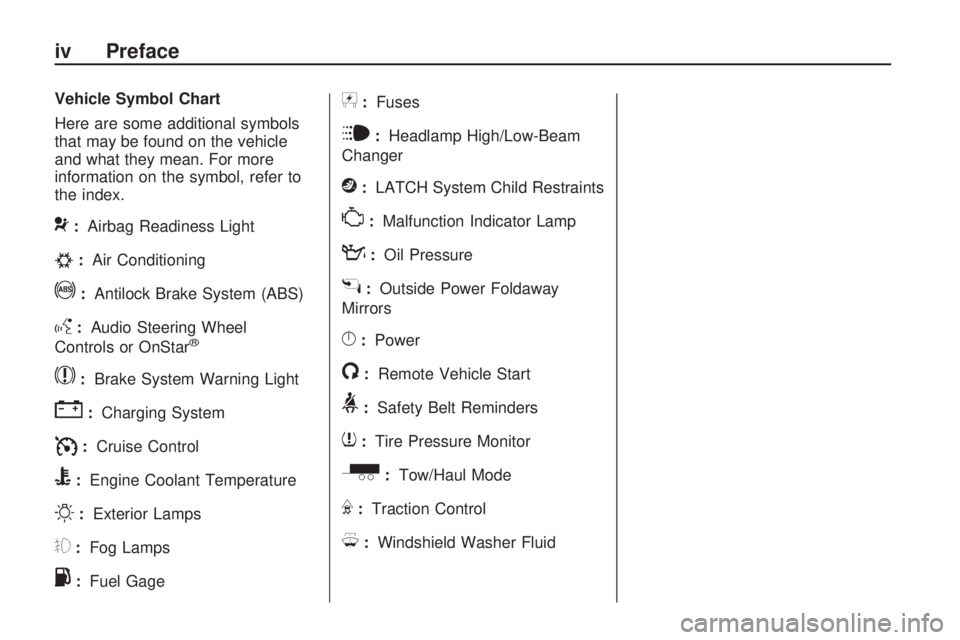
Vehicle Symbol Chart
Here are some additional symbols
that may be found on the vehicle
and what they mean. For more
information on the symbol, refer to
the index.
9:Airbag Readiness Light
#:Air Conditioning
!:Antilock Brake System (ABS)
g:Audio Steering Wheel
Controls or OnStar®
$:Brake System Warning Light
":Charging System
I:Cruise Control
B:Engine Coolant Temperature
O:Exterior Lamps
#:Fog Lamps
.:Fuel Gage
+:Fuses
i:Headlamp High/Low-Beam
Changer
j:LATCH System Child Restraints
*:Malfunction Indicator Lamp
::Oil Pressure
g:Outside Power Foldaway
Mirrors
}:Power
/:Remote Vehicle Start
>:Safety Belt Reminders
7:Tire Pressure Monitor
_:Tow/Haul Mode
F:Traction Control
M:Windshield Washer Fluid
iv Preface
Page 70 of 412

The rear window defogger and
heated mirrors, if the vehicle has
them, turn on during colder outside
temperatures and turn off when
the key is turned to ON/RUN.
Laws in some communities may
restrict the use of remote starters.
For example, some laws may
require a person using the remote
start to have the vehicle in view
when doing so. Check local
regulations for any requirements
on remote starting of vehicles.
Do not use the remote start
feature if the vehicle is low on fuel.
The vehicle could run out of fuel.
If the vehicle has the remote
start feature, the RKE transmitter
functions have an increased
range of operation. However, the
range may be less while the vehicle
is running.There are other conditions which
can affect the performance of
the transmitter, seeRemote Keyless
Entry (RKE) System on page 2-3
for additional information.
/(Remote Start):This button is
located on the RKE transmitter if the
vehicle has remote start.
To start the vehicle:
1. Aim the transmitter at the
vehicle.
2. Press and release
Q, then
immediately press and hold
/until the parking lamps ash.
If the vehicle’s lights can not
be seen, press and hold
/for
at least four seconds. The
vehicle’s doors lock. When the
vehicle starts, the parking
lamps turn on and remain on
while the vehicle is running.
Pressing
/again, after the
vehicle has started, shuts the
vehicle off.3. If it is the rst remote start since
the vehicle has been driven,
repeat these steps while the
engine is still running, to extend
the time by 10 minutes for the
engine to continue to run. Remote
start can be extended one time.
After entering the vehicle during a
remote start, insert and turn the key
to the ON/RUN position to drive
the vehicle.
If the vehicle is left running it
automatically shuts off after
10 minutes unless a time extension
has been done.
To manually shut off a remote start:
Aim the RKE transmitter at the
vehicle and press
/until the
parking lamps turn off.
Turn on the hazard warning
ashers.
Turn the ignition switch on and
then off.
2-6 Features and Controls
Page 119 of 412
Instrument Panel
Instrument Panel
Overview
Instrument Panel
Overview...........................3-4
Hazard Warning
Flashers............................3-5
Horn...................................3-5
Tilt and Telescopic
Steering Wheel.................3-6
Power Tilt Wheel and
Telescopic Steering
Column
.............................3-6
Turn Signal/Multifunction
Lever................................3-6
Turn and Lane-Change
Signals.............................3-7
Headlamp High/
Low-Beam Changer..........3-7
Flash-to-Pass......................3-7
Windshield Wipers..............3-8
Windshield Washer.............3-8
Rear Window Wiper/
Washer.............................3-9
Cruise Control...................3-10
Exterior Lamps..................3-12
Delayed Headlamps..........3-13
Daytime Running Lamps
(DRL)/Automatic
Headlamp System
...........3-13
Adaptive Forward Lighting
System............................3-14
Fog Lamps.......................3-14
Instrument Panel
Brightness.......................3-15
Dome Lamps....................3-15
Dome Lamp Override........3-15
Entry Lighting....................3-15
Delayed Entry Lighting......3-16
Delayed Exit Lighting........3-16
Parade Dimming...............3-16
Reading Lamps.................3-16
Electric Power
Management...................3-16
Battery Run-Down
Protection........................3-17
Accessory Power
Outlet(s)..........................3-18
Power Outlet 115 Volt
Alternating Current..........3-18
Analog Clock....................3-19
Climate Controls
Dual Automatic Climate
Control System................3-20
Outlet Adjustment.............3-25
Rear Air Conditioning and
Heating System...............3-26
Rear Air Conditioning and
Heating System and
Electronic Climate
Controls
..........................3-27
Warning Lights, Gages,
and Indicators
Warning Lights, Gages,
and Indicators.................3-28
Instrument Panel Cluster. . .3-29
Speedometer and
Odometer........................3-30
Tachometer.......................3-30
Safety Belt Reminders......3-30
Airbag Readiness Light.....3-31
Passenger Airbag Status
Indicator..........................3-31
Charging System Light......3-32
Voltmeter Gage.................3-33
Brake System Warning
Light................................3-33
Instrument Panel 3-1
Page 120 of 412
Antilock Brake System
(ABS) Warning Light.......3-34
StabiliTrak®Indicator
Light................................3-35
Engine Coolant
Temperature Warning
Light
................................3-35
Engine Coolant
Temperature Gage..........3-35
Tire Pressure Light...........3-36
Malfunction Indicator
Lamp..............................3-36
Oil Pressure Light.............3-39
Security Light....................3-39
Fog Lamp Light................3-39
Cruise Control Light..........3-40
Highbeam On Light...........3-40
Tow/Haul Mode Light........3-40
Fuel Gage........................3-40
Driver Information
Center (DIC)
Driver Information
Center (DIC)...................3-41
DIC Operation and
Displays..........................3-41
DIC Compass...................3-46
DIC Warnings and
Messages........................3-48
DIC Vehicle
Customization..................3-57
Audio System(s)
Audio System(s)................3-64
Setting the Clock..............3-65
Radio(s)............................3-67
Using an MP3 (Radio
with CD)..........................3-82
Using an MP3 (Radio
with CD and DVD
Player)
............................3-86
XM Radio Messages.........3-91
Navigation/Radio
System............................3-92
Bluetooth®........................3-92
Rear Seat Entertainment
(RSE) System................3-102
Rear Seat Audio (RSA).....3-111
Theft-Deterrent
Feature..........................3-113
Audio Steering Wheel
Controls.........................3-113
Radio Reception..............3-114
Multi-Band Antenna.........3-115
3-2 Instrument Panel
Page 130 of 412
Using Cruise Control on Hills
How well the cruise control will work
on hills depends upon the vehicle
speed, load, and the steepness
of the hills. When going up steep
hills, you might have to step on the
accelerator pedal to maintain the
vehicle speed. When going downhill,
you might have to brake or shift
to a lower gear to keep the vehicle
speed down. When the brakes
are applied the cruise control
is disengaged.
Ending Cruise Control
There are three ways to end cruise
control:
Step lightly on the brake pedal.
Press the[button.
Press theTbutton.
Erasing Speed Memory
The cruise control set speed memory
is erased when the cruise control or
the ignition is turned off.
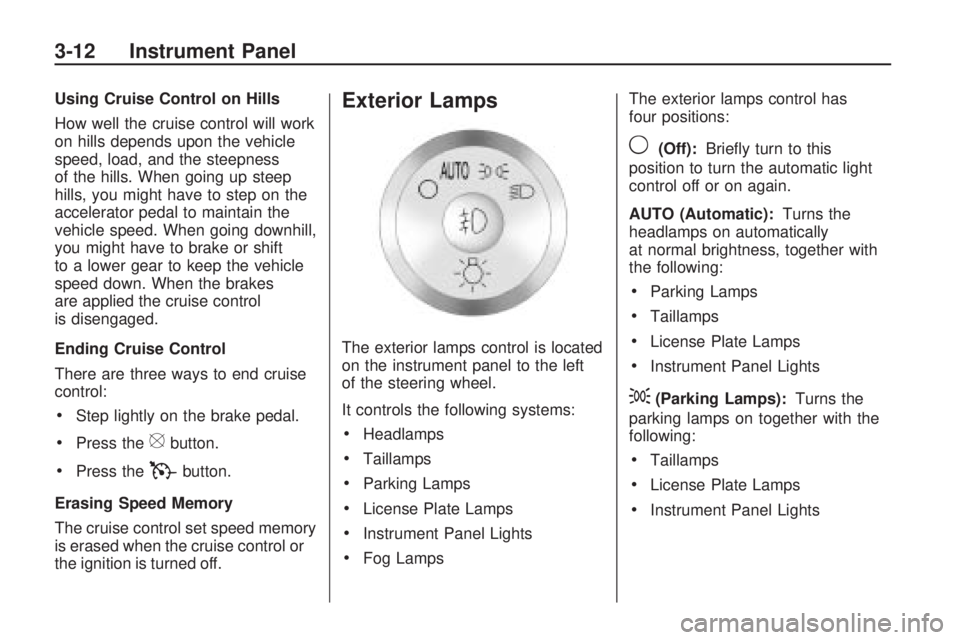
Exterior Lamps
The exterior lamps control is located
on the instrument panel to the left
of the steering wheel.
It controls the following systems:
Headlamps
Taillamps
Parking Lamps
License Plate Lamps
Instrument Panel Lights
Fog LampsThe exterior lamps control has
four positions:
9(Off):Briey turn to this
position to turn the automatic light
control off or on again.
AUTO (Automatic):Turns the
headlamps on automatically
at normal brightness, together with
the following:
Parking Lamps
Taillamps
License Plate Lamps
Instrument Panel Lights
;(Parking Lamps):Turns the
parking lamps on together with the
following:
Taillamps
License Plate Lamps
Instrument Panel Lights
3-12 Instrument Panel
Page 131 of 412

2(Headlamps):Turns the
headlamps on together with the
following lamps listed below.
A warning chime sounds if the
driver’s door is opened when the
ignition switch is off and the
headlamps are on.
Parking Lamps
Taillamps
License Plate Lamps
Instrument Panel Lights
#(Fog Lamps):Push the fog
lamps control in to turn on the
fog lamps.
SeeFog Lamps on page 3-14.
Delayed Headlamps
Delayed headlamps provide a period
of exterior lighting as you leave
the area around your vehicle. This
feature is activated when the
headlamps are on due to the
automatic headlamps control
feature, and when the ignition is
turned off. The headlamps remain
on until the exterior lamps control is
moved to the parking lamps
position or until the pre-selected
delayed headlamp lighting period
has ended.
If the ignition is turned off with the
headlamps switch in the parking
lamps or headlamps position,
the delayed headlamps cycle will
not occur.
To disable the delayed headlamps
feature or change the time of
delay, seeDIC Vehicle
Customization on page 3-57.
Daytime Running Lamps
(DRL)/Automatic
Headlamp System
Daytime Running Lamps (DRL) can
make it easier for others to see
the front of your vehicle during the
day. Fully functional daytime
running lamps are required on all
vehicles rst sold in Canada.
A light sensor on top of the
instrument panel makes the DRL
work, so do not cover the sensor.
The DRL system’s automatic control
makes the DRL lights come on when
the following conditions are met:
The ignition is in the ON/RUN
position.
The exterior lamps control is
in AUTO.
The engine is running.
Instrument Panel 3-13
Page 132 of 412

When the DRL are on, only the DRL
lights will be on. The headlamps,
taillamps, sidemarker, and other
lamps will not be on. The instrument
panel and cluster will also not be lit.
When it is dark enough outside, the
DRL lights will turn off and the
headlamps and parking lamps will
turn on. The other lamps that
come on with the headlamps will
also come on.
When it is bright enough outside,
the headlamps will go off and
the DRL will come on.
The regular headlamp system
should be turned on when it is
needed.Adaptive Forward
Lighting System
Vehicles with the Adaptive Forward
Lighting System (AFS) have
headlamps that swivel to the left or
right when making a turn to
provide better lighting. To enable
AFS, set the exterior lamp switch to
the AUTO position. Move the
switch out of the AUTO position to
turn off the system. SeeExterior
Lamps on page 3-12.
AFS operates when the vehicle
speed is greater than 2 mph
(3 km/h). AFS does not operate
when the transmission is in
R (Reverse). AFS is not immediately
operable after starting the vehicle;
driving a short distance is required
to calibrate the AFS.
Fog Lamps
Use the fog lamps for better vision
in foggy or misty conditions.
The fog lamps button is located on
the exterior lamps control to the
left of the steering column.
#(Fog Lamps):Press the exterior
lamps button to turn the fog lamps
on or off. A light comes on in
the instrument panel cluster when
the fog lamps are in use. The
ignition must be on for the fog lamps
to work.
When the headlamps are changed
to high-beam, the fog lamps will
turn off. The fog lamps come back
on again when the high-beam
headlamps are turned off.
Some localities have laws that
require the headlamps to be
on along with the fog lamps.
3-14 Instrument Panel
Page 140 of 412
The PASS indicator will turn off.
When the passenger temperature
setting is different than the
driver setting, the PASS indicator
comes on.
Manual Operation
The air delivery mode or fan speed
can be manually adjusted.
D/C(Fan Control):Press to
increase or decrease the fan speed.
Pressing
DorCwhile in automatic
control places the fan speed
under manual control.
The air delivery mode remains in
automatic control. The fan setting still
displays, but the word AUTO
no longer displays, and the AUTO
button indicator light turns off.
H/G(Air Delivery Mode
Control):Press to change the
direction of the airow in the vehicle.
Repeatedly press
HorGuntil the
desired mode appears on the
display. Pressing a mode buttonwhile the system is off changes the
air delivery mode without turning
the system on. Press a mode button
while in automatic control to place
the system into manual control.
The air delivery mode setting still
displays, but the word AUTO no
longer displays, and the AUTO
button indicator light turns off.
H(Vent):Air is directed to the
instrument panel outlets.
)(Bi-Level):Air is divided
between the instrument panel and
oor outlets. Some air is directed
towards the windshield and
side window outlets. Cooler air is
directed to the upper outlets
and warmer air to the oor outlets.
6(Floor):Air is directed to
the oor outlets, with some of the
air directed to the windshield,
side window, and second row oor
outlets. In this mode, the system
uses outside air.
-(Defog):This mode clears the
windows of fog or moisture. Air
is directed to the windshield, oor
outlets, and side window vents.
When this mode is selected,
the system turns off recirculation
and runs the air conditioning
compressor unless the outside
temperature is less than 40°F (4°C).
Do not drive the vehicle until all
the windows are clear.
0(Defrost):Press to turn the
defrost on or off. This mode quickly
clears the windshield of fog or frost.
Air is directed to the windshield, side
window, and oor vents. In this
mode, outside air is pulled inside the
vehicle. The air conditioning system
runs automatically in this setting,
unless the outside temperature is
less than 40°F (4°C).
Do not drive the vehicle until all the
windows are clear.
While in defrost mode, if the PASS
button is pressed, the PASS button
indicator ashes three times to show
3-22 Instrument Panel
Page 141 of 412

that the passenger climate control
system cannot be activated. If the
passenger temperature buttons are
adjusted while in defrost mode, the
driver temperature indicator will
change. The passenger temperature
will not be displayed.
@(Recirculation):Press to turn
the recirculation mode on or off.
An indicator light comes on
when recirculation is on. When the
engine is turned off, the recirculation
mode automatically turns off and
must be re-selected when the
engine is turned on again.
This mode recirculates and helps to
quickly cool the air inside the
vehicle. It can be used to prevent
outside air and odors from entering
the vehicle.
The recirculation mode cannot be
used with oor, defog, or defrosting
modes. If recirculation is selected
in these modes, the indicator ashes
three times and turns off. The air
conditioning compressor also comeson when this mode is activated.
While in recirculation mode
the windows can fog when the
weather is cold and damp. To clear
the fog, select either the defog
or defrost mode and increase the
fan speed.Air Conditioning
#(Air Conditioning):Press to
turn the air conditioning (A/C)
on and off. An indicator light comes
on when A/C is on.
The A/C does not work when the
outside temperature is below
40°F (4°C). If
#is pressed the
indicator ashes three times
and turns off to show that the
A/C mode is not available. If the
A/C is on and the outside
temperature drops below a
temperature which is too cool for air
conditioning to be effective, the
A/C indicator turns off to show that
the A/C mode has been canceled.On hot days, open the windows
briey to let hot inside air escape.
This helps reduce the time it
takes for the interior of the vehicle
to cool down.
The air conditioning system removes
moisture from the air, so a small
amount of water might drip under the
vehicle while idling or after turning off
the engine. This is normal.
Rear Window Defogger
The rear window defogger uses a
warming grid to remove fog from the
rear window.
<(Rear Window Defogger):
Press to turn the rear window
defogger on or off. The rear window
defogger stays on for about
10 minutes, before turning off. The
defogger also turns off when the
engine is turned off. Do not drive
the vehicle until all the windows
are clear.
Instrument Panel 3-23
Page 157 of 412

If this has been done and the
vehicle still does not pass the
inspection for lack of OBD II
system readiness, your dealer/
retailer can prepare the vehicle for
inspection.
Oil Pressure Light
{CAUTION
Do not keep driving if the oil
pressure is low. The engine can
become so hot that it catches re.
Someone could be burned. Check
the oil as soon as possible and
have the vehicle serviced.
Notice:Lack of proper engine oil
maintenance can damage the
engine. The repairs would not be
covered by the vehicle warranty.
Always follow the maintenance
schedule in this manual for
changing engine oil.The oil pressure light should come
on briey as the engine is started.
If it does not come on have the
vehicle serviced by your
dealer/retailer.
If the light comes on and stays on, it
means that oil is not owing through
the engine properly. The vehicle
could be low on oil and might have
some other system problem.
Security Light
This light ashes when the security
system is activated.
For more information, see
Theft-Deterrent Systems on
page 2-16.
Fog Lamp Light
The fog lamp light comes on when
the fog lamps are in use.
The light goes out when the fog
lamps are turned off. SeeFog Lamps
on page 3-14for more information.
Instrument Panel 3-39