audio BUICK ENCLAVE 2011 User Guide
[x] Cancel search | Manufacturer: BUICK, Model Year: 2011, Model line: ENCLAVE, Model: BUICK ENCLAVE 2011Pages: 388, PDF Size: 5.26 MB
Page 152 of 388
Black plate (2,1)Buick Verano Owner Manual - 2012 - CRC - 1/10/12
7-2 Infotainment System
.Set up the tone, speaker
adjustments, and preset radio
stations.
For more information, see Defensive
Driving on page 9‑3.
The vehicle has Retained
Accessory Power (RAP). With RAP,
the audio system can be played
even after the ignition is turned off.
See Retained Accessory Power
(RAP) on page 9‑22 for more
information.
Navigation/Radio System
For vehicles with a navigation radio
system, see the separate navigation
manual.
Theft-Deterrent Feature
The theft-deterrent feature works by
learning a portion of the Vehicle
Identification Number (VIN) to
the infotainment system. The
infotainment system does not
operate if it is stolen or moved to a
different vehicle.
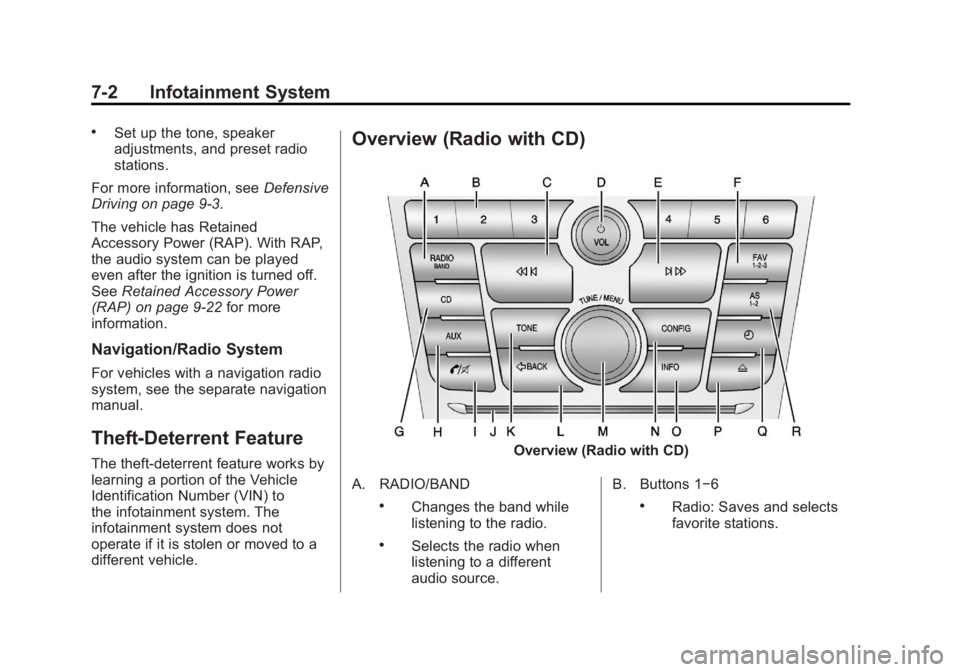
Overview (Radio with CD)
Overview (Radio with CD)
A. RADIO/BAND
.Changes the band while
listening to the radio.
.Selects the radio when
listening to a different
audio source. B. Buttons 1−6
.Radio: Saves and selects
favorite stations.
Page 153 of 388

Black plate (3,1)Buick Verano Owner Manual - 2012 - CRC - 1/10/12
Infotainment System 7-3
C.s©(Previous/Reverse)
.Radio: Seeks the previous
station.
.CD: Selects the previous
track or rewinds within a
track.
D.
O/VOL (Power/Volume)
.Turns the system on or off
and adjusts the volume.
E.
¨ \(Next/Forward)
.Radio: Seeks the next
station.
.CD: Selects the next track
or fast forwards within a
track.
F. FAV 1-2-3 (Favorites Page)
.Radio: Opens the
favorites list.
G. CD
.Selects the CD player. H. AUX (Auxiliary)
.Selects an external audio
source.
I.
V/8(Phone/Mute)
.Opens the phone
main menu.
.Mutes the audio system.
J. CD Slot
.Insert a CD.
K. TONE
.Opens the tone menu.
L.
/BACK
.Menu: Moves one
level back.
.Character Input: Deletes
the last character.
M. TUNE/MENU
.Turn to open menus,
highlight menu items,
or set numeric values while
in a menu.
.Press to select menu
items.
.Radio: Manually selects
radio stations.
.CD: Selects tracks.
N. CONFIG (Configuration)
.Opens the settings menu.
O. INFO (Information)
.Radio: Shows available
information about the
current station.
.CD: Shows available
information about the
current track.
P.
Z(Eject)
.Removes a disc from the
CD slot.
Q.
H(Clock)
.Opens the clock menu.
R. AS 1-2 (Autostore)
.Radio: Opens the auto
store stations list.
Page 155 of 388

Black plate (5,1)Buick Verano Owner Manual - 2012 - CRC - 1/10/12
Infotainment System 7-5
C.s©(Previous/Reverse)
.Press to seek to the
beginning of the current or
previous track. If the track
has been playing for less
than five seconds, it seeks
the previous track. If longer
than five seconds, the
current track starts from
the beginning.
.Press and hold to quickly
reverse through a track.
Release the button to
return to playing speed.
See CD Player on
page 7‑22 andMP3 on
page 7‑25 for more
information.
.For AM, FM, or XM (if
equipped), press to seek to
the previous strong station. D.
O/VOL (Power/Volume)
.Press to turn the system
on and off.
.Turn to adjust the volume.
E.
¨ \(Next/Forward)
.Press to seek the next
track.
.Press and hold to fast
forward through a track.
.Release the button to
return to playing speed.
See CD Player on
page 7‑22 andMP3 on
page 7‑25 for more
information.
.For AM, FM, or XM (if
equipped), press to seek to
the next strong station. F. FAV 1-2-3 (Favorites Page)
.Press to display the
current page number
above the preset buttons.
The stored stations for
each list display on the
touch-sensitive preset
buttons at the bottom of
the screen. The number
of preset FAV lists
can be changed in the
Configuration Menu.
G. SRCE (Source)
.Press to change the audio
sources such as AM-FM
Radio, XM™ (if equipped),
CD, and AUX.
H.
p/j(Play/Pause)
.Press to start, pause, and
resume playback. See CD
Player on page 7‑22 and
MP3 on page 7‑25 for
more information.
Page 156 of 388

Black plate (6,1)Buick Verano Owner Manual - 2012 - CRC - 1/10/12
7-6 Infotainment System
I.V/8(Phone/Mute)
.SeeBluetooth
(Infotainment Controls) on
page 7‑31 orBluetooth
(Overview) on page 7‑30
or Bluetooth (Voice
Recognition) on page 7‑35
for more information.
J. CD Slot
K. TONE
.Press to access the sound
menu screen to adjust
bass, midrange, and treble.
See AM-FM Radio on
page 7‑12 for more
information.
L.
/BACK
.Press to return to the
previous screen in a menu.
.If on a page accessed
directly by a faceplate
button or Home Page
screen button,
pressing
/BACK will
go to the previous menu. M. TUNE/MENU
.Turn to highlight a feature.
Press to activate the
highlighted feature.
.Turn to manually change
the radio station.
N. CONFIG (Configuration)
.Press to adjust features
for radio, display, phone,
vehicle, and time.
O. INFO (Information)
.Press to scroll through an
audio information screen.
P.
Z(Eject)
.Press to eject a disc from
the CD player. See CD
Player on page 7‑22.
Q.
H(Clock)
.Press to set the time.
R. AS 1-2 (Autostore)
Touch Screen Buttons
Touch screen buttons are on the
screen and highlighted when a
feature is available. Some screen
buttons highlight when active and
gray out when inactive.
Home Page
The infotainment system displays a
home page that makes accessing
many of the features an easy
process.
Back: If on page 2 of the Home
Page, press Back to return to
page 1 of the Home Page. If on
page 1, Back serves no function.
Home: While navigating through
other menus, press to go back to
the Home Page to start a different
feature.
Fav: Press to display a page of
stored (favorite) AM, FM, or XM (if
equipped) stations. Keep pressing
Fav to scroll through the favorite
pages.
Page 157 of 388
Black plate (7,1)Buick Verano Owner Manual - 2012 - CRC - 1/10/12
Infotainment System 7-7
Info:Press to toggle through an
audio information screen.
The Home Page Menu lists the
options Customize Home Page and
Restore Home Page Defaults.
Out of all available Home Page
icons, up to eight icons can be
selected and sorted for the first
Home Page screen.
Home Page Features
Various functions are disabled when
the vehicle is moving.
Press the Now Playing screen
button to display the active source
page. The sources available are
AM, FM, XM (if equipped), CD,
USB/iPod, and AUX.
See AM-FM Radio on page 7‑12,
Satellite Radio on page 7‑17, and
Auxiliary Devices on page 7‑26.
Press the Phone screen button to
display the Phone main page. See
Bluetooth (Infotainment Controls) on page 7‑31
orBluetooth (Overview)
on page 7‑30 orBluetooth (Voice
Recognition) on page 7‑35.
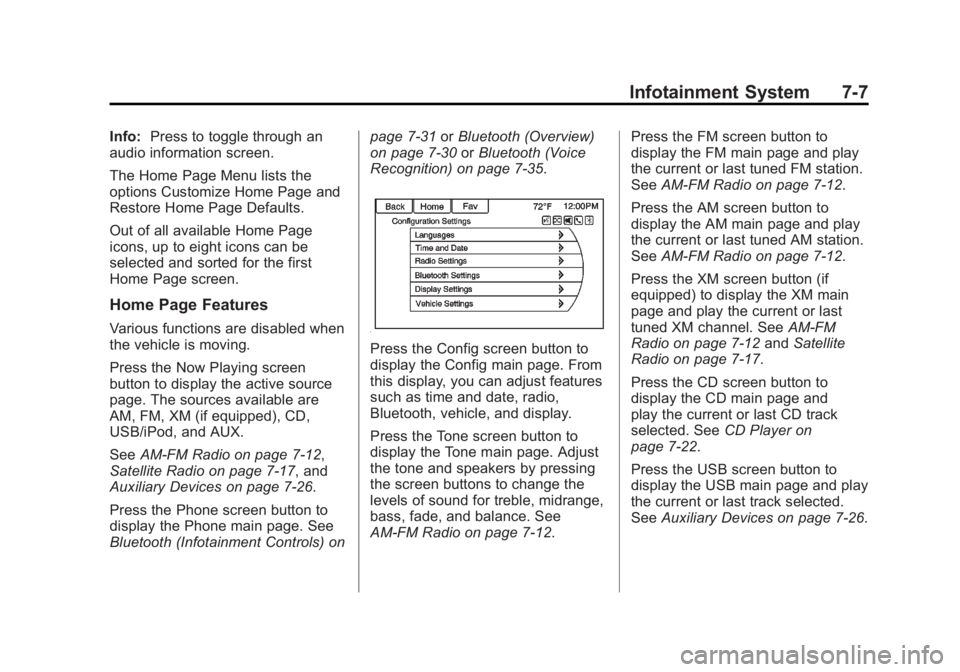
Press the Config screen button to
display the Config main page. From
this display, you can adjust features
such as time and date, radio,
Bluetooth, vehicle, and display.
Press the Tone screen button to
display the Tone main page. Adjust
the tone and speakers by pressing
the screen buttons to change the
levels of sound for treble, midrange,
bass, fade, and balance. See
AM-FM Radio on page 7‑12. Press the FM screen button to
display the FM main page and play
the current or last tuned FM station.
See
AM-FM Radio on page 7‑12.
Press the AM screen button to
display the AM main page and play
the current or last tuned AM station.
See AM-FM Radio on page 7‑12.
Press the XM screen button (if
equipped) to display the XM main
page and play the current or last
tuned XM channel. See AM-FM
Radio on page 7‑12 andSatellite
Radio on page 7‑17.
Press the CD screen button to
display the CD main page and
play the current or last CD track
selected. See CD Player on
page 7‑22.
Press the USB screen button to
display the USB main page and play
the current or last track selected.
See Auxiliary Devices on page 7‑26.
Page 161 of 388
Black plate (11,1)Buick Verano Owner Manual - 2012 - CRC - 1/10/12
Infotainment System 7-11
Turning a Function On or Off
1. Turn the TUNE/MENU knob tohighlight the function.
2. Press the TUNE/MENU knob to turn the function on or off.
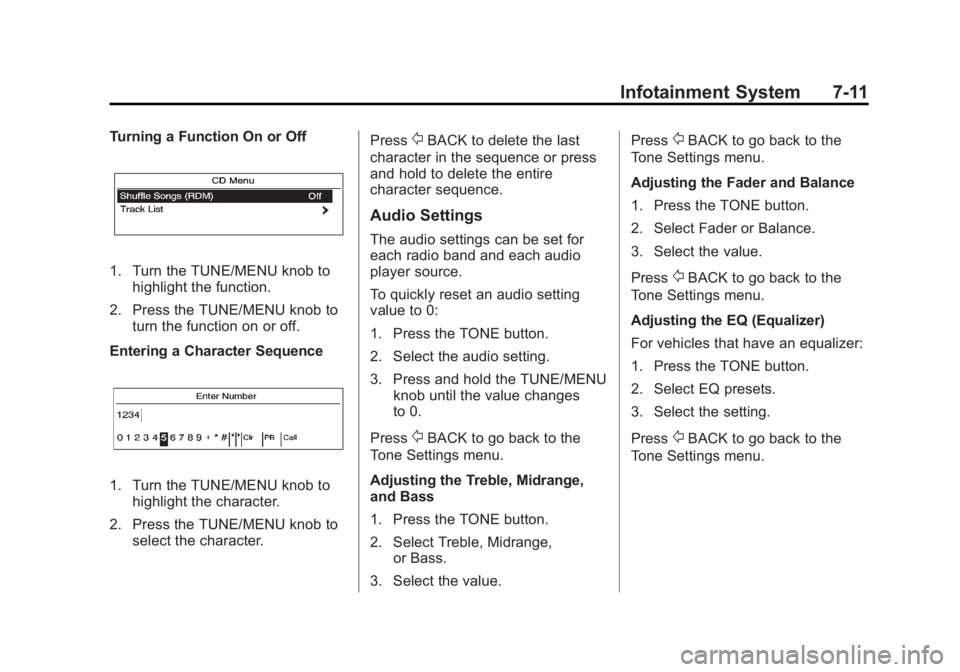
Entering a Character Sequence
1. Turn the TUNE/MENU knob to highlight the character.
2. Press the TUNE/MENU knob to select the character. Press
/BACK to delete the last
character in the sequence or press
and hold to delete the entire
character sequence.
Audio Settings
The audio settings can be set for
each radio band and each audio
player source.
To quickly reset an audio setting
value to 0:
1. Press the TONE button.
2. Select the audio setting.
3. Press and hold the TUNE/MENU knob until the value changes
to 0.
Press
/BACK to go back to the
Tone Settings menu.
Adjusting the Treble, Midrange,
and Bass
1. Press the TONE button.
2. Select Treble, Midrange, or Bass.
3. Select the value. Press
/BACK to go back to the
Tone Settings menu.
Adjusting the Fader and Balance
1. Press the TONE button.
2. Select Fader or Balance.
3. Select the value.
Press
/BACK to go back to the
Tone Settings menu.
Adjusting the EQ (Equalizer)
For vehicles that have an equalizer:
1. Press the TONE button.
2. Select EQ presets.
3. Select the setting.
Press
/BACK to go back to the
Tone Settings menu.
Page 162 of 388

Black plate (12,1)Buick Verano Owner Manual - 2012 - CRC - 1/10/12
7-12 Infotainment System
System Settings
Configuring the Number of
Favorite Pages
To configure the number of available
favorite pages:
1. Press the CONFIG button.
2. Select Radio Settings.
3. Select Radio Favorites.
4. Select the number of availablefavorite pages.
5. Press
/BACK to go back to the
System Configuration menu.
Auto Volume
The auto volume feature
automatically adjusts the radio
volume to compensate for road and
wind noise as the vehicle speeds up
or slows down, so that the volume
level is consistent. The level of volume compensation
can be selected, or the auto volume
feature can be turned off.
1. Press the CONFIG button.
2. Select Radio Settings.
3. Select Auto Volume.
4. Select the setting.
5. Press
/BACK to go back to the
System Configuration menu.
Maximum Startup Volume
The maximum volume played when
the radio is first turned on can
be set.
1. Press the CONFIG button.
2. Select Radio Settings.
3. Select Maximum Startup Volume.
4. Select the setting.
5. Press
/BACK to go back to the
System Configuration menu.
Radio
AM-FM Radio
For vehicles equipped with the
MyLink or IntelliLink infotainment
system, see the separate MyLink/
IntelliLink Features and Functions
Guide for more information.
Control Buttons
The buttons used to control the
radio are:
O/VOL (Power/Volume):
.Press to turn the radio on or off.
.Turn the knob to increase or
decrease the volume. The
volume is adjusted for the
current audio source or voice
prompts.
RADIO/BAND (Radio with CD
Only): Press to turn the radio on
and choose between AM, FM, and
XM™, if equipped.
Page 163 of 388
Black plate (13,1)Buick Verano Owner Manual - 2012 - CRC - 1/10/12
Infotainment System 7-13
TUNE/MENU:Turn to navigate the
available menus and to search for
stations.
INFO: Press to display additional
information that may be available for
the current song.
s ©or¨\: Press to search for
stations.
FAV 1-2-3: Press to open the
favorites list and select the
favorites page.
Buttons 1−6: Press to select
preset stations.
AS 1-2 (Autostore): Press to open
the autostore list.
SRCE (Source/Radio with CD and
Touchscreen Only): Press to
select the AM, FM, or XM (if
equipped) band.
The audio sources can also be
changed by using the steering
wheel controls. See Steering Wheel
Controls on page 5‑2 for more
information.
Radio Menus (Radio with CD)
Radio menus are available for AM
and FM.
Turn the TUNE/MENU knob to open
the main radio menu for that band.
Selecting a Band
Press the RADIO/BAND button to
choose AM, FM, or XM, if equipped.
The last station that was playing
starts playing again.
Selecting a Station
Seek Tuning
If the radio station is not known:
Briefly press
s ©or¨\to
automatically search for the next
available station. If a station is not
found, the radio switches to a more
sensitive search level. If a station
still is not found, the frequency that
was last active begins to play. If the radio station is known:
Press and hold
s
©or¨\until
the station on the display is
reached, then release the button.
Manual Tuning
Turn the TUNE/MENU knob to
select the frequency on the display.
Favorites List
1. Turn the TUNE/MENU knob.
2. Select Favorites List.
3. Select the station.
Station Lists
1. Turn the TUNE/MENU knob.
2. Select AM or FM Station List. All receivable stations in the current
reception area are displayed. If a
station list has not been created,
an automatic station search
is done.
3. Select the station.
Page 165 of 388
Black plate (15,1)Buick Verano Owner Manual - 2012 - CRC - 1/10/12
Infotainment System 7-15
To adjust the speaker balance:
.Press L (Left) or R (Right) to
change from the left or right
speakers.
EQ Settings
EQ (Equalization): The EQ
settings are selected through the
sound menu. EQ provides a choice
of Manual or Talk. Turn the TUNE/
MENU knob to highlight. Press
TUNE/MENU to select Manual
or Talk.
Radio Settings
To access the Radio Settings menu:
1. Press the CONFIG button.
2. Turn the TUNE/MENU knob until
Radio Settings displays. Press
the TUNE/MENU knob to display
other options within that feature.
Audio system settings or features
can be customized for:
.Audio Cue Options
.Auto Volume
.Gracenote Options
.Startup Volume
.Number of Favorite Pages
.XM Categories
.RDS
.Software Version Menus
Audio Cue Options: Audio Cue
Volume: Press + or - or turn the
TUNE/MENU knob to increase or
decrease the audio cue volume.
Turn the TUNE/MENU knob to On
or Off to turn Audio Cues on or off.
Auto Volume: Turn the TUNE/
MENU knob to select volume Off,
Low, Medium, or High.
Gracenote Options: Press the
TUNE/MENU knob to turn
Normalization on or off.
Startup Volume: Press + or - or
turn the TUNE/MENU knob to
increase or decrease the
infotainment startup volume. Number of Favorite Pages:
Turn
the TUNE/MENU knob to highlight
the number of favorites. Press the
TUNE/MENU knob to select.
XM Categories: If equipped, turn
the TUNE/MENU knob to highlight
the category. Press the TUNE/
MENU knob to select. Turn the
TUNE/MENU knob to Show all XM
Categories to display all categories.
RDS: Press the TUNE/MENU knob
to turn RDS on or off.
Software Version Menus: Turn the
TUNE/MENU knob to highlight the
menu. Press the TUNE/MENU knob
to select software menu.
Finding a Station
Select a band such as AM, FM,
or XM (if equipped).
Turn the TUNE/MENU knob to find
a radio station. To select a preset
station, press the corresponding
preset button.
See “Mixed-Band Presets” following
for more information.
Page 167 of 388
Black plate (17,1)Buick Verano Owner Manual - 2012 - CRC - 1/10/12
Infotainment System 7-17
Radio Data System (RDS)
The audio system has a Radio Data
System (RDS). RDS features are
available for use only on FM
stations that broadcast RDS
information. With RDS, the
radio can:
.Seek to stations broadcasting
the selected type of
programming.
.Receive announcements
concerning local and national
emergencies.
.Display messages from radio
stations.
This system relies on receiving
specific information from these
stations and only works when the
information is available. In rare
cases, a radio station could
broadcast incorrect information that
causes the radio features to work
improperly. If this happens, contact
the radio station. The RDS system is always on.
When information is broadcast from
the current FM station, the station
name or call letters display on the
audio screen. RDS can provide a
program type (PTY) for current
programming and the name of the
program being broadcast.
Satellite Radio
For vehicles equipped with the
MyLink or IntelliLink infotainment
system, see the separate MyLink/
IntelliLink Features and Functions
Guide for more information.
Vehicles with an XM Satellite Radio
tuner and a valid XM Satellite Radio
subscription can receive XM
programming.
XM Satellite Radio Service
XM is a satellite radio service based
in the 48 contiguous United States
and 10 Canadian provinces. XM
Satellite Radio has a wide variety of
programming and commercial-free
music, coast to coast, and indigital-quality sound. A service
fee is required to receive the XM
service. If XM service needs to be
reactivated, the radio will display
"No Subscription Please Renew" on
channel XM1. For more information,
contact XM at www.xmradio.com
or 1-800-929-2100 in the U.S.,
and www.xmradio.ca or
1-877-438-9677 in Canada.
Control Buttons
The buttons used to control the XM
radio are:
RADIO/BAND or SRCE (Source):
Press to turn the radio on and
choose between AM, FM, and XM.
s
©or¨\: Press to go to the
previous or next channel.
FAV 1-2-3: Press to open the
favorites list.
Buttons 1−6: Press to select a
favorite.
TUNE/MENU: Turn to select a
channel.