steering wheel BUICK ENCLAVE 2011 Owner's Guide
[x] Cancel search | Manufacturer: BUICK, Model Year: 2011, Model line: ENCLAVE, Model: BUICK ENCLAVE 2011Pages: 388, PDF Size: 5.26 MB
Page 181 of 388
Black plate (31,1)Buick Verano Owner Manual - 2012 - CRC - 1/10/12
Infotainment System 7-31
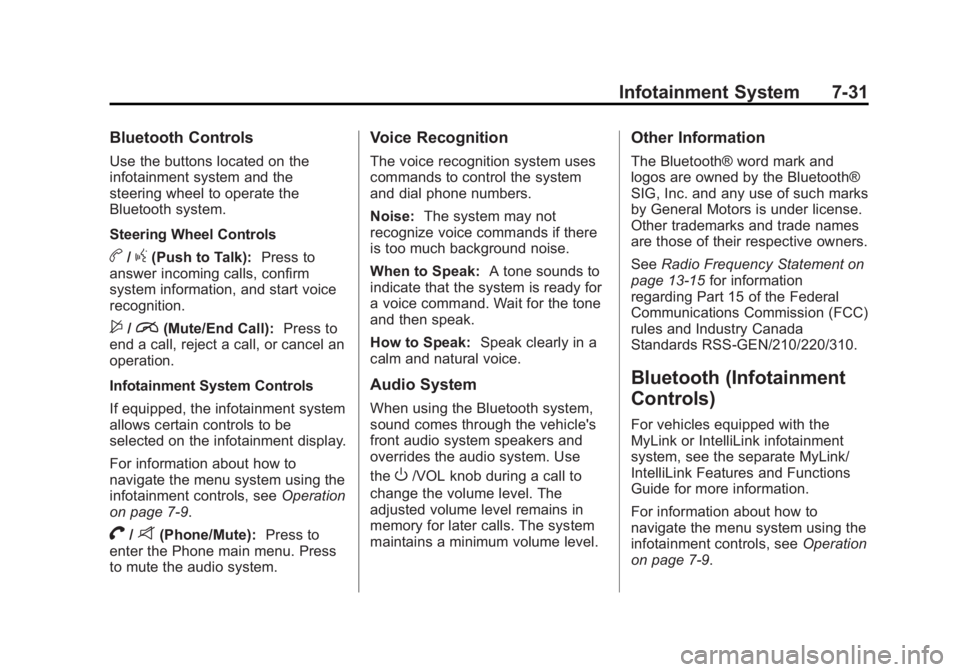
Bluetooth Controls
Use the buttons located on the
infotainment system and the
steering wheel to operate the
Bluetooth system.
Steering Wheel Controls
b/g(Push to Talk):Press to
answer incoming calls, confirm
system information, and start voice
recognition.
$/i(Mute/End Call): Press to
end a call, reject a call, or cancel an
operation.
Infotainment System Controls
If equipped, the infotainment system
allows certain controls to be
selected on the infotainment display.
For information about how to
navigate the menu system using the
infotainment controls, see Operation
on page 7‑9.
V/8(Phone/Mute): Press to
enter the Phone main menu. Press
to mute the audio system.
Voice Recognition
The voice recognition system uses
commands to control the system
and dial phone numbers.
Noise: The system may not
recognize voice commands if there
is too much background noise.
When to Speak: A tone sounds to
indicate that the system is ready for
a voice command. Wait for the tone
and then speak.
How to Speak: Speak clearly in a
calm and natural voice.
Audio System
When using the Bluetooth system,
sound comes through the vehicle's
front audio system speakers and
overrides the audio system. Use
the
O/VOL knob during a call to
change the volume level. The
adjusted volume level remains in
memory for later calls. The system
maintains a minimum volume level.
Other Information
The Bluetooth® word mark and
logos are owned by the Bluetooth®
SIG, Inc. and any use of such marks
by General Motors is under license.
Other trademarks and trade names
are those of their respective owners.
See Radio Frequency Statement on
page 13‑15 for information
regarding Part 15 of the Federal
Communications Commission (FCC)
rules and Industry Canada
Standards RSS-GEN/210/220/310.
Bluetooth (Infotainment
Controls)
For vehicles equipped with the
MyLink or IntelliLink infotainment
system, see the separate MyLink/
IntelliLink Features and Functions
Guide for more information.
For information about how to
navigate the menu system using the
infotainment controls, see Operation
on page 7‑9.
Page 186 of 388
Black plate (36,1)Buick Verano Owner Manual - 2012 - CRC - 1/10/12
7-36 Infotainment System
To use voice recognition, press
the
b/gbutton located on the
steering wheel. Use the commands
below for the various voice features.
For additional information say
"Help" while you are in a voice
recognition menu.
Pairing
A Bluetooth-enabled cell phone
must be paired to the Bluetooth
system and then connected to the
vehicle before it can be used. See
your cell phone manufacturer's user
guide for Bluetooth functions before
pairing the cell phone. If a Bluetooth
phone is not connected, calls will be
made using OnStar Hands-Free
Calling, if available. See OnStar
Overview on page 14‑1 for more
information. Pairing Information
.A Bluetooth phone with MP3
capability cannot be paired to
the vehicle as a phone and an
MP3 player at the same time.
.Up to five cell phones can be
paired to the Bluetooth system.
.The pairing process is disabled
when the vehicle is moving.
.Pairing only needs to be
completed once, unless the
pairing information on the cell
phone changes or the cell phone
is deleted from the system.
.Only one paired cell phone can
be connected to the Bluetooth
system at a time.
.If multiple paired cell phones are
within range of the system, the
system connects to the first
available paired cell phone in the
order that they were first paired
to the system. To link to a
different paired phone, see
“Linking to a Different Phone”
later in this section.Pairing a Phone
1. Press
b/g. The system
responds “Ready,”followed by
a tone.
2. Say “Bluetooth.” This command
can be skipped.
3. Say “Pair.”The system responds
with instructions and a four-digit
Personal Identification Number
(PIN). The PIN is used in Step 5.
4. Start the pairing process on the cell phone that you want to pair.
For help with this process, see
your cell phone manufacturer's
user guide.
5. Locate the device named “Your
Vehicle” in the list on the cell
phone. Follow the instructions
on the cell phone to enter the
PIN provided in Step 3. After the
PIN is successfully entered, the
system prompts you to provide a
name for the paired cell phone.
Page 199 of 388
Black plate (3,1)Buick Verano Owner Manual - 2012 - CRC - 1/10/12
Climate Controls 8-3
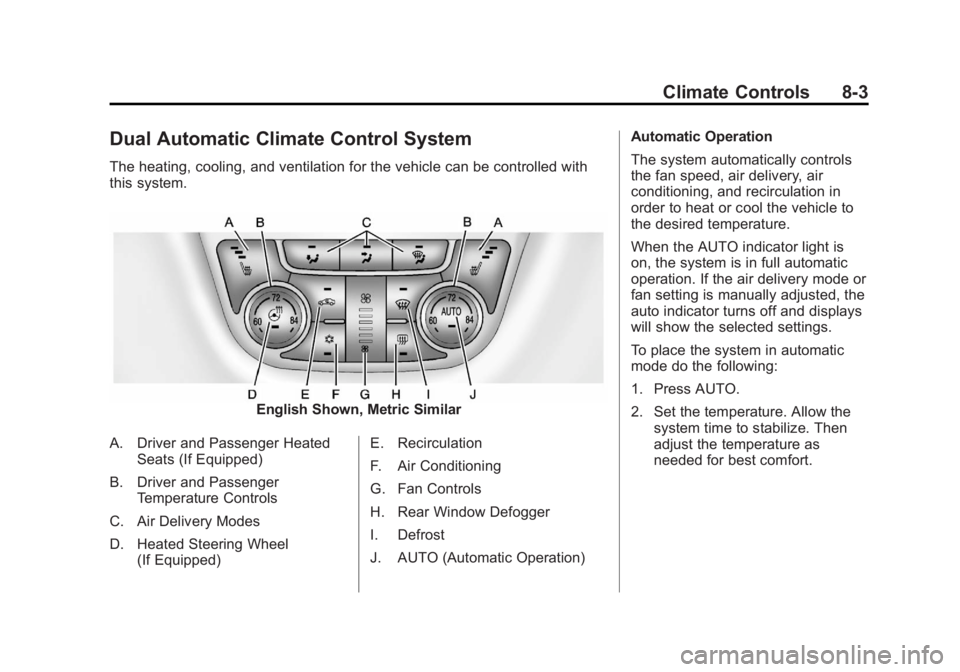
Dual Automatic Climate Control System
The heating, cooling, and ventilation for the vehicle can be controlled with
this system.
English Shown, Metric Similar
A. Driver and Passenger Heated Seats (If Equipped)
B. Driver and Passenger Temperature Controls
C. Air Delivery Modes
D. Heated Steering Wheel (If Equipped) E. Recirculation
F. Air Conditioning
G. Fan Controls
H. Rear Window Defogger
I. Defrost
J. AUTO (Automatic Operation) Automatic Operation
The system automatically controls
the fan speed, air delivery, air
conditioning, and recirculation in
order to heat or cool the vehicle to
the desired temperature.
When the AUTO indicator light is
on, the system is in full automatic
operation. If the air delivery mode or
fan setting is manually adjusted, the
auto indicator turns off and displays
will show the selected settings.
To place the system in automatic
mode do the following:
1. Press AUTO.
2. Set the temperature. Allow the
system time to stabilize. Then
adjust the temperature as
needed for best comfort.
Page 201 of 388
Black plate (5,1)Buick Verano Owner Manual - 2012 - CRC - 1/10/12
Climate Controls 8-5
system does not detect possible
window fogging, it returns to normal
operation. To turn Auto Defog off or
on, see "Climate and Air Quality"
underVehicle Personalization on
page 5‑30.
Rear Window Defogger
=(Rear Window Defogger):
Press to turn the rear window
defogger on or off.
The rear window defogger turns
off automatically after about
10 minutes. If turned on again it
runs for about five minutes before
turning off.
The rear window defogger can be
set to automatic operation; see
“Climate and Air Quality” under
Vehicle Personalization on
page 5‑30. When auto rear defog is
selected, the rear window defogger
turns on automatically when the
interior temperature is cold and the
outside temperature is about 4°C
(40°F) and below. The auto rear
defogger turns off automatically after about 10 minutes. At higher
speeds, the rear window defogger
may stay on continuously.
For vehicles with heated outside
rearview mirrors, they turn on when
the rear window defogger button is
on and help to clear fog or frost from
the surface of the mirrors. See
Heated Mirrors on page 2‑17.
Notice:
Do not try to clear frost
or other material from the inside
of the front windshield and rear
window with a razor blade or
anything else that is sharp. This
may damage the rear window
defogger grid and affect the
radio's ability to pick up stations
clearly. The repairs would not be
covered by the vehicle warranty.
MorL(Heated Seats, If
Equipped): Press to turn the
heated seats on or off. See Heated
Front Seats on page 3‑6.
((Heated Steering Wheel, If
Equipped): Press to turn the
heated steering wheel on or off.
See Heated Steering Wheel on
page 5‑3.
Remote Start Climate Control
Operation: For vehicles with the
remote vehicle start feature, the
climate control system may run
when the vehicle is started remotely.
The system will default to a heating
or cooling mode depending on the
outside temperature and then go
back to the previous settings. See
Remote Vehicle Start on page 2‑8.
The rear window defogger turns on
if it is cold outside.
Page 206 of 388

Black plate (4,1)Buick Verano Owner Manual - 2012 - CRC - 1/10/12
9-4 Driving and Operating
If the engine stops, there will be
some power brake assist but it will
be used when the brake is applied.
Once the power assist is used up, it
can take longer to stop and the
brake pedal will be harder to push.
Steering
Electric Power Steering
Your vehicle has electric power
steering. It does not have power
steering fluid. Regular maintenance
is not required.
If power steering assist is lost due
to a system malfunction, the vehicle
can be steered, but may require
increased effort.
If the steering wheel is turned in
either direction several times until
it stops, or it is held until it is
stopped for an extended time,
power steering assist should return
shortly after a few normal steering
movements.See specific vehicle steering
messages under
Vehicle Messages
on page 5‑25.
See your dealer if there is a
problem.
Curve Tips
.Take curves at a reasonable
speed.
.Reduce speed before entering a
curve, while the front wheels are
straight.
.Adjust speed so you can drive
through the curve. Maintain a
reasonable, steady speed.
.Wait until out of the curve before
accelerating gently into the
straightaway.
Steering in Emergencies
There are times when steering
can be more effective than braking.
For example, you come over a hill
and find a truck stopped in the lane,
or a child darts out from between
parked cars and stops right in front
of you. These problems can be
avoided by braking —if you can
stop in time.
If you cannot fully stop, follow these
suggestions:
.Quickly apply the brakes to
remove as much speed as
possible from a collision.
.Steer around the problem, to
the left or right depending on
available space.
.Straighten the wheel once you
have avoided the object.
Page 207 of 388

Black plate (5,1)Buick Verano Owner Manual - 2012 - CRC - 1/10/12
Driving and Operating 9-5
Off-Road Recovery
The vehicle's right wheels can drop
off the edge of a road onto the
shoulder while driving. Follow
these tips:
1. Ease off the accelerator andthen, if there is nothing in the
way, steer the vehicle so that
it straddles the edge of the
pavement. 2. Turn the steering wheel about
one-eighth of a turn, until the
right front tire contacts the
pavement edge.
3. Then turn the steering wheel to go straight down the roadway.
Loss of Control
Skidding
There are three types of skids that
correspond to the vehicle's three
control systems:
.Braking Skid —wheels are not
rolling.
.Steering or Cornering
Skid —too much speed or
steering in a curve causes tires
to slip and lose cornering force.
.Acceleration Skid —too much
throttle causes the driving
wheels to spin. Defensive drivers avoid most skids
by taking reasonable care suited to
existing conditions, and by not
overdriving those conditions. But
skids are always possible.
If the vehicle starts to slide, follow
these suggestions:
.Ease your foot off the
accelerator pedal and quickly
steer the way you want the
vehicle to go. The vehicle may
straighten out. Be ready for a
second skid if it occurs.
.Slow down and adjust your
driving according to weather
conditions. Stopping distance
can be longer and vehicle
control can be affected when
traction is reduced by water,
snow, ice, gravel, or other
material on the road. Learn to
recognize warning clues
—such
as enough water, ice, or packed
snow on the road to make a
mirrored surface —and slow
down when you have any doubt.
Page 210 of 388

Black plate (8,1)Buick Verano Owner Manual - 2012 - CRC - 1/10/12
9-8 Driving and Operating
Drive with caution, whatever the
condition. Accelerate gently so
traction is not lost. Accelerating too
quickly causes the wheels to spin
and makes the surface under the
tires slick, so there is even less
traction.
Try not to break the fragile traction.
If you accelerate too fast, the drive
wheels will spin and polish the
surface under the tires even more.
TheAntilock Brake System (ABS)
on page 9‑30 improves vehicle
stability during hard stops on
slippery roads, but apply the brakes
sooner than when on dry pavement.
Allow greater following distance on
any slippery road and watch for
slippery spots. Icy patches can
occur on otherwise clear roads in
shaded areas. The surface of a
curve or an overpass can remain icy when the surrounding roads are
clear. Avoid sudden steering
maneuvers and braking while
on ice.
Turn off cruise control on slippery
surfaces.
Blizzard Conditions
Being stuck in snow can be a
serious situation. Stay with the
vehicle unless there is help nearby.
If possible, use the
Roadside
Assistance Program on page 13‑5.
To get help and keep everyone in
the vehicle safe:
.Turn on the hazard warning
flashers.
.Tie a red cloth to an outside
mirror.
{WARNING
Snow can trap engine exhaust
under the vehicle. This may
cause exhaust gases to get
inside. Engine exhaust contains
carbon monoxide (CO) which
cannot be seen or smelled. It can
cause unconsciousness and even
death.
If the vehicle is stuck in the snow:
.Clear away snow from around
the base of your vehicle,
especially any that is blocking
the exhaust pipe.
.Check again from time to
time to be sure snow does
not collect there.
.Open a window about 5 cm
(2 in) on the side of the
vehicle that is away from the
wind to bring in fresh air.
(Continued)
Page 212 of 388
Black plate (10,1)Buick Verano Owner Manual - 2012 - CRC - 1/10/12
9-10 Driving and Operating
Rocking the Vehicle to Get
it Out
Turn the steering wheel left and
right to clear the area around the
front wheels. Turn off any traction
system. Shift back and forth
between R (Reverse) and a forward
gear, or with a manual transmission,
between 1 (First) or 2 (Second) and
R (Reverse), spinning the wheels
as little as possible. To prevent
transmission wear, wait until the
wheels stop spinning before shifting
gears. Release the accelerator
pedal while shifting, and press
lightly on the accelerator pedal
when the transmission is in gear.
Slowly spinning the wheels in the
forward and reverse directions
causes a rocking motion that could
free the vehicle. If that does not get
the vehicle out after a few tries, it
might need to be towed out. If the
vehicle does need to be towed
out, seeTowing the Vehicle on
page 10‑67.
Vehicle Load Limits
It is very important to know how
much weight the vehicle can
carry. This weight is called the
vehicle capacity weight and
includes the weight of all
occupants, cargo, and all
nonfactory‐installed options.
Two labels on the vehicle show
how much weight it may
properly carry, the Tire and
Loading Information label and
the Certification label.
{WARNING
Do not load the vehicle any
heavier than the Gross
Vehicle Weight Rating
(GVWR), or either the
maximum front or rear Gross
Axle Weight Rating (GAWR).
This can cause systems to
break and change the way the
(Continued)
WARNING (Continued)
vehicle handles. This could
cause loss of control and a
crash. Overloading can also
shorten the life of the vehicle.
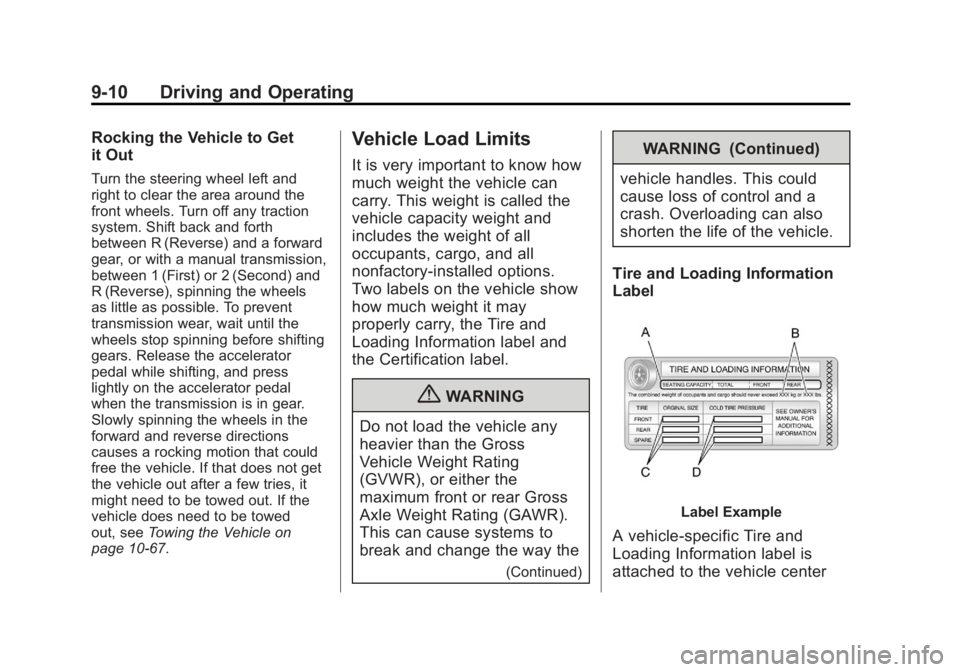
Tire and Loading Information
Label
Label Example
A vehicle-specific Tire and
Loading Information label is
attached to the vehicle center
Page 217 of 388
Black plate (15,1)Buick Verano Owner Manual - 2012 - CRC - 1/10/12
Driving and Operating 9-15
Following break‐in, engine speed
and load can be gradually
increased.
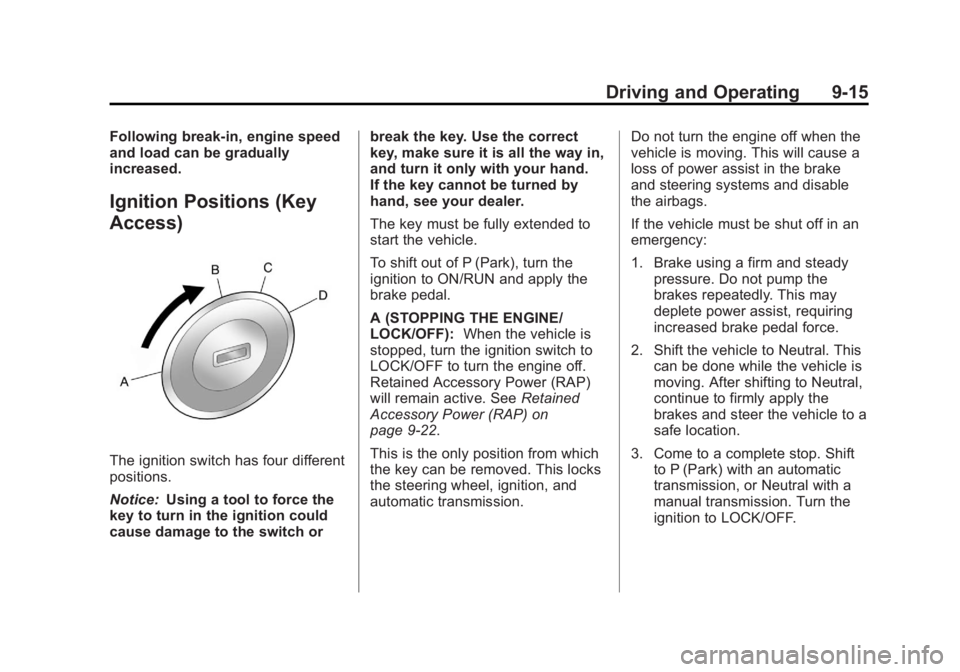
Ignition Positions (Key
Access)
The ignition switch has four different
positions.
Notice:Using a tool to force the
key to turn in the ignition could
cause damage to the switch or break the key. Use the correct
key, make sure it is all the way in,
and turn it only with your hand.
If the key cannot be turned by
hand, see your dealer.
The key must be fully extended to
start the vehicle.
To shift out of P (Park), turn the
ignition to ON/RUN and apply the
brake pedal.
A (STOPPING THE ENGINE/
LOCK/OFF):
When the vehicle is
stopped, turn the ignition switch to
LOCK/OFF to turn the engine off.
Retained Accessory Power (RAP)
will remain active. See Retained
Accessory Power (RAP) on
page 9‑22.
This is the only position from which
the key can be removed. This locks
the steering wheel, ignition, and
automatic transmission. Do not turn the engine off when the
vehicle is moving. This will cause a
loss of power assist in the brake
and steering systems and disable
the airbags.
If the vehicle must be shut off in an
emergency:
1. Brake using a firm and steady
pressure. Do not pump the
brakes repeatedly. This may
deplete power assist, requiring
increased brake pedal force.
2. Shift the vehicle to Neutral. This can be done while the vehicle is
moving. After shifting to Neutral,
continue to firmly apply the
brakes and steer the vehicle to a
safe location.
3. Come to a complete stop. Shift to P (Park) with an automatic
transmission, or Neutral with a
manual transmission. Turn the
ignition to LOCK/OFF.
Page 218 of 388
Black plate (16,1)Buick Verano Owner Manual - 2012 - CRC - 1/10/12
9-16 Driving and Operating
4. Set the parking brake. SeeParking Brake on page 9‑31.
{WARNING
Turning off the vehicle while
moving may cause loss of power
assist in the brake and steering
systems and disable the airbags.
While driving, only shut the
vehicle off in an emergency.
If the vehicle cannot be pulled
over, and must be shut off while
driving, turn the ignition to ACC/
ACCESSORY.
The ignition switch can bind in the
LOCK/OFF position with the wheels
turned off center. If this happens,
move the steering wheel from right
to left while turning the key to ACC/
ACCESSORY. If this does not work,
then the vehicle needs service. B (ACC/ACCESSORY):
This
position provides power to some of
the electrical accessories. It unlocks
the steering wheel and ignition.
To move the key from ACC/
ACCESSORY to LOCK/OFF,
push in the key and then turn it to
LOCK/OFF.
C (ON/RUN): The ignition switch
stays in this position when the
engine is running. This position
can be used to operate the
electrical accessories, including the
ventilation fan and 12-volt power
outlet, as well as to display some
warning and indicator lights. This
position can also be used for
service and diagnostics, and to
verify the proper operation of the
malfunction indicator lamp as may
be required for emission inspection
purposes. The transmission is also
unlocked in this position on
automatic transmission vehicles. The battery could be drained if the
key is left in the ACC/ACCESSORY
or ON/RUN position with the engine
off. The vehicle might not start if the
battery is allowed to drain for an
extended period of time.
D (START):
This position starts the
engine. When the engine starts,
release the key. The ignition switch
will return to ON/RUN for normal
driving.
A warning tone sounds when the
driver door is opened if the ignition
is still in ACC/ACCESSORY and the
key is in the ignition.
If the ignition becomes difficult to
turn, see Keys on page 2‑2 for more
information.