Page 11 BUICK ENCLAVE 2011 Manual PDF
[x] Cancel search | Manufacturer: BUICK, Model Year: 2011, Model line: ENCLAVE, Model: BUICK ENCLAVE 2011Pages: 388, PDF Size: 5.26 MB
Page 112 of 388
Black plate (2,1)Buick Verano Owner Manual - 2012 - CRC - 1/10/12
5-2 Instruments and Controls
Ride Control SystemMessages . . . . . . . . . . . . . . . . . . 5-29
Anti-theft Alarm System Messages . . . . . . . . . . . . . . . . . . 5-29
Tire Messages . . . . . . . . . . . . . . . 5-29
Transmission Messages . . . . . 5-30
Washer Fluid Messages . . . . . 5-30
Window Messages . . . . . . . . . . . 5-30
Vehicle Personalization
Vehicle Personalization . . . . . . 5-30
Controls
Steering Wheel
Adjustment
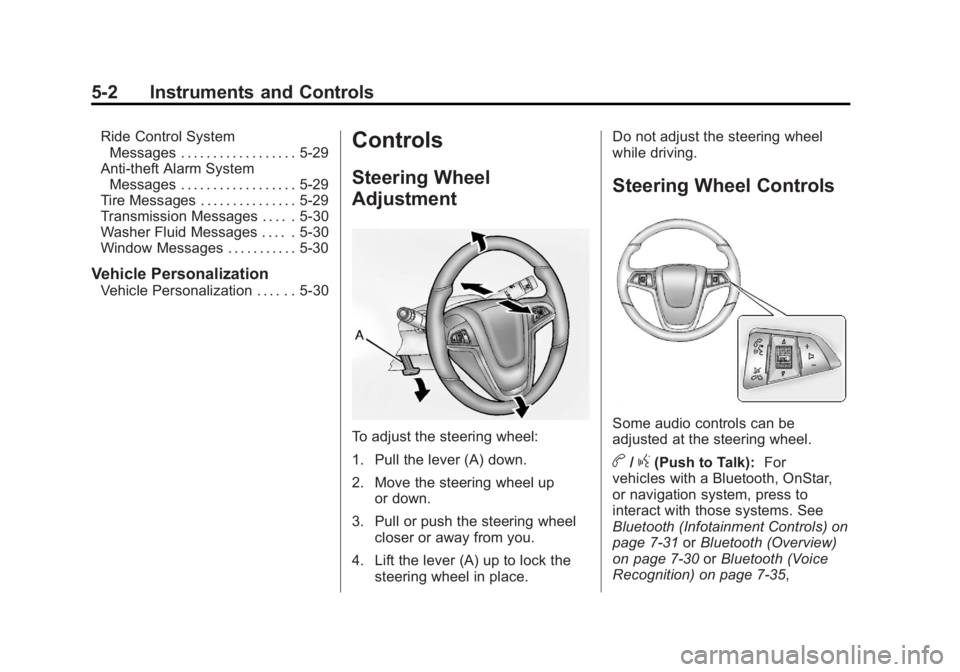
To adjust the steering wheel:
1. Pull the lever (A) down.
2. Move the steering wheel up
or down.
3. Pull or push the steering wheel closer or away from you.
4. Lift the lever (A) up to lock the steering wheel in place. Do not adjust the steering wheel
while driving.
Steering Wheel Controls
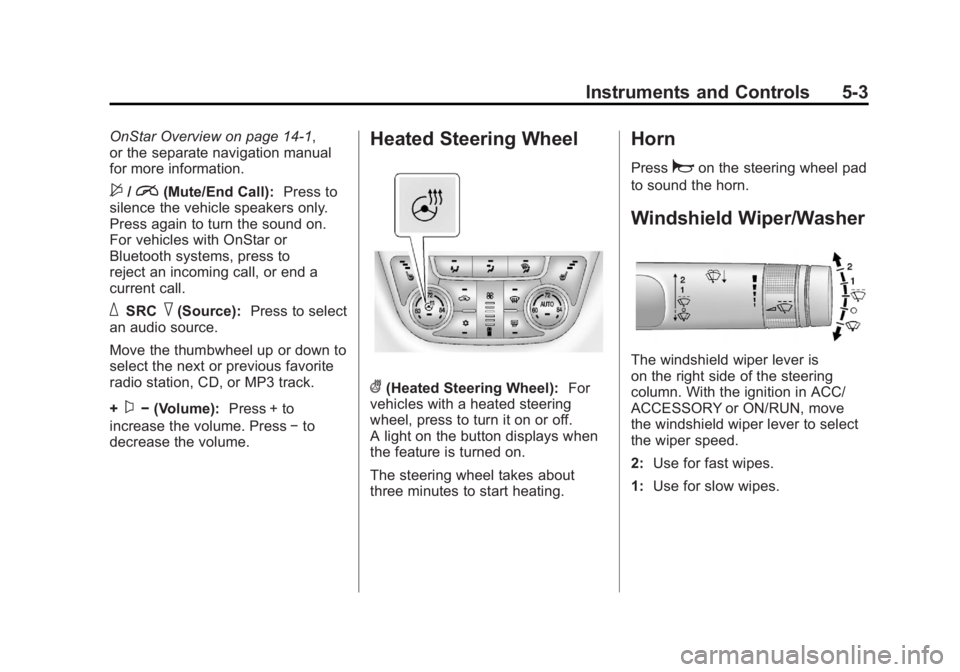
Some audio controls can be
adjusted at the steering wheel.
b/g(Push to Talk):
For
vehicles with a Bluetooth, OnStar,
or navigation system, press to
interact with those systems. See
Bluetooth (Infotainment Controls) on
page 7‑31 orBluetooth (Overview)
on page 7‑30 orBluetooth (Voice
Recognition) on page 7‑35,
Page 113 of 388
Black plate (3,1)Buick Verano Owner Manual - 2012 - CRC - 1/10/12
Instruments and Controls 5-3
OnStar Overview on page 14‑1,
or the separate navigation manual
for more information.
$/i(Mute/End Call):Press to
silence the vehicle speakers only.
Press again to turn the sound on.
For vehicles with OnStar or
Bluetooth systems, press to
reject an incoming call, or end a
current call.
_SRC^(Source): Press to select
an audio source.
Move the thumbwheel up or down to
select the next or previous favorite
radio station, CD, or MP3 track.
+
x− (Volume): Press + to
increase the volume. Press −to
decrease the volume.
Heated Steering Wheel
((Heated Steering Wheel): For
vehicles with a heated steering
wheel, press to turn it on or off.
A light on the button displays when
the feature is turned on.
The steering wheel takes about
three minutes to start heating.
Horn
Pressaon the steering wheel pad
to sound the horn.
Windshield Wiper/Washer
The windshield wiper lever is
on the right side of the steering
column. With the ignition in ACC/
ACCESSORY or ON/RUN, move
the windshield wiper lever to select
the wiper speed.
2: Use for fast wipes.
1: Use for slow wipes.
Page 114 of 388

Black plate (4,1)Buick Verano Owner Manual - 2012 - CRC - 1/10/12
5-4 Instruments and Controls
3(Adjustable Interval Wipes):
Move the lever to
3, then turn the
band up for more frequent wipes or
down for less frequent wipes.
9(Off): Use to turn the windshield
wipers off.
3(Mist): Briefly move the wiper
lever down for a single wipe or hold
down for several wipes.
Clear ice and snow from the wiper
blades before using them. If they
are frozen to the windshield,
carefully loosen or thaw them.
Damaged wiper blades should be
replaced. See Wiper Blade
Replacement on page 10‑21.
Heavy snow or ice can overload the
wipers. A circuit breaker stops them
until the motor cools. Wipe Parking
If the ignition is turned to LOCK/
OFF while the wipers are on 1, 2,
or
3, they will immediately stop.
If the windshield wiper lever is then
moved to
9before the driver door
is opened, or within 10 minutes, the
wipers will restart and move to the
base of the windshield.
If the ignition is turned to LOCK/
OFF during a windshield wash, the
wipers will stop when they reach the
base of the windshield.
Windshield Washer
Pull the windshield wiper lever
toward you to spray windshield
washer fluid and activate the wipers.
The washer and wipers will continue
until the lever is released or the
maximum wash time is reached.
When the windshield wiper lever is
released, additional wipes may
occur depending on how long the
windshield washer had been
activated. If the washer fluid is low a
message may display on the
Driver Information Center (DIC),
see
Washer Fluid Messages on
page 5‑30. For information on
filling the windshield washer fluid
reservoir, seeWasher Fluid on
page 10‑16.
{WARNING
In freezing weather, do not use
the washer until the windshield
is warmed. Otherwise the
washer fluid can form ice on the
windshield, blocking your vision.
Compass
There is a compass display in the
Driver Information Center (DIC). The
compass receives its heading and
other information from the Global
Positioning System (GPS) antenna,
StabiliTrak, and vehicle speed
information.
Page 115 of 388
Black plate (5,1)Buick Verano Owner Manual - 2012 - CRC - 1/10/12
Instruments and Controls 5-5
Avoid covering the GPS antenna for
long periods of time with objects
that may interfere with the antenna's
ability to receive a satellite signal.
SeeBackglass Antenna on
page 7‑21 andSatellite Radio
Antenna on page 7‑21 for the
location of the vehicle's antennas.
The compass system is designed to
operate for a certain number of
miles or degrees of turn before
needing a signal from the GPS
satellites. When the compass
display shows CAL, drive the
vehicle for a short distance in an
open area where it can receive a
GPS signal. The compass system
will automatically determine when
the GPS signal is restored and
provide a heading again. See
Compass Messages on page 5‑26
for more information on the
messages that may be displayed for
the compass.Clock
The infotainment system controls
are used to access the time and
date settings through the menu
system. The clock menu can be
only be used with the radio on while
in ON/RUN or ACC/ACCESSORY.
See Operation on page 7‑9 for
information about how to use the
menu system.
Setting the Clock (Radio
with CD)
To set the time:
1. Press the CONFIG button and
select Time Settings or press
H.
2. Select Set Time.
3. Turn the TUNE/MENU knob to adjust the highlighted number.
4. Press TUNE/MENU to select the next number. 5. To save the time and return to
the Time Settings menu,
press
/BACK at any time or
press the TUNE/MENU knob
after adjusting the minutes.
Setting the 12/24 Hour Format
1. Press the CONFIG button and select Time Settings or press
H.
2. Highlight 12/24 Hour Format.
3. Press TUNE/MENU to select the 12 hour or 24 hour display
format.
Setting the Clock (Radio with
CD and Touchscreen)
The clock is in the center stack
display.
To set the time:
1. Press the CONFIG button toenter the menu options or
press
H. Turn the TUNE/MENU
knob to scroll through the
available setup features.
Page 116 of 388
Black plate (6,1)Buick Verano Owner Manual - 2012 - CRC - 1/10/12
5-6 Instruments and Controls
Press TUNE/MENU or press the
Time screen button to display
other options within that feature.
2. Press + or −to increase or
decrease the Hours and Minutes
displayed on the clock.
12/24 HR Format: Press the 12 HR
screen button for standard time;
press the 24 HR screen button for
military time.
Day + or Day −:Press the Day +
or Day −display buttons to increase
or decrease the day.
Display: Press Display to turn the
display of the time on the screen on
or off.
Power Outlets
The accessory power outlets can be
used to plug in electrical equipment,
such as a cell phone or MP3 player.
There is one accessory power outlet
located on the instrument panel
below the climate control and one
on the rear of the center floor
console. These outlets are powered when the key is in ON/RUN or ACC/
ACCESSORY, or until the driver
door is opened within 10 minutes of
turning off the vehicle. See
Retained
Accessory Power (RAP) on
page 9‑22.
Notice: Leaving electrical
equipment plugged in for an
extended period of time while the
vehicle is off will drain the
battery. Always unplug electrical
equipment when not in use and
do not plug in equipment that
exceeds the maximum 20 ampere
rating.
Certain electrical accessories
may not be compatible with the
accessory power outlet and could
overload vehicle or adapter fuses.
If a problem is experienced, see
your dealer.
When adding electrical equipment,
be sure to follow the installation
instructions included with the
equipment. See Add-On Electrical
Equipment on page 9‑52. Notice:
Hanging heavy
equipment from the power outlet
can cause damage not covered
by the vehicle warranty. The
power outlets are designed for
accessory power plugs only, such
as cell phone charge cords.
Cigarette Lighter
For vehicles with a cigarette lighter,
it is located on the instrument panel
below the climate control system.
To activate the cigarette lighter,
push it into the heating element and
let go. When the lighter is ready it
will pop back out.
Notice: Holding a cigarette lighter
in while it is heating does not let
the lighter back away from the
heating element when it is hot.
Damage from overheating can
occur to the lighter or heating
element, or a fuse could be
blown. Do not hold a cigarette
lighter in while it is heating.
Page 119 of 388
Black plate (9,1)Buick Verano Owner Manual - 2012 - CRC - 1/10/12
Instruments and Controls 5-9
Speedometer
The speedometer shows the
vehicle's speed in either kilometers
per hour (km/h) or miles per
hour (mph).
Odometer
The odometer shows how far the
vehicle has been driven, in either
kilometers or miles.
This vehicle has a tamper‐resistant
odometer. The digital odometer will
read 999,999 if it is turned back.
If the vehicle needs a new odometer
installed, it must be set to the
mileage total of the old odometer.
If that is not possible, then it must
be set at zero and a label must be
put on the driver door to show the
old mileage reading when the new
odometer was installed.
Trip Odometer
The trip odometer can show how far
the vehicle has been driven since
the trip odometer was last reset.
The trip odometer is accessed
and reset through the Driver
Information Center (DIC). See
Driver Information Center (DIC) on
page 5‑21.
Tachometer
The tachometer displays the
engine speed in revolutions per
minute (rpm).
Notice:If the engine is operated
with the tachometer in the shaded
warning area, the vehicle could
be damaged, and the damages
would not be covered by the
vehicle warranty. Do not operate
the engine with the tachometer in
the shaded warning area.
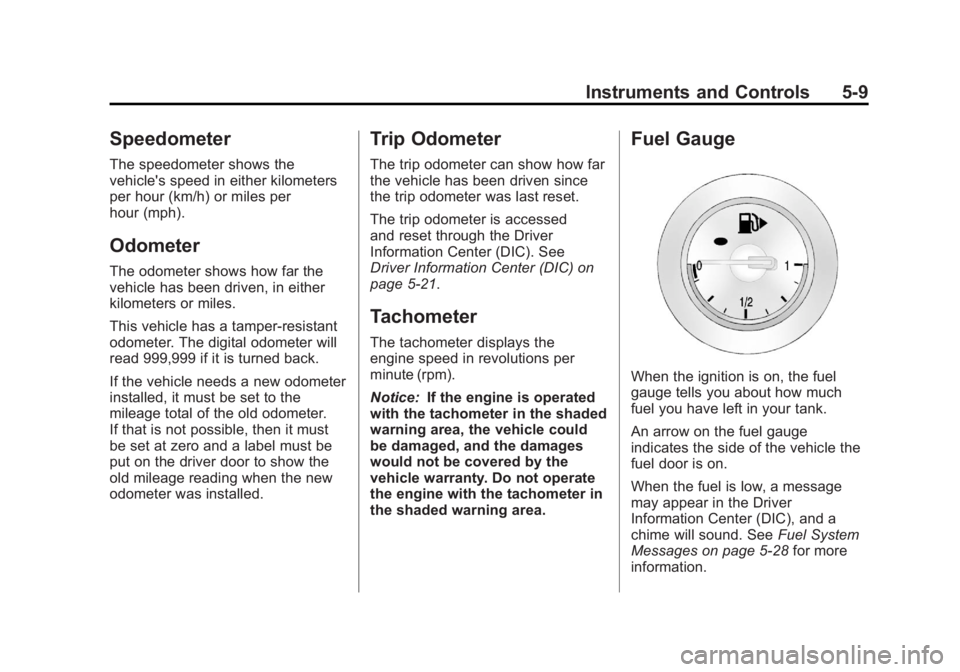
Fuel Gauge
When the ignition is on, the fuel
gauge tells you about how much
fuel you have left in your tank.
An arrow on the fuel gauge
indicates the side of the vehicle the
fuel door is on.
When the fuel is low, a message
may appear in the Driver
Information Center (DIC), and a
chime will sound. See Fuel System
Messages on page 5‑28 for more
information.
Page 121 of 388

Black plate (11,1)Buick Verano Owner Manual - 2012 - CRC - 1/10/12
Instruments and Controls 5-11
Passenger Safety Belt
Reminder Light
When the vehicle is started, this
light flashes and a chime may come
on to remind front passengers to
fasten their safety belt. Then the
light stays on solid until the belt is
buckled.
SeePassenger Airbag Status
Indicator on page 5‑12.
This cycle continues several times
if the front passenger remains or
becomes unbuckled while the
vehicle is moving.
If the front passenger safety belt is
buckled, neither the chime nor the
light comes on. The front passenger safety belt
reminder light and chime may turn
on if an object is put on the seat
such as a briefcase, handbag,
grocery bag, laptop, or other
electronic device. To turn off the
reminder light and/or chime, remove
the object from the seat or buckle
the safety belt.Airbag Readiness Light
This light shows if there is an
electrical problem with the airbag
system. The system check includes
the airbag sensor(s), passenger
sensing system, the pretensioners,
the airbag modules, the wiring, and
the crash sensing and diagnostic
module. For more information on the
airbag system, see
Airbag System
on page 3‑19.
The airbag readiness light comes
on for several seconds when the
vehicle is started. If the light does
not come on then, have the vehicle
fixed immediately.
{WARNING
If the airbag readiness light stays
on after the vehicle is started or
comes on while driving, it means
the airbag system might not be
working properly. The airbags in
the vehicle might not inflate in a
crash, or they could even inflate
without a crash. To help avoid
injury, have the vehicle serviced
right away.
Page 122 of 388

Black plate (12,1)Buick Verano Owner Manual - 2012 - CRC - 1/10/12
5-12 Instruments and Controls
Passenger Airbag Status
Indicator
The vehicle has a passenger
sensing system. SeePassenger
Sensing System on page 3‑26 for
important safety information. The
instrument panel has a passenger
airbag status indicator.
When the vehicle is started, the
passenger airbag status indicator
will light ON and OFF for several
seconds as a system check. If you
use remote start, if equipped, to
start the vehicle, you may not see the system check. Then, after
several seconds, the status
indicator will light either ON or OFF
to let you know the status of the
front outboard passenger frontal
airbag and knee airbag.
If the word ON is lit on the
passenger airbag status indicator,
it means that the front outboard
passenger frontal airbag and knee
airbag are allowed to inflate.
If the word OFF is lit on the
passenger airbag status indicator, it
means that the passenger sensing
system has turned off the front
outboard passenger frontal airbag
and passenger knee airbag.
If, after several seconds, both status
indicator lights remain on, or if there
are no lights at all, there may be
a problem with the lights or the
passenger sensing system. See
your dealer for service.
{WARNING
If the airbag readiness light ever
comes on and stays on, it means
that something may be wrong
with the airbag system. To help
avoid injury to yourself or others,
have the vehicle serviced right
away. See
Airbag Readiness
Light on page 5‑11 for more
information, including important
safety information.
Page 123 of 388
Black plate (13,1)Buick Verano Owner Manual - 2012 - CRC - 1/10/12
Instruments and Controls 5-13
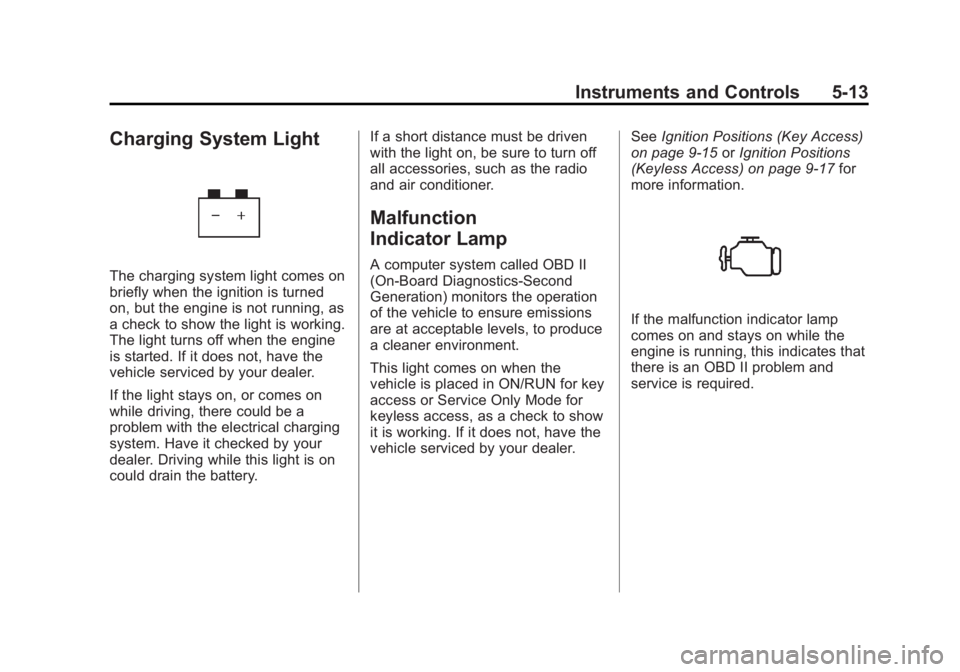
Charging System Light
The charging system light comes on
briefly when the ignition is turned
on, but the engine is not running, as
a check to show the light is working.
The light turns off when the engine
is started. If it does not, have the
vehicle serviced by your dealer.
If the light stays on, or comes on
while driving, there could be a
problem with the electrical charging
system. Have it checked by your
dealer. Driving while this light is on
could drain the battery.If a short distance must be driven
with the light on, be sure to turn off
all accessories, such as the radio
and air conditioner.
Malfunction
Indicator Lamp
A computer system called OBD II
(On-Board Diagnostics-Second
Generation) monitors the operation
of the vehicle to ensure emissions
are at acceptable levels, to produce
a cleaner environment.
This light comes on when the
vehicle is placed in ON/RUN for key
access or Service Only Mode for
keyless access, as a check to show
it is working. If it does not, have the
vehicle serviced by your dealer.
See
Ignition Positions (Key Access)
on page 9‑15 orIgnition Positions
(Keyless Access) on page 9‑17 for
more information.
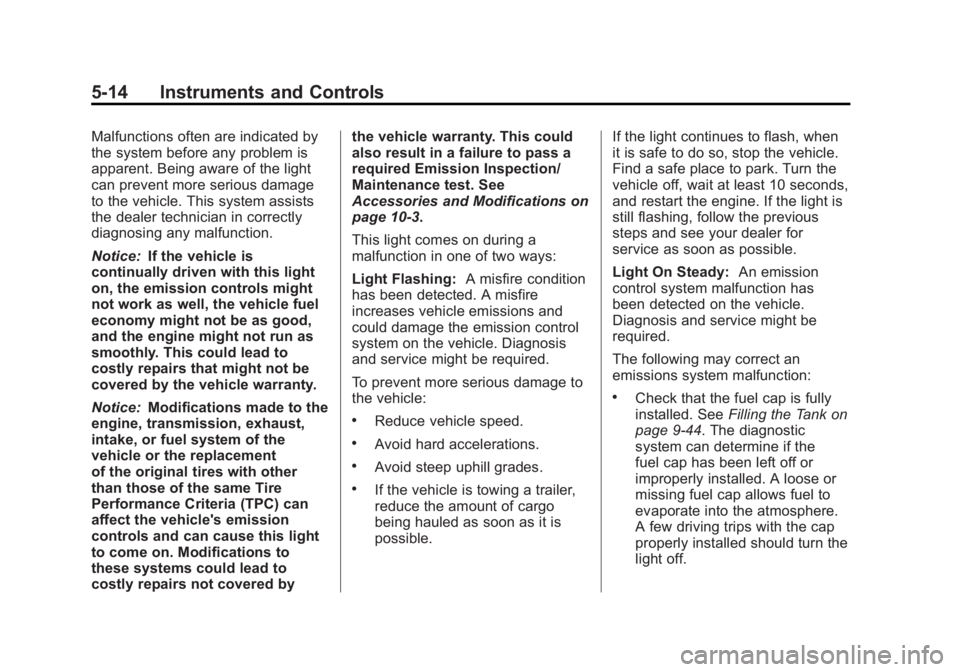
If the malfunction indicator lamp
comes on and stays on while the
engine is running, this indicates that
there is an OBD II problem and
service is required.
Page 124 of 388
Black plate (14,1)Buick Verano Owner Manual - 2012 - CRC - 1/10/12
5-14 Instruments and Controls
Malfunctions often are indicated by
the system before any problem is
apparent. Being aware of the light
can prevent more serious damage
to the vehicle. This system assists
the dealer technician in correctly
diagnosing any malfunction.
Notice:If the vehicle is
continually driven with this light
on, the emission controls might
not work as well, the vehicle fuel
economy might not be as good,
and the engine might not run as
smoothly. This could lead to
costly repairs that might not be
covered by the vehicle warranty.
Notice: Modifications made to the
engine, transmission, exhaust,
intake, or fuel system of the
vehicle or the replacement
of the original tires with other
than those of the same Tire
Performance Criteria (TPC) can
affect the vehicle's emission
controls and can cause this light
to come on. Modifications to
these systems could lead to
costly repairs not covered by the vehicle warranty. This could
also result in a failure to pass a
required Emission Inspection/
Maintenance test. See
Accessories and Modifications on
page 10‑3.
This light comes on during a
malfunction in one of two ways:
Light Flashing:
A misfire condition
has been detected. A misfire
increases vehicle emissions and
could damage the emission control
system on the vehicle. Diagnosis
and service might be required.
To prevent more serious damage to
the vehicle:
.Reduce vehicle speed.
.Avoid hard accelerations.
.Avoid steep uphill grades.
.If the vehicle is towing a trailer,
reduce the amount of cargo
being hauled as soon as it is
possible. If the light continues to flash, when
it is safe to do so, stop the vehicle.
Find a safe place to park. Turn the
vehicle off, wait at least 10 seconds,
and restart the engine. If the light is
still flashing, follow the previous
steps and see your dealer for
service as soon as possible.
Light On Steady:
An emission
control system malfunction has
been detected on the vehicle.
Diagnosis and service might be
required.
The following may correct an
emissions system malfunction:
.Check that the fuel cap is fully
installed. See Filling the Tank on
page 9‑44. The diagnostic
system can determine if the
fuel cap has been left off or
improperly installed. A loose or
missing fuel cap allows fuel to
evaporate into the atmosphere.
A few driving trips with the cap
properly installed should turn the
light off.