anc BUICK ENCLAVE 2014 Owner's Manual
[x] Cancel search | Manufacturer: BUICK, Model Year: 2014, Model line: ENCLAVE, Model: BUICK ENCLAVE 2014Pages: 410, PDF Size: 4.02 MB
Page 1 of 410
Black plate (1,1)Buick Enclave Owner Manual (GMNA-Localizing-U.S./Canada/Mexico-
6014143) - 2014 - CRC - 8/14/13
2014 Buick Enclave Owner ManualM
In Brief. . . . . . . . . . . . . . . . . . . . . . . . 1-1
Instrument Panel . . . . . . . . . . . . . . 1-2
Initial Drive Information . . . . . . . . 1-4
Vehicle Features . . . . . . . . . . . . . 1-15
Performance and Maintenance . . . . . . . . . . . . . . . . 1-21
Keys, Doors, and Windows . . . . . . . . . . . . . . . . . . . . 2-1
Keys and Locks . . . . . . . . . . . . . . . 2-1
Doors . . . . . . . . . . . . . . . . . . . . . . . . . . 2-8
Vehicle Security . . . . . . . . . . . . . . 2-11
Exterior Mirrors . . . . . . . . . . . . . . . 2-14
Interior Mirrors . . . . . . . . . . . . . . . . 2-16
Windows . . . . . . . . . . . . . . . . . . . . . 2-17
Roof . . . . . . . . . . . . . . . . . . . . . . . . . . 2-19
Seats and Restraints . . . . . . . . . 3-1
Head Restraints . . . . . . . . . . . . . . . 3-2
Front Seats . . . . . . . . . . . . . . . . . . . . 3-3
Rear Seats . . . . . . . . . . . . . . . . . . . . 3-8
Safety Belts . . . . . . . . . . . . . . . . . . 3-13
Airbag System . . . . . . . . . . . . . . . . 3-22
Child Restraints . . . . . . . . . . . . . . 3-36 Storage
. . . . . . . . . . . . . . . . . . . . . . . 4-1
Storage Compartments . . . . . . . . 4-1
Additional Storage Features . . . 4-3
Roof Rack System . . . . . . . . . . . . . 4-5
Instruments and Controls . . . . 5-1
Controls . . . . . . . . . . . . . . . . . . . . . . . 5-2
Warning Lights, Gauges, and
Indicators . . . . . . . . . . . . . . . . . . . 5-10
Information Displays . . . . . . . . . . 5-24
Vehicle Messages . . . . . . . . . . . . 5-30
Vehicle Personalization . . . . . . . 5-40
Universal Remote System . . . . 5-47
Lighting . . . . . . . . . . . . . . . . . . . . . . . 6-1
Exterior Lighting . . . . . . . . . . . . . . . 6-1
Interior Lighting . . . . . . . . . . . . . . . . 6-5
Lighting Features . . . . . . . . . . . . . . 6-6
Infotainment System . . . . . . . . . 7-1
Introduction . . . . . . . . . . . . . . . . . . . . 7-1
Radio . . . . . . . . . . . . . . . . . . . . . . . . . . 7-6
Audio Players . . . . . . . . . . . . . . . . 7-12
Rear Seat Infotainment . . . . . . . 7-18 Phone . . . . . . . . . . . . . . . . . . . . . . . . 7-20
Settings . . . . . . . . . . . . . . . . . . . . . . 7-27
Trademarks and License
Agreements . . . . . . . . . . . . . . . . . 7-30
Climate Controls . . . . . . . . . . . . . 8-1
Climate Control Systems . . . . . . 8-1
Air Vents . . . . . . . . . . . . . . . . . . . . . . . 8-8
Maintenance . . . . . . . . . . . . . . . . . . . 8-9
Driving and Operating . . . . . . . . 9-1
Driving Information . . . . . . . . . . . . . 9-2
Starting and Operating . . . . . . . 9-14
Engine Exhaust . . . . . . . . . . . . . . 9-21
Automatic Transmission . . . . . . 9-22
Drive Systems . . . . . . . . . . . . . . . . 9-25
Brakes . . . . . . . . . . . . . . . . . . . . . . . 9-26
Ride Control Systems . . . . . . . . 9-28
Cruise Control . . . . . . . . . . . . . . . . 9-30
Driver Assistance Systems . . . 9-32
Fuel . . . . . . . . . . . . . . . . . . . . . . . . . . 9-42
Trailer Towing . . . . . . . . . . . . . . . . 9-46
Conversions and Add-Ons . . . 9-53
Page 2 of 410
Black plate (2,1)Buick Enclave Owner Manual (GMNA-Localizing-U.S./Canada/Mexico-
6014143) - 2014 - CRC - 8/14/13
2014 Buick Enclave Owner ManualM
Vehicle Care. . . . . . . . . . . . . . . . . 10-1
General Information . . . . . . . . . . 10-2
Vehicle Checks . . . . . . . . . . . . . . . 10-4
Headlamp Aiming . . . . . . . . . . . 10-27
Bulb Replacement . . . . . . . . . . 10-27
Electrical System . . . . . . . . . . . . 10-29
Wheels and Tires . . . . . . . . . . . 10-36
Jump Starting . . . . . . . . . . . . . . . 10-69
Towing the Vehicle . . . . . . . . . . 10-72
Appearance Care . . . . . . . . . . . 10-76
Service and Maintenance . . . 11-1
General Information . . . . . . . . . . 11-1
Maintenance Schedule . . . . . . . 11-3
Special Application
Services . . . . . . . . . . . . . . . . . . . . 11-8
Additional Maintenance
and Care . . . . . . . . . . . . . . . . . . . . 11-9
Recommended Fluids, Lubricants, and Parts . . . . . . 11-12
Maintenance Records . . . . . . . 11-14 Technical Data
. . . . . . . . . . . . . . . 12-1
Vehicle Identification . . . . . . . . . 12-1
Vehicle Data . . . . . . . . . . . . . . . . . . 12-2
Customer Information . . . . . . . 13-1
Customer Information . . . . . . . . 13-1
Reporting Safety Defects . . . . 13-12
Vehicle Data Recording and
Privacy . . . . . . . . . . . . . . . . . . . . 13-14
OnStar . . . . . . . . . . . . . . . . . . . . . . . 14-1
OnStar Overview . . . . . . . . . . . . . 14-1
OnStar Services . . . . . . . . . . . . . . 14-2
OnStar Additional Information . . . . . . . . . . . . . . . . . . 14-5
Index . . . . . . . . . . . . . . . . . . . . . i-1
Page 3 of 410
Black plate (3,1)Buick Enclave Owner Manual (GMNA-Localizing-U.S./Canada/Mexico-
6014143) - 2014 - CRC - 8/14/13
Introduction iii
The names, logos, emblems,
slogans, vehicle model names, and
vehicle body designs appearing in
this manual including, but not limited
to, GM, the GM logo, BUICK, the
BUICK Emblem, and ENCLAVE are
trademarks and/or service marks of
General Motors LLC, its
subsidiaries, affiliates, or licensors.This manual describes features that
may or may not be on your specific
vehicle either because they are
options that you did not purchase or
due to changes subsequent to the
printing of this owner manual.
Please refer to the purchase
documentation relating to your
specific vehicle to confirm each of
the features found on your vehicle.
For vehicles first sold in Canada,
substitute the name
“General
Motors of Canada Limited” for Buick
Motor Division wherever it appears
in this manual.
Keep this manual in the vehicle for
quick reference.
Canadian Vehicle Owners
Propriétaires Canadiens
A French language manual can be
obtained from your dealer, at
www.helminc.com, or from:
On peut obtenir un exemplaire de
ce guide en français auprès du
concessionnaire ou à l'adresse
savant:
Helm, Incorporated
Attention: Customer Service
47911 Halyard Drive
Plymouth, MI 48170
Litho in U.S.A.
Part No. 22867653 B Second Printing©2013 General Motors LLC. All Rights Reserved.
Page 7 of 410
Black plate (1,1)Buick Enclave Owner Manual (GMNA-Localizing-U.S./Canada/Mexico-
6014143) - 2014 - CRC - 8/14/13
In Brief 1-1
In Brief
Instrument Panel
Instrument Panel . . . . . . . . . . . . . . 1-2
Initial Drive Information
Initial Drive Information . . . . . . . . 1-4
Remote Keyless Entry (RKE)System . . . . . . . . . . . . . . . . . . . . . . 1-4
Remote Vehicle Start . . . . . . . . . 1-4
Door Locks . . . . . . . . . . . . . . . . . . . 1-5
Liftgate . . . . . . . . . . . . . . . . . . . . . . . . 1-5
Windows . . . . . . . . . . . . . . . . . . . . . . 1-6
Seat Adjustment . . . . . . . . . . . . . . 1-6
Memory Features . . . . . . . . . . . . . 1-7
Second Row Seats . . . . . . . . . . . 1-7
Third Row Seats . . . . . . . . . . . . . . 1-8
Heated and Cooled Front Seats . . . . . . . . . . . . . . . . . . . . . . . . 1-8
Head Restraint Adjustment . . . . 1-9 Safety Belts . . . . . . . . . . . . . . . . . . . 1-9
Passenger Sensing System . . . 1-9
Mirror Adjustment . . . . . . . . . . . . 1-10
Steering Wheel
Adjustment . . . . . . . . . . . . . . . . . 1-10
Interior Lighting . . . . . . . . . . . . . . 1-11
Exterior Lighting . . . . . . . . . . . . . 1-12
Windshield Wiper/Washer . . . . 1-13
Climate Controls . . . . . . . . . . . . . 1-14
Transmission . . . . . . . . . . . . . . . . 1-14
Vehicle Features
Radio(s) . . . . . . . . . . . . . . . . . . . . . 1-15
Satellite Radio . . . . . . . . . . . . . . . 1-16
Portable Audio Devices . . . . . . 1-17
Bluetooth
®. . . . . . . . . . . . . . . . . . . 1-17
Steering Wheel Controls . . . . . 1-17
Cruise Control . . . . . . . . . . . . . . . 1-18
Infotainment System . . . . . . . . . 1-18
Forward Collision Alert (FCA)
System . . . . . . . . . . . . . . . . . . . . . 1-19 Lane Departure
Warning (LDW) . . . . . . . . . . . . . 1-19
Side Blind Zone Alert (SBZA) . . . . . . . . . . . . . . . 1-19
Rear Vision
Camera (RVC) . . . . . . . . . . . . . 1-19
Ultrasonic Parking Assist . . . . 1-19
Power Outlets . . . . . . . . . . . . . . . 1-20
Universal Remote System . . . 1-20
Sunroof . . . . . . . . . . . . . . . . . . . . . . 1-20
Performance and Maintenance
Traction Control/Electronic Stability Control . . . . . . . . . . . . 1-21
Tire Pressure Monitor . . . . . . . . 1-21
Engine Oil Life System . . . . . . 1-22
Driving for Better Fuel Economy . . . . . . . . . . . . . . . . . . . 1-22
Roadside Assistance Program . . . . . . . . . . . . . . . . . . . . 1-23
OnStar
®. . . . . . . . . . . . . . . . . . . . . 1-23
Page 10 of 410
Black plate (4,1)Buick Enclave Owner Manual (GMNA-Localizing-U.S./Canada/Mexico-
6014143) - 2014 - CRC - 8/14/13
1-4 In Brief
Initial Drive
Information
This section provides a brief
overview about some of the
important features that may or may
not be on your specific vehicle.
For more detailed information, refer
to each of the features which can be
found later in this owner manual.
Remote Keyless Entry
(RKE) System
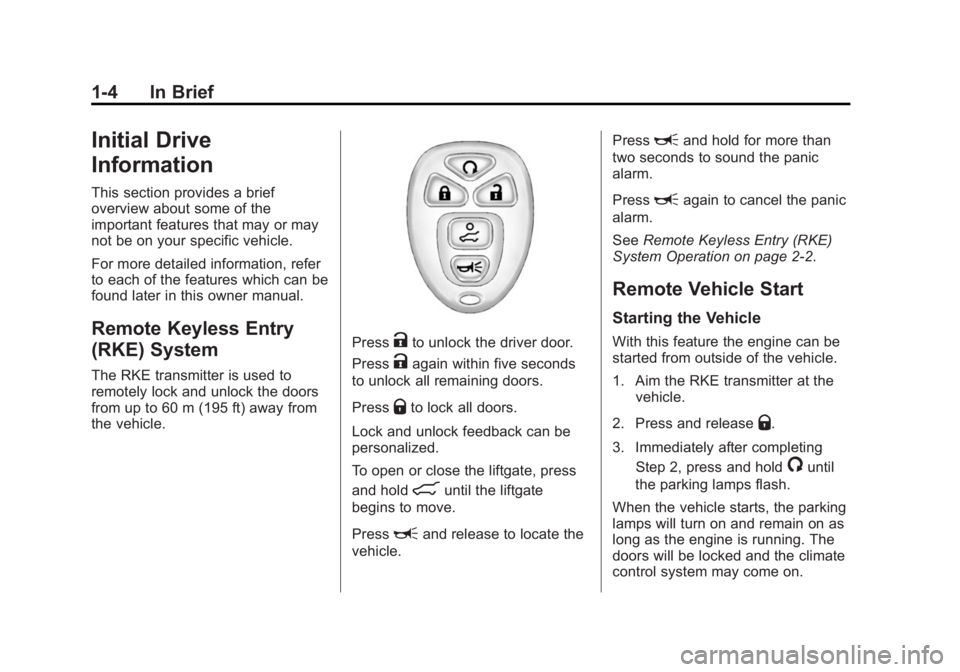
The RKE transmitter is used to
remotely lock and unlock the doors
from up to 60 m (195 ft) away from
the vehicle.
PressKto unlock the driver door.
Press
Kagain within five seconds
to unlock all remaining doors.
Press
Qto lock all doors.
Lock and unlock feedback can be
personalized.
To open or close the liftgate, press
and hold
8until the liftgate
begins to move.
Press
Land release to locate the
vehicle. Press
Land hold for more than
two seconds to sound the panic
alarm.
Press
Lagain to cancel the panic
alarm.
See Remote Keyless Entry (RKE)
System Operation on page 2-2.
Remote Vehicle Start
Starting the Vehicle
With this feature the engine can be
started from outside of the vehicle.
1. Aim the RKE transmitter at the
vehicle.
2. Press and release
Q.
3. Immediately after completing Step 2, press and hold
/until
the parking lamps flash.
When the vehicle starts, the parking
lamps will turn on and remain on as
long as the engine is running. The
doors will be locked and the climate
control system may come on.
Page 11 of 410
Black plate (5,1)Buick Enclave Owner Manual (GMNA-Localizing-U.S./Canada/Mexico-
6014143) - 2014 - CRC - 8/14/13
In Brief 1-5
The engine will continue to run for
10 minutes. Repeat the steps for a
10-minute time extension. Remote
start can be extended only once.
Canceling a Remote Start
To cancel a remote start:
.Aim the RKE transmitter at the
vehicle and press and hold
/
until the parking lamps turn off.
.Turn on the hazard warning
flashers.
.Turn the ignition switch on and
then off.
See Remote Vehicle Start on
page 2-4.
Door Locks
To lock or unlock a door manually:
.From the inside, use the door
lock knob on the window sill.
.From the outside, turn the key
toward the front or rear of the
vehicle, or press
QorKon the
Remote Keyless Entry (RKE)
transmitter.
Power Door Locks
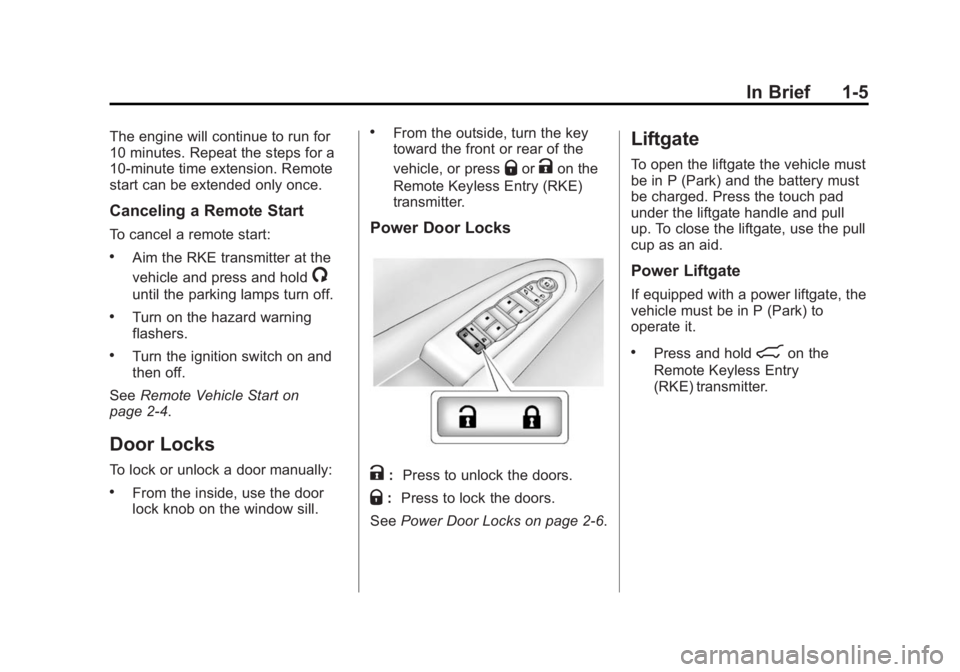
K: Press to unlock the doors.
Q:Press to lock the doors.
See Power Door Locks on page 2-6.
Liftgate
To open the liftgate the vehicle must
be in P (Park) and the battery must
be charged. Press the touch pad
under the liftgate handle and pull
up. To close the liftgate, use the pull
cup as an aid.
Power Liftgate
If equipped with a power liftgate, the
vehicle must be in P (Park) to
operate it.
.Press and hold8on the
Remote Keyless Entry
(RKE) transmitter.
Page 15 of 410
Black plate (9,1)Buick Enclave Owner Manual (GMNA-Localizing-U.S./Canada/Mexico-
6014143) - 2014 - CRC - 8/14/13
In Brief 1-9
Press the button once for the
highest setting. With each press of
the button, the seat will change to
the next lower setting, and then to
the off setting. The lights indicate
three for the highest setting and one
for the lowest.
SeeHeated and Cooled Front Seats
on page 3-7.
Head Restraint
Adjustment
Do not drive until the head restraints
for all occupants are installed and
adjusted properly.
To achieve a comfortable seating
position, change the seatback
recline angle as little as necessary
while keeping the seat and the head
restraint height in the proper
position.
See Head Restraints on page 3-2
and Power Seat Adjustment on
page 3-3.
Safety Belts
Refer to the following sections for
important information on how to use
safety belts properly:
.Safety Belts on page 3-13.
.How to Wear Safety Belts
Properly on page 3-14.
.Lap-Shoulder Belt on page 3-15.
.Lower Anchors and Tethers for
Children (LATCH System) on
page 3-43.
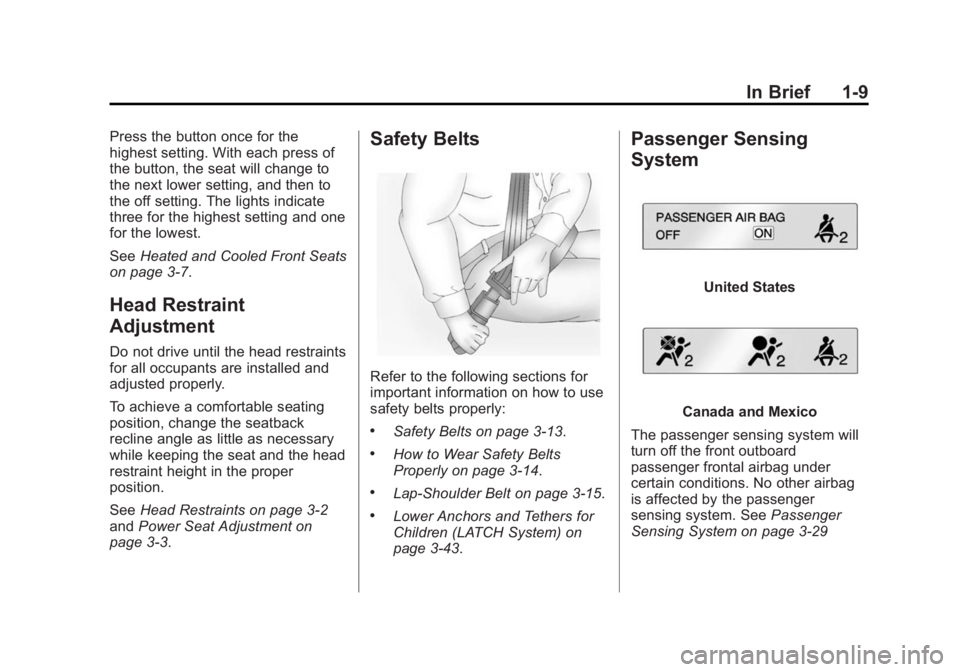
Passenger Sensing
System
United States
Canada and Mexico
The passenger sensing system will
turn off the front outboard
passenger frontal airbag under
certain conditions. No other airbag
is affected by the passenger
sensing system. See Passenger
Sensing System on page 3-29
Page 22 of 410
Black plate (16,1)Buick Enclave Owner Manual (GMNA-Localizing-U.S./Canada/Mexico-
6014143) - 2014 - CRC - 8/14/13
1-16 In Brief
Storing Radio Station Presets
Up to 30 preset stations can be
stored. AM, FM, and SiriusXM (if
equipped) can be mixed.
1. From the AM, FM, or SiriusXMmain page, press and hold
any 1−5 buttons or one of the
preset screen buttons at the
bottom of the screen. After a few
seconds, a beep is heard and
the new preset information
displays on that screen button.
2. Repeat for each preset.
See AM-FM Radio on page 7-6.
Setting the Clock
Press Settings on the Home Page,
then press the Set Time or Set Date
settings screen button to display the
different options for setting the time
and date. Set Time:
.Press the up or down arrows to
increase or decrease the Hours,
Minutes, AM, PM, or 24 hr on
the clock.
.Press and hold to quickly
increase or decrease the time
settings.
.Press OK or the Back screen
button to save the adjustments
that were made.
Set Date:
.Press the up or down arrows to
increase or decrease the Month,
Day, and Year settings.
.Press and hold to quickly
increase or decrease the date
settings.
.Press OK or the Back screen
button to save the adjustments
that were made.
Setting the Analog Clock
The analog clock is on the
instrument panel above the radio.
The clock is not connected with any
other vehicle system and runs by
itself. To adjust the time:
1. Push and hold the button located directly above the clock
to advance the clock hands.
Holding the button down causes
the clock to advance faster.
2. Push and release the button to increase the time by one minute
increments.
Satellite Radio
If equipped, vehicles with a
SiriusXM®satellite radio tuner and a
valid SiriusXM satellite radio
subscription can receive SiriusXM
programming.
Page 25 of 410
Black plate (19,1)Buick Enclave Owner Manual (GMNA-Localizing-U.S./Canada/Mexico-
6014143) - 2014 - CRC - 8/14/13
In Brief 1-19
Forward Collision Alert
(FCA) System
If equipped, FCA may help avoid or
reduce the harm caused by
front-end crashes. FCA provides a
green indicator when a vehicle is
detected ahead. This indicator
displays amber if you follow a
vehicle much too closely. When
approaching a vehicle ahead too
quickly, FCA provides a red flashing
alert on the windshield and rapidly
beeps.
SeeForward Collision Alert (FCA)
System on page 9-32.
Lane Departure
Warning (LDW)
If equipped, LDW is intended to help
avoid unintentional lane departures
at speeds of 56 km/h (35 mph) or
greater. LDW uses a camera sensor to detect the lane markings. The
LDW indicator,
@, appears green if
a lane marking is detected. If the
vehicle departs the lane, the
indicator will change to amber and
flash. In addition, beeps will sound.
See Lane Departure Warning (LDW)
on page 9-40.
Side Blind Zone
Alert (SBZA)
If equipped, SBZA will detect
vehicles in the next lane over in the
vehicle's side blind zone area.
When this happens, the SBZA
display will light up in the
corresponding outside side mirror
and will flash if the turn signal is on.
See Side Blind Zone Alert (SBZA)
on page 9-35.
Rear Vision
Camera (RVC)
If equipped, RVC displays a view of
the area behind the vehicle, on the
center stack display, when the
vehicle is shifted into R (Reverse).
See Rear Vision Camera (RVC) on
page 9-37.
Ultrasonic Parking Assist
If equipped, this system uses
sensors on the rear bumper to
assist with parking and avoiding
objects while in R (Reverse).
It operates at speeds less than
8 km/h (5 mph). Ultrasonic Rear
Parking Assist (URPA) uses audible
beeps to provide distance and
system information.
Keep the sensors on the vehicle's
rear bumper clean to ensure proper
operation.
See Ultrasonic Parking Assist on
page 9-34.
Page 27 of 410
Black plate (21,1)Buick Enclave Owner Manual (GMNA-Localizing-U.S./Canada/Mexico-
6014143) - 2014 - CRC - 8/14/13
In Brief 1-21
Vent:Press the front or rear of the
switch to vent or close the sunroof.
Express-open/Express-close:
Press and release the rear or front
of the switch to express-open or
express-close the sunroof.
Manual Sunshade
The sunshades must be opened
and closed manually. To open the
sunshade, press the button on the
sunshade handle to release it and
guide it back. To close the
sunshade, pull the sunshade
forward until it latches.
See Sunroof on page 2-19.
Performance and
Maintenance
Traction Control/
Electronic Stability
Control
The vehicle has a traction control
system that limits wheel spin, and
the StabiliTrak system that assists
with directional control of the vehicle
in difficult driving conditions. Both
systems turn on automatically every
time the vehicle is started.
.To turn off traction control and
StabiliTrak, press and release
4
on the center stack, and the
appropriate DIC message
displays. See Ride Control
System Messages on page 5-36.
.Press and release4again to
turn on both systems.
See Traction Control/Electronic
Stability Control on page 9-28.
Tire Pressure Monitor
This vehicle may have a Tire
Pressure Monitor System (TPMS).
The low tire pressure warning light
alerts to a significant loss in
pressure of one of the vehicle's
tires. If the warning light comes on,
stop as soon as possible and inflate
the tires to the recommended
pressure shown on the Tire and
Loading Information label. See
Vehicle Load Limits on page 9-10.
The warning light will remain on until
the tire pressure is corrected.
The low tire pressure warning light
may come on in cool weather when
the vehicle is first started, and then
turn off as the vehicle is driven.