AUX BUICK ENCLAVE 2016 Owner's Manual
[x] Cancel search | Manufacturer: BUICK, Model Year: 2016, Model line: ENCLAVE, Model: BUICK ENCLAVE 2016Pages: 360, PDF Size: 5.04 MB
Page 8 of 360

Buick Enclave Owner Manual (GMNA-Localizing-U.S./Canada/Mexico-
9159225) - 2016 - crc - 7/31/15
In Brief 7
1.Air Vents 0183.
2. Turn Signal Lever. See Turn
and Lane-Change Signals
0 147.
Windshield Wiper/Washer
0 102.
3. Instrument Cluster 0108.
4. Clock 0105.
5. Instrument Panel Storage 095.
6. Infotainment 0151.
7. Passenger Airbag Status Indicator. See Passenger
Sensing System 070.
8. Hazard Warning Flashers
0146.
9. Heated and Cooled Front
Seats 050 (If Equipped).
10. Rear Window Wiper/Washer
0103.
Traction Control System (TCS)
Disable Button. See Traction
Control/Electronic Stability
Control 0209.
Forward Collision Alert (FCA)
System 0216 (If Equipped). Lane Departure Warning
(LDW)
0220 (If Equipped).
Tow/Haul Button (If Equipped).
See Tow/Haul Mode 0206.
Power Liftgate Button (If
Equipped). See Liftgate033.
11. Power Outlets 0106.
12. USB Port. See Auxiliary
Devices 0164.
13. Shift Lever. See Automatic
Transmission 0203.
14. Dual Automatic Climate Control
System 0176.
15. Driver Information Center (DIC) Buttons. See Driver Information
Center (DIC) 0120.
16. Steering Wheel Controls 0102
(If Equipped).
17. Horn 0102.
18. Steering Wheel Adjustment
0101.
19. Cruise Control 0211.
20. Dome Lamp Override. See Dome Lamps 0148. Instrument Panel Illumination
Control
0147.
21. Data Link Connector (DLC) (Out of View). See Malfunction
Indicator Lamp (Check Engine
Light) 0113.
22. Parking Brake 0208.
23. Hood Release. See Hood
0 235.
24. Exterior Lamp Controls 0144.
Page 19 of 360
Buick Enclave Owner Manual (GMNA-Localizing-U.S./Canada/Mexico-
9159225) - 2016 - crc - 7/31/15
18 In Brief
Vehicle Features
Infotainment System
If the vehicle has a base radio it is
included in this manual. See the
separate infotainment manual for
information on the connected radios,
audio players, phone, navigation
system, and voice or speech
recognition. There is also
information on settings and
downloadable applications (if
equipped).
Radio(s)
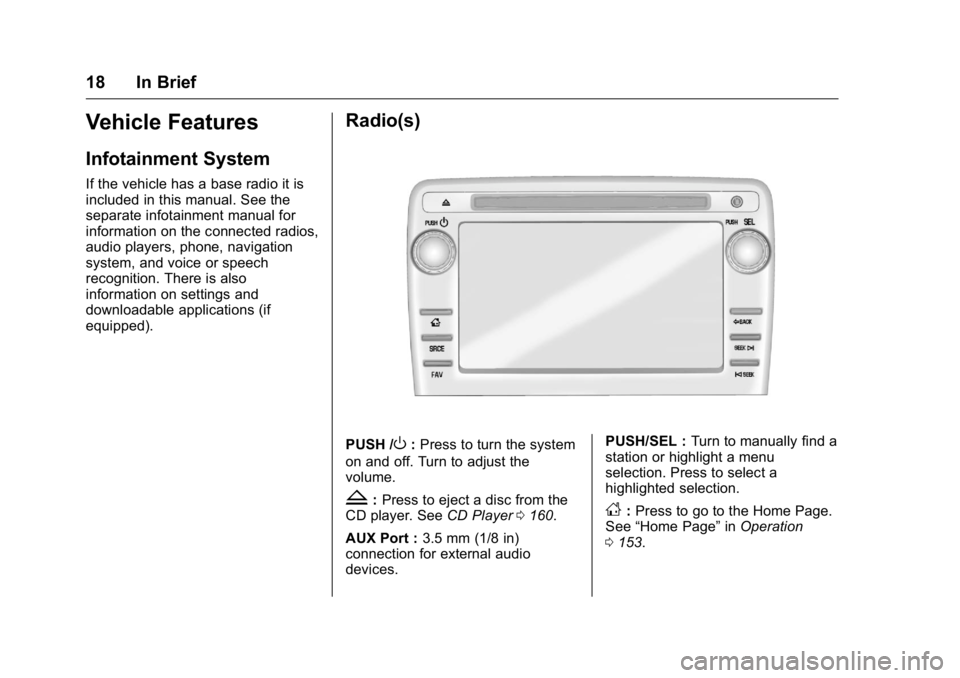
PUSH /O:Press to turn the system
on and off. Turn to adjust the
volume.
Z: Press to eject a disc from the
CD player. See CD Player0160.
AUX Port : 3.5 mm (1/8 in)
connection for external audio
devices. PUSH/SEL :
Turn to manually find a
station or highlight a menu
selection. Press to select a
highlighted selection.D: Press to go to the Home Page.
See “Home Page” inOperation
0 153.
Page 20 of 360
Buick Enclave Owner Manual (GMNA-Localizing-U.S./Canada/Mexico-
9159225) - 2016 - crc - 7/31/15
In Brief 19
SRCE :Press to switch between
AM, FM, CD, and if equipped,
SiriusXM
®, front auxiliary, rear
auxiliary, and iPod/USB.
Press and hold to mute/pause the
system.
FAV : Press to display the favorite
list or add a favorite. See Operation
0 153.
©SEEK or SEEK¨:Seek or scan
stations and tracks. See Operation
0 153.
/BACK : Press to return to the
previous screen in a menu.
Storing Radio Station Presets
Up to 30 preset stations can be
stored. AM, FM, and SiriusXM (if
equipped) can be mixed.
1. From the AM, FM, or SiriusXM main page, press and hold any
1−5 buttons or one of the
preset screen buttons at the
bottom of the screen. After a
few seconds, a beep is heard
and the new preset information
displays on that screen button.
2. Repeat for each preset. See
AM-FM Radio 0156.
Setting the Digital Clock
Press Settings on the Home Page,
then press the Set Time or Set Date
settings screen button to display the
different options for setting the time
and date.
Set Time:
.
Press the up or down arrows to
change the Hours, Minutes, AM,
PM, or the 24 hour setting on the
clock.
. Press and hold to quickly
increase or decrease the time
settings.
. Press OK to save the
adjustments.
. Press the Back or Cancel screen
button to cancel the
adjustments.
Set Date:
. Press the up or down arrows to
increase or decrease the Month,
Day, and Year settings. .
Press and hold to quickly
increase or decrease the date
settings.
. Press OK to save the
adjustments.
. Press the Back or Cancel screen
button to cancel the
adjustments.
Setting the Analog Clock
The analog clock is on the
instrument panel above the radio.
The clock is not connected with any
other vehicle system and runs by
itself. To adjust the time:
1. Press and hold the button directly above the clock to
quickly advance the time.
2. Press and release the button to increase the time by
one-minute intervals.
Satellite Radio
If equipped, vehicles with a
SiriusXM®satellite radio tuner and a
valid SiriusXM satellite radio
subscription can receive SiriusXM
programming.
Page 21 of 360
Buick Enclave Owner Manual (GMNA-Localizing-U.S./Canada/Mexico-
9159225) - 2016 - crc - 7/31/15
20 In Brief
SiriusXM Satellite Radio
Service
SiriusXM is a satellite radio service
based in the 48 contiguous United
States and 10 Canadian provinces.
SiriusXM satellite radio has a wide
variety of programming and
commercial-free music, coast to
coast, and in digital-quality sound.
A fee is required to receive the
SiriusXM service.
Refer to:
.www.siriusxm.com or call
1-866-635-2349 (U.S.).
. www.xmradio.ca or call
1-877-209-0079 (Canada).
See Satellite Radio 0159.
Portable Audio Devices
The vehicle has a 3.5 mm (1/8 in)
auxiliary input jack on the faceplate
and a USB port in the center stack.
External devices such as iPods,
laptop computers, MP3 players, CD
changers, USB storage devices,
etc. can be connected to the auxiliary port using a 3.5 mm (1/8 in)
input jack or the USB port
depending on the audio system.
If equipped, there are two USB
ports on the rear of the center
console that can be used for
charging only. They can charge
devices that draw 2.1 amps or less.
See the device’
s owner manual for
the specification.
See Auxiliary Devices 0164.
Bluetooth®
The Bluetooth®system allows users
with a Bluetooth-enabled mobile
phone to make and receive
hands-free calls using the vehicle
audio system and controls.
The Bluetooth-enabled mobile
phone must be paired with the
in-vehicle Bluetooth system before it
can be used in the vehicle. Not all
phones will support all functions.
See Bluetooth 0167.
Steering Wheel Controls
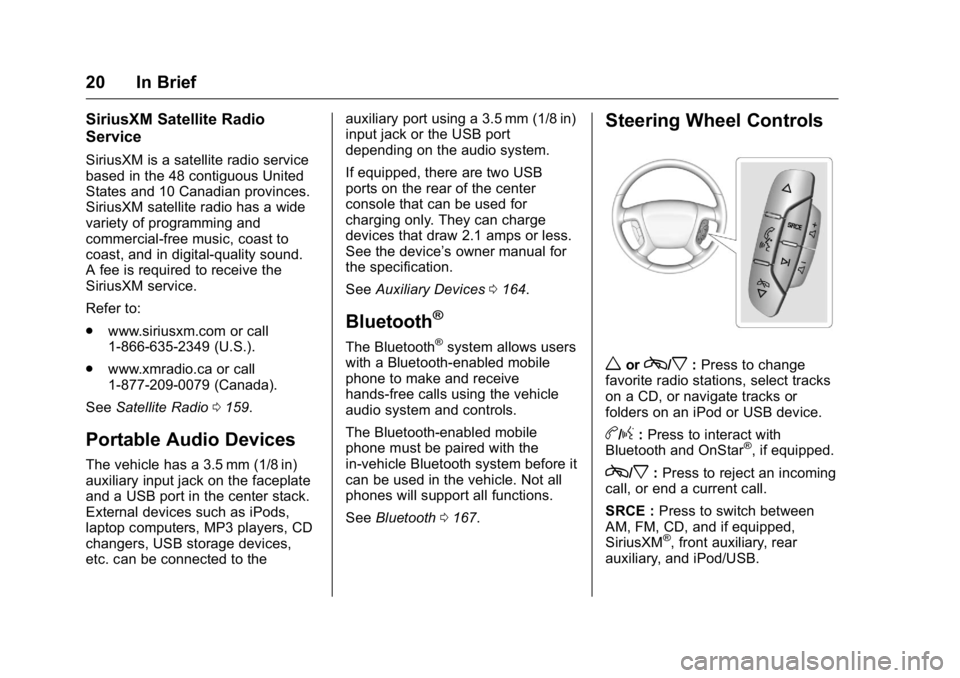
worc/x:Press to change
favorite radio stations, select tracks
on a CD, or navigate tracks or
folders on an iPod or USB device.
b/g: Press to interact with
Bluetooth and OnStar®, if equipped.
c/x: Press to reject an incoming
call, or end a current call.
SRCE : Press to switch between
AM, FM, CD, and if equipped,
SiriusXM
®, front auxiliary, rear
auxiliary, and iPod/USB.
Page 96 of 360
Buick Enclave Owner Manual (GMNA-Localizing-U.S./Canada/Mexico-
9159225) - 2016 - crc - 7/31/15
Storage 95
Storage
Storage Compartments
Storage Compartments . . . . . . . . 95
Instrument Panel Storage . . . . . . 95
Glove Box . . . . . . . . . . . . . . . . . . . . . 95
Cupholders . . . . . . . . . . . . . . . . . . . . 95
Armrest Storage . . . . . . . . . . . . . . . 96
Center Console Storage . . . . . . . 96
Additional Storage Features
Cargo Cover . . . . . . . . . . . . . . . . . . . 97
Cargo Tie-Downs . . . . . . . . . . . . . . 97
Cargo Management System . . . 97
Convenience Net . . . . . . . . . . . . . . 98
Roof Rack System
Roof Rack System . . . . . . . . . . . . . 98
Storage
Compartments
{Warning
Do not store heavy or sharp
objects in storage compartments.
In a crash, these objects may
cause the cover to open and
could result in injury.
Instrument Panel Storage
This vehicle has an instrument
panel storage area. To open, press
the button on the cover.The vehicle has an auxiliary input
jack on the upper right side of the
faceplate and a USB port in the
instrument panel storage. See
Auxiliary Devices
0164.
Glove Box
Lift the glove box handle to open it.
Use the key to lock and unlock the
glove box.
Cupholders
There are two cupholders, with
removable liners, in front of the
center console. There may be
cupholders in the second row seat
armrest. To access, pull the armrest
down. There are additional
cupholders on each side of the third
row seat and in each door.
Page 97 of 360
Buick Enclave Owner Manual (GMNA-Localizing-U.S./Canada/Mexico-
9159225) - 2016 - crc - 7/31/15
96 Storage
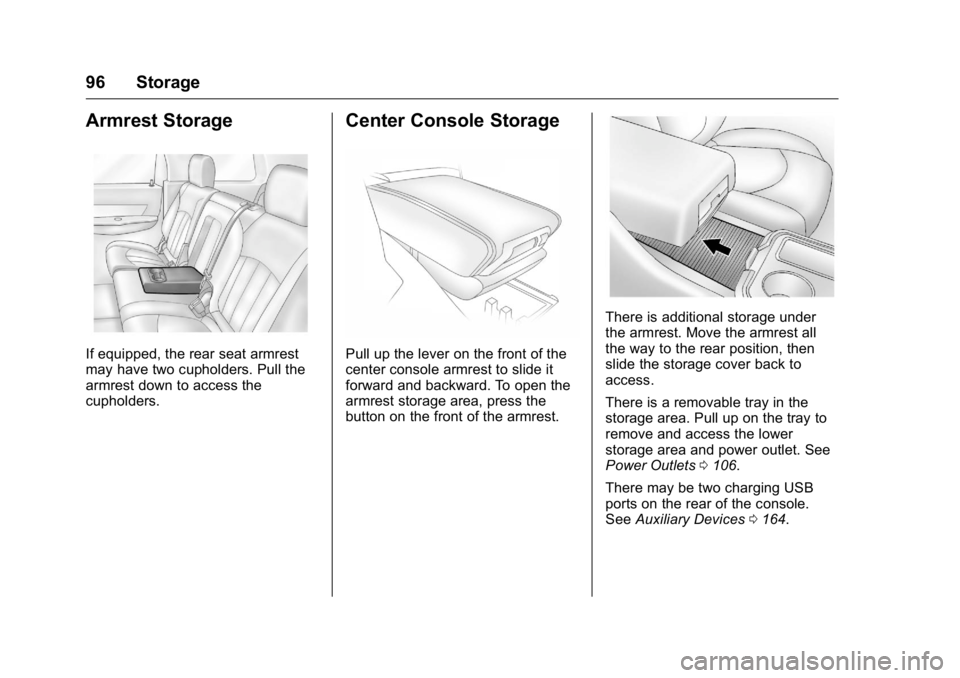
Armrest Storage
If equipped, the rear seat armrest
may have two cupholders. Pull the
armrest down to access the
cupholders.
Center Console Storage
Pull up the lever on the front of the
center console armrest to slide it
forward and backward. To open the
armrest storage area, press the
button on the front of the armrest.
There is additional storage under
the armrest. Move the armrest all
the way to the rear position, then
slide the storage cover back to
access.
There is a removable tray in the
storage area. Pull up on the tray to
remove and access the lower
storage area and power outlet. See
Power Outlets0106.
There may be two charging USB
ports on the rear of the console.
See Auxiliary Devices 0164.
Page 103 of 360
Buick Enclave Owner Manual (GMNA-Localizing-U.S./Canada/Mexico-
9159225) - 2016 - crc - 7/31/15
102 Instruments and Controls
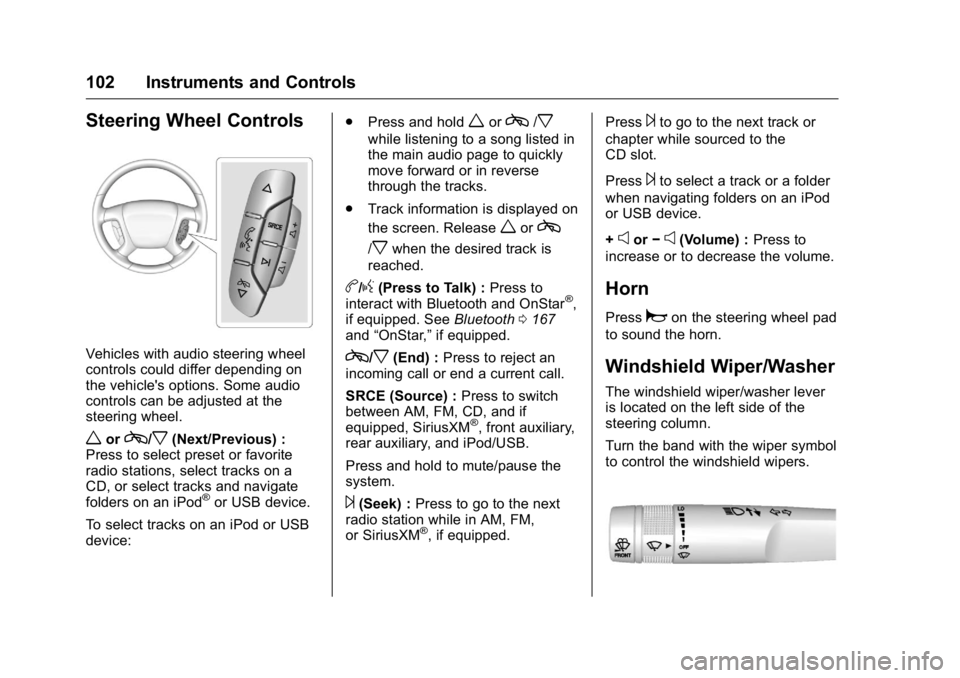
Steering Wheel Controls
Vehicles with audio steering wheel
controls could differ depending on
the vehicle's options. Some audio
controls can be adjusted at the
steering wheel.
worc/x(Next/Previous) :
Press to select preset or favorite
radio stations, select tracks on a
CD, or select tracks and navigate
folders on an iPod
®or USB device.
To select tracks on an iPod or USB
device: .
Press and hold
worc/x
while listening to a song listed in
the main audio page to quickly
move forward or in reverse
through the tracks.
. Track information is displayed on
the screen. Release
worc
/xwhen the desired track is
reached.
b/g(Press to Talk) : Press to
interact with Bluetooth and OnStar®,
if equipped. See Bluetooth0167
and “OnStar,” if equipped.
c/x(End) :Press to reject an
incoming call or end a current call.
SRCE (Source) : Press to switch
between AM, FM, CD, and if
equipped, SiriusXM
®, front auxiliary,
rear auxiliary, and iPod/USB.
Press and hold to mute/pause the
system.
¨(Seek) : Press to go to the next
radio station while in AM, FM,
or SiriusXM
®, if equipped. Press
¨to go to the next track or
chapter while sourced to the
CD slot.
Press
¨to select a track or a folder
when navigating folders on an iPod
or USB device.
+
eor −e(Volume) : Press to
increase or to decrease the volume.
Horn
Pressaon the steering wheel pad
to sound the horn.
Windshield Wiper/Washer
The windshield wiper/washer lever
is located on the left side of the
steering column.
Turn the band with the wiper symbol
to control the windshield wipers.
Page 152 of 360
Buick Enclave Owner Manual (GMNA-Localizing-U.S./Canada/Mexico-
9159225) - 2016 - crc - 7/31/15
Infotainment System 151
Infotainment
System
Introduction
Infotainment . . . . . . . . . . . . . . . . . . 151
Theft-Deterrent Feature . . . . . . 152
Overview . . . . . . . . . . . . . . . . . . . . . 153
Operation . . . . . . . . . . . . . . . . . . . . . 153
Radio
AM-FM Radio . . . . . . . . . . . . . . . . 156
Satellite Radio . . . . . . . . . . . . . . . . 159
Radio Reception . . . . . . . . . . . . . . 159
Multi-Band Antenna . . . . . . . . . . 160
Audio Players
CD Player . . . . . . . . . . . . . . . . . . . . 160
MP3 . . . . . . . . . . . . . . . . . . . . . . . . . . 162
Auxiliary Devices . . . . . . . . . . . . . 164
OnStar System
OnStar System . . . . . . . . . . . . . . . 165
Rear Seat Infotainment
Rear Seat Audio (RSA)System . . . . . . . . . . . . . . . . . . . . . . 165
Phone
Bluetooth . . . . . . . . . . . . . . . . . . . . . 167
Settings
Settings . . . . . . . . . . . . . . . . . . . . . . 174
Trademarks and License
Agreements
Trademarks and LicenseAgreements . . . . . . . . . . . . . . . . . 175
Introduction
Infotainment
Base radio information is included in
this manual. See the infotainment
manual for information on other
available infotainment systems.
Read the following pages to
become familiar with these features.
{Warning
Taking your eyes off the road for
too long or too often while using
any infotainment feature can
cause a crash. You or others
could be injured or killed. Do not
give extended attention to
infotainment tasks while driving.
Limit your glances at the vehicle
displays and focus your attention
on driving. Use voice commands
whenever possible.
The infotainment system has built-in
features intended to help avoid
distraction by disabling some
functions when driving. These
Page 154 of 360

Buick Enclave Owner Manual (GMNA-Localizing-U.S./Canada/Mexico-
9159225) - 2016 - crc - 7/31/15
Infotainment System 153
Overview
The infotainment system is controlled by using the buttons, touch screen,
steering wheel controls, and voice recognition. SeeOperation0153.
1. PUSH/O(Volume/Power)
2.
Z(Eject)
3. CD Slot
4. AUX Port
5. PUSH/SEL (Select) 6.
/BACK
7. SEEK
¨(Next/Forward)
8.
©SEEK (Previous/Reverse)
9. FAV (Favorites Menu)
10. SRCE (Source) 11.
D(Home Page)
Operation
Infotainment Controls
PUSH/O(Volume/Power):
. Press to turn the system on
and off.
. Turn to adjust the volume.
Z(Eject) : Press to eject a disc
from the CD player. See CD Player
0 160.
AUX Port : 3.5 mm (1/8 in)
connection for external audio
devices.
PUSH/SEL (Select):
. Turn to manually find a station or
highlight a menu selection.
. Press to select a highlighted
selection.
D(Home Page) : Press to go to
the Home Page. See “Home Page”
later in this section.
Page 155 of 360
Buick Enclave Owner Manual (GMNA-Localizing-U.S./Canada/Mexico-
9159225) - 2016 - crc - 7/31/15
154 Infotainment System
SRCE (Source) :Press to switch
between AM, FM, CD, and if
equipped, SiriusXM
®, front auxiliary,
rear auxiliary, and iPod/USB.
Press and hold to mute/pause the
system. Press and hold again to
unmute/resume the system.
FAV (Favorites Menu) : In AM, FM,
or SiriusXM (if equipped), press to
change the current favorite page
number above the preset buttons.
Keep pressing to scroll through the
favorites pages. The stored stations
for each list display on the bottom of
the screen. The number of preset
Favorite Pages can be changed by
pressing the Settings button on a
Home Page, then pressing
Favorites Pages, and then selecting
the number of Favorite Pages.
©SEEK (Previous/Reverse):
. AM, FM, SiriusXM (if equipped):
Press to seek to the previous
strong station. Press and hold
for Scan. Press
©again to stop
the scan. .
CD, USB: Press to seek to the
beginning of the current or
previous track.
. CD, USB: Press and hold to
quickly reverse through a track.
Release the button to return to
playing speed. See CD Player
0 160 andAuxiliary Devices
0 164.
SEEK
¨(Next/Forward):
. AM, FM, SiriusXM (if equipped):
Press to seek to the next strong
station. Press and hold for Scan.
Press
¨again to stop the scan.
. CD, USB: Press to seek or skip
the next track or program.
. CD, USB: Press and hold to fast
forward through a track. Release
the button to return to playing
speed. See CD Player0160
and Auxiliary Devices 0164.
/BACK : Press to return to the
previous screen in a menu.
Touchscreen Buttons
Touchscreen buttons are visible on
the screen when available. When a
function is unavailable, the button
may gray out. When a function is
selected, the button may highlight or
animate.
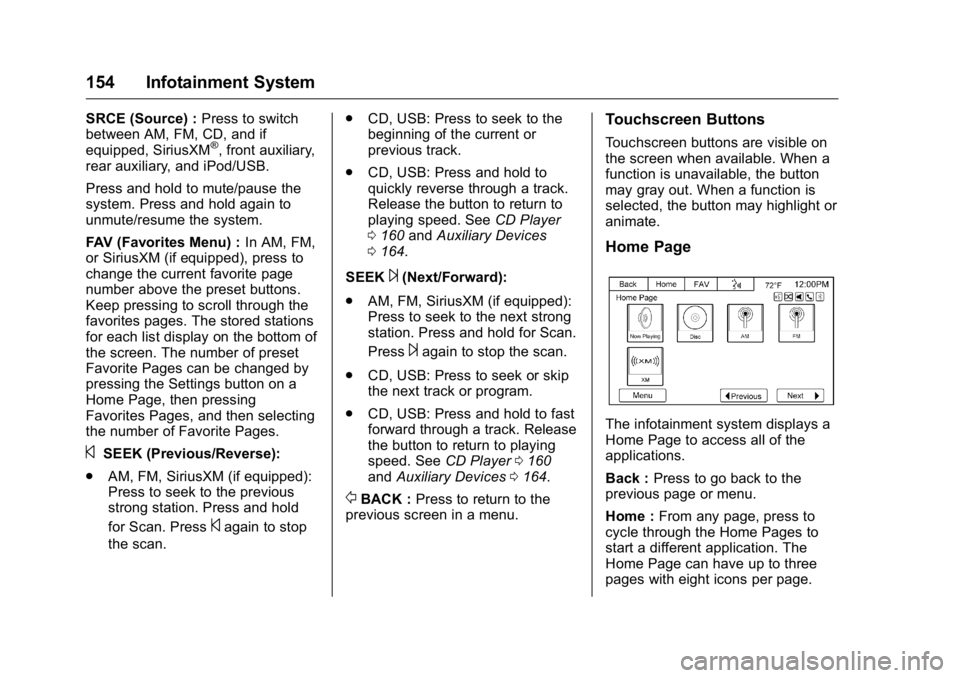
Home Page
The infotainment system displays a
Home Page to access all of the
applications.
Back : Press to go back to the
previous page or menu.
Home : From any page, press to
cycle through the Home Pages to
start a different application. The
Home Page can have up to three
pages with eight icons per page.