AUX BUICK ENCLAVE 2016 User Guide
[x] Cancel search | Manufacturer: BUICK, Model Year: 2016, Model line: ENCLAVE, Model: BUICK ENCLAVE 2016Pages: 360, PDF Size: 5.04 MB
Page 156 of 360
Buick Enclave Owner Manual (GMNA-Localizing-U.S./Canada/Mexico-
9159225) - 2016 - crc - 7/31/15
Infotainment System 155
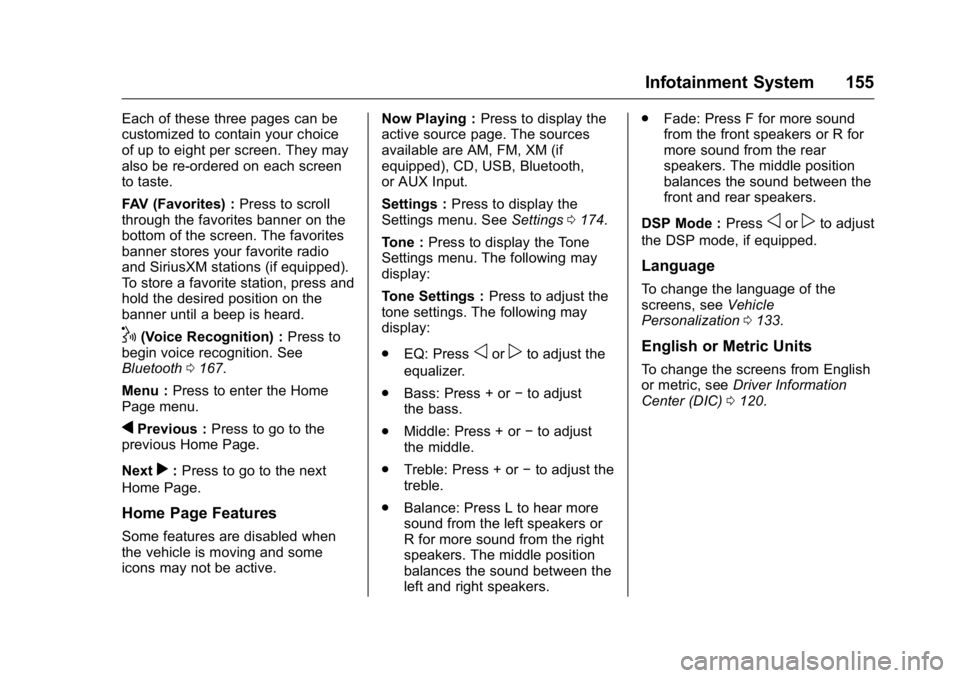
Each of these three pages can be
customized to contain your choice
of up to eight per screen. They may
also be re-ordered on each screen
to taste.
FAV (Favorites) :Press to scroll
through the favorites banner on the
bottom of the screen. The favorites
banner stores your favorite radio
and SiriusXM stations (if equipped).
To store a favorite station, press and
hold the desired position on the
banner until a beep is heard.
!(Voice Recognition) : Press to
begin voice recognition. See
Bluetooth 0167.
Menu : Press to enter the Home
Page menu.
qPrevious : Press to go to the
previous Home Page.
Next
r: Press to go to the next
Home Page.
Home Page Features
Some features are disabled when
the vehicle is moving and some
icons may not be active. Now Playing :
Press to display the
active source page. The sources
available are AM, FM, XM (if
equipped), CD, USB, Bluetooth,
or AUX Input.
Settings : Press to display the
Settings menu. See Settings0174.
Tone : Press to display the Tone
Settings menu. The following may
display:
Tone Settings : Press to adjust the
tone settings. The following may
display:
. EQ: Press
oorpto adjust the
equalizer.
. Bass: Press + or −to adjust
the bass.
. Middle: Press + or −to adjust
the middle.
. Treble: Press + or −to adjust the
treble.
. Balance: Press L to hear more
sound from the left speakers or
R for more sound from the right
speakers. The middle position
balances the sound between the
left and right speakers. .
Fade: Press F for more sound
from the front speakers or R for
more sound from the rear
speakers. The middle position
balances the sound between the
front and rear speakers.
DSP Mode : Press
oorpto adjust
the DSP mode, if equipped.
Language
To change the language of the
screens, see Vehicle
Personalization 0133.
English or Metric Units
To change the screens from English
or metric, see Driver Information
Center (DIC) 0120.
Page 165 of 360
Buick Enclave Owner Manual (GMNA-Localizing-U.S./Canada/Mexico-
9159225) - 2016 - crc - 7/31/15
164 Infotainment System
Auxiliary Devices
The vehicle has a 3.5 mm (1/8 in)
auxiliary input jack on the faceplate
and a USB port in the center stack.
If equipped, there are two USB
ports on the rear of the center
console that can be used for
charging only. They can charge
devices that draw 2.1 amps or less.
See the device’s owner manual for
the specification.
Using the 3.5 mm (1/8 in)
Auxiliary Input Jack
This is not an audio output; do not
plug a headphone set into the front
auxiliary input jack. Connect an
auxiliary input device such as an
iPod, laptop computer, MP3 player,
CD player, or cassette tape player
to the auxiliary input jack for use as
another source for audio listening.
Drivers are encouraged to set up
any auxiliary device while the
vehicle is in P (Park). See
Defensive Driving 0186 for more
information on driver distraction. To use an auxiliary input device,
connect a 3.5 mm (1/8 in) cable to
the radio's front auxiliary input jack.
Press SRCE to select the device.
Using the USB Port
The USB port can control a USB
storage device or an iPod using the
radio buttons and knobs.
USB Supported Devices
.
USB Flash Drives
. Portable USB Hard Drives
. Fifth generation or later iPod
. iPod classic
®(6th generation)
. iPod nano
®(3G, 4G, 5G,
and 6G)
. iPod touch
®(1G, 2G, 3G,
and 4G)
. iPhone
®(2G, 3G, 3GS, 4, and 5)
. iPad
®(1G, 2G) Not all iPods and USB drives are
compatible with the USB port.
Make sure the iPod has the latest
firmware from Apple
®for proper
operation. iPod firmware can be
updated using the latest iTunes
®
application. See www.apple.com/
itunes.
For help identifying your iPod, go to
www.apple.com/support.
Page 166 of 360

Buick Enclave Owner Manual (GMNA-Localizing-U.S./Canada/Mexico-
9159225) - 2016 - crc - 7/31/15
Infotainment System 165
OnStar System
OnStar®with 4G LTE
If equipped with OnStar 4G LTE, up
to seven devices, such as
smartphones, tablets, and laptops,
can be connected to high-speed
Internet through the vehicle’s built-in
Wi-Fi hotspot.Call 1-888-4-ONSTAR
(1-888-466-7827) to connect to an
OnStar Advisor for assistance. See
www.onstar.com for a detailed
instruction guide, vehicle availability,
details, and system limitations.
Services and apps vary by make,
model, year, carrier, availability, and
conditions. 4G LTE service is
available in select markets. 4G LTE
performance is based on industry
averages and vehicle systems
design. Some services require a
data plan.
Rear Seat
Infotainment
Rear Seat Audio (RSA)
System
If equipped with RSA, rear seat
passengers can listen to and control
any of the music sources: radio,
CDs, DVDs, or other auxiliary
sources. The rear seat passengers
can only control the music sources
the front seat passengers are not
listening to (except on some radios
where dual control is allowed). For
example, rear seat passengers can
control a CD and listen to it through
the headphones, while the driver
listens to the radio through the front
speakers. The rear seat passengers
have control of the volume for each
set of headphones.
To turn the RSA off from the front,
press and hold the radio power
button for more than two seconds.
Press the power button on the RSA
to turn it back on.
Page 167 of 360
Buick Enclave Owner Manual (GMNA-Localizing-U.S./Canada/Mexico-
9159225) - 2016 - crc - 7/31/15
166 Infotainment System
The RSA functions operate even
when the main radio is off. The front
audio system displays
Xwhen the
RSA is on, and disappears from the
display when it is off.
Audio can be heard through wired
headphones (not included) plugged
into the jacks on the RSA. If the
vehicle has this feature, audio can
also be heard on Channel 2 of the
wireless headphones.
The audio system mutes the rear
speakers when the RSA audio is
active through the headphones.
To listen to an iPod or portable
audio device through the RSA,
attach the iPod or portable audio
device to the front auxiliary input (if
available), located on the front audio
system. Turn the iPod on, then
choose the front auxiliary input with
the RSA SRCE button.
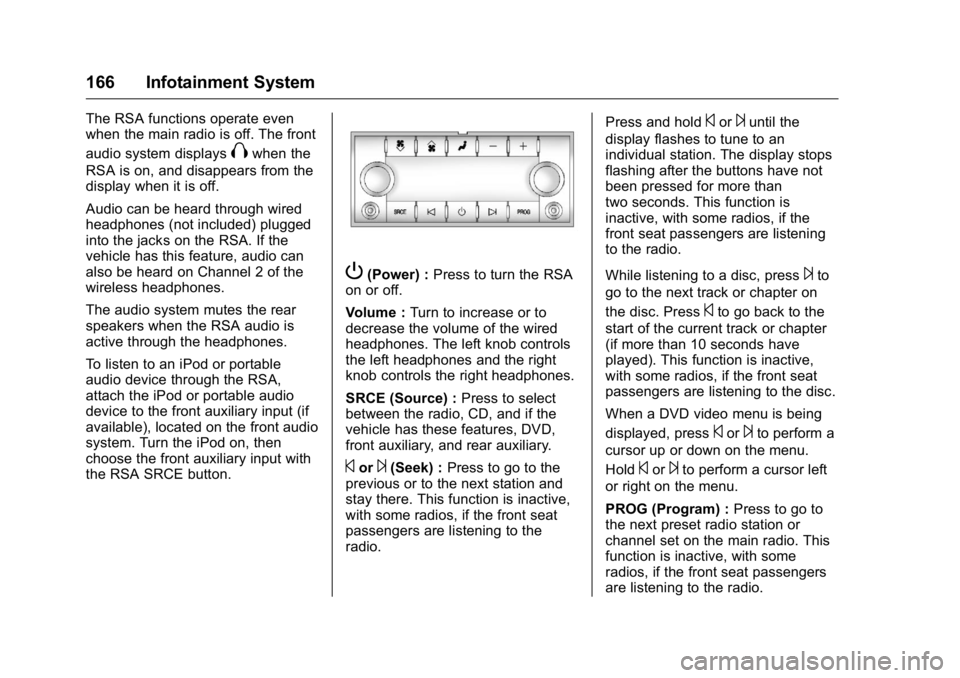
P(Power) : Press to turn the RSA
on or off.
Volume : Turn to increase or to
decrease the volume of the wired
headphones. The left knob controls
the left headphones and the right
knob controls the right headphones.
SRCE (Source) : Press to select
between the radio, CD, and if the
vehicle has these features, DVD,
front auxiliary, and rear auxiliary.
©or¨(Seek) : Press to go to the
previous or to the next station and
stay there. This function is inactive,
with some radios, if the front seat
passengers are listening to the
radio. Press and hold
©or¨until the
display flashes to tune to an
individual station. The display stops
flashing after the buttons have not
been pressed for more than
two seconds. This function is
inactive, with some radios, if the
front seat passengers are listening
to the radio.
While listening to a disc, press
¨to
go to the next track or chapter on
the disc. Press
©to go back to the
start of the current track or chapter
(if more than 10 seconds have
played). This function is inactive,
with some radios, if the front seat
passengers are listening to the disc.
When a DVD video menu is being
displayed, press
©or¨to perform a
cursor up or down on the menu.
Hold
©or¨to perform a cursor left
or right on the menu.
PROG (Program) : Press to go to
the next preset radio station or
channel set on the main radio. This
function is inactive, with some
radios, if the front seat passengers
are listening to the radio.
Page 260 of 360

Buick Enclave Owner Manual (GMNA-Localizing-U.S./Canada/Mexico-
9159225) - 2016 - crc - 7/31/15
Vehicle Care 259
The vehicle may not be equipped
with all of the fuses, relays, and
features shown.Fuses Usage
A/C CLTCH Air Conditioning Clutch Fuses Usage
ABS MTR Antilock Brake System (ABS)
Motor
AFS Adaptive Forward Lighting System
AIRBAG Airbag System
AUX POWER Auxiliary Power AUX
VAC PUMP Auxiliary
Vacuum Pump
AWD All-Wheel-Drive System
BATT 1 Battery 1
BATT 2 Battery 2
BATT 3 Battery 3 CIGAR
LIGHTER Cigarette Lighter
ECM 1 Engine Control Module 1
ECM/
FPM IGN Engine Control
Module/Fuel Pump
Control Module
Ignition
EMISSION 1 Emission 1
Page 262 of 360

Buick Enclave Owner Manual (GMNA-Localizing-U.S./Canada/Mexico-
9159225) - 2016 - crc - 7/31/15
Vehicle Care 261
FusesUsage
WPR/WSW Windshield Wiper/ Washer
Relays Usage
A/C
CMPRSR
CLTCH Air Conditioning
Compressor Clutch
AUX
VAC PUMP Auxiliary
Vacuum Pump
CRNK Switched Power
FAN 1 Cooling Fan 1
FAN 2 Cooling Fan 2
FAN 3 Cooling Fan 3 FOG
LAMP (GMC) Fog Lamps (GMC)
HI BEAM High-Beam Headlamps
HID/
LO BEAM High Intensity
Discharge (HID)
Low-Beam
Headlamps
HORN Horn IGN Ignition Main Relays
Usage
LT TRLR
STOP/TRN Trailer Left
Stoplamp and Turn
Signal Lamp
PRK LAMP Parking Lamp PWR/TRN Powertrain
RR DEFOG Rear Window Defogger
RT TRLR
STOP/TRN Trailer Right
Stoplamp and Turn
Signal Lamp
Stop Lamps (CHINAONLY) Stop Lamps
(China Only)
TRLR
BCK/UP Trailer Back-up
Lamps
WPR Windshield Wiper
WPR HI Windshield Wiper High SpeedInstrument Panel Fuse
Block
The instrument panel fuse block is
under the instrument panel on the
passenger side of the vehicle. Pull
down on the cover to access the
fuse block.
Page 351 of 360

Buick Enclave Owner Manual (GMNA-Localizing-U.S./Canada/Mexico-
9159225) - 2016 - crc - 7/31/15
350 Index
Assistance Program,Roadside . . . . . . . . . . . . . . . . . . . . . . 329
Audio Theft-Deterrent Feature . . . . . . . 152
Audio Players CD . . . . . . . . . . . . . . . . . . . . . . . . . . . 160
MP3 . . . . . . . . . . . . . . . . . . . . . . . . . . 162
Automatic Dimming Mirrors . . . . . . . . . . . . . . . . 40
Door Locks . . . . . . . . . . . . . . . . . . . . . 32
Transmission . . . . . . . . . . . . . . . . . 203
Transmission Fluid . . . . . . . . . . . 241
Automatic Transmission Manual Mode . . . . . . . . . . . . . . . . . 205
Shift Lock Control FunctionCheck . . . . . . . . . . . . . . . . . . . . . . . 253
Auxiliary Devices . . . . . . . . . . . . . . . . . . . . . . . 164
B
BatteryLoad Management . . . . . . . . . . . . 150
Power Protection . . . . . . . . . . . . . 150
Voltage and ChargingMessages . . . . . . . . . . . . . . . . . . . 125
Battery - North America . . . . 252, 293
Blade Replacement, Wiper . . . . . 254
Bluetooth
Overview . . . . . . . . . . . . . . . . . . . . . 167 Brake
System Warning Light . . . . . . . . .115
Brakes . . . . . . . . . . . . . . . . . . . . . . . . . . 250 Antilock . . . . . . . . . . . . . . . . . . . . . . . 207
Assist . . . . . . . . . . . . . . . . . . . . . . . . . 208
Fluid . . . . . . . . . . . . . . . . . . . . . . . . . . 251
Parking . . . . . . . . . . . . . . . . . . . . . . . 208
System Messages . . . . . . . . . . . . 125
Braking . . . . . . . . . . . . . . . . . . . . . . . . . 187
Break-In, New Vehicle . . . . . . . . . . 196
Bulb Replacement . . . . . . . . . . . . . . 257 Headlamp Aiming . . . . . . . . . . . . . 255
Headlamps . . . . . . . . . . . . . . . . . . . 255
High Intensity Discharge(HID) Lighting . . . . . . . . . . . . . . . 255
License Plate Lamps . . . . . . . . . 256
Taillamps, Turn Signal, and
Stoplamps . . . . . . . . . . . . . . . . . . 256
Buying New Tires . . . . . . . . . . . . . . . 278C
Calibration . . . . . . . . . . . . . . . . . . . . . . 103
California Fuel Requirements . . . . . . . . . . . 222
Perchlorate MaterialsRequirements . . . . . . . . . . . . . . . 234
California Proposition
65 Warning . . . . . . . . . .234, 252, 293 Camera
Rear Vision (RVC) . . . . . . . . . . . . 213
Canadian Vehicle Owners . . . . . . . . 2
Capacities and Specifications . . . . . . . . . . . . . . . . . 323
Carbon Monoxide Engine Exhaust . . . . . . . . . . . . . . . 202
Liftgate . . . . . . . . . . . . . . . . . . . . . . . . . 33
Winter Driving . . . . . . . . . . . . . . . . 190
Cargo Cover . . . . . . . . . . . . . . . . . . . . . . . . . . . 97
Management System . . . . . . . . . . . 97
Tie-Downs . . . . . . . . . . . . . . . . . . . . . . 97
Caution, Danger, and Warning . . . . 2
CD Player . . . . . . . . . . . . . . . . . . . . . . 160
Center Console Storage . . . . . . . . . 96
Chains, Tire . . . . . . . . . . . . . . . . . . . . 283
Charging System Light . . . . . . . . . 113
Check Ignition Transmission Lock . . . 253
Malfunction IndicatorEngine Light . . . . . . . . . . . . . . . . .113
Child Restraints Infants and Young Children . . . . . 77
Lower Anchors and Tethersfor Children . . . . . . . . . . . . . . . . . . . 83
Older Children . . . . . . . . . . . . . . . . . . 76
Securing . . . . . . . . . . . . . . . . . . . . 89, 91
Page 352 of 360

Buick Enclave Owner Manual (GMNA-Localizing-U.S./Canada/Mexico-
9159225) - 2016 - crc - 7/31/15
Index 351
Child Restraints (cont'd)Systems . . . . . . . . . . . . . . . . . . . . . . . . 80
Circuit Breakers . . . . . . . . . . . . . . . . 258
Cleaning Exterior Care . . . . . . . . . . . . . . . . . 300
Interior Care . . . . . . . . . . . . . . . . . . 304
Climate Control Systems Dual Automatic . . . . . . . . . . . . . . . 176
Rear . . . . . . . . . . . . . . . . . . . . . 181, 182
Clock . . . . . . . . . . . . . . . . . . . . . . . . . . . 105
Cluster, Instrument . . . . . . . . . . . . . 108
Collision Damage Repair . . . . . . . 332
Compact Spare Tire . . . . . . . . . . . . 291
Compartments Storage . . . . . . . . . . . . . . . . . . . . . . . . . 95
Compass . . . . . . . . . . . . . . . . . . . . . . . 103
Connections OnStar
®. . . . . . . . . . . . . . . . . . . . . . 341
Control Traction and ElectronicStability . . . . . . . . . . . . . . . . . . . . . 209
Control of a Vehicle . . . . . . . . . . . . . 187
Convenience Net . . . . . . . . . . . . . . . . 98
Convex Mirrors . . . . . . . . . . . . . . . . . . 39
Coolant Engine . . . . . . . . . . . . . . . . . . . . . . . . 244
Engine Temperature Gauge . . .110 Coolant (cont'd)
Engine Temperature
Warning Light . . . . . . . . . . . . . . . .117
Cooling System . . . . . . . . . . . . . . . . . 243
Engine Messages . . . . . . . . . . . . 126
Courtesy Lamps . . . . . . . . . . . . . . . . 148
Courtesy Transportation Program . . . . . . . . . . . . . . . . . . . . . . . 331
Cover
Cargo . . . . . . . . . . . . . . . . . . . . . . . . . . . 97
Engine . . . . . . . . . . . . . . . . . . . . . . . . 238
Cruise Control . . . . . . . . . . . . . . . . . . 211 Light . . . . . . . . . . . . . . . . . . . . . . . . . . .119
Messages . . . . . . . . . . . . . . . . . . . . 125
Cupholders . . . . . . . . . . . . . . . . . . . . . . 95
Customer Assistance . . . . . . . . . . . 327 Offices . . . . . . . . . . . . . . . . . . . . . . . . 327
Text Telephone (TTY)Users . . . . . . . . . . . . . . . . . . . . . . . 327
Customer Information Service PublicationsOrdering Information . . . . . . . . 334
Customer Satisfaction
Procedure . . . . . . . . . . . . . . . . . . . . . 325
D
Damage Repair, Collision . . . . . . . 332
Danger, Warning, and Caution . . . . 2
Data Recorders, Event . . . . . . . . . 337
Daytime Running Lamps/Automatic Headlamp
System . . . . . . . . . . . . . . . . . . . . . . . . 145
Defensive Driving . . . . . . . . . . . . . . . 186
Delayed Entry Lighting . . . . . . . . . 149
Delayed Exit Lighting . . . . . . . . . . . 149
Delayed Headlamps . . . . . . . . . . . . 146
Delayed Locking . . . . . . . . . . . . . . . . . 32
Devices Auxiliary . . . . . . . . . . . . . . . . . . . . . . 164
Diagnostics OnStar
®. . . . . . . . . . . . . . . . . . . . . . 343
Distracted Driving . . . . . . . . . . . . . . . 186
Dome Lamps . . . . . . . . . . . . . . . . . . . 148
Door Ajar Messages . . . . . . . . . . . . . . . 125
Delayed Locking . . . . . . . . . . . . . . . . 32
Locks . . . . . . . . . . . . . . . . . . . . . . . . . . . 31
Power Locks . . . . . . . . . . . . . . . . . . . . 32
Drive Belt Routing, Engine . . . . . . 324
Drive Systems
All-Wheel Drive . . . . . . . . . . 207, 253
Driver Information Center (DIC) . . . . . . . . . . . . . . . . . . 120