instrument cluster BUICK ENCLAVE 2017 Owner's Manual
[x] Cancel search | Manufacturer: BUICK, Model Year: 2017, Model line: ENCLAVE, Model: BUICK ENCLAVE 2017Pages: 366, PDF Size: 5 MB
Page 8 of 366

Buick Enclave Owner Manual (GMNA-Localizing-U.S./Canada/Mexico-
9955666) - 2017 - crc - 8/4/16
In Brief 7
1.Air Vents 0186.
2. Turn Signal Lever. See Turn
and Lane-Change
Signals 0149.
Windshield Wiper/
Washer 0104.
3. Instrument Cluster 0110.
4. Clock 0107.
5. Instrument Panel Storage 097.
6. Infotainment 0154.
7. Passenger Airbag Status Indicator. See Passenger
Sensing System 072.
8. Hazard Warning
Flashers 0149.
9. Heated and Cooled Front
Seats 051 (If Equipped).
10. Rear Window Wiper/
Washer 0105.
Traction Control System (TCS)
Disable Button. See Traction
Control/Electronic Stability
Control 0212.
Forward Collision Alert (FCA)
System 0220 (If Equipped). Lane Departure Warning
(LDW)
0223 (If Equipped).
Tow/Haul Button (If Equipped).
See Tow/Haul Mode 0209.
Power Liftgate Button (If
Equipped). See Liftgate034.
11. Power Outlets 0108.
12. USB Port. See Auxiliary
Devices 0167.
13. Shift Lever. See Automatic
Transmission 0207.
14. Dual Automatic Climate Control
System 0179.
15. Driver Information Center (DIC) Buttons. See Driver Information
Center (DIC) 0122.
16. Steering Wheel Controls 0104
(If Equipped).
17. Horn 0104.
18. Steering Wheel
Adjustment 0103.
19. Cruise Control 0214.
20. Dome Lamp Override. See Dome Lamps 0150. Instrument Panel Illumination
Control
0150.
21. Data Link Connector (DLC) (Out of View). See Malfunction
Indicator Lamp (Check Engine
Light) 0116.
22. Parking Brake 0211.
23. Hood Release. See Hood 0239.
24. Exterior Lamp Controls 0146.
Page 18 of 366
Buick Enclave Owner Manual (GMNA-Localizing-U.S./Canada/Mexico-
9955666) - 2017 - crc - 8/4/16
In Brief 17
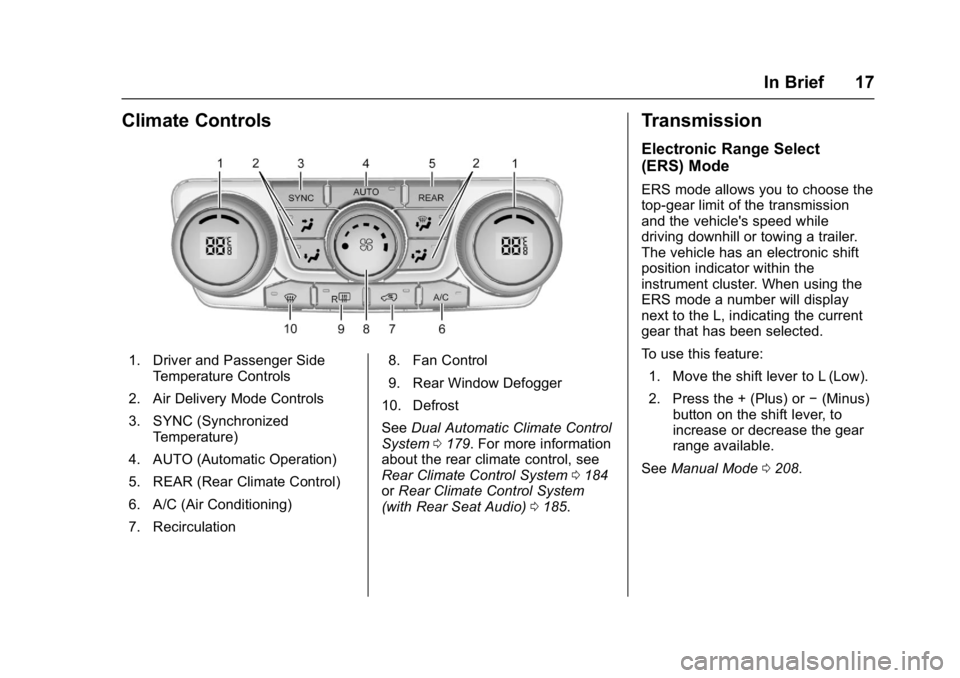
Climate Controls
1. Driver and Passenger SideTemperature Controls
2. Air Delivery Mode Controls
3. SYNC (Synchronized Temperature)
4. AUTO (Automatic Operation)
5. REAR (Rear Climate Control)
6. A/C (Air Conditioning)
7. Recirculation 8. Fan Control
9. Rear Window Defogger
10. Defrost
See Dual Automatic Climate Control
System 0179. For more information
about the rear climate control, see
Rear Climate Control System 0184
or Rear Climate Control System
(with Rear Seat Audio) 0185.
Transmission
Electronic Range Select
(ERS) Mode
ERS mode allows you to choose the
top-gear limit of the transmission
and the vehicle's speed while
driving downhill or towing a trailer.
The vehicle has an electronic shift
position indicator within the
instrument cluster. When using the
ERS mode a number will display
next to the L, indicating the current
gear that has been selected.
To use this feature:
1. Move the shift lever to L (Low).
2. Press the + (Plus) or −(Minus)
button on the shift lever, to
increase or decrease the gear
range available.
See Manual Mode 0208.
Page 68 of 366

Buick Enclave Owner Manual (GMNA-Localizing-U.S./Canada/Mexico-
9955666) - 2017 - crc - 8/4/16
Seats and Restraints 67
Warning (Continued)
Occupants should not lean on or
sleep against the door or side
windows in seating positions with
seat-mounted side impact airbags
and/or roof-rail airbags.
{Warning
Children who are up against,
or very close to, any airbag when
it inflates can be seriously injured
or killed. Always secure children
properly in the vehicle. To read
how, seeOlder Children 078 or
Infants and Young Children 080.
There is an airbag readiness light
on the instrument cluster, which
shows the airbag symbol.
The system checks the airbag
electrical system for malfunctions.
The light tells you if there is an
electrical problem. See Airbag
Readiness Light 0114.
Where Are the Airbags?
The driver frontal airbag is in the
center of the steering wheel.
The front outboard passenger
frontal airbag is in the passenger
side instrument panel.
Page 103 of 366
Buick Enclave Owner Manual (GMNA-Localizing-U.S./Canada/Mexico-
9955666) - 2017 - crc - 8/4/16
102 Instruments and Controls
Instruments and
Controls
Controls
Steering Wheel Adjustment . . . 103
Steering Wheel Controls . . . . . . 104
Horn . . . . . . . . . . . . . . . . . . . . . . . . . . 104
Windshield Wiper/Washer . . . . 104
Rear Window Wiper/Washer . . . . . . . . . . . . . . . . . . . . . 105
Compass . . . . . . . . . . . . . . . . . . . . . 105
Clock . . . . . . . . . . . . . . . . . . . . . . . . . 107
Power Outlets . . . . . . . . . . . . . . . . 108
Warning Lights, Gauges, and
Indicators
Warning Lights, Gauges, and Indicators . . . . . . . . . . . . . . . . . . . 109
Instrument Cluster . . . . . . . . . . . . 110
Speedometer . . . . . . . . . . . . . . . . . 111
Odometer . . . . . . . . . . . . . . . . . . . . . 111
Tachometer . . . . . . . . . . . . . . . . . . . 111
Fuel Gauge . . . . . . . . . . . . . . . . . . . 111
Engine Coolant Temperature Gauge . . . . . . . . . . . . . . . . . . . . . . 112
Voltmeter Gauge . . . . . . . . . . . . . . 113
Safety Belt Reminders . . . . . . . . 113
Airbag Readiness Light . . . . . . . 114 Passenger Airbag Status
Indicator . . . . . . . . . . . . . . . . . . . . . 114
Charging System Light . . . . . . . 115
Malfunction Indicator Lamp (Check Engine Light) . . . . . . . . 116
Brake System Warning Light . . . . . . . . . . . . . . . . . . . . . . . . 118
Antilock Brake System (ABS) Warning Light . . . . . . . . . . . . . . . 118
Tow/Haul Mode Light . . . . . . . . . 119
Lane Departure Warning (LDW) Light . . . . . . . . . . . . . . . . . 119
Vehicle Ahead Indicator . . . . . . . 119
StabiliTrak
®Indicator Light . . . 119
Engine Coolant Temperature Warning Light . . . . . . . . . . . . . . . 120
Tire Pressure Light . . . . . . . . . . . 120
Engine Oil Pressure Light . . . . 120
Security Light . . . . . . . . . . . . . . . . . 121
High-Beam On Light . . . . . . . . . . 121
Cruise Control Light . . . . . . . . . . 122
Information Displays
Driver Information Center (DIC) . . . . . . . . . . . . . . . . 122
Vehicle Messages
Vehicle Messages . . . . . . . . . . . . 127
Battery Voltage and ChargingMessages . . . . . . . . . . . . . . . . . . . 127
Brake System Messages . . . . . 127 Cruise Control Messages . . . . . 128
Door Ajar Messages . . . . . . . . . . 128
Engine Cooling System
Messages . . . . . . . . . . . . . . . . . . . 129
Engine Oil Messages . . . . . . . . . 129
Engine Power Messages . . . . . 130
Fuel System Messages . . . . . . . 130
Key and Lock Messages . . . . . 130
Lamp Messages . . . . . . . . . . . . . . 130
Object Detection System
Messages . . . . . . . . . . . . . . . . . . . 131
Ride Control System Messages . . . . . . . . . . . . . . . . . . . 132
Airbag System Messages . . . . 133
Security Messages . . . . . . . . . . . 133
Service Vehicle Messages . . . . 133
Tire Messages . . . . . . . . . . . . . . . . 133
Transmission Messages . . . . . . 134
Vehicle Reminder Messages . . . . . . . . . . . . . . . . . . . 135
Vehicle Speed Messages . . . . . 135
Washer Fluid Messages . . . . . . 135
Vehicle Personalization
Vehicle Personalization . . . . . . . 136
Page 111 of 366

Buick Enclave Owner Manual (GMNA-Localizing-U.S./Canada/Mexico-
9955666) - 2017 - crc - 8/4/16
110 Instruments and Controls
Instrument Cluster
English Shown, Metric Similar
Page 114 of 366

Buick Enclave Owner Manual (GMNA-Localizing-U.S./Canada/Mexico-
9955666) - 2017 - crc - 8/4/16
Instruments and Controls 113
Voltmeter Gauge
When the engine is not running, but
the ignition is on, this gauge shows
the battery's state of charge in
DC volts.
When the engine is running, this
gauge shows the condition of the
charging system. The vehicle's
charging system regulates voltage
based on the state of charge of the
battery. The voltmeter may fluctuate.
This is normal. Readings between
the low and high warning zones
indicate the normal operating range.Readings in the low warning zone
may occur when a large number of
electrical accessories are operating
in the vehicle and the engine is left
idling for an extended period.
If there is a problem with the battery
charging system, a SERVICE
BATTERY CHARGING SYSTEM
message appears in the Driver
Information Center (DIC) and/or the
charging system light comes on.
See
Battery Voltage and Charging
Messages 0127 for more
information.
However, readings in either warning
zone can indicate a possible
problem in the electrical system.
Have the vehicle serviced as soon
as possible.
Safety Belt Reminders
Driver Safety Belt Reminder
Light
There is a driver safety belt
reminder light on the instrument
cluster.
When the vehicle is started, this
light flashes and a chime may come
on to remind the driver to fasten
their safety belt. Then the light stays
on solid until the belt is buckled.
This cycle may continue several
times if the driver remains or
becomes unbuckled while the
vehicle is moving.
If the driver safety belt is buckled,
neither the light nor the chime
comes on.
Passenger Safety Belt
Reminder Light
There is a passenger safety belt
reminder light near the passenger
airbag status indicator. See
Passenger Sensing System 072.
Page 123 of 366
Buick Enclave Owner Manual (GMNA-Localizing-U.S./Canada/Mexico-
9955666) - 2017 - crc - 8/4/16
122 Instruments and Controls
Cruise Control Light
This light comes on when the cruise
control is set.
This light goes out when the cruise
control is canceled. SeeCruise
Control 0214.
Information Displays
Driver Information
Center (DIC)
The DIC displays information about
your vehicle. It also displays
warning messages if a system
problem is detected.
All messages will appear in the DIC
display at the top of the instrument
cluster.
The DIC comes on when the ignition
is on. After a short delay, the DIC
will display the information that was
last displayed before the engine
was turned off.
The DIC also displays a shift lever
position indicator on the bottom line
of the display. See Automatic
Transmission 0207.
The outside air temperature and
compass, if equipped, also display
on the DIC when viewing the trip
and fuel information. The outside air
temperature automatically appears
in the top right corner of the DIC
display. If there is a problem with the system that controls the
temperature display, the numbers
will be replaced with dashes. If this
occurs, have the vehicle serviced.
The compass will be shown in the
bottom right corner of the DIC
display. See
Compass0105.
The DIC has different displays,
which can be accessed by pressing
the DIC buttons on the center stack.
The DIC also allows some features
to be customized. See Vehicle
Personalization 0136.
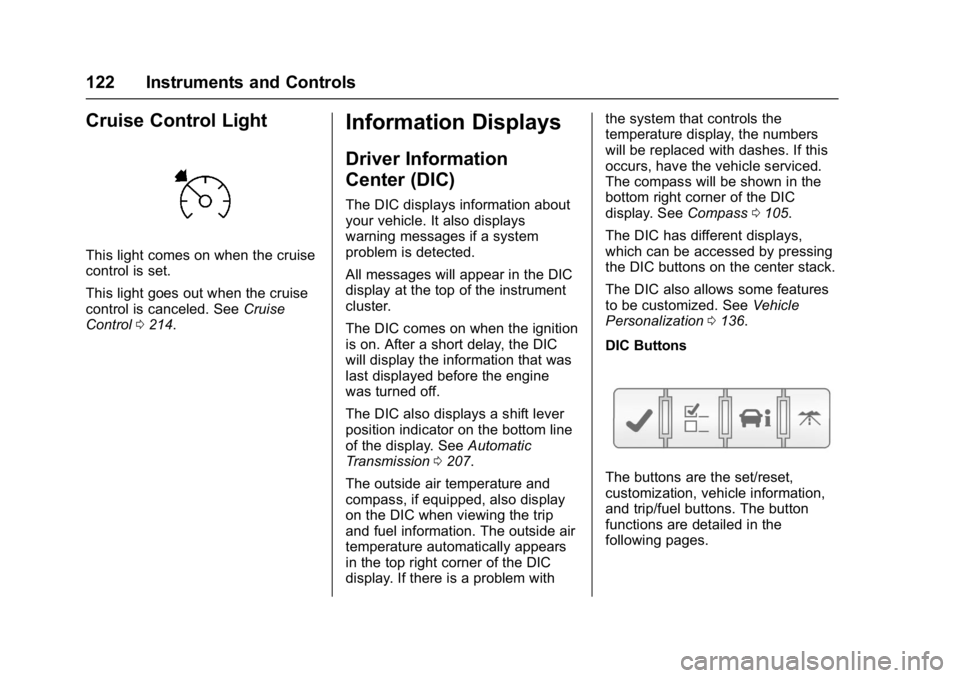
DIC Buttons
The buttons are the set/reset,
customization, vehicle information,
and trip/fuel buttons. The button
functions are detailed in the
following pages.
Page 128 of 366
Buick Enclave Owner Manual (GMNA-Localizing-U.S./Canada/Mexico-
9955666) - 2017 - crc - 8/4/16
Instruments and Controls 127
Vehicle Messages
Messages are displayed on the DIC
to notify the driver that the status of
the vehicle has changed and that
some action may be needed by the
driver to correct the condition.
Multiple messages may appear one
after another.
Some messages may not require
immediate action, but you can press
any of the DIC buttons on the
instrument panel to acknowledge
that you received the messages and
to clear them from the display.
Some messages cannot be cleared
from the DIC display because they
are more urgent. These messages
require action before they can be
cleared. You should take any
messages that appear on the
display seriously and remember that
clearing the messages will only
make the messages disappear, not
correct the problem.
The following are the possible
messages that can be displayed
and some information about them.
Battery Voltage and
Charging Messages
BATTERY LOW START
VEHICLE
This message displays when the
system detects that the battery
voltage has dropped to a critical
level and the engine must be started
to avoid a dead battery situation.
BATTERY SAVER ACTIVE
This message displays when the
system detects that the battery
voltage is dropping below expected
levels. The battery saver system
starts reducing certain features of
the vehicle that you may be able to
notice. At the point that the features
are disabled, this message is
displayed. It means that the vehicle
is trying to save the charge in the
battery.
Turn off all unnecessary
accessories to allow the battery to
recharge.
The normal battery voltage range is
11.5 to 15.5 volts.
SERVICE BATTERY
CHARGING SYSTEM
On some vehicles, this message
displays if there is a problem with
the battery charging system. Under
certain conditions, the charging
system light may also turn on in the
instrument cluster. SeeCharging
System Light 0115. Driving with this
problem could drain the battery.
Turn off all unnecessary
accessories. Have the electrical
system checked as soon as
possible. See your dealer.
Brake System Messages
SERVICE BRAKE SYSTEM
This message displays along with
the brake system warning light if
there is a problem with the brake
system. See Brake System Warning
Light 0118. If this message
appears, stop as soon as possible
and turn off the vehicle. Restart the
vehicle and check for the message
on the DIC display. If the message
is still displayed or appears again
Page 130 of 366
Buick Enclave Owner Manual (GMNA-Localizing-U.S./Canada/Mexico-
9955666) - 2017 - crc - 8/4/16
Instruments and Controls 129
Engine Cooling System
Messages
ENGINE HOT A/C (Air
Conditioning) OFF
This message displays when the
engine coolant becomes hotter than
the normal operating temperature.
SeeEngine Coolant Temperature
Gauge 0112. To avoid added strain
on a hot engine, the air conditioning
compressor automatically turns off.
When the coolant temperature
returns to normal, the air
conditioning compressor turns back
on. You can continue to drive your
vehicle.
If this message continues to appear,
have the system repaired by your
dealer as soon as possible to avoid
damage to the engine.
ENGINE OVERHEATED IDLE
ENGINE
This message displays when the
engine coolant temperature is too
hot. Stop and allow the vehicle to
idle until it cools down. See Engine
Coolant Temperature Gauge 0112. See
Overheated Engine Protection
Operating Mode 0251 for
information on driving to a safe
place in an emergency.
ENGINE OVERHEATED STOP
ENGINE
This message displays and a
continuous chime sounds if the
engine cooling system reaches
unsafe temperatures for operation.
Stop and turn off the vehicle as
soon as it is safe to do so to avoid
severe damage. This message
clears when the engine has cooled
to a safe operating temperature.
Engine Oil Messages
CHANGE ENGINE OIL SOON
This message displays when
service is required for the vehicle.
See your dealer. See Engine Oil
0 241 andMaintenance
Schedule 0315.
Acknowledging the CHANGE
ENGINE OIL SOON message will
not reset the OIL LIFE REMAINING. See
“Oil Life” underDriver
Information Center (DIC) 0122 and
Engine Oil Life System 0244.
ENGINE OIL LOW —ADD OIL
On some vehicles, this message
displays when the engine oil level
may be too low. Check the oil level
before filling to the recommended
level. If the oil is not low and this
message remains on, take the
vehicle to your dealer for service.
See Engine Oil 0241.
OIL PRESSURE LOW STOP
ENGINE
This message displays when the
vehicle's engine oil pressure is low.
The oil pressure light also appears
on the instrument cluster. See
Engine Oil Pressure Light 0120.
Stop the vehicle immediately, as
engine damage can result from
driving a vehicle with low oil
pressure. Have the vehicle serviced
by your dealer as soon as possible
when this message is displayed.
Page 131 of 366
Buick Enclave Owner Manual (GMNA-Localizing-U.S./Canada/Mexico-
9955666) - 2017 - crc - 8/4/16
130 Instruments and Controls
Engine Power Messages
ENGINE POWER IS REDUCED
This message displays and a chime
sounds when the cooling system
temperature gets too hot and the
engine further enters the engine
coolant protection mode. See
Engine Overheating0250 for
further information.
This message also displays when
the vehicle's engine power is
reduced. Reduced engine power
can affect the vehicle's ability to
accelerate. If this message is on,
but there is no reduction in
performance, proceed to your
destination. The performance may
be reduced the next time the vehicle
is driven. The vehicle may be driven
at a reduced speed while this
message is on, but acceleration and
speed may be reduced. Anytime
this message stays on, the vehicle
should be taken to your dealer for
service as soon as possible.
Fuel System Messages
FUEL LEVEL LOW
This message displays and a chime
sounds if the fuel level is low. Refuel
as soon as possible. See Fuel
Gauge 0111 and Fuel 0225 for
more information.
TIGHTEN GAS CAP
This message may display along
with the check engine light on the
instrument cluster if the vehicle's
fuel cap is not tightened properly.
See Malfunction Indicator Lamp
(Check Engine Light) 0116.
Reinstall the fuel cap fully. See
Filling the Tank 0226. The
diagnostic system can determine if
the fuel cap has been left off or
improperly installed. A loose or
missing fuel cap allows fuel to
evaporate into the atmosphere.
A few driving trips with the cap
properly installed should turn this
light and message off.
Key and Lock Messages
REPLACE BATTERY IN
REMOTE KEY
This message displays if a Remote
Keyless Entry (RKE) transmitter
battery is low. The battery needs to
be replaced in the transmitter. See
“Battery Replacement” under
Remote Keyless Entry (RKE)
System Operation 029.
Lamp Messages
AUTOMATIC LIGHT
CONTROL OFF
This message displays when the
automatic headlamps are turned off.
This message clears itself after
10 seconds.
AUTOMATIC LIGHT
CONTROL ON
This message displays when the
automatic headlamps are turned on.
This message clears itself after
10 seconds.