Eco BUICK ENCLAVE 2018 User Guide
[x] Cancel search | Manufacturer: BUICK, Model Year: 2018, Model line: ENCLAVE, Model: BUICK ENCLAVE 2018Pages: 393, PDF Size: 5.68 MB
Page 31 of 393
Buick Enclave Owner Manual (GMNA-Localizing-U.S./Canada/Mexico-
10999311) - 2018 - crc - 11/20/17
30 Keys, Doors, and Windows
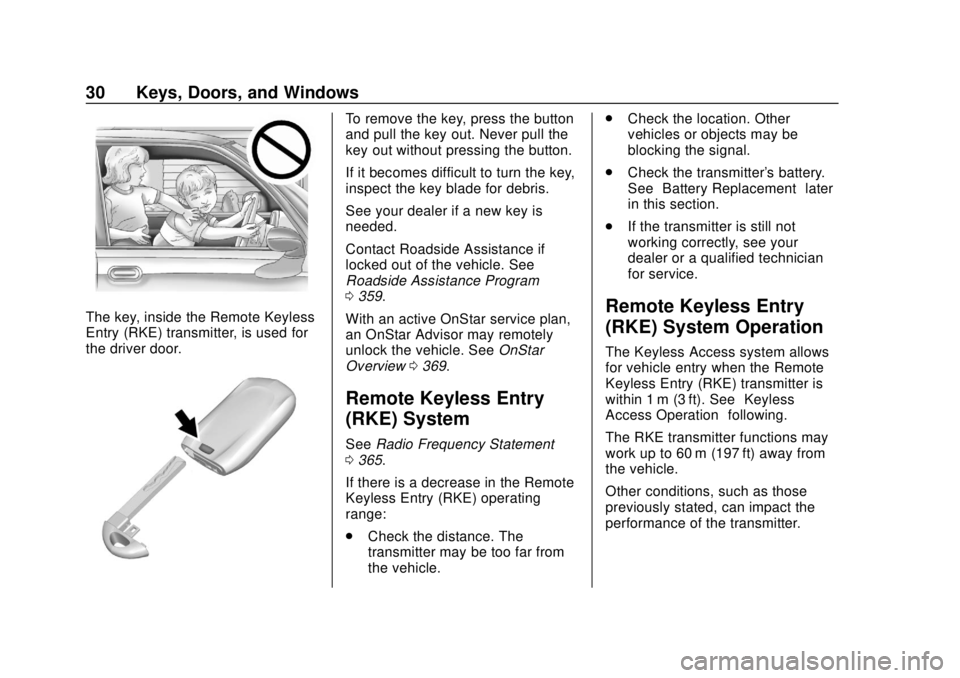
The key, inside the Remote Keyless
Entry (RKE) transmitter, is used for
the driver door.
To remove the key, press the button
and pull the key out. Never pull the
key out without pressing the button.
If it becomes difficult to turn the key,
inspect the key blade for debris.
See your dealer if a new key is
needed.
Contact Roadside Assistance if
locked out of the vehicle. See
Roadside Assistance Program
0359.
With an active OnStar service plan,
an OnStar Advisor may remotely
unlock the vehicle. See OnStar
Overview 0369.
Remote Keyless Entry
(RKE) System
See Radio Frequency Statement
0 365.
If there is a decrease in the Remote
Keyless Entry (RKE) operating
range:
. Check the distance. The
transmitter may be too far from
the vehicle. .
Check the location. Other
vehicles or objects may be
blocking the signal.
. Check the transmitter's battery.
See “Battery Replacement” later
in this section.
. If the transmitter is still not
working correctly, see your
dealer or a qualified technician
for service.
Remote Keyless Entry
(RKE) System Operation
The Keyless Access system allows
for vehicle entry when the Remote
Keyless Entry (RKE) transmitter is
within 1 m (3 ft). See “Keyless
Access Operation” following.
The RKE transmitter functions may
work up to 60 m (197 ft) away from
the vehicle.
Other conditions, such as those
previously stated, can impact the
performance of the transmitter.
Page 32 of 393
Buick Enclave Owner Manual (GMNA-Localizing-U.S./Canada/Mexico-
10999311) - 2018 - crc - 11/20/17
Keys, Doors, and Windows 31
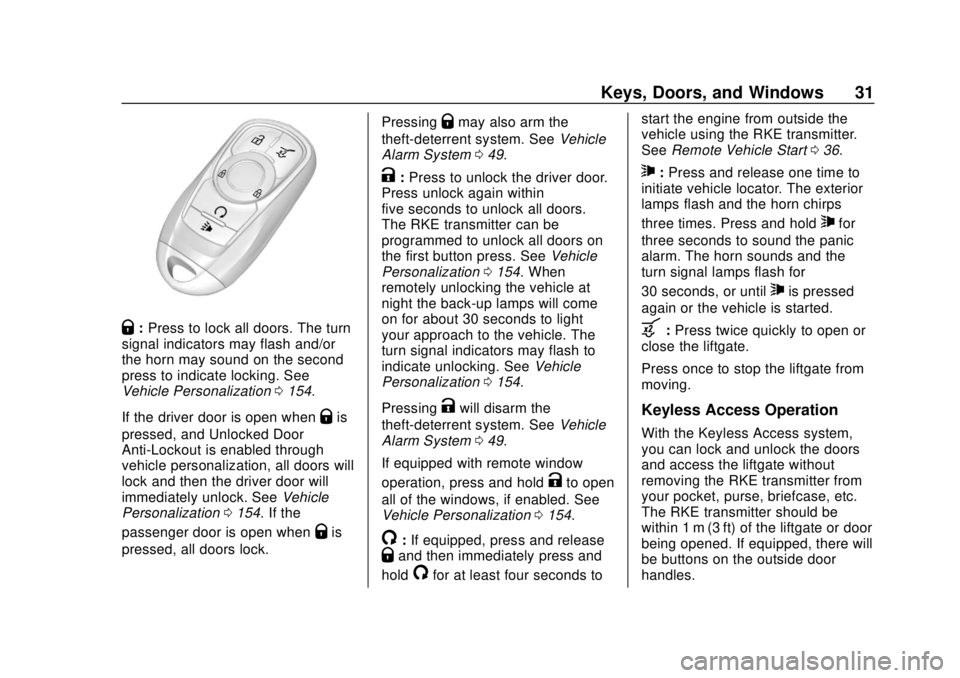
Q:Press to lock all doors. The turn
signal indicators may flash and/or
the horn may sound on the second
press to indicate locking. See
Vehicle Personalization 0154.
If the driver door is open when
Qis
pressed, and Unlocked Door
Anti-Lockout is enabled through
vehicle personalization, all doors will
lock and then the driver door will
immediately unlock. See Vehicle
Personalization 0154. If the
passenger door is open when
Qis
pressed, all doors lock. Pressing
Qmay also arm the
theft-deterrent system. See Vehicle
Alarm System 049.
K:Press to unlock the driver door.
Press unlock again within
five seconds to unlock all doors.
The RKE transmitter can be
programmed to unlock all doors on
the first button press. See Vehicle
Personalization 0154. When
remotely unlocking the vehicle at
night the back-up lamps will come
on for about 30 seconds to light
your approach to the vehicle. The
turn signal indicators may flash to
indicate unlocking. See Vehicle
Personalization 0154.
Pressing
Kwill disarm the
theft-deterrent system. See Vehicle
Alarm System 049.
If equipped with remote window
operation, press and hold
Kto open
all of the windows, if enabled. See
Vehicle Personalization 0154.
/:If equipped, press and releaseQand then immediately press and
hold
/for at least four seconds to start the engine from outside the
vehicle using the RKE transmitter.
See
Remote Vehicle Start 036.
7:Press and release one time to
initiate vehicle locator. The exterior
lamps flash and the horn chirps
three times. Press and hold
7for
three seconds to sound the panic
alarm. The horn sounds and the
turn signal lamps flash for
30 seconds, or until
7is pressed
again or the vehicle is started.
b: Press twice quickly to open or
close the liftgate.
Press once to stop the liftgate from
moving.
Keyless Access Operation
With the Keyless Access system,
you can lock and unlock the doors
and access the liftgate without
removing the RKE transmitter from
your pocket, purse, briefcase, etc.
The RKE transmitter should be
within 1 m (3 ft) of the liftgate or door
being opened. If equipped, there will
be buttons on the outside door
handles.
Page 33 of 393
Buick Enclave Owner Manual (GMNA-Localizing-U.S./Canada/Mexico-
10999311) - 2018 - crc - 11/20/17
32 Keys, Doors, and Windows
Keyless Access can be
programmed to unlock all doors on
the first lock/unlock press from the
driver door. SeeVehicle
Personalization 0154.
If equipped with memory seats, RKE
transmitters 1 and 2 are linked to
seating positions of memory 1 or 2.
See Memory Seats 065.
Keyless Unlocking/Locking from
the Driver Door
When the doors are locked and the
RKE transmitter is within 1 m (3 ft) of
the driver door handle, pressing the
lock/unlock button on the driver door
handle will unlock the driver door.
If the lock/unlock button is pressed
again within five seconds, all
passenger doors will unlock.
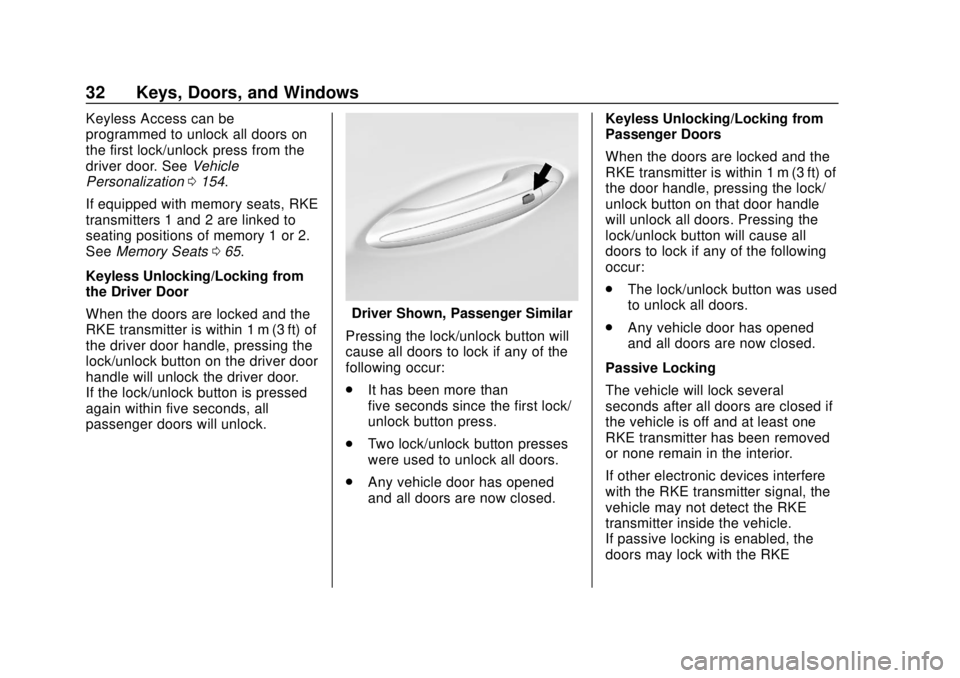
Driver Shown, Passenger Similar
Pressing the lock/unlock button will
cause all doors to lock if any of the
following occur:
. It has been more than
five seconds since the first lock/
unlock button press.
. Two lock/unlock button presses
were used to unlock all doors.
. Any vehicle door has opened
and all doors are now closed. Keyless Unlocking/Locking from
Passenger Doors
When the doors are locked and the
RKE transmitter is within 1 m (3 ft) of
the door handle, pressing the lock/
unlock button on that door handle
will unlock all doors. Pressing the
lock/unlock button will cause all
doors to lock if any of the following
occur:
.
The lock/unlock button was used
to unlock all doors.
. Any vehicle door has opened
and all doors are now closed.
Passive Locking
The vehicle will lock several
seconds after all doors are closed if
the vehicle is off and at least one
RKE transmitter has been removed
or none remain in the interior.
If other electronic devices interfere
with the RKE transmitter signal, the
vehicle may not detect the RKE
transmitter inside the vehicle.
If passive locking is enabled, the
doors may lock with the RKE
Page 34 of 393
Buick Enclave Owner Manual (GMNA-Localizing-U.S./Canada/Mexico-
10999311) - 2018 - crc - 11/20/17
Keys, Doors, and Windows 33
transmitter inside the vehicle. Do
not leave the RKE transmitter in an
unattended vehicle.
To customize the doors to
automatically lock when exiting the
vehicle, see“Remote Lock, Unlock,
Start” under Vehicle Personalization
0 154.
Temporary Disable of Passive
Locking
Temporarily disable the passive
locking by pressing and holding
K
on the interior door switch with a
door open for at least four seconds,
or until three chimes are heard.
Passive locking will then remain
disabled until
Qon the interior door
is pressed, or until the vehicle is
turned on.
Remote Left in Vehicle Alert
When the vehicle is turned off and
an RKE transmitter is left in the
vehicle, the horn will chirp three
times after all doors are closed. To
turn on or off, see Vehicle
Personalization 0154. Remote No Longer in Vehicle Alert
If the vehicle is on with a door open,
and then all doors are closed, the
vehicle will check for RKE
transmitters inside. If an RKE
transmitter is not detected, the
Driver Information Center (DIC) will
display NO REMOTE DETECTED
and the horn will chirp three times.
This occurs only once each time the
vehicle is driven. To turn on or off,
see
Vehicle Personalization 0154.
Keyless Liftgate Opening
When the doors are locked, press
the touch pad on the liftgate handle
to open the liftgate if the RKE
transmitter is within 1 m (3 ft).
Programming Transmitters to
the Vehicle
Only RKE transmitters programmed
to the vehicle will work. If a
transmitter is lost or stolen, a
replacement can be purchased and
programmed through your dealer.
The vehicle can be reprogrammed
so that lost or stolen transmitters no
longer work. Any remaining transmitters will need to be
programmed. Each vehicle can
have up to eight transmitters
matched to it.
Programming with Recognized
Transmitters
A new transmitter can be
programmed to the vehicle when
there are two recognized
transmitters.
To program, the vehicle must be off
and all of the transmitters, both
currently recognized and new, must
be with you.
1. Place the two recognized transmitters in the cupholder.
2. Remove the key lock cylinder cap on the driver door handle.
See Door Locks 038. Insert
the vehicle key of the new
transmitter into the key lock
cylinder on the driver door
handle and turn the key,
counterclockwise, to the unlock
position five times within
10 seconds.
Page 35 of 393
Buick Enclave Owner Manual (GMNA-Localizing-U.S./Canada/Mexico-
10999311) - 2018 - crc - 11/20/17
34 Keys, Doors, and Windows
The Driver Information Center
(DIC) displays READY FOR
REMOTE #2, 3, 4, ETC.
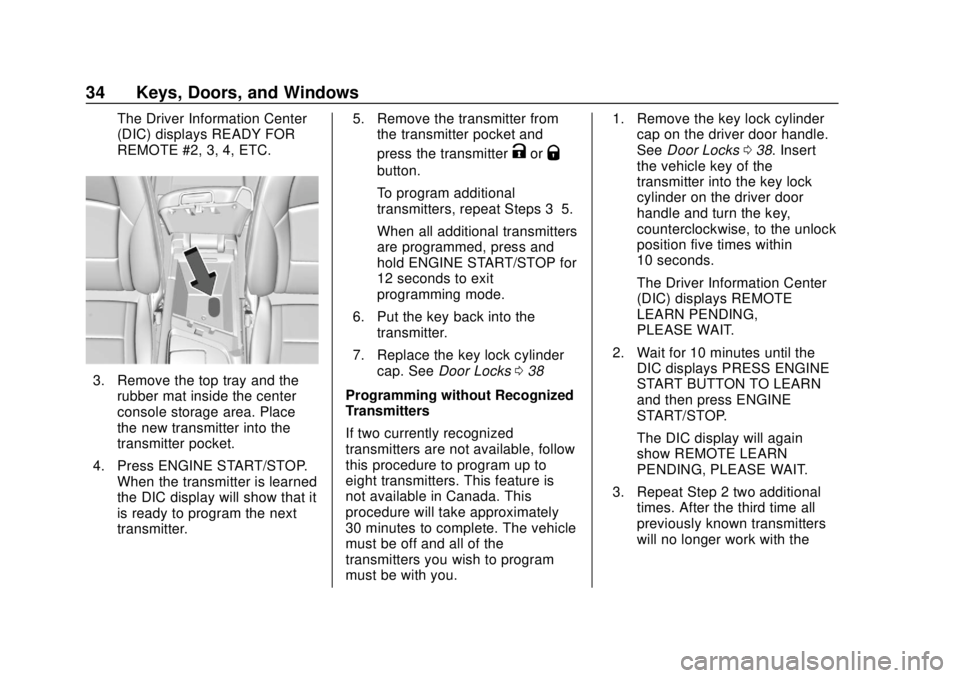
3. Remove the top tray and therubber mat inside the center
console storage area. Place
the new transmitter into the
transmitter pocket.
4. Press ENGINE START/STOP. When the transmitter is learned
the DIC display will show that it
is ready to program the next
transmitter. 5. Remove the transmitter from
the transmitter pocket and
press the transmitter
KorQ
button.
To program additional
transmitters, repeat Steps 3–5.
When all additional transmitters
are programmed, press and
hold ENGINE START/STOP for
12 seconds to exit
programming mode.
6. Put the key back into the transmitter.
7. Replace the key lock cylinder cap. See Door Locks 038
Programming without Recognized
Transmitters
If two currently recognized
transmitters are not available, follow
this procedure to program up to
eight transmitters. This feature is
not available in Canada. This
procedure will take approximately
30 minutes to complete. The vehicle
must be off and all of the
transmitters you wish to program
must be with you. 1. Remove the key lock cylinder
cap on the driver door handle.
See Door Locks 038. Insert
the vehicle key of the
transmitter into the key lock
cylinder on the driver door
handle and turn the key,
counterclockwise, to the unlock
position five times within
10 seconds.
The Driver Information Center
(DIC) displays REMOTE
LEARN PENDING,
PLEASE WAIT.
2. Wait for 10 minutes until the DIC displays PRESS ENGINE
START BUTTON TO LEARN
and then press ENGINE
START/STOP.
The DIC display will again
show REMOTE LEARN
PENDING, PLEASE WAIT.
3. Repeat Step 2 two additional times. After the third time all
previously known transmitters
will no longer work with the
Page 36 of 393
Buick Enclave Owner Manual (GMNA-Localizing-U.S./Canada/Mexico-
10999311) - 2018 - crc - 11/20/17
Keys, Doors, and Windows 35
vehicle. Remaining transmitters
can be relearned during the
next steps.
The DIC display should now
show READY FOR REMOTE
# 1.
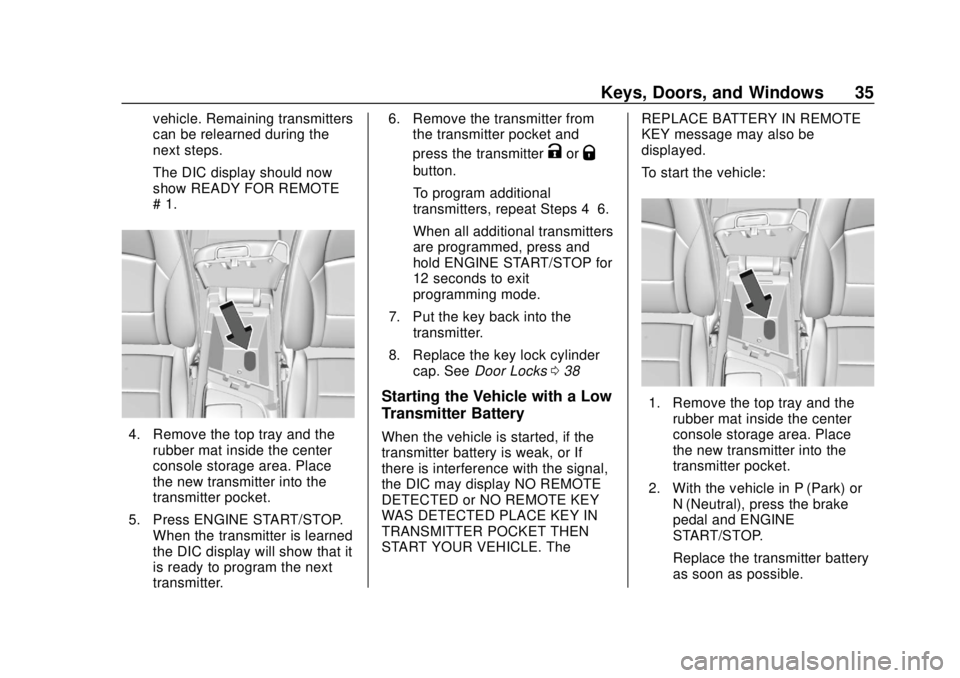
4. Remove the top tray and therubber mat inside the center
console storage area. Place
the new transmitter into the
transmitter pocket.
5. Press ENGINE START/STOP. When the transmitter is learned
the DIC display will show that it
is ready to program the next
transmitter. 6. Remove the transmitter from
the transmitter pocket and
press the transmitter
KorQ
button.
To program additional
transmitters, repeat Steps 4–6.
When all additional transmitters
are programmed, press and
hold ENGINE START/STOP for
12 seconds to exit
programming mode.
7. Put the key back into the transmitter.
8. Replace the key lock cylinder cap. See Door Locks 038
Starting the Vehicle with a Low
Transmitter Battery
When the vehicle is started, if the
transmitter battery is weak, or If
there is interference with the signal,
the DIC may display NO REMOTE
DETECTED or NO REMOTE KEY
WAS DETECTED PLACE KEY IN
TRANSMITTER POCKET THEN
START YOUR VEHICLE. The REPLACE BATTERY IN REMOTE
KEY message may also be
displayed.
To start the vehicle:
1. Remove the top tray and the
rubber mat inside the center
console storage area. Place
the new transmitter into the
transmitter pocket.
2. With the vehicle in P (Park) or N (Neutral), press the brake
pedal and ENGINE
START/STOP.
Replace the transmitter battery
as soon as possible.
Page 38 of 393
Buick Enclave Owner Manual (GMNA-Localizing-U.S./Canada/Mexico-
10999311) - 2018 - crc - 11/20/17
Keys, Doors, and Windows 37
Starting the Engine Using
Remote Start
To start the vehicle:1. Press and release
Qon the
RKE transmitter.
2. Immediately after completing Step 1, press and hold
/until
the lamps flash. If the vehicle's
lights cannot be seen, press
and hold
/for at least
four seconds.
When the vehicle starts, the park
lamps will turn on and remain on as
long as the engine is running. The
doors will be locked and the climate
control system will operate
automatically if the vehicle has the
automatic system, or at the same
setting as when the vehicle was last
turned off.
The heated seats turn on during
colder outside temperatures and
shut off when the ignition is turned
on. See Heated and Ventilated
Front Seats 068. The rear window defogger and
heated mirrors, if equipped, turn on
during colder outside temperatures
and turn off when the ignition is
turned on.
After entering the vehicle during a
remote start, press the brake and
ENGINE START/STOP with the
transmitter in the vehicle to drive the
vehicle.
If the vehicle is left running, it
automatically shuts off after
10 minutes unless a time extension
has been done.
Extending Engine Run Time
To extend the engine run time by
10 minutes, repeat Steps 1 and 2
while the engine is still running. An
extension can be requested
30 seconds after starting. The
engine run time can only be
extended if it is the first remote start
since the vehicle has been driven.
Remote start can be extended
one time.
If the remote start procedure is used
again while the engine is still
running, 10 minutes will be added
on for a total of 20 minutes.
For example, if
Qand then/are
pressed again while the engine is
still running, 10 minutes will be
added on for a total of 20 minutes.
A maximum of two remote starts or
remote start with an extension are
allowed between ignition cycles.
After the vehicle's engine has been
started two times using the remote
start button or a start with an
extension, the ignition must be
turned on and then back off before
the remote start procedure can be
used again.
Canceling a Remote Start
To manually shut off a remote start:
. Press and hold
/until the
lamps turn off.
. Turn on the hazard warning
flashers.
. Turn the ignition switch on and
then off.
Page 41 of 393
Buick Enclave Owner Manual (GMNA-Localizing-U.S./Canada/Mexico-
10999311) - 2018 - crc - 11/20/17
40 Keys, Doors, and Windows
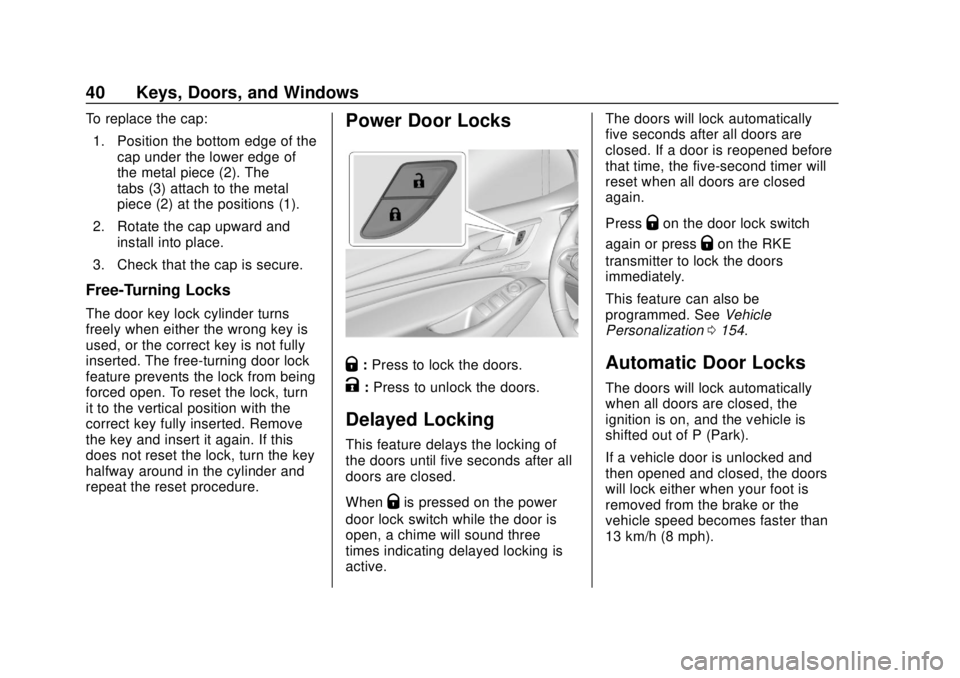
To replace the cap:1. Position the bottom edge of the cap under the lower edge of
the metal piece (2). The
tabs (3) attach to the metal
piece (2) at the positions (1).
2. Rotate the cap upward and install into place.
3. Check that the cap is secure.
Free-Turning Locks
The door key lock cylinder turns
freely when either the wrong key is
used, or the correct key is not fully
inserted. The free-turning door lock
feature prevents the lock from being
forced open. To reset the lock, turn
it to the vertical position with the
correct key fully inserted. Remove
the key and insert it again. If this
does not reset the lock, turn the key
halfway around in the cylinder and
repeat the reset procedure.
Power Door Locks
Q: Press to lock the doors.
K:Press to unlock the doors.
Delayed Locking
This feature delays the locking of
the doors until five seconds after all
doors are closed.
When
Qis pressed on the power
door lock switch while the door is
open, a chime will sound three
times indicating delayed locking is
active. The doors will lock automatically
five seconds after all doors are
closed. If a door is reopened before
that time, the five-second timer will
reset when all doors are closed
again.
Press
Qon the door lock switch
again or press
Qon the RKE
transmitter to lock the doors
immediately.
This feature can also be
programmed. See Vehicle
Personalization 0154.
Automatic Door Locks
The doors will lock automatically
when all doors are closed, the
ignition is on, and the vehicle is
shifted out of P (Park).
If a vehicle door is unlocked and
then opened and closed, the doors
will lock either when your foot is
removed from the brake or the
vehicle speed becomes faster than
13 km/h (8 mph).
Page 45 of 393
Buick Enclave Owner Manual (GMNA-Localizing-U.S./Canada/Mexico-
10999311) - 2018 - crc - 11/20/17
44 Keys, Doors, and Windows
.Presslon the bottom of the
liftgate to the left of the latch to
close.
Press any liftgate button or the
touch pad while the liftgate is
moving to stop it. Pressing again
restarts the operation in the reverse
direction. The touch pad on the
underside of the liftgate handle
cannot be used to close the liftgate.
Caution
Manually forcing the liftgate to
open or close during a power
cycle can damage the vehicle.
Allow the power cycle to
complete.
The power liftgate may be
temporarily disabled under extreme
low temperatures, or after repeated
power cycling over a short period of
time. If this occurs, the liftgate can
still be operated manually.
If the vehicle is shifted out of
P (Park) while the power function is
in progress, the liftgate will continue to completion. If the vehicle is
accelerated before the liftgate has
completed moving, the liftgate may
stop or reverse direction. Check for
DIC messages and make sure the
liftgate is closed and latched before
driving.
Falling Liftgate Detection
If the power liftgate automatically
closes after a power opening cycle,
it indicates that the system is
reacting to excess weight on the
liftgate or a possible support strut
failure. A repetitive chime will sound
while the falling liftgate detection
feature is operating. Remove any
excess weight. If the liftgate
continues to automatically close
after opening, see your dealer for
service before using the power
liftgate.
Interfering with the power liftgate
motion or manually closing the
liftgate too quickly after power
opening may resemble a support
strut failure. This could also activate
the falling liftgate detection feature.
Allow the liftgate to complete its
operation and wait a few seconds
before manually closing the liftgate.
Obstacle Detection Features
If the liftgate encounters an obstacle
during a power open or close cycle,
the liftgate will automatically reverse
direction and move a short distance
away from the obstacle. After
removing the obstruction, the power
liftgate operation can be used again.
If the liftgate encounters multiple
obstacles on the same power cycle,
the power function will deactivate.
After removing the obstructions,
manually close the liftgate which will
allow normal power operation
functions to resume.
If the vehicle is locked while the
liftgate is closing, and an obstacle is
encountered that prevents the
liftgate from completely closing, the
horn will sound as an alert that the
liftgate did not close.
Pinch sensors are on the side
edges of the liftgate. If an object is
caught between the liftgate and the
vehicle and presses against this
Page 46 of 393
Buick Enclave Owner Manual (GMNA-Localizing-U.S./Canada/Mexico-
10999311) - 2018 - crc - 11/20/17
Keys, Doors, and Windows 45
sensor, the liftgate will reverse
direction and open fully. The liftgate
will remain open until it is activated
again or closed manually.
Setting the 3/4 Mode
To change the position the liftgate
stops at when opening:1. Select MAX or 3/4 mode and power open the liftgate.
2. Stop the liftgate movement at the desired height by pressing
any liftgate switch. Manually
adjust the liftgate position if
needed.
3. Press and hold
lto the left
of the latch at the bottom of the
liftgate until the turn signals
flash and a beep sounds. This
indicates the setting has been
recorded.
The liftgate cannot be set below a
minimum programmable height.
If there is no light flash or sound,
then the height adjustment may be
too low.
Manual Operation
Select OFF to manually operate the
liftgate.
Caution
Attempting to move the liftgate
too quickly and with excessive
force may result in damage to the
vehicle.
Operate the liftgate manually with a
smooth motion and moderate
speed. The system includes a
feature which limits the manual
closing speed to protect the
components.
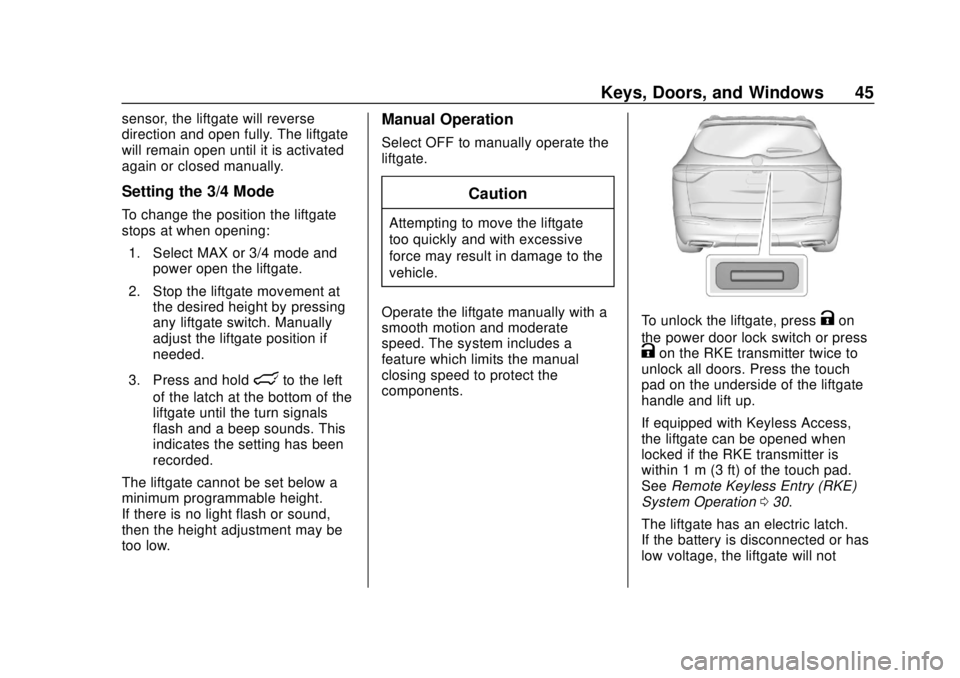
To unlock the liftgate, pressKon
the power door lock switch or press
Kon the RKE transmitter twice to
unlock all doors. Press the touch
pad on the underside of the liftgate
handle and lift up.
If equipped with Keyless Access,
the liftgate can be opened when
locked if the RKE transmitter is
within 1 m (3 ft) of the touch pad.
See Remote Keyless Entry (RKE)
System Operation 030.
The liftgate has an electric latch.
If the battery is disconnected or has
low voltage, the liftgate will not