fan BUICK ENCLAVE 2018 User Guide
[x] Cancel search | Manufacturer: BUICK, Model Year: 2018, Model line: ENCLAVE, Model: BUICK ENCLAVE 2018Pages: 393, PDF Size: 5.68 MB
Page 100 of 393
Buick Enclave Owner Manual (GMNA-Localizing-U.S./Canada/Mexico-
10999311) - 2018 - crc - 11/20/17
Seats and Restraints 99
Warning (Continued)
front passenger seat, always
move the front passenger seat as
far back as it will go.
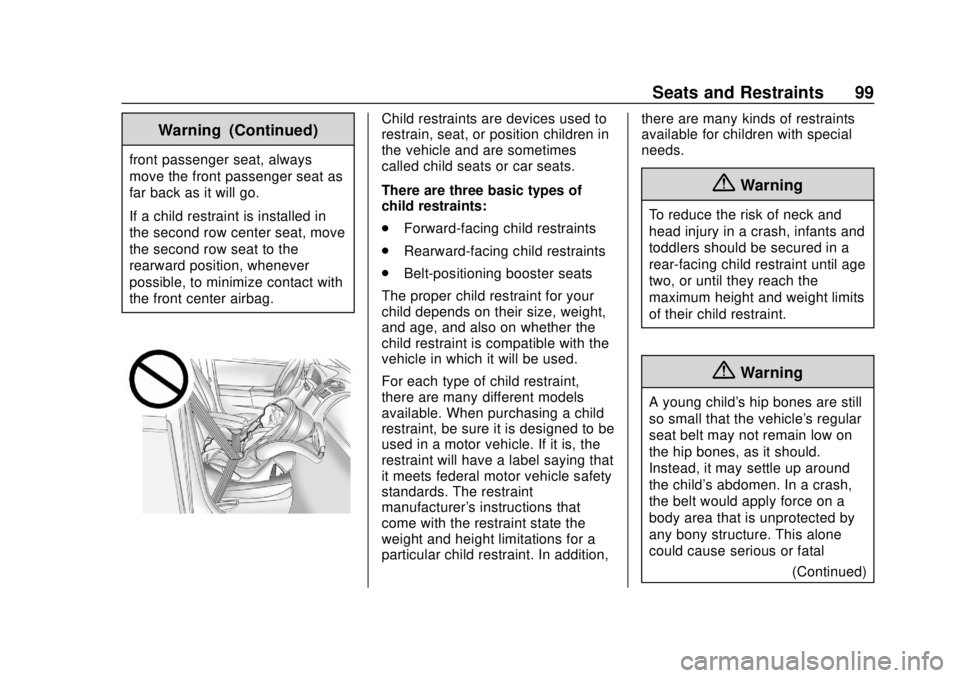
If a child restraint is installed in
the second row center seat, move
the second row seat to the
rearward position, whenever
possible, to minimize contact with
the front center airbag.
Child restraints are devices used to
restrain, seat, or position children in
the vehicle and are sometimes
called child seats or car seats.
There are three basic types of
child restraints:
.Forward-facing child restraints
. Rearward-facing child restraints
. Belt-positioning booster seats
The proper child restraint for your
child depends on their size, weight,
and age, and also on whether the
child restraint is compatible with the
vehicle in which it will be used.
For each type of child restraint,
there are many different models
available. When purchasing a child
restraint, be sure it is designed to be
used in a motor vehicle. If it is, the
restraint will have a label saying that
it meets federal motor vehicle safety
standards. The restraint
manufacturer's instructions that
come with the restraint state the
weight and height limitations for a
particular child restraint. In addition, there are many kinds of restraints
available for children with special
needs.
{Warning
To reduce the risk of neck and
head injury in a crash, infants and
toddlers should be secured in a
rear-facing child restraint until age
two, or until they reach the
maximum height and weight limits
of their child restraint.
{Warning
A young child's hip bones are still
so small that the vehicle's regular
seat belt may not remain low on
the hip bones, as it should.
Instead, it may settle up around
the child's abdomen. In a crash,
the belt would apply force on a
body area that is unprotected by
any bony structure. This alone
could cause serious or fatal
(Continued)
Page 101 of 393

Buick Enclave Owner Manual (GMNA-Localizing-U.S./Canada/Mexico-
10999311) - 2018 - crc - 11/20/17
100 Seats and Restraints
Warning (Continued)
injuries. To reduce the risk of
serious or fatal injuries during a
crash, young children should
always be secured in appropriate
child restraints.
Child Restraint Systems
Rear-Facing Infant Restraint
A rear-facing child restraint provides
restraint with the seating surface
against the back of the infant. The harness system holds the infant
in place and, in a crash, acts to
keep the infant positioned in the
restraint.
Forward-Facing Child Restraint
A forward-facing child restraint
provides restraint for the child's
body with the harness.
Booster Seats
A belt-positioning booster seat is
used for children who have
outgrown their forward-facing child
restraint. Boosters are designed to
improve the fit of the vehicle's seat
belt system until the child is large
enough for the vehicle seat belts to
fit properly without a booster seat.
See the seat belt fit test in Older
Children 096.
Page 102 of 393

Buick Enclave Owner Manual (GMNA-Localizing-U.S./Canada/Mexico-
10999311) - 2018 - crc - 11/20/17
Seats and Restraints 101
Securing an Add-On Child
Restraint in the Vehicle
{Warning
A child can be seriously injured or
killed in a crash if the child
restraint is not properly secured in
the vehicle. Secure the child
restraint properly in the vehicle
using the vehicle’s seat belt or
LATCH system, following the
instructions that came with that
child restraint and the instructions
in this manual.
To help reduce the chance of injury,
the child restraint must be secured
in the vehicle. Child restraints must
be secured in vehicle seats by lap
belts or the lap belt portion of a
lap-shoulder belt, or by the LATCH
system. See Lower Anchors and
Tethers for Children (LATCH
System) 0103 for more information.
Children can be endangered in a
crash if the child restraint is not
properly secured in the vehicle. When securing an add-on child
restraint, refer to the instructions
that come with the restraint which
may be on the restraint itself or in a
booklet, or both, and to this manual.
The child restraint instructions are
important, so if they are not
available, obtain a replacement
copy from the manufacturer.
Keep in mind that an unsecured
child restraint can move around in a
collision or sudden stop and injure
people in the vehicle. Be sure to
properly secure any child restraint in
the vehicle
—even when no child is
in it.
In some areas of the United States
and Canada, Certified Child
Passenger Safety Technicians
(CPSTs) are available to inspect
and demonstrate how to correctly
use and install child restraints. In
the U.S., refer to the National
Highway Traffic Safety
Administration (NHTSA) website to
locate the nearest child safety seat
inspection station. For CPST availability in Canada, check with
Transport Canada or the Provincial
Ministry of Transportation office.
Securing the Child Within the
Child Restraint
{Warning
A child can be seriously injured or
killed in a crash if the child is not
properly secured in the child
restraint. Secure the child
properly following the instructions
that came with that child restraint.
Where to Put the
Restraint
According to accident statistics,
children and infants are safer when
properly restrained in an appropriate
child restraint secured in a rear
seating position.
Whenever possible, children aged
12 and under should be secured in
a rear seating position.
Page 107 of 393
Buick Enclave Owner Manual (GMNA-Localizing-U.S./Canada/Mexico-
10999311) - 2018 - crc - 11/20/17
106 Seats and Restraints
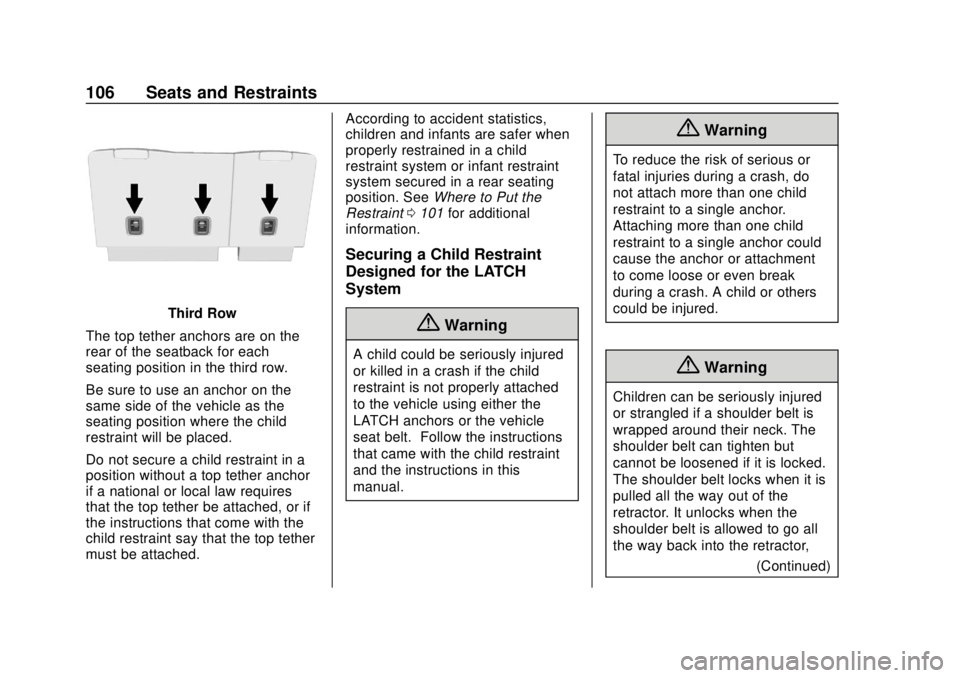
Third Row
The top tether anchors are on the
rear of the seatback for each
seating position in the third row.
Be sure to use an anchor on the
same side of the vehicle as the
seating position where the child
restraint will be placed.
Do not secure a child restraint in a
position without a top tether anchor
if a national or local law requires
that the top tether be attached, or if
the instructions that come with the
child restraint say that the top tether
must be attached. According to accident statistics,
children and infants are safer when
properly restrained in a child
restraint system or infant restraint
system secured in a rear seating
position. See
Where to Put the
Restraint 0101 for additional
information.
Securing a Child Restraint
Designed for the LATCH
System
{Warning
A child could be seriously injured
or killed in a crash if the child
restraint is not properly attached
to the vehicle using either the
LATCH anchors or the vehicle
seat belt. Follow the instructions
that came with the child restraint
and the instructions in this
manual.
{Warning
To reduce the risk of serious or
fatal injuries during a crash, do
not attach more than one child
restraint to a single anchor.
Attaching more than one child
restraint to a single anchor could
cause the anchor or attachment
to come loose or even break
during a crash. A child or others
could be injured.
{Warning
Children can be seriously injured
or strangled if a shoulder belt is
wrapped around their neck. The
shoulder belt can tighten but
cannot be loosened if it is locked.
The shoulder belt locks when it is
pulled all the way out of the
retractor. It unlocks when the
shoulder belt is allowed to go all
the way back into the retractor,
(Continued)
Page 157 of 393

Buick Enclave Owner Manual (GMNA-Localizing-U.S./Canada/Mexico-
10999311) - 2018 - crc - 11/20/17
156 Instruments and Controls
Number of Favorites Shown
Touch to set the number of favorites
to display.
Select the desired number or select
Auto and the infotainment system
will automatically adjust the number
of favorites shown.
Audible Touch Feedback
This allows Audible Touch
Feedback to be turned on or off.
Select Off or On.
Auto Volume
This feature adjusts the volume
based on vehicle speed and
ambient noise.
Select Off, Low, Medium-Low,
Medium, Medium-High, or High.
Maximum Start Up Volume
This feature sets the maximum
startup volume. If the vehicle is
started and the volume is greater
than this level, the volume is
adjusted to this level.To set the maximum startup volume,
touch + or
−to increase or
decrease.
Vehicle
Select and the following may
display:
. Climate and Air Quality
. Collision/Detection Systems
. Comfort and Convenience
. Lighting
. Power Door Locks
. Remote Lock, Unlock, Start
Climate and Air Quality
Select and the following may
display:
. Auto Fan Speed
. Auto Defog
. Auto Rear Defog
. Ionizer
Auto Fan Speed
This feature will set the auto fan
speed. Select Low, Medium, or High.
Auto Defog
When set to On, the front defog will
automatically react to temperature
and humidity conditions that may
cause fogging.
Select Off or On.
Auto Rear Defog
If equipped, this allows the Auto
Rear Defog to be turned on or off.
This feature will automatically turn
on the rear window defogger when it
is cold outside.
Select Off or On.
Ionizer
If equipped with an ionizer, this
feature helps to clean the air inside
the vehicle and remove
contaminants such as pollen, odors,
and dust. See
Dual Automatic
Climate Control System 0176.
Select Off or On.
Page 174 of 393
Buick Enclave Owner Manual (GMNA-Localizing-U.S./Canada/Mexico-
10999311) - 2018 - crc - 11/20/17
Lighting 173
Exit Lighting
Some exterior lamps and interior
lights come on at night, or in areas
with limited lighting, when the driver
door is opened after the ignition is
turned off. The dome lamp comes
on after the ignition is turned off.
The exterior lamps and dome lamp
remain on for a set amount of time,
then automatically turn off.
The exterior lamps turn off
immediately by turning the exterior
lamp control off.
This feature can be changed. See
Vehicle Personalization0154.
Battery Load
Management
The vehicle has Electric Power
Management (EPM) that estimates
the battery's temperature and state
of charge. It then adjusts the voltage
for best performance and extended
life of the battery.
When the battery's state of charge
is low, the voltage is raised slightly
to quickly bring the charge back up. When the state of charge is high,
the voltage is lowered slightly to
prevent overcharging. If the vehicle
has a voltmeter gauge or a voltage
display on the Driver Information
Center (DIC), you may see the
voltage move up or down. This is
normal. If there is a problem, an
alert will be displayed.
The battery can be discharged at
idle if the electrical loads are very
high. This is true for all vehicles.
This is because the generator
(alternator) may not be spinning fast
enough at idle to produce all of the
power needed for very high
electrical loads.
A high electrical load occurs when
several of the following are on, such
as: headlamps, high beams, rear
window defogger, climate control fan
at high speed, heated seats, engine
cooling fans, trailer loads, and loads
plugged into accessory power
outlets.
EPM works to prevent excessive
discharge of the battery. It does this
by balancing the generator's output
and the vehicle's electrical needs.It can increase engine idle speed to
generate more power whenever
needed. It can temporarily reduce
the power demands of some
accessories.
Normally, these actions occur in
steps or levels, without being
noticeable. In rare cases at the
highest levels of corrective action,
this action may be noticeable to the
driver. If so, a DIC battery voltage
and charging message displays. It is
recommended that the driver reduce
the electrical loads as much as
possible.
See
Driver Information Center (DIC)
(Base Level) 0148 orDriver
Information Center (DIC) (Uplevel)
0 150.Battery Power Protection
This feature helps prevent the
battery from being drained, if the
interior courtesy lamps or reading
lamps are accidentally left on. If any
of these lamps are left on, they
automatically turn off after
Page 177 of 393
Buick Enclave Owner Manual (GMNA-Localizing-U.S./Canada/Mexico-
10999311) - 2018 - crc - 11/20/17
176 Climate Controls
Climate Controls
Climate Control Systems
Dual Automatic ClimateControl System . . . . . . . . . . . . . 176
Rear Climate Control System . . . . . . . . . . . . . . . . . . . . . . 180
Air Vents
Air Vents . . . . . . . . . . . . . . . . . . . . . 182
Maintenance
Passenger Compartment AirFilter . . . . . . . . . . . . . . . . . . . . . . . . 183
Service . . . . . . . . . . . . . . . . . . . . . . . 183
Climate Control Systems
Dual Automatic Climate Control System
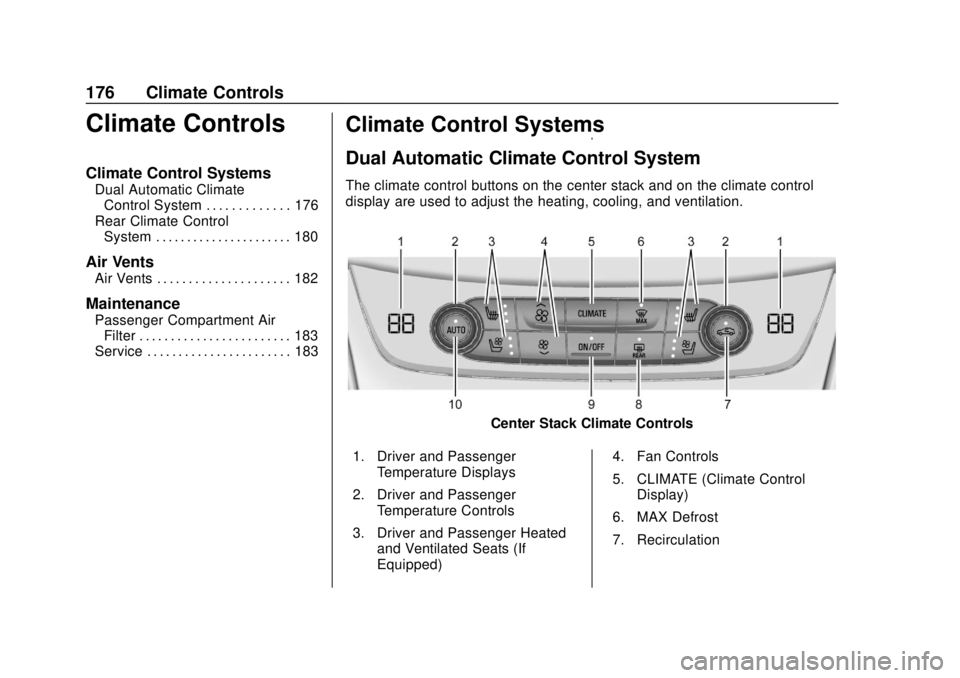
The climate control buttons on the center stack and on the climate control
display are used to adjust the heating, cooling, and ventilation.
Center Stack Climate Controls
1. Driver and Passenger Temperature Displays
2. Driver and Passenger Temperature Controls
3. Driver and Passenger Heated and Ventilated Seats (If
Equipped) 4. Fan Controls
5. CLIMATE (Climate Control
Display)
6. MAX Defrost
7. Recirculation
Page 178 of 393

Buick Enclave Owner Manual (GMNA-Localizing-U.S./Canada/Mexico-
10999311) - 2018 - crc - 11/20/17
Climate Controls 177
8. Rear Window Defogger andHeated Outside Mirrors (If
Equipped)
9. Power (ON/OFF)
10. AUTO (Automatic Operation)
Climate Control Display
1. Outside Temperature Display
2. Driver and Passenger Temperature Controls
3. Fan Control
4. Sync (Synchronized Temperature)
5. A/C (Air Conditioning) 6. Climate Control Selection
(Application Tray Button)
7. Air Delivery Mode Control
The fan, air delivery mode, air
conditioning, driver and passenger
temperatures, and Sync settings
can be controlled by touching
CLIMATE on the infotainment
display Home Page or the climate
button in the application tray display.
A selection can then be made on
the front climate control page
displayed. See the infotainment
manual.
Climate Control Status Display
The climate control status display
appears briefly when the climate
controls on the center stack are
adjusted. The air delivery mode can
be adjusted on the climate control
display.
Automatic Operation
The system automatically controls
the fan speed, air delivery, air
conditioning, and recirculation in
order to heat or cool the vehicle to
the desired temperature.
When AUTO is lit, all four functions
operate automatically. Each function
can also be manually set and the
selected setting is displayed.
Functions not manually set will
continue to be automatically
controlled, even if the AUTO
indicator is not lit.
For automatic operation: 1. Press AUTO.
2. Set the temperature. Allow the system time to stabilize. Adjust
the temperature as needed for
best comfort.
Page 179 of 393
Buick Enclave Owner Manual (GMNA-Localizing-U.S./Canada/Mexico-
10999311) - 2018 - crc - 11/20/17
178 Climate Controls
To improve fuel efficiency and to
cool the vehicle faster with A/C on,
recirculation may be automatically
selected in warm weather. Press
@to select recirculation; press it
again to select outside air.
Driver and Passenger
Temperature Controls : The
temperature can be adjusted
separately for the driver and the
passenger. Turn the knob clockwise
or counterclockwise to increase or
decrease the driver or passenger
temperature setting.
The driver and passenger
temperatures can also be adjusted
by touching the controls on the
climate control display.
Sync : Touch Sync on the display to
link all passenger settings to the
driver settings. Adjust the driver side
temperature control to change the
linked temperature. When the
passenger settings are adjusted, the
Sync button is displayed and the
temperatures are unlinked.
Manual Operation
CLIMATE : Press CLIMATE to show
the climate control display.
ON/OFF : Press to turn the fan on
or off. When off, no air will flow into
the vehicle. Turning the fan on,
pressing any other button, or turning
a knob will turn the system back on
using the current setting.
hi: Press or touch the fan controls
on the center stack or the display to
increase or decrease the fan speed.
The fan speed setting displays.
Pressing either button cancels
automatic fan control and the fan is
controlled manually. Press AUTO to
return to automatic operation.
Air Delivery Mode Control : When
the climate information is displayed,
touch
6,Y, orXon the display to
change the direction of air flow. Any
combination of the three modes can
be selected. The selected air
delivery mode is lit. Pressing any
mode control cancels automatic air
delivery control and the direction of the airflow is controlled manually.
Press AUTO to return to automatic
operation.
To change the current mode, select
one or more of the following:
6:
Air is directed to the floor
outlets, with some air to the
windshield and side windows.
Y: Air is directed to the instrument
panel outlets.
X: Clears the windows of fog or
moisture. Air is directed to the
windshield.
1MAX : Air is directed to the
windshield, the fan runs at a higher
speed, and the temperature of the
air is increased if not already at
maximum. This mode overrides the
previous mode selected and clears
fog or frost from the windshield
more quickly. When
1MAX is
pressed again, the system returns
to the previous mode setting and
fan speed.
For best results, clear all snow and
ice from the windshield before
defrosting.
Page 180 of 393

Buick Enclave Owner Manual (GMNA-Localizing-U.S./Canada/Mexico-
10999311) - 2018 - crc - 11/20/17
Climate Controls 179
A/C (Air Conditioning) :Touch A/C
on the display to turn the air
conditioning on or off. If the fan is
turned off, the air conditioner will not
run and A/C OFF will show on the
climate control display.
Touch AUTO to return to automatic
operation and the air conditioner
runs automatically as needed.
@: Press to turn on recirculation.
An indicator light comes on. Air is
recirculated to quickly cool the
inside of the vehicle or to reduce the
entry of outside air and odors.
If selected during cool or cold
weather, the windshield and
windows may fog. Turn off
recirculation to help clear the
windshield and windows.
Auto Defog : The climate control
system has a sensor to
automatically detect high humidity
inside the vehicle. When high
humidity is detected, the climate
control system may adjust to
outside air supply and turn on the
air conditioner. The fan speed may
slightly increase to help prevent fogging. If the climate control
system does not detect possible
window fogging, it returns to normal
operation.
To turn Auto Defog off or on, see
“Climate and Air Quality”
under
Vehicle Personalization 0154.
Ionizer : If equipped with an ionizer,
this feature helps to clean the air
inside the vehicle and remove
contaminants such as pollen, odors,
and dust. If the climate control
system is on and the ionizer is
enabled, Ionizer On will be
displayed. To turn the ionizer on or
off, see “Climate and Air Quality”
under Vehicle Personalization
0 154.
Rear Window Defogger
K:Press to turn the rear window
defogger on or off. An indicator light
on the button comes on to show that
the rear window defogger is on. The
rear window defogger only works
when the engine is running. It turns
off when the ignition is turned off or
in ACC/ACCESSORY. The rear window defogger can be
set to automatic operation. See
“Climate and Air Quality”
under
Vehicle Personalization 0154.
When Auto Rear Defog is selected,
the rear window defogger turns on
automatically when the interior
temperature is cold and the outside
temperature is about 4 °C (40 °F)
and below. The auto rear defogger
turns off automatically after about
10 minutes, or after five minutes if
the outside temperature is not
as cold.
The upper gridlines on the rear
window are antenna lines and are
not intended to heat when the
defogger is activated.
If the vehicle is equipped with
heated outside mirrors, they turn on
when the rear window defogger
button is on and help to clear fog or
frost from the surface of the mirror.
See Heated Mirrors 052.