infotainment center BUICK ENCLAVE 2018 Owner's Manual
[x] Cancel search | Manufacturer: BUICK, Model Year: 2018, Model line: ENCLAVE, Model: BUICK ENCLAVE 2018Pages: 393, PDF Size: 5.68 MB
Page 6 of 393
Buick Enclave Owner Manual (GMNA-Localizing-U.S./Canada/Mexico-
10999311) - 2018 - crc - 11/20/17
In Brief 5
In Brief
Instrument Panel
Instrument Panel . . . . . . . . . . . . . . . . 6
Initial Drive Information
Initial Drive Information . . . . . . . . . . 8
Stop/Start System . . . . . . . . . . . . . . . 8
Remote Keyless Entry (RKE)System . . . . . . . . . . . . . . . . . . . . . . . . 8
Remote Vehicle Start . . . . . . . . . . . 8
Door Locks . . . . . . . . . . . . . . . . . . . . . 9
Liftgate . . . . . . . . . . . . . . . . . . . . . . . . 10
Windows . . . . . . . . . . . . . . . . . . . . . . . 10
Seat Adjustment . . . . . . . . . . . . . . . 11
Memory Features . . . . . . . . . . . . . . 11
Second Row Seats . . . . . . . . . . . . 12
Third Row Seats . . . . . . . . . . . . . . . 12
Heated and Ventilated Seats . . . 14
Head Restraint Adjustment . . . . 14
Seat Belts . . . . . . . . . . . . . . . . . . . . . 15
Passenger Sensing System . . . 15
Mirror Adjustment . . . . . . . . . . . . . . 15
Steering Wheel Adjustment . . . . 16
Interior Lighting . . . . . . . . . . . . . . . . 17
Exterior Lighting . . . . . . . . . . . . . . . 18
Windshield Wiper/Washer . . . . . . 18
Climate Controls . . . . . . . . . . . . . . . 19
Transmission . . . . . . . . . . . . . . . . . . 20
Vehicle Features
Infotainment System . . . . . . . . . . . 21
Steering Wheel Controls . . . . . . . 21
Cruise Control . . . . . . . . . . . . . . . . . 22
Driver Information Center (DIC) . . . . . . . . . . . . . . . . . 22
Forward Collision Alert (FCA) System . . . . . . . . . . . . . . . . . . . . . . . 23
Forward Automatic Braking (FAB) . . . . . . . . . . . . . . . . 23
Front Pedestrian Braking (FPB) System . . . . . . . . . . . . . . . . . . . . . . . 23
Lane Keep Assist (LKA) . . . . . . . 23
Lane Change Alert (LCA) . . . . . . 23
Surround Vision . . . . . . . . . . . . . . . 24
Rear Vision Camera (RVC) . . . . 24
Rear Cross Traffic Alert (RCTA) System . . . . . . . . . . . . . . . . . . . . . . . 24
Parking Assist . . . . . . . . . . . . . . . . . 24
Power Outlets . . . . . . . . . . . . . . . . . 24
Universal Remote System . . . . . 25
Sunroof . . . . . . . . . . . . . . . . . . . . . . . . 25
Performance and Maintenance
Traction Control/Electronic Stability Control . . . . . . . . . . . . . . 26
Tire Pressure Monitor . . . . . . . . . . 26
Fuel . . . . . . . . . . . . . . . . . . . . . . . . . . . 27
E85 or FlexFuel . . . . . . . . . . . . . . . . 27
Engine Oil Life System . . . . . . . . 27 Driving for Better Fuel
Economy . . . . . . . . . . . . . . . . . . . . . 28
Roadside Assistance Program . . . . . . . . . . . . . . . . . . . . . . 28
Page 8 of 393

Buick Enclave Owner Manual (GMNA-Localizing-U.S./Canada/Mexico-
10999311) - 2018 - crc - 11/20/17
In Brief 7
1.Air Vents 0182.
2. Turn Signal Lever. See Turn
and Lane-Change Signals
0 170.
IntelliBeam
®System Button (If
Equipped). See Exterior Lamp
Controls 0166.
3. Manual Mode 0215 (If
Equipped).
4. Instrument Cluster 0132.
Driver Information Center (DIC)
Display.
See Driver Information Center
(DIC) (Base Level) 0148 or
Driver Information Center (DIC)
(Uplevel) 0150.
5. Windshield Wiper/Washer
0124.
6. Traction Control/Electronic
Stability Control 0220.
All Wheel Drive Button (If
Equipped). See Driver Mode
Control 0222. Sport Mode Button (If
Equipped) or Tow/Haul Mode
Button (If Equipped). See
Driver Mode Control
0222.
7. Light Sensor. See Automatic
Headlamp System 0169.
8. Hazard Warning Flashers
0170.
Assistance Systems for
Parking or Backing 0235 (If
Equipped).
Lane Keep Assist (LKA) 0247
(If Equipped).
9. Infotainment 0175.
10. Dual Automatic Climate Control
System 0176.
Heated and Ventilated Front
Seats 068 (If Equipped).
11. Wireless Charging 0129 (If
Equipped).
12. Shift Lever. See Automatic
Transmission 0210.
13. ENGINE START/STOP Button. SeeIgnition Positions 0200.
14. Steering Wheel Controls 0123. 15.
Horn 0124.
16. Steering Wheel Adjustment
0123 (Out of View).
17. Cruise Control 0224.
Adaptive Cruise Control 0226
(If Equipped).
Heated Steering Wheel 0123
(If Equipped).
Forward Collision Alert (FCA)
System 0239 (If Equipped).
18. Hood Release. See Hood
0 266.
19. Data Link Connector (DLC) (Out of View). See Malfunction
Indicator Lamp (Check Engine
Light) 0140.
20. Exterior Lamp Controls 0166.
21. Instrument Panel Illumination
Control 0171.
22. Electric Parking Brake 0218.
Page 127 of 393
Buick Enclave Owner Manual (GMNA-Localizing-U.S./Canada/Mexico-
10999311) - 2018 - crc - 11/20/17
126 Instruments and Controls
Compass
The vehicle may have a compass
display on the Driver Information
Center (DIC). The compass receives
its heading and other information
from the Global Positioning
System (GPS) antenna, StabiliTrak,
and vehicle speed information.
The compass system is designed to
operate for a certain number of
miles or degrees of turn before
needing a signal from the GPS
satellites. When the compass
display shows CAL, drive the
vehicle for a short distance in an
open area where it can receive a
GPS signal. The compass system
will automatically determine when a
GPS signal is restored and provide
a heading again.
Clock
The infotainment system controls
are used to access the time and
date settings through the menu
system. See“Home Page” in the
infotainment manual for information
about how to use the menu system.
Setting the Clock
Time
To set the time:
1. From the Home Page, touch the SETTINGS screen button,
then touch Time and Date.
2. Touch Set Time, then touch
y
orzto increase or decrease
hours or minutes, and change
AM or PM.
3. Touch 12-24 Hr for a 12 or 24 hour clock.
4. Touch
[Back to go back to the
previous menu.
Date
To set the date: 1. Touch the SETTINGS screen button, then touch Time
and Date.
2. Touch Set Date, then touch
y
orzto increase or decrease
month, day, or year. 3. Touch
[Back to go back to the
previous menu.
Auto Set
When on, the time and date will
automatically update.
To set auto set: 1. Touch the SETTINGS screen button, then touch Time
and Date.
2. Touch Set Time or Set Date.
3. Touch Auto Set, then select On-Cell Network or Off-Manual
to manually set the time
and date.
4. Touch
[Back to go back to the
previous menu.
If auto set is on, the time displayed
on the clock may not update
immediately when driving into a new
time zone.
Auto set requires an active OnStar
service plan.
Page 128 of 393
Buick Enclave Owner Manual (GMNA-Localizing-U.S./Canada/Mexico-
10999311) - 2018 - crc - 11/20/17
Instruments and Controls 127
Clock Display
When on, the digital clock will
display on the infotainment screen.
To set the clock display:1. Touch the SETTINGS screen button, then touch Time
and Date.
2. Touch Clock Display, then select Off or On.
3. Touch
[Back to go back to the
previous menu.
Power Outlets
Power Outlets 12-Volt Direct
Current
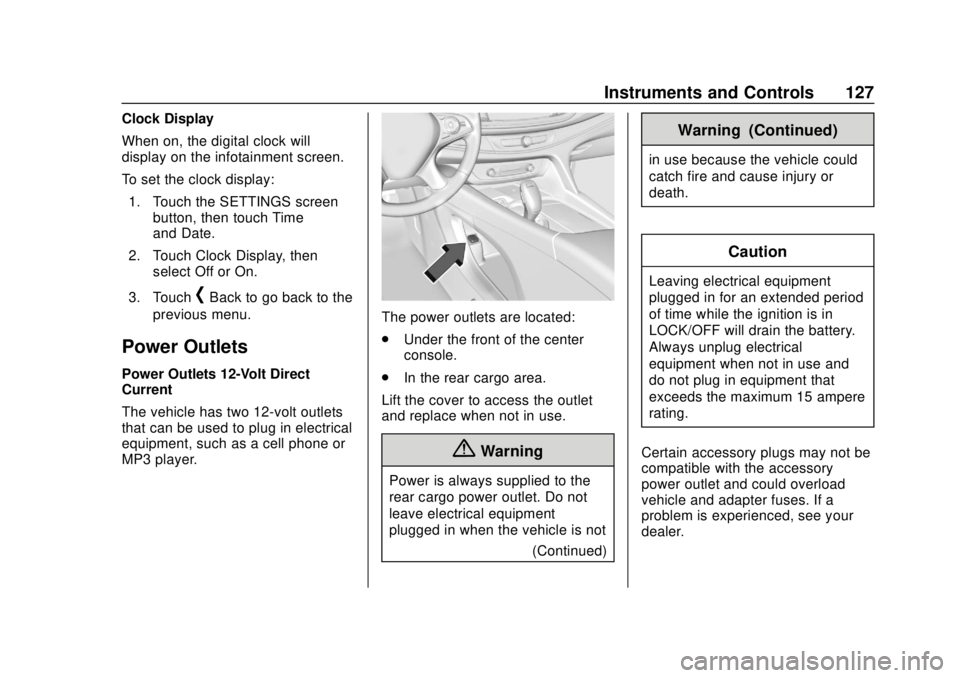
The vehicle has two 12-volt outlets
that can be used to plug in electrical
equipment, such as a cell phone or
MP3 player.
The power outlets are located:
. Under the front of the center
console.
. In the rear cargo area.
Lift the cover to access the outlet
and replace when not in use.
{Warning
Power is always supplied to the
rear cargo power outlet. Do not
leave electrical equipment
plugged in when the vehicle is not (Continued)
Warning (Continued)
in use because the vehicle could
catch fire and cause injury or
death.
Caution
Leaving electrical equipment
plugged in for an extended period
of time while the ignition is in
LOCK/OFF will drain the battery.
Always unplug electrical
equipment when not in use and
do not plug in equipment that
exceeds the maximum 15 ampere
rating.
Certain accessory plugs may not be
compatible with the accessory
power outlet and could overload
vehicle and adapter fuses. If a
problem is experienced, see your
dealer.
Page 162 of 393
Buick Enclave Owner Manual (GMNA-Localizing-U.S./Canada/Mexico-
10999311) - 2018 - crc - 11/20/17
Instruments and Controls 161
Android Auto
Select and the following may
display:
.Android Auto
. Manage Android Auto Devices
Android Auto
This feature allows Android devices
to be connected to the infotainment
system through a USB port.
Select Off or On.
Manage Android Auto Devices
Select to manage Android devices.
Android Auto must be on for this
feature to be accessed.
Voice
Select and the following may
display:
. Confidence Threshold
. Prompt Length
. Audio Feedback Speed
. Display “What Can I Say?” TipsConfidence Threshold
This feature allows the adjustment
of the sensitivity of the speech
recognition system.
Select Confirm More or
Confirm Less.
Prompt Length
This feature adjusts the voice
prompt length.
Select Short or Long.
Audio Feedback Speed
This feature adjusts the audio
feedback speed.
Select Slow, Medium, or Fast.
Display
“What Can I Say?” Tips
This feature gives voice
command tips.
Select Off or On.
Display
Select and the following may
display:
. Mode
. Calibrate Touchscreen .
Turn Display Off
Mode
Select to change the display screen
for day or night driving.
Select Auto, Day, or Night.
Calibrate Touchscreen
Select to calibrate the touchscreen,
then follow the prompts.
Turn Display Off
Select to turn the display off. Touch
anywhere on the infotainment
display area or press any controls
on the radio center stack to turn the
display on.
Rear Camera
This allows for Rear Parking Assist
Symbols and Guidance Lines to be
turned off or on.
Select Off or On for the desired
feature.
See Assistance Systems for Parking
or Backing 0235.
Page 178 of 393

Buick Enclave Owner Manual (GMNA-Localizing-U.S./Canada/Mexico-
10999311) - 2018 - crc - 11/20/17
Climate Controls 177
8. Rear Window Defogger andHeated Outside Mirrors (If
Equipped)
9. Power (ON/OFF)
10. AUTO (Automatic Operation)
Climate Control Display
1. Outside Temperature Display
2. Driver and Passenger Temperature Controls
3. Fan Control
4. Sync (Synchronized Temperature)
5. A/C (Air Conditioning) 6. Climate Control Selection
(Application Tray Button)
7. Air Delivery Mode Control
The fan, air delivery mode, air
conditioning, driver and passenger
temperatures, and Sync settings
can be controlled by touching
CLIMATE on the infotainment
display Home Page or the climate
button in the application tray display.
A selection can then be made on
the front climate control page
displayed. See the infotainment
manual.
Climate Control Status Display
The climate control status display
appears briefly when the climate
controls on the center stack are
adjusted. The air delivery mode can
be adjusted on the climate control
display.
Automatic Operation
The system automatically controls
the fan speed, air delivery, air
conditioning, and recirculation in
order to heat or cool the vehicle to
the desired temperature.
When AUTO is lit, all four functions
operate automatically. Each function
can also be manually set and the
selected setting is displayed.
Functions not manually set will
continue to be automatically
controlled, even if the AUTO
indicator is not lit.
For automatic operation: 1. Press AUTO.
2. Set the temperature. Allow the system time to stabilize. Adjust
the temperature as needed for
best comfort.
Page 239 of 393
Buick Enclave Owner Manual (GMNA-Localizing-U.S./Canada/Mexico-
10999311) - 2018 - crc - 11/20/17
238 Driving and Operating
Warning (Continued)
speeds greater than 8 km/h
(5 mph). To prevent injury, death,
or vehicle damage, even with
Parking Assist, always check the
area around the vehicle and
check all mirrors before moving
forward or backing.
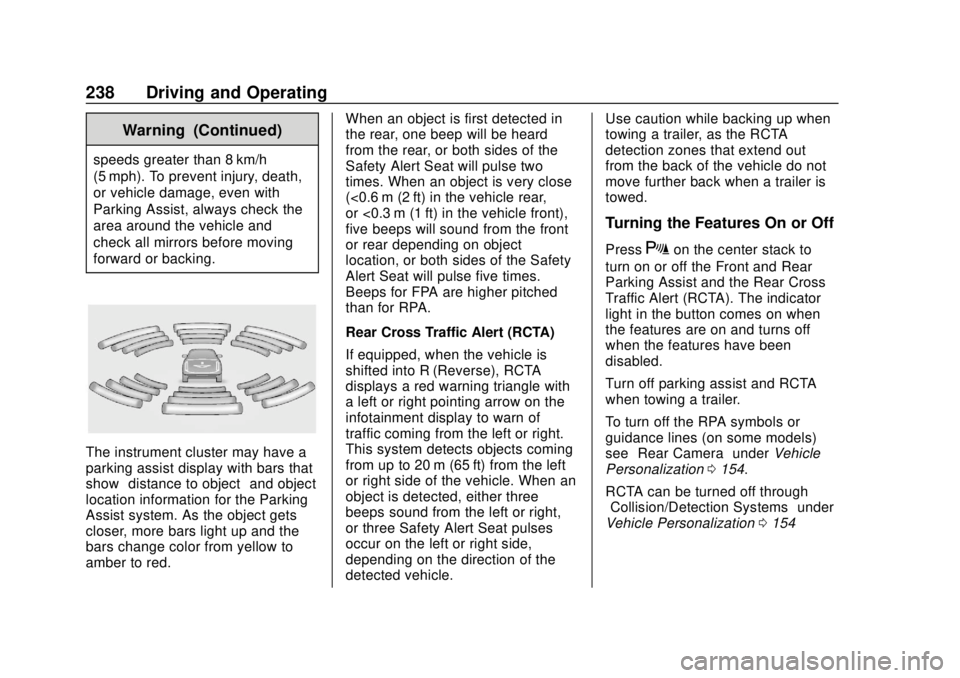
The instrument cluster may have a
parking assist display with bars that
show“distance to object” and object
location information for the Parking
Assist system. As the object gets
closer, more bars light up and the
bars change color from yellow to
amber to red. When an object is first detected in
the rear, one beep will be heard
from the rear, or both sides of the
Safety Alert Seat will pulse two
times. When an object is very close
(<0.6 m (2 ft) in the vehicle rear,
or <0.3 m (1 ft) in the vehicle front),
five beeps will sound from the front
or rear depending on object
location, or both sides of the Safety
Alert Seat will pulse five times.
Beeps for FPA are higher pitched
than for RPA.
Rear Cross Traffic Alert (RCTA)
If equipped, when the vehicle is
shifted into R (Reverse), RCTA
displays a red warning triangle with
a left or right pointing arrow on the
infotainment display to warn of
traffic coming from the left or right.
This system detects objects coming
from up to 20 m (65 ft) from the left
or right side of the vehicle. When an
object is detected, either three
beeps sound from the left or right,
or three Safety Alert Seat pulses
occur on the left or right side,
depending on the direction of the
detected vehicle.Use caution while backing up when
towing a trailer, as the RCTA
detection zones that extend out
from the back of the vehicle do not
move further back when a trailer is
towed.
Turning the Features On or Off
PressXon the center stack to
turn on or off the Front and Rear
Parking Assist and the Rear Cross
Traffic Alert (RCTA). The indicator
light in the button comes on when
the features are on and turns off
when the features have been
disabled.
Turn off parking assist and RCTA
when towing a trailer.
To turn off the RPA symbols or
guidance lines (on some models)
see “Rear Camera” underVehicle
Personalization 0154.
RCTA can be turned off through
“Collision/Detection Systems” under
Vehicle Personalization 0154
Page 356 of 393

Buick Enclave Owner Manual (GMNA-Localizing-U.S./Canada/Mexico-
10999311) - 2018 - crc - 11/20/17
Customer Information 355
Customer
Information
Customer Information
Customer SatisfactionProcedure . . . . . . . . . . . . . . . . . . . 355
Customer Assistance Offices . . . . . . . . . . . . . . . . . . . . . . 357
Customer Assistance for Text Telephone (TTY) Users . . . . . 358
Online Owner Center . . . . . . . . . 358
GM Mobility Reimbursement Program . . . . . . . . . . . . . . . . . . . . 359
Roadside Assistance Program . . . . . . . . . . . . . . . . . . . . 359
Scheduling Service Appointments . . . . . . . . . . . . . . . 361
Courtesy Transportation Program . . . . . . . . . . . . . . . . . . . . 361
Collision Damage Repair . . . . . 362
Service Publications Ordering Information . . . . . . . . . . . . . . . . . . 364
Radio Frequency Statement . . . . . . . . . . . . . . . . . . . 365
Reporting Safety Defects
Reporting Safety Defects tothe United States
Government . . . . . . . . . . . . . . . . . 365
Reporting Safety Defects to the Canadian
Government . . . . . . . . . . . . . . . . . 366
Reporting Safety Defects to General Motors . . . . . . . . . . . . . 366
Vehicle Data Recording and
Privacy
Vehicle Data Recording andPrivacy . . . . . . . . . . . . . . . . . . . . . . 367
Event Data Recorders . . . . . . . . 367
OnStar . . . . . . . . . . . . . . . . . . . . . . . 368
Infotainment System . . . . . . . . . . 368
Customer Information
Customer Satisfaction
Procedure
Your satisfaction and goodwill are
important to your dealer and to
Buick. Normally, any concerns with
the sales transaction or the
operation of the vehicle will be
resolved by your dealer's sales or
service departments. Sometimes,
however, despite the best intentions
of all concerned, misunderstandings
can occur. If your concern has not
been resolved to your satisfaction,
the following steps should be taken:
STEP ONE : Discuss your concern
with a member of dealership
management. Normally, concerns
can be quickly resolved at that level.
If the matter has already been
reviewed with the sales, service,
or parts manager, contact the owner
of your dealership or the general
manager.
STEP TWO : If after contacting a
member of dealership management,
it appears your concern cannot be
Page 384 of 393

Buick Enclave Owner Manual (GMNA-Localizing-U.S./Canada/Mexico-
10999311) - 2018 - crc - 11/20/17
Index 383
CompartmentsStorage . . . . . . . . . . . . . . . . . . . . . . . .117
Compass . . . . . . . . . . . . . . . . . . . . . . . 126
Connections OnStar . . . . . . . . . . . . . . . . . . . . . . . 372
Control Traction and Electronic
Stability . . . . . . . . . . . . . . . . . . . . . 220
Control of a Vehicle . . . . . . . . . . . . . 186
Convex Mirrors . . . . . . . . . . . . . . . . . . 51
Coolant Engine Temperature Gauge . . 137
Cooling . . . . . . . . . . . . . . . . . . . . 176, 180
Cooling System . . . . . . . . . . . . . . . . . 272
Courtesy Lamps . . . . . . . . . . . . . . . . 171
Courtesy Transportation Program . . . . . . . . . . . . . . . . . . . . . . . 361
Cruise Control . . . . . . . . . . . . . . . . . . 224 Light . . . . . . . . . . . . . . . . . . . . . . . . . . 147
Cruise Control, Adaptive . . . . . . . . 226
Cupholders . . . . . . . . . . . . . . . . . . . . . 117
Customer Assistance . . . . . . . . . . . 358 Offices . . . . . . . . . . . . . . . . . . . . . . . . 357
Text Telephone (TTY)Users . . . . . . . . . . . . . . . . . . . . . . . 358
Customer Information Service PublicationsOrdering Information . . . . . . . . 364 Customer Satisfaction
Procedure . . . . . . . . . . . . . . . . . . . . . 355
D
Damage Repair, Collision . . . . . . . 362
Danger, Warning, and Caution . . . . 2
Data Collection
Infotainment System . . . . . . . . . . 368
OnStar . . . . . . . . . . . . . . . . . . . . . . . 368
Data Recorders, Event . . . . . . . . . 367
Daytime Running Lamps (DRL) . . . . . . . . . . . . . . . . . . 169
Defensive Driving . . . . . . . . . . . . . . . 186
Delayed Locking . . . . . . . . . . . . . . . . . 40
Diagnostics OnStar . . . . . . . . . . . . . . . . . . . . . . . 374
Distracted Driving . . . . . . . . . . . . . . . 185
Dome Lamps . . . . . . . . . . . . . . . . . . . 171
Door
Ajar Light . . . . . . . . . . . . . . . . . . . . . 147
Delayed Locking . . . . . . . . . . . . . . . . 40
Locks . . . . . . . . . . . . . . . . . . . . . . . . . . . 38
Power Locks . . . . . . . . . . . . . . . . . . . . 40
Drive Belt Routing, Engine . . . . . . 354
Drive Systems All-Wheel Drive . . . . . . . . . . 216, 281
Driver Assistance Systems . . . . . 234 Driver Information
Center (DIC) . . . . . . . . . . . . . 148, 150
Driver Mode Control . . . . . . . . . . . . 222
Driving Assistance Systems . . . . . . . . . . 239
Characteristics andTowing Tips . . . . . . . . . . . . . . . . . 253
Defensive . . . . . . . . . . . . . . . . . . . . . 186
Drunk . . . . . . . . . . . . . . . . . . . . . . . . . 186
For Better Fuel Economy . . . . . . . 28
Hill and Mountain Roads . . . . . . 194
If the Vehicle is Stuck . . . . . . . . . 196
Loss of Control . . . . . . . . . . . . . . . 188
Off-Road . . . . . . . . . . . . . . . . . . . . . 188
Off-Road Recovery . . . . . . . . . . . 187
Vehicle Load Limits . . . . . . . . . . . 196
Wet Roads . . . . . . . . . . . . . . . . . . . 193
Winter . . . . . . . . . . . . . . . . . . . . . . . . 194
Dual Automatic Climate Control System . . . . . . . . . . . . . . . . 176
E
Electric Parking Brake . . . . . . . . . . 218
Electric Parking Brake Light . . . . 142
Electrical Equipment,Add-On . . . . . . . . . . . . . . . . . . . . . . . 261
Page 390 of 393

Buick Enclave Owner Manual (GMNA-Localizing-U.S./Canada/Mexico-
10999311) - 2018 - crc - 11/20/17
Index 389
SeatsHead Restraints . . . . . . . . . . . . . . . . 61
Heated and Ventilated Front . . . . 68
Heated, Rear . . . . . . . . . . . . . . . . . . . 72
Lumbar Adjustment, Front . . . . . . 64
Memory . . . . . . . . . . . . . . . . . . . . . . . . . 65
Power Adjustment, Front . . . . . . . 63
Rear . . . . . . . . . . . . . . . . . . . . . . . . . . . . 70
Reclining Seatbacks . . . . . . . . . . . . 64
Third Row Seat . . . . . . . . . . . . . . . . . 73
Securing Child
Restraints . . . . . . . . . . . . . . . . 111, 113
Security Light . . . . . . . . . . . . . . . . . . . . . . . . . . 146
OnStar . . . . . . . . . . . . . . . . . . . . . . . 371
Vehicle . . . . . . . . . . . . . . . . . . . . . . . . . 49
Vehicle Alarm . . . . . . . . . . . . . . . . . . . 49
Service . . . . . . . . . . . . . . . . . . . . . . . . . 183 Accessories andModifications . . . . . . . . . . . . . . . . 265
Doing Your Own Work . . . . . . . . 265
Maintenance Records . . . . . . . . 351
Maintenance, General
Information . . . . . . . . . . . . . . . . . . 339
Parts Identification Label . . . . . 352
Publications Ordering
Information . . . . . . . . . . . . . . . . . . 364
Scheduling Appointments . . . . . 361 Service Electric Parking
Brake Light . . . . . . . . . . . . . . . . . . . . 142
Services Special Application . . . . . . . . . . . 346
Servicing the Airbag . . . . . . . . . . . . . 94
Shifting Into Park . . . . . . . . . . . . . . . . . . . . . . 205
Out of Park . . . . . . . . . . . . . . . . . . . 206
Side Blind Zone Alert (SBZA) . . . 245
Signals, Turn and Lane-Change . . . . . . . . . . . . . . . . . 170
Spare Tire Compact . . . . . . . . . . . . . . . . . . . . . . 323
Special Application Services . . . . 346
Specifications and Capacities . . . . . . . . . . . . . . . . . . . . . 353
Speedometer . . . . . . . . . . . . . . . . . . . 135
StabiliTrak OFF Light . . . . . . . . . . . . . . . . . . . . . 144
Start Assist, Hill . . . . . . . . . . . . . . . . . 219
Start Vehicle, Remote . . . . . . . . . . . 36
Starting the Engine . . . . . . . . . . . . . 202
Steering . . . . . . . . . . . . . . . . . . . . . . . . 187 Heated Wheel . . . . . . . . . . . . . . . . 123
Wheel Adjustment . . . . . . . . . . . . 123
Wheel Controls . . . . . . . . . . . . . . . 123
Storage Areas Cargo Management System . . .118 Storage Areas (cont'd)
Center Console . . . . . . . . . . . . . . . .118
Glove Box . . . . . . . . . . . . . . . . . . . . .117
Roof Rack System . . . . . . . . . . . . 120
Sunglasses . . . . . . . . . . . . . . . . . . . .118
Storage Compartments . . . . . . . . . 117
Struts Gas . . . . . . . . . . . . . . . . . . . . . . . . . . . 283
Stuck Vehicle . . . . . . . . . . . . . . . . . . . 196
Sun Visors . . . . . . . . . . . . . . . . . . . . . . . 57
Sunglass Storage . . . . . . . . . . . . . . . 118
Sunroof . . . . . . . . . . . . . . . . . . . . . . . . . . 58
Symbols . . . . . . . . . . . . . . . . . . . . . . . . . . 3
System
Forward CollisionAlert (FCA) . . . . . . . . . . . . . . . . . . 239
Infotainment . . . . . . . . . . . . . 175, 368
Roof Rack . . . . . . . . . . . . . . . . . . . . 120
Systems Driver Assistance . . . . . . . . . . . . . 234
T
Tachometer . . . . . . . . . . . . . . . . . . . . . 135
Text Telephone (TTY) Users . . . . 358
Theft-Deterrent Systems . . . . . . . . . 50Immobilizer . . . . . . . . . . . . . . . . . . . . . 50
Third-Row Seats . . . . . . . . . . . . . . . . . 73
Time . . . . . . . . . . . . . . . . . . . . . . . . . . . . 126