check BUICK ENCLAVE 2020 Workshop Manual
[x] Cancel search | Manufacturer: BUICK, Model Year: 2020, Model line: ENCLAVE, Model: BUICK ENCLAVE 2020Pages: 381, PDF Size: 7.08 MB
Page 212 of 381
Buick Enclave Owner Manual (GMNA-Localizing-U.S./Canada/Mexico-
13527524) - 2020 - CRC - 4/10/19
Driving and Operating 211follow the vehicle in front of you, but
will not exceed the set speed. It may
apply limited braking, if necessary.
When braking is active, the brake
lamps will come on. The automatic
braking may feel or sound different
than if the brakes were applied
manually. This is normal.
Stationary or Very Slow-Moving
Objects
{ WarningACC may not detect and react to
stopped or slow-moving vehicles
ahead of you. For example, the
system may not brake for a
vehicle it has never detected
moving. This can occur in
stop-and-go traffic or when a
vehicle suddenly appears due to
a vehicle ahead changing lanes.
Your vehicle may not stop and
could cause a crash. Use caution
when using ACC. Your complete
attention is always required while
(Continued) Warning (Continued) driving and you should be ready
to take action and apply the
brakes.
ACC Automatically Disengages
ACC may automatically disengage
and you will need to manually apply
the brakes to slow the vehicle if:
.
The sensors are blocked.
.
The Traction Control System
(TCS) or StabiliTrak/ESC system
has activated or been disabled.
.
There is a fault in the system.
.
The radar falsely reports
blockage when driving in a
desert or remote area with no
other vehicles or roadside
objects. A DIC message may
display to indicate that ACC is
temporarily unavailable.
A message will appear on the DIC
indicating that cruise is disengaging.
The ACC active symbol will turn
white when ACC is no longer active. In some cases, when ACC will not
activate, regular cruise control may
be used. See “ Switching Between
ACC and Regular Cruise Control ”
previously in this section. Always
consider driving conditions before
using either cruise control system.
Notification to Resume ACC
ACC will maintain a following gap
behind a detected vehicle and slow
your vehicle to a stop behind that
vehicle.
If the stopped vehicle ahead has
driven away and ACC has not
resumed, the vehicle ahead
indicator will flash as a reminder to
check traffic ahead before
proceeding. In addition, the left and
right sides of the Safety Alert Seat
will pulse three times, or three
beeps will sound. See “ Alert Type ”
and “ Adaptive Cruise Go Notifier ” in
“ Collision/Detection Systems ” under
Vehicle Personalization 0 137 .
When the vehicle ahead drives
away, press RES+ or the
accelerator pedal to resume cruise
control. If stopped for more than
Page 217 of 381
Buick Enclave Owner Manual (GMNA-Localizing-U.S./Canada/Mexico-
13527524) - 2020 - CRC - 4/10/19
216 Driving and Operating
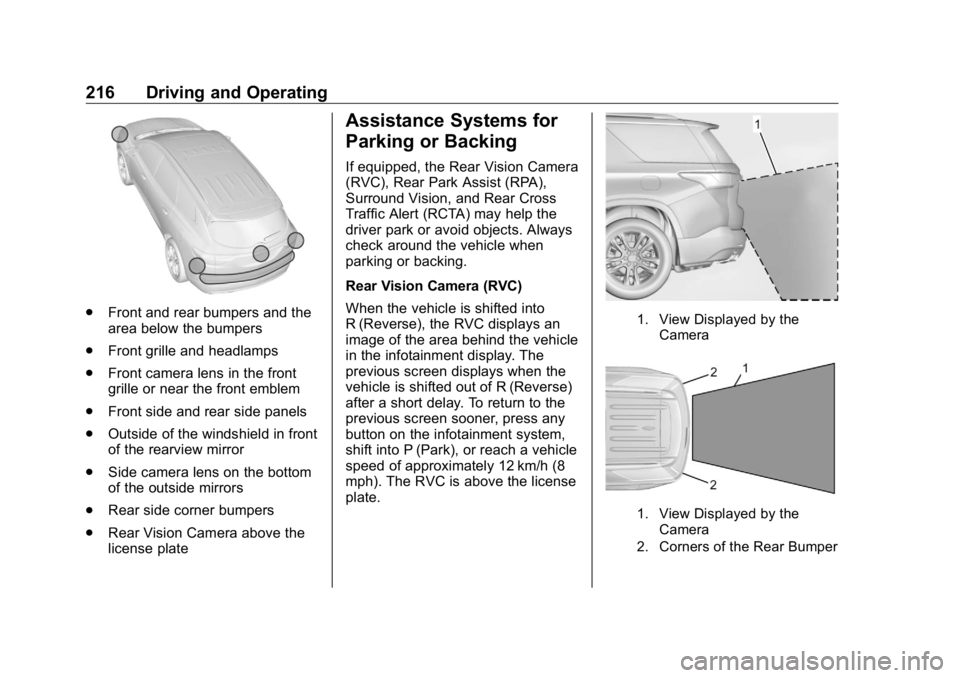
.
Front and rear bumpers and the
area below the bumpers
.
Front grille and headlamps
.
Front camera lens in the front
grille or near the front emblem
.
Front side and rear side panels
.
Outside of the windshield in front
of the rearview mirror
.
Side camera lens on the bottom
of the outside mirrors
.
Rear side corner bumpers
.
Rear Vision Camera above the
license plate Assistance Systems for
Parking or Backing If equipped, the Rear Vision Camera
(RVC), Rear Park Assist (RPA),
Surround Vision, and Rear Cross
Traffic Alert (RCTA) may help the
driver park or avoid objects. Always
check around the vehicle when
parking or backing.
Rear Vision Camera (RVC)
When the vehicle is shifted into
R (Reverse), the RVC displays an
image of the area behind the vehicle
in the infotainment display. The
previous screen displays when the
vehicle is shifted out of R (Reverse)
after a short delay. To return to the
previous screen sooner, press any
button on the infotainment system,
shift into P (Park), or reach a vehicle
speed of approximately 12 km/h (8
mph). The RVC is above the license
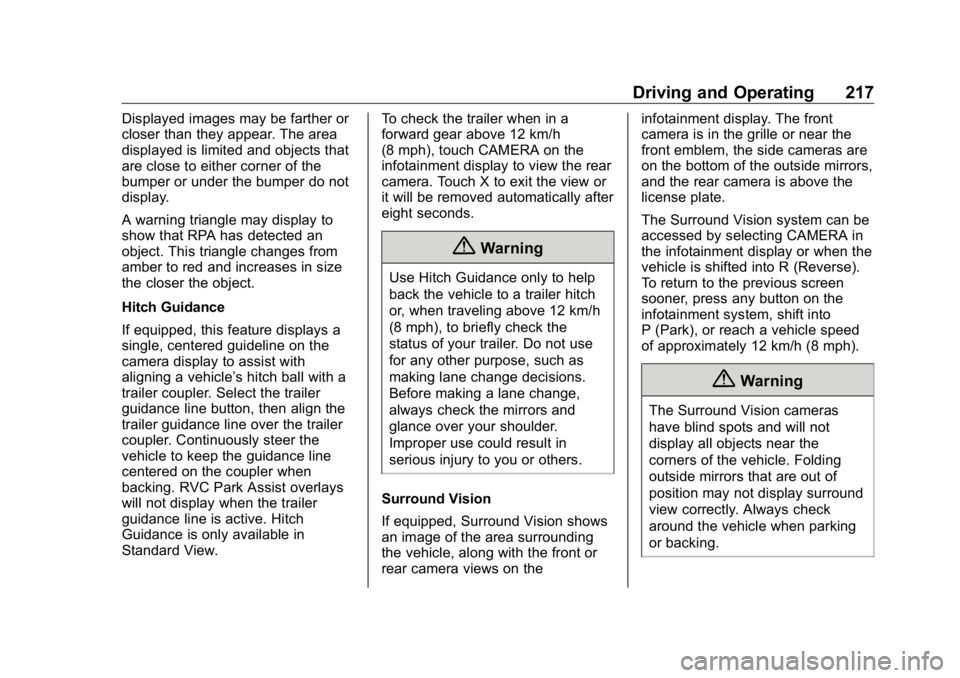
plate. 1. View Displayed by the
Camera
1. View Displayed by the
Camera
2. Corners of the Rear Bumper
Page 218 of 381
Buick Enclave Owner Manual (GMNA-Localizing-U.S./Canada/Mexico-
13527524) - 2020 - CRC - 4/10/19
Driving and Operating 217Displayed images may be farther or
closer than they appear. The area
displayed is limited and objects that
are close to either corner of the
bumper or under the bumper do not
display.
A warning triangle may display to
show that RPA has detected an
object. This triangle changes from
amber to red and increases in size
the closer the object.
Hitch Guidance
If equipped, this feature displays a
single, centered guideline on the
camera display to assist with
aligning a vehicle ’ s hitch ball with a
trailer coupler. Select the trailer
guidance line button, then align the
trailer guidance line over the trailer
coupler. Continuously steer the
vehicle to keep the guidance line
centered on the coupler when
backing. RVC Park Assist overlays
will not display when the trailer
guidance line is active. Hitch
Guidance is only available in
Standard View. To check the trailer when in a
forward gear above 12 km/h
(8 mph), touch CAMERA on the
infotainment display to view the rear
camera. Touch X to exit the view or
it will be removed automatically after
eight seconds.
{ WarningUse Hitch Guidance only to help
back the vehicle to a trailer hitch
or, when traveling above 12 km/h
(8 mph), to briefly check the
status of your trailer. Do not use
for any other purpose, such as
making lane change decisions.
Before making a lane change,
always check the mirrors and
glance over your shoulder.
Improper use could result in
serious injury to you or others.
Surround Vision
If equipped, Surround Vision shows
an image of the area surrounding
the vehicle, along with the front or
rear camera views on the infotainment display. The front
camera is in the grille or near the
front emblem, the side cameras are
on the bottom of the outside mirrors,
and the rear camera is above the
license plate.
The Surround Vision system can be
accessed by selecting CAMERA in
the infotainment display or when the
vehicle is shifted into R (Reverse).
To return to the previous screen
sooner, press any button on the
infotainment system, shift into
P (Park), or reach a vehicle speed
of approximately 12 km/h (8 mph).
{ WarningThe Surround Vision cameras
have blind spots and will not
display all objects near the
corners of the vehicle. Folding
outside mirrors that are out of
position may not display surround
view correctly. Always check
around the vehicle when parking
or backing.
Page 219 of 381
Buick Enclave Owner Manual (GMNA-Localizing-U.S./Canada/Mexico-
13527524) - 2020 - CRC - 4/10/19
218 Driving and Operating
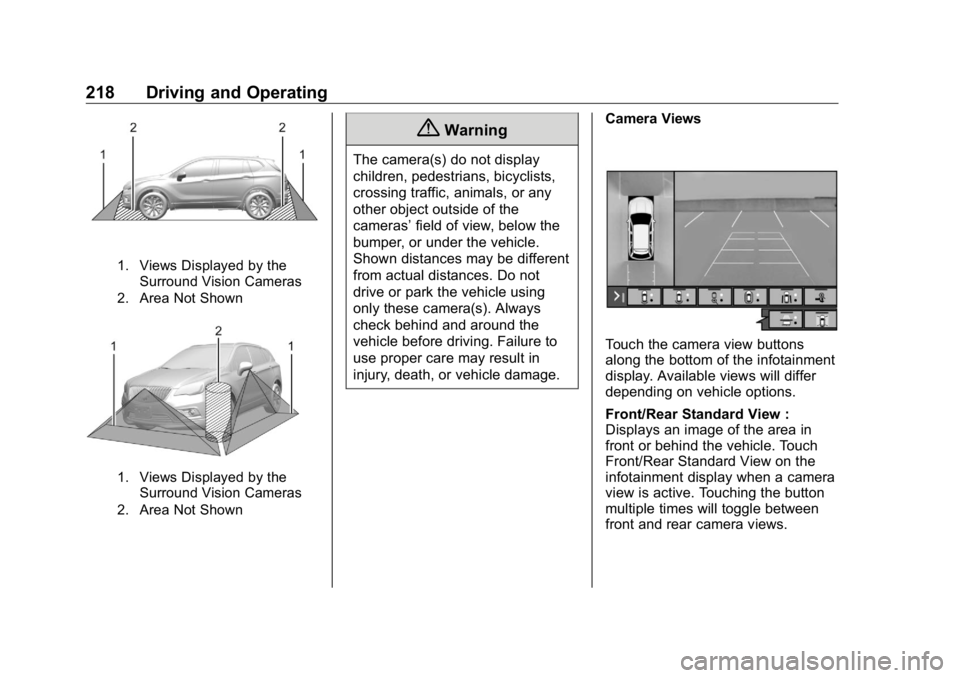
1. Views Displayed by the
Surround Vision Cameras
2. Area Not Shown
1. Views Displayed by the
Surround Vision Cameras
2. Area Not Shown { WarningThe camera(s) do not display
children, pedestrians, bicyclists,
crossing traffic, animals, or any
other object outside of the
cameras ’ field of view, below the
bumper, or under the vehicle.
Shown distances may be different
from actual distances. Do not
drive or park the vehicle using
only these camera(s). Always
check behind and around the
vehicle before driving. Failure to
use proper care may result in
injury, death, or vehicle damage. Camera Views
Touch the camera view buttons
along the bottom of the infotainment
display. Available views will differ
depending on vehicle options.
Front/Rear Standard View :
Displays an image of the area in
front or behind the vehicle. Touch
Front/Rear Standard View on the
infotainment display when a camera
view is active. Touching the button
multiple times will toggle between
front and rear camera views.
Page 221 of 381
Buick Enclave Owner Manual (GMNA-Localizing-U.S./Canada/Mexico-
13527524) - 2020 - CRC - 4/10/19
220 Driving and Operating
{ WarningThe Park Assist system does not
detect children, pedestrians,
bicyclists, animals, or objects
below the bumper or that are too
close or too far from the vehicle.
It is not available at speeds
greater than 8 km/h (5 mph). To
prevent injury, death, or vehicle
damage, even with Park Assist,
always check the area around the
vehicle and check all mirrors
before backing.
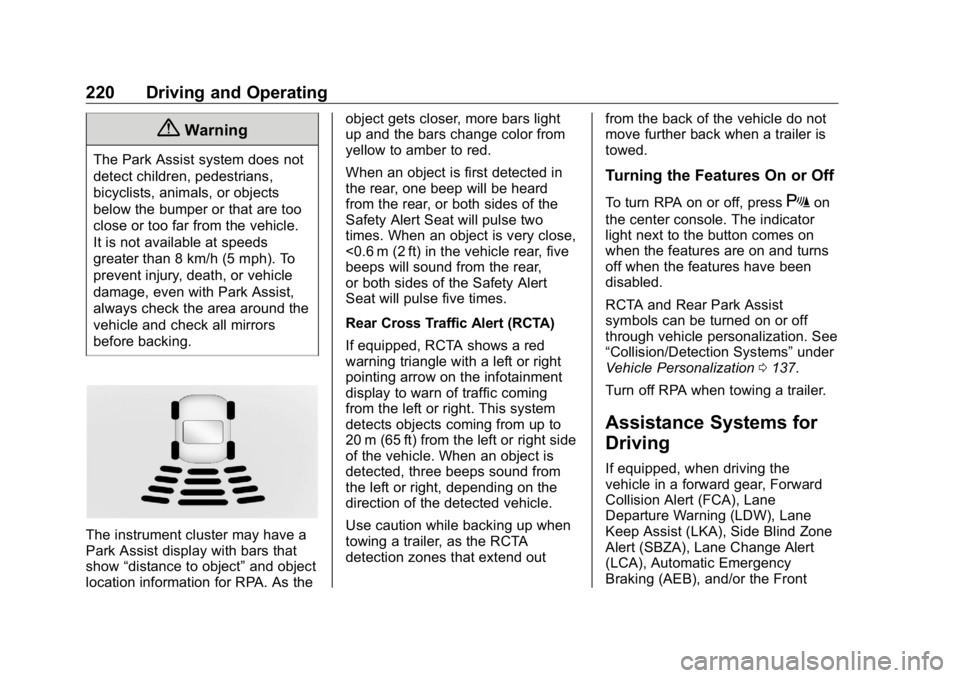
The instrument cluster may have a
Park Assist display with bars that
show “ distance to object ” and object
location information for RPA. As the object gets closer, more bars light
up and the bars change color from
yellow to amber to red.
When an object is first detected in
the rear, one beep will be heard
from the rear, or both sides of the
Safety Alert Seat will pulse two
times. When an object is very close,
<0.6 m (2 ft) in the vehicle rear, five
beeps will sound from the rear,
or both sides of the Safety Alert
Seat will pulse five times.
Rear Cross Traffic Alert (RCTA)
If equipped, RCTA shows a red
warning triangle with a left or right
pointing arrow on the infotainment
display to warn of traffic coming
from the left or right. This system
detects objects coming from up to
20 m (65 ft) from the left or right side
of the vehicle. When an object is
detected, three beeps sound from
the left or right, depending on the
direction of the detected vehicle.
Use caution while backing up when
towing a trailer, as the RCTA
detection zones that extend out from the back of the vehicle do not
move further back when a trailer is
towed.
Turning the Features On or Off To turn RPA on or off, press
X on
the center console. The indicator
light next to the button comes on
when the features are on and turns
off when the features have been
disabled.
RCTA and Rear Park Assist
symbols can be turned on or off
through vehicle personalization. See
“ Collision/Detection Systems ” under
Vehicle Personalization 0 137 .
Turn off RPA when towing a trailer.
Assistance Systems for
Driving If equipped, when driving the
vehicle in a forward gear, Forward
Collision Alert (FCA), Lane
Departure Warning (LDW), Lane
Keep Assist (LKA), Side Blind Zone
Alert (SBZA), Lane Change Alert
(LCA), Automatic Emergency
Braking (AEB), and/or the Front
Page 228 of 381

Buick Enclave Owner Manual (GMNA-Localizing-U.S./Canada/Mexico-
13527524) - 2020 - CRC - 4/10/19
Driving and Operating 227When the vehicle is in a forward
gear, the left or right side mirror
display will light up if a moving
vehicle is detected in that blind
zone. If the turn signal is activated
and a vehicle is also detected on
the same side, the display will flash
as an extra warning not to change
lanes. Since this system is part of
the Lane Change Alert (LCA)
system, read the entire LCA section
before using this feature.
Lane Change Alert (LCA) If equipped, the LCA system is a
lane-changing aid that assists
drivers with avoiding lane change
crashes that occur with moving
vehicles in the side blind zone (or
spot) areas or with vehicles rapidly
approaching these areas from
behind. The LCA warning display
will light up in the corresponding
outside mirror and will flash if the
turn signal is on. { WarningLCA does not alert the driver to
vehicles outside of the system
detection zones, pedestrians,
bicyclists, or animals. It may not
provide alerts when changing
lanes under all driving conditions.
Failure to use proper care when
changing lanes may result in
injury, death, or vehicle damage.
Before making a lane change,
always check mirrors, glance over
your shoulder, and use the turn
signals.
LCA Detection Zones
1. SBZA Detection Zone 2. LCA Detection Zone
The LCA sensor covers a zone of
approximately one lane over from
both sides of the vehicle, or 3.5 m
(11 ft). The height of the zone is
approximately between 0.5 m (1.5 ft)
and 2 m (6 ft) off the ground. The
Side Blind Zone Alert (SBZA)
warning area starts at approximately
the middle of the vehicle and goes
back 5 m (16 ft). Drivers are also
warned of vehicles rapidly
approaching from up to 70 m (230 ft)
behind the vehicle.
How the System Works The LCA symbol lights up in the
outside mirrors when the system
detects a moving vehicle in the next
lane over that is in the side blind
zone or rapidly approaching that
zone from behind. A lit LCA symbol
indicates it may be unsafe to
change lanes. Before making a lane
change, check the LCA display,
check mirrors, glance over your
shoulder, and use the turn signals.
Page 237 of 381

Buick Enclave Owner Manual (GMNA-Localizing-U.S./Canada/Mexico-
13527524) - 2020 - CRC - 4/10/19
236 Driving and Operating .
Front Pedestrian Braking (FPB)
If equipped with Lane Change Alert
(LCA), the LCA detection zones that
extend back from the side of the
vehicle do not move further back
when a trailer is towed. Use caution
while changing lanes when towing a
trailer.
If equipped with Rear Cross Traffic
Alert (RCTA), use caution while
backing up when towing a trailer, as
the RCTA detection zones that
extend out from the back of the
vehicle do not move further back
when a trailer is towed.
{ Warning
To prevent serious injury or death
from carbon monoxide (CO),
when towing a trailer:
.
Do not drive with the
liftgate, trunk/hatch,
or rear-most window open.
(Continued) Warning (Continued) .
Fully open the air outlets on
or under the instrument
panel.
.
Adjust the climate control
system to a setting that
brings in only outside air.
See “ Climate Control
Systems ” in the Index.
For more information about
carbon monoxide, see Engine
Exhaust 0 190 .
Towing a trailer requires experience.
The combination of the vehicle and
trailer is longer and not as
responsive as the vehicle itself. Get
used to the handling and braking of
the combination by driving on a
level road surface before driving on
public roads.
The trailer structure, the tires, and
the brakes must be all be rated to
carry the intended cargo.
Inadequate trailer equipment can
cause the combination to operate in an unexpected or unsafe manner.
Before driving, inspect all trailer
hitch parts and attachments, safety
chains, electrical connectors, lamps,
tires, and mirrors. See Towing
Equipment 0 241 . If the trailer has
electric brakes, start the
combination moving and then
manually apply the trailer brake
controller to check the trailer brakes
work. During the trip, occasionally
check that the cargo and trailer are
secure and that the lamps and any
trailer brakes are working.
Towing with a Stability Control
System When towing, the stability control
system might be heard. The system
reacts to vehicle movement caused
by the trailer, which mainly occurs
during cornering. This is normal
when towing heavier trailers.
Following Distance
Stay at least twice as far behind the
vehicle ahead as you would when
driving without a trailer. This can
help to avoid heavy braking and
sudden turns.
Page 239 of 381

Buick Enclave Owner Manual (GMNA-Localizing-U.S./Canada/Mexico-
13527524) - 2020 - CRC - 4/10/19
238 Driving and Operating When parking your vehicle and your
trailer on a hill:
1. Press the brake pedal, but do
not shift into P (Park) yet. Turn
the wheels into the curb if
facing downhill or into traffic if
facing uphill.
2. Have someone place chocks
under the trailer wheels.
3. When the wheel chocks are in
place, gradually release the
brake pedal to allow the chocks
to absorb the load of the trailer.
4. Reapply the brake pedal. Then
apply the parking brake and
shift into P (Park).
5. Release the brake pedal.
Leaving After Parking on a Hill 1. Apply and hold the brake
pedal.
.
Start the engine.
.
Shift into a gear.
.
Release the parking brake.
2. Let up on the brake pedal. 3. Drive slowly until the trailer is
clear of the chocks.
4. Stop and have someone pick
up and store the chocks.
Maintenance When Trailer
Towing The vehicle needs service more
often when used to tow trailers. See
Maintenance Schedule 0 328 . It is
especially important to check the
engine oil, axle lubricant, belts,
cooling system, and brake system
before and during each trip.
Check periodically that all nuts and
bolts on the trailer hitch are tight.
Engine Cooling When Trailer
Towing The cooling system may temporarily
overheat during severe operating
conditions. See Engine Overheating
0 262 . Trailer Towing CautionTowing a trailer improperly can
damage the vehicle and result in
costly repairs not covered by the
vehicle warranty. To tow a trailer
correctly, follow the directions in
this section and see your dealer
for important information about
towing a trailer with the vehicle.
Trailer Weight
{ WarningNever exceed the towing capacity
for your vehicle.
Safe trailering requires monitoring
the weight, speed, altitude, road
grades, outside temperature,
dimensions of the front of the trailer,
and how frequently the vehicle is
used to tow a trailer.
Page 245 of 381

Buick Enclave Owner Manual (GMNA-Localizing-U.S./Canada/Mexico-
13527524) - 2020 - CRC - 4/10/19
244 Driving and Operating Trailer Lamps Always check all trailer lamps are
working at the beginning of each
trip, and periodically on longer trips.
Turn Signals When Towing a
Trailer When properly connected, the trailer
turn signals will illuminate to indicate
the vehicle is turning, changing
lanes, or stopping. When towing a
trailer, the arrows on the instrument
cluster will illuminate even if the
trailer is not properly connected or
the bulbs are burned out.
Tow/Haul Mode For instructions on how to enter
Tow/Haul mode, see Driver Mode
Control 0 202 .
Tow/Haul assists when pulling a
heavy trailer or a large or heavy
load. See Tow/Haul Mode 0 196 .
Tow/Haul Mode is designed to be
most effective when the vehicle and
trailer combined weight is at least
75% of the vehicle's Gross Combined Weight Rating (GCWR).
See “ Weight of the Trailer ” under
Trailer Towing 0 238 .
Tow/Haul Mode is most useful when
pulling a heavy trailer or a large or
heavy load:
.
through rolling terrain
.
in stop-and-go traffic
.
in busy parking lots
Operating the vehicle in Tow/Haul
Mode when lightly loaded or not
towing will not cause damage;
however, it is not recommended and
may result in unpleasant engine and
transmission driving characteristics
and reduced fuel economy.
Trailer Sway
Control (TSC) Vehicles with StabiliTrak/Electronic
Stability Control (ESC) have a
Trailer Sway Control (TSC) feature.
Trailer sway is unintended
side-to-side motion of a trailer while
towing. If the vehicle is towing a
trailer and the TSC detects that
sway is increasing, the vehicle brakes are selectively applied at
each wheel, to help reduce
excessive trailer sway. If equipped
with the Integrated Trailer Brake
Control (ITBC) system, and the
trailer has an electric brake system,
StabiliTrak/ESC may also apply the
trailer brakes.
If TSC is enabled, the Traction
Control System (TCS)/StabiliTrak/
ESC warning light will flash on the
instrument cluster. Reduce vehicle
speed by gradually removing your
foot from the accelerator. If trailer
sway continues, StabiliTrak/ESC
can reduce engine torque to help
slow the vehicle. TSC will not
function if StabiliTrak/ESC is turned
off. See Traction Control/Electronic
Stability Control 0 200 .
Page 246 of 381
Buick Enclave Owner Manual (GMNA-Localizing-U.S./Canada/Mexico-
13527524) - 2020 - CRC - 4/10/19
Driving and Operating 245
{ WarningTrailer sway can result in a crash
and in serious injury or death,
even if the vehicle is equipped
with TSC.
If the trailer begins to sway,
reduce vehicle speed by
gradually removing your foot from
the accelerator. Then pull over to
check the trailer and vehicle to
help correct possible causes,
including an improperly or
overloaded trailer, unrestrained
cargo, improper trailer hitch
configuration, or improperly
inflated or incorrect vehicle or
trailer tires. See Towing
Equipment 0 241 for trailer ratings
and hitch setup
recommendations. Trailer Tires Special Trailer (ST) tires differ from
vehicle tires. Trailer tires are
designed with stiff sidewalls to help
prevent sway and to support heavy
loads. These features can make it
difficult to determine if the trailer tire
pressures are low only based on a
visual inspection.
Always check all trailer tire
pressures before each trip when the
tires are cool. Low trailer tire
pressure is a leading cause of trailer
tire blow-outs.
Trailer tires deteriorate over time.
The trailer tire sidewall will show the
week and year the tire was
manufactured. Many trailer tire
manufacturers recommend
replacing tires more than six
years old. Overloading is another leading
cause of trailer tire blow-outs. Never
load your trailer with more weight
than the tires are designed to
support. The load rating is located
on the trailer tire sidewall.
Always know the maximum speed
rating for the trailer tires before
driving. This may be significantly
lower than the vehicle tire speed
rating. The speed rating may be on
the trailer tire sidewall. If the speed
rating is not shown, the default
trailer tire speed rating is 105 km/h
(65 mph).