lane assist BUICK ENCLAVE 2023 Owners Manual
[x] Cancel search | Manufacturer: BUICK, Model Year: 2023, Model line: ENCLAVE, Model: BUICK ENCLAVE 2023Pages: 366, PDF Size: 6.62 MB
Page 4 of 366
Buick Enclave Owner Manual (GMNA-Localizing-U.S./Canada/Mexico-
16411536) - 2023 - CRC - 3/28/22
Introduction 3
A circle with a slash through it is a safety
symbol which means“Do not,” “Do not do
this,” or“Do not let this happen.”
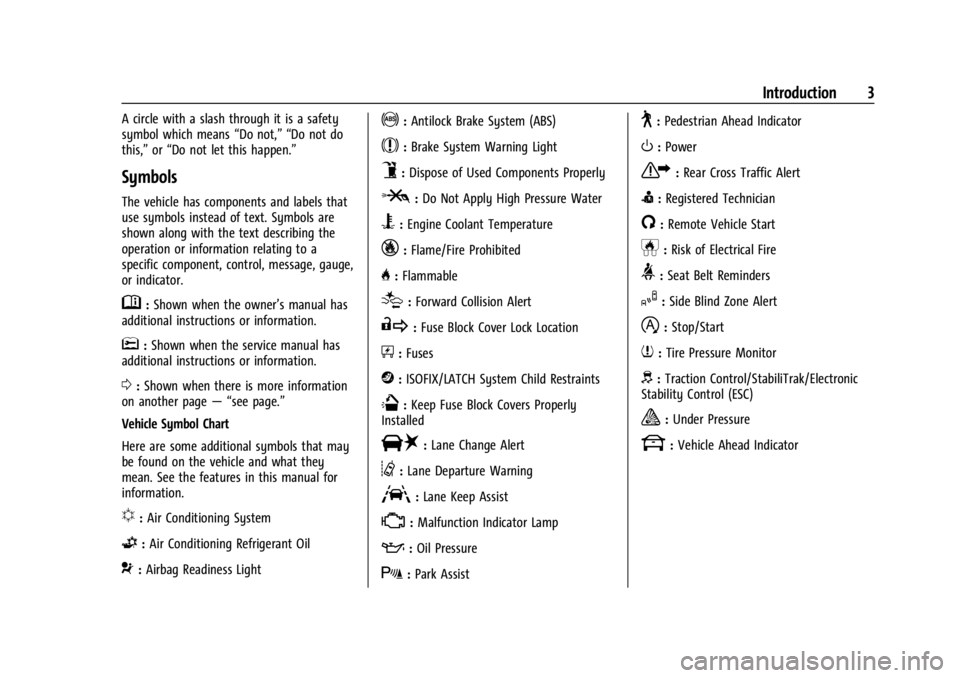
Symbols
The vehicle has components and labels that
use symbols instead of text. Symbols are
shown along with the text describing the
operation or information relating to a
specific component, control, message, gauge,
or indicator.
M:Shown when the owner’s manual has
additional instructions or information.
*: Shown when the service manual has
additional instructions or information.
0: Shown when there is more information
on another page — “see page.”
Vehicle Symbol Chart
Here are some additional symbols that may
be found on the vehicle and what they
mean. See the features in this manual for
information.
u: Air Conditioning System
G:Air Conditioning Refrigerant Oil
9:Airbag Readiness Light
!:Antilock Brake System (ABS)
$:Brake System Warning Light
9:Dispose of Used Components Properly
P:Do Not Apply High Pressure Water
B:Engine Coolant Temperature
_:Flame/Fire Prohibited
H: Flammable
[:Forward Collision Alert
R:Fuse Block Cover Lock Location
+:Fuses
j:ISOFIX/LATCH System Child Restraints
Q:Keep Fuse Block Covers Properly
Installed
|: Lane Change Alert
@:Lane Departure Warning
A:Lane Keep Assist
*: Malfunction Indicator Lamp
::Oil Pressure
X:Park Assist
~:Pedestrian Ahead Indicator
O:Power
7:Rear Cross Traffic Alert
I:Registered Technician
/:Remote Vehicle Start
h:Risk of Electrical Fire
>:Seat Belt Reminders
I:Side Blind Zone Alert
h:Stop/Start
7:Tire Pressure Monitor
d:Traction Control/StabiliTrak/Electronic
Stability Control (ESC)
a: Under Pressure
k: Vehicle Ahead Indicator
Page 6 of 366

Buick Enclave Owner Manual (GMNA-Localizing-U.S./Canada/Mexico-
16411536) - 2023 - CRC - 3/28/22
Introduction 5
1.Air Vents 0183.
2. Turn Signal Lever. See Turn and
Lane-Change Signals 0126.
Exterior Lamp Controls 0123.
3. Manual Mode 0209.
4. Instrument Cluster (Base Level) 096 or
Instrument Cluster (Uplevel) 098.
Driver Information Center (DIC) Display.
See Driver Information Center (DIC) (Base
Level) 0112 orDriver Information Center
(DIC) (Uplevel) 0114.
5. Windshield Wiper/Washer 089.
6. Auto Stop Disable Switch. See Stop/Start
System 0201.
All-Wheel Drive Button (If Equipped). See
Driver Mode Control 0214.
Sport Mode Button (If Equipped) or Tow/
Haul Mode Button (If Equipped). See
Driver Mode Control 0214.
7. Light Sensor. See Automatic Headlamp
System 0125.
8. Hazard Warning Flashers 0126.
Assistance Systems for Parking or Backing
0 226 (If Equipped).
Lane Keep Assist (LKA) 0239 (If
Equipped). 9. Infotainment Controls. See
Overview
0 131.
10. Dual Automatic Climate Control System
0178.
Heated and Ventilated Front Seats 041
(If Equipped).
11. Wireless Charging 093 (If Equipped).
12. Shift Lever. See Automatic Transmission
0 206.
13. USB Port 0139.
14. ENGINE START/STOP Button. See Ignition
Positions 0199.
15. Steering Wheel Controls 0132.
16. Horn 089.
17. Steering Wheel Adjustment 088 (Out
of View).
18. Cruise Control 0215.
Adaptive Cruise Control (Advanced) 0217
(If Equipped).
Heated Steering Wheel 088 (If
Equipped).
Forward Collision Alert (FCA) System
0 232 (If Equipped).
19. Hood Release. See Hood0259. 20. Data Link Connector (DLC) (Out of View).
SeeMalfunction Indicator Lamp (Check
Engine Light) 0105.
21. Instrument Panel Illumination Control
0126.
22. Head-Up Display (HUD) 0117 (If
Equipped).
23. Electric Parking Brake 0210.
Page 88 of 366
Buick Enclave Owner Manual (GMNA-Localizing-U.S./Canada/Mexico-
16411536) - 2023 - CRC - 3/28/22
Instruments and Controls 87
Instruments and Controls
Controls
Steering Wheel Adjustment . . . . . . . . . . . . 88
Heated Steering Wheel . . . . . . . . . . . . . . . . . 88
Horn . . . . . . . . . . . . . . . . . . . . . . . . . . . . . . . . . . . 89
Windshield Wiper/Washer . . . . . . . . . . . . . 89
Rear Window Wiper/Washer . . . . . . . . . . . 90
Compass . . . . . . . . . . . . . . . . . . . . . . . . . . . . . . . . 91
Clock . . . . . . . . . . . . . . . . . . . . . . . . . . . . . . . . . . . 92
Power Outlets . . . . . . . . . . . . . . . . . . . . . . . . . . 92
Wireless Charging . . . . . . . . . . . . . . . . . . . . . . 93
Warning Lights, Gauges, and Indicators
Warning Lights, Gauges, andIndicators . . . . . . . . . . . . . . . . . . . . . . . . . . . . . 95
Instrument Cluster (Base Level) . . . . . . . . 96
Instrument Cluster (Uplevel) . . . . . . . . . . . . 98
Speedometer . . . . . . . . . . . . . . . . . . . . . . . . . . 100
Odometer . . . . . . . . . . . . . . . . . . . . . . . . . . . . . 100
Trip Odometer . . . . . . . . . . . . . . . . . . . . . . . . 100
Tachometer . . . . . . . . . . . . . . . . . . . . . . . . . . . 100
Fuel Gauge . . . . . . . . . . . . . . . . . . . . . . . . . . . . 100
Engine Oil Temperature Gauge (Uplevel Only) . . . . . . . . . . . . . . . . . . . . . . . 101
Engine Coolant Temperature Gauge . . . 102
Voltmeter Gauge (Uplevel Only) . . . . . . . 102
Seat Belt Reminders . . . . . . . . . . . . . . . . . . . 103
Airbag Readiness Light . . . . . . . . . . . . . . . . 103
Passenger Airbag Status Indicator . . . . . 104 Charging System Light . . . . . . . . . . . . . . . . 105
Malfunction Indicator Lamp (Check
Engine Light) . . . . . . . . . . . . . . . . . . . . . . . . 105
Brake System Warning Light . . . . . . . . . . 106
Electric Parking Brake Light . . . . . . . . . . . . 107
Service Electric Parking Brake Light . . . . 107
Antilock Brake System (ABS) Warning Light . . . . . . . . . . . . . . . . . . . . . . . . . . . . . . . . . 108
Lane Keep Assist (LKA) Light . . . . . . . . . . . 108
Vehicle Ahead Indicator . . . . . . . . . . . . . . . 108
Pedestrian Ahead Indicator . . . . . . . . . . . . 108
Traction Off Light . . . . . . . . . . . . . . . . . . . . . 109
StabiliTrak OFF Light . . . . . . . . . . . . . . . . . . 109
Traction Control System (TCS)/ StabiliTrak Light . . . . . . . . . . . . . . . . . . . . . 109
Driver Mode Control Light . . . . . . . . . . . . . 110
Tire Pressure Light . . . . . . . . . . . . . . . . . . . . . 110
Engine Oil Pressure Light . . . . . . . . . . . . . . 110
Low Fuel Warning Light . . . . . . . . . . . . . . . . 111
Security Light . . . . . . . . . . . . . . . . . . . . . . . . . . 111
High-Beam On Light . . . . . . . . . . . . . . . . . . . . 111
Lamps On Reminder . . . . . . . . . . . . . . . . . . . . 111
Cruise Control Light . . . . . . . . . . . . . . . . . . . . 112
Door Ajar Light . . . . . . . . . . . . . . . . . . . . . . . . . 112
Information Displays
Driver Information Center (DIC) (Base Level) . . . . . . . . . . . . . . . . . . . . . . . . . . . . . . . . 112
Driver Information Center (DIC) (Uplevel) . . . . . . . . . . . . . . . . . . . . . . . . . . . . . 114
Head-Up Display (HUD) . . . . . . . . . . . . . . . . 117
Vehicle Messages
Vehicle Messages . . . . . . . . . . . . . . . . . . . . . . 119
Engine Power Messages . . . . . . . . . . . . . . . 120
Vehicle Speed Messages . . . . . . . . . . . . . . . 120
Universal Remote System
Universal Remote System . . . . . . . . . . . . . 120
Universal Remote System Programming . . . . . . . . . . . . . . . . . . . . . . . . 120
Universal Remote System Operation . . . 122
Page 109 of 366
Buick Enclave Owner Manual (GMNA-Localizing-U.S./Canada/Mexico-
16411536) - 2023 - CRC - 3/28/22
108 Instruments and Controls
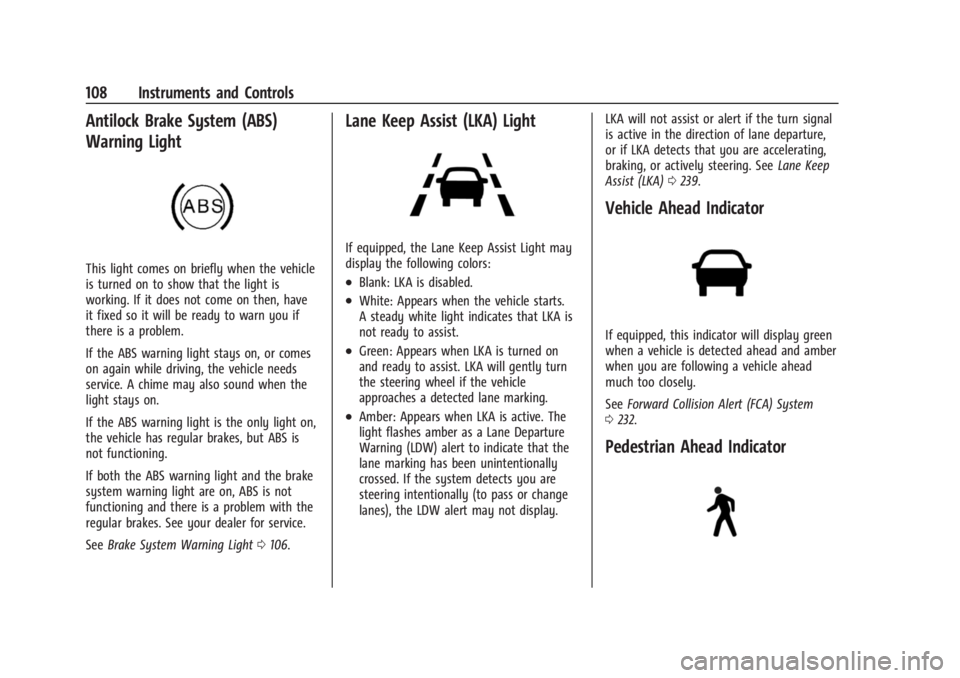
Antilock Brake System (ABS)
Warning Light
This light comes on briefly when the vehicle
is turned on to show that the light is
working. If it does not come on then, have
it fixed so it will be ready to warn you if
there is a problem.
If the ABS warning light stays on, or comes
on again while driving, the vehicle needs
service. A chime may also sound when the
light stays on.
If the ABS warning light is the only light on,
the vehicle has regular brakes, but ABS is
not functioning.
If both the ABS warning light and the brake
system warning light are on, ABS is not
functioning and there is a problem with the
regular brakes. See your dealer for service.
SeeBrake System Warning Light 0106.
Lane Keep Assist (LKA) Light
If equipped, the Lane Keep Assist Light may
display the following colors:
.Blank: LKA is disabled.
.White: Appears when the vehicle starts.
A steady white light indicates that LKA is
not ready to assist.
.Green: Appears when LKA is turned on
and ready to assist. LKA will gently turn
the steering wheel if the vehicle
approaches a detected lane marking.
.Amber: Appears when LKA is active. The
light flashes amber as a Lane Departure
Warning (LDW) alert to indicate that the
lane marking has been unintentionally
crossed. If the system detects you are
steering intentionally (to pass or change
lanes), the LDW alert may not display. LKA will not assist or alert if the turn signal
is active in the direction of lane departure,
or if LKA detects that you are accelerating,
braking, or actively steering. See
Lane Keep
Assist (LKA) 0239.
Vehicle Ahead Indicator
If equipped, this indicator will display green
when a vehicle is detected ahead and amber
when you are following a vehicle ahead
much too closely.
See Forward Collision Alert (FCA) System
0 232.
Pedestrian Ahead Indicator
Page 119 of 366
Buick Enclave Owner Manual (GMNA-Localizing-U.S./Canada/Mexico-
16411536) - 2023 - CRC - 3/28/22
118 Instruments and Controls
.Vehicle Messages
Some vehicle messages or alerts displayed in
the HUD may be cleared by using the
steering wheel controls. See Vehicle
Messages 0119.
Some information shown may not be
available on your vehicle if it is not
equipped with these features.
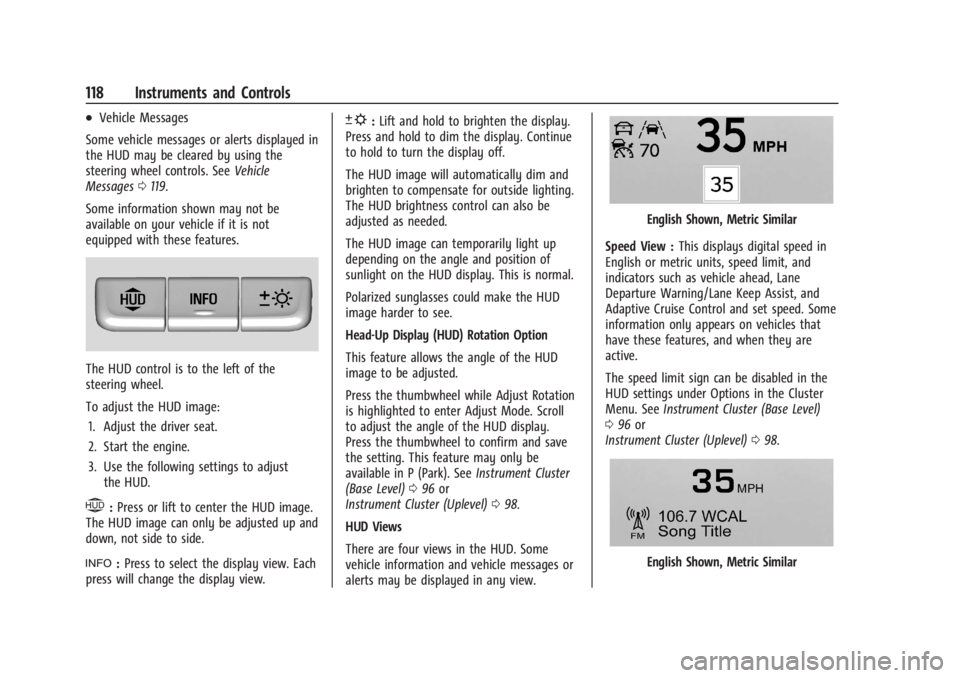
The HUD control is to the left of the
steering wheel.
To adjust the HUD image: 1. Adjust the driver seat.
2. Start the engine.
3. Use the following settings to adjust the HUD.
$:Press or lift to center the HUD image.
The HUD image can only be adjusted up and
down, not side to side.
!: Press to select the display view. Each
press will change the display view.
D: Lift and hold to brighten the display.
Press and hold to dim the display. Continue
to hold to turn the display off.
The HUD image will automatically dim and
brighten to compensate for outside lighting.
The HUD brightness control can also be
adjusted as needed.
The HUD image can temporarily light up
depending on the angle and position of
sunlight on the HUD display. This is normal.
Polarized sunglasses could make the HUD
image harder to see.
Head-Up Display (HUD) Rotation Option
This feature allows the angle of the HUD
image to be adjusted.
Press the thumbwheel while Adjust Rotation
is highlighted to enter Adjust Mode. Scroll
to adjust the angle of the HUD display.
Press the thumbwheel to confirm and save
the setting. This feature may only be
available in P (Park). See Instrument Cluster
(Base Level) 096 or
Instrument Cluster (Uplevel) 098.
HUD Views
There are four views in the HUD. Some
vehicle information and vehicle messages or
alerts may be displayed in any view.
English Shown, Metric Similar
Speed View : This displays digital speed in
English or metric units, speed limit, and
indicators such as vehicle ahead, Lane
Departure Warning/Lane Keep Assist, and
Adaptive Cruise Control and set speed. Some
information only appears on vehicles that
have these features, and when they are
active.
The speed limit sign can be disabled in the
HUD settings under Options in the Cluster
Menu. See Instrument Cluster (Base Level)
0 96 or
Instrument Cluster (Uplevel) 098.
English Shown, Metric Similar
Page 186 of 366
Buick Enclave Owner Manual (GMNA-Localizing-U.S./Canada/Mexico-
16411536) - 2023 - CRC - 3/28/22
Driving and Operating 185
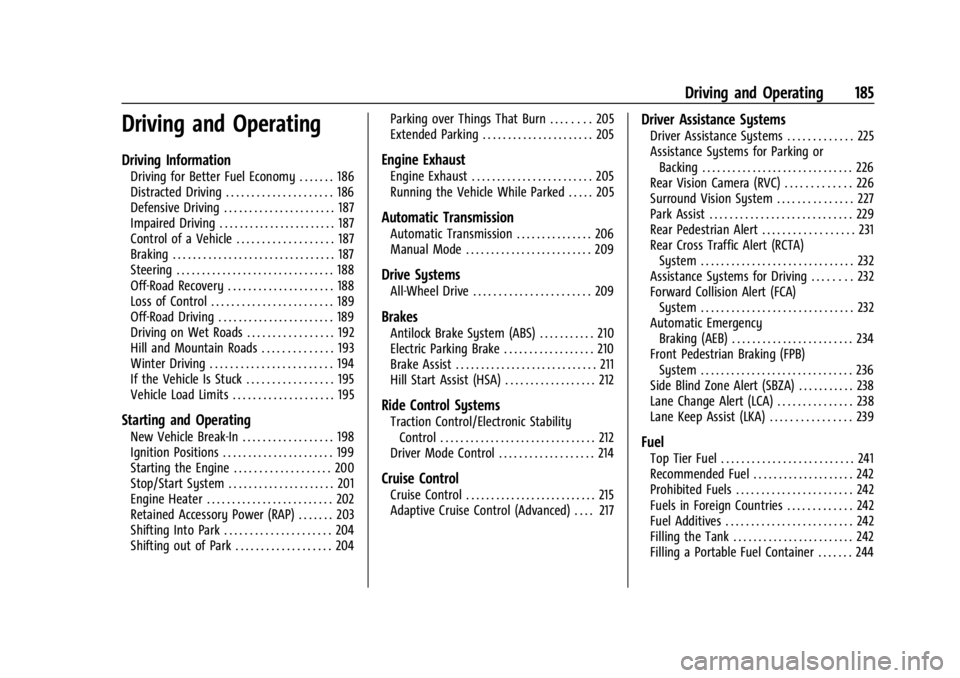
Driving and Operating
Driving Information
Driving for Better Fuel Economy . . . . . . . 186
Distracted Driving . . . . . . . . . . . . . . . . . . . . . 186
Defensive Driving . . . . . . . . . . . . . . . . . . . . . . 187
Impaired Driving . . . . . . . . . . . . . . . . . . . . . . . 187
Control of a Vehicle . . . . . . . . . . . . . . . . . . . 187
Braking . . . . . . . . . . . . . . . . . . . . . . . . . . . . . . . . 187
Steering . . . . . . . . . . . . . . . . . . . . . . . . . . . . . . . 188
Off-Road Recovery . . . . . . . . . . . . . . . . . . . . . 188
Loss of Control . . . . . . . . . . . . . . . . . . . . . . . . 189
Off-Road Driving . . . . . . . . . . . . . . . . . . . . . . . 189
Driving on Wet Roads . . . . . . . . . . . . . . . . . 192
Hill and Mountain Roads . . . . . . . . . . . . . . 193
Winter Driving . . . . . . . . . . . . . . . . . . . . . . . . 194
If the Vehicle Is Stuck . . . . . . . . . . . . . . . . . 195
Vehicle Load Limits . . . . . . . . . . . . . . . . . . . . 195
Starting and Operating
New Vehicle Break-In . . . . . . . . . . . . . . . . . . 198
Ignition Positions . . . . . . . . . . . . . . . . . . . . . . 199
Starting the Engine . . . . . . . . . . . . . . . . . . . 200
Stop/Start System . . . . . . . . . . . . . . . . . . . . . 201
Engine Heater . . . . . . . . . . . . . . . . . . . . . . . . . 202
Retained Accessory Power (RAP) . . . . . . . 203
Shifting Into Park . . . . . . . . . . . . . . . . . . . . . 204
Shifting out of Park . . . . . . . . . . . . . . . . . . . 204Parking over Things That Burn . . . . . . . . 205
Extended Parking . . . . . . . . . . . . . . . . . . . . . . 205
Engine Exhaust
Engine Exhaust . . . . . . . . . . . . . . . . . . . . . . . . 205
Running the Vehicle While Parked . . . . . 205
Automatic Transmission
Automatic Transmission . . . . . . . . . . . . . . . 206
Manual Mode . . . . . . . . . . . . . . . . . . . . . . . . . 209
Drive Systems
All-Wheel Drive . . . . . . . . . . . . . . . . . . . . . . . 209
Brakes
Antilock Brake System (ABS) . . . . . . . . . . . 210
Electric Parking Brake . . . . . . . . . . . . . . . . . . 210
Brake Assist . . . . . . . . . . . . . . . . . . . . . . . . . . . . 211
Hill Start Assist (HSA) . . . . . . . . . . . . . . . . . . 212
Ride Control Systems
Traction Control/Electronic Stability
Control . . . . . . . . . . . . . . . . . . . . . . . . . . . . . . . 212
Driver Mode Control . . . . . . . . . . . . . . . . . . . 214
Cruise Control
Cruise Control . . . . . . . . . . . . . . . . . . . . . . . . . . 215
Adaptive Cruise Control (Advanced) . . . . 217
Driver Assistance Systems
Driver Assistance Systems . . . . . . . . . . . . . 225
Assistance Systems for Parking or Backing . . . . . . . . . . . . . . . . . . . . . . . . . . . . . . 226
Rear Vision Camera (RVC) . . . . . . . . . . . . . 226
Surround Vision System . . . . . . . . . . . . . . . 227
Park Assist . . . . . . . . . . . . . . . . . . . . . . . . . . . . 229
Rear Pedestrian Alert . . . . . . . . . . . . . . . . . . 231
Rear Cross Traffic Alert (RCTA) System . . . . . . . . . . . . . . . . . . . . . . . . . . . . . . 232
Assistance Systems for Driving . . . . . . . . 232
Forward Collision Alert (FCA) System . . . . . . . . . . . . . . . . . . . . . . . . . . . . . . 232
Automatic Emergency Braking (AEB) . . . . . . . . . . . . . . . . . . . . . . . . 234
Front Pedestrian Braking (FPB) System . . . . . . . . . . . . . . . . . . . . . . . . . . . . . . 236
Side Blind Zone Alert (SBZA) . . . . . . . . . . . 238
Lane Change Alert (LCA) . . . . . . . . . . . . . . . 238
Lane Keep Assist (LKA) . . . . . . . . . . . . . . . . 239
Fuel
Top Tier Fuel . . . . . . . . . . . . . . . . . . . . . . . . . . 241
Recommended Fuel . . . . . . . . . . . . . . . . . . . . 242
Prohibited Fuels . . . . . . . . . . . . . . . . . . . . . . . 242
Fuels in Foreign Countries . . . . . . . . . . . . . 242
Fuel Additives . . . . . . . . . . . . . . . . . . . . . . . . . 242
Filling the Tank . . . . . . . . . . . . . . . . . . . . . . . . 242
Filling a Portable Fuel Container . . . . . . . 244
Page 189 of 366

Buick Enclave Owner Manual (GMNA-Localizing-U.S./Canada/Mexico-
16411536) - 2023 - CRC - 3/28/22
188 Driving and Operating
applied. Once the power assist is used up, it
can take longer to stop and the brake pedal
will be harder to push.
Steering
Caution
To avoid damage to the steering system,
do not drive over curbs, parking barriers,
or similar objects at speeds greater than
3 km/h (1 mph). Use care when driving
over other objects such as lane dividers
and speed bumps. Damage caused by
misuse of the vehicle is not covered by
the vehicle warranty.
Electric Power Steering
The vehicle is equipped with an electric
power steering system, which reduces the
amount of effort needed to steer the
vehicle. It does not have power steering
fluid. Regular maintenance is not required.
If the vehicle experiences a system
malfunction and loses power steering,
greater steering effort may be required.
Power steering assist also may be reduced if
you turn the steering wheel as far as it can
turn and hold it there with force for an
extended period of time.
See your dealer if there is a problem.
Curve Tips
.Take curves at a reasonable speed.
.Reduce speed before entering a curve.
.Maintain a reasonable steady speed
through the curve.
.Wait until the vehicle is out of the curve
before accelerating gently into the
straightaway.
Steering in Emergencies
.There are some situations when steering
around a problem may be more effective
than braking.
.Holding both sides of the steering wheel
allows you to turn 180 degrees without
removing a hand.
.The Antilock Brake System (ABS) allows
steering while braking.
Off-Road Recovery
The vehicle's right wheels can drop off the
edge of a road onto the shoulder while
driving. Follow these tips:1. Ease off the accelerator and then, if there is nothing in the way, steer the
vehicle so that it straddles the edge of
the pavement.
Page 194 of 366
Buick Enclave Owner Manual (GMNA-Localizing-U.S./Canada/Mexico-
16411536) - 2023 - CRC - 3/28/22
Driving and Operating 193
{Warning
Wet brakes can cause crashes. They
might not work as well in a quick stop
and could cause pulling to one side. You
could lose control of the vehicle.
After driving through a large puddle of
water or a car/vehicle wash, lightly apply
the brake pedal until the brakes work
normally.
Flowing or rushing water creates strong
forces. Driving through flowing water
could cause the vehicle to be carried
away. If this happens, you and other
vehicle occupants could drown. Do not
ignore police warnings and be very
cautious about trying to drive through
flowing water.
Hydroplaning
Hydroplaning is dangerous. Water can build
up under the vehicle's tires so they actually
ride on the water. This can happen if the
road is wet enough and you are going fast
enough. When the vehicle is hydroplaning, it
has little or no contact with the road.There is no hard and fast rule about
hydroplaning. The best advice is to slow
down when the road is wet.
Other Rainy Weather Tips
Besides slowing down, other wet weather
driving tips include:
.Allow extra following distance.
.Pass with caution.
.Keep windshield wiping equipment in
good shape.
.Keep the windshield washer fluid reservoir
filled.
.Have good tires with proper tread depth.
See
Tires 0285.
.Turn off cruise control.
.Activate All-Wheel Drive (AWD) mode. See
Driver Mode Control 0214.
Hill and Mountain Roads
Driving on steep hills or through mountains
is different than driving on flat or rolling
terrain. Tips include:
.Keep the vehicle serviced and in good
shape.
.Check all fluid levels and brakes, tires,
cooling system, and transmission.
.Shift to a lower gear when going down
steep or long hills.
{Warning
Using the brakes to slow the vehicle on a
long downhill slope can cause brake
overheating, can reduce brake
performance, and could result in a loss of
braking. Shift the transmission to a lower
gear to let the engine assist the brakes
on a steep downhill slope.
{Warning
Coasting downhill in N (Neutral) or with
the ignition off is dangerous. This can
cause overheating of the brakes and loss
of steering assist. Always have the engine
running and the vehicle in gear.
.Drive at speeds that keep the vehicle in
its own lane. Do not swing wide or cross
the center line.
.Be alert on top of hills; something could
be in your lane (e.g., stalled car, crash).
.Pay attention to special road signs (e.g.,
falling rocks area, winding roads, long
grades, passing or no-passing zones) and
take appropriate action.
Page 223 of 366
Buick Enclave Owner Manual (GMNA-Localizing-U.S./Canada/Mexico-
16411536) - 2023 - CRC - 3/28/22
222 Driving and Operating
Passing a Vehicle While Using ACC
If the set speed is high enough, and the left
turn signal is used to pass a vehicle ahead
in the selected following gap, ACC may
assist by gradually accelerating the vehicle
prior to the lane change.
{Warning
When using ACC to pass a vehicle or
perform a lane change, the following
distance to the vehicle being passed may
be reduced. ACC may not apply sufficient
acceleration or braking when passing a
vehicle or performing a lane change.
Always be ready to manually accelerate
or brake to complete the pass or lane
change.
Stationary or Very Slow-Moving Objects
{Warning
ACC may not detect and react to stopped
or slow-moving vehicles ahead of you. For
example, the system may not brake for a
vehicle it has never detected moving. This
can occur in stop-and-go traffic or when a
vehicle suddenly appears due to a vehicle (Continued)
Warning (Continued)
ahead changing lanes. Your vehicle may
not stop and could cause a crash. Use
caution when using ACC. Your complete
attention is always required while driving
and you should be ready to take action
and apply the brakes.
Irregular Objects Affecting ACC
ACC may have difficulty detecting the
following objects:
.Vehicles with cargo extending from the
back end.
.Non-standard shaped vehicles, such as
vehicle transport, vehicles with a side car
fitted, or horse carriages.
.Objects that are close to the front of your
vehicle.
ACC Automatically Disengages
ACC may automatically disengage and you
will need to manually apply the brakes to
slow the vehicle if:
.The sensors are blocked.
.The Traction Control System (TCS) or
StabiliTrak/ESC system has activated or
been disabled.
.There is a fault in the system.
.The radar falsely reports blockage when
driving in a desert or remote area with
no other vehicles or roadside objects.
.A DIC message may display to indicate
that ACC is temporarily unavailable.
The ACC active symbol will turn white when
ACC is no longer active.
In some cases, when ACC is temporarily
unavailable, regular cruise control may be
used. See “Switching Between ACC and
Regular Cruise Control” in this section.
Always consider driving conditions before
using either cruise control system.
Notification to Resume ACC
ACC will maintain a following gap behind a
detected vehicle and slow your vehicle to a
stop behind that vehicle.
If the stopped vehicle ahead has driven
away and ACC has not resumed, the vehicle
ahead indicator will flash as a reminder to
check traffic ahead before proceeding. In
addition, the left and right sides of the
Safety Alert Seat will pulse three times,
or three beeps will sound. Touch the
Settings icon on the infotainment home
page. Select “Vehicle”to display the list of
Page 230 of 366
Buick Enclave Owner Manual (GMNA-Localizing-U.S./Canada/Mexico-
16411536) - 2023 - CRC - 3/28/22
Driving and Operating 229
Front/Rear Overhead View :Displays a Front
or Rear Overhead View of the vehicle.
Touching the button will toggle between the
two views.
Side Forward/Rearward View : Displays a
view that shows objects next to the front or
rear sides of the vehicle. Touch Side
Forward/Rearward View on the infotainment
display when a camera view is active.
Touching the button multiple times will
toggle between forward and rearward views.
Park Assist and RCTA overlays are not
available when Side Forward/Rearward View
is active.
Hitch View : Assists while connecting to a
trailer. Displays a zoomed-in view of the
hitch to help align the vehicle’s hitch ball
with the trailer coupler. Shifting into
P (Park) while in this view will automatically
engage the Electric Parking Brake (EPB).
Guidance Lines : Displays available
guidelines. The horizontal markings
represent distance from the vehicle.
Top Down View : Displays an image of the
area surrounding the vehicle, along with
other views in the infotainment display. Top
Down can be enabled or disabled by
touching the Top Down View button
multiple times. Hitch Guidance
If equipped, this feature displays a single,
centered guideline on the camera display to
assist with aligning a vehicle’s hitch ball
with a trailer coupler. Select the trailer
guidance line button, then align the trailer
guidance line over the trailer coupler.
Continuously steer the vehicle to keep the
guidance line centered on the coupler when
backing. RVC Park Assist overlays will not
display when the trailer guidance line is
active. Hitch Guidance is only available in
Standard View.
To check the trailer when in a forward gear
above 12 km/h (8 mph), touch CAMERA on
the infotainment display to view the rear
camera. Touch X to exit the view or it will
be removed automatically after
eight seconds.
{Warning
Use Hitch Guidance only to help back the
vehicle to a trailer hitch or, when
traveling above 12 km/h (8 mph), to
briefly check the status of your trailer. Do
not use for any other purpose, such as
making lane change decisions. Before
(Continued)
Warning (Continued)
making a lane change, always check the
mirrors and glance over your shoulder.
Improper use could result in serious
injury to you or others.
Park Assist
The vehicle may be equipped with Front and
Rear Park Assist (FRPA). Under certain
conditions, the Park Assist system can assist
the driver during backing and parking
maneuvers when the vehicle is driven at no
more than 9 km/h (6 mph). An illuminated
indicator in the Park Assist button indicates
the system is ready.
Sensors located in the bumpers measure the
distance between the vehicle and objects
using sonar technology. These sensors are
designed to detect certain objects up to
2.5 m (8 ft) behind and 1.2 m (4 ft) in front of
your vehicle that are taller than
25 cm (10 in).
Different environmental conditions may
affect whether and how far the Park Assist
system can detect objects. Keep the sensors
clean of mud, dirt, snow, ice, and slush; and
clean sensors after a car wash in freezing