ignition BUICK ENCORE 2013 User Guide
[x] Cancel search | Manufacturer: BUICK, Model Year: 2013, Model line: ENCORE, Model: BUICK ENCORE 2013Pages: 368, PDF Size: 6.38 MB
Page 38 of 368

Black plate (10,1)Buick Encore Owner Manual - 2013 - crc - 1/8/13
2-10 Keys, Doors, and Windows
Disarming the System
To disarm the system, either unlock
the doors using the transmitter,
or start the vehicle.
To avoid setting off the alarm by
accident:
.Lock the vehicle with the
transmitter after all occupants
have left the vehicle and all
doors are closed.
.Always unlock a door with the
transmitter. Unlocking the driver
door with the backup key will not
disarm the alarm.
If you set off the alarm by accident,
turn off the alarm by pressing
Kon
the transmitter, or start the vehicle
with a recognized transmitter in the
vehicle. The alarm will not stop if
you unlock the driver door with
the key.
How to Detect a Tamper
Condition
IfKis pressed and the horn chirps
three times, an attempted break-in
has occurred while the system was
armed.
Immobilizer
See Radio Frequency Statement on
page 13-20 for information
regarding Part 15 of the Federal
Communications Commission (FCC)
rules and Industry Canada
Standards RSS-GEN/210/220/310.
Immobilizer Operation
This vehicle has a passive
theft-deterrent system.
The system does not have to be
manually armed or disarmed.
The vehicle is automatically
immobilized when the key is
removed from the ignition. The system is automatically
disarmed when the vehicle is
started with the correct key. The key
uses a transponder that matches an
immobilizer control unit in the
vehicle and automatically disarms
the system. Only an authorized key
starts the vehicle. The vehicle may
not start if the key is damaged.
The security light in the instrument
cluster comes on if there is a
problem with arming or disarming
the theft-deterrent system.
When trying to start the vehicle, the
security light comes on briefly when
the ignition is turned on.
If the engine does not start and the
security light stays on, there is a
problem with the system. Turn the
ignition off and try again.
Page 39 of 368
Black plate (11,1)Buick Encore Owner Manual - 2013 - crc - 1/8/13
Keys, Doors, and Windows 2-11
If the engine still does not start, and
the key appears to be undamaged
or the light continues to stay on, try
another ignition key. If the engine
does not start with the other key, the
vehicle needs service. If the vehicle
does start, the first key may be
damaged. See your dealer who can
service the theft-deterrent system
and have a new key made.
Do not leave the key or device that
disarms or deactivates the
theft-deterrent system in the vehicle.Exterior Mirrors
Convex Mirrors
{WARNING
A convex mirror can make things,
like other vehicles, look farther
away than they really are. If you
cut too sharply into the right lane,
you could hit a vehicle on the
right. Check the inside mirror or
glance over your shoulder before
changing lanes.
The passenger side mirror is convex
shaped. A convex mirror's surface is
curved so more can be seen from
the driver seat.
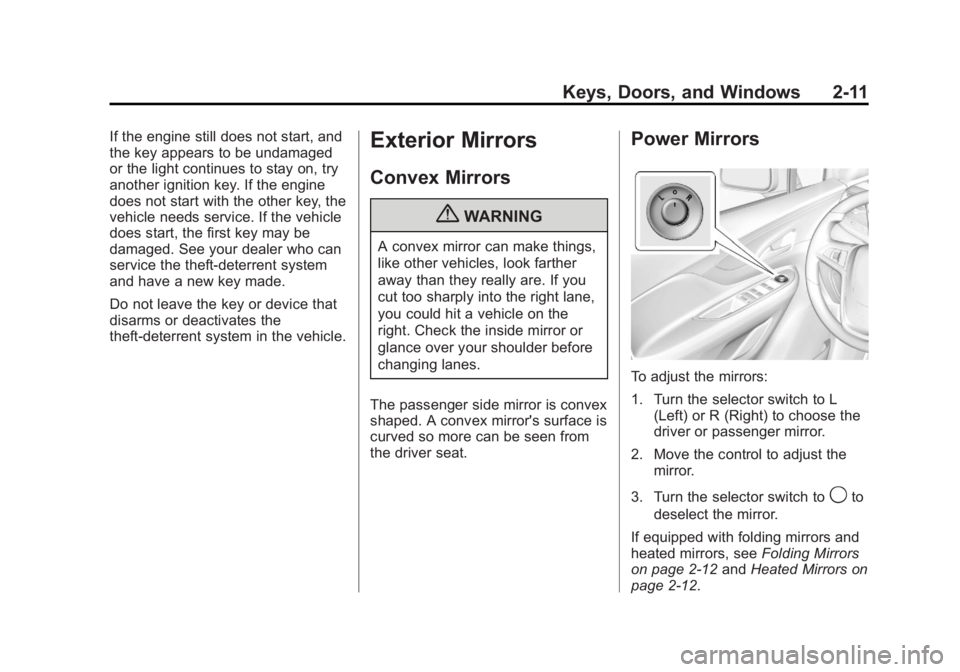
Power Mirrors
To adjust the mirrors:
1. Turn the selector switch to L (Left) or R (Right) to choose the
driver or passenger mirror.
2. Move the control to adjust the mirror.
3. Turn the selector switch to
9to
deselect the mirror.
If equipped with folding mirrors and
heated mirrors, see Folding Mirrors
on page 2-12 andHeated Mirrors on
page 2-12.
Page 41 of 368

Black plate (13,1)Buick Encore Owner Manual - 2013 - crc - 1/8/13
Keys, Doors, and Windows 2-13
vehicle. Check the blind spot
mirror for a vehicle in the blind
zone. Then, glance over your
shoulder to double check before
moving slowly into the
adjacent lane.
Reverse Tilt Mirrors
If equipped with the memory
package, the outside mirrors have a
reverse tilt feature. This feature tilts
the outside mirrors to a preselected
position when the vehicle is in
R (Reverse). This allows the driver
to view the curb for parallel parking.
The passenger and/or driver mirror
returns to its original position when
the vehicle is shifted out of
R (Reverse), or the ignition is turned
off or to OFF/LOCK.
This feature can be turned on or off
through the Driver Information
Center (DIC). SeeVehicle
Personalization on page 5-31.
Interior Mirrors
Manual Rearview Mirror
Hold the rearview mirror in the
center and move it to view the area
behind the vehicle.
For vehicles with a manual rearview
mirror, push the tab forward for
daytime use and pull it for nighttime
use to avoid glare from the
headlamps from behind.
Vehicles with OnStar have three
control buttons at the bottom of the
mirror. See your dealer for more
information about OnStar and how
to subscribe to it. See OnStar
Overview on page 14-1.
Automatic Dimming
Rearview Mirror
To adjust the inside rearview mirror,
hold the rearview mirror in the
center and move it to view the area
behind the vehicle.
For vehicles with an automatic
dimming rearview mirror, the mirror
will automatically reduce the glare
from the headlamps from behind.
The dimming feature and the
indicator light come on when the
vehicle is started.
Vehicles with OnStar have three
control buttons at the bottom of the
mirror. See your dealer for more
information about OnStar and how
to subscribe to it. See OnStar
Overview on page 14-1.
Cleaning the Mirror
Do not spray glass cleaner directly
on the mirror. Use a soft towel
dampened with water.
Page 43 of 368

Black plate (15,1)Buick Encore Owner Manual - 2013 - crc - 1/8/13
Keys, Doors, and Windows 2-15
Express-Up/Express-Down
Windows
If equipped, a window with the
express-up/down feature can be
raised or lowered without holding
the switch. Press or pull the window
switch fully and release it to activate
the express feature. The express
mode can be canceled by pressing
or pulling the switch.
Programming the Power
Windows
If the battery on the vehicle has
been recharged, disconnected,
or replaced, windows with the
express-up feature need to be
reprogrammed for this feature to
work. To program the window:
1. Close all doors with the ignitionin ON/RUN or ACC/
ACCESSORY, or when RAP is
active. See Retained Accessory
Power (RAP) on page 9-19. 2. Press and continue to hold the
window switch until the window
is fully open.
3. Pull up and hold the window switch to close the window.
Continue to hold it briefly after
the window is fully closed.
4. Repeat for each window that has the express-up feature.
Anti-Pinch Feature
The anti-pinch feature is on
windows with the express-up
feature. If an object is in the way of
the window as it is express-closing,
or in certain weather conditions like
severe icing, the window will stop
and open to a factory preset
position. The window functions
normally once the obstruction is
removed.
Rear Window Lockout
The rear window lockout feature
prevents the rear passenger
windows from operating, except
from the driver position.
Press
vto activate the rear
window lockout switch. The
indicator light comes on when
activated.
Press
vagain to deactivate the
lockout switch.
Page 44 of 368

Black plate (16,1)Buick Encore Owner Manual - 2013 - crc - 1/8/13
2-16 Keys, Doors, and Windows
Sun Visors
Pull the sun visor down to block
glare. Detach the sun visor from the
center mount to pivot to the side
window.
Close the mirror cover when driving.
If equipped, the vanity mirror lamp
comes on when opening the mirror
cover.
Roof
Sunroof
If equipped, the sunroof only
operates when the ignition is turned
to ON/RUN or Retained Accessory
Power (RAP) is active.
Open/Close:Press and hold the
front or rear of switch (1) to open or
close the sunroof. Vent:
Press and hold the front or
rear of switch (2) to vent or close
the sunroof.
Express-Open/Express-Close: To
express-open or express-close the
sunroof, fully press and release the
front or rear of switch (1) until the
sunroof reaches the desired
position.
Manually close the sunshade.
The sunroof will not operate if the
vehicle has an electrical failure.
Anti-Pinch Feature
If an object is in the path of the
sunroof when it is closing, the
anti-pinch feature will detect the
object and stop the sunroof from
closing at the point of the
obstruction. The sunroof then
returns to the full-open position.
Page 52 of 368

Black plate (6,1)Buick Encore Owner Manual - 2013 - crc - 1/8/13
3-6 Seats and Restraints
WARNING (Continued)
The lap belt could go up over
your abdomen. The belt forces
would be there, not at your pelvic
bones. This could cause serious
internal injuries.
For proper protection when the
vehicle is in motion, have the
seatback upright. Then sit well
back in the seat and wear the
safety belt properly.
Do not have a seatback reclined if
the vehicle is moving.
Memory Seats
If available, the MEM,“1,”and “2”
buttons on the outboard side of the
driver seat are used to manually
save and recall the driver seat and
outside mirror positions. These
manually stored positions are
referred to as Button Memory
positions. The vehicle will also automatically
save driver seat and outside mirror
positions to the current driver
Remote Keyless Entry (RKE)
transmitter when the ignition is
placed in OFF. These automatically
stored positions are referred to as
RKE Memory positions. See
Remote Keyless Entry (RKE)
System Operation on page 2-3.
Storing Button Memory Positions
To save positions into Button
Memory:
1. Adjust the driver seat and
outside mirrors to the desired
driving positions.
2. Press and hold MEM (Memory) and “1”at the same time until a
beep sounds.
3. Repeat Steps 1 and 2 for a second driver using “2.”
Page 53 of 368

Black plate (7,1)Buick Encore Owner Manual - 2013 - crc - 1/8/13
Seats and Restraints 3-7
Recalling Button Memory
Positions
To recall the Button Memory
positions, press and hold“1”or“2.”
The driver seat and outside mirrors
move to the positions stored to
those buttons when pressed.
Releasing “1”or“2” before the
stored positions are reached stops
the recall.
If something has blocked the driver
seat while recalling a memory
position, the recall may stop.
Remove the obstruction; then press
and hold the appropriate manual
control for the memory item that is
not recalling for two seconds. Try
recalling the memory position again
by pressing the appropriate memory
button. If the memory position is still
not recalling, see your dealer for
service.
Recalling RKE Memory Positions
The RKE memory feature can recall
the driver seat and outside mirrors
to previously stored RKE Memory
positions when entering the vehicle. Every time the ignition is placed in
OFF, the positions of the driver seat
and outside mirrors are
automatically stored to the RKE
transmitter that was used to start
the vehicle. These positions and
settings are called RKE Memory
positions and may be different than
the previously mentioned Button
Memory positions saved to the
“1”
or“2” buttons.
To recall, press
Kon the RKE
transmitter and open the driver door.
If the driver door is already open,
press
Kon the RKE transmitter to
activate the recall. The driver seat
and outside mirrors will move to the
previously saved RKE Memory
positions.
This feature is turned on or off using
the vehicle personalization menu.
See Vehicle Personalization on
page 5-31.
To stop recall movement, press one
of the memory, power mirror,
or power seat controls. If something has blocked the driver
seat while recalling a memory
position, the recall may stop.
Remove the obstruction; then press
and hold the appropriate manual
control for the memory item that is
not recalling for two seconds. Try
recalling the memory position again
by opening the driver door and
pressing the RKE transmitter
K
button. If the memory position is still
not recalling, see your dealer for
service.
Easy Exit Driver Seat
This feature moves the seat
rearward allowing the driver more
room to exit the vehicle.
To activate, place the ignition in
OFF and open the driver door. If the
driver door is already open, placing
the ignition in OFF will activate the
recall.
This feature is turned on or off using
the vehicle personalization menu.
See
Vehicle Personalization on
page 5-31.
Page 55 of 368
Black plate (9,1)Buick Encore Owner Manual - 2013 - crc - 1/8/13
Seats and Restraints 3-9
The passenger seat may take
longer to heat up.
Remote Start Heated Seats
When it is cold outside, the heated
seats can be turned on
automatically during a remote
vehicle start. The heated seats will
be canceled when the ignition is
turned on. Press the heated seat
controls to use the heated seats
after the vehicle is started.
The heated seat indicator lights on
the control do not turn on during a
remote start.
The temperature performance of an
unoccupied seat may be reduced.
This is normal.
The heated seats will not turn on
during a remote start unless the
heated seat feature is enabled in
the vehicle personalization menu.
SeeRemote Vehicle Start on
page 2-5 andVehicle
Personalization on page 5-31.Folding Seatback
The front passenger seatback
folds flat.
{WARNING
If you fold the seatback forward to
carry longer objects, such as skis,
be sure any such cargo is not
near an airbag. In a crash, an
inflating airbag might force that
object toward a person. This
could cause severe injury or even
death. Secure objects away from
the area in which an airbag would
inflate. For more information, see
Where Are the Airbags? on
page 3-25 andVehicle Load
Limits on page 9-10.
{WARNING
Things you put on this seatback
can strike and injure people in a
sudden stop or turn, or in a crash.
Remove or secure all items
before driving.
To fold the seatback:
1. Lower the head restraint all the way. See Head Restraints on
page 3-2.
2. Move the seat as far back as possible. See Seat Adjustment
on page 3-3.
Page 113 of 368
Black plate (7,1)Buick Encore Owner Manual - 2013 - crc - 1/8/13
Instruments and Controls 5-7
battery. Always unplug electrical
equipment when not in use and
do not plug in equipment that
exceeds the maximum 20 ampere
rating.
Certain electrical accessories may
not be compatible with the
accessory power outlet and could
overload vehicle or adapter fuses.
If a problem is experienced, see
your dealer.
When adding electrical equipment,
be sure to follow the installation
instructions included with the
equipment. SeeAdd-On Electrical
Equipment on page 9-47.
Notice: Hanging heavy
equipment from the power outlet
can cause damage not covered
by the vehicle warranty. The
power outlets are designed for
accessory power plugs only, such
as cell phone charge cords.Power Outlet 120 Volt
Alternating Current
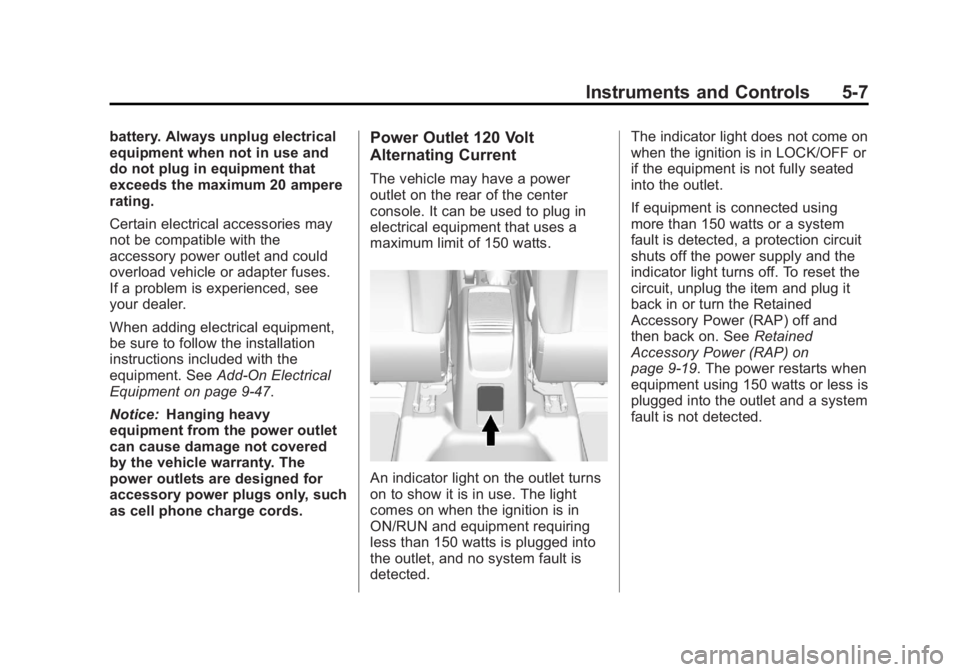
The vehicle may have a power
outlet on the rear of the center
console. It can be used to plug in
electrical equipment that uses a
maximum limit of 150 watts.
An indicator light on the outlet turns
on to show it is in use. The light
comes on when the ignition is in
ON/RUN and equipment requiring
less than 150 watts is plugged into
the outlet, and no system fault is
detected. The indicator light does not come on
when the ignition is in LOCK/OFF or
if the equipment is not fully seated
into the outlet.
If equipment is connected using
more than 150 watts or a system
fault is detected, a protection circuit
shuts off the power supply and the
indicator light turns off. To reset the
circuit, unplug the item and plug it
back in or turn the Retained
Accessory Power (RAP) off and
then back on. See
Retained
Accessory Power (RAP) on
page 9-19. The power restarts when
equipment using 150 watts or less is
plugged into the outlet and a system
fault is not detected.
Page 116 of 368
Black plate (10,1)Buick Encore Owner Manual - 2013 - crc - 1/8/13
5-10 Instruments and Controls
Speedometer
The speedometer shows the vehicle
speed in both kilometers per hour
(km/h) and miles per hour (mph).
Odometer
The odometer shows how far the
vehicle has been driven, in either
kilometers or miles.
Trip Odometer
The trip odometer can show how far
the vehicle has been driven since
the trip odometer was last reset.
The trip odometer is accessed and
reset through the Driver Information
Center (DIC). SeeDriver
Information Center (DIC) on
page 5-22.
Tachometer
The tachometer displays the engine
speed in revolutions per
minute (rpm).
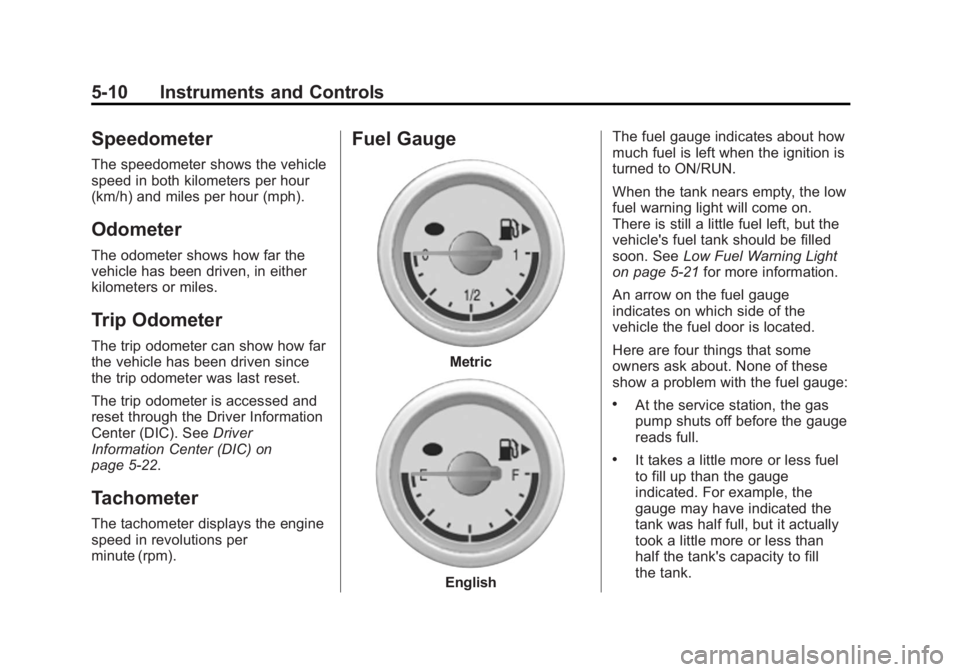
Fuel Gauge
Metric
English The fuel gauge indicates about how
much fuel is left when the ignition is
turned to ON/RUN.
When the tank nears empty, the low
fuel warning light will come on.
There is still a little fuel left, but the
vehicle's fuel tank should be filled
soon. See
Low Fuel Warning Light
on page 5-21 for more information.
An arrow on the fuel gauge
indicates on which side of the
vehicle the fuel door is located.
Here are four things that some
owners ask about. None of these
show a problem with the fuel gauge:
.At the service station, the gas
pump shuts off before the gauge
reads full.
.It takes a little more or less fuel
to fill up than the gauge
indicated. For example, the
gauge may have indicated the
tank was half full, but it actually
took a little more or less than
half the tank's capacity to fill
the tank.