Black plate (2,1)Buick Encore Owner Manual - 2013 - crc - 1/8/13
12-2 Technical Data
Vehicle Data
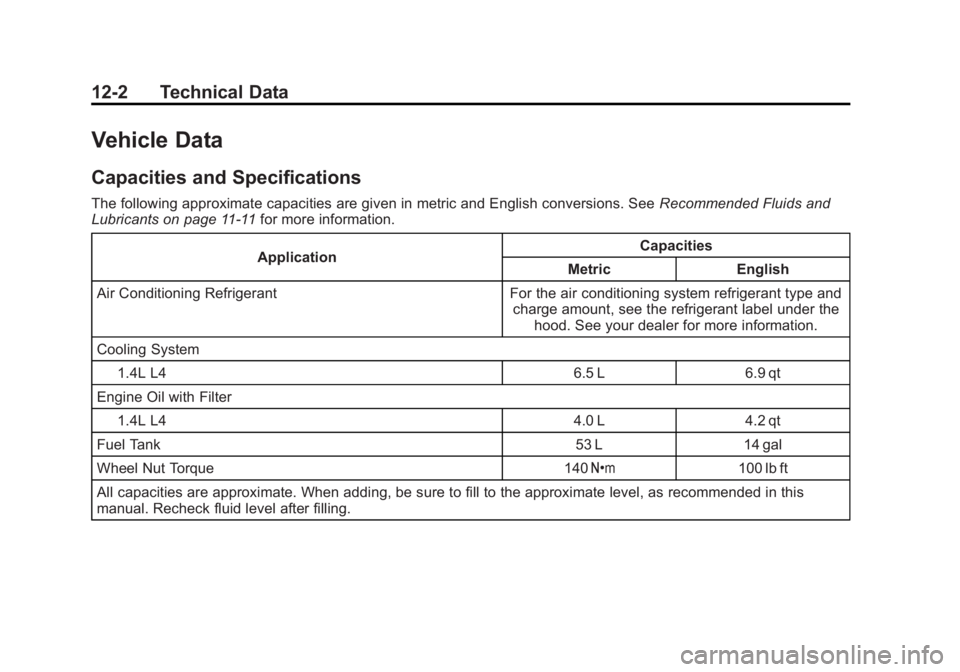
Capacities and Specifications
The following approximate capacities are given in metric and English conversions. SeeRecommended Fluids and
Lubricants on page 11-11 for more information.
Application Capacities
Metric English
Air Conditioning Refrigerant For the air conditioning system refrigerant type and charge amount, see the refrigerant label under thehood. See your dealer for more information.
Cooling System 1.4L L4 6.5 L 6.9 qt
Engine Oil with Filter 1.4L L4 4.0 L 4.2 qt
Fuel Tank 53 L14 gal
Wheel Nut Torque 140Y 100 lb ft
All capacities are approximate. When adding, be sure to fill to the approximate level, as recommended in this
manual. Recheck fluid level after filling.
Black plate (4,1)Buick Encore Owner Manual - 2013 - crc - 1/8/13
14-4 OnStar
2. Say“Call.”System responds:
“Please say the name or number
to call.”
3. Say the entire number without pausing, including a “1”and the
area code. System responds:
“OK calling.”
Calling 911 Emergency
1. Press=. The system responds
“OnStar Ready,” followed by
a tone.
2. Say “Call.”The system responds
“Please say the name or number
to call.”
3. Say “911”without pausing. The
system responds “911.”
4. Say “Call.”The system responds
“OK, dialing 911.”
Retrieve My Number
1. Press=. System responds:
“OnStar ready.”
2. Say “My number.” System
responds: “Your OnStar
Hands-Free Calling number is.”
End a Call
Press=. System responds: “Call
ended.”
Store a Name Tag for Speed
Dialing
1. Press=. System responds:
“OnStar ready.”
2. Say “Store.” System responds:
“Please say the number you
would like to store.”
3. Say the entire number without pausing. System responds:
“Please say the name tag.”
4. Pick a name tag. System responds: “About to store
tag>. Does that sound OK?”
5. Say “Yes”or say “No”to try
again. System responds: “OK,
storing .”
Place a Call Using a Stored
Number
1. Press=. System responds:
“OnStar ready.”
2. Say “Call .” System
responds: “OK, calling
.”
Verify Minutes and Expiration
Press=and say “Minutes” then
“Verify” to check how many minutes
remain and their expiration date.
OnStar Mobile App
Download the OnStar RemoteLink
mobile app to select Apple, Android
and BlackBerry devices to check
vehicle fuel level, oil life, or tire
pressure; to start the vehicle (if
equipped) or unlock it; or to connect
to an OnStar Advisor. For OnStar
RemoteLink information and
compatibility, see www.onstar.com
(U.S.), www.onstar.ca (Canada).