seats BUICK ENCORE 2013 Repair Manual
[x] Cancel search | Manufacturer: BUICK, Model Year: 2013, Model line: ENCORE, Model: BUICK ENCORE 2013Pages: 368, PDF Size: 6.38 MB
Page 98 of 368
Black plate (52,1)Buick Encore Owner Manual - 2013 - crc - 1/8/13
3-52 Seats and Restraints
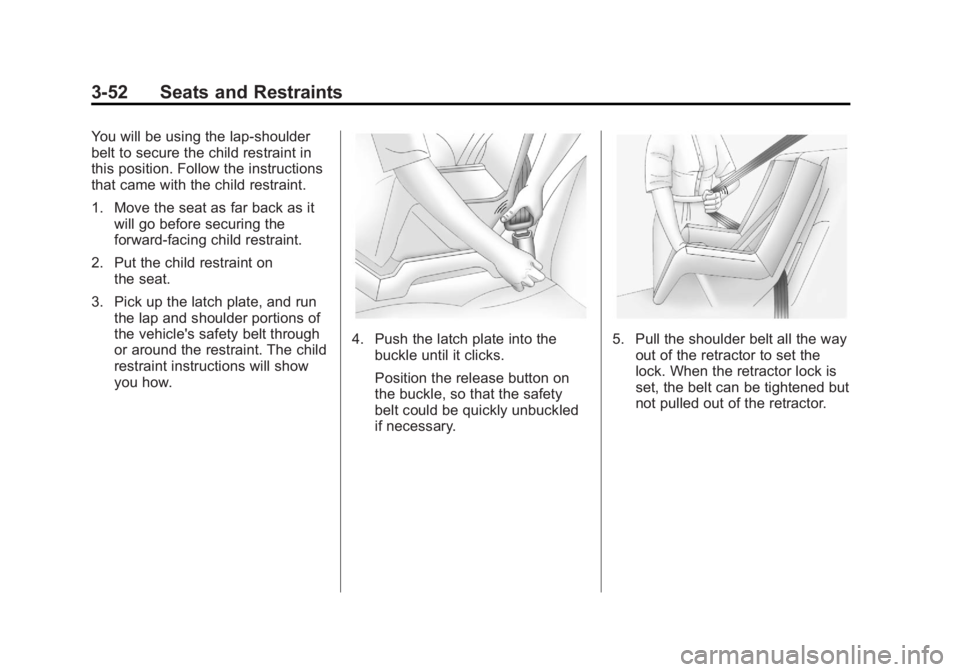
You will be using the lap-shoulder
belt to secure the child restraint in
this position. Follow the instructions
that came with the child restraint.
1. Move the seat as far back as itwill go before securing the
forward-facing child restraint.
2. Put the child restraint on the seat.
3. Pick up the latch plate, and run the lap and shoulder portions of
the vehicle's safety belt through
or around the restraint. The child
restraint instructions will show
you how.
4. Push the latch plate into thebuckle until it clicks.
Position the release button on
the buckle, so that the safety
belt could be quickly unbuckled
if necessary.5. Pull the shoulder belt all the wayout of the retractor to set the
lock. When the retractor lock is
set, the belt can be tightened but
not pulled out of the retractor.
Page 99 of 368
Black plate (53,1)Buick Encore Owner Manual - 2013 - crc - 1/8/13
Seats and Restraints 3-53
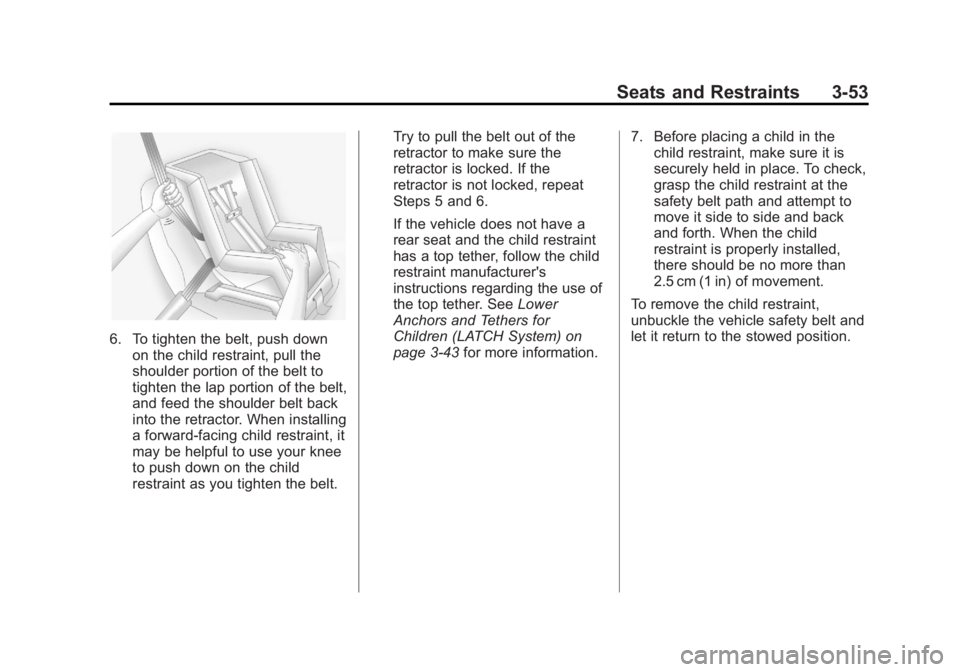
6. To tighten the belt, push downon the child restraint, pull the
shoulder portion of the belt to
tighten the lap portion of the belt,
and feed the shoulder belt back
into the retractor. When installing
a forward-facing child restraint, it
may be helpful to use your knee
to push down on the child
restraint as you tighten the belt. Try to pull the belt out of the
retractor to make sure the
retractor is locked. If the
retractor is not locked, repeat
Steps 5 and 6.
If the vehicle does not have a
rear seat and the child restraint
has a top tether, follow the child
restraint manufacturer's
instructions regarding the use of
the top tether. See
Lower
Anchors and Tethers for
Children (LATCH System) on
page 3-43 for more information. 7. Before placing a child in the
child restraint, make sure it is
securely held in place. To check,
grasp the child restraint at the
safety belt path and attempt to
move it side to side and back
and forth. When the child
restraint is properly installed,
there should be no more than
2.5 cm (1 in) of movement.
To remove the child restraint,
unbuckle the vehicle safety belt and
let it return to the stowed position.
Page 100 of 368

Black plate (54,1)Buick Encore Owner Manual - 2013 - crc - 1/8/13
3-54 Seats and Restraints
2NOTES
Page 139 of 368

Black plate (33,1)Buick Encore Owner Manual - 2013 - crc - 1/8/13
Instruments and Controls 5-33
Device List
Allows the management of a
Bluetooth device.
Select Connect, Separate,
or Delete.
Pair Device
Allows the pairing of a new
Bluetooth device. See“Bluetooth”in
the infotainment manual.
Change Bluetooth Code
Manually change or set the code.
Return to Factory Settings
Select Return to Factory Settings to
return Bluetooth to the default
settings.
Select Yes or No.
Display Settings
Select Display Settings and the
following may be displayed:
.Home Page Menu
.Display Off
Home Page Menu
Select Home Page Menu and the
following may be displayed:
.Customize
.Sort
.Restore Home Page Defaults
Customize
Select what icons will be available
on the Home Page.
Turn TUNE/MENU knob or outer
ring to select an icon, then press the
knob or outer ring.
Sort
This allows the first Home Page to
be customized. See “Home Page”
under “Using the System” in the
infotainment manual.
Restore Home Page Defaults
Select Restore Home Page Defaults
to return the Home Page to the
default settings.
Select Yes or No.
Vehicle Settings
The following list of menu items may
be available:
.Climate and Air Quality
.Comfort and Convenience
.Lighting
.Power Door Locks
.Remote Lock/Unlock/Start
.Return to Factory Settings?
Climate and Air Quality
If equipped, select the Climate and
Air Quality menu and the following
may be displayed:
.Auto Fan Speed
.Air Conditioning Mode
.Remote Start Auto Heat Seats
.Auto Defog
.Auto Rear Defog
Page 140 of 368

Black plate (34,1)Buick Encore Owner Manual - 2013 - crc - 1/8/13
5-34 Instruments and Controls
Auto Fan Speed
This allows the selection of the
automatic fan speed. This feature
sets the climate control fan speed to
maintain the interior temperature.
Select High, Medium, or Low.
Air Conditioning Mode
When on, the Air Conditioning will
come on when the vehicle is
started.
Select On, Off, or Last Setting.
Remote Start Auto Heat Seats
On vehicles with remote start and
heated seats, the heated seats can
be set to on or off.
Select On or Off.
Auto Defog
When selected and high humidity is
detected, the climate control system
may adjust to outside air supply and
turn on the air conditioner or the
heater. The fan speed may slightly
increase to help prevent fogging.When high humidity is no longer
detected, the system will return to
its prior operation.
Select or Deselect.
Auto Rear Defog
When selected, this feature turns on
the rear defogger at vehicle start
when the interior temperature is cold
and fog is likely. The auto rear defog
function can be disabled by
pressing
1. When off, the feature
can be turned on by pressing
1.
See “Rear Window Defogger” under
Climate Control Systems on
page 8-1.
Select or Deselect.
Comfort and Convenience
If equipped, select the Comfort and
Convenience menu and the
following may be displayed:
.Easy Exit Driver Seat
.Auto Memory Recall
.Chime Volume
.Button Volume
.Reverse Tilt Mirror
.Auto Reverse Gear Wiper
Easy Exit Driver Seat
This feature moves the seat
rearward allowing the driver more
room to exit the vehicle.
Select On or Off.
Auto Memory Recall
If equipped, this feature recalls the
driver seat and outside mirrors to
previously stored Remote Keyless
Entry (RKE) transmitter memory
positions when entering the vehicle.
See Memory Seats on page 3-6.
Select On or Off.
Chime Volume
This allows the selection of the
chime volume level.
Select Normal or High.
Page 147 of 368

Black plate (5,1)Buick Encore Owner Manual - 2013 - crc - 1/8/13
Lighting 6-5
Interior Lighting
Instrument Panel
Illumination Control
This feature controls the brightness
of the instrument panel controls and
infotainment display screen. The
thumbwheel is to the left of the
steering column on the instrument
panel.
D(Instrument Panel
Brightness): Move the
thumbwheel up or down and hold, to
brighten or dim the instrument panel
controls and infotainment display
screen.
Courtesy Lamps
The courtesy lamps come on
automatically when any door is
opened and the dome lamp is in the
door position.
Dome Lamps
The dome lamp controls are in the
headliner above the rear seats.
9(Dome Lamp Override): Press
to turn the lamps off, even when a
door is open.
H(Door): When the button is
returned to the middle position, the
lamps turn on automatically when a
door is opened.
R(On): Press to turn on the dome
lamps.
Reading Lamps
For vehicles with front reading
lamps, they are in the overhead
console.
#or$(Reading Lamps): Press
to turn each lamp on or off.
Page 181 of 368

Black plate (3,1)Buick Encore Owner Manual - 2013 - crc - 1/8/13
Climate Controls 8-3
Dual Automatic Climate Control System
The heating, cooling, and ventilation for the vehicle can be controlled with
this system.
English Shown, Metric Similar
1. Driver and Passenger Heated Seats (If Equipped)
2. Driver and Passenger Temperature Controls
3. Air Delivery Modes
4. Heated Steering Wheel (If Equipped)
5. Recirculation 6. Air Conditioning
7. Fan Controls
8. Rear Window Defogger
9. Defrost
10. AUTO (Automatic Operation)Automatic Operation
The system automatically controls
the fan speed, air delivery, air
conditioning, and recirculation in
order to heat or cool the vehicle to
the desired temperature.
When the AUTO indicator light is
on, the system is in full automatic
operation. If the air delivery mode or
fan setting is manually adjusted, the
auto indicator turns off and displays
will show the selected settings.
To place the system in automatic
mode do the following:
1. Press AUTO.
2. Set the temperature. Allow the
system time to stabilize. Then
adjust the temperature as
needed for best comfort.
To improve fuel efficiency and to
cool the vehicle faster,
recirculation may be
automatically selected in warm
weather. The recirculation light
Page 183 of 368
Black plate (5,1)Buick Encore Owner Manual - 2013 - crc - 1/8/13
Climate Controls 8-5
Rear Window Defogger
=(Rear Window Defogger):
Press to turn the rear window
defogger on or off.
The rear window defogger turns off
automatically after about
10 minutes. If turned on again it
runs for about five minutes before
turning off.
The rear window defogger can be
set to automatic operation; see
“Climate and Air Quality” under
Vehicle Personalization on
page 5-31. When auto rear defog is
selected, the rear window defogger
turns on automatically when the
interior temperature is cold and the
outside temperature is about 4°C
(40°F) and below. The auto rear
defogger turns off automatically
after about 10 minutes. At higher
speeds, the rear window defogger
may stay on continuously.
For vehicles with heated outside
rearview mirrors, they turn on when
the rear window defogger button is on and help to clear fog or frost from
the surface of the mirrors. See
Heated Mirrors on page 2-12.
Notice:
Do not try to clear frost
or other material from the inside
of the front windshield and rear
window with a razor blade or
anything else that is sharp. This
may damage the rear window
defogger grid and affect the
radio's ability to pick up stations
clearly. The repairs would not be
covered by the vehicle warranty.
MorL(Heated Seats, If
Equipped): Press to turn the
heated seats on or off. See Heated
Front Seats on page 3-8.
((Heated Steering Wheel, If
Equipped): Press to turn the
heated steering wheel on or off. See
Heated Steering Wheel on
page 5-3.
Remote Start Climate Control
Operation: For vehicles with the
remote vehicle start feature, the
climate control system may run
when the vehicle is started remotely. The system uses the driver
’s
previous settings to heat or cool the
inside of the vehicle. The rear defog
may come on during remote start
based on cold ambient conditions.
The rear defog indicator light does
not come on during a remote start.
If the vehicle has front heated seats,
they may come on during a remote
start. The heated seat indicator
lights do not come on during a
remote start. See Remote Vehicle
Start on page 2-5 andHeated Front
Seats on page 3-8.
Sensors
The solar sensor, located on top of
the instrument panel near the
windshield, monitors the solar heat.
The climate control system uses the
sensor information to adjust the
temperature, fan speed,
recirculation, and air delivery mode
for best comfort.
If the sensor is covered, the
automatic climate control system
may not work properly.
Page 184 of 368
Black plate (6,1)Buick Encore Owner Manual - 2013 - crc - 1/8/13
8-6 Climate Controls
Air Vents
Use the louvers located on the air
vents to change the direction of the
airflow.
Use the thumbwheels near the air
vents to control the amount of
airflow or to shut off the airflow.
Operation Tips
.Keep all outlets open whenever
possible for best system
performance.
.Keep the paths under all seats
clear of objects to help circulate
the air inside the vehicle more
effectively.
.Use of non-GM approved hood
deflectors can adversely affect
the performance of the system.
Maintenance
Air Intake
Clear away any ice, snow, or leaves
from the air intake at the base of the
windshield that can block the flow of
air into the vehicle.
Passenger Compartment
Air Filter
The filter removes dust, pollen, and
other airborne irritants from outside
air that is pulled into the vehicle.
The filter should be replaced as part
of routine scheduled maintenance.
SeeMaintenance Schedule on
page 11-3. To find out what type of
filter to use, see Maintenance
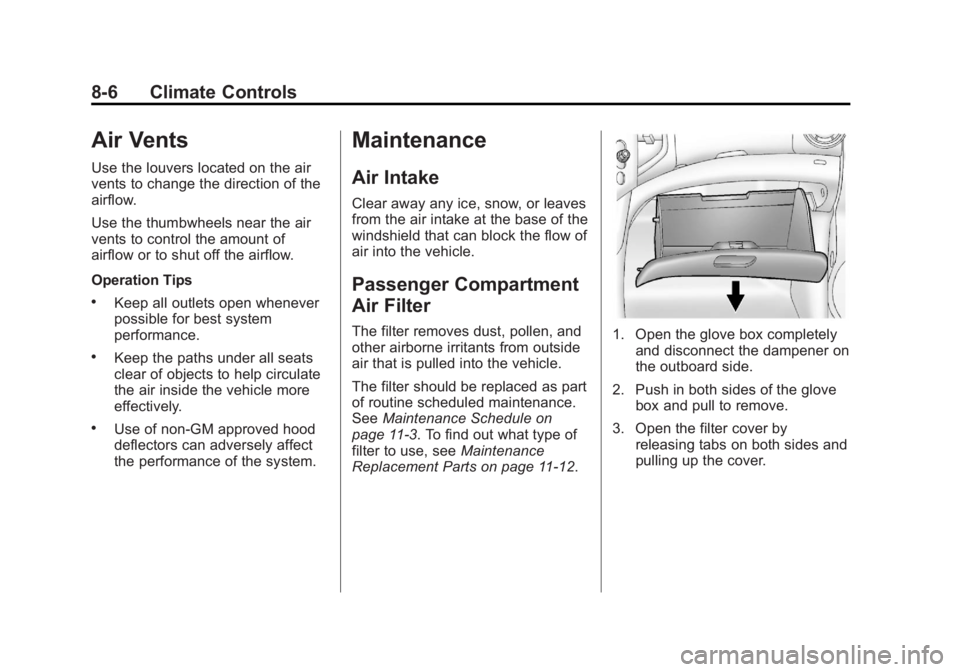
Replacement Parts on page 11-12.1. Open the glove box completely and disconnect the dampener on
the outboard side.
2. Push in both sides of the glove box and pull to remove.
3. Open the filter cover by releasing tabs on both sides and
pulling up the cover.
Page 200 of 368
Black plate (14,1)Buick Encore Owner Manual - 2013 - crc - 1/8/13
9-14 Driving and Operating
The GVWR includes the weight
of the vehicle, all occupants,
fuel, and cargo. Never exceed
the GVWR for the vehicle, or the
Gross Axle Weight Rating
(GAWR) for either the front or
rear axle.
And, if there is a heavy load, it
should be spread out. See
“Steps for Determining Correct
Load Limit”earlier in this
section.
{WARNING
Do not load the vehicle any
heavier than the Gross
Vehicle Weight Rating
(GVWR), or either the
maximum front or rear Gross
Axle Weight Rating (GAWR).
This can cause systems to
break and change the way the
vehicle handles. This could
(Continued)
WARNING (Continued)
cause loss of control and a
crash. Overloading can also
shorten the life of the vehicle.
If you put things inside the
vehicle —like suitcases, tools,
packages, or anything
else —they will go as fast as the
vehicle goes. If you have to stop
or turn quickly, or if there is a
crash, they will keep going.
{WARNING
Things inside the vehicle can
strike and injure people in a
sudden stop or turn, or in a
crash.
.Put things in the cargo
area of the vehicle. In the
cargo area, put them as
(Continued)
WARNING (Continued)
far forward as possible.
Try to spread the weight
evenly.
.Never stack heavier
things, like suitcases,
inside the vehicle so that
some of them are above
the tops of the seats.
.Do not leave an
unsecured child restraint
in the vehicle.
.Secure loose items in the
vehicle.
.Do not leave a seat folded
down unless needed.