change wheel BUICK ENCORE 2013 Owner's Manual
[x] Cancel search | Manufacturer: BUICK, Model Year: 2013, Model line: ENCORE, Model: BUICK ENCORE 2013Pages: 368, PDF Size: 6.38 MB
Page 5 of 368
Black plate (5,1)Buick Encore Owner Manual - 2013 - crc - 1/8/13
Introduction v
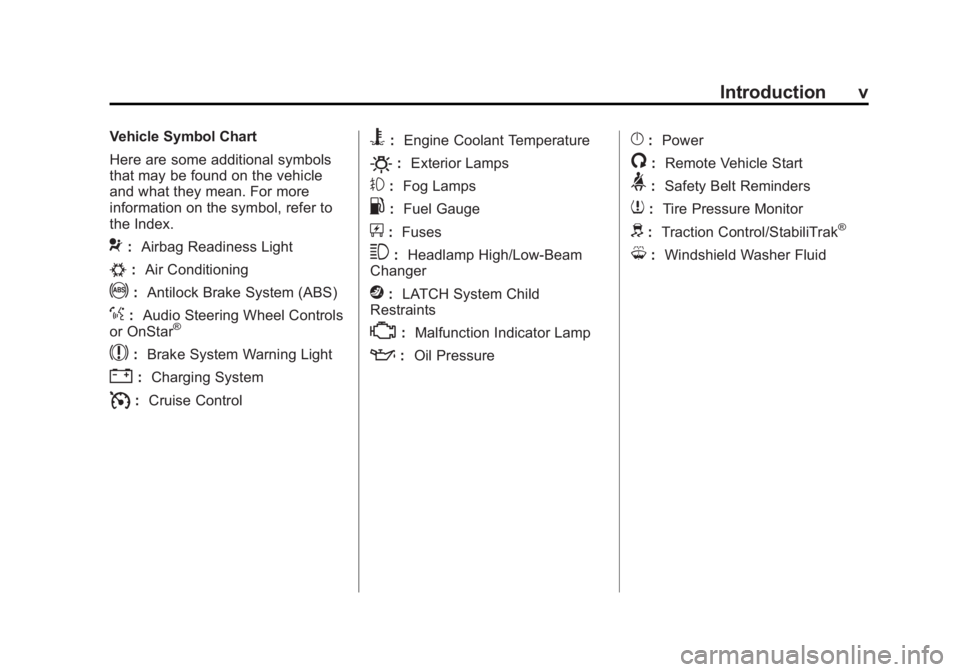
Vehicle Symbol Chart
Here are some additional symbols
that may be found on the vehicle
and what they mean. For more
information on the symbol, refer to
the Index.
9:Airbag Readiness Light
#:Air Conditioning
!:Antilock Brake System (ABS)
%:Audio Steering Wheel Controls
or OnStar®
$: Brake System Warning Light
":Charging System
I:Cruise Control
B: Engine Coolant Temperature
O:Exterior Lamps
#:Fog Lamps
.: Fuel Gauge
+:Fuses
3: Headlamp High/Low-Beam
Changer
j: LATCH System Child
Restraints
*: Malfunction Indicator Lamp
::Oil Pressure
}:Power
/:Remote Vehicle Start
>:Safety Belt Reminders
7:Tire Pressure Monitor
d:Traction Control/StabiliTrak®
M:Windshield Washer Fluid
Page 9 of 368
Black plate (3,1)Buick Encore Owner Manual - 2013 - crc - 1/8/13
In Brief 1-3
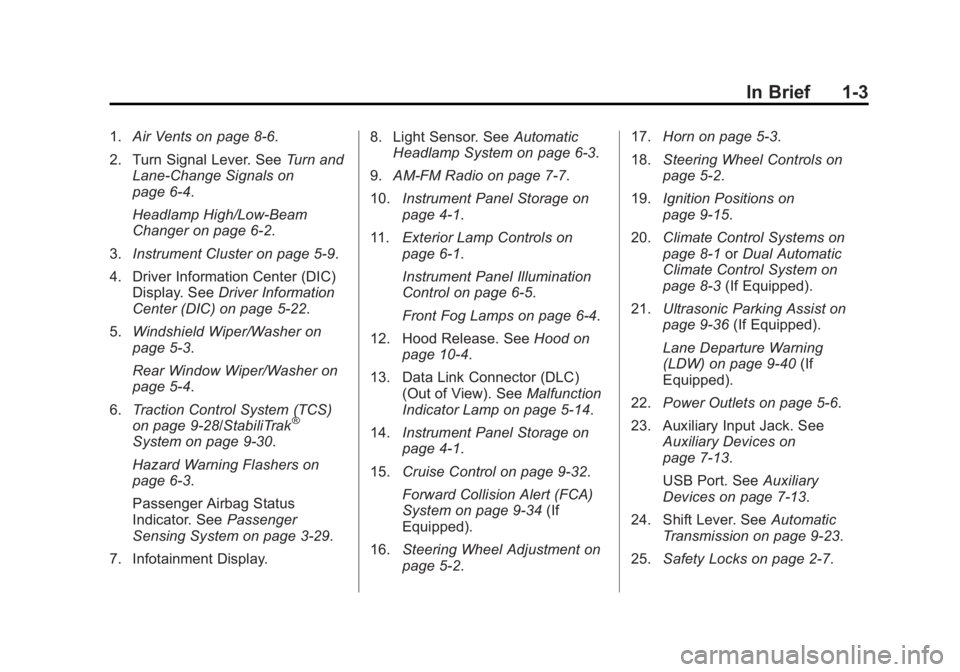
1.Air Vents on page 8-6.
2. Turn Signal Lever. See Turn and
Lane-Change Signals on
page 6-4.
Headlamp High/Low-Beam
Changer on page 6-2.
3. Instrument Cluster on page 5-9.
4. Driver Information Center (DIC) Display. See Driver Information
Center (DIC) on page 5-22.
5. Windshield Wiper/Washer on
page 5-3.
Rear Window Wiper/Washer on
page 5-4.
6. Traction Control System (TCS)
on page 9-28/StabiliTrak
®
System on page 9-30.
Hazard Warning Flashers on
page 6-3.
Passenger Airbag Status
Indicator. See Passenger
Sensing System on page 3-29.
7. Infotainment Display. 8. Light Sensor. See
Automatic
Headlamp System on page 6-3.
9. AM-FM Radio on page 7-7.
10. Instrument Panel Storage on
page 4-1.
11. Exterior Lamp Controls on
page 6-1.
Instrument Panel Illumination
Control on page 6-5.
Front Fog Lamps on page 6-4.
12. Hood Release. See Hood on
page 10-4.
13. Data Link Connector (DLC) (Out of View). See Malfunction
Indicator Lamp on page 5-14.
14. Instrument Panel Storage on
page 4-1.
15. Cruise Control on page 9-32.
Forward Collision Alert (FCA)
System on page 9-34 (If
Equipped).
16. Steering Wheel Adjustment on
page 5-2. 17.
Horn on page 5-3.
18. Steering Wheel Controls on
page 5-2.
19. Ignition Positions on
page 9-15.
20. Climate Control Systems on
page 8-1 orDual Automatic
Climate Control System on
page 8-3 (If Equipped).
21. Ultrasonic Parking Assist on
page 9-36 (If Equipped).
Lane Departure Warning
(LDW) on page 9-40 (If
Equipped).
22. Power Outlets on page 5-6.
23. Auxiliary Input Jack. See Auxiliary Devices on
page 7-13.
USB Port. See Auxiliary
Devices on page 7-13.
24. Shift Lever. See Automatic
Transmission on page 9-23.
25. Safety Locks on page 2-7.
Page 22 of 368
Black plate (16,1)Buick Encore Owner Manual - 2013 - crc - 1/8/13
1-16 In Brief
4. Press the center of the TUNE/MENU knob to select the next
number.
5. To save and return to the Time and Date Settings menu, press
/BACK at any time or press the
TUNE/MENU knob after
adjusting the value.
6. Repeat steps 2–5 for the remaining features.
Setting the 12/24 Hour Format
1. Press the CONFIG button and select Time and Date Settings or
press
H.
2. Select Set Time Format.
3. Turn the TUNE/MENU knob to highlight the 12 hour or 24 hour
display format.
4. Press the TUNE/MENU knob to select display format.
Portable Audio Devices
Some vehicles have a 3.5 mm
(1/8 in) auxiliary input and a USB
port located in the center console.
External devices such as iPods
®,
laptop computers, MP3 players, CD
changers, and USB drives may be
connected, depending on the audio
system.
See Auxiliary Devices on page 7-13.
Bluetooth®
The Bluetooth®system allows users
with a Bluetooth-enabled mobile
phone to make and receive
hands-free calls using the vehicle
audio system and controls.
The Bluetooth-enabled mobile
phone must be paired with the
in-vehicle Bluetooth system before it
can be used in the vehicle. Not all
phones will support all functions.
See Bluetooth on page 7-16.
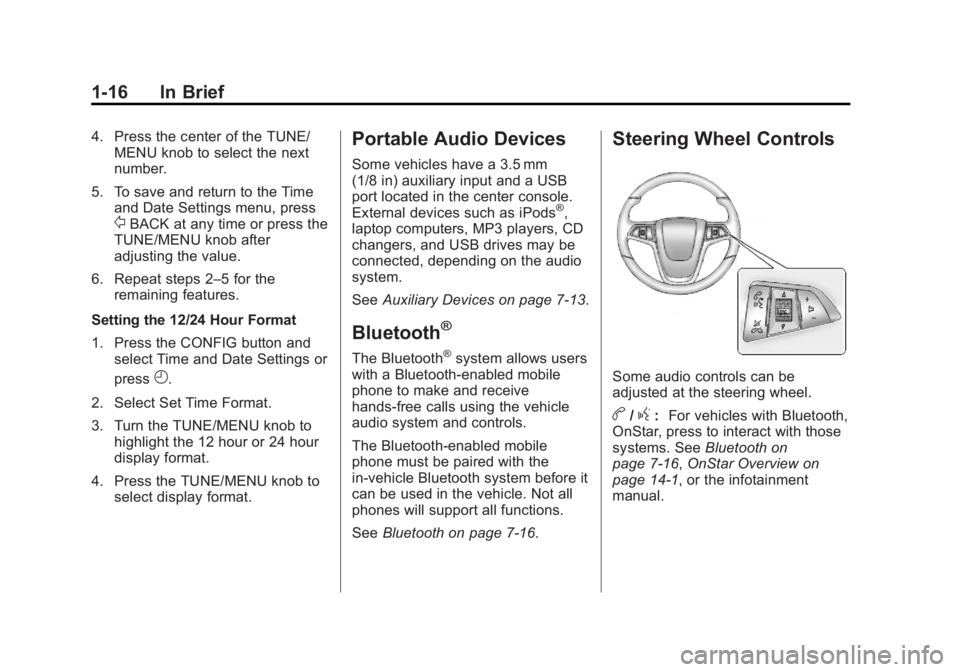
Steering Wheel Controls
Some audio controls can be
adjusted at the steering wheel.
b/g:For vehicles with Bluetooth,
OnStar, press to interact with those
systems. See Bluetooth on
page 7-16, OnStar Overview on
page 14-1, or the infotainment
manual.
Page 23 of 368

Black plate (17,1)Buick Encore Owner Manual - 2013 - crc - 1/8/13
In Brief 1-17
$/i:Press to silence the
vehicle speakers only. Press again
to turn the sound on. For vehicles
with OnStar or Bluetooth systems,
press to reject an incoming call,
or to end a current call.
_SRC^: Press the thumbwheel
inward to change the audio source.
Move the thumbwheel up or down to
select the next or previous favorite
radio station, CD, or MP3 track.
+
x−: Press + to increase or −to
decrease the volume.
For more information, see Steering
Wheel Controls on page 5-2.
Infotainment System
See the infotainment manual for
information on the radio, audio
players, phone, navigation system,
and voice or speech recognition.
There is also information on settings
and downloadable applications (if
equipped).
Driver Information
Center (DIC)
The DIC display is in the instrument
cluster. It shows the status of many
vehicle systems. The controls for
the DIC are on the turn signal lever.
1. SET/CLR: Press to set or clear
the menu item displayed.
2.
w x: Turn the band to scroll
through the menu items.
3. MENU: Press to display the DIC
menus. This button is also used
to return to or exit the last
screen displayed on the DIC.
See Driver Information Center (DIC)
on page 5-22.
Rear Vision
Camera (RVC)
If available, the RVC displays a view
of the area behind the vehicle when
the vehicle is shifted into
R (Reverse). The display will appear
on the radio screen.
To clean the camera lens above the
license plate, rinse it with water and
wipe it with a soft cloth.
See Rear Vision Camera (RVC) on
page 9-38.
Ultrasonic Parking Assist
If available, Ultrasonic Front and
Rear Parking Assist (UFRPA) uses
sensors on the front and rear
bumpers to detect objects while
parking the vehicle. It operates at
speeds less than 8 km/h (5 mph).
UFRPA uses audio beeps to provide
distance and system information.
Page 80 of 368

Black plate (34,1)Buick Encore Owner Manual - 2013 - crc - 1/8/13
3-34 Seats and Restraints
{WARNING
For up to 10 seconds after the
vehicle is turned off and the
battery is disconnected, an airbag
can still inflate during improper
service. You can be injured if you
are close to an airbag when it
inflates. Avoid yellow connectors.
They are probably part of the
airbag system. Be sure to follow
proper service procedures, and
make sure the person performing
work for you is qualified to do so.
Adding Equipment to the
Airbag-Equipped Vehicle
Adding accessories that change the
vehicle's frame, bumper system,
height, front end or side sheet
metal, may keep the airbag system
from working properly. The
operation of the airbag system canalso be affected by changing or
moving any parts of the front seats,
safety belts, the airbag sensing and
diagnostic module, steering wheel,
instrument panel, roof-rail airbag
modules, ceiling headliner or pillar
garnish trim, overhead console,
front sensors, side impact sensors,
or airbag wiring.
Your dealer and the service manual
have information about the location
of the airbag sensors, sensing and
diagnostic module, and airbag
wiring.
If the vehicle has rollover roof‐rail
airbags, see
Different Size Tires
and Wheels on page 10-52 for
important information.
If you have to modify your vehicle
because you have a disability and
have questions about whether the
modifications will affect the vehicle's
airbag system, or if you have
questions about whether the airbag
system will be affected if the vehicle is modified for any other reason, call
Customer Assistance. See
Customer Assistance Offices (U.S.
and Canada) on page 13-5
or
Customer Assistance Offices
(Mexico) on page 13-5.
Airbag System Check
The airbag system does not need
regularly scheduled maintenance or
replacement. Make sure the airbag
readiness light is working. See
Airbag Readiness Light on
page 5-12.
Notice: If an airbag covering is
damaged, opened, or broken, the
airbag may not work properly. Do
not open or break the airbag
coverings. If there are any
opened or broken airbag covers,
have the airbag covering and/or
airbag module replaced. For the
location of the airbags, see
Where Are the Airbags? on
page 3-25. See your dealer for
service.
Page 109 of 368
Black plate (3,1)Buick Encore Owner Manual - 2013 - crc - 1/8/13
Instruments and Controls 5-3
$/i(Mute/End Call):Press to
silence the vehicle speakers only.
Press again to turn the sound on.
For vehicles with OnStar or
Bluetooth systems, press to reject
an incoming call, or end a
current call.
_SRC^(Source): Press the
thumbwheel inward to change the
audio source.
Move the thumbwheel up or down to
select the next or previous favorite
radio station, CD, or MP3 track.
+
x− (Volume): Press + to
increase or −to decrease the
volume.
Heated Steering Wheel
((Heated Steering Wheel): For
vehicles with a heated steering
wheel, press to turn it on or off.
A light on the button displays when
the feature is turned on.
The steering wheel takes about
three minutes to start heating.
Horn
Pressaon the steering wheel pad
to sound the horn.
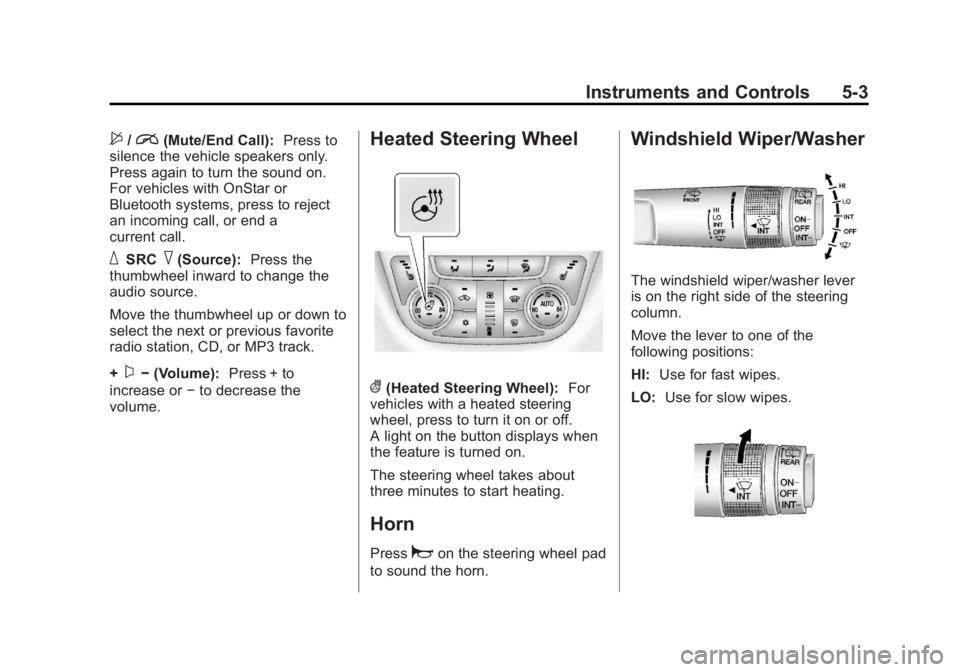
Windshield Wiper/Washer
The windshield wiper/washer lever
is on the right side of the steering
column.
Move the lever to one of the
following positions:
HI: Use for fast wipes.
LO: Use for slow wipes.
Page 184 of 368
Black plate (6,1)Buick Encore Owner Manual - 2013 - crc - 1/8/13
8-6 Climate Controls
Air Vents
Use the louvers located on the air
vents to change the direction of the
airflow.
Use the thumbwheels near the air
vents to control the amount of
airflow or to shut off the airflow.
Operation Tips
.Keep all outlets open whenever
possible for best system
performance.
.Keep the paths under all seats
clear of objects to help circulate
the air inside the vehicle more
effectively.
.Use of non-GM approved hood
deflectors can adversely affect
the performance of the system.
Maintenance
Air Intake
Clear away any ice, snow, or leaves
from the air intake at the base of the
windshield that can block the flow of
air into the vehicle.
Passenger Compartment
Air Filter
The filter removes dust, pollen, and
other airborne irritants from outside
air that is pulled into the vehicle.
The filter should be replaced as part
of routine scheduled maintenance.
SeeMaintenance Schedule on
page 11-3. To find out what type of
filter to use, see Maintenance
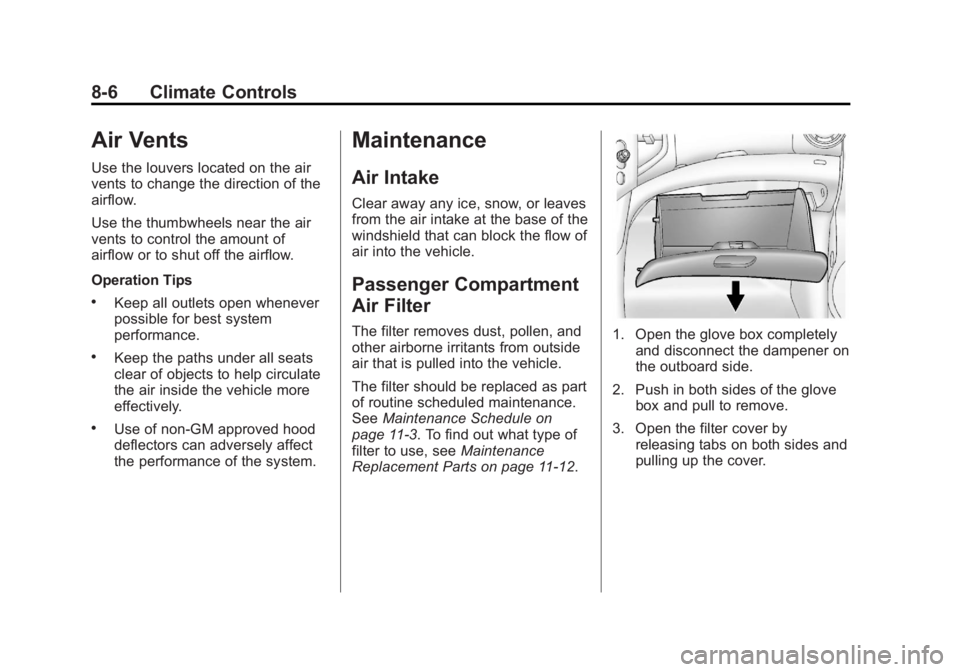
Replacement Parts on page 11-12.1. Open the glove box completely and disconnect the dampener on
the outboard side.
2. Push in both sides of the glove box and pull to remove.
3. Open the filter cover by releasing tabs on both sides and
pulling up the cover.
Page 192 of 368
Black plate (6,1)Buick Encore Owner Manual - 2013 - crc - 1/8/13
9-6 Driving and Operating
3. Turn the steering wheel to gostraight down the roadway.
Loss of Control
Skidding
There are three types of skids that
correspond to the vehicle's three
control systems:
.Braking Skid —wheels are not
rolling.
.Steering or Cornering Skid —
too much speed or steering in a
curve causes tires to slip and
lose cornering force.
.Acceleration Skid —too much
throttle causes the driving
wheels to spin.
Defensive drivers avoid most skids
by taking reasonable care suited to
existing conditions, and by not
overdriving those conditions. But
skids are always possible. If the vehicle starts to slide, follow
these suggestions:
.Ease your foot off the
accelerator pedal and steer the
way you want the vehicle to go.
The vehicle may straighten out.
Be ready for a second skid if it
occurs.
.Slow down and adjust your
driving according to weather
conditions. Stopping distance
can be longer and vehicle
control can be affected when
traction is reduced by water,
snow, ice, gravel, or other
material on the road. Learn to
recognize warning clues
—such
as enough water, ice, or packed
snow on the road to make a
mirrored surface —and slow
down when you have any doubt.
.Try to avoid sudden steering,
acceleration, or braking,
including reducing vehicle speed
by shifting to a lower gear. Any
sudden changes could cause
the tires to slide. Remember: Antilock brakes help
avoid only the braking skid.
Driving on Wet Roads
Rain and wet roads can reduce
vehicle traction and affect your
ability to stop and accelerate.
Always drive slower in these types
of driving conditions and avoid
driving through large puddles and
deep‐standing or flowing water.
{WARNING
Wet brakes can cause crashes.
They might not work as well in a
quick stop and could cause
pulling to one side. You could
lose control of the vehicle.
After driving through a large
puddle of water or a car/vehicle
wash, lightly apply the brake
pedal until the brakes work
normally.
(Continued)
Page 212 of 368

Black plate (26,1)Buick Encore Owner Manual - 2013 - crc - 1/8/13
9-26 Driving and Operating
Drive Systems
All-Wheel Drive
If equipped, this feature transfers
engine power, as required, to all
four wheels. It is fully automatic, and
adjusts itself as needed for road
conditions.
When using a compact spare tire on
an All-Wheel Drive (AWD) vehicle,
the system automatically detects the
compact spare and disables AWD to
protect the system. A Driver
Information Center (DIC) message
will display on the instrument
cluster. SeeVehicle Messages on
page 5-25. To restore AWD
operation and prevent excessive
wear on the system, replace the
compact spare with a full-size tire as
soon as possible. See Compact
Spare Tire on page 10-61.
AWD will be disabled and the
message will display if there is
excessive wheel spin. When the
system cools down, AWD will be
restored.
Brakes
Antilock Brake
System (ABS)
This vehicle has ABS, an advanced
electronic braking system that helps
prevent a braking skid.
When the vehicle begins to drive
away, ABS checks itself.
A momentary motor or clicking noise
might be heard while this test is
going on, and it might even be
noticed that the brake pedal moves
a little. This is normal.
If there is a problem with ABS, this
warning light stays on. See Antilock
Brake System (ABS) Warning Light
on page 5-17. If driving safely on a wet road and it
becomes necessary to slam on the
brakes and continue braking to
avoid a sudden obstacle, a
computer senses that the wheels
are slowing down. If one of the
wheels is about to stop rolling, the
computer will separately work the
brakes at each wheel.
ABS can change the brake pressure
to each wheel, as required, faster
than any driver could. This can help
you steer around the obstacle while
braking hard.
As the brakes are applied, the
computer keeps receiving updates
on wheel speed and controls
braking pressure accordingly.
Page 218 of 368
Black plate (32,1)Buick Encore Owner Manual - 2013 - crc - 1/8/13
9-32 Driving and Operating
Cruise Control
The cruise control lets the vehicle
maintain a speed of about 40 km/h
(25 mph) or more without keeping
your foot on the accelerator. Cruise
control does not work at speeds
below 40 km/h (25 mph).
The vehicle has a Traction Control
System (TCS) or StabiliTrak system
that begins to limit wheel spin while
using cruise control and the cruise
control will automatically disengage.
SeeTraction Control System (TCS)
on page 9-28 orStabiliTrak
®System
on page 9-30. When road conditions
allow you to safely use it again, the
cruise control can be turned
back on.
{WARNING
Cruise control can be dangerous
where you cannot drive safely at
a steady speed. So, do not use
the cruise control on winding
roads or in heavy traffic.
Cruise control can be dangerous
on slippery roads. On such roads,
fast changes in tire traction can
cause excessive wheel slip, and
you could lose control. Do not use
cruise control on slippery roads.
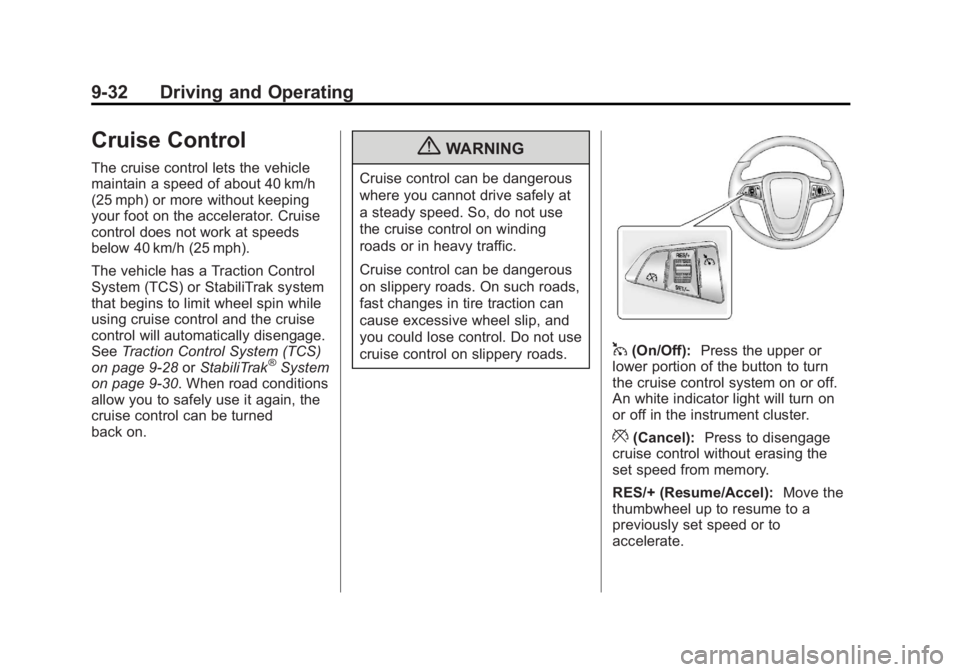
1(On/Off): Press the upper or
lower portion of the button to turn
the cruise control system on or off.
An white indicator light will turn on
or off in the instrument cluster.
*(Cancel): Press to disengage
cruise control without erasing the
set speed from memory.
RES/+ (Resume/Accel): Move the
thumbwheel up to resume to a
previously set speed or to
accelerate.