Power lock BUICK ENCORE 2015 User Guide
[x] Cancel search | Manufacturer: BUICK, Model Year: 2015, Model line: ENCORE, Model: BUICK ENCORE 2015Pages: 341, PDF Size: 4.37 MB
Page 44 of 341
Black plate (17,1)Buick Encore Owner Manual (GMNA-Localizing-U.S./Canada/Mexico-
7707490) - 2015 - crc - 2/4/15
Keys, Doors, and Windows 2-17
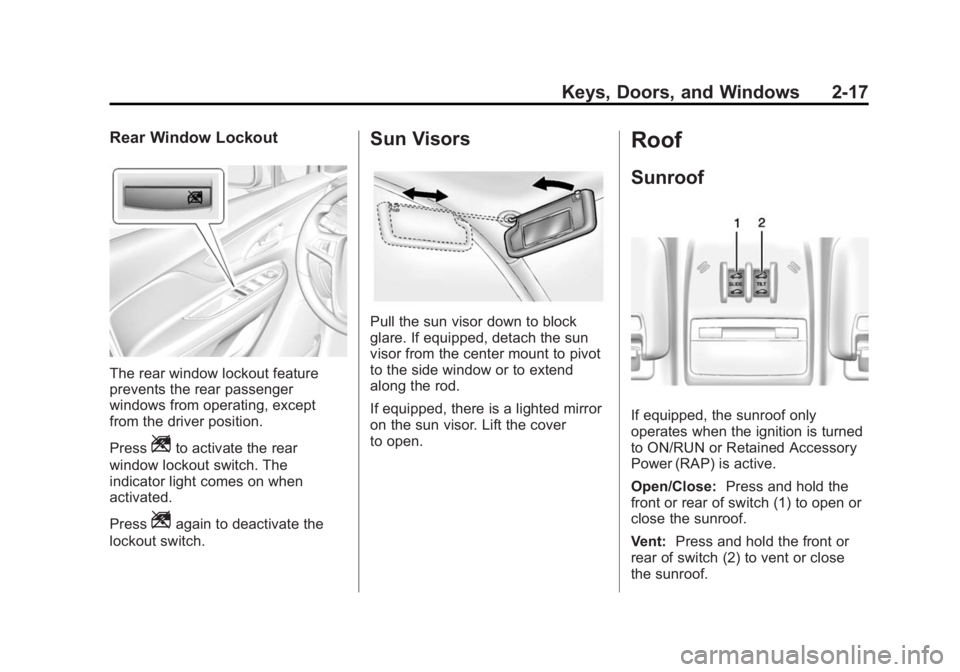
Rear Window Lockout
The rear window lockout feature
prevents the rear passenger
windows from operating, except
from the driver position.
Press
Zto activate the rear
window lockout switch. The
indicator light comes on when
activated.
Press
Zagain to deactivate the
lockout switch.
Sun Visors
Pull the sun visor down to block
glare. If equipped, detach the sun
visor from the center mount to pivot
to the side window or to extend
along the rod.
If equipped, there is a lighted mirror
on the sun visor. Lift the cover
to open.
Roof
Sunroof
If equipped, the sunroof only
operates when the ignition is turned
to ON/RUN or Retained Accessory
Power (RAP) is active.
Open/Close: Press and hold the
front or rear of switch (1) to open or
close the sunroof.
Vent: Press and hold the front or
rear of switch (2) to vent or close
the sunroof.
Page 49 of 341

Black plate (4,1)Buick Encore Owner Manual (GMNA-Localizing-U.S./Canada/Mexico-
7707490) - 2015 - crc - 2/4/15
3-4 Seats and Restraints
To adjust a manual seat:
1. Pull the handle at the front ofthe seat.
2. Slide the seat to the desired position and release the handle.
3. Try to move the seat back and forth to be sure it is locked in
place.
Power Seat Adjustment
To adjust a power seat:
.Move the seat forward or
rearward by sliding the control
forward or rearward.
.Raise or lower the front part of
the seat cushion by moving the
front of the control up or down.
.Raise or lower the entire seat by
moving the rear of the control up
or down.
To adjust the seatback, see
Reclining Seatbacks on page 3-5.
To adjust the lumbar support, see
Lumbar Adjustment on page 3-4.
Lumbar Adjustment
If available, press the front or rear of
the switch to increase or decrease
lumbar support. Release the switch
when the desired level of support is
reached.
Page 50 of 341
Black plate (5,1)Buick Encore Owner Manual (GMNA-Localizing-U.S./Canada/Mexico-
7707490) - 2015 - crc - 2/4/15
Seats and Restraints 3-5
Reclining Seatbacks
{Warning
If either seatback is not locked, it
could move forward in a sudden
stop or crash. That could cause
injury to the person sitting there.
Always push and pull on the
seatbacks to be sure they are
locked.
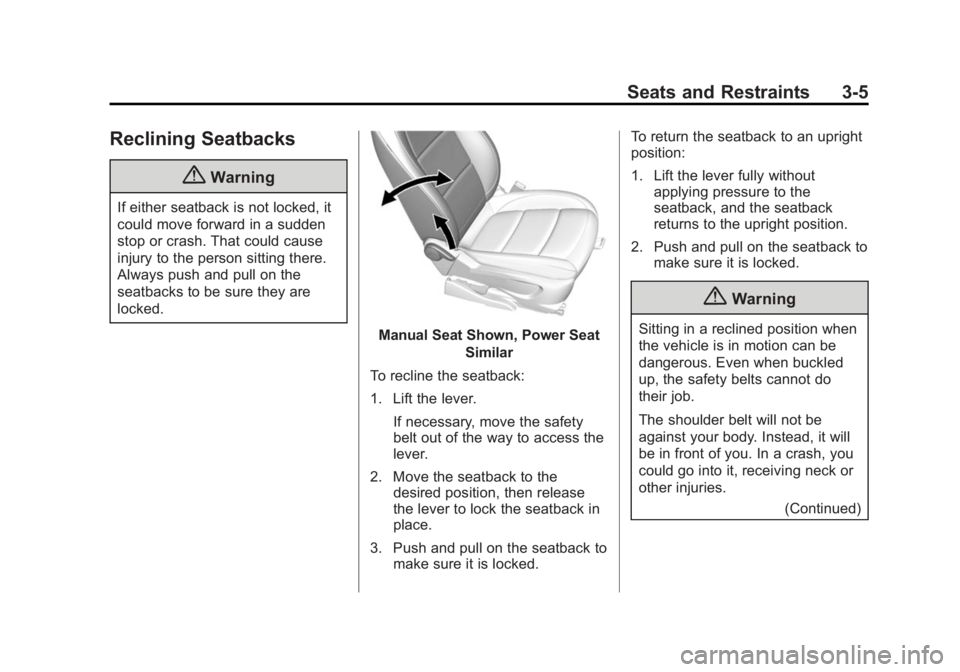
Manual Seat Shown, Power SeatSimilar
To recline the seatback:
1. Lift the lever. If necessary, move the safety
belt out of the way to access the
lever.
2. Move the seatback to the desired position, then release
the lever to lock the seatback in
place.
3. Push and pull on the seatback to make sure it is locked. To return the seatback to an upright
position:
1. Lift the lever fully without
applying pressure to the
seatback, and the seatback
returns to the upright position.
2. Push and pull on the seatback to make sure it is locked.
{Warning
Sitting in a reclined position when
the vehicle is in motion can be
dangerous. Even when buckled
up, the safety belts cannot do
their job.
The shoulder belt will not be
against your body. Instead, it will
be in front of you. In a crash, you
could go into it, receiving neck or
other injuries.
(Continued)
Page 52 of 341

Black plate (7,1)Buick Encore Owner Manual (GMNA-Localizing-U.S./Canada/Mexico-
7707490) - 2015 - crc - 2/4/15
Seats and Restraints 3-7
Recalling Button Memory
Positions
To recall the Button Memory
positions, press and hold“1”or“2.”
The driver seat and outside mirrors
move to the positions stored to
those buttons when pressed.
Releasing “1”or“2” before the
stored positions are reached stops
the recall.
If something has blocked the driver
seat while recalling a memory
position, the recall may stop.
Remove the obstruction; then press
and hold the appropriate manual
control for the memory item that is
not recalling for two seconds. Try
recalling the memory position again
by pressing the appropriate memory
button. If the memory position is still
not recalling, see your dealer for
service.
Recalling RKE Memory Positions
The RKE memory feature can recall
the driver seat and outside mirrors
to previously stored RKE Memory
positions when entering the vehicle. Every time the ignition is placed in
OFF, the positions of the driver seat
and outside mirrors are
automatically stored to the RKE
transmitter that was used to start
the vehicle. These positions and
settings are called RKE Memory
positions and may be different than
the previously mentioned Button
Memory positions saved to the
“1”
or“2” buttons.
To recall, press
Kon the RKE
transmitter and open the driver door.
If the driver door is already open,
press
Kon the RKE transmitter to
activate the recall. The driver seat
and outside mirrors will move to the
previously saved RKE Memory
positions.
This feature is turned on or off using
the vehicle personalization menu.
See Vehicle Personalization on
page 5-30.
To stop recall movement, press one
of the memory, power mirror,
or power seat controls. If something has blocked the driver
seat while recalling a memory
position, the recall may stop.
Remove the obstruction; then press
and hold the appropriate manual
control for the memory item that is
not recalling for two seconds. Try
recalling the memory position again
by opening the driver door and
pressing the RKE transmitter
K
button. If the memory position is still
not recalling, see your dealer for
service.
Easy Exit Driver Seat
This feature moves the seat
rearward allowing the driver more
room to exit the vehicle.
To activate, place the ignition in
OFF and open the driver door. If the
driver door is already open, placing
the ignition in OFF will activate the
recall.
This feature is turned on or off using
the vehicle personalization menu.
See
Vehicle Personalization on
page 5-30.
Page 53 of 341
Black plate (8,1)Buick Encore Owner Manual (GMNA-Localizing-U.S./Canada/Mexico-
7707490) - 2015 - crc - 2/4/15
3-8 Seats and Restraints
To stop recall movement, press one
of the memory or power seat
controls.
If something has blocked the driver
seat while recalling the exit position,
the recall may stop. Remove the
obstruction; then press and hold the
power seat control rearward for
two seconds. Try recalling the exit
position again. If the exit position is
still not recalling, see your dealer for
service.
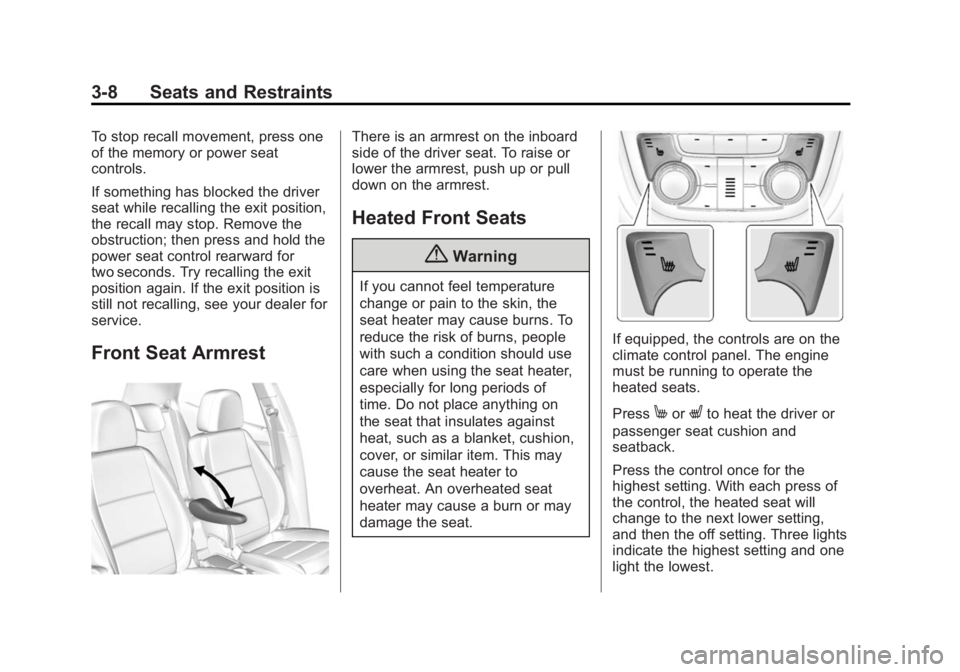
Front Seat Armrest
There is an armrest on the inboard
side of the driver seat. To raise or
lower the armrest, push up or pull
down on the armrest.
Heated Front Seats
{Warning
If you cannot feel temperature
change or pain to the skin, the
seat heater may cause burns. To
reduce the risk of burns, people
with such a condition should use
care when using the seat heater,
especially for long periods of
time. Do not place anything on
the seat that insulates against
heat, such as a blanket, cushion,
cover, or similar item. This may
cause the seat heater to
overheat. An overheated seat
heater may cause a burn or may
damage the seat.
If equipped, the controls are on the
climate control panel. The engine
must be running to operate the
heated seats.
Press
MorLto heat the driver or
passenger seat cushion and
seatback.
Press the control once for the
highest setting. With each press of
the control, the heated seat will
change to the next lower setting,
and then the off setting. Three lights
indicate the highest setting and one
light the lowest.
Page 108 of 341
Black plate (1,1)Buick Encore Owner Manual (GMNA-Localizing-U.S./Canada/Mexico-
7707490) - 2015 - crc - 2/4/15
Instruments and Controls 5-1
Instruments and
Controls
Controls
Steering Wheel Adjustment . . . 5-2
Steering Wheel Controls . . . . . . 5-2
Heated Steering Wheel . . . . . . . 5-2
Horn . . . . . . . . . . . . . . . . . . . . . . . . . . 5-2
Windshield Wiper/Washer . . . . . 5-2
Rear Window Wiper/Washer . . . . . . . . . . . . . . . . . . . . . . 5-4
Compass . . . . . . . . . . . . . . . . . . . . . 5-4
Clock . . . . . . . . . . . . . . . . . . . . . . . . . 5-5
Power Outlets . . . . . . . . . . . . . . . . . 5-5
Warning Lights, Gauges, and
Indicators
Warning Lights, Gauges, and Indicators . . . . . . . . . . . . . . . . . . . . 5-7
Instrument Cluster . . . . . . . . . . . . 5-8
Speedometer . . . . . . . . . . . . . . . . . 5-9
Odometer . . . . . . . . . . . . . . . . . . . . . 5-9
Trip Odometer . . . . . . . . . . . . . . . . . 5-9
Tachometer . . . . . . . . . . . . . . . . . . . 5-9
Fuel Gauge . . . . . . . . . . . . . . . . . . . 5-9 Engine Coolant Temperature
Gauge . . . . . . . . . . . . . . . . . . . . . . 5-10
Safety Belt Reminders . . . . . . . 5-11
Airbag Readiness Light . . . . . . 5-12
Passenger Airbag Status Indicator . . . . . . . . . . . . . . . . . . . . 5-12
Charging System Light . . . . . . 5-13
Malfunction Indicator Lamp . . . . . . . . . . . . . 5-13
Brake System Warning Light . . . . . . . . . . . . . . . . . . . . . . . 5-16
Antilock Brake System (ABS) Warning Light . . . . . . . . . . . . . . 5-17
Power Steering Warning Light . . . . . . . . . . . . . . . . . . . . . . . 5-17
Lane Departure Warning (LDW) Light . . . . . . . . . . . . . . . . 5-17
Vehicle Ahead Indicator . . . . . . 5-18
Traction Off Light . . . . . . . . . . . . 5-18
StabiliTrak®OFF Light . . . . . . . 5-18
Traction Control System (TCS)/StabiliTrak
®Light . . . . 5-19
Tire Pressure Light . . . . . . . . . . 5-19
Engine Oil Pressure Light . . . . 5-19
Low Fuel Warning Light . . . . . . 5-20
Immobilizer Light . . . . . . . . . . . . 5-20
High-Beam On Light . . . . . . . . . 5-21 Front Fog Lamp Light . . . . . . . . 5-21
Lamps On Reminder . . . . . . . . . 5-21
Cruise Control Light . . . . . . . . . 5-21
Information Displays
Driver Information
Center (DIC) . . . . . . . . . . . . . . . 5-22
Vehicle Messages
Vehicle Messages . . . . . . . . . . . 5-25
Battery Voltage and ChargingMessages . . . . . . . . . . . . . . . . . . 5-25
Brake System Messages . . . . 5-25
Door Ajar Messages . . . . . . . . . 5-26
Engine Cooling System Messages . . . . . . . . . . . . . . . . . . 5-26
Engine Oil Messages . . . . . . . . 5-26
Engine Power Messages . . . . 5-26
Fuel System Messages . . . . . . 5-27
Object Detection System Messages . . . . . . . . . . . . . . . . . . 5-27
Ride Control System Messages . . . . . . . . . . . . . . . . . . 5-28
Tire Messages . . . . . . . . . . . . . . . 5-29
Transmission Messages . . . . . 5-29
Vehicle Personalization
Vehicle Personalization . . . . . . 5-30
Page 112 of 341

Black plate (5,1)Buick Encore Owner Manual (GMNA-Localizing-U.S./Canada/Mexico-
7707490) - 2015 - crc - 2/4/15
Instruments and Controls 5-5
2. Press and hold SET/CLR whilethe Set Area display is active.
3. Find the vehicle's currentlocation and zone number on the
map. Zones 1 through 15 are
available.
4. Use
w xto change to the
correct zone number.
5. Press SET/CLR to confirm the setting.
Clock
The infotainment system controls
are used to access the time and
date settings through the menu
system. See “Using the System” in
the infotainment manual.
Setting the Clock
To set the time and date:
1. Press the CONFIG button and then turn the TUNE/MENU knob
to select Time and Date or
press
H.
2. Select the desired feature.
3. Turn the TUNE/MENU knob to adjust the highlighted number.
4. Press the TUNE/MENU knob to select the next number.
5. To save and return to the Time and Date menu, press
/BACK
at any time or press the TUNE/
MENU knob after adjusting the
value.
6. Repeat steps 2–5 for the remaining feature. If auto timing is set, the time
displayed on the clock may not
update immediately when driving
into a new time zone.
Setting the 12/24 Hour Format
1. Press the CONFIG button and
select Time and Date or
press
H.
2. Select Set Time Format.
3. Turn the TUNE/MENU knob to highlight the 12 hour or 24 hour
display format.
4. Press the TUNE/MENU knob to select display format.
Power Outlets
The accessory power outlets can be
used to plug in electrical equipment,
such as a cell phone or MP3 player.
There is one accessory power outlet
on the center stack below the
climate control. This outlet is
powered when the key is in ON/
RUN or ACC/ACCESSORY, or until
the driver door is opened within
Page 113 of 341

Black plate (6,1)Buick Encore Owner Manual (GMNA-Localizing-U.S./Canada/Mexico-
7707490) - 2015 - crc - 2/4/15
5-6 Instruments and Controls
10 minutes of turning off the vehicle.
SeeRetained Accessory Power
(RAP) on page 9-18.
{Caution
Leaving electrical equipment
plugged in for an extended period
of time while the vehicle is off will
drain the battery. Always unplug
electrical equipment when not in
use and do not plug in equipment
that exceeds the maximum
20 amp rating.
Certain electrical accessories may
not be compatible with the
accessory power outlet and could
overload vehicle or adapter fuses.
If a problem is experienced, see
your dealer.
When adding electrical equipment,
be sure to follow the installation
instructions included with the
equipment. See Add-On Electrical
Equipment on page 9-45.
{Caution
Hanging heavy equipment from
the power outlet can cause
damage not covered by the
vehicle warranty. The power
outlets are designed for
accessory power plugs only, such
as cell phone charge cords.
Power Outlet 120 Volt
Alternating Current
If equipped, this power outlet is on
the rear of the center console. It can
be used to plug in electrical
equipment that uses a maximum
limit of 150 watts.
An indicator light on the outlet turns
on to show it is in use. The light
comes on when the ignition is in
ON/RUN and equipment requiring
less than 150 watts is plugged into
the outlet, and no system fault is
detected.
The indicator light does not come on
when the ignition is in LOCK/OFF or
if the equipment is not fully seated
into the outlet.
If equipment is connected using
more than 150 watts or a system
fault is detected, a protection circuit
shuts off the power supply and the
Page 124 of 341
Black plate (17,1)Buick Encore Owner Manual (GMNA-Localizing-U.S./Canada/Mexico-
7707490) - 2015 - crc - 2/4/15
Instruments and Controls 5-17
Antilock Brake System
(ABS) Warning Light
This light comes on briefly when the
engine is started.
If the light stays on, turn the ignition
to LOCK/OFF or if the light comes
on, stop as soon as possible and
turn the ignition off. Then start the
engine again to reset the system.
If the light still stays on, or comes
on again while driving, the vehicle
needs service. See your dealer.
If the regular brake system warning
light is not on, the brakes will still
work, but the antilock brakes will not
work. If the regular brake system
warning light is also on, the antilock
brakes will not work and there is aproblem with the regular brakes.
See
Brake System Warning Light on
page 5-16.
The ABS warning light will come on
briefly when the ignition is turned to
ON/RUN. This is normal. If the light
does not come on then, have it fixed
so it will be ready to warn if there is
a problem.Power Steering Warning
Light
This light comes on briefly when the
ignition is turned to ON/RUN as a
check to show it is working.
If it does not come on have the
vehicle serviced by your dealer. If this light stays on, or comes on
while driving, the system may not be
working. If this happens, see your
dealer for service.
Lane Departure Warning
(LDW) Light
If equipped, this light comes on
briefly while starting the vehicle.
If it does not come on, have the
vehicle serviced.
This light is green if LDW is on and
ready to operate.
This light changes to amber and
flashes to indicate that the lane
marking has been crossed without
using a turn signal in that direction.
See
Lane Departure Warning (LDW)
on page 9-39.
Page 139 of 341

Black plate (32,1)Buick Encore Owner Manual (GMNA-Localizing-U.S./Canada/Mexico-
7707490) - 2015 - crc - 2/4/15
5-32 Instruments and Controls
Home Page Menu
Select Home Page Menu and the
following may display:
.Customize
.Sort
.Restore Home Page Defaults
Customize
Select what icons will be available
on the Home Page.
Turn the TUNE/MENU knob or outer
ring to select an icon, then press the
knob or outer ring.
Sort
This allows the first Home Page to
be customized. See “Home Page”
under “Using the System” in the
infotainment manual.
Restore Home Page Defaults
Select Restore Home Page Defaults
to return the Home Page to the
default settings.
Select Yes or No
Display Off
Select to turn the display off. Press
or turn any faceplate button to turn
the display on.
Vehicle Settings
The following list of menu items may
be available:
.Climate and Air Quality
.Comfort and Convenience
.Collision Detection System
.Lighting
.Power Door Locks
.Remote Lock/Unlock/Start
.Return to Factory Settings?
Climate and Air Quality
If equipped, select the Climate and
Air Quality menu and the following
may display:
.Auto Fan Speed
.Air Conditioning Mode
.Remote Start Auto Heat Seats
.Auto Defog
.Auto Rear Defog
Auto Fan Speed
This allows the selection of the
automatic fan speed. This feature
sets the climate control fan speed to
maintain the interior temperature.
Select High, Medium, or Low.
Air Conditioning Mode
When on, the Air Conditioning will
come on when the vehicle is
started.
Select On, Off, or Last Setting.
Remote Start Auto Heat Seats
On vehicles with remote start and
heated seats, the heated seats can
be set to on or off.
Select On or Off.
Auto Defog
When selected and high humidity is
detected, the climate control system
may adjust to outside air supply and
turn on the air conditioner or the