service BUICK ENCORE 2016 Owner's Guide
[x] Cancel search | Manufacturer: BUICK, Model Year: 2016, Model line: ENCORE, Model: BUICK ENCORE 2016Pages: 320, PDF Size: 4.75 MB
Page 113 of 320
Buick Encore Owner Manual (GMNA-Localizing-U.S./Canada/Mexico-
9234779) - 2016 - CRC - 1/5/16
112 Instruments and Controls
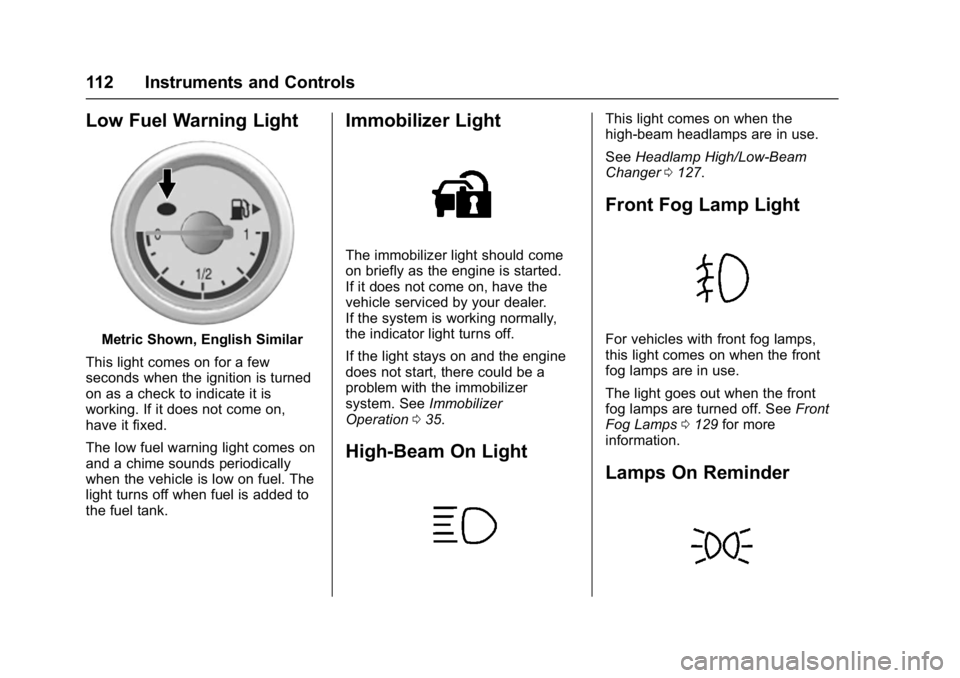
Low Fuel Warning Light
Metric Shown, English Similar
This light comes on for a few
seconds when the ignition is turned
on as a check to indicate it is
working. If it does not come on,
have it fixed.
The low fuel warning light comes on
and a chime sounds periodically
when the vehicle is low on fuel. The
light turns off when fuel is added to
the fuel tank.
Immobilizer Light
The immobilizer light should come
on briefly as the engine is started.
If it does not come on, have the
vehicle serviced by your dealer.
If the system is working normally,
the indicator light turns off.
If the light stays on and the engine
does not start, there could be a
problem with the immobilizer
system. See Immobilizer
Operation 035.
High-Beam On Light
This light comes on when the
high-beam headlamps are in use.
See Headlamp High/Low-Beam
Changer 0127.
Front Fog Lamp Light
For vehicles with front fog lamps,
this light comes on when the front
fog lamps are in use.
The light goes out when the front
fog lamps are turned off. See Front
Fog Lamps 0129 for more
information.
Lamps On Reminder
Page 118 of 320
Buick Encore Owner Manual (GMNA-Localizing-U.S./Canada/Mexico-
9234779) - 2016 - CRC - 1/5/16
Instruments and Controls 117
Brake System Messages
BRAKE FLUID LOW
This message is displayed when the
brake fluid level is low. SeeBrake
Fluid 0206.
BRAKES OVERHEATED
This message may display if the
brakes are too hot.
RELEASE PARKING BRAKE
This message is displayed if the
parking brake is applied. Release it
before you attempt to drive. See
Parking Brake 0167 for more
information.
SERVICE BRAKE ASSIST
This message is displayed when
there is a problem with the brake
assist system. Take the vehicle to
your dealer.
Door Ajar Messages
DOOR(S) OPEN
A vehicle symbol will be displayed
on the DIC showing which door is
open along with this message.
Close the door completely.
HOOD OPEN
This message may display along
with a hood open symbol when the
hood is open. Close the hood
completely.
REAR ACCESS OPEN
This message will display when the
liftgate is open. Close the liftgate
completely.
Engine Cooling System
Messages
ENGINE OVERHEATED —
IDLE ENGINE
This message displays when the
engine coolant temperature is too
hot. Stop and allow the vehicle to
idle until it cools down.
ENGINE OVERHEATED —
STOP ENGINE
This message displays and a
continuous chime sounds if the
engine cooling system reaches
unsafe temperatures for operation.
Stop and turn off the vehicle as
soon as it is safe to do so to avoid
severe damage. This message
clears when the engine has cooled
to a safe operating temperature.
Engine Oil Messages
CHANGE ENGINE OIL SOON
This message displays when the
engine oil needs to be changed.
When the engine oil is changed, be
sure to reset the Oil Life System.
See Engine Oil Life System 0197,
Driver Information Center (DIC)
0 113, Engine Oil 0195, and
Maintenance Schedule 0263.
Page 119 of 320
Buick Encore Owner Manual (GMNA-Localizing-U.S./Canada/Mexico-
9234779) - 2016 - CRC - 1/5/16
118 Instruments and Controls
ENGINE OIL HOT, IDLE
ENGINE
This message displays when the
engine oil temperature is too hot.
Stop and allow the vehicle to idle
until it cools down.
ENGINE OIL LOW ADD OIL
On some vehicles, this message
displays when the engine oil level
may be too low. Check the oil level
before filling to the recommended
level. If the oil is not low and this
message remains on, take the
vehicle to your dealer for service.
SeeEngine Oil 0195.
Engine Power Messages
ENGINE POWER IS REDUCED
This message displays when the
vehicle's engine power is reduced.
Reduced engine power can affect
the vehicle's ability to accelerate.
If this message is on, but there is no
reduction in performance, proceed
to your destination. The
performance may be reduced the
next time the vehicle is driven. The
vehicle may be driven at a reduced speed while this message is on, but
maximum acceleration and speed
may be reduced. Anytime this
message stays on, or displays
repeatedly, the vehicle should be
taken to your dealer for service as
soon as possible.
Fuel System Messages
FUEL LEVEL LOW
This message displays when the
vehicle is low on fuel. Refuel as
soon as possible.
TIGHTEN GAS CAP
This message displays when the
fuel cap is not on tight. Tighten the
fuel cap.
Object Detection System
Messages
FORWARD COLLISION
ALERT OFF
If equipped with the Forward
Collision Alert (FCA) system, this
message may display if the FCA
system cannot activate due to a
temporary condition. See
Forward
Collision Alert (FCA) System 0177.
FRONT CAMERA BLOCKED,
CLEAN WINDSHIELD
This message displays when the
Lane Departure Warning (LDW) and
Forward Collision Alert (FCA)
systems are disabled because the
camera view is blocked and cannot
operate properly. It may also
activate during heavy rain or due to
road spray. To clean the system,
clean the outside of the windshield
area in front of the LDW/FCA
camera sensor.
LANE DEPARTURE WARNING
UNAVAILABLE
If equipped with the Lane Departure
Warning (LDW) system, this
message may display if the LDW
system cannot activate due to a
temporary condition. See Lane
Departure Warning (LDW) 0180.
Page 120 of 320
Buick Encore Owner Manual (GMNA-Localizing-U.S./Canada/Mexico-
9234779) - 2016 - CRC - 1/5/16
Instruments and Controls 119
PARK ASSIST OFF
This message displays when the
parking assist system has been
turned off or when there is a
temporary condition causing the
system to be disabled. SeeParking
Assist 0175.
PARK ASSIST FAULT CLEAN
BUMPER
This message displays if snow,
mud, ice, or dirt is blocking the
sensors on the bumpers. Clean the
bumpers.
SERVICE FRONT CAMERA
If this message remains on after
continued driving, the vehicle needs
service. Do not use the Lane
Departure Warning (LDW) and
Forward Collision Alert (FCA)
features. Take the vehicle to your
dealer.
SERVICE PARKING ASSIST
This message displays if there is a
problem with the Front and Rear
Parking Assist (FRPA) system. Do
not use this system to help you
park. See Parking Assist 0175.
SERVICE SIDE DETECTION
SYSTEM
If this message remains on after
continued driving, the vehicle needs
service. Side Blind Zone Alert
(SBZA) and Rear Cross Traffic Alert
(RCTA) features will not work. Take
the vehicle to your dealer.
SIDE BLIND ZONE ALERT OFF
This message indicates that the
driver has turned the Side Blind
Zone Alert (SBZA) system off.
SIDE DETECTION SYSTEM
UNAVAILABLE
This message indicates that Side
Blind Zone Alert (SBZA) and Rear
Cross Traffic Alert (RCTA) are
disabled either because the sensor
is blocked and cannot detect
vehicles in the blind zone, or the
vehicle is passing through an open
area, such as the desert, where
there is insufficient data for
operation. This message may also
activate during heavy rain or due to
road spray. The vehicle does not need service. For cleaning, see
“Washing the Vehicle”
under
Exterior Care 0252.
Ride Control System
Messages
ALL WHEEL DRIVE OFF
If your vehicle has the All-Wheel
Drive (AWD) system, this message
displays when the rear drive system
is overheating. This message turns
off when the rear drive system cools
down. If the warning message stays
on for a while, you need to reset the
warning message. To reset the
warning message, turn the ignition
off and then back on again. If the
message stays on, see your dealer
right away. See All-Wheel Drive
0 166 for more information.
SERVICE ALL WHEEL DRIVE
SYSTEM
If your vehicle has the All-Wheel
Drive (AWD) system, this message
displays if a problem occurs with
this system. If this message
appears, stop as soon as possible
and turn off the vehicle. Restart the
Page 121 of 320
Buick Encore Owner Manual (GMNA-Localizing-U.S./Canada/Mexico-
9234779) - 2016 - CRC - 1/5/16
120 Instruments and Controls
vehicle and check for the message
on the DIC display. If the message
is still displayed or appears again
when you begin driving, the AWD
system needs service. See your
dealer.
TRACTION CONTROL OFF
This message displays when the
Traction Control System (TCS) is
turned off. Adjust your driving
accordingly.
TRACTION CONTROL ON
This message displays when the
Traction Control System (TCS) is
first turned on. SeeTraction Control/
Electronic Stability Control 0168 for
more information.
Tire Messages
SERVICE TIRE MONITOR
SYSTEM
This message displays if there is a
problem with the Tire Pressure
Monitor System (TPMS). See Tire
Pressure Monitor Operation 0230.
TIRE LEARNING ACTIVE
This message displays when the
system is learning new tires. See
Tire Pressure Monitor
Operation 0230.
TIRE PRESSURE LOW ADD
AIR TO TIRE
On vehicles with the Tire Pressure
Monitor System (TPMS), this
message displays when the
pressure in one or more of the
vehicle's tires is low.
The low tire pressure warning light
will also come on. See Tire
Pressure Light 0111.
If a tire pressure message displays,
inflate the tires until the tire
pressure is equal to the values
shown on the Tire and Loading
Information label. See Tires0221,
Vehicle Load Limits 0151, and Tire
Pressure 0228.
More than one tire pressure
message can be received at a time.
The DIC also shows the tire
pressure values. See Driver
Information Center (DIC) 0113.
Transmission Messages
SERVICE TRANSMISSION
This message displays if there is a
problem with the transmission. See
your dealer.
TRANSMISSION HOT —IDLE
ENGINE
This message displays and a chime
sounds if the transmission fluid in
the vehicle gets hot. Driving with the
transmission fluid temperature high
can cause damage to the vehicle.
Stop the vehicle and let it idle to
allow the transmission to cool. This
message clears when the fluid
temperature reaches a safe level.
Page 149 of 320
Buick Encore Owner Manual (GMNA-Localizing-U.S./Canada/Mexico-
9234779) - 2016 - CRC - 1/5/16
148 Driving and Operating
Always drive slower in these types
of driving conditions and avoid
driving through large puddles and
deep-standing or flowing water.
{Warning
Wet brakes can cause crashes.
They might not work as well in a
quick stop and could cause
pulling to one side. You could
lose control of the vehicle.
After driving through a large
puddle of water or a car/vehicle
wash, lightly apply the brake
pedal until the brakes work
normally.
Flowing or rushing water creates
strong forces. Driving through
flowing water could cause the
vehicle to be carried away. If this
happens, you and other vehicle
occupants could drown. Do not
ignore police warnings and be
very cautious about trying to drive
through flowing water.
Hydroplaning
Hydroplaning is dangerous. Water
can build up under the vehicle's
tires so they actually ride on the
water. This can happen if the road is
wet enough and you are going fast
enough. When the vehicle is
hydroplaning, it has little or no
contact with the road.
There is no hard and fast rule about
hydroplaning. The best advice is to
slow down when the road is wet.
Other Rainy Weather Tips
Besides slowing down, other wet
weather driving tips include:
.Allow extra following distance.
. Pass with caution.
. Keep windshield wiping
equipment in good shape.
. Keep the windshield washer fluid
reservoir filled.
. Have good tires with proper
tread depth. See Tires0221.
. Turn off cruise control.
Hill and Mountain Roads
Driving on steep hills or through
mountains is different than driving
on flat or rolling terrain. Tips include:
.Keep the vehicle serviced and in
good shape.
. Check all fluid levels and brakes,
tires, cooling system, and
transmission.
. Shift to a lower gear when going
down steep or long hills.
{Warning
Using the brakes to slow the
vehicle on a long downhill slope
can cause brake overheating, can
reduce brake performance, and
could result in a loss of braking.
Shift the transmission to a lower
gear to let the engine assist the
brakes on a steep downhill slope.
Page 156 of 320

Buick Encore Owner Manual (GMNA-Localizing-U.S./Canada/Mexico-
9234779) - 2016 - CRC - 1/5/16
Driving and Operating 155
Starting and
Operating
New Vehicle Break-In
Caution
The vehicle does not need an
elaborate break-in. But it will
perform better in the long run if
you follow these guidelines:. Do not drive at any one
constant speed, fast or slow,
for the first 805 km (500 mi).
Do not make full-throttle
starts. Avoid downshifting to
brake or slow the vehicle.
. Avoid making hard stops for
the first 322 km (200 mi) or
so. During this time the new
brake linings are not yet
broken in. Hard stops with
new linings can mean
premature wear and earlier
replacement. Follow this
(Continued)
Caution (Continued)
breaking-in guideline every
time you get new brake
linings.
Following break-in, engine speed
and load can be gradually
increased.
Ignition Positions
The ignition switch has four different
positions.
The key must be fully extended to
start the vehicle. To shift out of P (Park), the ignition
must be in ON/RUN and the regular
brake pedal applied.
0 (STOPPING THE ENGINE/LOCK/
OFF) :
When the vehicle is stopped,
turn the ignition switch to LOCK/
OFF to turn the engine off.
This position locks the ignition and
transmission. The steering wheel
may also lock, if equipped.
The ignition switch can bind in the
LOCK/OFF position with the wheels
turned off center. If this happens,
move the steering wheel from right
to left while turning the key to ACC/
ACCESSORY. If this does not work,
then the vehicle needs service.
Do not turn the engine off when the
vehicle is moving. This will cause a
loss of power assist in the brake
and steering systems and disable
the airbags.
Page 157 of 320
Buick Encore Owner Manual (GMNA-Localizing-U.S./Canada/Mexico-
9234779) - 2016 - CRC - 1/5/16
156 Driving and Operating
If the vehicle must be shut off in an
emergency:1. Brake using a firm and steady pressure. Do not pump the
brakes repeatedly. This may
deplete power assist, requiring
increased brake pedal force.
2. Shift the vehicle to N (Neutral). This can be done while the
vehicle is moving. After shifting
to N (Neutral), firmly apply the
brakes and steer the vehicle to
a safe location.
3. Come to a complete stop, shift to P (Park), and turn the
ignition to LOCK/OFF. On
vehicles with an automatic
transmission, the shift lever
must be in P (Park) to turn the
ignition switch to the LOCK/
OFF position.
4. Set the parking brake. See Parking Brake 0167.{Warning
Turning off the vehicle while
moving may cause loss of power
assist in the brake and steering
systems and disable the airbags.
While driving, only shut the
vehicle off in an emergency.
If the vehicle cannot be pulled over,
and must be shut off while driving,
turn the ignition to ACC/
ACCESSORY.
Caution
Using a tool to force the key to
turn in the ignition could cause
damage to the switch or break the
key. Use the correct key, make
sure it is all the way in, and turn it
only with your hand. If the key
cannot be turned by hand, see
your dealer. 1 (ACC/ACCESSORY) :
This is the
position in which you can operate
things like the radio and the
windshield wipers when the engine
is off.
2 (ON/RUN) : This position can be
used to operate the electrical
accessories and to display some
instrument cluster warning and
indicator lights. This position can
also be used for service and
diagnostics, and to verify the proper
operation of the malfunction
indicator lamp as may be required
for emission inspection purposes.
The switch stays in this position
when the engine is running.
If you leave the key in the ACC/
ACCESSORY or ON/RUN position
with the engine off, the battery could
be drained. You may not be able to
start the vehicle if the battery is
allowed to drain for an extended
period of time.
3 (START) : This is the position that
starts the engine. When the engine
starts, release the key. The ignition
switch returns to ON/RUN for
driving.
Page 166 of 320

Buick Encore Owner Manual (GMNA-Localizing-U.S./Canada/Mexico-
9234779) - 2016 - CRC - 1/5/16
Driving and Operating 165
The vehicle has an automatic
neutral shift feature which allows the
transmission to automatically shift to
N (Neutral) when the vehicle is
stopped with a forward gear
engaged. The reduced load on the
engine improves vehicle fuel
economy.
{Warning
Shifting into a drive gear while the
engine is running at high speed is
dangerous. Unless your foot is
firmly on the brake pedal, the
vehicle could move very rapidly.
You could lose control and hit
people or objects. Do not shift
into a drive gear while the engine
is running at high speed.
Caution
Shifting out of P (Park) or
N (Neutral) with the engine
running at high speed may
damage the transmission. The(Continued)
Caution (Continued)
repairs would not be covered by
the vehicle warranty. Be sure the
engine is not running at high
speed when shifting the vehicle.
D : This position is for normal
driving. It provides the best fuel
economy. If more power is needed
for passing, and the vehicle is:
. Going less than 56 km/h
(35 mph), push the accelerator
pedal about halfway down.
. Going about 56 km/h (35 mph) or
more, push the accelerator all
the way down.
M : This position allows shifting
similar to a manual transmission.
See Manual Mode 0165.
Caution
If the vehicle does not shift gears,
the transmission could be
damaged. Have the vehicle
serviced right away. Operating Modes
The transmission may operate in a
lower gear than normal to improve
vehicle performance. The engine
speed may be higher and there may
be an increase in noise during the
following conditions:
.
When climbing a grade.
. When driving downhill.
. When driving in hot
temperatures or at high altitude.
Manual Mode
Driver Shift Control (DSC)
Page 177 of 320

Buick Encore Owner Manual (GMNA-Localizing-U.S./Canada/Mexico-
9234779) - 2016 - CRC - 1/5/16
176 Driving and Operating
Objects Detected by Both the
Front and Rear Sensors
In general, if objects are detected at
the same time near both the front
and rear bumpers while backing up,
the beeps only sound to indicate
that objects are close to the rear
bumper.
However, if an object comes within
0.3 m (1 ft) of the front bumper while
the vehicle is backing up and at the
same time there is another object
further than 0.3 m (1 ft) from the rear
bumper, then higher-pitched beeps
only sound to indicate the front
object.
Turning the System On and Off
The FRPA system can be turned on
and off by pressing the park assist
button on the center stack, forward
of the shift lever.
The indicator light in the button
comes on when the system is
turned on.
When the system is off, the indicator
light in the button is off or PARK
ASSIST OFF briefly displays on the
Driver Information Center (DIC).
FRPA defaults to the on setting
each time the vehicle is started.
When the System Does Not
Seem to Work Properly
The following messages may be
displayed on the DIC:
SERVICE PARKING ASSIST :If
this message occurs, take the
vehicle to your dealer to repair the
system.
PARK ASSIST OFF : If the FRPA
system does not activate due to a
temporary condition, the message
displays on the DIC. This can occur
under the following conditions:
. The driver has disabled the
system. .
The sensors are not clean. Keep
the vehicle's bumpers free of
mud, dirt, snow, ice and slush.
For cleaning instructions, see
Exterior Care 0252.
. The park assist sensors are
covered by frost or ice. Frost or
ice can form around and behind
the sensors and may not always
be seen; this can occur after
washing the vehicle in cold
weather. The message may not
clear until the frost or ice has
melted.
. An object was hanging out of the
liftgate during the last drive
cycle. Once the object is
removed, FRPA will return to
normal operation.
. An object or cover is attached to
the front of the vehicle.
. The bumper is damaged. Take
the vehicle to your dealer to
repair the system.