climate settings BUICK ENCORE 2016 Owner's Manual
[x] Cancel search | Manufacturer: BUICK, Model Year: 2016, Model line: ENCORE, Model: BUICK ENCORE 2016Pages: 320, PDF Size: 4.75 MB
Page 30 of 320
Buick Encore Owner Manual (GMNA-Localizing-U.S./Canada/Mexico-
9234779) - 2016 - CRC - 1/5/16
Keys, Doors, and Windows 29
Remote Vehicle Start
The vehicle may have this feature
that allows you to start the engine
from outside the vehicle.
/(Remote Vehicle Start) :This
button will be on the RKE
transmitter if the vehicle has remote
start.
The climate control system will use
the previous settings during a
remote start. The rear window
defogger may come on during a
remote start based on cold ambient
conditions. The rear window
defogger indicator light does not
come on during a remote start. If the
vehicle has heated seats, they may
come on during a remote start. See
Heated Front Seats 047.
Laws in some local communities
may restrict the use of remote
starters. For example, some laws
require a person using remote start
to have the vehicle in view. Check
local regulations for any
requirements. Other conditions can affect the
performance of the transmitter. See
Remote Keyless Entry (RKE)
System
026.
Starting the Vehicle
To start the engine using the remote
start feature:
1. Press and release
Q.
2. Immediately after completing Step 1, press and hold
/for at
least four seconds or until the
turn signal lamps flash. The
turn signal lamps flashing
confirms the request to remote
start the vehicle has been
received.
When the engine starts, the parking
lamps will turn on and remain on as
long as the engine is running. The
doors will be locked and the climate
control system may come on.
The engine will continue to run for
10 minutes. After 30 seconds,
repeat the steps if a 10-minute
extension is desired. Remote start
can be extended only once. Extending Engine Run Time
The engine run time can also be
extended by another 10 minutes,
if during the first 10 minutes
Steps 1–2 are repeated while the
engine is still running. An extension
can be requested 30 seconds after
starting. This provides a total of
20 minutes.
The remote start can only be
extended once.
When the remote start is extended,
the second 10-minute period is
added on to the first 10 minutes for
a total of 20 minutes.
A maximum of two remote starts,
or a remote start with an extension,
are allowed between ignition cycles.
The vehicle's ignition must be
changed to ON/RUN/START and
then back to OFF before the remote
start procedure can be used again.
Canceling a Remote Start
To cancel a remote start, do one of
the following:
.
Press and hold
/until the
parking lamps turn off.
Page 99 of 320
Buick Encore Owner Manual (GMNA-Localizing-U.S./Canada/Mexico-
9234779) - 2016 - CRC - 1/5/16
98 Instruments and Controls
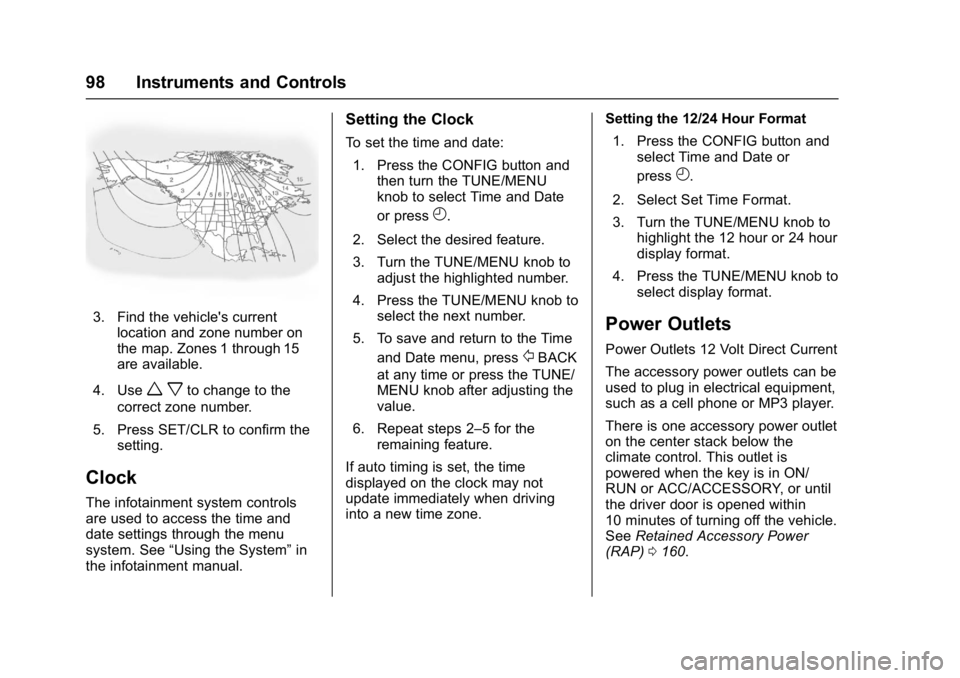
3. Find the vehicle's currentlocation and zone number on
the map. Zones 1 through 15
are available.
4. Use
w xto change to the
correct zone number.
5. Press SET/CLR to confirm the setting.
Clock
The infotainment system controls
are used to access the time and
date settings through the menu
system. See “Using the System” in
the infotainment manual.
Setting the Clock
To set the time and date:
1. Press the CONFIG button and then turn the TUNE/MENU
knob to select Time and Date
or press
H.
2. Select the desired feature.
3. Turn the TUNE/MENU knob to adjust the highlighted number.
4. Press the TUNE/MENU knob to select the next number.
5. To save and return to the Time and Date menu, press
/BACK
at any time or press the TUNE/
MENU knob after adjusting the
value.
6. Repeat steps 2–5 for the remaining feature.
If auto timing is set, the time
displayed on the clock may not
update immediately when driving
into a new time zone. Setting the 12/24 Hour Format
1. Press the CONFIG button and select Time and Date or
press
H.
2. Select Set Time Format.
3. Turn the TUNE/MENU knob to highlight the 12 hour or 24 hour
display format.
4. Press the TUNE/MENU knob to select display format.
Power Outlets
Power Outlets 12 Volt Direct Current
The accessory power outlets can be
used to plug in electrical equipment,
such as a cell phone or MP3 player.
There is one accessory power outlet
on the center stack below the
climate control. This outlet is
powered when the key is in ON/
RUN or ACC/ACCESSORY, or until
the driver door is opened within
10 minutes of turning off the vehicle.
See Retained Accessory Power
(RAP) 0160.
Page 124 of 320
Buick Encore Owner Manual (GMNA-Localizing-U.S./Canada/Mexico-
9234779) - 2016 - CRC - 1/5/16
Instruments and Controls 123
Sort
This allows the first Home Page to
be customized. See“Home Page”
under “Using the System” in the
infotainment manual.
Restore Home Page Defaults
Select Restore Home Page Defaults
to return the Home Page to the
default settings.
Select Yes or No
Display Off
Select to turn the display off. Press
or turn any faceplate button to turn
the display on.
Vehicle Settings
The following list of menu items may
be available:
. Climate and Air Quality
. Comfort and Convenience
. Collision Detection System
. Lighting
. Power Door Locks
. Remote Lock/Unlock/Start
. Return to Factory Settings?
Climate and Air Quality
If equipped, select the Climate and
Air Quality menu and the following
may display:
.
Auto Fan Speed
. Air Conditioning Mode
. Remote Start Auto Heat Seats
. Auto Defog
. Auto Rear Defog
Auto Fan Speed
This allows the selection of the
automatic fan speed. This feature
sets the climate control fan speed to
maintain the interior temperature.
Select High, Medium, or Low.
Air Conditioning Mode
When on, the Air Conditioning will
come on when the vehicle is
started.
Select On, Off, or Last Setting.
Remote Start Auto Heat Seats
On vehicles with remote start and
heated seats, the heated seats can
be set to on or off. Select On or Off.
Auto Defog
When selected and high humidity is
detected, the climate control system
may adjust to outside air supply and
turn on the air conditioner or the
heater. The fan speed may slightly
increase to help prevent fogging.
When high humidity is no longer
detected, the system will return to
its prior operation.
Select or Deselect.
Auto Rear Defog
When selected, this feature turns on
the rear defogger at vehicle start
when the interior temperature is cold
and fog is likely. The auto rear defog
function can be disabled by
pressing
1. When off, the feature
can be turned on by pressing
1.
See “Rear Window Defogger” under
Climate Control Systems 0134.
Select or Deselect.
Page 135 of 320
Buick Encore Owner Manual (GMNA-Localizing-U.S./Canada/Mexico-
9234779) - 2016 - CRC - 1/5/16
134 Climate Controls
Climate Controls
Climate Control Systems
Climate Control Systems . . . . . 134
Dual Automatic ClimateControl System . . . . . . . . . . . . . 137
Air Vents
Air Vents . . . . . . . . . . . . . . . . . . . . . 141
Maintenance
Air Intake . . . . . . . . . . . . . . . . . . . . . 141
Passenger Compartment AirFilter . . . . . . . . . . . . . . . . . . . . . . . . 141
Climate Control Systems
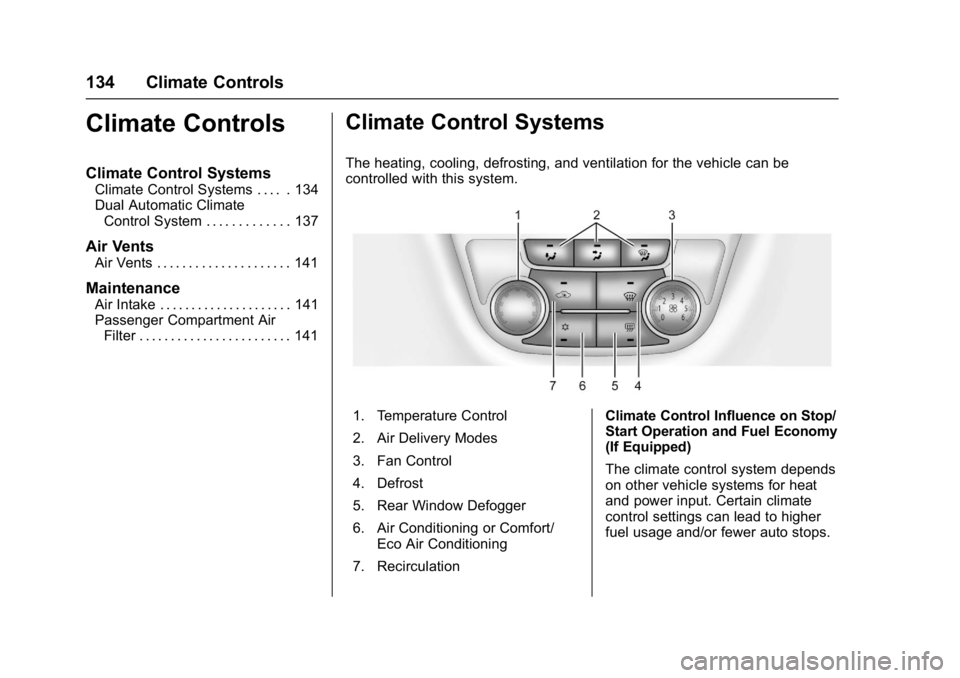
The heating, cooling, defrosting, and ventilation for the vehicle can be
controlled with this system.
1. Temperature Control
2. Air Delivery Modes
3. Fan Control
4. Defrost
5. Rear Window Defogger
6. Air Conditioning or Comfort/
Eco Air Conditioning
7. Recirculation Climate Control Influence on Stop/
Start Operation and Fuel Economy
(If Equipped)
The climate control system depends
on other vehicle systems for heat
and power input. Certain climate
control settings can lead to higher
fuel usage and/or fewer auto stops.
Page 136 of 320
Buick Encore Owner Manual (GMNA-Localizing-U.S./Canada/Mexico-
9234779) - 2016 - CRC - 1/5/16
Climate Controls 135
The following are climate control
settings that use more fuel:
.Comfort air conditioning mode.
. The defrost mode.
. Extreme temperature settings,
such as LO or HI.
. High fan speed settings.
To help reduce fuel usage:
. Use the full automatic control as
described under “Automatic
Operation” following.
. Use eco air conditioning, instead
of the comfort air conditioning.
. Select a temperature setting that
is higher in hot weather and
lower in cold weather.
. Turn off the air conditioning
when it is not needed.
. Only use defrost to clear the
windows.
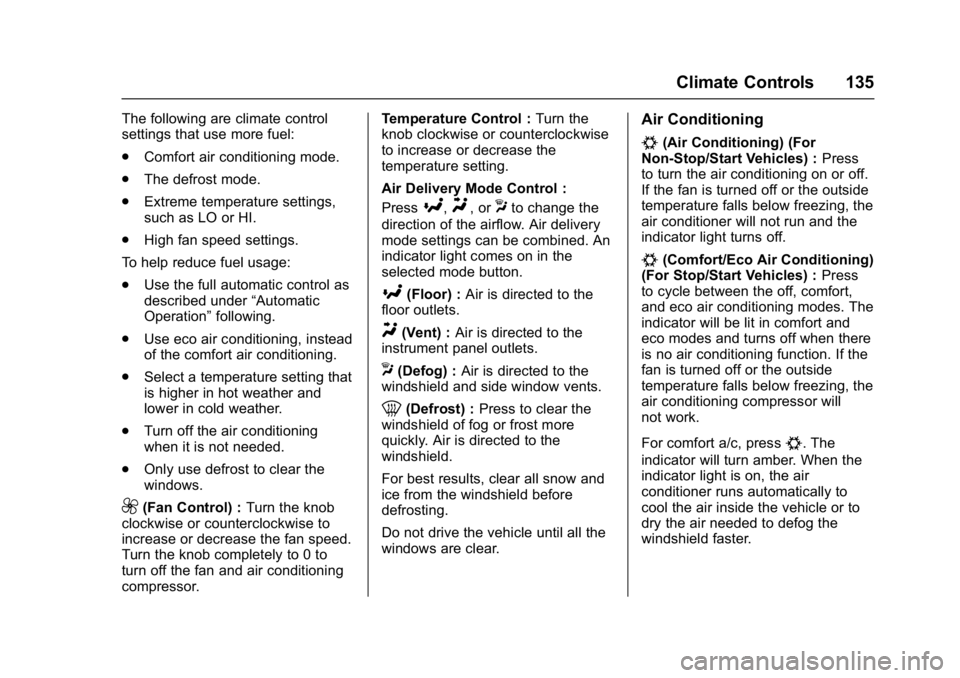
9(Fan Control) : Turn the knob
clockwise or counterclockwise to
increase or decrease the fan speed.
Turn the knob completely to 0 to
turn off the fan and air conditioning
compressor. Temperature Control :
Turn the
knob clockwise or counterclockwise
to increase or decrease the
temperature setting.
Air Delivery Mode Control :
Press
[,Y, orXto change the
direction of the airflow. Air delivery
mode settings can be combined. An
indicator light comes on in the
selected mode button.
[(Floor) : Air is directed to the
floor outlets.
Y(Vent) : Air is directed to the
instrument panel outlets.
X(Defog) : Air is directed to the
windshield and side window vents.
0(Defrost) : Press to clear the
windshield of fog or frost more
quickly. Air is directed to the
windshield.
For best results, clear all snow and
ice from the windshield before
defrosting.
Do not drive the vehicle until all the
windows are clear.
Air Conditioning
#(Air Conditioning) (For
Non-Stop/Start Vehicles) : Press
to turn the air conditioning on or off.
If the fan is turned off or the outside
temperature falls below freezing, the
air conditioner will not run and the
indicator light turns off.
#(Comfort/Eco Air Conditioning)
(For Stop/Start Vehicles) : Press
to cycle between the off, comfort,
and eco air conditioning modes. The
indicator will be lit in comfort and
eco modes and turns off when there
is no air conditioning function. If the
fan is turned off or the outside
temperature falls below freezing, the
air conditioning compressor will
not work.
For comfort a/c, press
#. The
indicator will turn amber. When the
indicator light is on, the air
conditioner runs automatically to
cool the air inside the vehicle or to
dry the air needed to defog the
windshield faster.
Page 138 of 320
Buick Encore Owner Manual (GMNA-Localizing-U.S./Canada/Mexico-
9234779) - 2016 - CRC - 1/5/16
Climate Controls 137
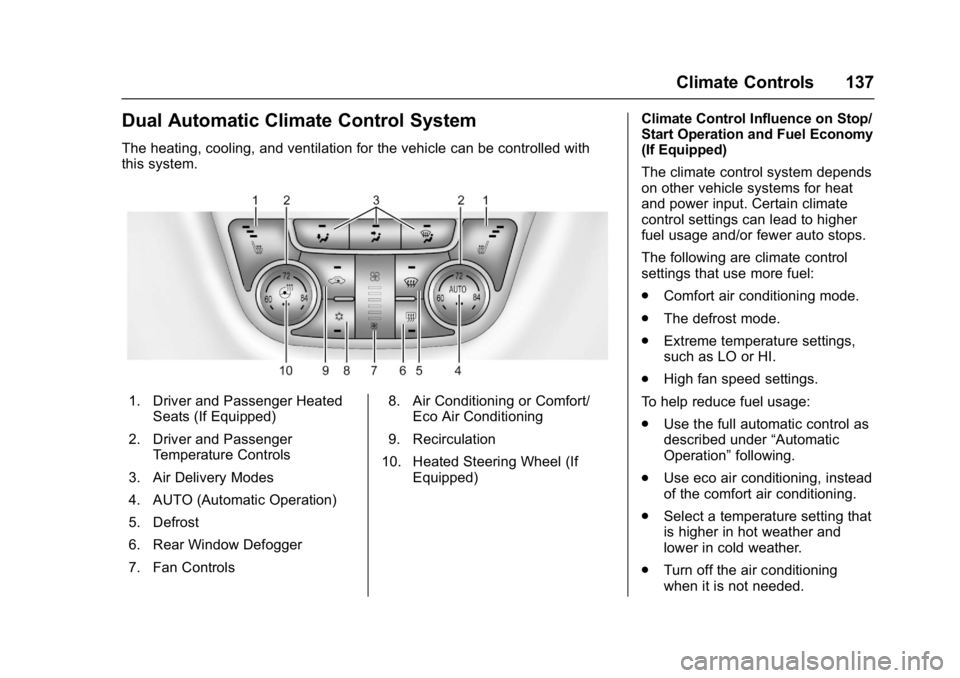
Dual Automatic Climate Control System
The heating, cooling, and ventilation for the vehicle can be controlled with
this system.
1. Driver and Passenger HeatedSeats (If Equipped)
2. Driver and Passenger Temperature Controls
3. Air Delivery Modes
4. AUTO (Automatic Operation)
5. Defrost
6. Rear Window Defogger
7. Fan Controls 8. Air Conditioning or Comfort/
Eco Air Conditioning
9. Recirculation
10. Heated Steering Wheel (If Equipped) Climate Control Influence on Stop/
Start Operation and Fuel Economy
(If Equipped)
The climate control system depends
on other vehicle systems for heat
and power input. Certain climate
control settings can lead to higher
fuel usage and/or fewer auto stops.
The following are climate control
settings that use more fuel:
.
Comfort air conditioning mode.
. The defrost mode.
. Extreme temperature settings,
such as LO or HI.
. High fan speed settings.
To help reduce fuel usage:
. Use the full automatic control as
described under “Automatic
Operation” following.
. Use eco air conditioning, instead
of the comfort air conditioning.
. Select a temperature setting that
is higher in hot weather and
lower in cold weather.
. Turn off the air conditioning
when it is not needed.
Page 139 of 320

Buick Encore Owner Manual (GMNA-Localizing-U.S./Canada/Mexico-
9234779) - 2016 - CRC - 1/5/16
138 Climate Controls
.Only use defrost to clear the
windows.
Automatic Operation
The system automatically controls
the fan speed, air delivery, air
conditioning, and recirculation in
order to heat or cool the vehicle to
the desired temperature.
When the AUTO indicator light is
on, the system is in full automatic
operation. If the air delivery mode or
fan setting is manually adjusted, the
auto indicator turns off and displays
will show the selected settings.
To place the system in automatic
mode do the following: 1. Press AUTO.
2. Set the temperature. Allow the system time to stabilize. Then
adjust the temperature as
needed for best comfort.
To improve fuel efficiency and
to cool the vehicle faster,
recirculation may be
automatically selected in warm
weather. The recirculation light will not come on. Presshto
select recirculation; press it
again to select outside air.
English units can be changed to
metric units through the Driver
Information Center (DIC). See
Driver Information Center
(DIC) 0113.
Manual Operation
9(Fan Control) : Press the
lower
9button to decrease the fan
speed. Pressing the lower button
longer turns the fan and cooling off.
Press the upper
9button to
increase the fan speed. The
selected fan speed is indicated by a
number on the display screen.
Press AUTO to return to automatic
operation.
Air Delivery Modes : Press
[,Y,
or
Xto change the direction of the
airflow. Air delivery mode settings
can be combined. An indicator light
comes on in the selected mode
button. Changing the mode cancels the
automatic operation and the system
goes into manual mode. Press
AUTO to return to automatic
operation.
[(Floor) :
Air is directed to the
floor outlets.
Y(Vent) : Air is directed to the
instrument panel outlets.
X(Defog) : Air is directed to the
windshield and side window vents.
0(Defrost) : Press to clear the
windshield of fog or frost more
quickly. Air is directed to the
windshield.
For best results, clear all snow and
ice from the windshield before
defrosting.
#(Air Conditioning) (For
Non-Stop/Start Vehicles) : Press
to turn the air conditioning on or off.
If the fan is turned off or the outside
temperature falls below freezing, the
air conditioner will not run and the
indicator light turns off.
Press AUTO to return to automatic
operation. When the indicator light
is on, the air conditioner runs
Page 141 of 320
Buick Encore Owner Manual (GMNA-Localizing-U.S./Canada/Mexico-
9234779) - 2016 - CRC - 1/5/16
140 Climate Controls
10 minutes. At higher speeds, the
rear window defogger may stay on
continuously.
For vehicles with heated outside
rearview mirrors, they turn on when
the rear window defogger button is
on and help to clear fog or frost from
the surface of the mirrors. See
Heated Mirrors036.
Caution
Do not try to clear frost or other
material from the inside of the
front windshield and rear window
with a razor blade or anything
else that is sharp. This may
damage the rear window
defogger grid and affect the
radio's ability to pick up stations
clearly. The repairs would not be
covered by the vehicle warranty.
MorL(Heated Seats, If
Equipped) : Press to turn the
heated seats on or off. See Heated
Front Seats 047.
((Heated Steering Wheel, If
Equipped) : Press to turn the
heated steering wheel on or off. See
Heated Steering Wheel 095.
Remote Start Climate Control
Operation : For vehicles with the
remote vehicle start feature, the
climate control system may run
when the vehicle is started remotely.
The system uses the driver ’s
previous settings to heat or cool
the inside of the vehicle. The rear
defog may come on during remote
start based on cold ambient
conditions. The rear defog indicator
light does not come on during a
remote start. If the vehicle has front
heated seats, they may come on
during a remote start. The heated
seat indicator lights do not come on
during a remote start. See Remote
Vehicle Start 029 and Heated Front
Seats 047.Sensors
The solar sensor, located on top of
the instrument panel near the
windshield, monitors the solar heat.
The climate control system uses the
sensor information to adjust the
temperature, fan speed,
recirculation, and air delivery mode
for best comfort.
If the sensor is covered, the
automatic climate control system
may not work properly.
Page 146 of 320
Buick Encore Owner Manual (GMNA-Localizing-U.S./Canada/Mexico-
9234779) - 2016 - CRC - 1/5/16
Driving and Operating 145
.Designate a front seat
passenger to handle potential
distractions.
. Become familiar with vehicle
features before driving, such as
programming favorite radio
stations and adjusting climate
control and seat settings.
Program all trip information into
any navigation device prior to
driving.
. Wait until the vehicle is parked
to retrieve items that have fallen
to the floor.
. Stop or park the vehicle to tend
to children.
. Keep pets in an appropriate
carrier or restraint.
. Avoid stressful conversations
while driving, whether with a
passenger or on a cell phone.
{Warning
Taking your eyes off the road too
long or too often could cause a
crash resulting in injury or death.
Focus your attention on driving. Refer to the infotainment section for
more information on using that
system. Refer to the infotainment
manual for more information on the
navigation system, if equipped,
including pairing and using a cell
phone.
Defensive Driving
Defensive driving means
“always
expect the unexpected.” The first
step in driving defensively is to wear
the safety belt. See Safety
Belts 053.
. Assume that other road users
(pedestrians, bicyclists, and
other drivers) are going to be
careless and make mistakes.
Anticipate what they might do
and be ready.
. Allow enough following distance
between you and the driver in
front of you.
. Focus on the task of driving.
Drunk Driving
Death and injury associated with
drinking and driving is a global
tragedy.
{Warning
Drinking and then driving is very
dangerous. Your reflexes,
perceptions, attentiveness, and
judgment can be affected by even
a small amount of alcohol. You
can have a serious —or even
fatal —collision if you drive after
drinking.
Do not drink and drive or ride with
a driver who has been drinking.
Ride home in a cab; or if you are
with a group, designate a driver
who will not drink.
Control of a Vehicle
Braking, steering, and accelerating
are important factors in helping to
control a vehicle while driving.
Page 159 of 320
Buick Encore Owner Manual (GMNA-Localizing-U.S./Canada/Mexico-
9234779) - 2016 - CRC - 1/5/16
158 Driving and Operating
then stops again, do the same
thing. This clears the extra
gasoline from the engine. Do
not race the engine
immediately after starting it.
Operate the engine and
transmission gently until the oil
warms up and lubricates all
moving parts.
Stop/Start System
{Warning
Exiting the vehicle without first
shifting into P (Park) may cause
the vehicle to move. You or others
may be injured. Because the
vehicle has the auto engine stop/
start feature, the vehicle's engine
might seem to be shut off;
however, once the brake pedal is
released, the engine will start up
again.
Shift to P (Park) and turn the
ignition to LOCK/OFF, before
exiting the vehicle.The stop/start system helps to save
fuel and to reduce the exhaust
emissions.
Auto Engine Stop/Start
When the brakes are applied and
the vehicle is at a complete stop,
the engine may turn off. When
stopped, the tachometer displays
AUTO STOP. See
Tachometer
0 102. When the brake pedal is
released or the accelerator pedal
pushed, the engine will restart.
Auto Stop may be deactivated if:
. A minimum vehicle speed is not
reached.
. The engine or transmission is
not at the required operating
temperature.
. The shift lever is in any gear
other than D (Drive).
. The battery charge is low. .
The interior comfort level has not
reached the required level for
the climate control system or
defog settings. See Dual
Automatic Climate Control
System 0137.
. The Auto Stop time is greater
than two minutes.
Engine Heater
Vehicles with the 1.4L engine may
have an engine heater. The engine
heater can help in cold weather
conditions at or below −18 °C (0 °F)
for easier starting and better fuel
economy during engine warm-up.
Plug in the heater at least four hours
before starting the vehicle. An
internal thermostat in the plug-end
of the cord will prevent engine
heater operation at temperatures
above −18 °C (0 °F).