signals BUICK ENCORE 2016 Owner's Manual
[x] Cancel search | Manufacturer: BUICK, Model Year: 2016, Model line: ENCORE, Model: BUICK ENCORE 2016Pages: 320, PDF Size: 4.75 MB
Page 8 of 320

Buick Encore Owner Manual (GMNA-Localizing-U.S./Canada/Mexico-
9234779) - 2016 - CRC - 1/5/16
In Brief 7
1.Air Vents 0141.
2. Turn Signal Lever. See Turn
and Lane-Change
Signals 0129.
Headlamp High/Low-Beam
Changer 0127.
3. Instrument Cluster 0101.
4. Driver Information Center (DIC) Display. See Driver Information
Center (DIC) 0113.
5. Windshield Wiper/Washer 095.
Rear Window Wiper/
Washer 097.
6. Traction Control/Electronic
Stability Control 0168.
Hazard Warning
Flashers 0128.
Passenger Airbag Status
Indicator. See Passenger
Sensing System 065.
7. Light Sensor. See Automatic
Headlamp System 0128.
8. Infotainment 0133.
9. Instrument Panel Storage 089. 10. Shift Lever. See
Automatic
Transmission 0164.
11. Auxiliary Input Jack. See the Infotainment Manual.
12. Power Outlets 098.
13. Parking Assist 0175 (If
Equipped).
Lane Departure Warning
(LDW) 0180 (If Equipped).
14. Climate Control Systems 0134
or Dual Automatic Climate
Control System 0137 (If
Equipped).
15. Ignition Positions 0155.
16. Steering Wheel Controls 095.
17. Horn 095.
18. Steering Wheel
Adjustment 095.
19. Cruise Control 0170.
Forward Collision Alert (FCA)
System 0177 (If Equipped).
20. Instrument Panel Storage 089. 21. Data Link Connector (DLC)
(Out of View). See Malfunction
Indicator Lamp (Check Engine
Light) 0106.
22. Hood Release. See Hood 0190.
23. Exterior Lamp Controls 0126.
Instrument Panel Illumination
Control 0130.
Front Fog Lamps 0129 (If
Equipped).
Page 28 of 320
Buick Encore Owner Manual (GMNA-Localizing-U.S./Canada/Mexico-
9234779) - 2016 - CRC - 1/5/16
Keys, Doors, and Windows 27
The hazard warning flashers may
flash and/or the horn may sound to
indicate locking. See“Remote Lock/
Unlock/Start” underVehicle
Personalization 0121.
If the driver door is open when
Qis
pressed and Open Door Anti Lock
Out is enabled through vehicle
personalization, all doors will lock
and then the driver door will unlock.
See “Remote Lock/Unlock/Start”
under Vehicle
Personalization 0121.
Pressing
Qmay also arm the
theft-deterrent system. See Vehicle
Alarm System 033.
K(Unlock) : Press to unlock the
driver door, all doors or, if equipped,
the locking fuel door. See “Remote
Lock/Unlock/Start” underVehicle
Personalization 0121.
The hazard warning flashers will
flash to indicate unlocking. See
“Remote Lock/Unlock/Start” under
Vehicle Personalization 0121.
Pressing
Kwill disarm the
theft-deterrent system. See Vehicle
Alarm System 033.
7(Vehicle Locator/Panic
Alarm) : If equipped, press and hold
briefly to initiate vehicle locator. The
exterior lamps flash and the horn
chirps three times.
Press and hold
7for at least
three seconds to sound the panic
alarm. The horn sounds and the
turn signals flash for 30 seconds,
or until
7is pressed again or the
key is placed in the ignition and
turned to ACC/ACCESSORY or
ON/RUN.
/(Remote Vehicle Start) :
If equipped, press
Qand then press
and hold
/for several seconds to
start the engine from outside the
vehicle using the RKE transmitter.
See Remote Vehicle Start 029.
The buttons on the keys are
disabled when there is a key in the
ignition.
Programming Transmitters to
the Vehicle
Only RKE transmitters programmed
to this vehicle will work. If a
transmitter is lost or stolen, a replacement can be purchased and
programmed through your dealer.
When the replacement transmitter is
programmed to this vehicle, all
remaining transmitters must also be
reprogrammed. Any lost or stolen
transmitters will no longer work
once the new transmitter is
programmed.
Programming with a Recognized
Transmitter
To program a new key:
1. Insert the original, already programmed key in the ignition
and turn the key to the ON/
RUN position.
2. Turn the key to LOCK/OFF, and remove the key.
3. Insert the new key to be programmed and turn it to the
ON/RUN position within
five seconds.
The security light will turn off
once the key has been
programmed.
4. Repeat Steps 1–3 if additional keys are to be programmed.
Page 35 of 320
Buick Encore Owner Manual (GMNA-Localizing-U.S./Canada/Mexico-
9234779) - 2016 - CRC - 1/5/16
34 Keys, Doors, and Windows
On Solid :Vehicle is secured
during the delay to arm the system.
Fast Flast : Vehicle is unsecured.
A door, the liftgate, or the hood
is open.
Slow Flash : Alarm system is
armed.
Arming the Alarm System
1. Turn off the vehicle.
2. Lock the vehicle in one of two ways:
.Use the RKE transmitter.
. With a door open, press
Q
on the interior of the door.
3. After 30 seconds the alarm system will arm, and the
indicator light will begin to
slowly flash indicating the
alarm system is operating.
Pressing
Qon the RKE
transmitter a second time will
bypass the 30-second delay
and immediately arm the alarm
system. The vehicle alarm system will not
arm if the doors are locked with
the key.
If any door or the hood is opened
without first unlocking with the RKE
transmitter, the horn will chirp and
the lights will flash to indicate
pre-alarm. If the vehicle is not
started, or the door is not unlocked
by pressing
Kon the RKE
transmitter during the 10–second
pre-alarm, the alarm will be
activated.
The alarm will also be activated if
any door or the the hood is opened
without first disarming the system.
When the alarm is activated, the
turn signals flash and the horn
sounds for about 30 seconds. The
alarm system will then re-arm to
monitor for the next unauthorized
event.
Disarming the Alarm System
To disarm the alarm system or turn
off the alarm if it has been activated:
. Press
Kon the RKE transmitter.
. Start the vehicle. Avoid setting off the alarm by
accident by locking the vehicle after
all occupants have left the vehicle
and all doors are closed.
To avoid setting off the alarm by
accident:
.
Lock the vehicle after all
occupants have exited.
. Always unlock the vehicle with
the RKE transmitter.
Unlocking the driver door with the
key will not disarm the system or
turn off the alarm.
How to Detect a Tamper
Condition
IfKis pressed and the horn chirps
and the lights flash three times, an
attempted break-in has occurred
while the system was armed.
Immobilizer
See Radio Frequency
Statement 0288.
Page 127 of 320
Buick Encore Owner Manual (GMNA-Localizing-U.S./Canada/Mexico-
9234779) - 2016 - CRC - 1/5/16
126 Lighting
Lighting
Exterior Lighting
Exterior Lamp Controls . . . . . . . 126
Headlamp High/Low-BeamChanger . . . . . . . . . . . . . . . . . . . . 127
Flash-to-Pass . . . . . . . . . . . . . . . . 127
Daytime Running Lamps (DRL) . . . . . . . . . . . . . . . 127
Automatic Headlamp System . . . . . . . . . . . . . . . . . . . . . . 128
Hazard Warning Flashers . . . . . 128
Turn and Lane-Change Signals . . . . . . . . . . . . . . . . . . . . . . 129
Front Fog Lamps . . . . . . . . . . . . . 129
Interior Lighting
Instrument Panel Illumination Control . . . . . . . . . . . . . . . . . . . . . . 130
Courtesy Lamps . . . . . . . . . . . . . . 130
Dome Lamps . . . . . . . . . . . . . . . . . 130
Reading Lamps . . . . . . . . . . . . . . 131
Lighting Features
Entry Lighting . . . . . . . . . . . . . . . . 131
Exit Lighting . . . . . . . . . . . . . . . . . . 131
Battery Power Protection . . . . . 132
Exterior Lighting
Exterior Lamp Controls
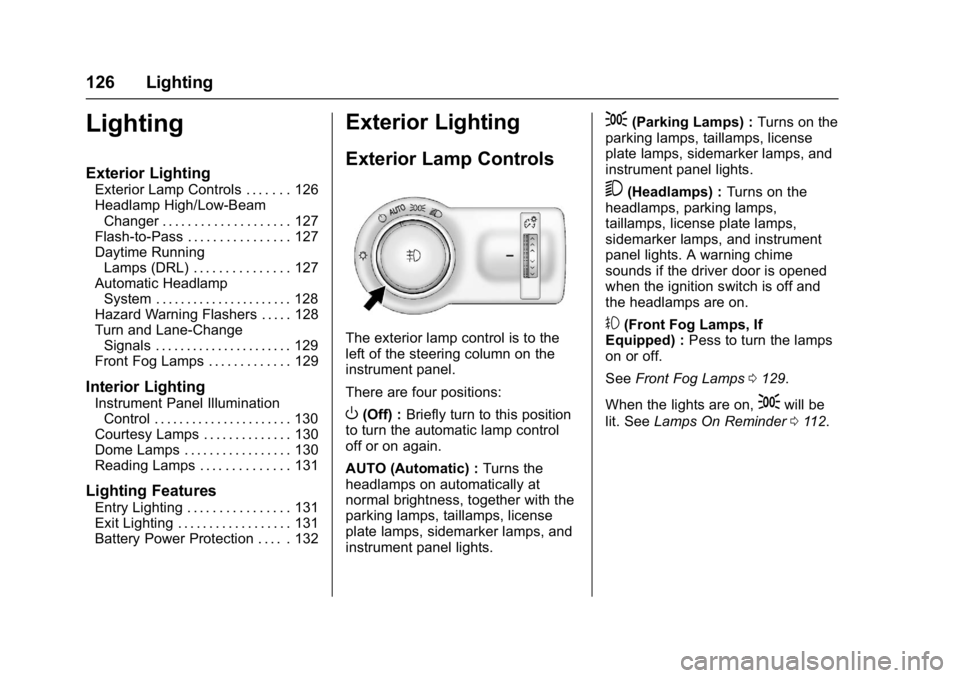
The exterior lamp control is to the
left of the steering column on the
instrument panel.
There are four positions:
O(Off) : Briefly turn to this position
to turn the automatic lamp control
off or on again.
AUTO (Automatic) : Turns the
headlamps on automatically at
normal brightness, together with the
parking lamps, taillamps, license
plate lamps, sidemarker lamps, and
instrument panel lights.
;(Parking Lamps) : Turns on the
parking lamps, taillamps, license
plate lamps, sidemarker lamps, and
instrument panel lights.
5(Headlamps) : Turns on the
headlamps, parking lamps,
taillamps, license plate lamps,
sidemarker lamps, and instrument
panel lights. A warning chime
sounds if the driver door is opened
when the ignition switch is off and
the headlamps are on.
#(Front Fog Lamps, If
Equipped) : Pess to turn the lamps
on or off.
See Front Fog Lamps 0129.
When the lights are on,
;will be
lit. See Lamps On Reminder 0112.
Page 130 of 320
Buick Encore Owner Manual (GMNA-Localizing-U.S./Canada/Mexico-
9234779) - 2016 - CRC - 1/5/16
Lighting 129
Turn and Lane-Change
Signals
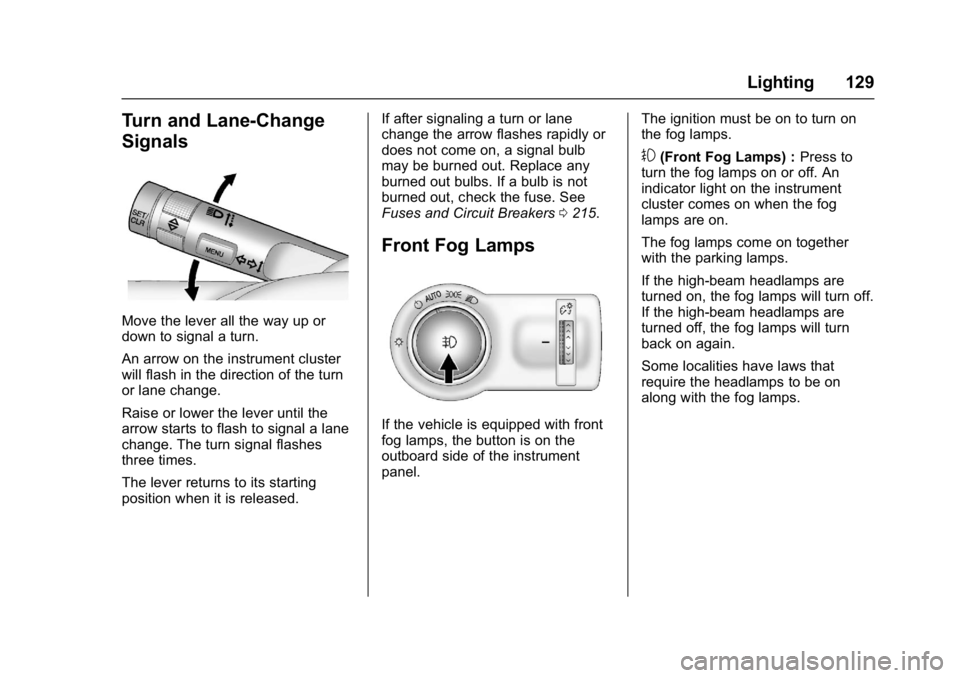
Move the lever all the way up or
down to signal a turn.
An arrow on the instrument cluster
will flash in the direction of the turn
or lane change.
Raise or lower the lever until the
arrow starts to flash to signal a lane
change. The turn signal flashes
three times.
The lever returns to its starting
position when it is released.If after signaling a turn or lane
change the arrow flashes rapidly or
does not come on, a signal bulb
may be burned out. Replace any
burned out bulbs. If a bulb is not
burned out, check the fuse. See
Fuses and Circuit Breakers
0215.
Front Fog Lamps
If the vehicle is equipped with front
fog lamps, the button is on the
outboard side of the instrument
panel. The ignition must be on to turn on
the fog lamps.
#(Front Fog Lamps) :
Press to
turn the fog lamps on or off. An
indicator light on the instrument
cluster comes on when the fog
lamps are on.
The fog lamps come on together
with the parking lamps.
If the high-beam headlamps are
turned on, the fog lamps will turn off.
If the high-beam headlamps are
turned off, the fog lamps will turn
back on again.
Some localities have laws that
require the headlamps to be on
along with the fog lamps.
Page 180 of 320

Buick Encore Owner Manual (GMNA-Localizing-U.S./Canada/Mexico-
9234779) - 2016 - CRC - 1/5/16
Driving and Operating 179
the corresponding outside side
mirror and will flash if the turn signal
is on.
{Warning
SBZA does not alert the driver to
vehicles rapidly approaching
outside of the side blind zones,
pedestrians, bicyclists,
or animals. It may not provide
alerts when changing lanes under
all driving conditions. Failure to
use proper care when changing
lanes may result in injury, death,
or vehicle damage. Before
making a lane change, always
check mirrors, glance over your
shoulder, and use the turn
signals.SBZA Detection Zones
The SBZA sensor covers a zone of
approximately one lane over from
both sides of the vehicle, or 3.5 m
(11 ft). The height of the zone is
approximately between 0.5 m (1.5 ft)
and 2 m (6 ft) off the ground. This
zone starts at approximately the
middle of the vehicle and goes back
5 m (16 ft).
How the System Works
The SBZA symbol lights up in the
side mirrors when the system
detects a moving vehicle in the next
lane over that is in the side blind
zone. This indicates it may be unsafe to change lanes. Before
making a lane change, check the
SBZA display, check mirrors, glance
over your shoulder, and use the turn
signals.
Left Side Mirror
DisplayRight Side Mirror Display
When the vehicle is started, both
outside mirror SBZA displays will
briefly come on to indicate the
system is operating. When the
vehicle is in a forward gear, the left-
or right-side mirror display will light
up if a moving vehicle is detected in
that blind zone. If the turn signal is
activated in the same direction of a
detected vehicle, this display will
flash as an extra warning not to
change lanes.
Page 293 of 320
Buick Encore Owner Manual (GMNA-Localizing-U.S./Canada/Mexico-
9234779) - 2016 - CRC - 1/5/16
292 OnStar
OnStar
OnStar Overview
OnStar Overview . . . . . . . . . . . . . 292
OnStar Services
Emergency . . . . . . . . . . . . . . . . . . . 293
Security . . . . . . . . . . . . . . . . . . . . . . 293
Navigation . . . . . . . . . . . . . . . . . . . . 293
Connections . . . . . . . . . . . . . . . . . . 294
Diagnostics . . . . . . . . . . . . . . . . . . . 296
OnStar Additional Information
OnStar AdditionalInformation . . . . . . . . . . . . . . . . . . 296
OnStar Additional Information . . . . . . . . . . . . . . . . . . 301
OnStar Overview
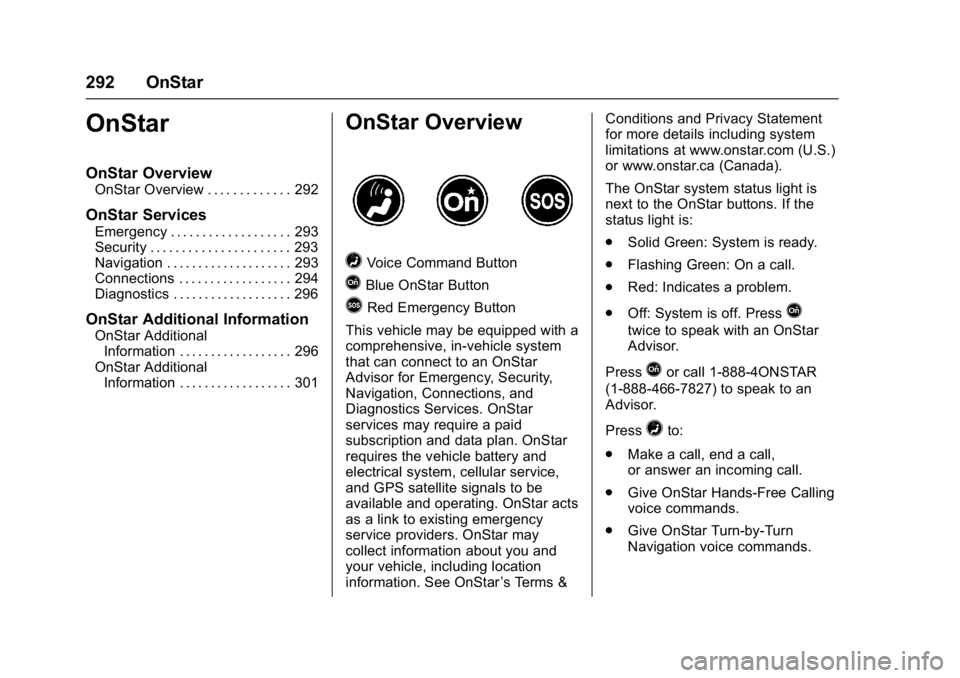
=Voice Command Button
QBlue OnStar Button
>Red Emergency Button
This vehicle may be equipped with a
comprehensive, in-vehicle system
that can connect to an OnStar
Advisor for Emergency, Security,
Navigation, Connections, and
Diagnostics Services. OnStar
services may require a paid
subscription and data plan. OnStar
requires the vehicle battery and
electrical system, cellular service,
and GPS satellite signals to be
available and operating. OnStar acts
as a link to existing emergency
service providers. OnStar may
collect information about you and
your vehicle, including location
information. See OnStar ’s Terms &Conditions and Privacy Statement
for more details including system
limitations at www.onstar.com (U.S.)
or www.onstar.ca (Canada).
The OnStar system status light is
next to the OnStar buttons. If the
status light is:
.
Solid Green: System is ready.
. Flashing Green: On a call.
. Red: Indicates a problem.
. Off: System is off. PressQ
twice to speak with an OnStar
Advisor.
Press
Qor call 1-888-4ONSTAR
(1-888-466-7827) to speak to an
Advisor.
Press
=to:
. Make a call, end a call,
or answer an incoming call.
. Give OnStar Hands-Free Calling
voice commands.
. Give OnStar Turn-by-Turn
Navigation voice commands.
Page 298 of 320

Buick Encore Owner Manual (GMNA-Localizing-U.S./Canada/Mexico-
9234779) - 2016 - CRC - 1/5/16
OnStar 297
Reactivation for Subsequent
Owners
PressQand follow the prompts to
speak to an Advisor as soon as
possible. The Advisor will update
vehicle records and explain OnStar
service options.
How OnStar Service Works
Automatic Crash Response,
Emergency Services, Crisis Assist,
Stolen Vehicle Assistance,
Advanced Diagnostics, Remote
Services, Roadside Assistance,
Turn-by-Turn Navigation, and
Hands-Free Calling are available on
most vehicles. Not all OnStar
services are available everywhere
or on all vehicles. For more
information, a full description of
OnStar services, system limitations,
and OnStar terms and conditions:
. Call 1-888-4ONSTAR
(1-888-466-7827).
. See www.onstar.com (U.S.).
. See www.onstar.ca (Canada).
. Call TTY 1-877-248-2080. .
Press
Qto speak with an
Advisor.
OnStar services cannot work unless
the vehicle is in a place where
OnStar has an agreement with a
wireless service provider for service
in that area. The wireless service
provider must also have coverage,
network capacity, reception, and
technology compatible with OnStar
services. Service involving location
information about the vehicle cannot
work unless GPS signals are
available, unobstructed, and
compatible with the OnStar
hardware. OnStar services may not
work if the OnStar equipment is not
properly installed or it has not been
properly maintained. If equipment or
software is added, connected,
or modified, OnStar services may
not work. Other problems beyond
the control of OnStar —such as
hills, tall buildings, tunnels, weather,
electrical system design and
architecture of the vehicle, damage
to the vehicle in a crash, or wireless
phone network congestion or
jamming —may prevent service. See
Radio Frequency
Statement 0288.
Services for People with
Disabilities
Advisors provide services to help
Subscribers with physical disabilities
and medical conditions.
Press
Qto help:
. Locate a gas station with an
attendant to pump gas.
. Find a hotel, restaurant, etc.,
that meets accessibility needs.
. Provide directions to the closest
hospital or pharmacy in urgent
situations.
TTY Users
OnStar has the ability to
communicate to deaf,
hard-of-hearing, or speech-impaired
customers while in the vehicle. The
available dealer-installed TTY
system can provide in-vehicle
access to all OnStar services,
except Virtual Advisor and OnStar
Turn-by-Turn Navigation.
Page 299 of 320

Buick Encore Owner Manual (GMNA-Localizing-U.S./Canada/Mexico-
9234779) - 2016 - CRC - 1/5/16
298 OnStar
OnStar Personal Identification
Number (PIN)
A PIN is needed to access some
OnStar services. The PIN will need
to be changed the first time when
speaking with an Advisor. To
change the OnStar PIN, contact an
OnStar Advisor by pressing
Qor
calling 1-888-4ONSTAR.
Warranty
OnStar equipment may be
warranted as part of the vehicle
warranty.
Languages
The vehicle can be programmed to
respond in multiple languages.
Press
Qand ask for an Advisor.
Advisors are available in English,
Spanish, and French. Available
languages may vary by country.
Potential Issues
OnStar cannot perform Remote
Door Unlock or Stolen Vehicle
Assistance after the vehicle has
been off continuously for five days
without an ignition cycle. If the vehicle has not been started for
five days, OnStar can contact
Roadside Assistance or a locksmith
to help gain access to the vehicle.
Global Positioning
System (GPS)
.
Obstruction of the GPS can
occur in a large city with tall
buildings; in parking garages;
around airports; in tunnels and
underpasses; or in an area with
very dense trees. If GPS signals
are not available, the OnStar
system should still operate to
call OnStar. However, OnStar
could have difficulty identifying
the exact location.
. In emergency situations, OnStar
can use the last stored GPS
location to send to emergency
responders.
A temporary loss of GPS can cause
loss of the ability to send a
Turn-by-Turn Navigation route. The
Advisor may give a verbal route or
may ask for a call back after the
vehicle is driven into an open area.
Cellular and GPS Antennas
Cellular reception is required for
OnStar to send remote signals to
the vehicle. Do not place items over
or near the antenna to prevent
blocking cellular and GPS signal
reception.
Unable to Connect to OnStar
Message
If there is limited cellular coverage
or the cellular network has reached
maximum capacity, this message
may come on. Press
Qto try the
call again or try again after driving a
few miles into another cellular area.
Vehicle and Power Issues
OnStar services require a vehicle
electrical system, wireless service,
and GPS satellite technologies to be
available and operating for features
to function properly. These systems
may not operate if the battery is
discharged or disconnected.
Page 302 of 320

Buick Encore Owner Manual (GMNA-Localizing-U.S./Canada/Mexico-
9234779) - 2016 - CRC - 1/5/16
OnStar 301
self-extracting archive; that is
permitted without inclusion of
this license, as long as the
normal SFX banner has not
been removed from the binary
or disabled.
3. Altered versions–including, but not limited to, ports to new
operating systems, existing
ports with new graphical
interfaces, and dynamic,
shared, or static library
versions–must be plainly
marked as such and must not
be misrepresented as being
the original source. Such
altered versions also must not
be misrepresented as being
Info-ZIP releases–including,
but not limited to, labeling of
the altered versions with the
names “Info-ZIP” (or any
variation thereof, including, but
not limited to, different
capitalizations), “Pocket
UnZip,” “WiZ” or“MacZip”
without the explicit permission
of Info-ZIP. Such altered
versions are further prohibited
from misrepresentative use of the Zip-Bugs or Info-ZIP e-mail
addresses or of the
Info-ZIP URL(s).
4. Info-ZIP retains the right to use the names “Info-ZIP,” “Zip,”
“UnZip,” “UnZipSFX,” “WiZ,”
“Pocket UnZip,” “Pocket Zip,”
and “MacZip” for its own
source and binary releases.
OnStar Additional
Information
Transferring Service
PressQto request account transfer
eligibility information. The Advisor
can cancel or change account
information.
Reactivation for Subsequent
Owners
PressQand follow the prompts to
speak to an Advisor as soon as
possible. The Advisor will update
vehicle records and will explain
OnStar service offers and options.
How OnStar Service Works
Automatic Crash Response,
Emergency Services, Crisis Assist,
Stolen Vehicle Assistance, Vehicle
Diagnostics, Remote Services,
Roadside Assistance, and
Turn-by-Turn Navigation are
available on most vehicles. Not all
OnStar services are available
everywhere or on all vehicles. For
more information, a full description
of OnStar services, system
limitations, and OnStar terms and
conditions, see www.onstar.com.mx.
OnStar service cannot work unless
your vehicle is in a place where
OnStar has an agreement with a
wireless service provider for service
in that area, and the wireless
service provider has coverage,
network capacity, reception, and
technology compatible with OnStar
service. Service involving location
information about the vehicle cannot
work unless GPS signals are
available, unobstructed, and
compatible with the OnStar
hardware. OnStar service may not
work if the OnStar equipment is not
properly installed or it has not been