side mirror BUICK ENCORE 2019 User Guide
[x] Cancel search | Manufacturer: BUICK, Model Year: 2019, Model line: ENCORE, Model: BUICK ENCORE 2019Pages: 333, PDF Size: 5.37 MB
Page 163 of 333

Buick Encore Owner Manual (GMNA-Localizing-U.S./Canada/Mexico-
12163005) - 2019 - crc - 9/17/18
162 Driving and Operating
Blizzard Conditions
Stop the vehicle in a safe place and
signal for help. Stay with the vehicle
unless there is help nearby.
If possible, use Roadside
Assistance. SeeRoadside
Assistance Program 0299. To get
help and keep everyone in the
vehicle safe:
. Turn on the hazard warning
flashers.
. Tie a red cloth to an outside
mirror.
{Warning
Snow can trap engine exhaust
under the vehicle. This may
cause exhaust gases to get
inside. Engine exhaust contains
carbon monoxide (CO), which
cannot be seen or smelled. It can
cause unconsciousness and even
death.
If the vehicle is stuck in snow:
(Continued)
Warning (Continued)
.Clear snow from the base of
the vehicle, especially any
blocking the exhaust pipe.
. Open a window about 5 cm
(2 in) on the vehicle side
that is away from the wind,
to bring in fresh air.
. Fully open the air outlets on
or under the instrument
panel.
. Adjust the climate control
system to circulate the air
inside the vehicle and set
the fan speed to the highest
setting. See “Climate
Control Systems.”
For more information about CO,
see Engine Exhaust 0175.
To save fuel, run the engine for
short periods to warm the vehicle
and then shut the engine off and
partially close the window. Moving
about to keep warm also helps. If it takes time for help to arrive,
when running the engine, push the
accelerator pedal slightly so the
engine runs faster than the idle
speed. This keeps the battery
charged to restart the vehicle and to
signal for help with the headlamps.
Do this as little as possible, to
save fuel.
If the Vehicle Is Stuck
Slowly and cautiously spin the
wheels to free the vehicle when
stuck in sand, mud, ice, or snow.
If stuck too severely for the traction
system to free the vehicle, turn the
traction system off and use the
rocking method. See
Traction
Control/Electronic Stability Control
0 181.
{Warning
If the vehicle's tires spin at high
speed, they can explode, and you
or others could be injured. The
vehicle can overheat, causing an
(Continued)
Page 188 of 333

Buick Encore Owner Manual (GMNA-Localizing-U.S./Canada/Mexico-
12163005) - 2019 - crc - 9/17/18
Driving and Operating 187
.Front and rear bumpers and the
area below the bumpers
. Front grille and headlamps .
Front camera lens in the front
grille or near the front emblem
. Front side and rear side panels
. Outside of the windshield in front
of the rearview mirrors
. Side camera lens on the bottom
of the outside mirrors
. Rear side corner bumpers
. Rear Vision Camera above the
license plate
Rear Vision
Camera (RVC)
The RVC can assist when backing
up by displaying a view of the area
behind the vehicle.
{Warning
The camera(s) do not display
children, pedestrians, bicyclists,
crossing traffic, animals, or any
other object outside of the
cameras’ field of view, below the
bumper, or under the vehicle.
(Continued)
Warning (Continued)
Shown distances may be different
from actual distances. Do not
drive or park the vehicle using
only these camera(s). Always
check behind and around the
vehicle before driving. Failure to
use proper care may result in
injury, death, or vehicle damage.
An image appears on the
infotainment display when the
vehicle is shifted into R (Reverse).
The previous screen displays when
the vehicle is shifted out of
R (Reverse) after a short delay. To
return to the previous screen
sooner, press any button on the
infotainment display, shift into
P (Park), or reach a vehicle speed
of approximately 12 km/h (8 mph).
Symbols and Guidelines
The RVC may have a guideline
overlay that can help you align the
vehicle when backing into a parking
spot. Select the guidance lines
button on the camera screen to
Page 193 of 333
Buick Encore Owner Manual (GMNA-Localizing-U.S./Canada/Mexico-
12163005) - 2019 - crc - 9/17/18
192 Driving and Operating
Warning (Continued)
proper condition. Keep the
windshield, headlamps, and FCA
sensors clean and in good repair.
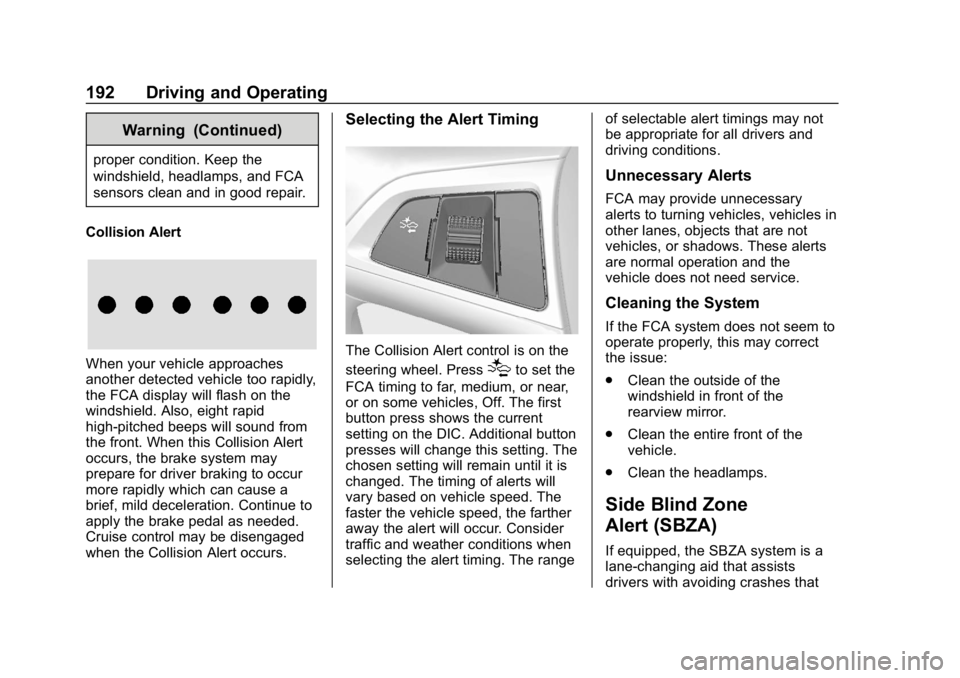
Collision Alert
When your vehicle approaches
another detected vehicle too rapidly,
the FCA display will flash on the
windshield. Also, eight rapid
high-pitched beeps will sound from
the front. When this Collision Alert
occurs, the brake system may
prepare for driver braking to occur
more rapidly which can cause a
brief, mild deceleration. Continue to
apply the brake pedal as needed.
Cruise control may be disengaged
when the Collision Alert occurs.
Selecting the Alert Timing
The Collision Alert control is on the
steering wheel. Press
[to set the
FCA timing to far, medium, or near,
or on some vehicles, Off. The first
button press shows the current
setting on the DIC. Additional button
presses will change this setting. The
chosen setting will remain until it is
changed. The timing of alerts will
vary based on vehicle speed. The
faster the vehicle speed, the farther
away the alert will occur. Consider
traffic and weather conditions when
selecting the alert timing. The range of selectable alert timings may not
be appropriate for all drivers and
driving conditions.
Unnecessary Alerts
FCA may provide unnecessary
alerts to turning vehicles, vehicles in
other lanes, objects that are not
vehicles, or shadows. These alerts
are normal operation and the
vehicle does not need service.
Cleaning the System
If the FCA system does not seem to
operate properly, this may correct
the issue:
.
Clean the outside of the
windshield in front of the
rearview mirror.
. Clean the entire front of the
vehicle.
. Clean the headlamps.
Side Blind Zone
Alert (SBZA)
If equipped, the SBZA system is a
lane-changing aid that assists
drivers with avoiding crashes that
Page 194 of 333
Buick Encore Owner Manual (GMNA-Localizing-U.S./Canada/Mexico-
12163005) - 2019 - crc - 9/17/18
Driving and Operating 193
occur with moving vehicles in the
side blind zone (or spot) areas. The
SBZA warning display will light up in
the corresponding outside side
mirror and will flash if the turn signal
is on.
{Warning
SBZA does not alert the driver to
vehicles rapidly approaching
outside of the side blind zones,
pedestrians, bicyclists,
or animals. It may not provide
alerts when changing lanes under
all driving conditions. Failure to
use proper care when changing
lanes may result in injury, death,
or vehicle damage. Before
making a lane change, always
check mirrors, glance over your
shoulder, and use the turn
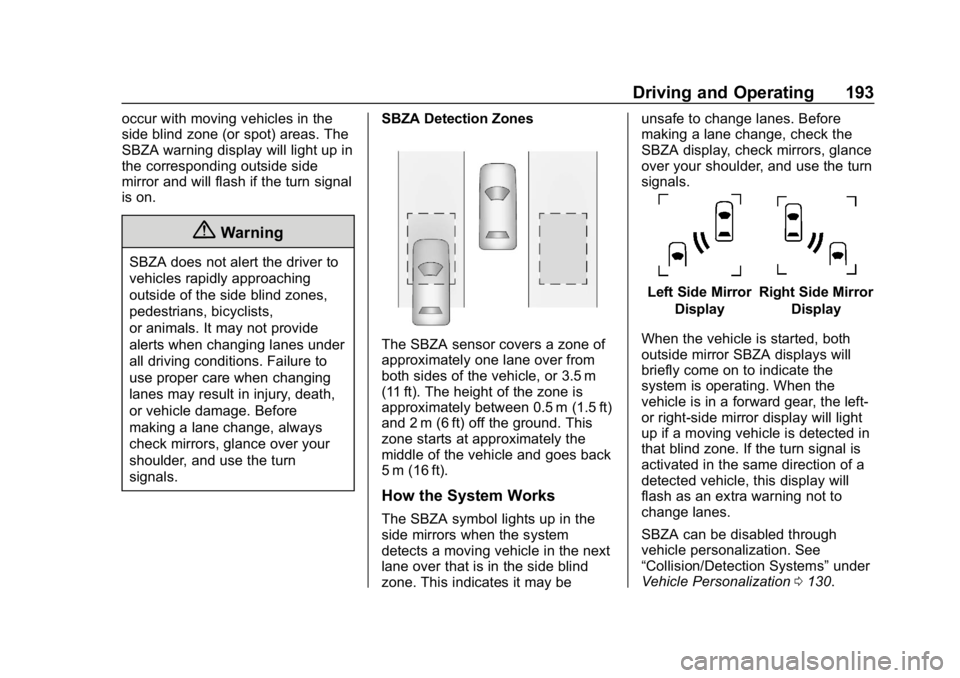
signals.SBZA Detection Zones
The SBZA sensor covers a zone of
approximately one lane over from
both sides of the vehicle, or 3.5 m
(11 ft). The height of the zone is
approximately between 0.5 m (1.5 ft)
and 2 m (6 ft) off the ground. This
zone starts at approximately the
middle of the vehicle and goes back
5 m (16 ft).
How the System Works
The SBZA symbol lights up in the
side mirrors when the system
detects a moving vehicle in the next
lane over that is in the side blind
zone. This indicates it may be unsafe to change lanes. Before
making a lane change, check the
SBZA display, check mirrors, glance
over your shoulder, and use the turn
signals.
Left Side Mirror
DisplayRight Side Mirror Display
When the vehicle is started, both
outside mirror SBZA displays will
briefly come on to indicate the
system is operating. When the
vehicle is in a forward gear, the left-
or right-side mirror display will light
up if a moving vehicle is detected in
that blind zone. If the turn signal is
activated in the same direction of a
detected vehicle, this display will
flash as an extra warning not to
change lanes.
SBZA can be disabled through
vehicle personalization. See
“Collision/Detection Systems” under
Vehicle Personalization 0130.
Page 195 of 333

Buick Encore Owner Manual (GMNA-Localizing-U.S./Canada/Mexico-
12163005) - 2019 - crc - 9/17/18
194 Driving and Operating
If SBZA is disabled by the driver,
the SBZA mirror displays will not
light up.
When the System Does Not
Seem to Work Properly
SBZA displays may not come on
when passing a vehicle quickly or
for a stopped vehicle. SBZA may
alert to objects attached to the
vehicle, such as a bicycle, or object
extending out to either side of the
vehicle. This is normal system
operation; the vehicle does not need
service.
SBZA may not always alert the
driver to vehicles in the side blind
zone, especially in wet conditions.
The system does not need to be
serviced. The system may light up
due to guardrails, signs, trees,
shrubs, and other non-moving
objects. This is normal system
operation; the vehicle does not need
service.
SBZA may not operate when the
SBZA sensors in the left or right
corners of the rear bumper are
covered with mud, dirt, snow, ice,or slush, or in heavy rainstorms. For
cleaning instructions, see "Washing
the Vehicle" under
Exterior Care
0 270. If the DIC still displays the
system unavailable message after
cleaning both sides of the vehicle
toward the rear corners of the
vehicle, see your dealer.
If the SBZA displays do not light up
when vehicles are in the blind zone
and the system is clean, the system
may need service. Take the vehicle
to your dealer.
When SBZA is disabled for any
reason other than the driver turning
it off, the Side Blind Zone Alert On
option will not be available on the
personalization menu.
Radio Frequency Information
See Radio Frequency Statement
0 305.
Lane Departure
Warning (LDW)
If equipped, LDW may help avoid
crashes due to unintentional lane
departures. It may provide an alert if the vehicle is crossing a lane
without using a turn signal in that
direction. LDW uses a camera
sensor to detect the lane markings
at speeds of 56 km/h (35 mph) or
greater.
{Warning
The LDW system does not steer
the vehicle. The LDW system
may not:
. Provide enough time to
avoid a crash.
. Detect lane markings under
poor weather or visibility
conditions. This can occur if
the windshield or
headlamps are blocked by
dirt, snow, or ice; if they are
not in proper condition; or if
the sun shines directly into
the camera.
. Detect road edges.
. Detect lanes on winding or
hilly roads.
(Continued)
Page 196 of 333

Buick Encore Owner Manual (GMNA-Localizing-U.S./Canada/Mexico-
12163005) - 2019 - crc - 9/17/18
Driving and Operating 195
Warning (Continued)
If LDW only detects lane
markings on one side of the road,
it will only warn you when
departing the lane on the side
where it has detected a lane
marking. Always keep your
attention on the road and
maintain proper vehicle position
within the lane, or vehicle
damage, injury, or death could
occur. Always keep the
windshield, headlamps, and
camera sensors clean and in
good repair. Do not use LDW in
bad weather conditions.
How the System Works
The LDW camera sensor is on the
windshield ahead of the rearview
mirror.
To turn LDW on and off, press
@on
the center stack. The indicator light
in the button comes on when LDW
is on. When LDW is on,
@is green if
LDW is available to warn of a lane
departure. If the vehicle crosses a
detected lane marking without using
the turn signal in that direction,
@
changes to amber and flashes.
Additionally, there will be three
beeps on the right or left, depending
on the lane departure direction.
When the System Does Not
Seem To Work Properly
The system may not detect lanes as
well when there are:
. Close vehicles ahead.
. Sudden lighting changes, such
as when driving through tunnels.
. Banked roads.
If the LDW system is not functioning
properly when lane markings are
clearly visible, cleaning the
windshield may help.
LDW alerts may occur due to tar
marks, shadows, cracks in the road,
temporary or construction lane
markings, or other road
imperfections. This is normal system operation; the vehicle does not need
service. Turn LDW off if these
conditions continue.
Page 234 of 333
Buick Encore Owner Manual (GMNA-Localizing-U.S./Canada/Mexico-
12163005) - 2019 - crc - 9/17/18
Vehicle Care 233
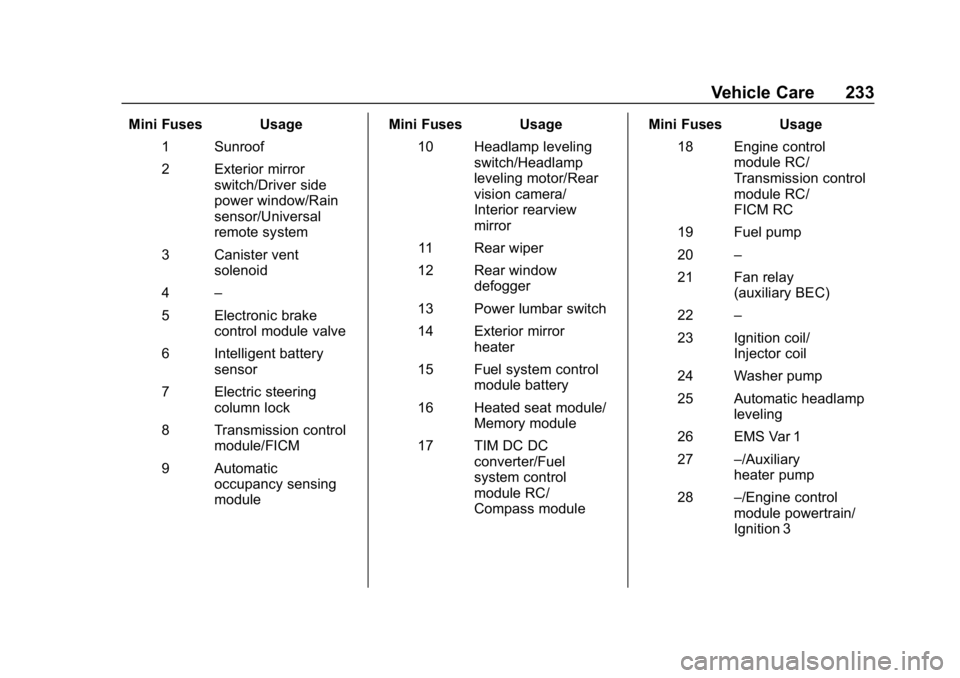
Mini Fuses Usage1 Sunroof
2 Exterior mirror switch/Driver side
power window/Rain
sensor/Universal
remote system
3 Canister vent solenoid
4 –
5 Electronic brake control module valve
6 Intelligent battery sensor
7 Electric steering column lock
8 Transmission control module/FICM
9 Automatic occupancy sensing
module Mini Fuses Usage
10 Headlamp leveling switch/Headlamp
leveling motor/Rear
vision camera/
Interior rearview
mirror
11 Rear wiper
12 Rear window defogger
13 Power lumbar switch
14 Exterior mirror heater
15 Fuel system control module battery
16 Heated seat module/ Memory module
17 TIM DC DC converter/Fuel
system control
module RC/
Compass module Mini Fuses Usage
18 Engine control module RC/
Transmission control
module RC/
FICM RC
19 Fuel pump
20 –
21 Fan relay (auxiliary BEC)
22 –
23 Ignition coil/ Injector coil
24 Washer pump
25 Automatic headlamp leveling
26 EMS Var 1
27 –/Auxiliary
heater pump
28 –/Engine control
module powertrain/
Ignition 3
Page 329 of 333

Buick Encore Owner Manual (GMNA-Localizing-U.S./Canada/Mexico-
12163005) - 2019 - crc - 9/17/18
328 Index
Pregnancy, Using Seat Belts . . . . 66
PrivacyVehicle Data Recording . . . . . . . 307
Program Courtesy Transportation . . . . . . 301
Prohibited Fuels . . . . . . . . . . . . . . . . 196
Proposition 65 Warning,
California . . . . . . . . . . . .202, 222, 264, Back Cover
Publication Ordering
Information . . . . . . . . . . . . . . . . . . . . 304
R
Radio Frequency Statement . . . . 305
Reading Lamps . . . . . . . . . . . . . . . . . 144
Rear Seat Armrest . . . . . . . . . . . . . . . 60
Rear Seats . . . . . . . . . . . . . . . . . . . . . . 56
Rear Vision Camera (RVC) . . . . . 187
Rear Window Washer/Wiper . . . . 107
Rearview Mirrors . . . . . . . . . . . . . . . . 42Automatic Dimming . . . . . . . . . . . . . 43
Reclining Seatbacks . . . . . . . . . . . . . 50
Recommended Fuel . . . . . . . . . . . . . . . . . . . . . . . . . . 196
Recommended Fluids and
Lubricants . . . . . . . . . . . . . . . . . . . . . 289 Records
Maintenance . . . . . . . . . . . . . . . . . . 291
Recreational Vehicle Towing . . . . 268
Reimbursement Program, GM Mobility . . . . . . . . . . . . . . . . . . . 299
Remote Keyless Entry (RKE) System . . . . . . . . . . . . . . . . . . . . . . . . . 27
Remote Vehicle Start . . . . . . . . . . . . 33
Replacement Parts Airbags . . . . . . . . . . . . . . . . . . . . . . . . . 80
Maintenance . . . . . . . . . . . . . . . . . . 290
Replacing Airbag System . . . . . . . . 80
Replacing LATCH System Parts after a Crash . . . . . . . . . . . . . 94
Replacing Seat Belt System Parts after a Crash . . . . . . . . . . . . . 67
Reporting Safety Defects Canadian Government . . . . . . . . 306
General Motors . . . . . . . . . . . . . . . 306
U.S. Government . . . . . . . . . . . . . 305
Restraints
Where to Put . . . . . . . . . . . . . . . . . . . 86
Retained Accessory Power (RAP) . . . . . . . . . . . . . . . . . . 172
Reverse Tilt Mirrors . . . . . . . . . . . . . . 42
Roads
Driving, Wet . . . . . . . . . . . . . . . . . . 160 Roadside Assistance
Program . . . . . . . . . . . . . . . . . . . . . . . 299
Roof Sunroof . . . . . . . . . . . . . . . . . . . . . . . . . 45
Roof Rack System . . . . . . . . . . . . . . 103
Rotation, Tires . . . . . . . . . . . . . . . . . . 251
Routing, Engine Drive Belt . . . . . . 294
Running the Vehicle While Parked . . . . . . . . . . . . . . . . . . . . . . . . 176
S
Safety Defects ReportingCanadian Government . . . . . . . . 306
General Motors . . . . . . . . . . . . . . . 306
U.S. Government . . . . . . . . . . . . . 305
Safety Locks . . . . . . . . . . . . . . . . . . . . . 37
Safety System Check . . . . . . . . . . . . 67
Scheduling Appointments . . . . . . . 301
Seat Belts . . . . . . . . . . . . . . . . . . . . . . . 60 Care . . . . . . . . . . . . . . . . . . . . . . . . . . . . 67
Extender . . . . . . . . . . . . . . . . . . . . . . . . 66
How to Wear Seat BeltsProperly . . . . . . . . . . . . . . . . . . . . . . . 61
Lap-Shoulder Belt . . . . . . . . . . . . . . 63
Reminders . . . . . . . . . . . . . . . . . . . . .116
Replacing after a Crash . . . . . . . . 67
Use During Pregnancy . . . . . . . . . . 66