dic BUICK ENCORE 2019 Owner's Manual
[x] Cancel search | Manufacturer: BUICK, Model Year: 2019, Model line: ENCORE, Model: BUICK ENCORE 2019Pages: 333, PDF Size: 5.37 MB
Page 4 of 333
Buick Encore Owner Manual (GMNA-Localizing-U.S./Canada/Mexico-
12163005) - 2019 - crc - 9/17/18
Introduction 3
Danger, Warning, and
Caution
Warning messages found on vehicle
labels and in this manual describe
hazards and what to do to avoid or
reduce them.
{Danger
Danger indicates a hazard with a
high level of risk which will result
in serious injury or death.
{Warning
Warning indicates a hazard that
could result in injury or death.
Caution
Caution indicates a hazard that
could result in property or vehicle
damage.
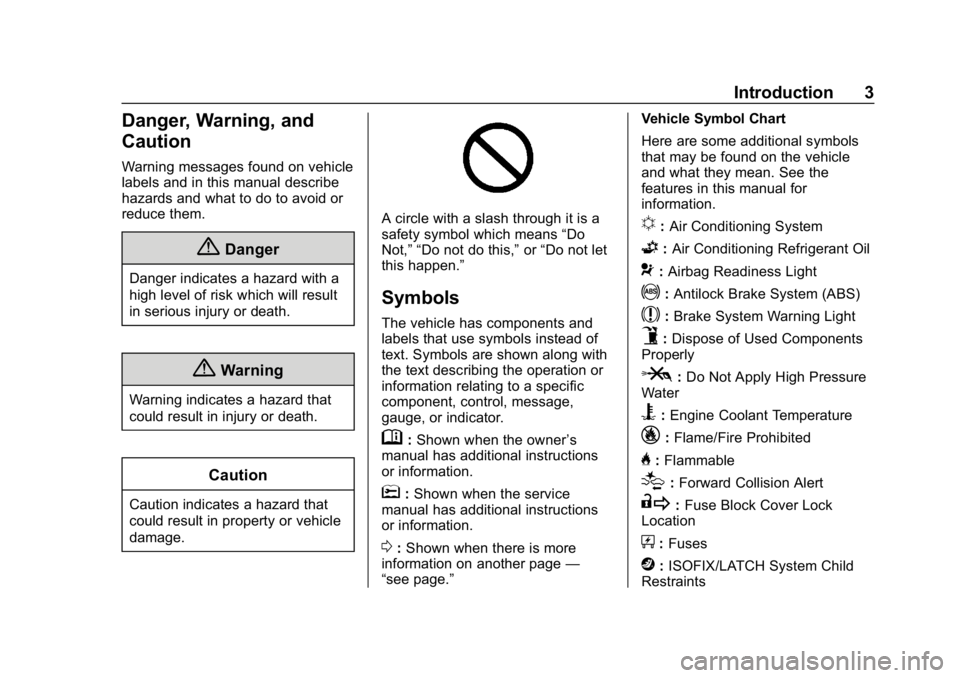
A circle with a slash through it is a
safety symbol which means“Do
Not,” “Do not do this,” or“Do not let
this happen.”
Symbols
The vehicle has components and
labels that use symbols instead of
text. Symbols are shown along with
the text describing the operation or
information relating to a specific
component, control, message,
gauge, or indicator.
M: Shown when the owner ’s
manual has additional instructions
or information.
*: Shown when the service
manual has additional instructions
or information.
0: Shown when there is more
information on another page —
“see page.” Vehicle Symbol Chart
Here are some additional symbols
that may be found on the vehicle
and what they mean. See the
features in this manual for
information.
u:
Air Conditioning System
G:Air Conditioning Refrigerant Oil
9:Airbag Readiness Light
!:Antilock Brake System (ABS)
$:Brake System Warning Light
9:Dispose of Used Components
Properly
P: Do Not Apply High Pressure
Water
B: Engine Coolant Temperature
_: Flame/Fire Prohibited
H:Flammable
[:Forward Collision Alert
R: Fuse Block Cover Lock
Location
+: Fuses
j:ISOFIX/LATCH System Child
Restraints
Page 5 of 333
Buick Encore Owner Manual (GMNA-Localizing-U.S./Canada/Mexico-
12163005) - 2019 - crc - 9/17/18
4 Introduction
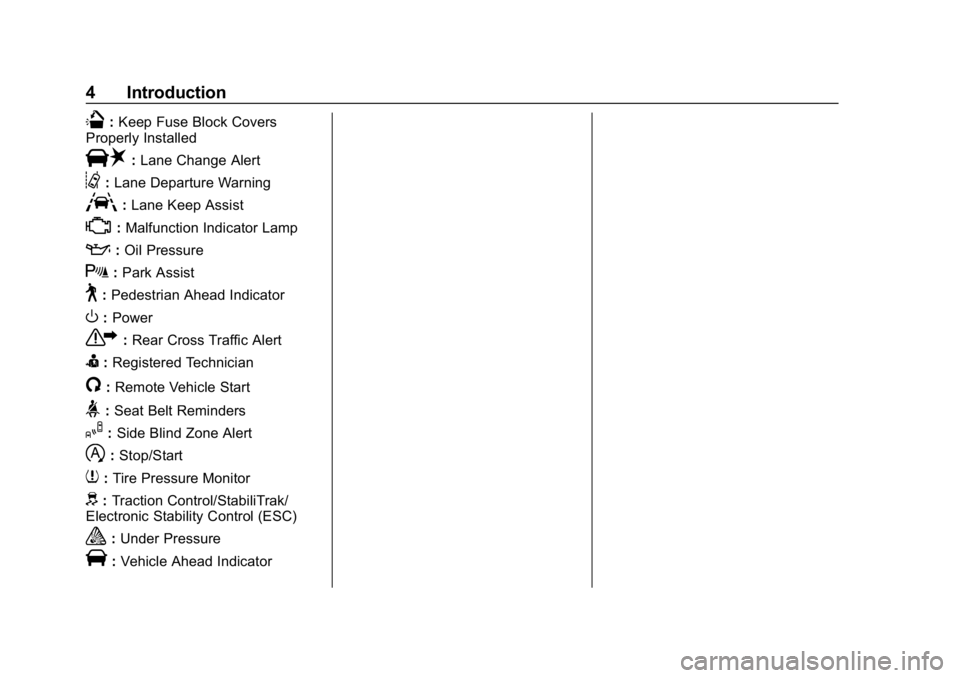
Q:Keep Fuse Block Covers
Properly Installed
|: Lane Change Alert
@:Lane Departure Warning
A:Lane Keep Assist
*:Malfunction Indicator Lamp
::Oil Pressure
X:Park Assist
~:Pedestrian Ahead Indicator
O:Power
7: Rear Cross Traffic Alert
I:Registered Technician
/:Remote Vehicle Start
>:Seat Belt Reminders
I: Side Blind Zone Alert
h:Stop/Start
7: Tire Pressure Monitor
d:Traction Control/StabiliTrak/
Electronic Stability Control (ESC)
a: Under Pressure
V:Vehicle Ahead Indicator
Page 6 of 333
Buick Encore Owner Manual (GMNA-Localizing-U.S./Canada/Mexico-
12163005) - 2019 - crc - 9/17/18
In Brief 5
In Brief
Instrument Panel
Instrument Panel . . . . . . . . . . . . . . . . 6
Initial Drive Information
Initial Drive Information . . . . . . . . . . 8
Stop/Start System . . . . . . . . . . . . . . . 8
Remote Keyless Entry (RKE)System . . . . . . . . . . . . . . . . . . . . . . . . 8
Remote Vehicle Start . . . . . . . . . . . 8
Door Locks . . . . . . . . . . . . . . . . . . . . . 9
Liftgate . . . . . . . . . . . . . . . . . . . . . . . . . . 9
Windows . . . . . . . . . . . . . . . . . . . . . . . 10
Seat Adjustment . . . . . . . . . . . . . . . 10
Memory Features . . . . . . . . . . . . . . 11
Second Row Seats . . . . . . . . . . . . 11
Heated Seats . . . . . . . . . . . . . . . . . . 12
Head Restraint Adjustment . . . . 12
Seat Belts . . . . . . . . . . . . . . . . . . . . . 12
Passenger Sensing System . . . 13
Mirror Adjustment . . . . . . . . . . . . . . 13
Steering Wheel Adjustment . . . . 14
Interior Lighting . . . . . . . . . . . . . . . . 14
Exterior Lighting . . . . . . . . . . . . . . . 15
Windshield Wiper/Washer . . . . . . 15
Climate Controls . . . . . . . . . . . . . . . 17
Transmission . . . . . . . . . . . . . . . . . . 18
Vehicle Features
Infotainment System . . . . . . . . . . . 19
Steering Wheel Controls . . . . . . . 19
Cruise Control . . . . . . . . . . . . . . . . . 19
Driver Information Center (DIC) . . . . . . . . . . . . . . . . . 20
Forward Collision Alert (FCA) System . . . . . . . . . . . . . . . . . . . . . . . 20
Lane Departure Warning (LDW) . . . . . . . . . . . . . . . 20
Side Blind Zone Alert (SBZA) . . . . . . . . . . . . . . . . . . 20
Rear Vision Camera (RVC) . . . . 21
Rear Cross Traffic Alert (RCTA) System . . . . . . . . . . . . . . . . . . . . . . . 21
Park Assist . . . . . . . . . . . . . . . . . . . . 21
Power Outlets . . . . . . . . . . . . . . . . . 21
Universal Remote System . . . . . 22
Sunroof . . . . . . . . . . . . . . . . . . . . . . . . 22
Performance and Maintenance
Traction Control/Electronic Stability Control . . . . . . . . . . . . . . 23
Tire Pressure Monitor . . . . . . . . . . 23
Fuel . . . . . . . . . . . . . . . . . . . . . . . . . . . 23
E85 or FlexFuel . . . . . . . . . . . . . . . . 24
Engine Oil Life System . . . . . . . . 24
Driving for Better Fuel Economy . . . . . . . . . . . . . . . . . . . . . 24 Roadside Assistance
Program . . . . . . . . . . . . . . . . . . . . . . 25
Page 8 of 333

Buick Encore Owner Manual (GMNA-Localizing-U.S./Canada/Mexico-
12163005) - 2019 - crc - 9/17/18
In Brief 7
1.Air Vents 0152.
2. Turn Signal Lever. See Turn
and Lane-Change Signals
0 142.
Headlamp High/Low-Beam
Changer 0140.
3. Instrument Cluster 0111.
4. Driver Information Center (DIC) Display.
See Driver Information Center
(DIC) (Uplevel) 0127 orDriver
Information Center (DIC) (Base
Level) 0125.
5. Windshield Wiper/Washer
0105.
Rear Window Wiper/Washer
0 107.
6. Light Sensor. See Automatic
Headlamp System 0141.
7. Infotainment 0146.
8. Climate Control Systems 0147
or Dual Automatic Climate
Control System 0149 (If
Equipped).
Heated Steering Wheel 0105
(If Equipped). 9.
Instrument Panel Storage
0100.
10. Shift Lever. See Automatic
Transmission 0176.
11. Traction Control/Electronic
Stability Control 0181.
Hazard Warning Flashers
0 142.
Passenger Airbag Status
Indicator. See Passenger
Sensing System 074.
12. Park Assist 0189 (If
Equipped).
13. Lane Departure Warning
(LDW) 0194 (If Equipped).
14. Ignition Positions 0167.
15. Steering Wheel Controls 0105.
16. Horn 0105.
17. Steering Wheel Adjustment
0105.
18. Cruise Control 0183.
Forward Collision Alert (FCA)
System 0191 (If Equipped). 19. Hood Release. See
Hood
0 204.
20. Instrument Panel Storage
0100.
21. Data Link Connector (DLC) (Out of View). See Malfunction
Indicator Lamp (Check Engine
Light) 0118.
22. Exterior Lamp Controls 0140.
Instrument Panel Illumination
Control 0143.
Front Fog Lamps 0143 (If
Equipped).
Page 13 of 333
Buick Encore Owner Manual (GMNA-Localizing-U.S./Canada/Mexico-
12163005) - 2019 - crc - 9/17/18
12 In Brief
Heated Seats
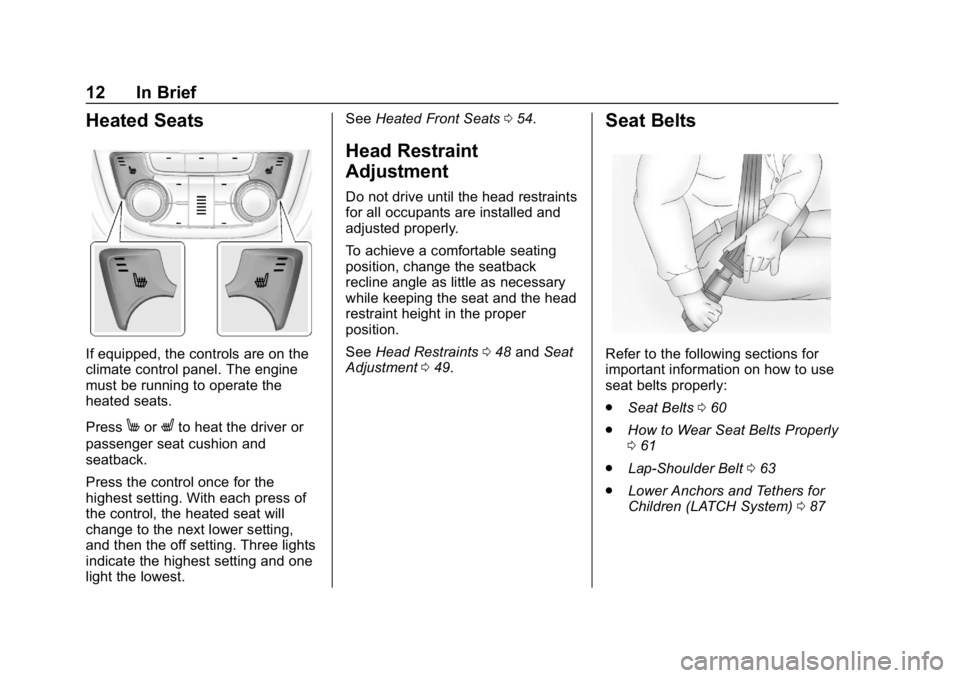
If equipped, the controls are on the
climate control panel. The engine
must be running to operate the
heated seats.
Press
MorLto heat the driver or
passenger seat cushion and
seatback.
Press the control once for the
highest setting. With each press of
the control, the heated seat will
change to the next lower setting,
and then the off setting. Three lights
indicate the highest setting and one
light the lowest. See
Heated Front Seats 054.
Head Restraint
Adjustment
Do not drive until the head restraints
for all occupants are installed and
adjusted properly.
To achieve a comfortable seating
position, change the seatback
recline angle as little as necessary
while keeping the seat and the head
restraint height in the proper
position.
See Head Restraints 048 and Seat
Adjustment 049.
Seat Belts
Refer to the following sections for
important information on how to use
seat belts properly:
.
Seat Belts 060
. How to Wear Seat Belts Properly
061
. Lap-Shoulder Belt 063
. Lower Anchors and Tethers for
Children (LATCH System) 087
Page 14 of 333

Buick Encore Owner Manual (GMNA-Localizing-U.S./Canada/Mexico-
12163005) - 2019 - crc - 9/17/18
In Brief 13
Passenger Sensing
System
United States
Canada and Mexico
The passenger sensing system
turns off the front outboard
passenger frontal airbag and knee
airbag (if equipped) under certain
conditions. No other airbag is
affected by the passenger sensing
system. See Passenger Sensing
System 074 for important
information. The passenger airbag status
indicator will be visible on the
instrument panel when the vehicle is
started. See
Passenger Airbag
Status Indicator 0117.
Mirror Adjustment
Exterior Mirrors
To adjust the mirrors:
1. Turn the selector switch to L (Left) or R (Right) to choose
the driver or passenger mirror.
2. Move the control to adjust the mirror. 3. Turn the selector switch to
9
to deselect the mirror.
Interior Mirror
Adjustment
Hold the rearview mirror in the
center and move it to view the area
behind the vehicle.
Manual Rearview Mirror
If equipped with a manual rearview
mirror, push the tab forward for
daytime use and pull it for nighttime
use to avoid glare from the
headlamps from behind. See
Manual Rearview Mirror
042.
Automatic Dimming Rearview
Mirror
If equipped with an automatic
dimming rearview mirror, the mirror
will automatically reduce the glare
from the headlamps from behind.
The dimming feature comes on
when the vehicle is started.
See Automatic Dimming Rearview
Mirror 043.
Page 20 of 333
Buick Encore Owner Manual (GMNA-Localizing-U.S./Canada/Mexico-
12163005) - 2019 - crc - 9/17/18
In Brief 19
2. Press the + (plus) end of thebutton on the top of the shift
lever to upshift, or press the −
(minus) end of the button to
downshift.
See Manual Mode 0178.Vehicle Features
Infotainment System
See the infotainment manual for
information on the radio, audio
players, phone, navigation system,
and voice or speech recognition.
It also includes information on
settings.
Steering Wheel Controls
The infotainment system can be
operated by using the steering
wheel controls. See “Steering Wheel
Controls” in the infotainment
manual.
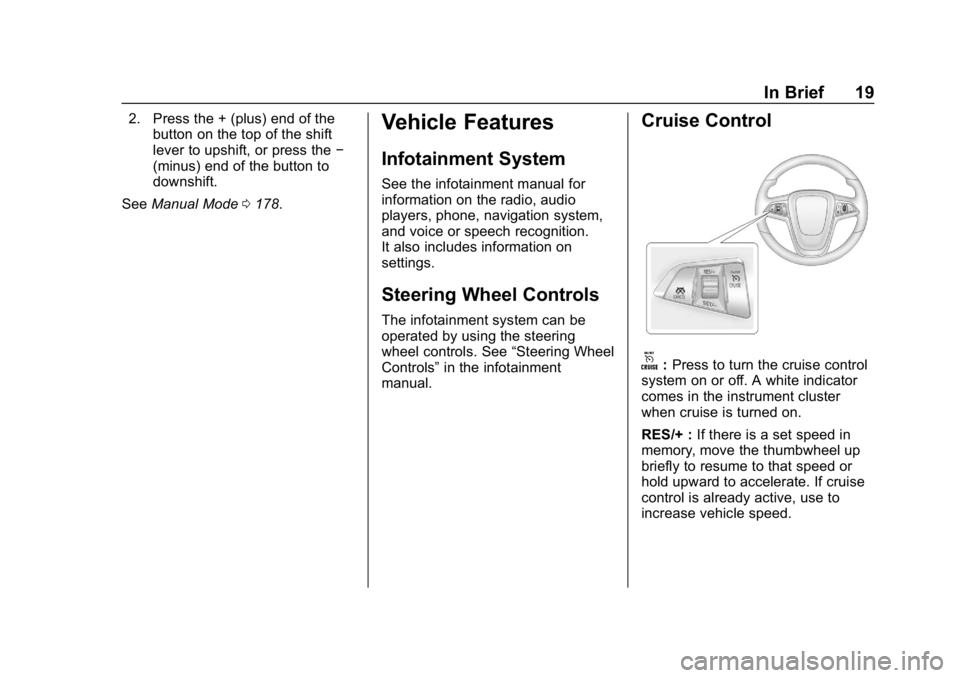
Cruise Control
o: Press to turn the cruise control
system on or off. A white indicator
comes in the instrument cluster
when cruise is turned on.
RES/+ : If there is a set speed in
memory, move the thumbwheel up
briefly to resume to that speed or
hold upward to accelerate. If cruise
control is already active, use to
increase vehicle speed.
Page 21 of 333
Buick Encore Owner Manual (GMNA-Localizing-U.S./Canada/Mexico-
12163005) - 2019 - crc - 9/17/18
20 In Brief
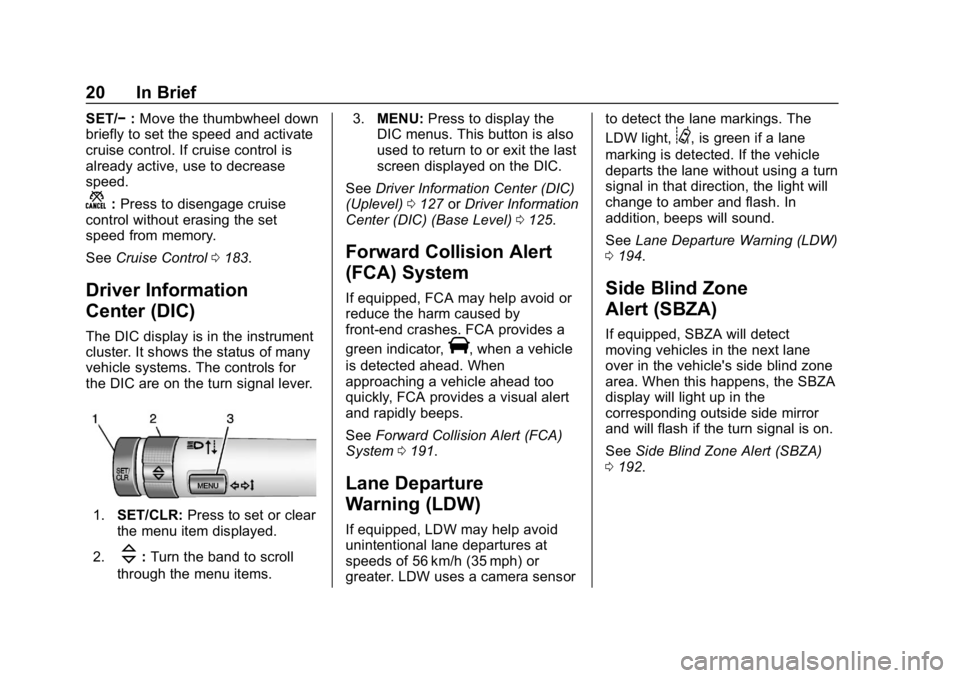
SET/−:Move the thumbwheel down
briefly to set the speed and activate
cruise control. If cruise control is
already active, use to decrease
speed.
n: Press to disengage cruise
control without erasing the set
speed from memory.
See Cruise Control 0183.
Driver Information
Center (DIC)
The DIC display is in the instrument
cluster. It shows the status of many
vehicle systems. The controls for
the DIC are on the turn signal lever.
1. SET/CLR: Press to set or clear
the menu item displayed.
2.
\: Turn the band to scroll
through the menu items. 3.
MENU: Press to display the
DIC menus. This button is also
used to return to or exit the last
screen displayed on the DIC.
See Driver Information Center (DIC)
(Uplevel) 0127 orDriver Information
Center (DIC) (Base Level) 0125.
Forward Collision Alert
(FCA) System
If equipped, FCA may help avoid or
reduce the harm caused by
front-end crashes. FCA provides a
green indicator,
V, when a vehicle
is detected ahead. When
approaching a vehicle ahead too
quickly, FCA provides a visual alert
and rapidly beeps.
See Forward Collision Alert (FCA)
System 0191.
Lane Departure
Warning (LDW)
If equipped, LDW may help avoid
unintentional lane departures at
speeds of 56 km/h (35 mph) or
greater. LDW uses a camera sensor to detect the lane markings. The
LDW light,
@, is green if a lane
marking is detected. If the vehicle
departs the lane without using a turn
signal in that direction, the light will
change to amber and flash. In
addition, beeps will sound.
See Lane Departure Warning (LDW)
0 194.
Side Blind Zone
Alert (SBZA)
If equipped, SBZA will detect
moving vehicles in the next lane
over in the vehicle's side blind zone
area. When this happens, the SBZA
display will light up in the
corresponding outside side mirror
and will flash if the turn signal is on.
See Side Blind Zone Alert (SBZA)
0 192.
Page 22 of 333
Buick Encore Owner Manual (GMNA-Localizing-U.S./Canada/Mexico-
12163005) - 2019 - crc - 9/17/18
In Brief 21
Rear Vision
Camera (RVC)
If equipped, RVC displays a view of
the area behind the vehicle, on the
infotainment display, when the
vehicle is shifted into R (Reverse).
SeeRear Vision Camera (RVC)
0 187.
Rear Cross Traffic Alert
(RCTA) System
If equipped, the RCTA system uses
a triangle with an arrow on the
infotainment display to warn of
traffic behind your vehicle that may
cross your vehicle's path while in
R (Reverse). In addition, beeps will
sound.
See “Rear Cross Traffic Alert
(RCTA)” underRear Vision Camera
(RVC) 0187.
Park Assist
If available, Front and Rear Park
Assist (FRPA) uses sensors on the
front and rear bumpers to detect objects while parking the vehicle.
It operates at speeds less than
8 km/h (5 mph). FRPA uses audio
beeps to provide distance and
system information.
Keep the sensors on the vehicle's
front and rear bumpers clean to
ensure proper operation.
See
Park Assist 0189.
Power Outlets
Power Outlet 110/120 Volt
Alternating Current
If equipped, this power outlet is on
the rear of the center console. It can
be used to plug in electrical
equipment that uses a maximum
limit of 150 watts.
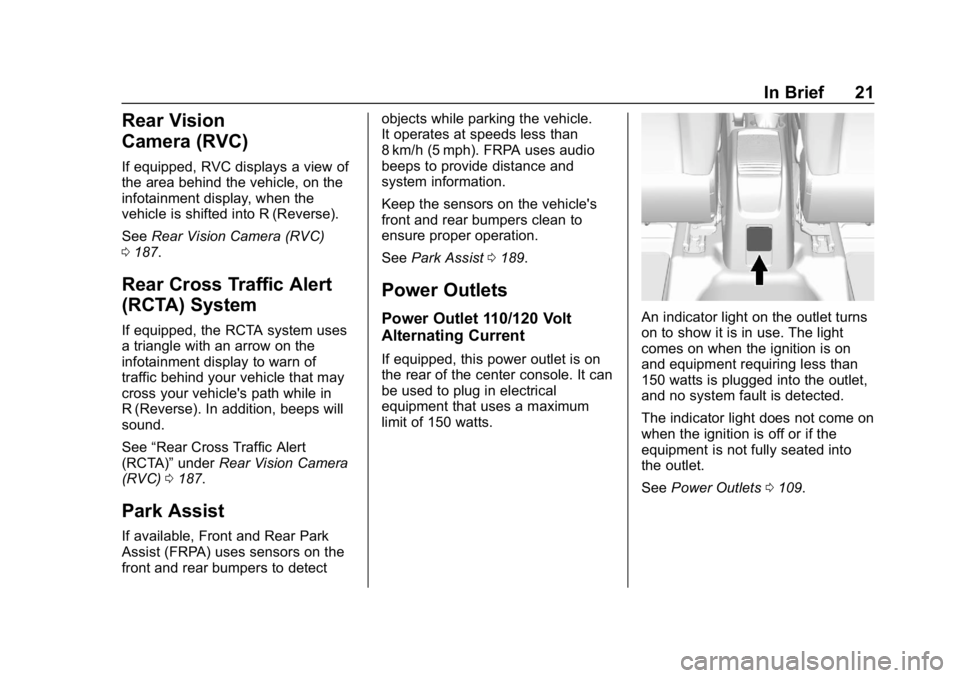
An indicator light on the outlet turns
on to show it is in use. The light
comes on when the ignition is on
and equipment requiring less than
150 watts is plugged into the outlet,
and no system fault is detected.
The indicator light does not come on
when the ignition is off or if the
equipment is not fully seated into
the outlet.
See Power Outlets 0109.
Page 24 of 333
Buick Encore Owner Manual (GMNA-Localizing-U.S./Canada/Mexico-
12163005) - 2019 - crc - 9/17/18
In Brief 23
Performance and
Maintenance
Traction Control/
Electronic Stability
Control
The Traction Control System (TCS)
limits wheel spin. The system is on
when the vehicle is started.
The StabiliTrak/Electronic Stability
Control (ESC) system assists with
directional control of the vehicle in
difficult driving conditions. The
system is on when the vehicle is
started.
.To turn off TCS, press and
release
gon the center stack.
iilluminates in the instrument
cluster and the appropriate DIC
may display.
. Press and release
gagain to
turn TCS back on.
. To turn off both TCS and
StabiliTrak/ESC, press and hold
guntilgandiilluminate in the instrument cluster and the
appropriate DIC message may
display.
. Press
gagain to turn on both
systems.
See Traction Control/Electronic
Stability Control 0181.
Tire Pressure Monitor
This vehicle may have a Tire
Pressure Monitor System (TPMS).
The low tire pressure warning light
alerts to a significant loss in
pressure of one of the vehicle's
tires. If the warning light comes on,
stop as soon as possible and inflate
the tires to the recommended
pressure shown on the Tire and Loading Information label. See
Vehicle Load Limits
0163. The
warning light will remain on until the
tire pressure is corrected.
The low tire pressure warning light
may come on in cool weather when
the vehicle is first started, and then
turn off as the vehicle is driven. This
may be an early indicator that the
tire pressures are getting low and
the tires need to be inflated to the
proper pressure.
The TPMS does not replace normal
monthly tire maintenance. Maintain
the correct tire pressures.
See Tire Pressure Monitor System
0 247.Fuel