power BUICK ENCORE 2020 User Guide
[x] Cancel search | Manufacturer: BUICK, Model Year: 2020, Model line: ENCORE, Model: BUICK ENCORE 2020Pages: 314, PDF Size: 5.28 MB
Page 30 of 314
Buick Encore Owner Manual (GMNA-Localizing-U.S./Canada-13710474) -
2020 - CRC - 10/7/19
Seats and Restraints 29
Seats and
Restraints
Head Restraints
Head Restraints . . . . . . . . . . . . . . . 30
Front Seats
Seat Adjustment . . . . . . . . . . . . . . . 31
Power Seat Adjustment . . . . . . . . 32
Lumbar Adjustment . . . . . . . . . . . . 32
Reclining Seatbacks . . . . . . . . . . . 32
Memory Seats . . . . . . . . . . . . . . . . . 34
Front Seat Armrest . . . . . . . . . . . . 36
Heated Front Seats . . . . . . . . . . . . 36
Folding Seatback . . . . . . . . . . . . . . 37
Rear Seats
Rear Seats . . . . . . . . . . . . . . . . . . . . 38
Rear Seat Armrest . . . . . . . . . . . . . 42
Seat Belts
Seat Belts . . . . . . . . . . . . . . . . . . . . . 42
How to Wear Seat BeltsProperly . . . . . . . . . . . . . . . . . . . . . . 43
Lap-Shoulder Belt . . . . . . . . . . . . . 45
Seat Belt Use During Pregnancy . . . . . . . . . . . . . . . . . . . . 48
Seat Belt Extender . . . . . . . . . . . . . 49
Safety System Check . . . . . . . . . . 49 Seat Belt Care . . . . . . . . . . . . . . . . . 49
Replacing Seat Belt System
Parts after a Crash . . . . . . . . . . . 50
Airbag System
Airbag System . . . . . . . . . . . . . . . . . 50
Where Are the Airbags? . . . . . . . 52
When Should an AirbagInflate? . . . . . . . . . . . . . . . . . . . . . . . 53
What Makes an Airbag Inflate? . . . . . . . . . . . . . . . . . . . . . . . 54
How Does an Airbag Restrain? . . . . . . . . . . . . . . . . . . . . . 55
What Will You See after an Airbag Inflates? . . . . . . . . . . . . . . 55
Passenger Sensing System . . . 56
Servicing the Airbag-Equipped Vehicle . . . . . . . . . . . . . . . . . . . . . . . 60
Adding Equipment to the Airbag-Equipped Vehicle . . . . . 61
Airbag System Check . . . . . . . . . . 62
Replacing Airbag System Parts after a Crash . . . . . . . . . . . . . . . . . 62
Child Restraints
Older Children . . . . . . . . . . . . . . . . . 63
Infants and Young Children . . . . 64
Child Restraint Systems . . . . . . . 67
Where to Put the Restraint . . . . . 68
Lower Anchors and Tethers forChildren (LATCH System) . . . . 70 Replacing LATCH System Parts
After a Crash . . . . . . . . . . . . . . . . . 77
Securing Child Restraints (With the Seat Belt in the
Rear Seat) . . . . . . . . . . . . . . . . . . . 78
Securing Child Restraints (With the Seat Belt in the
Front Seat) . . . . . . . . . . . . . . . . . . . 80
Page 33 of 314
Buick Encore Owner Manual (GMNA-Localizing-U.S./Canada-13710474) -
2020 - CRC - 10/7/19
32 Seats and Restraints
2. Slide the seat to the desiredposition and release the
handle.
3. Try to move the seat back and forth to be sure it is locked in
place.
Power Seat Adjustment
{Warning
The power seats will work with
the ignition off. Children could
operate the power seats and be
injured. Never leave children
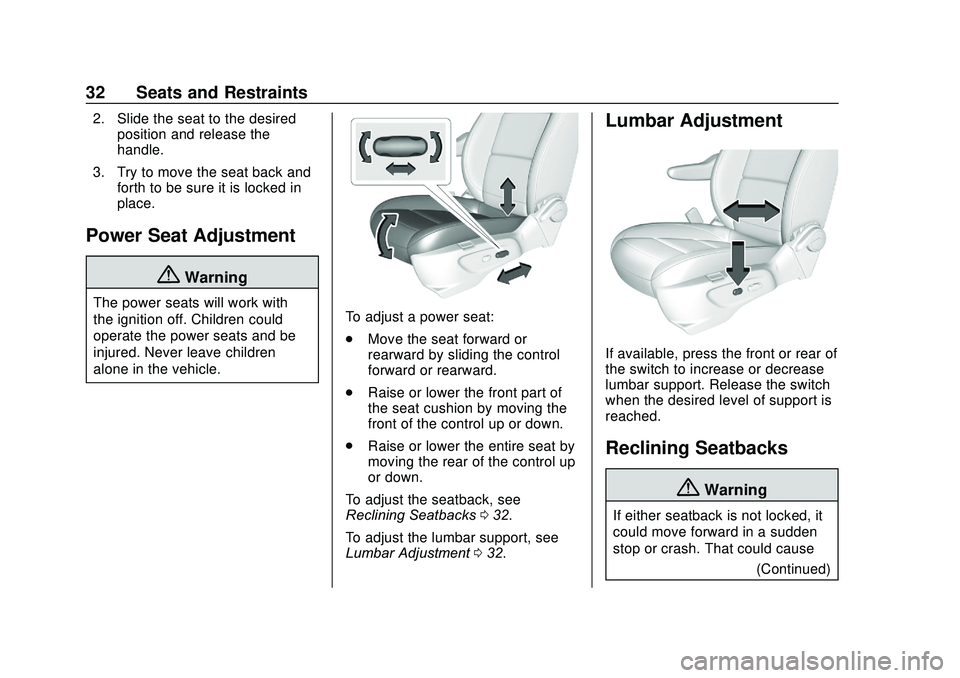
alone in the vehicle.To adjust a power seat:
.Move the seat forward or
rearward by sliding the control
forward or rearward.
. Raise or lower the front part of
the seat cushion by moving the
front of the control up or down.
. Raise or lower the entire seat by
moving the rear of the control up
or down.
To adjust the seatback, see
Reclining Seatbacks 032.
To adjust the lumbar support, see
Lumbar Adjustment 032.
Lumbar Adjustment
If available, press the front or rear of
the switch to increase or decrease
lumbar support. Release the switch
when the desired level of support is
reached.
Reclining Seatbacks
{Warning
If either seatback is not locked, it
could move forward in a sudden
stop or crash. That could cause
(Continued)
Page 34 of 314

Buick Encore Owner Manual (GMNA-Localizing-U.S./Canada-13710474) -
2020 - CRC - 10/7/19
Seats and Restraints 33
Warning (Continued)
injury to the person sitting there.
Always push and pull on the
seatbacks to be sure they are
locked.
Manual Seat Shown, Power SeatSimilar
To recline the seatback: 1. Lift the lever. If necessary, move the seat
belt out of the way to access
the lever. 2. Move the seatback to the
desired position, then release
the lever to lock the seatback
in place.
3. Push and pull on the seatback to make sure it is locked.
To return the seatback to an upright
position: 1. Lift the lever fully without applying pressure to the
seatback, and the seatback
returns to the upright position.
2. Push and pull on the seatback to make sure it is locked.
{Warning
Sitting in a reclined position when
the vehicle is in motion can be
dangerous. Even when buckled
up, the seat belts cannot do
their job.
(Continued)
Warning (Continued)
The shoulder belt will not be
against your body. Instead, it will
be in front of you. In a crash, you
could go into it, receiving neck or
other injuries.
The lap belt could go up over
your abdomen. The belt forces
would be there, not at your pelvic
bones. This could cause serious
internal injuries.
For proper protection when the
vehicle is in motion, have the
seatback upright. Then sit well
back in the seat and wear the
seat belt properly.
Page 36 of 314
Buick Encore Owner Manual (GMNA-Localizing-U.S./Canada-13710474) -
2020 - CRC - 10/7/19
Seats and Restraints 35
Recalling RKE Memory Positions
The RKE memory feature can recall
the driver seat and outside mirrors
to previously stored RKE Memory
positions when entering the vehicle.
Every time the ignition is turned off,
the positions of the driver seat and
outside mirrors are automatically
stored to the RKE transmitter that
was used to start the vehicle. These
positions and settings are called
RKE Memory positions and may be
different than the previously
mentioned Button Memory positions
saved to the 1 or 2 buttons.
.On vehicles with RKE, press
K
on the RKE transmitter and open
the driver door.
. On vehicles with Keyless
Access, press the lock/unlock
button on the outside driver door
handle and open the door. The
RKE transmitter must be present
for the recall to activate. .
If the driver door is already
open, press
Kon the RKE
transmitter to activate the recall.
This feature can be turned on or off.
See Vehicle Personalization 0113.
To stop recall movement, press one
of the memory, power mirror,
or power seat controls.
If something has blocked the driver
seat while recalling a memory
position, the recall may stop.
Remove the obstruction; then press
and hold the appropriate manual
control for the memory item that is
not recalling for two seconds. Try
recalling the memory position again
by opening the driver door and
pressing the RKE transmitter
K
button. If the memory position is still
not recalling, see your dealer for
service.
Easy Exit Driver Seat
This feature moves the seat
rearward allowing the driver more
room to exit the vehicle. To activate, turn off the ignition and
open the driver door. If the driver
door is already open, turning off the
ignition will activate the recall.
This feature can be turned on or off.
See
Vehicle Personalization 0113.
To stop recall movement, press one
of the memory, power mirror,
or power seat controls.
If something has blocked the driver
seat while recalling the exit position,
the recall may stop. Remove the
obstruction; then press and hold the
power seat control rearward for
two seconds. Try recalling the exit
position again. If the exit position is
still not recalling, see your dealer for
service.
Page 89 of 314
Buick Encore Owner Manual (GMNA-Localizing-U.S./Canada-13710474) -
2020 - CRC - 10/7/19
88 Instruments and Controls
Instruments and
Controls
Controls
Steering Wheel Adjustment . . . . 89
Steering Wheel Controls . . . . . . . 89
Heated Steering Wheel . . . . . . . . 89
Horn . . . . . . . . . . . . . . . . . . . . . . . . . . . 89
Windshield Wiper/Washer . . . . . . 89
Rear Window Wiper/Washer . . . 91
Compass . . . . . . . . . . . . . . . . . . . . . . 92
Clock . . . . . . . . . . . . . . . . . . . . . . . . . . 93
Power Outlets . . . . . . . . . . . . . . . . . 93
Warning Lights, Gauges, and
Indicators
Warning Lights, Gauges, andIndicators . . . . . . . . . . . . . . . . . . . . 94
Instrument Cluster . . . . . . . . . . . . . 95
Speedometer . . . . . . . . . . . . . . . . . . 96
Odometer . . . . . . . . . . . . . . . . . . . . . . 96
Trip Odometer . . . . . . . . . . . . . . . . . 97
Tachometer . . . . . . . . . . . . . . . . . . . . 97
Fuel Gauge . . . . . . . . . . . . . . . . . . . . 97
Engine Coolant Temperature Gauge . . . . . . . . . . . . . . . . . . . . . . . . 98
Seat Belt Reminders . . . . . . . . . . . 99
Airbag Readiness Light . . . . . . . . 99 Passenger Airbag Status
Indicator . . . . . . . . . . . . . . . . . . . . 100
Charging System Light . . . . . . . 101
Malfunction Indicator Lamp (Check Engine Light -
Capless) . . . . . . . . . . . . . . . . . . . . 101
Malfunction Indicator Lamp (Check Engine Light -
Capped) . . . . . . . . . . . . . . . . . . . . 103
Brake System Warning Light . . . . . . . . . . . . . . . . . . . . . . . . 105
Antilock Brake System (ABS) Warning Light . . . . . . . . . . . . . . . 105
Lane Departure Warning (LDW) Light . . . . . . . . . . . . . . . . . 106
Vehicle Ahead Indicator . . . . . . 106
Traction Off Light . . . . . . . . . . . . . 106
StabiliTrak OFF Light . . . . . . . . . 106
Traction Control System (TCS)/ StabiliTrak Light . . . . . . . . . . . . . 107
Tire Pressure Light . . . . . . . . . . . 107
Engine Oil Pressure Light . . . . 107
Low Fuel Warning Light . . . . . . 108
Immobilizer Light . . . . . . . . . . . . . 108
High-Beam On Light . . . . . . . . . . 108
Front Fog Lamp Light . . . . . . . . . 109
Lamps On Reminder . . . . . . . . . 109
Cruise Control Light . . . . . . . . . . 109
Door Ajar Light . . . . . . . . . . . . . . . 109
Information Displays
Driver Information Center (DIC) . . . . . . . . . . . . . . . . 110
Vehicle Messages
Vehicle Messages . . . . . . . . . . . . 112
Engine Power Messages . . . . . 113
Vehicle Speed Messages . . . . . 113
Vehicle Personalization
Vehicle Personalization . . . . . . . 113
Universal Remote System
Universal Remote System . . . . 119
Universal Remote SystemProgramming . . . . . . . . . . . . . . . . 119
Universal Remote System Operation . . . . . . . . . . . . . . . . . . . 122
Page 94 of 314
Buick Encore Owner Manual (GMNA-Localizing-U.S./Canada-13710474) -
2020 - CRC - 10/7/19
Instruments and Controls 93
GPS signal. The compass system
will automatically determine when a
GPS signal is restored and provide
a heading again.
Clock
Setting the Time and Date
To set the time or date:1. Select Settings from the Home Page, then select Time
and Date.
2. Select the desired function.
To set the time or date, touch
«or
ªto change the hour, minutes,
AM, PM, day, month, or year.
To change the 12-24 Hr setting,
touch 12-24 Hr.
To turn Auto Set on and off, touch
Auto Set.
If auto timing is set, the time
displayed on the clock may not
update immediately when driving
into a new time zone.
Auto set requires an active OnStar
or connected service plan. Press
qBACK to go to the last
menu and save the changes or
{to
return to the Home Page.
Power Outlets
Power Outlet 110/120-Volt
Alternating Current
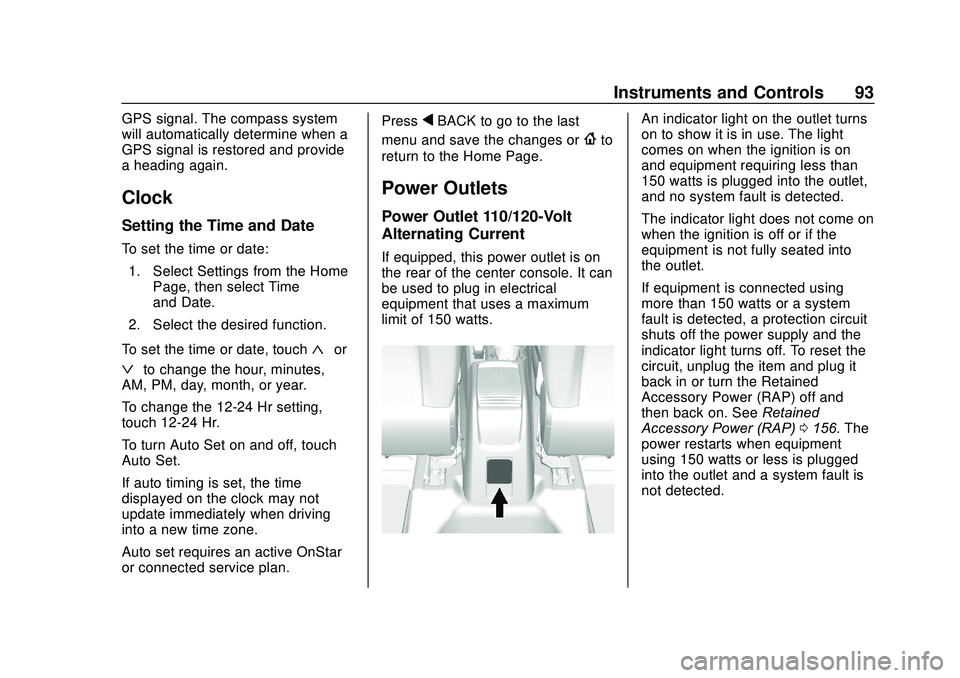
If equipped, this power outlet is on
the rear of the center console. It can
be used to plug in electrical
equipment that uses a maximum
limit of 150 watts.
An indicator light on the outlet turns
on to show it is in use. The light
comes on when the ignition is on
and equipment requiring less than
150 watts is plugged into the outlet,
and no system fault is detected.
The indicator light does not come on
when the ignition is off or if the
equipment is not fully seated into
the outlet.
If equipment is connected using
more than 150 watts or a system
fault is detected, a protection circuit
shuts off the power supply and the
indicator light turns off. To reset the
circuit, unplug the item and plug it
back in or turn the Retained
Accessory Power (RAP) off and
then back on. See Retained
Accessory Power (RAP) 0156. The
power restarts when equipment
using 150 watts or less is plugged
into the outlet and a system fault is
not detected.
Page 95 of 314
Buick Encore Owner Manual (GMNA-Localizing-U.S./Canada-13710474) -
2020 - CRC - 10/7/19
94 Instruments and Controls
The power outlet is not designed for
and may not work properly, if any of
the following are plugged in:
.Equipment with high initial peak
wattage, such as
compressor-driven refrigerators
and electric power tools
. Other equipment requiring an
extremely stable power supply,
such as
microcomputer-controlled
electric blankets and touch
sensor lamps
. Medical equipmentWarning Lights,
Gauges, and
Indicators
Warning lights and gauges can
signal that something is wrong
before it becomes serious enough
to cause an expensive repair or
replacement. Paying attention to the
warning lights and gauges could
prevent injury. Some warning lights come on briefly
when the engine is started to
indicate they are working. When
one of the warning lights comes on
and stays on while driving, or when
one of the gauges shows there may
be a problem, check the section that
explains what to do. Waiting to do
repairs can be costly and even
dangerous.
Page 114 of 314
Buick Encore Owner Manual (GMNA-Localizing-U.S./Canada-13710474) -
2020 - CRC - 10/7/19
Instruments and Controls 113
.Brakes
. Ride Control Systems
. Driver Assistance Systems
. Cruise Control
. Lighting and Bulb Replacement
. Wiper/Washer Systems
. Doors and Windows
. Seat Belts
. Airbag Systems
. Engine and Transmission
. Tire Pressure
. Battery
Engine Power Messages
ENGINE POWER IS REDUCED
This message displays when the
vehicle's propulsion power is
reduced. A reduction in propulsion
power can affect the vehicle's ability
to accelerate. If this message is on,
but there is no observed reduction
in performance, proceed to your
destination. The performance may
be reduced the next time the vehicle is driven. The vehicle may be driven
while this message is on, but
maximum acceleration and speed
may be reduced. Anytime this
message stays on, or displays
repeatedly, the vehicle should be
taken to your dealer for service as
soon as possible.
Under certain operating conditions,
propulsion will be disabled. Try
restarting after the vehicle has been
off for 30 seconds.
Vehicle Speed Messages
SPEED LIMITED TO XXX
KM/H (MPH)
This message shows that the
vehicle speed has been limited to
the speed displayed. The limited
speed is a protection for various
propulsion and vehicle systems,
such as lubrication, brakes, thermal,
suspension, Teen Driver if
equipped, or tires.
Vehicle
Personalization
Use the audio system controls to
access the personalization menus
for customizing vehicle features.
The following are all possible
personalization features. Depending
on the vehicle, some may not be
available.
To access the personalization
menus:
1. Touch SETTINGS on the Home Page of the infotainment
display.
2. Touch the desired feature to display a list of available
options.
3. Touch to select the desired feature setting.
4. Press BACK on the center stack or touch
Son the
infotainment display to return to
the previous menu or exit.
Page 115 of 314
Buick Encore Owner Manual (GMNA-Localizing-U.S./Canada-13710474) -
2020 - CRC - 10/7/19
114 Instruments and Controls
Personalization Menus
The following list of features may be
available:
.Time and Date
. Rear Seat Reminder
. Language
. Valet Mode
. Radio
. Vehicle
. Bluetooth
. Apple CarPlay
. Android Auto
. Voice
. Display
. Rear Camera
. Return to Factory Settings
. Software Information
. Wi-Fi
Each menu is detailed in the
following information.
Time and Date
Manually set the time and date. See
Clock 093.
Rear Seat Reminder
This allows for a chime and a
message when the rear door has
been opened before or during
operation of the vehicle.
Select Off or On.
Language
Select Language, then select from
the available language(s).
Valet Mode
To turn Valet Mode on and off, see
“Valet Mode” under“Settings” in the
infotainment manual.
Radio
To manage the radio features, see
“Radio” under“Settings” in the
infotainment manual.
Vehicle
Select and the following may be
displayed:
. Climate and Air Quality
. Collision/Detection Systems
. Comfort and Convenience
. Lighting
. Power Door Locks
. Remote Lock, Unlock, Start
Climate and Air Quality
Select and the following may be
displayed:
.
Auto Fan Speed
. Auto Defog
. Auto Rear Defog
. Ionizer
Auto Fan Speed
This feature will set the auto fan
speed.
Select Low, Medium, or High.
Page 117 of 314
Buick Encore Owner Manual (GMNA-Localizing-U.S./Canada-13710474) -
2020 - CRC - 10/7/19
116 Instruments and Controls
.Exit Lighting
Vehicle Locator Lights
This feature will flash the exterior
lamps when
Kon the Remote
Keyless Entry (RKE) transmitter is
pressed to locate the vehicle.
Select Off or On.
Exit Lighting
This allows the selection of how
long the exterior lamps stay on
when leaving the vehicle when it is
dark outside.
Select Off, 30 Seconds, 60 Seconds,
or 120 Seconds.
Power Door Locks
Select and the following may be
displayed:
. Unlocked Door Anti Lock Out
. Auto Door Unlock
. Delayed Door Lock Unlocked Door Anti Lock Out
When on, this feature will keep the
driver door from locking when the
door is open. If Off is selected, the
Delayed Door Lock menu will be
available.
Select Off or On.
Auto Door Unlock
This allows selection of which of the
doors will automatically unlock when
the vehicle is shifted into P (Park).
Select Off, All Doors, or Driver Door.
Delayed Door Lock
When on, this feature will delay the
locking of the doors. To override the
delay, press the power door lock
switch on the door.
Select Off or On.
Remote Lock, Unlock, Start
Select and the following may be
displayed:
.
Remote Unlock Light Feedback
. Remote Lock Feedback
. Remote Door Unlock .
Remote Start Auto Heat Seats
. Passive Door Unlock
. Passive Door Lock
. Remote Left in Vehicle Alert
Remote Unlock Light Feedback
When on, the exterior lamps will
flash when unlocking the vehicle
with the RKE transmitter.
Select Off or Flash Lights.
Remote Lock Feedback
This allows selection of what type of
feedback is given when locking the
vehicle with the RKE transmitter.
Select Off, Lights and Horn, Lights
Only, or Horn Only.
Remote Door Unlock
This allows selection of which doors
will unlock when pressing
Kon the
RKE transmitter.
When set to Driver Door, the driver
door will unlock the first time
Kis
pressed and all doors will unlock
when
Kis pressed a second time.