instrument BUICK ENCORE 2021 User Guide
[x] Cancel search | Manufacturer: BUICK, Model Year: 2021, Model line: ENCORE, Model: BUICK ENCORE 2021Pages: 313, PDF Size: 11.21 MB
Page 45 of 313

Buick Encore Owner Manual (GMNA-Localizing-U.S./Canada-14607636) -
2021 - CRC - 8/18/20
44 Seats and Restraints
Passenger Sensing System
The vehicle has a passenger sensing system
for the front outboard passenger position.
The passenger airbag status indicator will
light on the instrument panel when the
vehicle is started.
United States
Canada
The words ON and OFF, or the symbols for
on and off, will be visible during the system
check. When the system check is complete,
either the word ON or OFF, or the symbol
for on or off, will be visible. See Passenger
Airbag Status Indicator 080. The passenger sensing system turns off the
front outboard passenger frontal airbag and
knee airbag (if equipped) under certain
conditions. No other airbag is affected by
the passenger sensing system.
The passenger sensing system works with
sensors that are part of the front outboard
passenger seat. The sensors are designed to
detect the presence of a properly seated
occupant and determine if the front
outboard passenger frontal airbag and knee
airbag (if equipped) should be allowed to
inflate or not.
According to accident statistics, children are
safer when properly secured in a rear seat
in the correct child restraint for their weight
and size.
Whenever possible, children aged 12 and
under should be secured in a rear seating
position.
Never put a rear-facing child seat in the
front. This is because the risk to the
rear-facing child is so great if the airbag
inflates.
{Warning
A child in a rear-facing child restraint can
be seriously injured or killed if the
passenger frontal airbag inflates. This is
because the back of the rear-facing child
restraint would be very close to the
inflating airbag. A child in a
forward-facing child restraint can be
seriously injured or killed if the passenger
frontal airbag inflates and the passenger
seat is in a forward position.
Even if the passenger sensing system has
turned off the front outboard passenger
airbag(s), no system is fail-safe. No one
can guarantee that an airbag will not
deploy under some unusual circumstance,
even though the airbag(s) are off.
Never put a rear-facing child restraint in
the front seat, even if the airbag is off.
If securing a forward-facing child restraint
in the front outboard passenger seat,
always move the seat as far back as it
will go. It is better to secure child
restraints in the rear seat. Consider using
another vehicle to transport the child
when a rear seat is not available.
Page 48 of 313

Buick Encore Owner Manual (GMNA-Localizing-U.S./Canada-14607636) -
2021 - CRC - 8/18/20
Seats and Restraints 47
SeeAdding Equipment to the
Airbag-Equipped Vehicle 047 for more
information about modifications that can
affect how the system operates.
The ON indicator may be lit if an object,
such as a briefcase, handbag, grocery bag,
laptop, or other electronic device is put on
an unoccupied seat. If this is not desired,
remove the object from the seat.
{Warning
Stowing articles under the passenger seat
or between the passenger seat cushion
and seatback may interfere with the
proper operation of the passenger
sensing system.
Servicing the Airbag-Equipped
Vehicle
Airbags affect how the vehicle should be
serviced. There are parts of the airbag
system in several places around the vehicle.
Your dealer and the service manual have
information about servicing the vehicle and
the airbag system. To purchase a service
manual, see Publication Ordering
Information 0289.
{Warning
For up to 10 seconds after the vehicle is
turned off and the battery is
disconnected, an airbag can still inflate
during improper service. You can be
injured if you are close to an airbag
when it inflates. Avoid yellow connectors.
They are probably part of the airbag
system. Be sure to follow proper service
procedures, and make sure the person
performing work for you is qualified to
do so.
Adding Equipment to the
Airbag-Equipped Vehicle
Adding accessories that change the vehicle's
frame, bumper system, height, front end,
or side sheet metal may keep the airbag
system from working properly.
The operation of the airbag system can also
be affected by changing, including
improperly repairing or replacing, any parts
of the following:
.Airbag system, including airbag modules,
front or side impact sensors, sensing and
diagnostic module, or airbag wiring
.Front seats, including stitching, seams or
zippers
.Seat belts
.Steering wheel, instrument panel, ceiling
trim, or pillar garnish trim
.Inner door seals, including speakers
Your dealer and the service manual have
information about the location of the airbag
modules and sensors, sensing and diagnostic
module, and airbag wiring along with the
proper replacement procedures.
In addition, the vehicle has a passenger
sensing system for the front outboard
passenger position, which includes sensors
that are part of the passenger seat. The
passenger sensing system may not operate
properly if the original seat trim is replaced
with non-GM covers, upholstery, or trim; or
with GM covers, upholstery, or trim
designed for a different vehicle. Any object,
such as an aftermarket seat heater or a
comfort-enhancing pad or device, installed
under or on top of the seat fabric, could
also interfere with the operation of the
passenger sensing system. This could either
prevent proper deployment of the passenger
airbag(s) or prevent the passenger sensing
Page 68 of 313
Buick Encore Owner Manual (GMNA-Localizing-U.S./Canada-14607636) -
2021 - CRC - 8/18/20
Storage 67
Storage
Storage Compartments
Storage Compartments . . . . . . . . . . . . . . . . . 67
Instrument Panel Storage . . . . . . . . . . . . . . 67
Glove Box . . . . . . . . . . . . . . . . . . . . . . . . . . . . . . 67
Cupholders . . . . . . . . . . . . . . . . . . . . . . . . . . . . . 68
Underseat Storage . . . . . . . . . . . . . . . . . . . . . 68
Center Console Storage . . . . . . . . . . . . . . . . 68
Additional Storage Features
Cargo Cover . . . . . . . . . . . . . . . . . . . . . . . . . . . . 69
Cargo Management System . . . . . . . . . . . . 69
Convenience Net . . . . . . . . . . . . . . . . . . . . . . . 70
Roof Rack System
Roof Rack System . . . . . . . . . . . . . . . . . . . . . . 70
Storage Compartments{
Warning
Do not store heavy or sharp objects in
storage compartments. In a crash, these
objects may cause the cover to open and
could result in injury.
Instrument Panel Storage
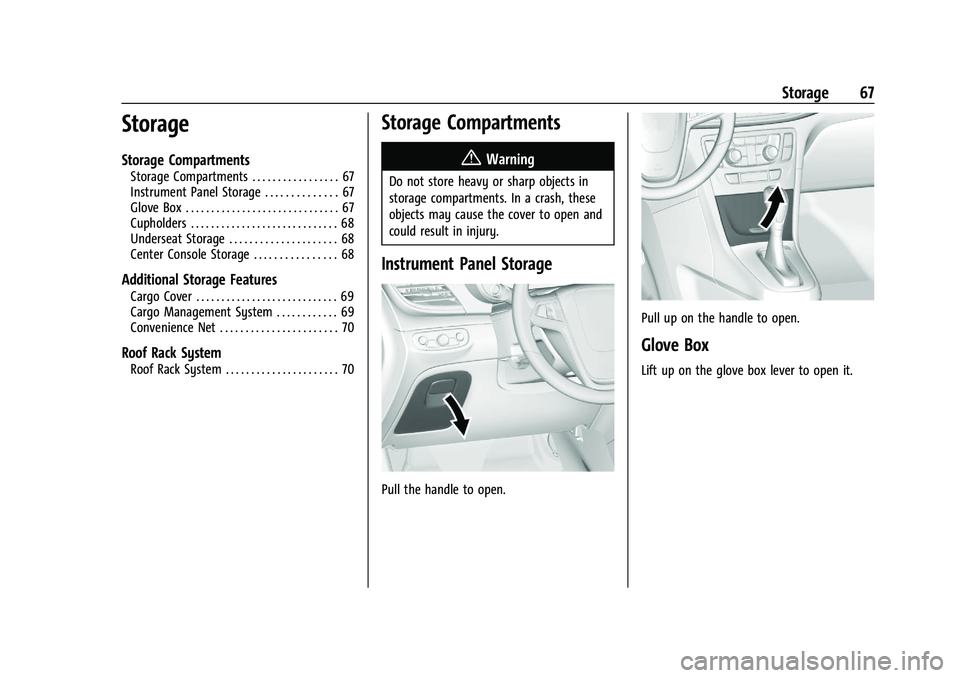
Pull the handle to open.
Pull up on the handle to open.
Glove Box
Lift up on the glove box lever to open it.
Page 72 of 313
Buick Encore Owner Manual (GMNA-Localizing-U.S./Canada-14607636) -
2021 - CRC - 8/18/20
Instruments and Controls 71
Instruments and Controls
Controls
Steering Wheel Adjustment . . . . . . . . . . . . . 71
Steering Wheel Controls . . . . . . . . . . . . . . . . 72
Horn . . . . . . . . . . . . . . . . . . . . . . . . . . . . . . . . . . . . 72
Windshield Wiper/Washer . . . . . . . . . . . . . . 72
Rear Window Wiper/Washer . . . . . . . . . . . 73
Compass . . . . . . . . . . . . . . . . . . . . . . . . . . . . . . . . 74
Clock . . . . . . . . . . . . . . . . . . . . . . . . . . . . . . . . . . . 75
Power Outlets . . . . . . . . . . . . . . . . . . . . . . . . . . 75
Warning Lights, Gauges, and Indicators
Warning Lights, Gauges, andIndicators . . . . . . . . . . . . . . . . . . . . . . . . . . . . . 75
Instrument Cluster . . . . . . . . . . . . . . . . . . . . . 76
Speedometer . . . . . . . . . . . . . . . . . . . . . . . . . . . 77
Odometer . . . . . . . . . . . . . . . . . . . . . . . . . . . . . . 77
Trip Odometer . . . . . . . . . . . . . . . . . . . . . . . . . . 77
Tachometer . . . . . . . . . . . . . . . . . . . . . . . . . . . . . 77
Fuel Gauge . . . . . . . . . . . . . . . . . . . . . . . . . . . . . 77
Engine Coolant Temperature Gauge . . . . 78
Seat Belt Reminders . . . . . . . . . . . . . . . . . . . . 79
Airbag Readiness Light . . . . . . . . . . . . . . . . . 79
Passenger Airbag Status Indicator . . . . . . 80
Charging System Light . . . . . . . . . . . . . . . . . 80
Malfunction Indicator Lamp (Check Engine Light) . . . . . . . . . . . . . . . . . . . . . . . . . . 81
Brake System Warning Light . . . . . . . . . . . 82 Antilock Brake System (ABS) Warning
Light . . . . . . . . . . . . . . . . . . . . . . . . . . . . . . . . . . 83
Lane Departure Warning (LDW) Light . . . 83
Vehicle Ahead Indicator . . . . . . . . . . . . . . . . 83
Traction Off Light . . . . . . . . . . . . . . . . . . . . . . 83
StabiliTrak OFF Light . . . . . . . . . . . . . . . . . . . 84
Traction Control System (TCS)/StabiliTrak Light . . . . . . . . . . . . . . . . . . . . . . . . . . . . . . . . . 84
Tire Pressure Light . . . . . . . . . . . . . . . . . . . . . 84
Engine Oil Pressure Light . . . . . . . . . . . . . . . 85
Low Fuel Warning Light . . . . . . . . . . . . . . . . 85
Immobilizer Light . . . . . . . . . . . . . . . . . . . . . . . 85
High-Beam On Light . . . . . . . . . . . . . . . . . . . . 86
Lamps On Reminder . . . . . . . . . . . . . . . . . . . . 86
Cruise Control Light . . . . . . . . . . . . . . . . . . . . 86
Door Ajar Light . . . . . . . . . . . . . . . . . . . . . . . . . 86
Information Displays
Driver Information Center (DIC) . . . . . . . . 86
Vehicle Messages
Vehicle Messages . . . . . . . . . . . . . . . . . . . . . . 88
Engine Power Messages . . . . . . . . . . . . . . . . 89
Vehicle Speed Messages . . . . . . . . . . . . . . . . 89
Vehicle Personalization
Vehicle Personalization (8 Inch Screen) . . . . . . . . . . . . . . . . . . . . . . . . . . . . . . . 89
Vehicle Personalization (7 Inch Screen) . . . . . . . . . . . . . . . . . . . . . . . . . . . . . . . 94
Controls
Steering Wheel Adjustment
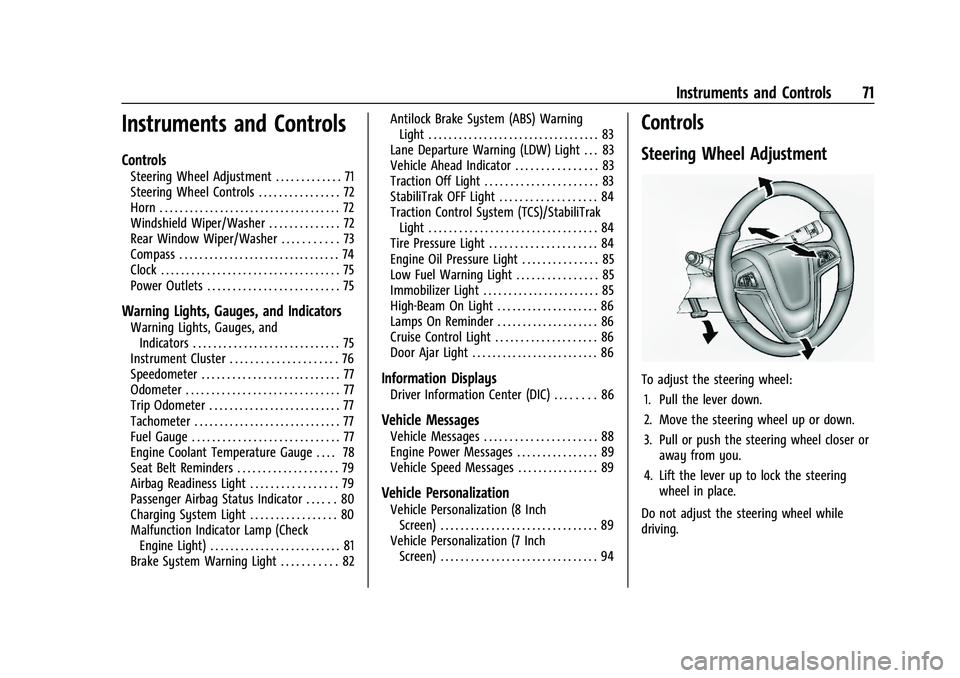
To adjust the steering wheel:
1. Pull the lever down.
2. Move the steering wheel up or down.
3. Pull or push the steering wheel closer or away from you.
4. Lift the lever up to lock the steering wheel in place.
Do not adjust the steering wheel while
driving.
Page 73 of 313
Buick Encore Owner Manual (GMNA-Localizing-U.S./Canada-14607636) -
2021 - CRC - 8/18/20
72 Instruments and Controls
Steering Wheel Controls
The infotainment system can be operated
by using the steering wheel controls. See
Steering Wheel Controls0106.
Horn
Pressaon the steering wheel pad to
sound the horn.
Windshield Wiper/Washer
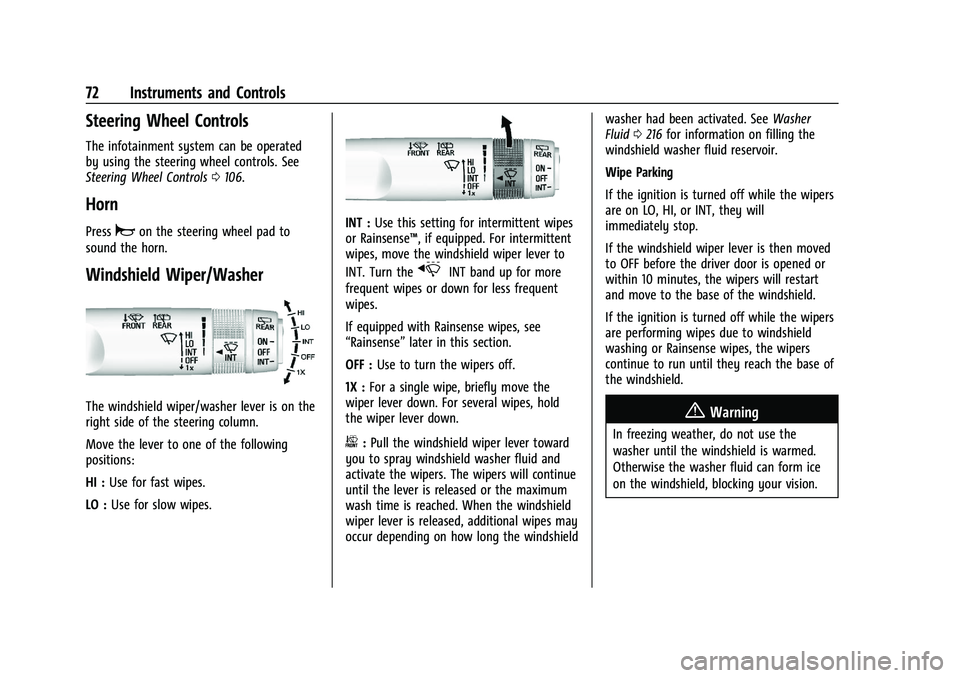
The windshield wiper/washer lever is on the
right side of the steering column.
Move the lever to one of the following
positions:
HI : Use for fast wipes.
LO : Use for slow wipes.
INT : Use this setting for intermittent wipes
or Rainsense™, if equipped. For intermittent
wipes, move the windshield wiper lever to
INT. Turn the
xINT band up for more
frequent wipes or down for less frequent
wipes.
If equipped with Rainsense wipes, see
“Rainsense” later in this section.
OFF : Use to turn the wipers off.
1X : For a single wipe, briefly move the
wiper lever down. For several wipes, hold
the wiper lever down.
b: Pull the windshield wiper lever toward
you to spray windshield washer fluid and
activate the wipers. The wipers will continue
until the lever is released or the maximum
wash time is reached. When the windshield
wiper lever is released, additional wipes may
occur depending on how long the windshield washer had been activated. See
Washer
Fluid 0216 for information on filling the
windshield washer fluid reservoir.
Wipe Parking
If the ignition is turned off while the wipers
are on LO, HI, or INT, they will
immediately stop.
If the windshield wiper lever is then moved
to OFF before the driver door is opened or
within 10 minutes, the wipers will restart
and move to the base of the windshield.
If the ignition is turned off while the wipers
are performing wipes due to windshield
washing or Rainsense wipes, the wipers
continue to run until they reach the base of
the windshield.
{Warning
In freezing weather, do not use the
washer until the windshield is warmed.
Otherwise the washer fluid can form ice
on the windshield, blocking your vision.
Page 74 of 313
Buick Encore Owner Manual (GMNA-Localizing-U.S./Canada-14607636) -
2021 - CRC - 8/18/20
Instruments and Controls 73
{Warning
Before driving the vehicle, always clear
snow and ice from the hood, windshield,
roof, and rear of the vehicle, including all
lamps and windows. Reduced visibility
from snow and ice buildup could lead to
a crash.
Clear snow and ice from the wiper blades
before using them. If frozen to the
windshield, carefully loosen or thaw them.
Damaged wiper blades should be replaced.
See Wiper Blade Replacement 0220.
Heavy snow or ice can overload the wiper
motor. A circuit breaker will stop the motor
until it cools down.
Rainsense™
If equipped with Rainsense, a sensor near
the top center of the windshield detects the
amount of water on the windshield and
controls the frequency of the windshield
wiper.
Keep the sensor free from debris to allow
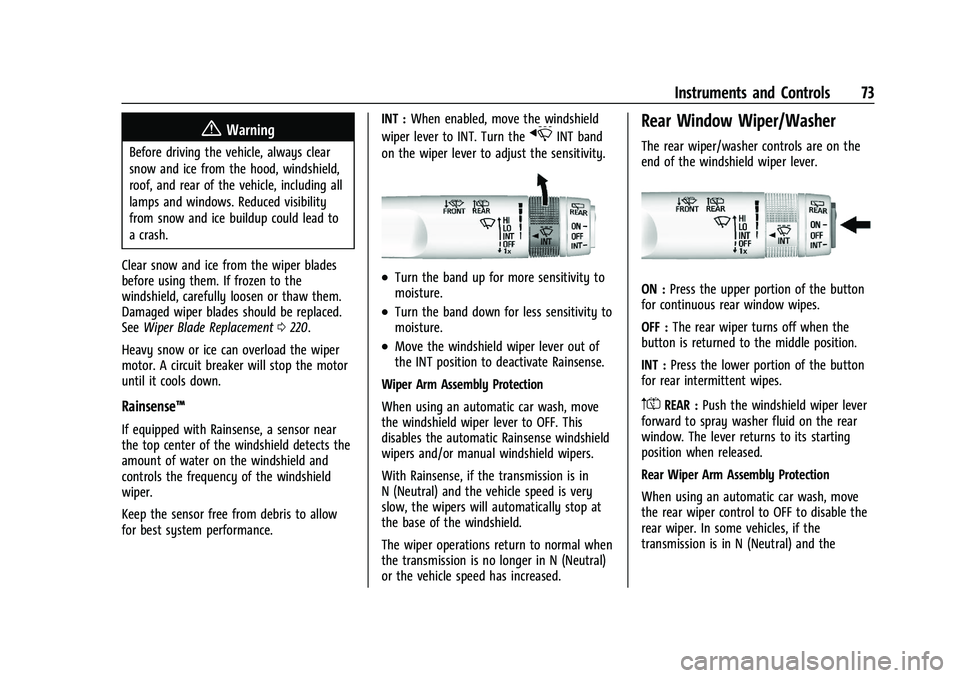
for best system performance. INT :
When enabled, move the windshield
wiper lever to INT. Turn the
xINT band
on the wiper lever to adjust the sensitivity.
.Turn the band up for more sensitivity to
moisture.
.Turn the band down for less sensitivity to
moisture.
.Move the windshield wiper lever out of
the INT position to deactivate Rainsense.
Wiper Arm Assembly Protection
When using an automatic car wash, move
the windshield wiper lever to OFF. This
disables the automatic Rainsense windshield
wipers and/or manual windshield wipers.
With Rainsense, if the transmission is in
N (Neutral) and the vehicle speed is very
slow, the wipers will automatically stop at
the base of the windshield.
The wiper operations return to normal when
the transmission is no longer in N (Neutral)
or the vehicle speed has increased.
Rear Window Wiper/Washer
The rear wiper/washer controls are on the
end of the windshield wiper lever.
ON : Press the upper portion of the button
for continuous rear window wipes.
OFF : The rear wiper turns off when the
button is returned to the middle position.
INT : Press the lower portion of the button
for rear intermittent wipes.
m=REAR : Push the windshield wiper lever
forward to spray washer fluid on the rear
window. The lever returns to its starting
position when released.
Rear Wiper Arm Assembly Protection
When using an automatic car wash, move
the rear wiper control to OFF to disable the
rear wiper. In some vehicles, if the
transmission is in N (Neutral) and the
Page 75 of 313
Buick Encore Owner Manual (GMNA-Localizing-U.S./Canada-14607636) -
2021 - CRC - 8/18/20
74 Instruments and Controls
vehicle speed is very slow, the rear wiper
will automatically park under the rear
spoiler.
The wiper operations return to normal when
the transmission is no longer in N (Neutral)
or the vehicle speed has increased.
Reverse Gear Wipes
If the rear wiper control is off, the rear
wiper will automatically operate
continuously when the shift lever is in
R (Reverse), and the front windshield wiper
is performing low or high speed wipes.
If the rear wiper control is off, the shift
lever is in R (Reverse), and the front
windshield wiper is performing interval
wipes, then the rear wiper automatically
performs interval wipes.
This feature can be changed. SeeVehicle
Personalization (8 Inch Screen) 089 or
Vehicle Personalization (7 Inch Screen) 094.
The windshield washer reservoir is used for
the windshield and the rear window. Check
the fluid level in the reservoir if either
washer is not working. See Washer Fluid
0 216.Compass
The vehicle may have a compass display in
the Driver Information Center (DIC).
Setting the Compass Zone
Under certain circumstances, such as during
a long trip or moving to a new area, the
compass zone will need to be reset. If the
compass is not set to the correct zone, it
may give false readings. The compass zone
should be set to the area in which the
vehicle is currently traveling.
Use the DIC buttons to set the
compass zone:
1. While the vehicle is in P (Park), press the MENU button to display the DIC menu.
2. Press and hold SET/CLR while the Set Area display is active.
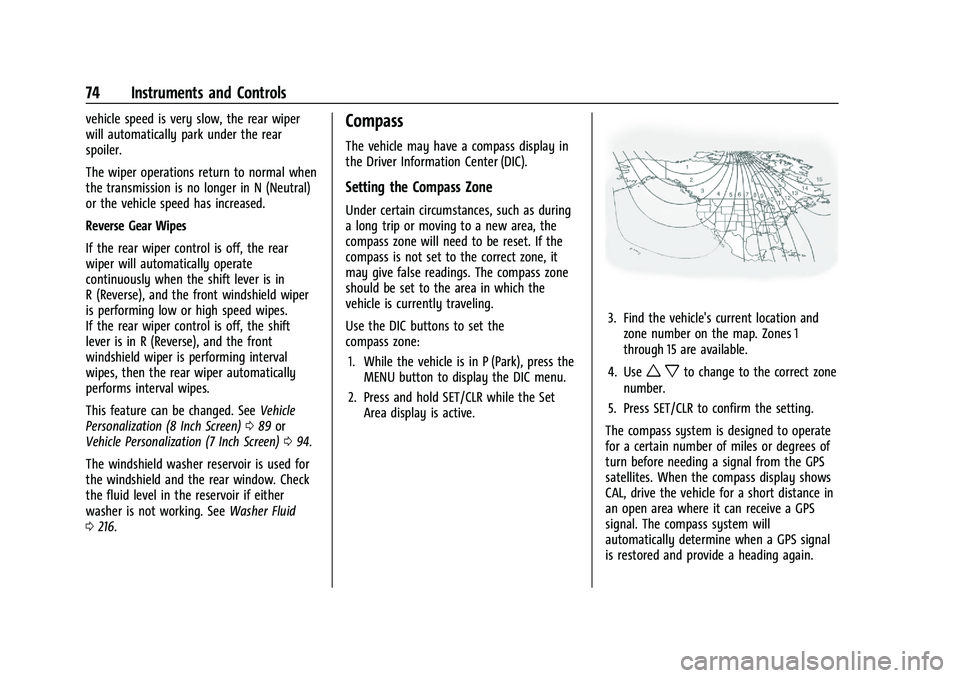
3. Find the vehicle's current location andzone number on the map. Zones 1
through 15 are available.
4. Use
w xto change to the correct zone
number.
5. Press SET/CLR to confirm the setting.
The compass system is designed to operate
for a certain number of miles or degrees of
turn before needing a signal from the GPS
satellites. When the compass display shows
CAL, drive the vehicle for a short distance in
an open area where it can receive a GPS
signal. The compass system will
automatically determine when a GPS signal
is restored and provide a heading again.
Page 76 of 313
Buick Encore Owner Manual (GMNA-Localizing-U.S./Canada-14607636) -
2021 - CRC - 8/18/20
Instruments and Controls 75
Clock
Set the time and date using the
infotainment system. See "Time / Date"
underSettings (8 Inch Screen) 0129 or
Settings (7 Inch Screen) 0154.
Power Outlets
Power Outlet 110/120-Volt Alternating
Current
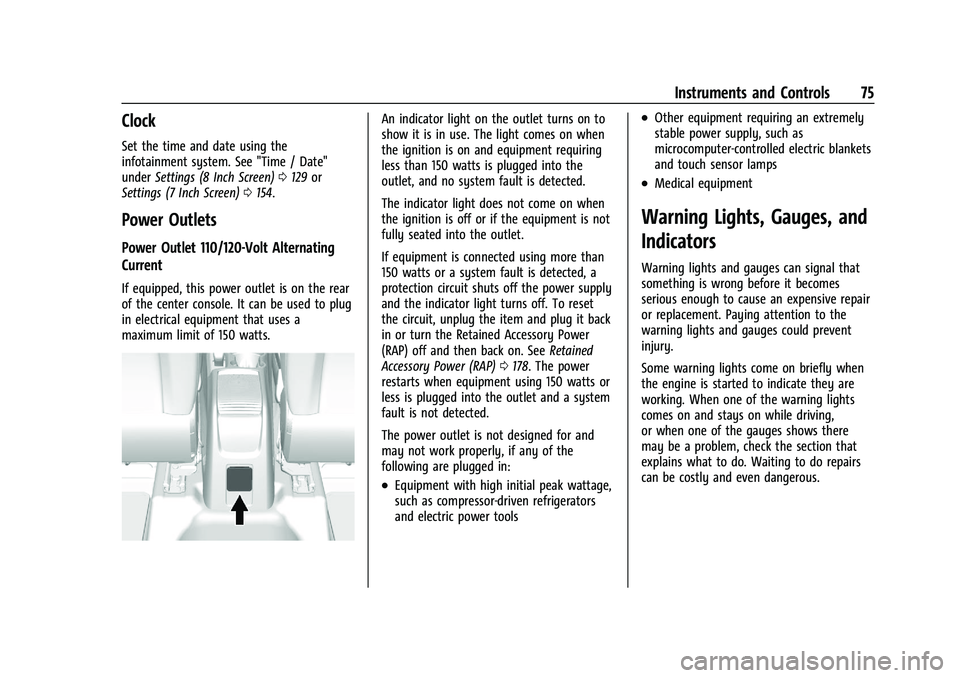
If equipped, this power outlet is on the rear
of the center console. It can be used to plug
in electrical equipment that uses a
maximum limit of 150 watts.
An indicator light on the outlet turns on to
show it is in use. The light comes on when
the ignition is on and equipment requiring
less than 150 watts is plugged into the
outlet, and no system fault is detected.
The indicator light does not come on when
the ignition is off or if the equipment is not
fully seated into the outlet.
If equipment is connected using more than
150 watts or a system fault is detected, a
protection circuit shuts off the power supply
and the indicator light turns off. To reset
the circuit, unplug the item and plug it back
in or turn the Retained Accessory Power
(RAP) off and then back on. See Retained
Accessory Power (RAP) 0178. The power
restarts when equipment using 150 watts or
less is plugged into the outlet and a system
fault is not detected.
The power outlet is not designed for and
may not work properly, if any of the
following are plugged in:
.Equipment with high initial peak wattage,
such as compressor-driven refrigerators
and electric power tools
.Other equipment requiring an extremely
stable power supply, such as
microcomputer-controlled electric blankets
and touch sensor lamps
.Medical equipment
Warning Lights, Gauges, and
Indicators
Warning lights and gauges can signal that
something is wrong before it becomes
serious enough to cause an expensive repair
or replacement. Paying attention to the
warning lights and gauges could prevent
injury.
Some warning lights come on briefly when
the engine is started to indicate they are
working. When one of the warning lights
comes on and stays on while driving,
or when one of the gauges shows there
may be a problem, check the section that
explains what to do. Waiting to do repairs
can be costly and even dangerous.
Page 77 of 313
Buick Encore Owner Manual (GMNA-Localizing-U.S./Canada-14607636) -
2021 - CRC - 8/18/20
76 Instruments and Controls
Instrument Cluster
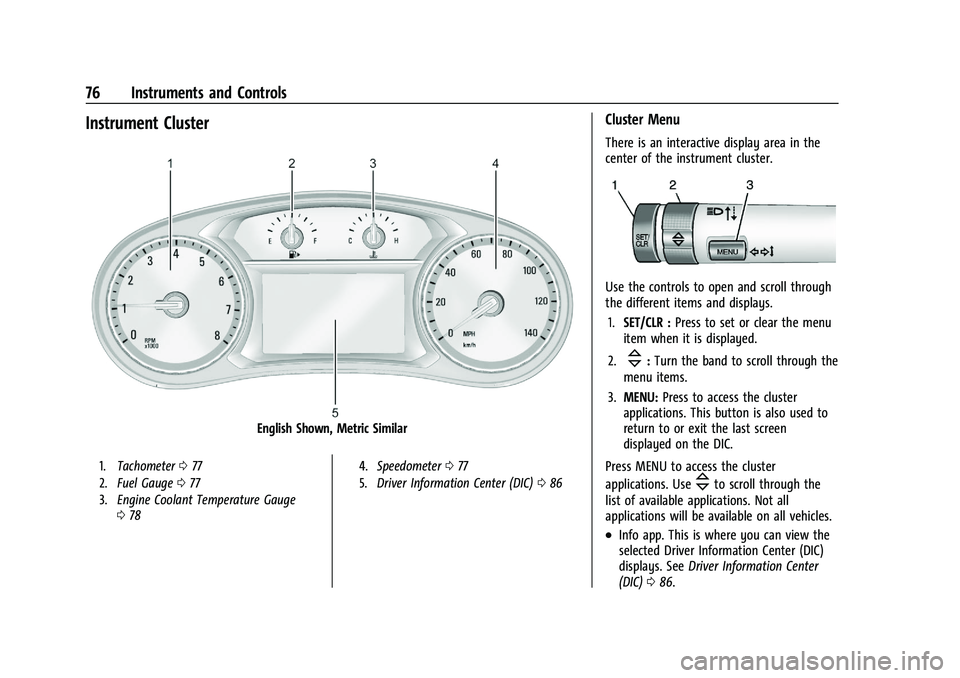
English Shown, Metric Similar
1.Tachometer 077
2. Fuel Gauge 077
3. Engine Coolant Temperature Gauge
078 4.
Speedometer 077
5. Driver Information Center (DIC) 086
Cluster Menu
There is an interactive display area in the
center of the instrument cluster.
Use the controls to open and scroll through
the different items and displays.
1. SET/CLR : Press to set or clear the menu
item when it is displayed.
2.
\: Turn the band to scroll through the
menu items.
3. MENU: Press to access the cluster
applications. This button is also used to
return to or exit the last screen
displayed on the DIC.
Press MENU to access the cluster
applications. Use
\to scroll through the
list of available applications. Not all
applications will be available on all vehicles.
.Info app. This is where you can view the
selected Driver Information Center (DIC)
displays. See Driver Information Center
(DIC) 086.
Page 78 of 313
Buick Encore Owner Manual (GMNA-Localizing-U.S./Canada-14607636) -
2021 - CRC - 8/18/20
Instruments and Controls 77
.Navigation
.Options
Navigation
Press SET/CLR to select the Navigation app.
Use
\to highlight available options.
If there is no active route, you can resume
the last route and turn the voice prompts
on/off. If there is an active route, press SET/
CLR to cancel route guidance or turn the
voice prompts on/off.
Options
Press SET/CLR to select the Options app. Use
\to scroll through the items in the
Options menu.
Unit : Press SET/CLR while Unit is displayed
to enter the Units menu. Choose U.S. or
metric units by pressing SET/CLR while the
desired item is highlighted.
Info Pages : Press SET/CLR while Info Pages
is displayed to enter the Info Pages menu.
Press SET/CLR to edit the list of info apps
displayed. See Driver Information Center
(DIC) 086.
Speedometer
The speedometer shows the vehicle speed in
kilometers per hour (km/h) and miles per
hour (mph).
Odometer
The odometer shows how far the vehicle has
been driven, in either kilometers or miles.
Trip Odometer
The trip odometer shows how far the
vehicle has been driven since the trip
odometer was last reset.
The trip odometer is accessed and reset
through the Driver Information Center (DIC).
See Driver Information Center (DIC) 086.
Tachometer
The tachometer displays the engine speed in
revolutions per minute (rpm).
When the engine is on, the tachometer will
indicate the engine’s revolutions per minute
(rpm). The tachometer may vary by several
hundred rpm’s, during Auto Stop mode,
when the engine is shutting off and
restarting.
Caution
If the engine is operated with the rpm in
the warning area at the high end of the
tachometer, the vehicle could be
damaged, and the damage would not be
covered by the vehicle warranty. Do not
operate the engine with the rpm in the
warning area.
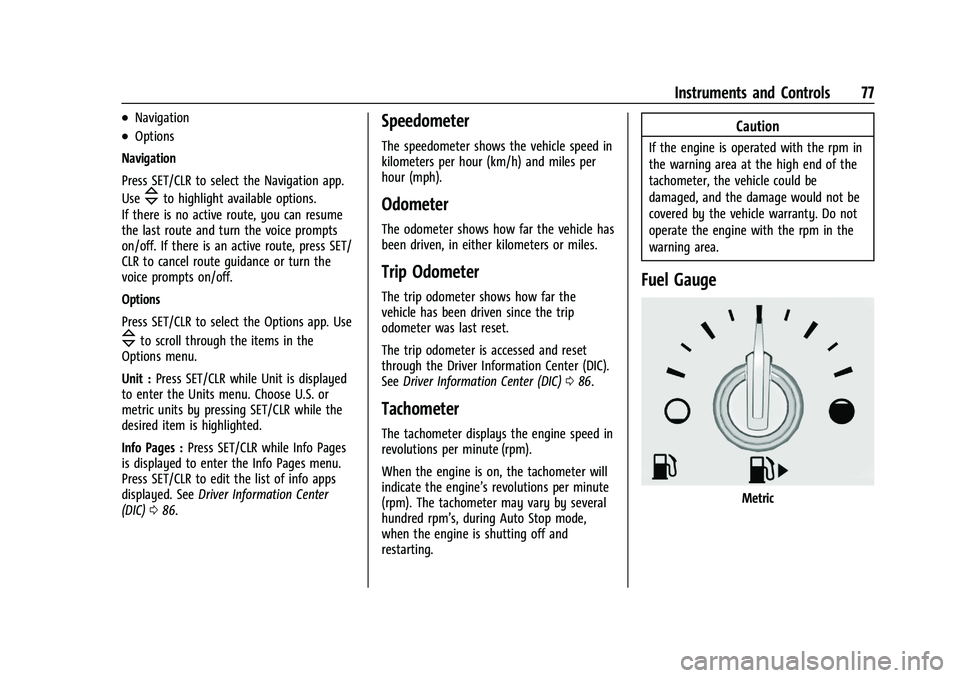
Fuel Gauge
Metric