ignition BUICK ENVISION 2016 Repair Manual
[x] Cancel search | Manufacturer: BUICK, Model Year: 2016, Model line: ENVISION, Model: BUICK ENVISION 2016Pages: 432, PDF Size: 5.68 MB
Page 352 of 432
Buick Envision Owner Manual (GMNA-Localizing-U.S./Canada/Mexico-
8534310) - 2016 - crc - 2/29/16
Vehicle Care 351
matching process is no longer
active. The TIRE LEARNING
ACTIVE message on the DIC
display screen goes off.
11. Turn the ignition to LOCK/OFF or press STOP to turn the
ignition off.
12. Set all four tires to the recommended air pressure
level as indicated on the Tire
and Loading Information label.
Tire Inspection
We recommend that the tires,
including the spare tire, if the
vehicle has one, be inspected
for signs of wear or damage at
least once a month.
Replace the tire if:
.The indicators at three or
more places around the tire
can be seen.
.There is cord or fabric
showing through the tire's
rubber.
.The tread or sidewall is
cracked, cut, or snagged
deep enough to show cord or
fabric.
.The tire has a bump, bulge,
or split.
.The tire has a puncture, cut,
or other damage that cannot
be repaired well because of
the size or location of the
damage.
Tire Rotation
Tires should be rotated every
12 000 km (7,500 mi). See
Maintenance Schedule 0382.
Tires are rotated to achieve a
more uniform wear for all tires.
The first rotation is the most
important.
Anytime unusual wear is
noticed, rotate the tires as soon
as possible, check for proper tire
inflation pressure, and check for
damaged tires or wheels. If the
unusual wear continues after the rotation, check the wheel
alignment. See
When It Is Time
for New Tires 0352 andWheel
Replacement 0356.
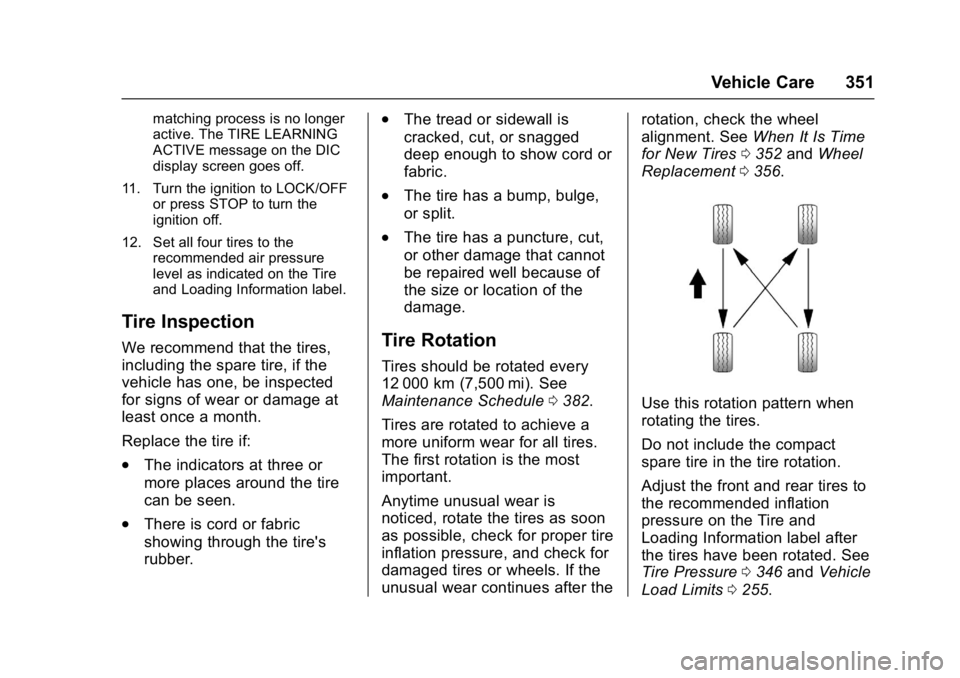
Use this rotation pattern when
rotating the tires.
Do not include the compact
spare tire in the tire rotation.
Adjust the front and rear tires to
the recommended inflation
pressure on the Tire and
Loading Information label after
the tires have been rotated. See
Tire Pressure 0346 and Vehicle
Load Limits 0255.
Page 367 of 432
Buick Envision Owner Manual (GMNA-Localizing-U.S./Canada/Mexico-
8534310) - 2016 - crc - 2/29/16
366 Vehicle Care
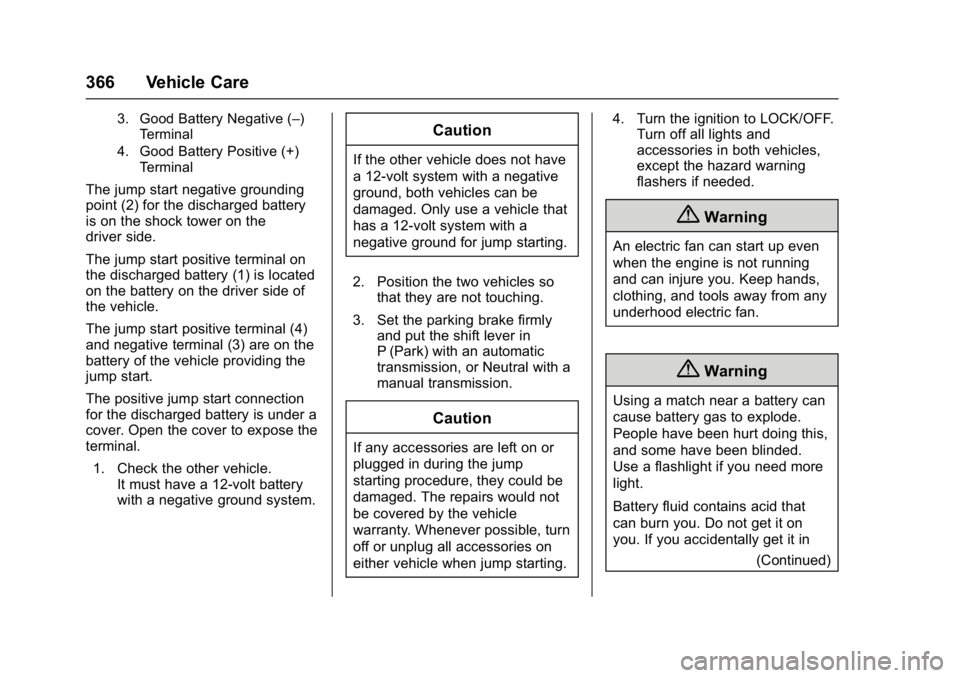
3. Good Battery Negative (–)Terminal
4. Good Battery Positive (+) Terminal
The jump start negative grounding
point (2) for the discharged battery
is on the shock tower on the
driver side.
The jump start positive terminal on
the discharged battery (1) is located
on the battery on the driver side of
the vehicle.
The jump start positive terminal (4)
and negative terminal (3) are on the
battery of the vehicle providing the
jump start.
The positive jump start connection
for the discharged battery is under a
cover. Open the cover to expose the
terminal.
1. Check the other vehicle. It must have a 12-volt battery
with a negative ground system.
Caution
If the other vehicle does not have
a 12-volt system with a negative
ground, both vehicles can be
damaged. Only use a vehicle that
has a 12-volt system with a
negative ground for jump starting.
2. Position the two vehicles so that they are not touching.
3. Set the parking brake firmly and put the shift lever in
P (Park) with an automatic
transmission, or Neutral with a
manual transmission.
Caution
If any accessories are left on or
plugged in during the jump
starting procedure, they could be
damaged. The repairs would not
be covered by the vehicle
warranty. Whenever possible, turn
off or unplug all accessories on
either vehicle when jump starting. 4. Turn the ignition to LOCK/OFF.
Turn off all lights and
accessories in both vehicles,
except the hazard warning
flashers if needed.
{Warning
An electric fan can start up even
when the engine is not running
and can injure you. Keep hands,
clothing, and tools away from any
underhood electric fan.
{Warning
Using a match near a battery can
cause battery gas to explode.
People have been hurt doing this,
and some have been blinded.
Use a flashlight if you need more
light.
Battery fluid contains acid that
can burn you. Do not get it on
you. If you accidentally get it in
(Continued)
Page 371 of 432
Buick Envision Owner Manual (GMNA-Localizing-U.S./Canada/Mexico-
8534310) - 2016 - crc - 2/29/16
370 Vehicle Care
.Is the proper towing equipment
going to be used? See your
dealer or trailering professional
for additional advice and
equipment recommendations.
. Is the vehicle ready to be
towed? Just as preparing the
vehicle for a long trip, make sure
the vehicle is prepared to be
towed.
Caution
Use of a shield mounted in front
of the vehicle grille could restrict
airflow and cause damage to the
transmission. The repairs would
not be covered by the vehicle
warranty. If using a shield, only
use one that attaches to the
towing vehicle.
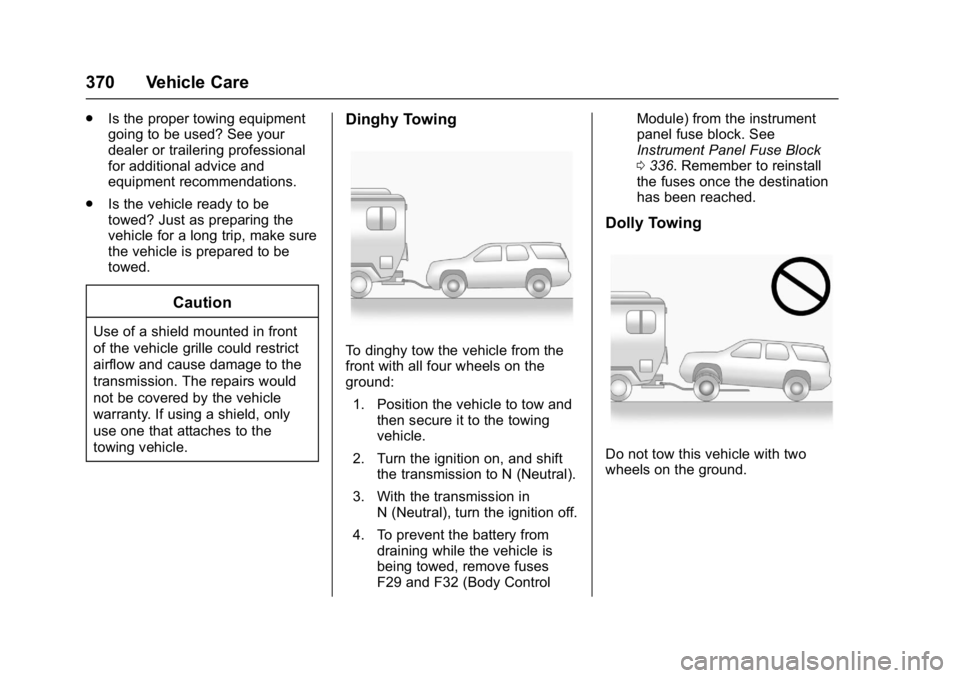
Dinghy Towing
To dinghy tow the vehicle from the
front with all four wheels on the
ground:
1. Position the vehicle to tow and then secure it to the towing
vehicle.
2. Turn the ignition on, and shift the transmission to N (Neutral).
3. With the transmission in N (Neutral), turn the ignition off.
4. To prevent the battery from draining while the vehicle is
being towed, remove fuses
F29 and F32 (Body Control Module) from the instrument
panel fuse block. See
Instrument Panel Fuse Block
0
336. Remember to reinstall
the fuses once the destination
has been reached.
Dolly Towing
Do not tow this vehicle with two
wheels on the ground.
Page 412 of 432
Buick Envision Owner Manual (GMNA-Localizing-U.S./Canada/Mexico-
8534310) - 2016 - crc - 2/29/16
OnStar 411
.Obtain the Wi-Fi®hotspot name
or SSID and password,
if equipped.
Press
Qto connect to an
Advisor to:
. Verify account information or
update contact information.
. Get driving directions.
. Receive a Diagnostic check of
the vehicle's key operating
systems.
. Receive Roadside Assistance.
. Manage Wi-Fi Settings,
if equipped.
Press
>to get a priority connection
to an OnStar Advisor available 24/
7 to:
. Get help for an emergency.
. Be a Good Samaritan or
respond to an AMBER Alert.
. Get assistance in severe
weather or other crisis situations
and find evacuation routes.
OnStar Services
Emergency
Emergency Services require an
active, OnStar subscription plan
(excludes Basic Plan). With
Automatic Crash Response, built-in
sensors can automatically alert a
specially trained OnStar Advisor
who is immediately connected in to
the vehicle to help.
Press
>for a priority connection to
an OnStar Advisor who can contact
emergency service providers, direct
them to your exact location, and
relay important information.
With OnStar Crisis Assist, specially
trained Advisors are available
24 hours a day, 7 days a week, to
provide a central point of contact,
assistance, and information during a
crisis.
With Roadside Assistance, Advisors
can locate a nearby service provider
to help with a flat tire, a battery
jump, or an empty gas tank.
Security
If equipped, OnStar provides these
services:
. With Stolen Vehicle Assistance,
OnStar Advisors can use GPS to
pinpoint the vehicle and help
authorities quickly recover it.
. With Remote Ignition Block,
if equipped, OnStar can block
the engine from being restarted.
. With Stolen Vehicle Slowdown,
if equipped, OnStar can work
with law enforcement to
gradually slow the vehicle down.
Navigation
OnStar navigation requires a
specific OnStar subscription plan.
Press
Qto receive Turn-by-Turn
directions or have them sent to the
vehicle’s navigation screen,
if equipped.
Turn-by-Turn Navigation
1. PressQto connect to an
Advisor.
Page 417 of 432
Buick Envision Owner Manual (GMNA-Localizing-U.S./Canada/Mexico-
8534310) - 2016 - crc - 2/29/16
416 OnStar
OnStar Personal Identification
Number (PIN)
A PIN is needed to access some
OnStar services. The PIN will need
to be changed the first time when
speaking with an Advisor. To
change the OnStar PIN, contact an
OnStar Advisor by pressing
Qor
calling 1-888-4ONSTAR.
Warranty
OnStar equipment may be
warranted as part of the vehicle
warranty.
Languages
The vehicle can be programmed to
respond in multiple languages.
Press
Qand ask for an Advisor.
Advisors are available in English,
Spanish, and French. Available
languages may vary by country.
Potential Issues
OnStar cannot perform Remote
Door Unlock or Stolen Vehicle
Assistance after the vehicle has
been off continuously for five days
without an ignition cycle. If the vehicle has not been started for
five days, OnStar can contact
Roadside Assistance or a locksmith
to help gain access to the vehicle.
Global Positioning
System (GPS)
.
Obstruction of the GPS can
occur in a large city with tall
buildings; in parking garages;
around airports; in tunnels and
underpasses; or in an area with
very dense trees. If GPS signals
are not available, the OnStar
system should still operate to
call OnStar. However, OnStar
could have difficulty identifying
the exact location.
. In emergency situations, OnStar
can use the last stored GPS
location to send to emergency
responders.
A temporary loss of GPS can cause
loss of the ability to send a
Turn-by-Turn Navigation route. The
Advisor may give a verbal route or
may ask for a call back after the
vehicle is driven into an open area.
Cellular and GPS Antennas
Cellular reception is required for
OnStar to send remote signals to
the vehicle. Do not place items over
or near the antenna to prevent
blocking cellular and GPS signal
reception.
Unable to Connect to OnStar
Message
If there is limited cellular coverage
or the cellular network has reached
maximum capacity, this message
may come on. Press
Qto try the
call again or try again after driving a
few miles into another cellular area.
Vehicle and Power Issues
OnStar services require a vehicle
electrical system, wireless service,
and GPS satellite technologies to be
available and operating for features
to function properly. These systems
may not operate if the battery is
discharged or disconnected.
Page 426 of 432

Buick Envision Owner Manual (GMNA-Localizing-U.S./Canada/Mexico-
8534310) - 2016 - crc - 2/29/16
Index 425
Headlamps (cont'd)High/Low Beam Changer . . . . . 157
Lamps On Reminder . . . . . . . . . 127
Washer . . . . . . . . . . . . . . . . . . . . . . . 107
Heated Rear Seats . . . . . . . . . . . . . . . . . . . . . 58
Steering Wheel . . . . . . . . . . . . . . . 104
Heated and Cooled Front Seats . . . . . . . . . . . . . . . . . . . . . . . . . . 55
Heated Mirrors . . . . . . . . . . . . . . . . . . . 44
Heater Engine . . . . . . . . . . . . . . . . . . . . . . . . 263
High-Beam On Light . . . . . . . . . . . . 126
Hill and Mountain Roads . . . . . . . . 253
Hill Start Assist (HSA) . . . . . . . . . . 272
Hood . . . . . . . . . . . . . . . . . . . . . . . . . . . 312
Horn . . . . . . . . . . . . . . . . . . . . . . . . . . . . 104
How to Wear Safety Belts Properly . . . . . . . . . . . . . . . . . . . . . . . . 59
I
If the System Needs Service . . . . 212
Ignition Positions . . . . . . . . . . . . . . . 259
Immobilizer . . . . . . . . . . . . . . . . . . . . . . 42
IndicatorVehicle Ahead . . . . . . . . . . . . . . . . 123
Infants and Young Children, Restraints . . . . . . . . . . . . . . . . . . . . . . 80
Infotainment System . . . . . . . . . . . . 409 Instrument Cluster . . . . . . . . . . . . . . 111
Instrument Panel Overview . . . . . . . 6
Interior Rearview Mirrors . . . . . . . . . 44
Internet Radio
Pandora . . . . . . . . . . . . . . . . . . . . . . 175
Introduction . . . . . . . . . . . . . . . . . . . . . . . 2
J
Jack Auxiliary . . . . . . . . . . . . . . . . . . . . . . 184
Jump Starting - North America . . . . . . . . . . . . . . . . . . . . . . . 365
K
Key and Lock Messages . . . . . . . . 140
Keyless EntryRemote (RKE) System . . . . . . . . . 26
Keys . . . . . . . . . . . . . . . . . . . . . . . . . . . . . 25
L
Labeling, Tire Sidewall . . . . . . . . . . 340
Lamps Courtesy . . . . . . . . . . . . . . . . . . . . . . 160
Daytime Running (DRL) . . . . . . 157
Dome . . . . . . . . . . . . . . . . . . . . . . . . . 160
Exterior Controls . . . . . . . . . . . . . . 155
Exterior Lamps OffReminder . . . . . . . . . . . . . . . . . . . 157
Exterior Lighting Battery Saver . . . . . . . . . . . . . . . . . . . . . . . 162 Lamps (cont'd)
License Plate . . . . . . . . . . . . . . . . . 332
Malfunction Indicator . . . . . . . . . .119
On Reminder . . . . . . . . . . . . . . . . . 127
Reading . . . . . . . . . . . . . . . . . . . . . . 161
Lane Change Alert (LCA) . . . . . . . 294
Lane Departure Warning (LDW) . . . . . . . . . . . . . . . . 296
Lane Keep Assist (LKA) . . . . . . . . 296
Lane Keep Assist Light . . . . . . . . . 123
Lap-Shoulder Belt . . . . . . . . . . . . . . . 60
LATCH System
Replacing Parts after aCrash . . . . . . . . . . . . . . . . . . . . . . . . . 91
LATCH, Lower Anchors and Tethers for Children . . . . . . . . . . . . 85
Leveling Control Headlamp . . . . . . . . . . . . . . . . . . . . 158
Liftgate . . . . . . . . . . . . . . . . . . . . . . . . . . 36
Light Adaptive Forward Lighting(AFL) Light . . . . . . . . . . . . . . . . . . 126
Lighting
Adaptive Forward . . . . . . . . . . . . . 158
Entry . . . . . . . . . . . . . . . . . . . . . . . . . 161
Exit . . . . . . . . . . . . . . . . . . . . . . . . . . . 162
Illumination Control . . . . . . . . . . . 160
Lights . . . . . . . . . . . . . . . . . . . . . . . . . . . 123