steering BUICK ENVISION 2016 Owner's Manual
[x] Cancel search | Manufacturer: BUICK, Model Year: 2016, Model line: ENVISION, Model: BUICK ENVISION 2016Pages: 432, PDF Size: 5.68 MB
Page 5 of 432
Buick Envision Owner Manual (GMNA-Localizing-U.S./Canada/Mexico-
8534310) - 2016 - crc - 2/29/16
4 Introduction
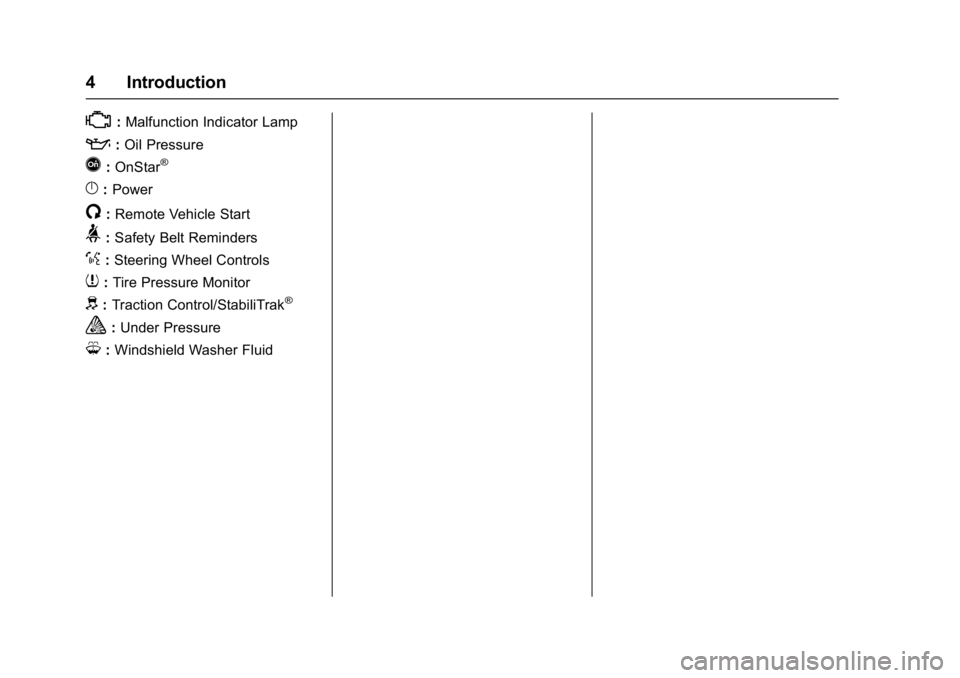
*:Malfunction Indicator Lamp
::Oil Pressure
Q:OnStar®
}:Power
/:Remote Vehicle Start
>: Safety Belt Reminders
%:Steering Wheel Controls
7: Tire Pressure Monitor
d:Traction Control/StabiliTrak®
a:Under Pressure
M: Windshield Washer Fluid
Page 6 of 432
Buick Envision Owner Manual (GMNA-Localizing-U.S./Canada/Mexico-
8534310) - 2016 - crc - 2/29/16
In Brief 5
In Brief
Instrument Panel
Instrument Panel Overview . . . . . . 6
Initial Drive Information
Initial Drive Information . . . . . . . . . . 8
Remote Keyless Entry (RKE)System . . . . . . . . . . . . . . . . . . . . . . . . 8
Remote Vehicle Start . . . . . . . . . . . 9
Door Locks . . . . . . . . . . . . . . . . . . . . . 9
Liftgate . . . . . . . . . . . . . . . . . . . . . . . . . . 9
Seat Adjustment . . . . . . . . . . . . . . . 10
Memory Features . . . . . . . . . . . . . . 11
Heated and Cooled Front Seats . . . . . . . . . . . . . . . . . . . . . . . . . 11
Head Restraint Adjustment . . . . 12
Safety Belts . . . . . . . . . . . . . . . . . . . . 12
Passenger Sensing System . . . 12
Mirror Adjustment . . . . . . . . . . . . . . 13
Steering Wheel Adjustment . . . . 14
Interior Lighting . . . . . . . . . . . . . . . . 14
Exterior Lighting . . . . . . . . . . . . . . . 15
Windshield Wiper/Washer . . . . . . 15
Climate Controls . . . . . . . . . . . . . . . 17
Transmission . . . . . . . . . . . . . . . . . . 17
Vehicle Features
Steering Wheel Controls . . . . . . . 18
Cruise Control . . . . . . . . . . . . . . . . . 18 Driver Information
Center (DIC) . . . . . . . . . . . . . . . . . 19
Forward Collision Alert (FCA) System . . . . . . . . . . . . . . . . . . . . . . . 19
Front Automatic Braking (FAB)
System . . . . . . . . . . . . . . . . . . . . . . . 19
Lane Keep Assist (LKA) . . . . . . . 20
Lane Change Alert (LCA) . . . . . . 20
Surround Vision . . . . . . . . . . . . . . . 20
Rear Vision Camera (RVC) . . . . 20
Rear Cross Traffic Alert (RCTA) System . . . . . . . . . . . . . . . . . . . . . . . 20
Parking Assist . . . . . . . . . . . . . . . . . 21
Automatic Parking Assist (APA) . . . . . . . . . . . . . . . . . . 21
Power Outlets . . . . . . . . . . . . . . . . . 21
Universal Remote System . . . . . 21
Sunroof . . . . . . . . . . . . . . . . . . . . . . . . 22
Performance and Maintenance
Traction Control/Electronic Stability Control . . . . . . . . . . . . . . 23
Tire Pressure Monitor . . . . . . . . . . 23
Engine Oil Life System . . . . . . . . 23
Driving for Better Fuel Economy . . . . . . . . . . . . . . . . . . . . . 24
Roadside Assistance Program . . . . . . . . . . . . . . . . . . . . . . 24
Page 8 of 432

Buick Envision Owner Manual (GMNA-Localizing-U.S./Canada/Mexico-
8534310) - 2016 - crc - 2/29/16
In Brief 7
1.Air Vents 0244.
2. Turn Signal Lever. See Turn
and Lane-Change
Signals 0159.
3. Instrument Cluster 0111.
Driver Information Center
Display. See Driver Information
Center (DIC) (Base Level)
0 128 orDriver Information
Center (DIC) (Uplevel) 0131.
4. Windshield Wiper/
Washer 0104.
Rear Window Wiper/
Washer 0106.
5. Hazard Warning
Flashers 0159.
6. AM-FM Radio 0170.
7. Light Sensor. See Automatic
Headlamp System 0157.
8. Lane Keep Assist (LKA) 0296
(If Equipped).
Assistance Systems for
Parking or Backing 0285 (If
Equipped).
9. Clock 0107. 10.
Heated and Cooled Front
Seats 055 (If Equipped).
11. Dual Automatic Climate Control
System 0240.
12. Traction Control/Electronic
Stability Control 0273.
13. Electric Parking Brake 0271.
14. Shift Lever. See Automatic
Transmission 0267.
15. ENGINE START/STOP Button. SeeIgnition Positions 0259.
16. Steering Wheel Controls 0103
(If Equipped).
Driver Information Center (DIC)
Buttons. See Driver Information
Center (DIC) (Base Level)
0 128 orDriver Information
Center (DIC) (Uplevel) 0131.
17. Horn 0104.
18. Steering Wheel
Adjustment 0103.
19. Cruise Control 0275.
Adaptive Cruise Control 0277
(If Equipped). Heated Steering Wheel
0104
(If Equipped).
Forward Collision Alert (FCA)
System 0290 (If Equipped).
20. Data Link Connector (DLC) (Out of View). See Malfunction
Indicator Lamp (Check Engine
Light) 0119.
21. Front Storage 097.
22. Instrument Panel Illumination
Control 0160.
Head-Up Display (HUD) 0133
(If Equipped) (Out of View).
23. Exterior Lamp Controls 0155.
Fog Lamps 0160 (If
Equipped).
Page 12 of 432
Buick Envision Owner Manual (GMNA-Localizing-U.S./Canada/Mexico-
8534310) - 2016 - crc - 2/29/16
In Brief 11
Reclining Seatbacks
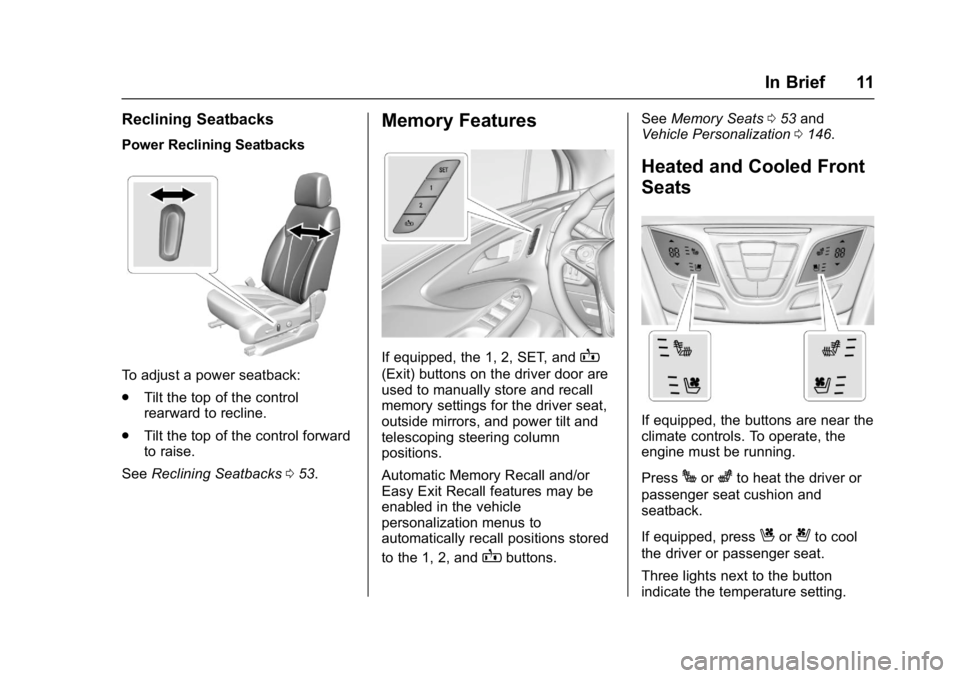
Power Reclining Seatbacks
To adjust a power seatback:
.Tilt the top of the control
rearward to recline.
. Tilt the top of the control forward
to raise.
See Reclining Seatbacks 053.
Memory Features
If equipped, the 1, 2, SET, andB
(Exit) buttons on the driver door are
used to manually store and recall
memory settings for the driver seat,
outside mirrors, and power tilt and
telescoping steering column
positions.
Automatic Memory Recall and/or
Easy Exit Recall features may be
enabled in the vehicle
personalization menus to
automatically recall positions stored
to the 1, 2, and
Bbuttons. See
Memory Seats 053 and
Vehicle Personalization 0146.
Heated and Cooled Front
Seats
If equipped, the buttons are near the
climate controls. To operate, the
engine must be running.
Press
Jorzto heat the driver or
passenger seat cushion and
seatback.
If equipped, press
Cor{to cool
the driver or passenger seat.
Three lights next to the button
indicate the temperature setting.
Page 15 of 432

Buick Envision Owner Manual (GMNA-Localizing-U.S./Canada/Mexico-
8534310) - 2016 - crc - 2/29/16
14 In Brief
Steering Wheel
Adjustment
To adjust the steering wheel:1. Pull the lever down.
2. Move the steering wheel up or down.
3. Pull or push the steering wheel closer or away from you.
4. Pull the lever up to lock the steering wheel in place.
Do not adjust the steering wheel
while driving.
Interior Lighting
Dome Lamp
The dome lamp is in the overhead
console.
To change the dome lamp settings,
press the following:
*: Turns the lamp off, even when
a door is open.
1: The lamp comes on when a
door is opened.
+: Turns the lamp on. Reading Lamps
There are reading lamps on the
overhead console and over the rear
passenger doors. These lamps
come on when any door is opened.
Front Reading Lamps
The reading lamps in the overhead
console are operated by touch.
Touch the lamp for dim light, touch
again for bright light, and touch
again to turn the light off.
Page 16 of 432

Buick Envision Owner Manual (GMNA-Localizing-U.S./Canada/Mexico-
8534310) - 2016 - crc - 2/29/16
In Brief 15
Rear Reading Lamps
Press the lamp lens to turn the rear
passenger reading lamps on or off.
For more information on interior
lighting, see Instrument Panel
Illumination Control 0160.
Exterior Lighting
The exterior lamp control is on the
instrument panel on the outboard
side of the steering wheel.
Turn the control to the following
positions:
O:Turns off the exterior lamps.
The knob returns to the AUTO
position after it is released. Turn to
Oagain to reactivate the
AUTO mode.
AUTO : Automatically turns the
exterior lamps on and off,
depending on outside lighting.
;: Turns on the parking lamps
including all lamps, except the
headlamps.
2: Turns on the headlamps
together with the parking lamps and
instrument panel lights.
See:
. Exterior Lamp Controls 0155.
. Fog Lamps 0160.
Windshield Wiper/Washer
Windshield Wiper with Rainsense
(AUTO Shown)
Windshield Wiper with IntermittentWipes (INT Shown)
With the ignition in ACC/
ACCESSORY or ON/RUN/START,
move the windshield wiper lever to
select the wiper speed.
HI : Use for fast wipes.
Page 19 of 432
Buick Envision Owner Manual (GMNA-Localizing-U.S./Canada/Mexico-
8534310) - 2016 - crc - 2/29/16
18 In Brief
Vehicle Features
Steering Wheel Controls
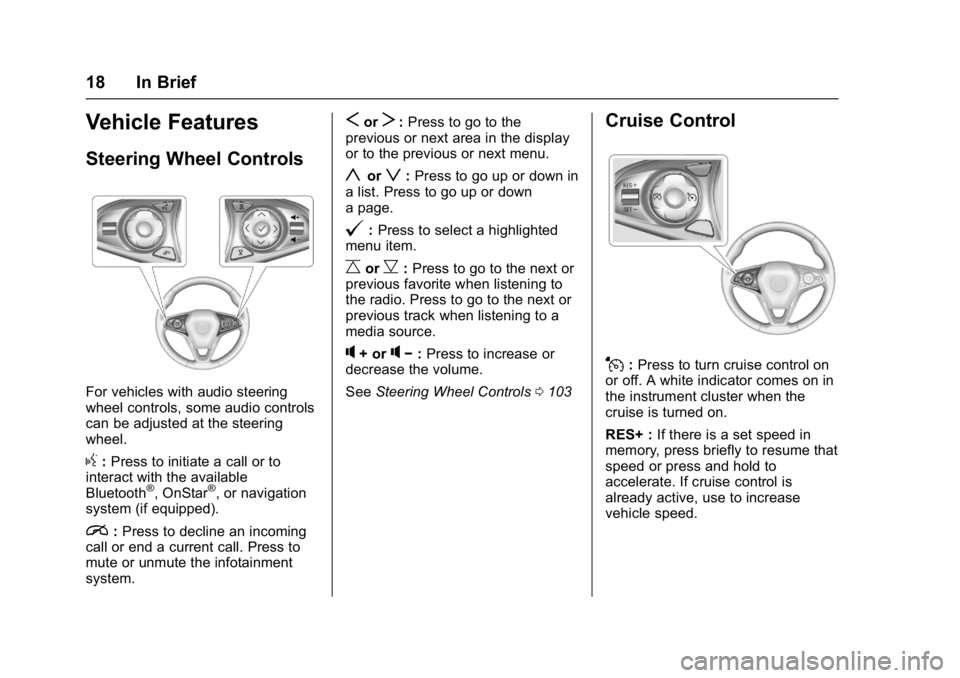
For vehicles with audio steering
wheel controls, some audio controls
can be adjusted at the steering
wheel.
g:Press to initiate a call or to
interact with the available
Bluetooth
®, OnStar®, or navigation
system (if equipped).
i: Press to decline an incoming
call or end a current call. Press to
mute or unmute the infotainment
system.
SorT: Press to go to the
previous or next area in the display
or to the previous or next menu.
yorz: Press to go up or down in
a list. Press to go up or down
a page.
@: Press to select a highlighted
menu item.
CorB: Press to go to the next or
previous favorite when listening to
the radio. Press to go to the next or
previous track when listening to a
media source.
q+ orq− :Press to increase or
decrease the volume.
See Steering Wheel Controls 0103
Cruise Control
J:Press to turn cruise control on
or off. A white indicator comes on in
the instrument cluster when the
cruise is turned on.
RES+ : If there is a set speed in
memory, press briefly to resume that
speed or press and hold to
accelerate. If cruise control is
already active, use to increase
vehicle speed.
Page 21 of 432
Buick Envision Owner Manual (GMNA-Localizing-U.S./Canada/Mexico-
8534310) - 2016 - crc - 2/29/16
20 In Brief
vehicle. This can help avoid or
lessen the severity of crashes when
driving in a forward gear.
SeeFront Automatic Braking (FAB)
System 0292.
Lane Keep Assist (LKA)
If equipped, LKA may help avoid
crashes due to unintentional lane
departures. It may assist by gently
turning the steering wheel if the
vehicle approaches a detected lane
marking without using a turn signal
in that direction. It may also provide
a Lane Departure Warning (LDW)
alert as the lane marking is crossed.
The system will not assist or alert if
it detects that you are actively
steering. Override LKA by turning
the steering wheel. LKA uses a
camera to detect lane markings
between 60 km/h (37 mph) and
180 km/h (112 mph).
See Lane Departure Warning (LDW)
0 296 andLane Keep Assist
(LKA) 0296.
Lane Change Alert (LCA)
If equipped, the LCA system is a
lane-changing aid that assists
drivers with avoiding lane change
crashes that occur with moving
vehicles in the side blind zone (or
spot) areas or with vehicles rapidly
approaching these areas from
behind. The LCA warning display
will light up in the corresponding
outside side mirror and will flash if
the turn signal is on. The Side Blind
Zone Alert (SBZA) system is
included as part of the LCA system.
See Side Blind Zone Alert (SBZA)
0 293 andLane Change Alert
(LCA) 0294.
Surround Vision
If equipped, views around the
vehicle display on the center stack
to aid with parking and low-speed
maneuvers.
See “Surround Vision” under
Assistance Systems for Parking or
Backing 0285.
Front Vision Camera
If equipped, a view of the area in
front of the vehicle displays on the
center stack to aid with parking and
low-speed maneuvers.
See “Front Vision Camera” under
Assistance Systems for Parking or
Backing 0285.
Rear Vision
Camera (RVC)
If equipped, RVC displays a view of
the area behind the vehicle on the
infotainment display when the
vehicle is shifted into R (Reverse) to
aid with parking and low-speed
backing maneuvers.
See Assistance Systems for Parking
or Backing 0285.
Rear Cross Traffic Alert
(RCTA) System
If equipped, the RCTA system uses
a triangle with an arrow displayed
on the RVC screen to warn of traffic
behind your vehicle that may cross
Page 22 of 432

Buick Envision Owner Manual (GMNA-Localizing-U.S./Canada/Mexico-
8534310) - 2016 - crc - 2/29/16
In Brief 21
your vehicle's path while in
R (Reverse). In addition, beeps will
sound, or the driver seat will pulse.
SeeAssistance Systems for Parking
or Backing 0285.
Parking Assist
If equipped, Rear Parking
Assist (RPA) uses sensors on the
rear bumper to assist with parking
and avoiding objects while in
R (Reverse). It operates at speeds
less than 8 km/h (5 mph). RPA may
display a warning triangle on the
Rear Vision Camera screen and a
graphic on the instrument cluster to
provide the object distance. In
addition, multiple beeps or seat
pulses may occur if very close to an
object.
The vehicle may also have the Front
Parking Assist system.
See Assistance Systems for Parking
or Backing 0285.
Automatic Parking
Assist (APA)
If equipped, the APA system helps
to search for and maneuver the
vehicle into parallel or perpendicular
parking spots using automatic
steering, DIC displays, and beeps.
When the vehicle speed is below
30 km/h (18 mph), press
Oto
enable the system.
See “Automatic Parking Assist
(APA)” underAssistance Systems
for Parking or Backing 0285.
Power Outlets
The vehicle has four 12-volt
accessory power outlets, which can
be used to plug in electrical
equipment, such as a cell phone or
MP3 player.
There are power outlets:
.
On the center floor console.
. Inside the center floor console.
. On the rear of the center floor
console.
. In the rear cargo area. To use the outlet, remove the cover.
See
Power Outlets 0108.
Universal Remote System
This system provides a way to
replace up to three remote control
transmitters used to activate
devices such as garage door
openers, security systems, and
home automation devices.
Read the instructions completely
before attempting to program the
Universal Remote system. Because
of the steps involved, it may be
Page 25 of 432
Buick Envision Owner Manual (GMNA-Localizing-U.S./Canada/Mexico-
8534310) - 2016 - crc - 2/29/16
24 In Brief
The oil life system should be reset
to 100% only following an oil
change.
Resetting the Oil Life System1. Using the DIC controls on the right side of the steering wheel,
display REMAINING OIL LIFE
on the DIC. See Driver
Information Center (DIC) (Base
Level) 0128 orDriver
Information Center (DIC)
(Uplevel) 0131. When
remaining oil life is low, the
CHANGE ENGINE OIL SOON
message will appear on the
display. See Engine Oil
Messages 0139.
2. Press
Von the DIC controls
and hold down for a few
seconds to clear the CHANGE
ENGINE OIL SOON message
and reset the oil life at 100%.
Be careful not to reset the oil
life display accidentally at any
time other than after the oil is
changed. It cannot be reset
accurately until the next oil
change. See
Engine Oil Life System 0316.
Driving for Better Fuel
Economy
Driving habits can affect fuel
mileage. Here are some driving tips
to get the best fuel economy
possible.
.
Avoid fast starts and accelerate
smoothly.
. Brake gradually and avoid
abrupt stops.
. Avoid idling the engine for long
periods of time.
. When road and weather
conditions are appropriate, use
cruise control.
. Always follow posted speed
limits or drive more slowly when
conditions require.
. Keep vehicle tires properly
inflated.
. Combine several trips into a
single trip. .
Replace the vehicle's tires with
the same TPC Spec number
molded into the tire's sidewall
near the size.
. Follow recommended scheduled
maintenance.
Roadside Assistance
Program
U.S.: 1-800-252-1112
TTY Users (U.S. Only):
1-888-889-2438
Canada: 1-800-268-6800
New Buick owners are automatically
enrolled in the Roadside Assistance
Program.
See Roadside Assistance
Program 0400.