change wheel BUICK ENVISION 2017 User Guide
[x] Cancel search | Manufacturer: BUICK, Model Year: 2017, Model line: ENVISION, Model: BUICK ENVISION 2017Pages: 366, PDF Size: 5.37 MB
Page 160 of 366
Buick Envision Owner Manual (GMNA-Localizing-U.S./Canada/Mexico-
10122659) - 2017 - crc - 11/16/16
Lighting 159
Lighting
Exterior Lighting
Exterior Lamp Controls . . . . . . . 159
Exterior Lamps OffReminder . . . . . . . . . . . . . . . . . . . 161
Headlamp High/Low-Beam Changer . . . . . . . . . . . . . . . . . . . . 161
Flash-to-Pass . . . . . . . . . . . . . . . . 161
Daytime Running Lamps (DRL) . . . . . . . . . . . . . . . 161
Automatic Headlamp System . . . . . . . . . . . . . . . . . . . . . . 161
Adaptive Forward Lighting (AFL) . . . . . . . . . . . . . . . 162
Headlamp Leveling Control . . . 162
Hazard Warning Flashers . . . . . 163
Turn and Lane-Change Signals . . . . . . . . . . . . . . . . . . . . . . 163
Fog Lamps . . . . . . . . . . . . . . . . . . . 164
Interior Lighting
Instrument Panel Illumination
Control . . . . . . . . . . . . . . . . . . . . . . 164
Courtesy Lamps . . . . . . . . . . . . . . 164
Dome Lamps . . . . . . . . . . . . . . . . . 164
Reading Lamps . . . . . . . . . . . . . . 165
Lighting Features
Entry Lighting . . . . . . . . . . . . . . . . 165
Exit Lighting . . . . . . . . . . . . . . . . . . 166
Battery Power Protection . . . . . 166
Exterior Lighting Battery Saver . . . . . . . . . . . . . . . . . . . . . . . 166
Exterior Lighting
Exterior Lamp Controls
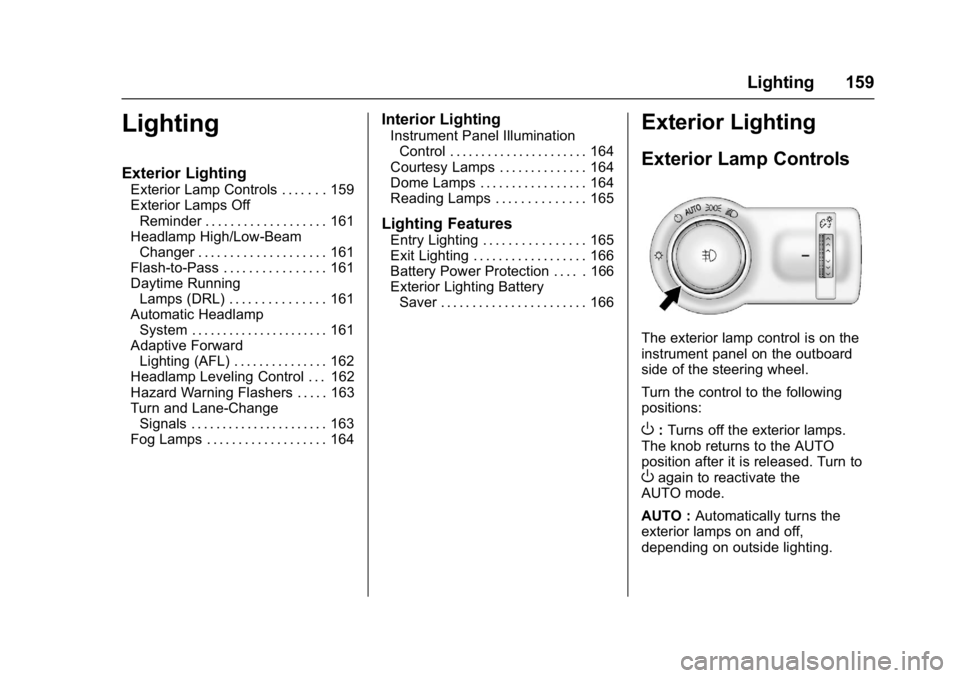
The exterior lamp control is on the
instrument panel on the outboard
side of the steering wheel.
Turn the control to the following
positions:
O: Turns off the exterior lamps.
The knob returns to the AUTO
position after it is released. Turn to
Oagain to reactivate the
AUTO mode.
AUTO : Automatically turns the
exterior lamps on and off,
depending on outside lighting.
Page 165 of 366

Buick Envision Owner Manual (GMNA-Localizing-U.S./Canada/Mexico-
10122659) - 2017 - crc - 11/16/16
164 Lighting
Fog Lamps
The ignition and the parking lamps
or headlamps must be on for the
front fog lamps to work.
#:If equipped, press to turn on or
off. An indicator light on the
instrument cluster comes on when
the fog lamps are on.
Some localities have laws that
require the headlamps to be on
along with the fog lamps.
Interior Lighting
Instrument Panel
Illumination Control
The brightness of the instrument
panel lighting and steering wheel
controls can be adjusted.
D: Move and hold the thumbwheel
up or down to brighten or dim the
lights.
Courtesy Lamps
The courtesy lamps come on when
any door is opened and the dome
lamp is in the
1position.
Dome Lamps
The dome lamp is in the overhead
console.
To change the dome lamp settings,
press:
*: Turns the lamp off, even when
a door is open.
1: The lamp comes on when a
door is opened.
+: Turns the lamp on.
Page 173 of 366

Buick Envision Owner Manual (GMNA-Localizing-U.S./Canada/Mexico-
10122659) - 2017 - crc - 11/16/16
172 Climate Controls
MODE :Press to change the
direction of the airflow in the vehicle.
Repeatedly press the button until
the desired mode appears on the
display. Multiple presses will cycle
through the delivery selections.
If the air delivery mode is directing
all the air to the floor, the rear fan
speed indicator will change when
the knob is turned, but the airflow
amount will not. This is normal
operation for the system.
MorL: If equipped, pressMorLto heat the left or right outboard seat
cushion. See Heated Rear Seats
0 60.
Air Vents
1. Slider Knob
2. Thumbwheel
Use the slider knobs (1) on the air
vents to change the direction of the
airflow.
Use the thumbwheels (2) near the
air vents to control the amount of
airflow or to shut off the airflow. Operation Tips
.
Keep all outlets open whenever
possible for best system
performance.
. Keep the path under all seats
clear of objects to help circulate
the air inside the vehicle more
effectively.
. Use of non-GM approved hood
deflectors can adversely affect
the performance of the system.
Page 176 of 366
Buick Envision Owner Manual (GMNA-Localizing-U.S./Canada/Mexico-
10122659) - 2017 - crc - 11/16/16
Driving and Operating 175
Driving and
Operating
Driving Information
Driver Behavior . . . . . . . . . . . . . . . 176
Driving Environment . . . . . . . . . . 176
Vehicle Design . . . . . . . . . . . . . . . 176
Distracted Driving . . . . . . . . . . . . 177
Defensive Driving . . . . . . . . . . . . . 177
Drunk Driving . . . . . . . . . . . . . . . . . 178
Control of a Vehicle . . . . . . . . . . . 178
Braking . . . . . . . . . . . . . . . . . . . . . . . 178
Steering . . . . . . . . . . . . . . . . . . . . . . 178
Off-Road Recovery . . . . . . . . . . . 179
Loss of Control . . . . . . . . . . . . . . . 179
Driving on Wet Roads . . . . . . . . 180
Hill and Mountain Roads . . . . . 181
Winter Driving . . . . . . . . . . . . . . . . 181
If the Vehicle Is Stuck . . . . . . . . 183
Vehicle Load Limits . . . . . . . . . . . 183
Starting and Operating
New Vehicle Break-In . . . . . . . . . 187
Ignition Positions . . . . . . . . . . . . . 187
Starting the Engine . . . . . . . . . . . 189
Engine Heater . . . . . . . . . . . . . . . . 191
Retained AccessoryPower (RAP) . . . . . . . . . . . . . . . . 192
Shifting Into Park . . . . . . . . . . . . . 192 Shifting out of Park . . . . . . . . . . . 193
Parking over Things
That Burn . . . . . . . . . . . . . . . . . . . 193
Extended Parking . . . . . . . . . . . . 194
Engine Exhaust
Engine Exhaust . . . . . . . . . . . . . . 194
Running the Vehicle While Parked . . . . . . . . . . . . . . . . . . . . . . 195
Automatic Transmission
Automatic Transmission . . . . . . 195
Manual Mode . . . . . . . . . . . . . . . . . 197
Drive Systems
All-Wheel Drive . . . . . . . . . . . . . . . 198
Brakes
Antilock BrakeSystem (ABS) . . . . . . . . . . . . . . . 198
Electric Parking Brake . . . . . . . . 199
Brake Assist . . . . . . . . . . . . . . . . . . 201
Hill Start Assist (HSA) . . . . . . . . 201
Ride Control Systems
Traction Control/Electronic Stability Control . . . . . . . . . . . . . 201
Cruise Control
Cruise Control . . . . . . . . . . . . . . . . 203
Adaptive Cruise Control . . . . . . 205
Driver Assistance Systems
Driver Assistance Systems . . . 213
Assistance Systems forParking or Backing . . . . . . . . . . 214
Assistance Systems for Driving . . . . . . . . . . . . . . . . . . . . . . 218
Forward Collision Alert (FCA) System . . . . . . . . . . . . . . . . . . . . . . 218
Forward Automatic Braking (FAB) . . . . . . . . . . . . . . . 221
Side Blind Zone Alert (SBZA) . . . . . . . . . . . . . . . . 222
Lane Change Alert (LCA) . . . . . 222
Lane Departure Warning (LDW) . . . . . . . . . . . . . 224
Lane Keep Assist (LKA) . . . . . . 224
Fuel
Fuel . . . . . . . . . . . . . . . . . . . . . . . . . . 226
California Fuel Requirements . . . . . . . . . . . . . . . 227
Fuels in Foreign Countries . . . 228
Fuel Additives . . . . . . . . . . . . . . . . 228
Filling the Tank . . . . . . . . . . . . . . . 228
Filling a Portable Fuel Container . . . . . . . . . . . . . . . . . . . 230
Trailer Towing
General TowingInformation . . . . . . . . . . . . . . . . . . 230
Page 184 of 366

Buick Envision Owner Manual (GMNA-Localizing-U.S./Canada/Mexico-
10122659) - 2017 - crc - 11/16/16
Driving and Operating 183
If the Vehicle Is Stuck
Slowly and cautiously spin the
wheels to free the vehicle when
stuck in sand, mud, ice, or snow.
If stuck too severely for the traction
system to free the vehicle, turn the
traction system off and use the
rocking method. SeeTraction
Control/Electronic Stability Control
0 201.
{Warning
If the vehicle's tires spin at high
speed, they can explode, and you
or others could be injured. The
vehicle can overheat, causing an
engine compartment fire or other
damage. Spin the wheels as little
as possible and avoid going
above 56 km/h (35 mph).
Rocking the Vehicle to Get
it Out
Turn the steering wheel left and
right to clear the area around the
front wheels. Turn off any traction
system. Shift back and forth between R (Reverse) and a low
forward gear, spinning the wheels
as little as possible. To prevent
transmission wear, wait until the
wheels stop spinning before shifting
gears. Release the accelerator
pedal while shifting, and press
lightly on the accelerator pedal
when the transmission is in gear.
Slowly spinning the wheels in the
forward and reverse directions
causes a rocking motion that could
free the vehicle. If that does not get
the vehicle out after a few tries, it
might need to be towed out. If the
vehicle does need to be towed out,
see
Towing the Vehicle 0301.
Vehicle Load Limits
It is very important to know how
much weight the vehicle can
carry. This weight is called the
vehicle capacity weight and
includes the weight of all
occupants, cargo, and all
nonfactory-installed options.
Two labels on the vehicle may
show how much weight it may properly carry, the Tire and
Loading Information label and
the Certification/Tire label.
{Warning
Do not load the vehicle any
heavier than the Gross
Vehicle Weight Rating
(GVWR), or either the
maximum front or rear Gross
Axle Weight Rating (GAWR).
This can cause systems to
break and change the way the
vehicle handles. This could
cause loss of control and a
crash. Overloading can also
reduce stopping distance,
damage the tires, and shorten
the life of the vehicle.
Page 200 of 366

Buick Envision Owner Manual (GMNA-Localizing-U.S./Canada/Mexico-
10122659) - 2017 - crc - 11/16/16
Driving and Operating 199
If driving safely on a wet road and it
becomes necessary to slam on the
brakes and continue braking to
avoid a sudden obstacle, a
computer senses the wheels are
slowing down. If one of the wheels
is about to stop rolling, the computer
will separately work the brakes at
each wheel.
ABS can change the brake pressure
to each wheel, as required, faster
than any driver could. This can help
you steer around the obstacle while
braking hard.
As the brakes are applied, the
computer keeps receiving updates
on wheel speed and controls
braking pressure accordingly.
Remember: ABS does not change
the time needed to get a foot up to
the brake pedal or always decrease
stopping distance. If you get too
close to the vehicle in front of you,
there will not be enough time to
apply the brakes if that vehicle
suddenly slows or stops. Always
leave enough room up ahead to
stop, even with ABS.Using ABS
Do not pump the brakes. Just hold
the brake pedal down firmly and let
ABS work. You may hear the ABS
pump or motor operating and feel
the brake pedal pulsate. This is
normal.
Braking in Emergencies
ABS allows you to steer and brake
at the same time. In many
emergencies, steering can help
more than even the very best
braking.
Electric Parking Brake
The Electric Parking Brake (EPB)
switch is on the center console. The
EPB can always be activated, even
if the ignition is off. To prevent
draining the battery, avoid repeated
cycles of the EPB when the engine
is not running.
The system has a red parking brake
status light and an amber parking
brake warning light.
SeeElectric Parking Brake
Light 0125 andService Electric
Parking Brake Light 0125. There
are also parking brake-related
Driver Information Center (DIC)
messages. See Brake System
Messages 0140. In case of
insufficient electrical power, the EPB
cannot be applied or released.
Before leaving the vehicle, check
the red parking brake status light to
ensure that the parking brake is
applied.
EPB Apply
To apply the EPB:
1. Be sure the vehicle is at a complete stop.
Page 204 of 366

Buick Envision Owner Manual (GMNA-Localizing-U.S./Canada/Mexico-
10122659) - 2017 - crc - 11/16/16
Driving and Operating 203
Caution
Do not repeatedly brake or
accelerate heavily when TCS is
off. The vehicle driveline could be
damaged.
To turn off only TCS, press and
release
g. The traction off lighti
illuminates in the instrument cluster.
To turn TCS on again, press and
release
g. The traction off lightiin
the instrument cluster will turn off.
If TCS is limiting wheel spin when
g
is pressed, the system will not turn
off until the wheels stop spinning. To turn off both TCS and StabiliTrak,
press and hold
guntil the traction
off light
iand StabiliTrak OFF light
gilluminate and stay on in the
instrument cluster.
To turn TCS and StabiliTrak on
again, press and release
g. The
traction off light
iand StabiliTrak
OFF light
gin the instrument cluster
turn off.
Adding accessories can affect the
vehicle performance. See
Accessories and Modifications
0 240.
Cruise Control
With cruise control the vehicle can
maintain a speed of about 40 km/h
(25 mph) or more without keeping
your foot on the accelerator. Cruise
control does not work at speeds
below 40 km/h (25 mph).
{Warning
Cruise control can be dangerous
where you cannot drive safely at
a steady speed. Do not use
cruise control on winding roads or
in heavy traffic.
Cruise control can be dangerous
on slippery roads. On such roads,
fast changes in tire traction can
cause excessive wheel slip, and
you could lose control. Do not use
cruise control on slippery roads.
Page 207 of 366
Buick Envision Owner Manual (GMNA-Localizing-U.S./Canada/Mexico-
10122659) - 2017 - crc - 11/16/16
206 Driving and Operating
If a vehicle is detected in your path,
ACC can apply acceleration or
limited, moderate braking to
maintain the selected following gap.
To disengage ACC, apply the brake.
If ACC is controlling your vehicle
speed when the Traction Control
System (TCS) or StabiliTrak system
activates, the ACC may
automatically disengage. See
Traction Control/Electronic Stability
Control0201. When road
conditions allow ACC to be safely
used, the ACC can be turned
back on.
ACC will not engage if the TCS or
StabiliTrak system is disabled.
{Warning
ACC has limited braking ability
and may not have time to slow
the vehicle down enough to avoid
a collision with another vehicle
you are following. This can occur
when vehicles suddenly slow or
stop ahead, or enter your lane.
Also see “Alerting the Driver” in
(Continued)
Warning (Continued)
this section. Complete attention is
always required while driving and
you should be ready to take
action and apply the brakes. See
Defensive Driving 0177.
{Warning
ACC will not detect or brake for
children, pedestrians, animals,
or other objects.
Do not use ACC when:
. On winding and hilly roads
or when the sensors are
blocked by snow, ice, or dirt.
The system may not detect
a vehicle ahead. Keep the
entire front of the vehicle
clean.
(Continued)
Warning (Continued)
.Visibility is low, such as in
fog, rain, or snow
conditions. ACC
performance is limited under
these conditions.
. On slippery roads where
fast changes in tire traction
can cause excessive
wheel slip.
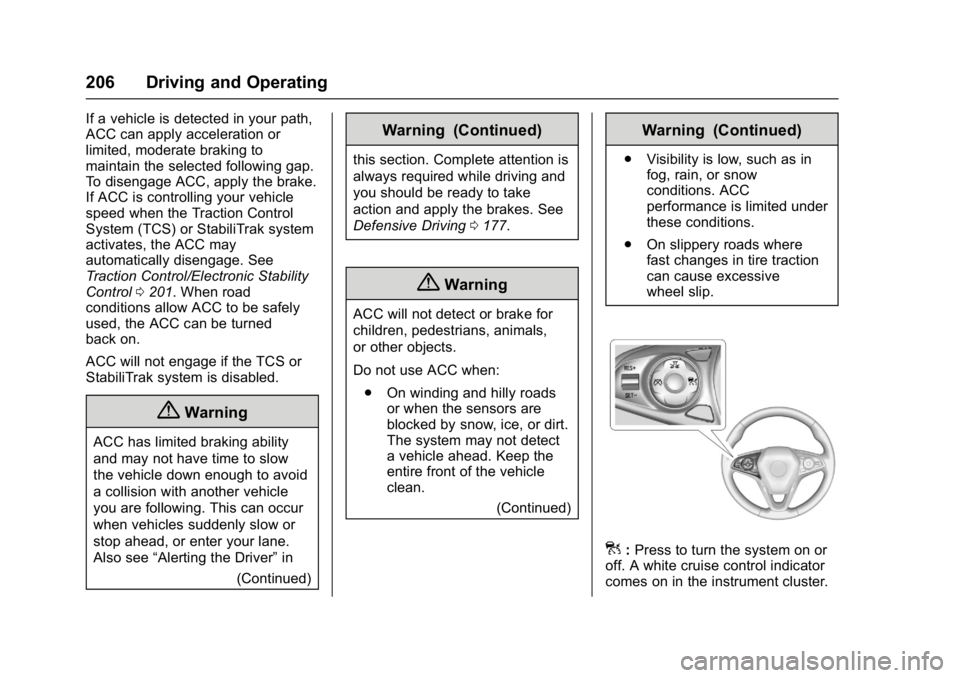
]:Press to turn the system on or
off. A white cruise control indicator
comes on in the instrument cluster.
Page 209 of 366

Buick Envision Owner Manual (GMNA-Localizing-U.S./Canada/Mexico-
10122659) - 2017 - crc - 11/16/16
208 Driving and Operating
on the Driver Information Center
(DIC) and HUD, if equipped. See
Cruise Control Messages0141.
. Press and hold RES+ up until
the desired set speed appears
on the display, then release it.
. To increase vehicle speed in
small increments, press RES+
up briefly. For each press, the
vehicle goes 1 km/h (1 mph)
faster.
When it is determined that there is
no vehicle ahead inside the selected
following gap, then the vehicle
speed will increase to the set speed.
Reducing Speed While ACC is at a
Set Speed
If ACC is already activated, do one
of the following:
. Use the brake to get to the
desired lower speed. Press
SET– down and release the
accelerator pedal. The vehicle
will now cruise at the lower
speed. .
Press and hold SET– down until
the desired lower speed is
reached, then release it.
. To decrease the vehicle speed in
smaller increments, press SET−
down briefly. For each press, the
vehicle goes about 1 km/h
(1 mph) slower.
Selecting the Follow Distance
When a slower moving vehicle is
detected ahead within the selected
following gap, ACC will adjust the
vehicle's speed and attempt to
maintain the follow distance gap
selected.
Press
3on the steering wheel to
adjust the following gap. When
pressed, the current gap setting
displays briefly on the instrument
cluster and HUD, if equipped.
Subsequent presses cycle the gap
button through three settings: Far,
Medium, or Near. The gap setting
will be maintained until it is
changed.
Since each gap setting corresponds
to a following time (Far, Medium,
or Near), the following distance will vary based on vehicle speed. The
faster the vehicle speed, the further
back your vehicle will follow a
vehicle detected ahead. Consider
traffic and weather conditions when
selecting the following gap. The
range of selectable gaps may not be
appropriate for all drivers and
driving conditions.
Changing the gap setting
automatically changes the alert
timing sensitivity (Far, Medium,
or Near) for the Forward Collision
Alert (FCA) feature. See
Forward
Collision Alert (FCA) System 0218.
Alerting the Driver
Without Head-Up Display
Page 219 of 366

Buick Envision Owner Manual (GMNA-Localizing-U.S./Canada/Mexico-
10122659) - 2017 - crc - 11/16/16
218 Driving and Operating
APA will instruct the vehicle to stop
once a large enough space is found.
Follow the displayed instructions.
When instructed to drive in reverse,
shift to R (Reverse) to engage
automatic steering. The steering
wheel will briefly vibrate as a
reminder to remove hands from the
steering wheel. Check surroundings
and continue braking or accelerating
as needed, and be prepared to stop
to avoid vehicles, pedestrians,
or objects.
If the vehicle exceeds 10 km/h
(6 mph), APA is automatically
disengaged and automatic steering
will turn off. A progress arrow
displays the status of the parking
maneuver. Depending on the space
size, additional maneuvers may be
required, and there will be additional
instructions. When changing gears,
allow the automatic steering to
complete before continuing the
parking maneuver. Upon successful
completion of a maneuver, APA will
beep and display a PARKING
COMPLETE message. Place the
vehicle in P (Park).APA may automatically disengage if:
.
The steering wheel is used by
the driver.
. The maximum allowed speed is
exceeded.
. There is a failure with the APA
system.
. Electronic stability control or
antilock brakes are activated.
. A high priority vehicle message
is displayed in the DIC.
To cancel APA, press
Oagain.
When the System Does Not Seem
to Work Properly
The APA system may require a
short period of driving along curves
to calibrate.
Assistance Systems for
Driving
If equipped, when driving the
vehicle in a forward gear, Forward
Collision Alert (FCA), Lane
Departure Warning (LDW), Lane
Keep Assist (LKA), Side Blind Zone
Alert (SBZA), Lane Change Alert (LCA), and/or Forward Automatic
Braking (FAB) can help to avoid a
crash or reduce crash damage.
Forward Collision Alert
(FCA) System
If equipped, the FCA system may
help to avoid or reduce the harm
caused by front-end crashes. When
approaching a vehicle ahead too
quickly, FCA provides a red flashing
alert on the windshield and rapidly
beeps or pulses the driver seat.
FCA also lights an amber visual
alert if following another vehicle
much too closely.
FCA detects vehicles within a
distance of approximately 60 m
(197 ft) and operates at speeds
above 40 km/h (25 mph). If the
vehicle has Adaptive Cruise Control
(ACC), it can detect vehicles to
distances of approximately 110 m
(360 ft) and operates at all speeds.
See
Adaptive Cruise Control 0205.