power steering BUICK ENVISION 2017 User Guide
[x] Cancel search | Manufacturer: BUICK, Model Year: 2017, Model line: ENVISION, Model: BUICK ENVISION 2017Pages: 366, PDF Size: 5.37 MB
Page 148 of 366
Buick Envision Owner Manual (GMNA-Localizing-U.S./Canada/Mexico-
10122659) - 2017 - crc - 11/16/16
Instruments and Controls 147
Steering System
Messages
STEERING ASSIST IS
REDUCED
This message may display if a
problem occurs with the electric
power steering system. If this
message appears, steering effort
may be slightly higher than normal.
The vehicle is still safe to drive. Use
caution while in reduced assist
mode. If this message is persistent
or appears repeatedly, take the
vehicle to your dealer for service.
SeeSteering 0178.
If the battery has recently been run
down or replaced, the Adaptive
Forward Lighting (AFL) light or
STEERING ASSIST IS REDUCED
message may remain on. This is
normal and there is no loss of power
steering or AFL performance. If the
light or DIC message continues to
display after normal driving, take the
vehicle to your dealer for service.
See Adaptive Forward Lighting
(AFL) Light 0129.
SERVICE POWER STEERING
This message displays when there
is a problem with electric power
steering. If this message displays
and a reduction in steering
performance or loss of power
steering assistance is noticed, see
your dealer. See Steering0178.
Tire Messages
SERVICE TIRE MONITOR
SYSTEM
This message displays if there is a
problem with the Tire Pressure
Monitor System (TPMS). See Tire
Pressure Monitor Operation 0281.
TIRE LEARNING ACTIVE
This message displays when the
system is learning new tires. See
Tire Pressure Monitor Operation
0281.
TIRE PRESSURE LOW ADD
AIR TO TIRE
On vehicles with the Tire Pressure
Monitor System (TPMS), this
message displays when the
pressure in one or more of the
vehicle's tires is low.
The low tire pressure warning light
will also come on. See Tire
Pressure Light 0128.
If a tire pressure message displays,
inflate the tires until the tire pressure
is equal to the values shown on the
Tire and Loading Information label.
See Tires 0271, Vehicle Load
Limits 0183, and Tire Pressure
0 279.
More than one tire pressure
message can be received at a time.
The DIC also shows the tire
pressure values.
See Driver Information Center (DIC)
(Base Level) 0131 orDriver
Information Center (DIC) (Uplevel)
0 134.
Page 160 of 366
Buick Envision Owner Manual (GMNA-Localizing-U.S./Canada/Mexico-
10122659) - 2017 - crc - 11/16/16
Lighting 159
Lighting
Exterior Lighting
Exterior Lamp Controls . . . . . . . 159
Exterior Lamps OffReminder . . . . . . . . . . . . . . . . . . . 161
Headlamp High/Low-Beam Changer . . . . . . . . . . . . . . . . . . . . 161
Flash-to-Pass . . . . . . . . . . . . . . . . 161
Daytime Running Lamps (DRL) . . . . . . . . . . . . . . . 161
Automatic Headlamp System . . . . . . . . . . . . . . . . . . . . . . 161
Adaptive Forward Lighting (AFL) . . . . . . . . . . . . . . . 162
Headlamp Leveling Control . . . 162
Hazard Warning Flashers . . . . . 163
Turn and Lane-Change Signals . . . . . . . . . . . . . . . . . . . . . . 163
Fog Lamps . . . . . . . . . . . . . . . . . . . 164
Interior Lighting
Instrument Panel Illumination
Control . . . . . . . . . . . . . . . . . . . . . . 164
Courtesy Lamps . . . . . . . . . . . . . . 164
Dome Lamps . . . . . . . . . . . . . . . . . 164
Reading Lamps . . . . . . . . . . . . . . 165
Lighting Features
Entry Lighting . . . . . . . . . . . . . . . . 165
Exit Lighting . . . . . . . . . . . . . . . . . . 166
Battery Power Protection . . . . . 166
Exterior Lighting Battery Saver . . . . . . . . . . . . . . . . . . . . . . . 166
Exterior Lighting
Exterior Lamp Controls
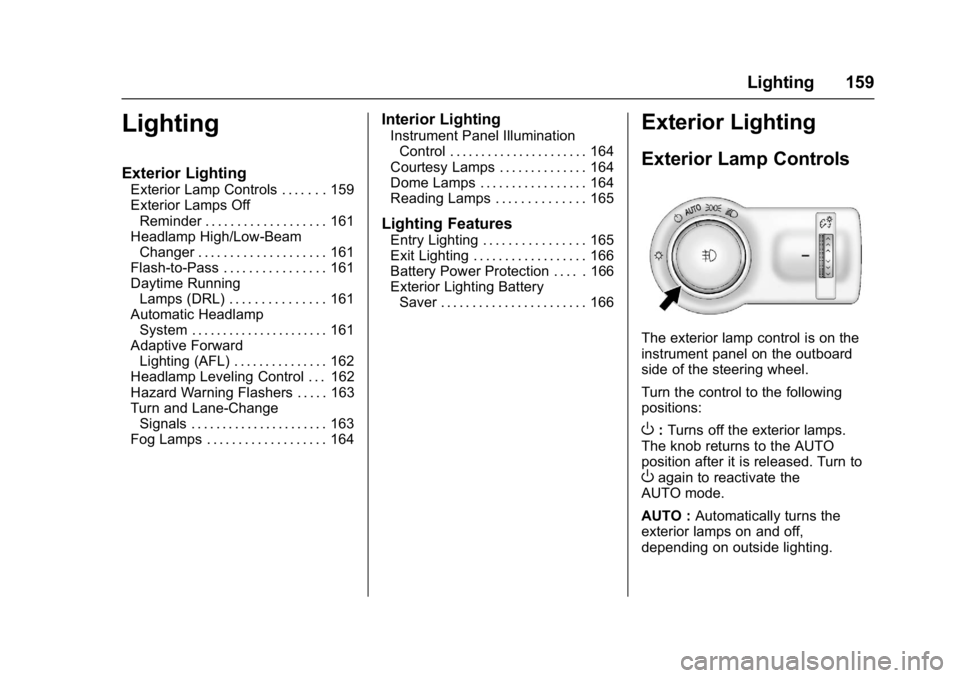
The exterior lamp control is on the
instrument panel on the outboard
side of the steering wheel.
Turn the control to the following
positions:
O: Turns off the exterior lamps.
The knob returns to the AUTO
position after it is released. Turn to
Oagain to reactivate the
AUTO mode.
AUTO : Automatically turns the
exterior lamps on and off,
depending on outside lighting.
Page 176 of 366
Buick Envision Owner Manual (GMNA-Localizing-U.S./Canada/Mexico-
10122659) - 2017 - crc - 11/16/16
Driving and Operating 175
Driving and
Operating
Driving Information
Driver Behavior . . . . . . . . . . . . . . . 176
Driving Environment . . . . . . . . . . 176
Vehicle Design . . . . . . . . . . . . . . . 176
Distracted Driving . . . . . . . . . . . . 177
Defensive Driving . . . . . . . . . . . . . 177
Drunk Driving . . . . . . . . . . . . . . . . . 178
Control of a Vehicle . . . . . . . . . . . 178
Braking . . . . . . . . . . . . . . . . . . . . . . . 178
Steering . . . . . . . . . . . . . . . . . . . . . . 178
Off-Road Recovery . . . . . . . . . . . 179
Loss of Control . . . . . . . . . . . . . . . 179
Driving on Wet Roads . . . . . . . . 180
Hill and Mountain Roads . . . . . 181
Winter Driving . . . . . . . . . . . . . . . . 181
If the Vehicle Is Stuck . . . . . . . . 183
Vehicle Load Limits . . . . . . . . . . . 183
Starting and Operating
New Vehicle Break-In . . . . . . . . . 187
Ignition Positions . . . . . . . . . . . . . 187
Starting the Engine . . . . . . . . . . . 189
Engine Heater . . . . . . . . . . . . . . . . 191
Retained AccessoryPower (RAP) . . . . . . . . . . . . . . . . 192
Shifting Into Park . . . . . . . . . . . . . 192 Shifting out of Park . . . . . . . . . . . 193
Parking over Things
That Burn . . . . . . . . . . . . . . . . . . . 193
Extended Parking . . . . . . . . . . . . 194
Engine Exhaust
Engine Exhaust . . . . . . . . . . . . . . 194
Running the Vehicle While Parked . . . . . . . . . . . . . . . . . . . . . . 195
Automatic Transmission
Automatic Transmission . . . . . . 195
Manual Mode . . . . . . . . . . . . . . . . . 197
Drive Systems
All-Wheel Drive . . . . . . . . . . . . . . . 198
Brakes
Antilock BrakeSystem (ABS) . . . . . . . . . . . . . . . 198
Electric Parking Brake . . . . . . . . 199
Brake Assist . . . . . . . . . . . . . . . . . . 201
Hill Start Assist (HSA) . . . . . . . . 201
Ride Control Systems
Traction Control/Electronic Stability Control . . . . . . . . . . . . . 201
Cruise Control
Cruise Control . . . . . . . . . . . . . . . . 203
Adaptive Cruise Control . . . . . . 205
Driver Assistance Systems
Driver Assistance Systems . . . 213
Assistance Systems forParking or Backing . . . . . . . . . . 214
Assistance Systems for Driving . . . . . . . . . . . . . . . . . . . . . . 218
Forward Collision Alert (FCA) System . . . . . . . . . . . . . . . . . . . . . . 218
Forward Automatic Braking (FAB) . . . . . . . . . . . . . . . 221
Side Blind Zone Alert (SBZA) . . . . . . . . . . . . . . . . 222
Lane Change Alert (LCA) . . . . . 222
Lane Departure Warning (LDW) . . . . . . . . . . . . . 224
Lane Keep Assist (LKA) . . . . . . 224
Fuel
Fuel . . . . . . . . . . . . . . . . . . . . . . . . . . 226
California Fuel Requirements . . . . . . . . . . . . . . . 227
Fuels in Foreign Countries . . . 228
Fuel Additives . . . . . . . . . . . . . . . . 228
Filling the Tank . . . . . . . . . . . . . . . 228
Filling a Portable Fuel Container . . . . . . . . . . . . . . . . . . . 230
Trailer Towing
General TowingInformation . . . . . . . . . . . . . . . . . . 230
Page 179 of 366

Buick Envision Owner Manual (GMNA-Localizing-U.S./Canada/Mexico-
10122659) - 2017 - crc - 11/16/16
178 Driving and Operating
.Focus on the task of driving.
Drunk Driving
Death and injury associated with
drinking and driving is a global
tragedy.
{Warning
Drinking and then driving is very
dangerous. Your reflexes,
perceptions, attentiveness, and
judgment can be affected by even
a small amount of alcohol. You
can have a serious —or even
fatal —collision if you drive after
drinking.
Do not drink and drive or ride with
a driver who has been drinking.
Ride home in a cab; or if you are
with a group, designate a driver
who will not drink.
Control of a Vehicle
Braking, steering, and accelerating
are important factors in helping to
control a vehicle while driving.
Braking
Braking action involves perception
time and reaction time. Deciding to
push the brake pedal is perception
time. Actually doing it is
reaction time.
Average driver reaction time is
about three-quarters of a second. In
that time, a vehicle moving at
100 km/h (60 mph) travels 20 m
(66 ft), which could be a lot of
distance in an emergency.
Helpful braking tips to keep in mind
include:
. Keep enough distance between
you and the vehicle in front
of you.
. Avoid needless heavy braking.
. Keep pace with traffic.
If the engine ever stops while the
vehicle is being driven, brake
normally but do not pump the
brakes. Doing so could make the
pedal harder to push down. If the
engine stops, there will be some
power brake assist but it will be
used when the brake is applied. Once the power assist is used up, it
can take longer to stop and the
brake pedal will be harder to push.
Steering
Electric Power Steering
The vehicle has electric power
steering. It does not have power
steering fluid. Regular maintenance
is not required.
If power steering assist is lost due
to a system malfunction, the vehicle
can be steered, but may require
increased effort. See your dealer if
there is a problem.
If the steering wheel is turned until it
reaches the end of its travel and is
held against that position for an
extended period of time, power
steering assist may be reduced.
If the steering assist is used for an
extended period of time, power
assist may be reduced.
Normal use of the power steering
assist should return when the
system cools down.
Page 189 of 366

Buick Envision Owner Manual (GMNA-Localizing-U.S./Canada/Mexico-
10122659) - 2017 - crc - 11/16/16
188 Driving and Operating
The Remote Keyless Entry (RKE)
transmitter must be in the vehicle for
the system to operate. If the
pushbutton start is not working, the
vehicle may be near a strong radio
antenna signal causing interference
to the Keyless Access system. See
Remote Keyless Entry (RKE)
System Operation027.
To shift out of P (Park), the vehicle
must be in ON/RUN and the brake
pedal must be applied.
Stopping the Engine/LOCK/
OFF (No Indicator Lights) : When
the vehicle is stopped, press
ENGINE START/STOP once to turn
the engine off.
If the vehicle is in P (Park), the
ignition will turn off, and Retained
Accessory Power (RAP) will remain
active. See Retained Accessory
Power (RAP) 0192.
If the vehicle is not in P (Park), the
ignition will return to ACC/
ACCESSORY and display the
message SHIFT TO PARK in the
Driver Information Center (DIC).
See Transmission Messages 0148. When the vehicle is shifted into
P (Park), the ignition system will
switch to OFF.
The vehicle may have an electric
steering column lock. The lock is
activated when the vehicle is
switched to OFF and either front
door is opened. A sound may be
heard as the lock actuates or
releases. The steering column lock
may not release with the wheels
turned off center. If this happens,
the vehicle may not start. Move the
steering wheel from left to right
while attempting to start the vehicle.
If this does not work, the vehicle
needs service.
Do not turn the engine off when the
vehicle is moving. This will cause a
loss of power assist in the brake
and steering systems and disable
the airbags.
If the vehicle must be shut off in an
emergency:
1. Brake using a firm and steady pressure. Do not pump the
brakes repeatedly. This may
deplete power assist, requiring
increased brake pedal force. 2. Shift the vehicle to N (Neutral).
This can be done while the
vehicle is moving. After shifting
to N (Neutral), firmly apply the
brakes and steer the vehicle to
a safe location.
3. Come to a complete stop, shift to P (Park), and turn the
ignition to OFF. On vehicles
with an automatic transmission,
the shift lever must be in
P (Park) to turn the ignition
switch to the OFF position.
4. Set the parking brake. See Electric Parking Brake 0199.
{Warning
Turning off the vehicle while
moving may cause loss of power
assist in the brake and steering
systems and disable the airbags.
While driving, only shut the
vehicle off in an emergency.
Page 200 of 366

Buick Envision Owner Manual (GMNA-Localizing-U.S./Canada/Mexico-
10122659) - 2017 - crc - 11/16/16
Driving and Operating 199
If driving safely on a wet road and it
becomes necessary to slam on the
brakes and continue braking to
avoid a sudden obstacle, a
computer senses the wheels are
slowing down. If one of the wheels
is about to stop rolling, the computer
will separately work the brakes at
each wheel.
ABS can change the brake pressure
to each wheel, as required, faster
than any driver could. This can help
you steer around the obstacle while
braking hard.
As the brakes are applied, the
computer keeps receiving updates
on wheel speed and controls
braking pressure accordingly.
Remember: ABS does not change
the time needed to get a foot up to
the brake pedal or always decrease
stopping distance. If you get too
close to the vehicle in front of you,
there will not be enough time to
apply the brakes if that vehicle
suddenly slows or stops. Always
leave enough room up ahead to
stop, even with ABS.Using ABS
Do not pump the brakes. Just hold
the brake pedal down firmly and let
ABS work. You may hear the ABS
pump or motor operating and feel
the brake pedal pulsate. This is
normal.
Braking in Emergencies
ABS allows you to steer and brake
at the same time. In many
emergencies, steering can help
more than even the very best
braking.
Electric Parking Brake
The Electric Parking Brake (EPB)
switch is on the center console. The
EPB can always be activated, even
if the ignition is off. To prevent
draining the battery, avoid repeated
cycles of the EPB when the engine
is not running.
The system has a red parking brake
status light and an amber parking
brake warning light.
SeeElectric Parking Brake
Light 0125 andService Electric
Parking Brake Light 0125. There
are also parking brake-related
Driver Information Center (DIC)
messages. See Brake System
Messages 0140. In case of
insufficient electrical power, the EPB
cannot be applied or released.
Before leaving the vehicle, check
the red parking brake status light to
ensure that the parking brake is
applied.
EPB Apply
To apply the EPB:
1. Be sure the vehicle is at a complete stop.
Page 270 of 366
Buick Envision Owner Manual (GMNA-Localizing-U.S./Canada/Mexico-
10122659) - 2017 - crc - 11/16/16
Vehicle Care 269
Instrument Panel Fuse
Block
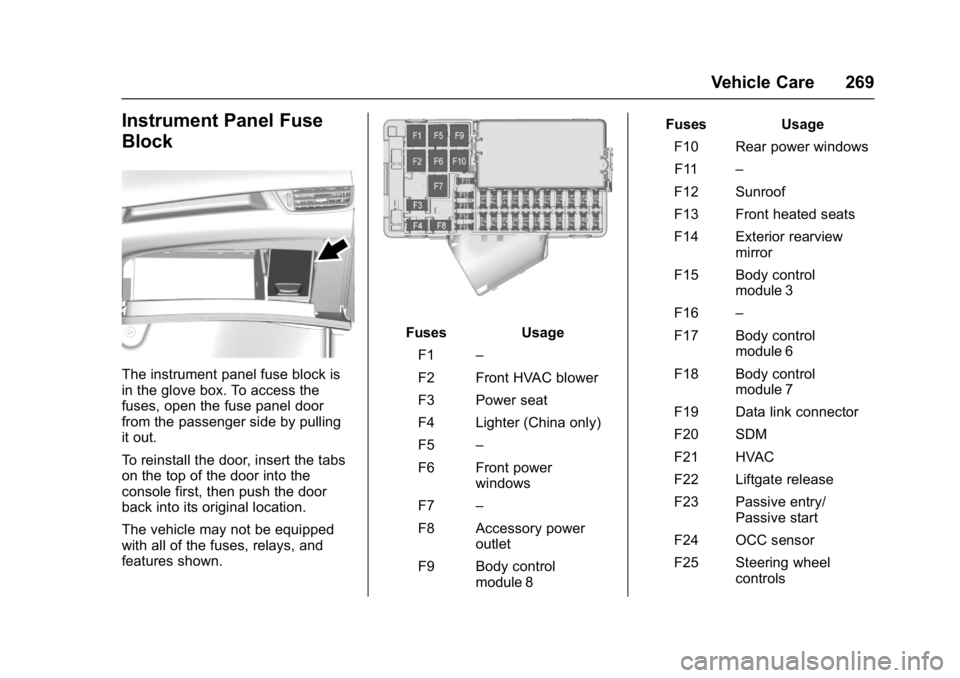
The instrument panel fuse block is
in the glove box. To access the
fuses, open the fuse panel door
from the passenger side by pulling
it out.
To reinstall the door, insert the tabs
on the top of the door into the
console first, then push the door
back into its original location.
The vehicle may not be equipped
with all of the fuses, relays, and
features shown.
FusesUsage
F1 –
F2 Front HVAC blower
F3 Power seat
F4 Lighter (China only)
F5 –
F6 Front power windows
F7 –
F8 Accessory power outlet
F9 Body control module 8 Fuses
Usage
F10 Rear power windows F11 –
F12 Sunroof
F13 Front heated seats
F14 Exterior rearview mirror
F15 Body control module 3
F16 –
F17 Body control module 6
F18 Body control module 7
F19 Data link connector
F20 SDM
F21 HVAC
F22 Liftgate release
F23 Passive entry/ Passive start
F24 OCC sensor
F25 Steering wheel controls
Page 284 of 366

Buick Envision Owner Manual (GMNA-Localizing-U.S./Canada/Mexico-
10122659) - 2017 - crc - 11/16/16
Vehicle Care 283
the sensor matching process is
performed successfully. See
your dealer for service.
. Replacement tires or wheels do
not match the original equipment
tires or wheels. Tires and wheels
other than those recommended
could prevent the TPMS from
functioning properly. See Buying
New Tires 0286.
. Operating electronic devices or
being near facilities using radio
wave frequencies similar to the
TPMS could cause the TPMS
sensors to malfunction.
If the TPMS is not functioning
properly it cannot detect or signal a
low tire condition. See your dealer
for service if the TPMS malfunction
light and DIC message comes on
and stays on.
TPMS Sensor Matching
Process
Each TPMS sensor has a unique
identification code. The identification
code needs to be matched to a new
tire/wheel position after rotating the
vehicle’s tires or replacing one or more of the TPMS sensors. The
TPMS sensor matching process
should also be performed after
replacing a spare tire with a road
tire containing the TPMS sensor.
The malfunction light and the DIC
message should go off at the next
ignition cycle. The sensors are
matched to the tire/wheel positions,
using a TPMS relearn tool, in the
following order: driver side front tire,
passenger side front tire, passenger
side rear tire, and driver side rear.
See your dealer for service or to
purchase a relearn tool. A TPMS
relearn tool can also be purchased.
See Tire Pressure Monitor Sensor
Activation Tool at
www.gmtoolsandequipment.com or
call 1-800-GM TOOLS
(1-800-468-6657).
There are two minutes to match the
first tire/wheel position, and
five minutes overall to match all four
tire/wheel positions. If it takes
longer, the matching process stops
and must be restarted.
The TPMS sensor matching
process is:
1. Set the parking brake.
2. Turn the ignition to ON/RUN with the engine off or place the
vehicle power mode in ON/
RUN/START. See Ignition
Positions 0187.
3. Make sure the Tire Pressure info page option is turned on.
The info pages on the DIC can
be turned on and off through
the Settings menu.
See Driver Information Center
(DIC) (Base Level) 0131 or
Driver Information Center (DIC)
(Uplevel) 0134.
4. Use the DIC controls on the right side of the steering wheel
to scroll to the Tire Pressure
screen under the DIC
info page.
5. Press and hold
Vin the center
of the DIC controls.
Page 310 of 366
Buick Envision Owner Manual (GMNA-Localizing-U.S./Canada/Mexico-
10122659) - 2017 - crc - 11/16/16
Vehicle Care 309
Caution (Continued)
chlorides are used on roads for
conditions such as ice and dust.
Always wash the chrome with
soap and water after exposure.
Caution
To avoid surface damage, do not
use strong soaps, chemicals,
abrasive polishes, cleaners,
brushes, or cleaners that contain
acid on aluminum or
chrome-plated wheels. Use only
approved cleaners. Also, never
drive a vehicle with aluminum or
chrome-plated wheels through an
automatic car wash that uses
silicone carbide tire cleaning
brushes. Damage could occur
and the repairs would not be
covered by the vehicle warranty.
Brake System
Visually inspect brake lines and
hoses for proper hook-up, binding,
leaks, cracks, chafing, etc. Inspect
disc brake pads for wear and rotors
for surface condition. Inspect drum
brake linings/shoes for wear or
cracks. Inspect all other brake parts.
Steering, Suspension, and
Chassis Components
Visually inspect steering,
suspension, and chassis
components for damaged, loose,
or missing parts or signs of wear at
least once a year.
Inspect power steering for proper
attachment, connections, binding,
leaks, cracks, chafing, etc.
Visually check constant velocity joint
boots and axle seals for leaks.
Body Component Lubrication
Lubricate all key lock cylinders,
hood hinges, liftgate hinges, and the
steel fuel door hinge, unless the
components are plastic. Applying
silicone grease on weatherstripswith a clean cloth will make them
last longer, seal better, and not stick
or squeak.
Underbody Maintenance
At least twice a year, spring and fall,
use plain water to flush any
corrosive materials from the
underbody. Take care to thoroughly
clean any areas where mud and
other debris can collect.
Do not directly power wash the
transfer case and/or front/rear axle
output seals. High pressure water
can overcome the seals and
contaminate the fluid. Contaminated
fluid will decrease the life of the
transfer case and/or axles and
should be replaced.
Sheet Metal Damage
If the vehicle is damaged and
requires sheet metal repair or
replacement, make sure the body
repair shop applies anti-corrosion
material to parts repaired or
replaced to restore corrosion
protection.
Page 323 of 366

Buick Envision Owner Manual (GMNA-Localizing-U.S./Canada/Mexico-
10122659) - 2017 - crc - 11/16/16
322 Service and Maintenance
Battery
The 12-volt battery supplies power
to start the engine and operate any
additional electrical accessories.
.To avoid break-down or failure to
start the vehicle, maintain a
battery with full cranking power.
. Trained dealer technicians have
the diagnostic equipment to test
the battery and ensure that the
connections and cables are
corrosion-free.
Belts
. Belts may need replacing if they
squeak or show signs of
cracking or splitting.
. Trained dealer technicians have
access to tools and equipment
to inspect the belts and
recommend adjustment or
replacement when necessary.
Brakes
Brakes stop the vehicle and are
crucial to safe driving. .
Signs of brake wear may include
chirping, grinding, or squealing
noises, or difficulty stopping.
. Trained dealer technicians have
access to tools and equipment
to inspect the brakes and
recommend quality parts
engineered for the vehicle.
Fluids
Proper fluid levels and approved
fluids protect the vehicle’s systems
and components. See
Recommended Fluids and
Lubricants 0324 for GM approved
fluids.
. Engine oil and windshield
washer fluid levels should be
checked at every fuel fill.
. Instrument cluster lights may
come on to indicate that fluids
may be low and need to be
filled.
Hoses
Hoses transport fluids and should
be regularly inspected to ensure
that there are no cracks or leaks. With a multi-point inspection, your
dealer can inspect the hoses and
advise if replacement is needed.
Lamps
Properly working headlamps,
taillamps, and brake lamps are
important to see and be seen on
the road.
.
Signs that the headlamps need
attention include dimming, failure
to light, cracking, or damage.
The brake lamps need to be
checked periodically to ensure
that they light when braking.
. With a multi-point inspection,
your dealer can check the lamps
and note any concerns.
Shocks and Struts
Shocks and struts help aid in control
for a smoother ride.
. Signs of wear may include
steering wheel vibration, bounce/
sway while braking, longer
stopping distance, or uneven
tire wear.