fuel BUICK ENVISION 2018 Owner's Guide
[x] Cancel search | Manufacturer: BUICK, Model Year: 2018, Model line: ENVISION, Model: BUICK ENVISION 2018Pages: 365, PDF Size: 5.56 MB
Page 165 of 365

Buick Envision Owner Manual (GMNA-Localizing-U.S./Canada/Mexico-
11434432) - 2018 - CRC - 10/25/17
164 Climate Controls
6. SYNC (SynchronizedTemperature)
7. AUTO (Automatic Operation)
8. Recirculation
9. A/C (Air Conditioning)
10. Rear Window Defogger
11. Power
Automatic Operation
The system automatically controls
the fan speed, air delivery, air
conditioning, and recirculation in
order to heat or cool the vehicle to
the desired temperature:
When AUTO is lit, all four functions
operate automatically. Each function
can also be manually set and the
selected setting is displayed.
Functions not manually set will
continue to be automatically
controlled, even if the AUTO
indicator is not lit.
For automatic operation:
1. Press AUTO. 2. Set the temperature. Allow the
system time to stabilize. Adjust
the temperature as needed for
best comfort.
To improve fuel efficiency and to
cool the vehicle faster, recirculation
may be automatically selected in
warm weather. The recirculation
light will not come on. Press
@to
select recirculation; press it again to
select outside air.
Q/R: The temperature can be
adjusted separately for the driver
and the passenger. Press to
increase or decrease the
temperature.
SYNC : Press to link the passenger
and rear climate temperature
settings to the driver setting. The
SYNC indicator light will turn on.
When the passenger or rear climate
settings are adjusted, the SYNC
indicator light turns off.
Manual Operation
O: Press to turn the fan off or on.
Q^or^ R:Press to increase or
decrease the fan speed. The fan
speed setting appears on the main
display. Pressing either button
cancels automatic fan control and
the fan is controlled manually. Press
AUTO to return to automatic
operation.
Air Delivery Mode Controls :
Press
X,Y, or[to change the
direction of the airflow. The indicator
light in the button will turn on. Any
combination of the three buttons
can be selected. The indicator light
in the button will turn on. The
current mode appears in the display
screen. Pressing any of the three
buttons cancels automatic air
delivery control and the direction of
the airflow is controlled manually.
Press AUTO to return to automatic
operation.
To change the current mode, select
one or more of the following:
X: Clears the windows of fog or
moisture. Air is directed to the
windshield.
Page 171 of 365
Buick Envision Owner Manual (GMNA-Localizing-U.S./Canada/Mexico-
11434432) - 2018 - CRC - 10/25/17
170 Driving and Operating
Driving and
Operating
Driving Information
Driver Behavior . . . . . . . . . . . . . . . 171
Driving Environment . . . . . . . . . . 171
Vehicle Design . . . . . . . . . . . . . . . 171
Distracted Driving . . . . . . . . . . . . 172
Defensive Driving . . . . . . . . . . . . . 172
Drunk Driving . . . . . . . . . . . . . . . . . 173
Control of a Vehicle . . . . . . . . . . . 173
Braking . . . . . . . . . . . . . . . . . . . . . . . 173
Steering . . . . . . . . . . . . . . . . . . . . . . 173
Off-Road Recovery . . . . . . . . . . . 174
Loss of Control . . . . . . . . . . . . . . . 174
Driving on Wet Roads . . . . . . . . 175
Hill and Mountain Roads . . . . . 176
Winter Driving . . . . . . . . . . . . . . . . 176
If the Vehicle Is Stuck . . . . . . . . 178
Vehicle Load Limits . . . . . . . . . . . 178
Starting and Operating
New Vehicle Break-In . . . . . . . . . 182
Ignition Positions . . . . . . . . . . . . . 183
Starting the Engine . . . . . . . . . . . 185
Engine Heater . . . . . . . . . . . . . . . . 186
Retained AccessoryPower (RAP) . . . . . . . . . . . . . . . . 188 Shifting Into Park . . . . . . . . . . . . . 188
Shifting out of Park . . . . . . . . . . . 189
Parking over Things
That Burn . . . . . . . . . . . . . . . . . . . 189
Extended Parking . . . . . . . . . . . . 189
Engine Exhaust
Engine Exhaust . . . . . . . . . . . . . . 190
Running the Vehicle While
Parked . . . . . . . . . . . . . . . . . . . . . . 190
Automatic Transmission
Automatic Transmission . . . . . . 191
Manual Mode . . . . . . . . . . . . . . . . . 193
Drive Systems
All-Wheel Drive . . . . . . . . . . . . . . . 194
Brakes
Antilock BrakeSystem (ABS) . . . . . . . . . . . . . . . 194
Electric Parking Brake . . . . . . . . 195
Brake Assist . . . . . . . . . . . . . . . . . . 196
Hill Start Assist (HSA) . . . . . . . . 197
Ride Control Systems
Traction Control/Electronic Stability Control . . . . . . . . . . . . . 197
Cruise Control
Cruise Control . . . . . . . . . . . . . . . . 199
Adaptive Cruise Control . . . . . . 201
Driver Assistance Systems
Driver Assistance Systems . . . 209
Assistance Systems forParking or Backing . . . . . . . . . . 210
Assistance Systems for Driving . . . . . . . . . . . . . . . . . . . . . . 214
Forward Collision Alert (FCA) System . . . . . . . . . . . . . . . . . . . . . . 214
Forward Automatic Braking (FAB) . . . . . . . . . . . . . . . 217
Side Blind Zone Alert (SBZA) . . . . . . . . . . . . . . . . 218
Lane Change Alert (LCA) . . . . . 218
Lane Departure Warning (LDW) . . . . . . . . . . . . . 220
Lane Keep Assist (LKA) . . . . . . 221
Fuel
Fuel . . . . . . . . . . . . . . . . . . . . . . . . . . 223
California Fuel Requirements . . . . . . . . . . . . . . . 224
Fuels in Foreign Countries . . . 224
Fuel Additives . . . . . . . . . . . . . . . . 224
Filling the Tank . . . . . . . . . . . . . . . 224
Filling a Portable Fuel Container . . . . . . . . . . . . . . . . . . . 226
Trailer Towing
General TowingInformation . . . . . . . . . . . . . . . . . . 226
Page 178 of 365

Buick Envision Owner Manual (GMNA-Localizing-U.S./Canada/Mexico-
11434432) - 2018 - CRC - 10/25/17
Driving and Operating 177
.Turn on Traction Control. See
Traction Control/Electronic
Stability Control 0197.
. The Antilock Brake System
(ABS) improves vehicle stability
during hard stops, but the
brakes should be applied sooner
than when on dry pavement.
See Antilock Brake System
(ABS) 0194.
. Allow greater following distance
and watch for slippery spots. Icy
patches can occur on otherwise
clear roads in shaded areas.
The surface of a curve or an
overpass can remain icy when
the surrounding roads are clear.
Avoid sudden steering
maneuvers and braking while
on ice.
. Turn off cruise control.
Blizzard Conditions
Stop the vehicle in a safe place and
signal for help. Stay with the vehicle
unless there is help nearby.
If possible, use Roadside
Assistance. See Roadside Assistance Program
0331. To get
help and keep everyone in the
vehicle safe:
. Turn on the hazard warning
flashers.
. Tie a red cloth to an outside
mirror.
{Warning
Snow can trap engine exhaust
under the vehicle. This may
cause exhaust gases to get
inside. Engine exhaust contains
carbon monoxide (CO), which
cannot be seen or smelled. It can
cause unconsciousness and even
death.
If the vehicle is stuck in snow:
. Clear snow from the base of
the vehicle, especially any
blocking the exhaust pipe.
. Open a window about 5 cm
(2 in) on the vehicle side
that is away from the wind,
to bring in fresh air.
(Continued)
Warning (Continued)
.Fully open the air outlets on
or under the instrument
panel.
. Adjust the climate control
system to circulate the air
inside the vehicle and set
the fan speed to the highest
setting. See “Climate
Control Systems.”
For more information about CO,
see Engine Exhaust 0190.
To save fuel, run the engine for
short periods to warm the vehicle
and then shut the engine off and
partially close the window. Moving
about to keep warm also helps.
If it takes time for help to arrive,
when running the engine, push the
accelerator pedal slightly so the
engine runs faster than the idle
speed. This keeps the battery
charged to restart the vehicle and to
signal for help with the headlamps.
Do this as little as possible, to
save fuel.
Page 182 of 365

Buick Envision Owner Manual (GMNA-Localizing-U.S./Canada/Mexico-
11434432) - 2018 - CRC - 10/25/17
Driving and Operating 181
Example 3
1.Vehicle Capacity Weight
for Example 3 = 453 kg
(1,000 lbs).
2.Subtract Occupant
Weight @ 91 kg
(200 lbs) × 5 = 453 kg
(1,000 lbs).
3.Available Cargo Weight
= 0 kg (0 lbs).
Refer to the vehicle's tire and
loading information label for
specific information about the
vehicle's capacity weight and
seating positions. The combined weight of the driver, passengers,
and cargo should never exceed
the vehicle's capacity weight.
Certification/Tire Label
Label Example
A vehicle-specific Certification/
Tire label is attached to the
center pillar (B-pillar).
The label may show the size of
the vehicle's original tires and
the inflation pressures needed to
obtain the gross weight capacity
of the vehicle. The label shows
the gross weight capacity of the
vehicle. This is called the GrossVehicle Weight Rating (GVWR).
The GVWR includes the weight
of the vehicle, all occupants,
fuel, and cargo.
The Certification/Tire label may
also show the maximum weights
for the front and rear axles,
called the Gross Axle Weight
Rating (GAWR). To find out the
actual loads on the front and
rear axles, weigh the vehicle at
a weigh station. Your dealer can
help with this. Be sure to spread
the load equally on both sides of
the centerline.
CautionOverloading the vehicle may
cause damage. Repairs would not
be covered by the vehicle
warranty. Do not overload the
vehicle.
Page 187 of 365
Buick Envision Owner Manual (GMNA-Localizing-U.S./Canada/Mexico-
11434432) - 2018 - CRC - 10/25/17
186 Driving and Operating
Stop/Start System
{Warning
The automatic engine Stop/Start
feature causes the engine to shut
off while the vehicle is still on. Do
not exit the vehicle before shifting
to P (Park). The vehicle may
restart and move unexpectedly.
Always shift to P (Park), and then
turn the ignition off before exiting
the vehicle.
The vehicle has a fuel saving Stop/
Start system to shut off the engine
to help conserve fuel.
Auto Engine Stop/Start
When the brakes are applied and
the vehicle is at a complete stop,
the engine may turn off. When
stopped, the tachometer displays
AUTO STOP. See Tachometer
0 120. When the brake pedal is
released or the accelerator pedal is
pushed, the engine will restart. Auto Stop may be deactivated if:
.
A minimum vehicle speed is not
reached.
. The engine or transmission is
not at the required operating
temperature.
. The outside temperature is not
in the required operating range,
typically between −10 °C (14 °F)
and 50 °C (122 °F).
. The shift lever is in any gear
other than D (Drive).
. The battery charge is low.
. The interior comfort level has not
reached the required level for
the climate control system or
defog settings.
. The Auto Stop time is greater
than two minutes.
Engine Heater
The vehicle may have an engine
heater. The engine heater can help
in cold weather conditions at or
below −18 °C (0 °F) for easier
starting and better fuel economy during engine warm-up. Plug in the
heater at least four hours before
starting the vehicle. An internal
thermostat in the plug end of the
cord will prevent engine heater
operation at temperatures above
−18 °C (0 °F).
To Use The Engine Heater
1. Turn off the engine.
3. Open the hood and unwrap the
electrical cord. The cord is in
the driver side of the engine
compartment, near the battery.
It is shipped from the factory
Page 190 of 365
Buick Envision Owner Manual (GMNA-Localizing-U.S./Canada/Mexico-
11434432) - 2018 - CRC - 10/25/17
Driving and Operating 189
Torque Lock
Torque lock is when the weight of
the vehicle puts too much force on
the parking pawl in the
transmission. This happens when
parking on a hill and shifting the
transmission into P (Park) is not
done properly and then it is difficult
to shift out of P (Park). To prevent
torque lock, set the parking brake
and then shift into P (Park). To find
out how, see "Shifting Into Park"
listed previously.
If torque lock does occur, the
vehicle may need to be pushed
uphill by another vehicle to relieve
the parking pawl pressure, so you
can shift out of P (Park).
Shifting out of Park
To shift out of P (Park):1. Apply the brake pedal.
2. Turn the ignition on.
3. Press the shift lever button.
4. Move the shift lever. If you still are unable to shift out of
P (Park):
1. Fully release the shift lever button.
2. Hold the brake pedal down and press the shift lever button
again.
3. Move the shift lever.
If you still cannot move the shift
lever from P (Park), see your dealer
for service.
Parking over Things
That Burn
{Warning
Things that can burn could touch
hot exhaust parts under the
vehicle and ignite. Do not park
over papers, leaves, dry grass,
or other things that can burn.
Extended Parking
It is best not to park with the vehicle
running. If the vehicle is left running,
be sure it will not move and there is
adequate ventilation.
See Shifting Into Park 0188 and
Engine Exhaust 0190.
If the vehicle is left parked and
running with the RKE transmitter
outside the vehicle, it will turn off
after one hour.
If the vehicle is left parked and
running with the RKE transmitter
inside the vehicle, it will turn off after
two hours.
The vehicle could turn off sooner if it
is parked on a hill, due to lack of
available fuel.
The timer will reset if the vehicle is
taken out of P (Park) while it is
running.
Page 193 of 365
Buick Envision Owner Manual (GMNA-Localizing-U.S./Canada/Mexico-
11434432) - 2018 - CRC - 10/25/17
192 Driving and Operating
Warning (Continued)
You could lose control and hit
people or objects. Do not shift
into a drive gear while the engine
is running at high speed.
Caution
Shifting out of P (Park) or
N (Neutral) with the engine
running at high speed may
damage the transmission. The
repairs would not be covered by
the vehicle warranty. Be sure the
engine is not running at high
speed when shifting the vehicle.
D : This position is for normal
driving. It provides the best fuel
economy. If you need more power
for passing, and you are:
. Going less than 56 km/h
(35 mph), push the accelerator
pedal about halfway down. .
Going about 56 km/h (35 mph) or
more, push the accelerator all
the way down.
Caution
If the vehicle does not shift gears,
the transmission could be
damaged. Have the vehicle
serviced right away.
Caution
A transmission hot message may
display if the automatic
transmission fluid is too hot.
Driving under this condition can
damage the vehicle. Stop and idle
the engine to cool the automatic
transmission fluid. This message
clears when the transmission fluid
has cooled sufficiently.
Caution
Spinning the tires or holding the
vehicle in one place on a hill
using only the accelerator pedal
may damage the transmission.
The repair will not be covered by
the vehicle warranty. If the vehicle
is stuck, do not spin the tires.
When stopping on a hill, use the
brakes to hold the vehicle in
place.
L : This position provides access to
gear ranges, which offer more
engine braking but lower fuel
economy than D (Drive). This can
be used on very steep hills, or in
deep snow or mud. See Manual
Mode 0193.
Operating Modes
The transmission may operate in a
lower gear than normal to improve
vehicle performance. The engine
Page 224 of 365
Buick Envision Owner Manual (GMNA-Localizing-U.S./Canada/Mexico-
11434432) - 2018 - CRC - 10/25/17
Driving and Operating 223
Fuel
GM recommends the use of TOP
TIER®detergent gasoline to keep
the engine cleaner and reduce
engine deposits. See
www.toptiergas.com for a list of TOP
TIER Detergent Gasoline marketers
and applicable countries.
Do not use any fuel labeled E85 or
FlexFuel. Do not use gasoline with
ethanol levels greater than 15% by
volume. For the 2.5L L4 engine, use regular
unleaded gasoline meeting ASTM
specification D4814 with a posted
octane rating of 87 or higher. Do not
use gasoline with a posted octane
rating of less than 87, as this may
cause engine knock and will lower
fuel economy.
For the 2.0L L4 Turbo engine,
premium unleaded gasoline meeting
ASTM specification D4814 with a
posted octane rating of 93 is highly
recommended for best performance
and fuel economy. Unleaded
gasoline with an octane rated as low
as 87 can be used. Using unleaded
gasoline rated below 93 octane,
however, will lead to reduced
acceleration and fuel economy.
If knocking occurs, use a gasoline
rated at 93 octane as soon as
possible, otherwise, the engine
could be damaged. If heavy
knocking is heard when using
gasoline with a 93 octane rating, the
engine needs service.Prohibited Fuels
Caution
Do not use fuels with any of the
following conditions; doing so
may damage the vehicle and void
its warranty:
. For vehicles which are not
FlexFuel, fuel labeled
greater than 15% ethanol by
volume, such as mid-level
ethanol blends (16 –50%
ethanol), E85, or FlexFuel.
. Fuel with any amount of
methanol, methylal, and
aniline. These fuels can
corrode metal fuel system
parts or damage plastic and
rubber parts.
. Fuel containing metals such
as methylcyclopentadienyl
manganese tricarbonyl
(MMT), which can damage
the emissions control
system and spark plugs.
(Continued)
Page 225 of 365
Buick Envision Owner Manual (GMNA-Localizing-U.S./Canada/Mexico-
11434432) - 2018 - CRC - 10/25/17
224 Driving and Operating
Caution (Continued)
.Fuel with a posted octane
rating of less than the
recommended fuel. Using
this fuel will lower fuel
economy and performance,
and may decrease the life of
the emissions catalyst.
California Fuel
Requirements
If the vehicle is certified to meet
California Emissions Standards, it is
designed to operate on fuels that
meet California specifications. See
the underhood emission control
label. If this fuel is not available in
states adopting California Emissions
Standards, the vehicle will operate
satisfactorily on fuels meeting
federal specifications, but emission
control system performance may be
affected. The malfunction indicator
lamp could turn on and the vehicle
may not pass a smog-check test.
See Malfunction Indicator Lamp
(Check Engine Light) 0125. If this occurs, return to your authorized
dealer for diagnosis. If it is
determined that the condition is
caused by the type of fuel used,
repairs may not be covered by the
vehicle warranty.
Fuels in Foreign
Countries
The U.S., Canada, and Mexico post
fuel octane ratings in anti-knock
index (AKI). For fuel not to use in a
foreign country, see
“Prohibited
Fuels” inFuel 0223.
Fuel Additives
To keep fuel systems clean, TOP
TIER detergent gasoline is
recommended. See Fuel0223.
If TOP TIER detergent gasoline is
not available, one bottle of GM Fuel
System Treatment Cleaner added to
the fuel tank at every engine oil
change, can help. GM Fuel System
Treatment Cleaner is the only
gasoline additive recommended by
General Motors. It is available at
your dealer.
Filling the Tank
{Warning
Fuel vapors and fuel fires burn
violently and can cause injury or
death. . To help avoid injuries to you
and others, read and follow
all the instructions on the
fuel pump island.
. Turn off the engine when
refueling.
. Keep sparks, flames, and
smoking materials away
from fuel.
. Do not leave the fuel pump
unattended.
. Do not use a cell phone
while refueling.
. Do not reenter the vehicle
while pumping fuel.
. Keep children away from
the fuel pump and never let
children pump fuel.
(Continued)
Page 226 of 365
Buick Envision Owner Manual (GMNA-Localizing-U.S./Canada/Mexico-
11434432) - 2018 - CRC - 10/25/17
Driving and Operating 225
Warning (Continued)
.Fuel can spray out if the
refueling nozzle is inserted
too quickly. This spray can
happen if the tank is nearly
full, and is more likely in hot
weather. Insert the refueling
nozzle slowly and wait for
any hiss noise to stop prior
to beginning to flow fuel.
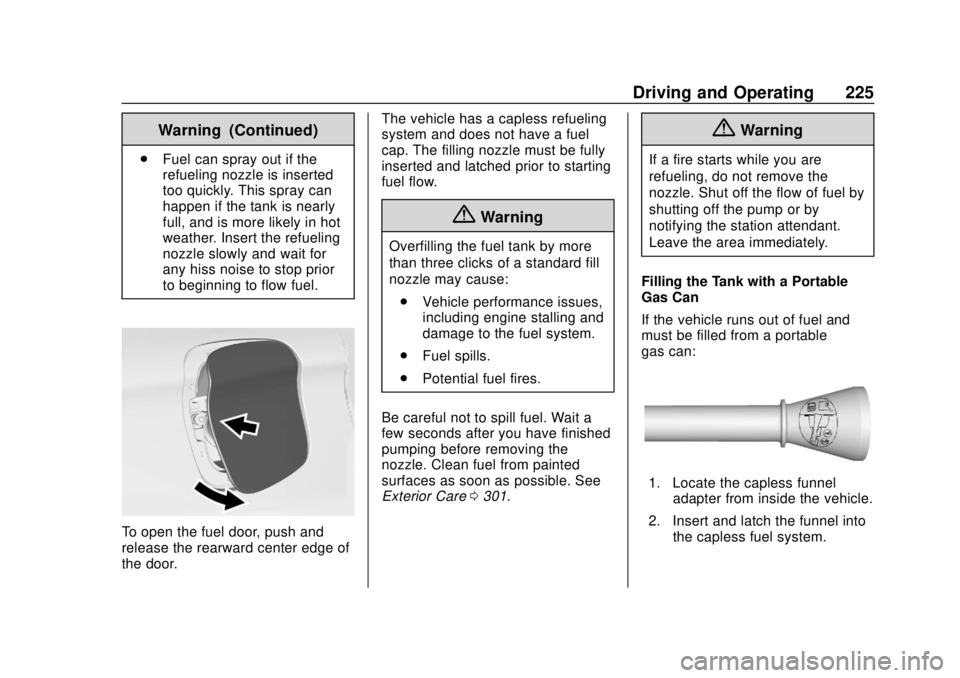
To open the fuel door, push and
release the rearward center edge of
the door. The vehicle has a capless refueling
system and does not have a fuel
cap. The filling nozzle must be fully
inserted and latched prior to starting
fuel flow.
{Warning
Overfilling the fuel tank by more
than three clicks of a standard fill
nozzle may cause:
. Vehicle performance issues,
including engine stalling and
damage to the fuel system.
. Fuel spills.
. Potential fuel fires.
Be careful not to spill fuel. Wait a
few seconds after you have finished
pumping before removing the
nozzle. Clean fuel from painted
surfaces as soon as possible. See
Exterior Care 0301.
{Warning
If a fire starts while you are
refueling, do not remove the
nozzle. Shut off the flow of fuel by
shutting off the pump or by
notifying the station attendant.
Leave the area immediately.
Filling the Tank with a Portable
Gas Can
If the vehicle runs out of fuel and
must be filled from a portable
gas can:
1. Locate the capless funnel adapter from inside the vehicle.
2. Insert and latch the funnel into the capless fuel system.