seat adjustment BUICK ENVISION 2019 Owner's Manual
[x] Cancel search | Manufacturer: BUICK, Model Year: 2019, Model line: ENVISION, Model: BUICK ENVISION 2019Pages: 377, PDF Size: 6.03 MB
Page 6 of 377
Buick Envision Owner Manual (GMNA-Localizing-U.S./Canada/Mexico-
12032235) - 2019 - CRC - 6/27/18
In Brief 5
In Brief
Instrument Panel
Instrument Panel Overview . . . . . . 6
Initial Drive Information
Initial Drive Information . . . . . . . . . . 8
Stop/Start System . . . . . . . . . . . . . . . 8
Remote Keyless Entry (RKE)System . . . . . . . . . . . . . . . . . . . . . . . . 8
Remote Vehicle Start . . . . . . . . . . . 9
Door Locks . . . . . . . . . . . . . . . . . . . . . 9
Liftgate . . . . . . . . . . . . . . . . . . . . . . . . 10
Windows . . . . . . . . . . . . . . . . . . . . . . . 10
Seat Adjustment . . . . . . . . . . . . . . . 11
Memory Features . . . . . . . . . . . . . . 11
Heated and Ventilated Seats . . . 12
Head Restraint Adjustment . . . . 12
Seat Belts . . . . . . . . . . . . . . . . . . . . . 13
Passenger Sensing System . . . 13
Mirror Adjustment . . . . . . . . . . . . . . 13
Steering Wheel Adjustment . . . . 14
Interior Lighting . . . . . . . . . . . . . . . . 15
Exterior Lighting . . . . . . . . . . . . . . . 16
Windshield Wiper/Washer . . . . . . 16
Climate Controls . . . . . . . . . . . . . . . 18
Transmission . . . . . . . . . . . . . . . . . . 18
Vehicle Features
Infotainment System . . . . . . . . . . . 19
Steering Wheel Controls . . . . . . . 19
Cruise Control . . . . . . . . . . . . . . . . . 19
Driver Information Center (DIC) . . . . . . . . . . . . . . . . . 19
Forward Collision Alert (FCA) System . . . . . . . . . . . . . . . . . . . . . . . 20
Forward Automatic Braking (FAB) . . . . . . . . . . . . . . . . 20
Lane Keep Assist (LKA) . . . . . . . 20
Lane Change Alert (LCA) . . . . . . 21
Surround Vision . . . . . . . . . . . . . . . 21
Rear Vision Camera (RVC) . . . . 21
Rear Cross Traffic Alert (RCTA) System . . . . . . . . . . . . . . . . . . . . . . . 21
Park Assist . . . . . . . . . . . . . . . . . . . . 21
Automatic Parking Assist (APA) . . . . . . . . . . . . . . . . . . 22
Power Outlets . . . . . . . . . . . . . . . . . 22
Universal Remote System . . . . . 22
Sunroof . . . . . . . . . . . . . . . . . . . . . . . . 22
Performance and Maintenance
Traction Control/Electronic Stability Control . . . . . . . . . . . . . . 23
Tire Pressure Monitor . . . . . . . . . . 24
Fuel (2.5L Engine) . . . . . . . . . . . . . 24
Fuel (2.0L Engine) . . . . . . . . . . . . . 25
E85 or FlexFuel . . . . . . . . . . . . . . . . 25 Engine Oil Life System . . . . . . . . 25
Driving for Better Fuel
Economy . . . . . . . . . . . . . . . . . . . . . 25
Roadside Assistance Program . . . . . . . . . . . . . . . . . . . . . . 26
Page 8 of 377

Buick Envision Owner Manual (GMNA-Localizing-U.S./Canada/Mexico-
12032235) - 2019 - CRC - 6/27/18
In Brief 7
1.Air Vents 0174.
2. Turn Signal Lever. See Turn
and Lane-Change Signals
0 164.
3. Instrument Cluster 0122.
Driver Information Center
Display. See Driver Information
Center (DIC) (Base Level)
0 140 orDriver Information
Center (DIC) (Uplevel) 0143.
4. Windshield Wiper/Washer
0113.
Rear Window Wiper/Washer
0 115.
5. Hazard Warning Flashers
0163.
6. Infotainment 0168.
7. Light Sensor. See Automatic
Headlamp System 0163.
8. Lane Keep Assist (LKA) 0228
(If Equipped).
Assistance Systems for
Parking or Backing 0217 (If
Equipped). Stop/Start Disable Switch. See
Starting the Engine
0191.
9. Clock 0116.
10. Heated and Ventilated Front
Seats 061 (If Equipped).
11. Dual Automatic Climate Control
System 0169.
12. Traction Control/Electronic
Stability Control 0203.
13. Electric Parking Brake 0201.
14. Shift Lever. See Automatic
Transmission 0197.
15. ENGINE START/STOP Button. SeeIgnition Positions 0189.
16. Steering Wheel Controls 0113.
Driver Information Center (DIC)
Buttons. See Driver Information
Center (DIC) (Base Level)
0 140 orDriver Information
Center (DIC) (Uplevel) 0143.
17. Horn 0113.
18. Steering Wheel Adjustment
0113 (Out of View).
19. Cruise Control 0205. Adaptive Cruise Control
0208
(If Equipped).
Heated Steering Wheel 0113
(If Equipped).
Forward Collision Alert (FCA)
System 0222 (If Equipped).
20. Data Link Connector (DLC) (Out of View). See Malfunction
Indicator Lamp (Check Engine
Light) 0132.
21. Front Storage 0106.
22. Instrument Panel Illumination
Control 0165.
Head-Up Display (HUD) 0145
(If Equipped) (Out of View).
23. Exterior Lamp Controls 0160.
Fog Lamps 0164 (If
Equipped).
Page 12 of 377
Buick Envision Owner Manual (GMNA-Localizing-U.S./Canada/Mexico-
12032235) - 2019 - CRC - 6/27/18
In Brief 11
Seat Adjustment
Power Seat
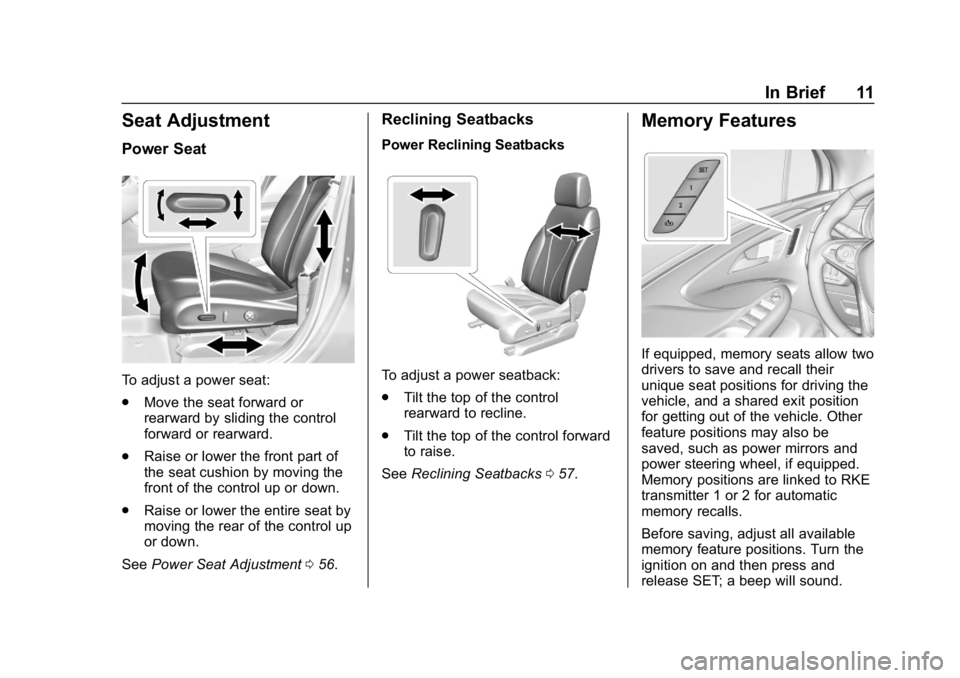
To adjust a power seat:
.Move the seat forward or
rearward by sliding the control
forward or rearward.
. Raise or lower the front part of
the seat cushion by moving the
front of the control up or down.
. Raise or lower the entire seat by
moving the rear of the control up
or down.
See Power Seat Adjustment 056.
Reclining Seatbacks
Power Reclining Seatbacks
To adjust a power seatback:
.
Tilt the top of the control
rearward to recline.
. Tilt the top of the control forward
to raise.
See Reclining Seatbacks 057.
Memory Features
If equipped, memory seats allow two
drivers to save and recall their
unique seat positions for driving the
vehicle, and a shared exit position
for getting out of the vehicle. Other
feature positions may also be
saved, such as power mirrors and
power steering wheel, if equipped.
Memory positions are linked to RKE
transmitter 1 or 2 for automatic
memory recalls.
Before saving, adjust all available
memory feature positions. Turn the
ignition on and then press and
release SET; a beep will sound.
Page 13 of 377
Buick Envision Owner Manual (GMNA-Localizing-U.S./Canada/Mexico-
12032235) - 2019 - CRC - 6/27/18
12 In Brief
Then immediately press and hold 1,
2, or
B(Exit) until two beeps
sound. To manually recall these
positions, press and hold 1, 2, or
B
until the saved position is reached.
When Auto Memory Recall is
enabled in vehicle personalization,
positions previously saved to
memory buttons 1 and 2 are
recalled when the ignition is
changed from off to on or ACC/
ACCESSORY.
When Easy Exit Options is enabled
in vehicle personalization, the
feature automatically recalls the
previously saved exit position when
exiting the vehicle.
Memory adjustments may not be
available upon delivery or after
service until steps in “Saving
Memory Positions” section are
performed. See Memory Seats058.
Heated and Ventilated
Seats
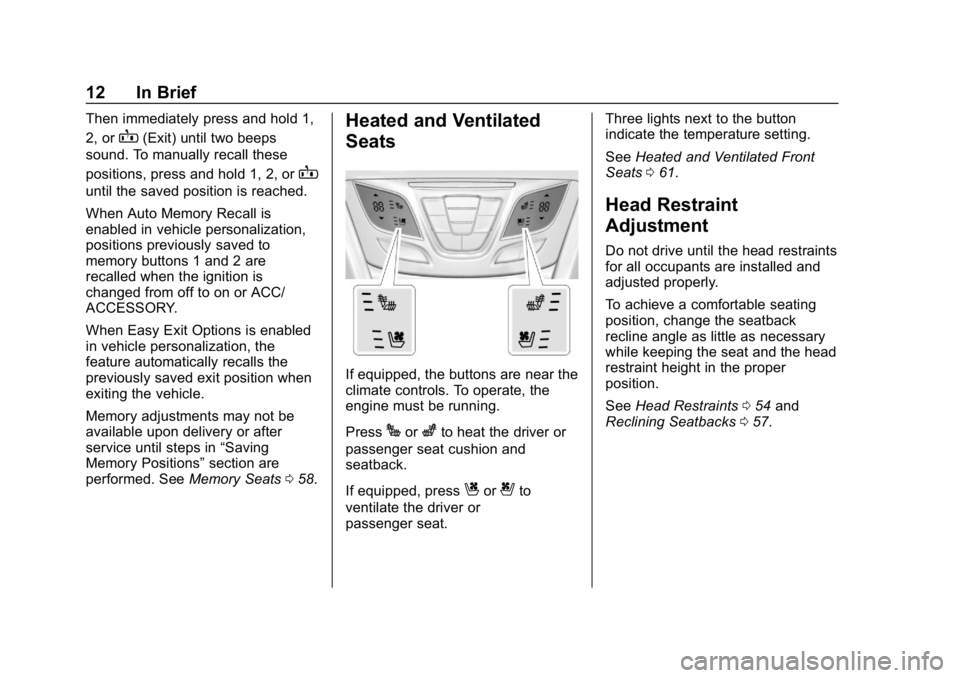
If equipped, the buttons are near the
climate controls. To operate, the
engine must be running.
Press
Jorzto heat the driver or
passenger seat cushion and
seatback.
If equipped, press
Cor{to
ventilate the driver or
passenger seat. Three lights next to the button
indicate the temperature setting.
See
Heated and Ventilated Front
Seats 061.
Head Restraint
Adjustment
Do not drive until the head restraints
for all occupants are installed and
adjusted properly.
To achieve a comfortable seating
position, change the seatback
recline angle as little as necessary
while keeping the seat and the head
restraint height in the proper
position.
See Head Restraints 054 and
Reclining Seatbacks 057.
Page 14 of 377
Buick Envision Owner Manual (GMNA-Localizing-U.S./Canada/Mexico-
12032235) - 2019 - CRC - 6/27/18
In Brief 13
Seat Belts
Refer to the following sections for
important information on how to use
seat belts properly:
.Seat Belts 065
. How to Wear Seat Belts Properly
066
. Lap-Shoulder Belt 068
. Lower Anchors and Tethers for
Children (LATCH System) 093
Passenger Sensing
System
United States
Canada and Mexico
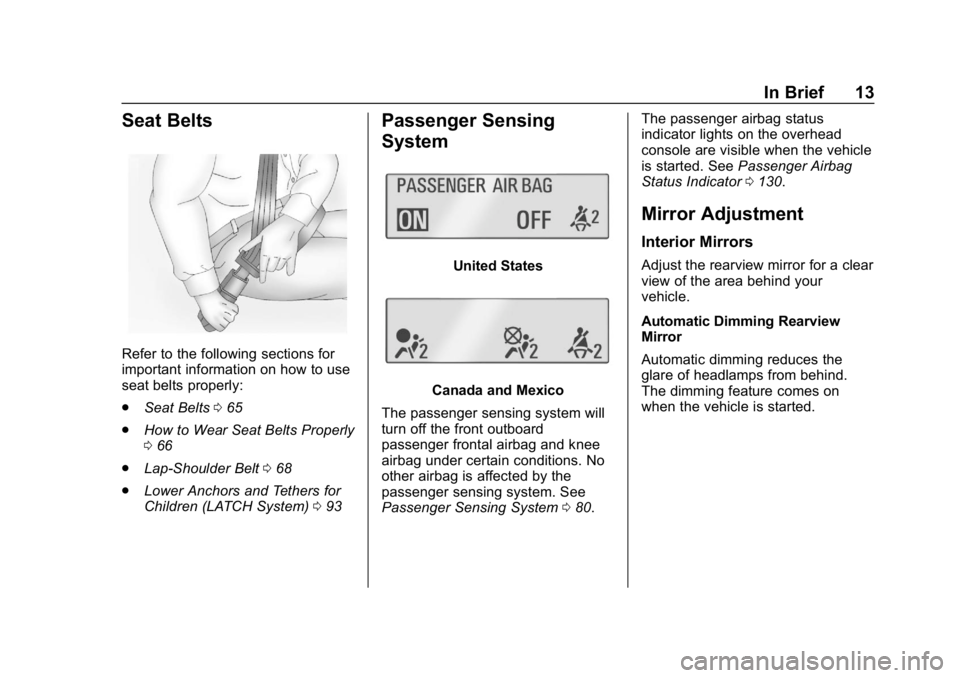
The passenger sensing system will
turn off the front outboard
passenger frontal airbag and knee
airbag under certain conditions. No
other airbag is affected by the
passenger sensing system. See
Passenger Sensing System 080. The passenger airbag status
indicator lights on the overhead
console are visible when the vehicle
is started. See
Passenger Airbag
Status Indicator 0130.
Mirror Adjustment
Interior Mirrors
Adjust the rearview mirror for a clear
view of the area behind your
vehicle.
Automatic Dimming Rearview
Mirror
Automatic dimming reduces the
glare of headlamps from behind.
The dimming feature comes on
when the vehicle is started.
Page 54 of 377
Buick Envision Owner Manual (GMNA-Localizing-U.S./Canada/Mexico-
12032235) - 2019 - CRC - 6/27/18
Seats and Restraints 53
Seats and
Restraints
Head Restraints
Head Restraints . . . . . . . . . . . . . . . 54
Front Seats
Power Seat Adjustment . . . . . . . . 56
Lumbar Adjustment . . . . . . . . . . . . 56
Thigh Support Adjustment . . . . . 57
Reclining Seatbacks . . . . . . . . . . . 57
Memory Seats . . . . . . . . . . . . . . . . . 58
Heated and Ventilated FrontSeats . . . . . . . . . . . . . . . . . . . . . . . . . 61
Rear Seats
Rear Seats . . . . . . . . . . . . . . . . . . . . 62
Rear Seat Armrest . . . . . . . . . . . . . 64
Heated Rear Seats . . . . . . . . . . . . 65
Seat Belts
Seat Belts . . . . . . . . . . . . . . . . . . . . . 65
How to Wear Seat BeltsProperly . . . . . . . . . . . . . . . . . . . . . . 66
Lap-Shoulder Belt . . . . . . . . . . . . . 68
Seat Belt Use During Pregnancy . . . . . . . . . . . . . . . . . . . . 71
Seat Belt Extender . . . . . . . . . . . . . 72
Safety System Check . . . . . . . . . . 72 Seat Belt Care . . . . . . . . . . . . . . . . . 72
Replacing Seat Belt System
Parts after a Crash . . . . . . . . . . . 73
Airbag System
Airbag System . . . . . . . . . . . . . . . . . 73
Where Are the Airbags? . . . . . . . 75
When Should an AirbagInflate? . . . . . . . . . . . . . . . . . . . . . . . 77
What Makes an Airbag Inflate? . . . . . . . . . . . . . . . . . . . . . . . 78
How Does an Airbag Restrain? . . . . . . . . . . . . . . . . . . . . . 78
What Will You See after an Airbag Inflates? . . . . . . . . . . . . . . 79
Passenger Sensing System . . . 80
Servicing the Airbag-Equipped Vehicle . . . . . . . . . . . . . . . . . . . . . . . 84
Adding Equipment to the Airbag-Equipped Vehicle . . . . . 84
Airbag System Check . . . . . . . . . . 85
Replacing Airbag System Parts after a Crash . . . . . . . . . . . . . . . . . 86
Child Restraints
Older Children . . . . . . . . . . . . . . . . . 86
Infants and Young Children . . . . 88
Child Restraint Systems . . . . . . . 90
Where to Put the Restraint . . . . . 92
Lower Anchors and Tethers forChildren (LATCH System) . . . . 93 Replacing LATCH System Parts
After a Crash . . . . . . . . . . . . . . . . . 99
Securing Child Restraints (With the Seat Belt in the
Rear Seat) . . . . . . . . . . . . . . . . . . . 99
Securing Child Restraints (With the Seat Belt in the
Front Seat) . . . . . . . . . . . . . . . . . . 101
Page 57 of 377
Buick Envision Owner Manual (GMNA-Localizing-U.S./Canada/Mexico-
12032235) - 2019 - CRC - 6/27/18
56 Seats and Restraints
Front Seats
Power Seat Adjustment
{Warning
The power seats will work with
the ignition off. Children could
operate the power seats and be
injured. Never leave children
alone in the vehicle.
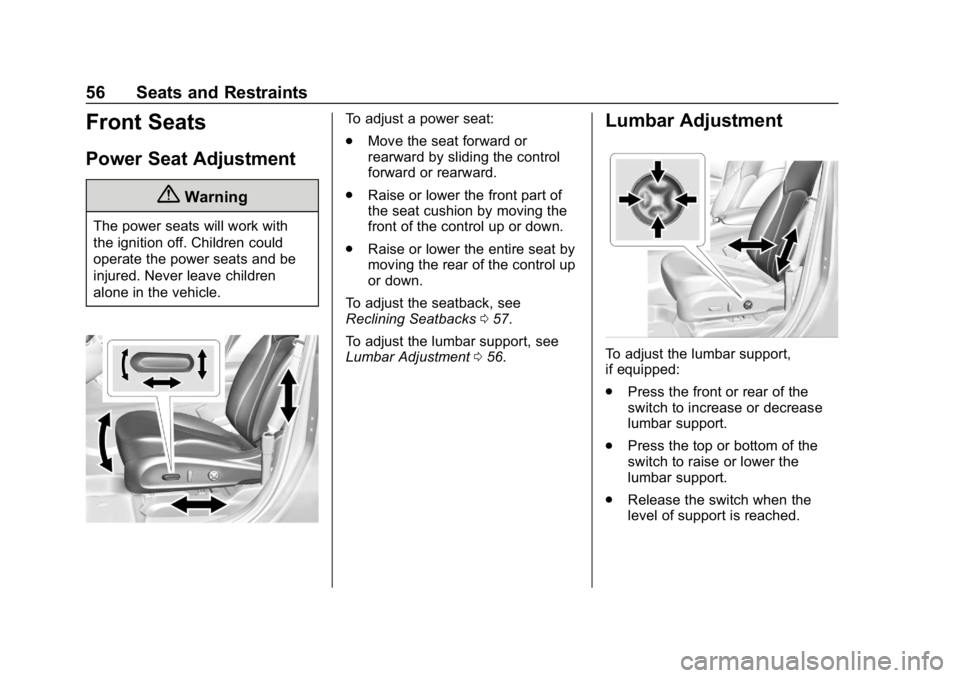
To adjust a power seat:
.Move the seat forward or
rearward by sliding the control
forward or rearward.
. Raise or lower the front part of
the seat cushion by moving the
front of the control up or down.
. Raise or lower the entire seat by
moving the rear of the control up
or down.
To adjust the seatback, see
Reclining Seatbacks 057.
To adjust the lumbar support, see
Lumbar Adjustment 056.Lumbar Adjustment
To adjust the lumbar support,
if equipped:
.
Press the front or rear of the
switch to increase or decrease
lumbar support.
. Press the top or bottom of the
switch to raise or lower the
lumbar support.
. Release the switch when the
level of support is reached.
Page 58 of 377
Buick Envision Owner Manual (GMNA-Localizing-U.S./Canada/Mexico-
12032235) - 2019 - CRC - 6/27/18
Seats and Restraints 57
Thigh Support
Adjustment
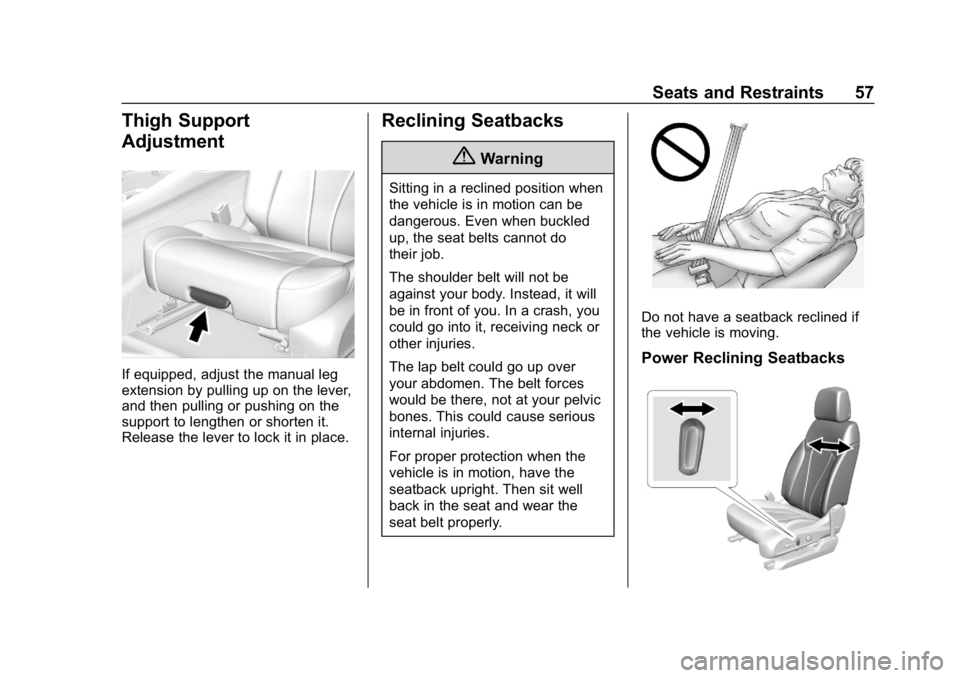
If equipped, adjust the manual leg
extension by pulling up on the lever,
and then pulling or pushing on the
support to lengthen or shorten it.
Release the lever to lock it in place.
Reclining Seatbacks
{Warning
Sitting in a reclined position when
the vehicle is in motion can be
dangerous. Even when buckled
up, the seat belts cannot do
their job.
The shoulder belt will not be
against your body. Instead, it will
be in front of you. In a crash, you
could go into it, receiving neck or
other injuries.
The lap belt could go up over
your abdomen. The belt forces
would be there, not at your pelvic
bones. This could cause serious
internal injuries.
For proper protection when the
vehicle is in motion, have the
seatback upright. Then sit well
back in the seat and wear the
seat belt properly.
Do not have a seatback reclined if
the vehicle is moving.
Power Reclining Seatbacks
Page 59 of 377
Buick Envision Owner Manual (GMNA-Localizing-U.S./Canada/Mexico-
12032235) - 2019 - CRC - 6/27/18
58 Seats and Restraints
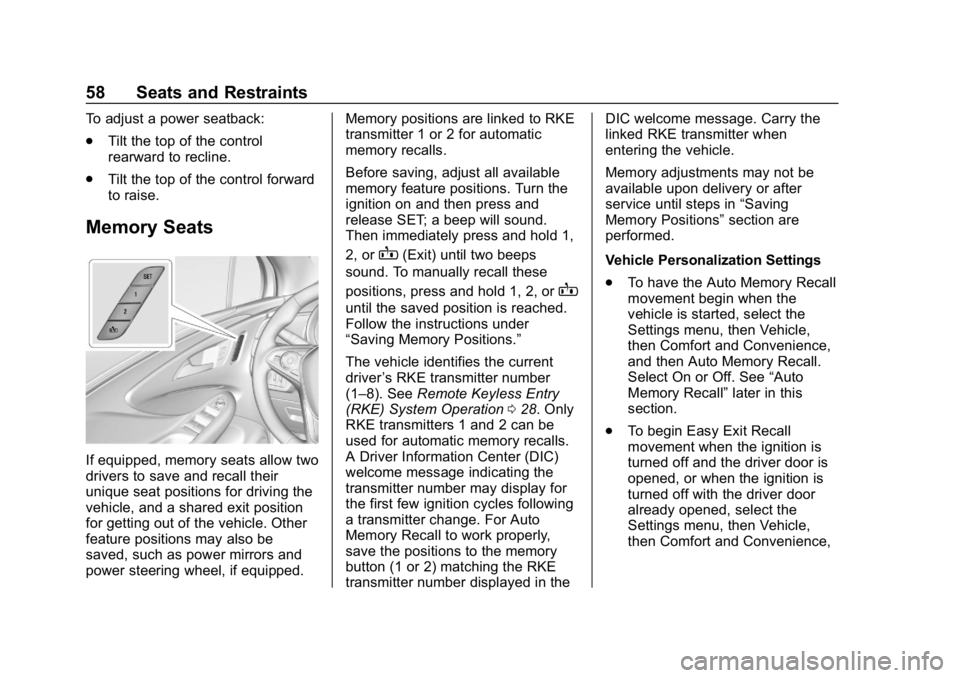
To adjust a power seatback:
.Tilt the top of the control
rearward to recline.
. Tilt the top of the control forward
to raise.
Memory Seats
If equipped, memory seats allow two
drivers to save and recall their
unique seat positions for driving the
vehicle, and a shared exit position
for getting out of the vehicle. Other
feature positions may also be
saved, such as power mirrors and
power steering wheel, if equipped. Memory positions are linked to RKE
transmitter 1 or 2 for automatic
memory recalls.
Before saving, adjust all available
memory feature positions. Turn the
ignition on and then press and
release SET; a beep will sound.
Then immediately press and hold 1,
2, or
B(Exit) until two beeps
sound. To manually recall these
positions, press and hold 1, 2, or
B
until the saved position is reached.
Follow the instructions under
“Saving Memory Positions.”
The vehicle identifies the current
driver ’s RKE transmitter number
(1–8). See Remote Keyless Entry
(RKE) System Operation 028. Only
RKE transmitters 1 and 2 can be
used for automatic memory recalls.
A Driver Information Center (DIC)
welcome message indicating the
transmitter number may display for
the first few ignition cycles following
a transmitter change. For Auto
Memory Recall to work properly,
save the positions to the memory
button (1 or 2) matching the RKE
transmitter number displayed in the DIC welcome message. Carry the
linked RKE transmitter when
entering the vehicle.
Memory adjustments may not be
available upon delivery or after
service until steps in
“Saving
Memory Positions” section are
performed.
Vehicle Personalization Settings
. To have the Auto Memory Recall
movement begin when the
vehicle is started, select the
Settings menu, then Vehicle,
then Comfort and Convenience,
and then Auto Memory Recall.
Select On or Off. See “Auto
Memory Recall” later in this
section.
. To begin Easy Exit Recall
movement when the ignition is
turned off and the driver door is
opened, or when the ignition is
turned off with the driver door
already opened, select the
Settings menu, then Vehicle,
then Comfort and Convenience,
Page 63 of 377
Buick Envision Owner Manual (GMNA-Localizing-U.S./Canada/Mexico-
12032235) - 2019 - CRC - 6/27/18
62 Seats and Restraints
Remote Start Auto Heated and
Ventilated Seats
The heated and ventilated seats can
be programmed to turn on
automatically during a remote
vehicle start when conditions allow.
The heated seat function can be
programmed to come on when
ENGINE START/STOP is pressed
under certain conditions. See
Vehicle Personalization0150.
Press the heated or ventilated seat
button to use the heated or
ventilated seats after the vehicle is
started.
The heated and ventilated seat
button lights will not turn on during a
remote start.
The temperature of an unoccupied
seat may be reduced.
To program the heated and
ventilated seat features, see Vehicle
Personalization 0150.Rear Seats
Rear Seat Reminder
If equipped, the message REAR
SEAT REMINDER LOOK IN REAR
SEAT displays under certain
conditions indicating there may be
an item or passenger in the rear
seat. Check before exiting the
vehicle.
This feature will activate when a
second row door is opened while
the vehicle is on or up to 10 minutes
before the vehicle is turned on.
There will be an alert when the
vehicle is turned off. The alert does
not directly detect objects in the rear
seat; instead, under certain
conditions, it detects when a rear
door is opened and closed,
indicating that there may be
something in the rear seat.
The feature is active only once each
time the vehicle is turned on and off,
and will require reactivation by
opening and closing the second row
doors. There may be an alert even when there is nothing in the rear
seat; for example, if a child entered
the vehicle through the rear door
and left the vehicle without the
vehicle being shut off.
The feature can be turned on or off.
See
Vehicle Personalization 0150.
Rear Seat Adjustment
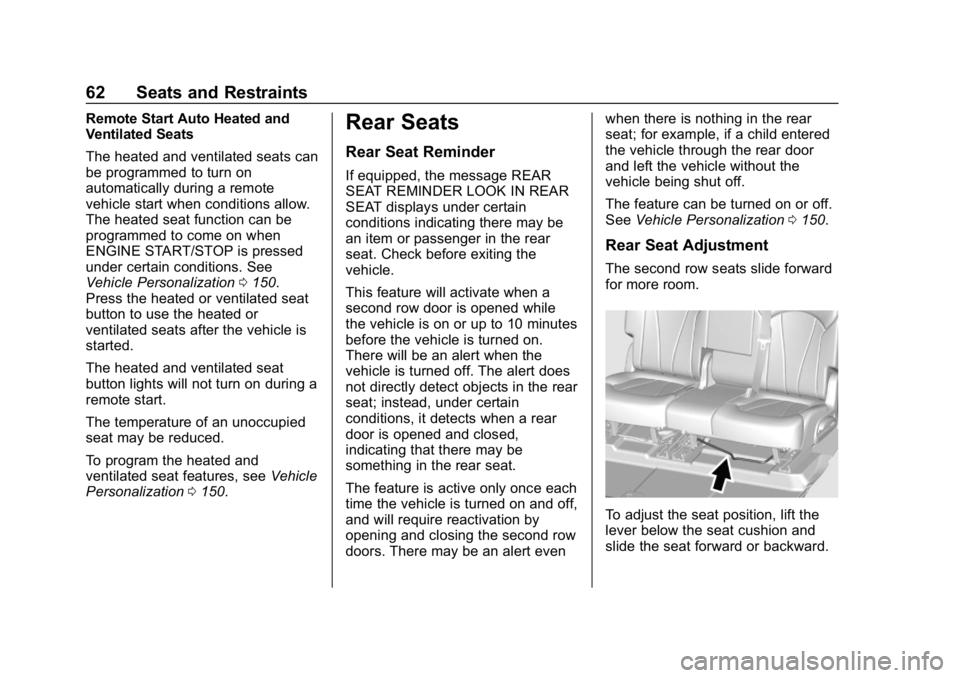
The second row seats slide forward
for more room.
To adjust the seat position, lift the
lever below the seat cushion and
slide the seat forward or backward.