child lock BUICK ENVISION 2020 User Guide
[x] Cancel search | Manufacturer: BUICK, Model Year: 2020, Model line: ENVISION, Model: BUICK ENVISION 2020Pages: 363, PDF Size: 7.26 MB
Page 79 of 363

Buick Envision Owner Manual (GMNA-Localizing-U.S./Canada/Mexico-
13555857) - 2020 - CRC - 3/25/19
78 Seats and Restraints According to accident statistics,
children and infants are safer when
properly restrained in a child
restraint system or infant restraint
system secured in a rear seating
position. See Where to Put the
Restraint 0 72 for additional
information.
Securing a Child Restraint with
the LATCH System
{ WarningA child could be seriously injured
or killed in a crash if the child
restraint is not properly attached
to the vehicle using either the
LATCH anchors or the vehicle
seat belt. Follow the instructions
that came with the child restraint
and the instructions in this
manual. { WarningTo reduce the risk of serious or
fatal injuries during a crash, do
not attach more than one child
restraint to a single anchor.
Attaching more than one child
restraint to a single anchor could
cause the anchor or attachment
to come loose or even break
during a crash. A child or others
could be injured.
{ WarningChildren can be seriously injured
or strangled if a shoulder belt is
wrapped around their neck. The
shoulder belt can tighten but
cannot be loosened if it is locked.
The shoulder belt locks when it is
pulled all the way out of the
retractor. It unlocks when the
shoulder belt is allowed to go all
the way back into the retractor,
(Continued) Warning (Continued) but it cannot do this if it is
wrapped around a child ’ s neck.
If the shoulder belt is locked and
tightened around a child ’ s neck,
the only way to loosen the belt is
to cut it.
Buckle any unused seat belts
behind the child restraint so
children cannot reach them. Pull
the shoulder belt all the way out
of the retractor to set the lock,
and tighten the belt behind the
child restraint after the child
restraint has been installed.
Caution
Do not let the LATCH
attachments rub against the
vehicle ’ s seat belts. This may
damage these parts. If necessary,
move buckled seat belts to avoid
rubbing the LATCH attachments.
(Continued)
Page 82 of 363

Buick Envision Owner Manual (GMNA-Localizing-U.S./Canada/Mexico-
13555857) - 2020 - CRC - 3/25/19
Seats and Restraints 812. Press both buttons on the head
restraint posts at the same
time, and pull up on the head
restraint.
3. Store the head restraint in the
cargo area of the vehicle.
4. When the child restraint is
removed, reinstall the head
restraint before the seating
position is used.
{ WarningWith head restraints that are not
installed and adjusted properly,
there is a greater chance that
occupants will suffer a neck/
spinal injury in a crash. Do not
drive until the head restraints for
all occupants are installed and
adjusted properly. To reinstall the head restraint:
1. Insert the head restraint posts
into the holes in the top of the
seatback. The notches on the
posts must face the driver side
of the vehicle.
2. Push the head restraint down.
3. Try to move the head restraint
to make sure that it is locked in
place. Replacing LATCH System
Parts After a Crash
{ WarningA crash can damage the LATCH
system in the vehicle. A damaged
LATCH system may not properly
secure the child restraint,
resulting in serious injury or even
death in a crash. To help make
sure the LATCH system is
working properly after a crash,
see your dealer to have the
system inspected and any
necessary replacements made as
soon as possible.
If the vehicle has the LATCH system
and it was being used during a
crash, new LATCH system parts
may be needed.
New parts and repairs may be
necessary even if the LATCH
system was not being used at the
time of the crash.
Page 84 of 363

Buick Envision Owner Manual (GMNA-Localizing-U.S./Canada/Mexico-
13555857) - 2020 - CRC - 3/25/19
Seats and Restraints 83
4. Pull the shoulder belt all the
way out of the retractor to set
the lock. When the retractor
lock is set, the belt can be
tightened but not pulled out of
the retractor. 5. To tighten the belt, push down
on the child restraint, pull the
shoulder portion of the belt to
tighten the lap portion of the
belt, and feed the shoulder belt
back into the retractor. When
installing a forward-facing child
restraint, it may be helpful to
use your knee to push down on
the child restraint as you
tighten the belt.
Try to pull the belt out of the
retractor to make sure the
retractor is locked. If the
retractor is not locked, repeat
Steps 4 and 5. 6. If the child restraint has a top
tether, follow the child restraint
manufacturer's instructions
regarding the use of the top
tether. See Lower Anchors and
Tethers for Children (LATCH
System) 0 73 .
7. Before placing a child in the
child restraint, make sure it is
securely held in place. To
check, grasp the child restraint
at the seat belt path and
attempt to move it side to side
and back and forth. When the
child restraint is properly
installed, there should be no
more than 2.5 cm (1 in) of
movement.
To remove the child restraint,
unbuckle the vehicle seat belt and
let it return to the stowed position.
If the top tether is attached to a top
tether anchor, disconnect it.
If the head restraint was removed,
reinstall it before the seating
position is used. See "Head
Restraint Removal and
Page 87 of 363

Buick Envision Owner Manual (GMNA-Localizing-U.S./Canada/Mexico-
13555857) - 2020 - CRC - 3/25/19
86 Seats and Restraints
5. Pull the shoulder belt all the
way out of the retractor to set
the lock. When the retractor
lock is set, the belt can be
tightened but not pulled out of
the retractor. 6. To tighten the belt, push down
on the child restraint, pull the
shoulder portion of the belt to
tighten the lap portion of the
belt, and feed the shoulder belt
back into the retractor. When
installing a forward-facing child
restraint, it may be helpful to
use your knee to push down on
the child restraint as you
tighten the belt.
Try to pull the belt out of the
retractor to make sure the
retractor is locked. If the
retractor is not locked, repeat
Steps 5 and 6. 7. Before placing a child in the
child restraint, make sure it is
securely held in place. To
check, grasp the child restraint
at the seat belt path and
attempt to move it side to side
and back and forth. When the
child restraint is properly
installed, there should be no
more than 2.5 cm (1 in) of
movement.
If the airbags are off, the OFF
indicator in the passenger airbag
status indicator will come on and
stay on when the vehicle is started.
If a child restraint has been installed
and the ON indicator is lit, see “ If
the On Indicator Is Lit for a Child
Restraint ” under Passenger Sensing
System 0 60 .
To remove the child restraint,
unbuckle the vehicle seat belt and
let it return to the stowed position.
Page 194 of 363
Buick Envision Owner Manual (GMNA-Localizing-U.S./Canada/Mexico-
13555857) - 2020 - CRC - 2/25/19
Driving and Operating 193Electronic Stability Control (ESC)
system activates, the ACC may
automatically disengage. See
Traction Control/Electronic Stability
Control 0 188 . When road
conditions allow ACC to be safely
used, the ACC can be turned
back on.
ACC will not engage if the TCS or
StabiliTrak/ESC system is disabled.
{ WarningACC has limited braking ability
and may not have time to slow
the vehicle down enough to avoid
a collision with another vehicle
you are following. This can occur
when vehicles suddenly slow or
stop ahead, or enter your lane.
Also see “ Alerting the Driver ” in
this section. Complete attention is
always required while driving and
you should be ready to take
action and apply the brakes. See
Defensive Driving 0 163 .{ WarningACC will not detect or brake for
children, pedestrians, animals,
or other objects.
Do not use ACC when:
.
On winding and hilly roads
or when the sensors are
blocked by snow, ice, or dirt.
The system may not detect
a vehicle ahead. Keep the
entire front of the vehicle
clean.
.
Visibility is low, such as in
fog, rain, or snow
conditions. ACC
performance is limited under
these conditions.
.
On slippery roads where
fast changes in tire traction
can cause excessive
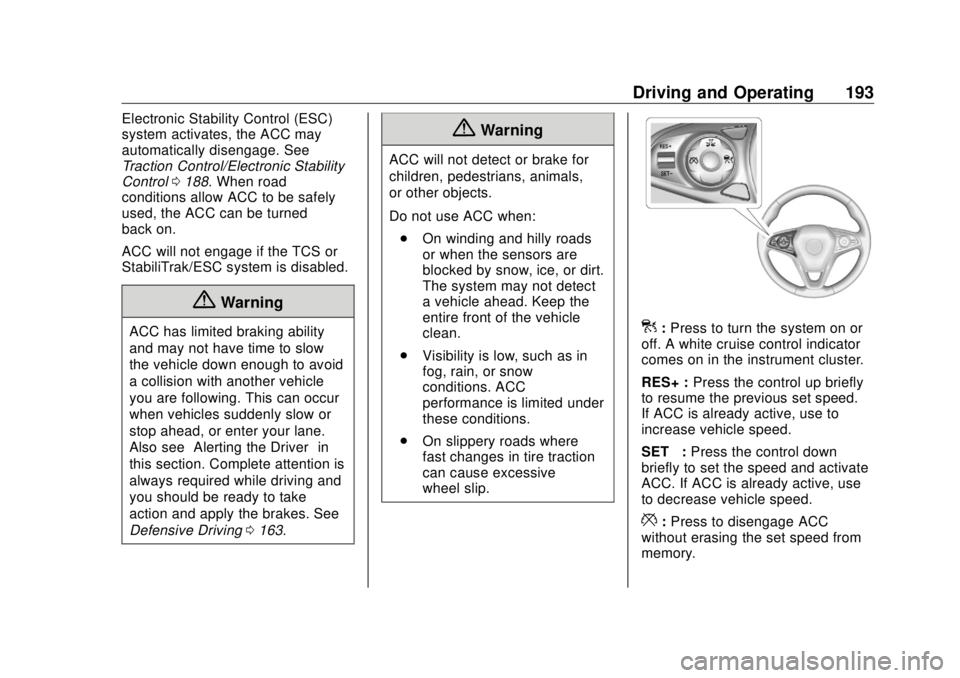
wheel slip. ] : Press to turn the system on or
off. A white cruise control indicator
comes on in the instrument cluster.
RES+ : Press the control up briefly
to resume the previous set speed.
If ACC is already active, use to
increase vehicle speed.
SET – : Press the control down
briefly to set the speed and activate
ACC. If ACC is already active, use
to decrease vehicle speed.
* : Press to disengage ACC
without erasing the set speed from
memory.
Page 202 of 363

Buick Envision Owner Manual (GMNA-Localizing-U.S./Canada/Mexico-
13555857) - 2020 - CRC - 2/25/19
Driving and Operating 201Warning (Continued).
Detect children,
pedestrians, bicyclists,
or animals.
.
Detect vehicles or objects
outside the area monitored
by the system.
.
Work at all driving speeds.
.
Warn you or provide you
with enough time to avoid a
crash.
.
Work under poor visibility or
bad weather conditions.
.
Work if the detection sensor
is not cleaned or is covered
by ice, snow, mud, or dirt.
.
Work if the detection sensor
is covered up, such as with
a sticker, magnet, or metal
plate.
.
Work if the area surrounding
the detection sensor is
damaged or not properly
repaired.
(Continued) Warning (Continued) Complete attention is always
required while driving, and you
should be ready to take action
and apply the brakes and/or steer
the vehicle to avoid crashes.
Audible or Safety Alert Seat
Some driver assistance features
alert the driver of obstacles by
beeping. To change the volume of
the warning chime, see “ Comfort
and Convenience ” under Vehicle
Personalization 0 133 .
If equipped with the Safety Alert
Seat, the driver seat cushion may
provide a vibrating pulse alert
instead of beeping. To change this,
see “ Collision/Detection Systems ”
under Vehicle Personalization
0 133 .
Cleaning
Depending on vehicle options, keep
these areas of the vehicle clean to
ensure the best driver assistance
feature performance. Driver Information Center (DIC) messages
may display when the systems are
unavailable or blocked.
Page 205 of 363

Buick Envision Owner Manual (GMNA-Localizing-U.S./Canada/Mexico-
13555857) - 2020 - CRC - 2/25/19
204 Driving and Operating
{ WarningThe camera(s) do not display
children, pedestrians, bicyclists,
crossing traffic, animals, or any
other object outside of the
cameras ’ field of view, below the
bumper, or under the vehicle.
Shown distances may be different
from actual distances. Do not
drive or park the vehicle using
only these camera(s). Always
check behind and around the
vehicle before driving. Failure to
use proper care may result in
injury, death, or vehicle damage.
Park Assist
With RPA, and if equipped with FPA,
as the vehicle moves at speeds of
less than 8 km/h (5 mph) the
sensors on the bumpers may detect
objects up to 1.8 m (6 ft) behind and
1.2 m (4 ft) in front of the vehicle
within a zone 25 cm (10 in) high off
the ground and below bumper level.
These detection distances may be
shorter during warmer or humid weather. Blocked sensors will not
detect objects and can also cause
false detections. Keep the sensors
clean of mud, dirt, snow, ice, and
slush; and clean sensors after a car
wash in freezing temperatures.
{ WarningThe Park Assist system does not
detect children, pedestrians,
bicyclists, animals, or objects
located below the bumper or that
are too close or too far from the
vehicle. It is not available at
speeds greater than 8 km/h
(5 mph). To prevent injury, death,
or vehicle damage, even with
Park Assist, always check the
area around the vehicle and
check all mirrors before moving
forward or backing. The instrument cluster may have a
park assist display with bars that
show “ distance to object ” and object
location information for RPA, and on
some vehicles, FPA. As the object
gets closer, more bars light up and
the bars change color from yellow to
amber to red.
When an object is first detected in
the rear, one beep will be heard
from the rear, or both sides of the
Safety Alert Seat will pulse two
times. When an object is very close
(<0.6 m (2 ft) in the vehicle rear,
or <0.3 m (1 ft) in the vehicle front),
five beeps will sound from the front
or rear depending on object
Page 353 of 363

Buick Envision Owner Manual (GMNA-Localizing-U.S./Canada/Mexico-
13555857) - 2020 - CRC - 2/25/19
352 Index Assistance Systems for
Driving . . . . . . . . . . . . . . . . . . . . . . . . 207
Assistance Systems for
Parking and Backing . . . . . . . . . . 202
Auto Stop
Stop/Start System . . . . . . . . . . . . 176
Automatic
Dimming Mirrors . . . . . . . . . . . . . . . . 28
Door Locks . . . . . . . . . . . . . . . . . . . . . 18
Emergency Braking (AEB) . . . . 209
Headlamp System . . . . . . . . . . . . 147
Transmission . . . . . . . . . . . . . . . . . 182
Transmission Fluid . . . . . . . . . . . 240
Automatic Transmission
Manual Mode . . . . . . . . . . . . . . . . . 184
B Battery
Exterior Lighting Battery
Saver . . . . . . . . . . . . . . . . . . . . . . . 151
Load Management . . . . . . . . . . . . 150
Power Protection . . . . . . . . . . . . . 151
Battery - North America . . . . 251, 293
Blade Replacement, Wiper . . . . . 252
Brake
Parking, Electric . . . . . . . . . . . . . . 186
System Warning Light . . . . . . . . .117
Brakes . . . . . . . . . . . . . . . . . . . . . . . . . . 249 Brakes (cont'd)
Antilock . . . . . . . . . . . . . . . . . . . . . . . 185
Assist . . . . . . . . . . . . . . . . . . . . . . . . . 187
Fluid . . . . . . . . . . . . . . . . . . . . . . . . . . 250
Braking . . . . . . . . . . . . . . . . . . . . . . . . . 163
Automatic
Emergency (AEB) . . . . . . . . . . . 209
Break-In, New Vehicle . . . . . . . . . . 173
Bulb Replacement
Halogen Bulbs . . . . . . . . . . . . . . . . 256
Headlamp Aiming . . . . . . . . . . . . . 255
Headlamps . . . . . . . . . . . . . . . . . . . 256
High Intensity Discharge
(HID) Lighting . . . . . . . . . . . . . . . 256
License Plate Lamps . . . . . . . . . 256
Buying New Tires . . . . . . . . . . . . . . . 281
C Calibration . . . . . . . . . . . . . . . . . . . . . . . 98
California
Perchlorate Materials
Requirements . . . . . . . . . . . . . . . 231
California
Proposition
65 Warning . . . . . . . . . .230, 251, 293,
Back Cover
Canadian Vehicle Owners . . . . . . . . 2 Capacities and
Specifications . . . . . . . . . . . . . . . . . 324
Carbon Monoxide
Engine Exhaust . . . . . . . . . . . . . . . 181
Liftgate . . . . . . . . . . . . . . . . . . . . . . . . . 20
Winter Driving . . . . . . . . . . . . . . . . 167
Cargo
Cover . . . . . . . . . . . . . . . . . . . . . . . . . . . 90
Management System . . . . . . . . . . . 91
Tie-Downs . . . . . . . . . . . . . . . . . . . . . . 91
Caution, Danger, and Warning . . . . 3
Center Console Storage . . . . . . . . . 90
Chains, Tire . . . . . . . . . . . . . . . . . . . . 285
Charging
Wireless . . . . . . . . . . . . . . . . . . . . . . 101
Charging System Light . . . . . . . . . 115
Check
Engine Light (Malfunction
Indicator) . . . . . . . . . . . . . . . . . . . . .115
Child Restraints
Infants and Young Children . . . . . 68
Lower Anchors and Tethers
for Children . . . . . . . . . . . . . . . . . . . 73
Older Children . . . . . . . . . . . . . . . . . . 67
Securing . . . . . . . . . . . . . . . . . . . . 82, 84
Systems . . . . . . . . . . . . . . . . . . . . . . . . 71
Circuit Breakers . . . . . . . . . . . . . . . . 258
Page 357 of 363

Buick Envision Owner Manual (GMNA-Localizing-U.S./Canada/Mexico-
13555857) - 2020 - CRC - 2/25/19
356 Index How to Wear Seat Belts
Properly . . . . . . . . . . . . . . . . . . . . . . . . 46
HVAC . . . . . . . . . . . . . . . . . . . . . . 153, 156
I Ignition Positions . . . . . . . . . . . . . . . 174
Immobilizer . . . . . . . . . . . . . . . . . . . . . . 26
Indicator
Vehicle Ahead . . . . . . . . . . . . . . . . .119
Infants and Young Children,
Restraints . . . . . . . . . . . . . . . . . . . . . . 68
Information
Publication Ordering . . . . . . . . . . 335
Infotainment . . . . . . . . . . . . . . . . . . . . 152
Infotainment System . . . . . . . . . . . . 339
Instrument Cluster . . . . . . . . . . . . . . 105
Instrument Panel Overview . . . . . . . 5
Interior Rearview Mirrors . . . . . . . . . 28
Introduction . . . . . . . . . . . . . . . . . . . . . . . 2
J Jump Starting - North
America . . . . . . . . . . . . . . . . . . . . . . . 293
K Keyless Entry
Remote (RKE) System . . . . . . . . . . 8
Keys . . . . . . . . . . . . . . . . . . . . . . . . . . . . . . 7 L Labeling, Tire Sidewall . . . . . . . . . . 267
Lamps
Courtesy . . . . . . . . . . . . . . . . . . . . . . 149
Daytime Running (DRL) . . . . . . 146
Dome . . . . . . . . . . . . . . . . . . . . . . . . . 149
Exterior Controls . . . . . . . . . . . . . . 144
Exterior Lamps Off
Reminder . . . . . . . . . . . . . . . . . . . 146
Exterior Lighting Battery
Saver . . . . . . . . . . . . . . . . . . . . . . . 151
License Plate . . . . . . . . . . . . . . . . . 256
Malfunction Indicator
(Check Engine) . . . . . . . . . . . . . .115
On Reminder . . . . . . . . . . . . . . . . . 123
Reading . . . . . . . . . . . . . . . . . . . . . . 149
Lane Change Alert (LCA) . . . . . . . 211
Lane Keep Assist (LKA) . . . . . . . . 213
Lane Keep Assist Light . . . . . . . . . 119
Lap-Shoulder Belt . . . . . . . . . . . . . . . 48
LATCH System
Replacing Parts after a
Crash . . . . . . . . . . . . . . . . . . . . . . . . . 81
LATCH, Lower Anchors and
Tethers for Children . . . . . . . . . . . . 73
Liftgate . . . . . . . . . . . . . . . . . . . . . . . . . . 20
Lighting
Entry . . . . . . . . . . . . . . . . . . . . . . . . . 150 Lighting (cont'd)
Exit . . . . . . . . . . . . . . . . . . . . . . . . . . . 150
Illumination Control . . . . . . . . . . . 149
Lights
Airbag Readiness . . . . . . . . . . . . . .113
Antilock Brake System
(ABS) Warning . . . . . . . . . . . . . . .118
Brake System Warning . . . . . . . .117
Charging System . . . . . . . . . . . . . .115
Check Engine (Malfunction
Indicator) . . . . . . . . . . . . . . . . . . . . .115
Cruise Control . . . . . . . . . . . . . . . . 123
Door Ajar . . . . . . . . . . . . . . . . . . . . . 123
Electric Parking Brake . . . . . . . . .117
Engine Coolant
Temperature Warning . . . . . . . 120
Engine Oil Pressure . . . . . . . . . . 121
Flash-to-Pass . . . . . . . . . . . . . . . . . 146
Front Fog Lamp . . . . . . . . . . . . . . 122
High-Beam On . . . . . . . . . . . . . . . . 122
High/Low Beam Changer . . . . . 146
Lane Keep Assist . . . . . . . . . . . . . .119
Low Fuel Warning . . . . . . . . . . . . 122
Seat Belt Reminders . . . . . . . . . . .113
Security . . . . . . . . . . . . . . . . . . . . . . 122
Service Electric Parking
Brake . . . . . . . . . . . . . . . . . . . . . . . .118
StabiliTrak OFF . . . . . . . . . . . . . . . 120
Page 358 of 363

Buick Envision Owner Manual (GMNA-Localizing-U.S./Canada/Mexico-
13555857) - 2020 - CRC - 2/25/19
Index 357Lights (cont'd)
Tire Pressure . . . . . . . . . . . . . . . . . 121
Traction Control System
(TCS)/StabiliTrak . . . . . . . . . . . . 120
Traction Off . . . . . . . . . . . . . . . . . . . .119
Locks
Automatic Door . . . . . . . . . . . . . . . . . 18
Delayed Locking . . . . . . . . . . . . . . . . 18
Door . . . . . . . . . . . . . . . . . . . . . . . . . . . . 16
Lockout Protection . . . . . . . . . . . . . . 18
Power Door . . . . . . . . . . . . . . . . . . . . . 18
Safety . . . . . . . . . . . . . . . . . . . . . . . . . . 19
Loss of Control . . . . . . . . . . . . . . . . . 165
Low Fuel Warning Light . . . . . . . . . 122
Lower Anchors and Tethers
for Children (LATCH
System) . . . . . . . . . . . . . . . . . . . . . . . . 73
Lumbar Adjustment . . . . . . . . . . . . . . 36
Front Seats . . . . . . . . . . . . . . . . . . . . . 36
M Maintenance
Records . . . . . . . . . . . . . . . . . . . . . . 322
Maintenance and Care
Additional . . . . . . . . . . . . . . . . . . . . . 317
Maintenance Schedule . . . . . . . . . 311 Maintenance Schedule (cont'd)
Recommended Fluids and
Lubricants . . . . . . . . . . . . . . . . . . . 320
Malfunction Indicator Lamp . . . . . 115
Manual Mode . . . . . . . . . . . . . . . . . . . 184
Memory Seats . . . . . . . . . . . . . . . . . . . 38
Messages
Engine Power . . . . . . . . . . . . . . . . 133
Vehicle . . . . . . . . . . . . . . . . . . . . . . . 132
Vehicle Speed . . . . . . . . . . . . . . . . 133
Mirrors
Automatic Dimming . . . . . . . . . . . . . 28
Automatic Dimming
Rearview . . . . . . . . . . . . . . . . . . . . . . 28
Convex . . . . . . . . . . . . . . . . . . . . . . . . . 27
Folding . . . . . . . . . . . . . . . . . . . . . . . . . 28
Heated . . . . . . . . . . . . . . . . . . . . . . . . . 28
Power . . . . . . . . . . . . . . . . . . . . . . . . . . 27
Tilt in Reverse . . . . . . . . . . . . . . . . . . 28
Mirrors, Interior Rearview . . . . . . . . 28
Monitor System, Tire
Pressure . . . . . . . . . . . . . . . . . . . . . . 274
N Navigation
Connected Services . . . . . . . . . . 348
Net, Convenience . . . . . . . . . . . . . . . 92
New Vehicle Break-In . . . . . . . . . . . 173 O Odometer . . . . . . . . . . . . . . . . . . . . . . . 108
Trip . . . . . . . . . . . . . . . . . . . . . . . . . . . 108
Off-Road
Recovery . . . . . . . . . . . . . . . . . . . . . 165
Oil
Engine . . . . . . . . . . . . . . . . . . . . . . . . 237
Engine Oil Life System . . . . . . . 239
Pressure Light . . . . . . . . . . . . . . . . 121
Older Children, Restraints . . . . . . . 67
Online Owner Center . . . . . . . . . . . 329
OnStar . . . . . . . . . . . . . . . . . . . . . . . . . 339
OnStar Additional
Information . . . . . . . . . . . . . . . . . . . . 342
OnStar Emergency . . . . . . . . . . . . . 341
OnStar Overview . . . . . . . . . . . . . . . 340
OnStar Security . . . . . . . . . . . . . . . . 342
Operation
Fog Lamps . . . . . . . . . . . . . . . . . . . 148
Outlets
Power . . . . . . . . . . . . . . . . . . . . . . . . . . 99
Overheating, Engine . . . . . . . . . . . . 247
Overview
Instrument Panel . . . . . . . . . . . . . . . . 5
P
Park
Shifting Into . . . . . . . . . . . . . . . . . . . 179