infotainment BUICK ENVISION 2020 User Guide
[x] Cancel search | Manufacturer: BUICK, Model Year: 2020, Model line: ENVISION, Model: BUICK ENVISION 2020Pages: 363, PDF Size: 7.26 MB
Page 153 of 363
Buick Envision Owner Manual (GMNA-Localizing-U.S./Canada/Mexico-
13555857) - 2020 - CRC - 2/25/19
152 Infotainment System
Infotainment
System Introduction Infotainment . . . . . . . . . . . . . . . . . . 152
Introduction Infotainment See the infotainment manual for
information on the radio, audio
players, phone, navigation system,
and voice or speech recognition.
It also includes information on
settings.
Active Noise Cancellation (ANC)
If equipped, ANC reduces engine
noise in the vehicle ’ s interior. ANC
requires the factory-installed audio
system, radio, speakers, amplifier (if
equipped), induction system, and
exhaust system to work properly.
Deactivation is required by your
dealer if related aftermarket
equipment is installed.
Page 164 of 363

Buick Envision Owner Manual (GMNA-Localizing-U.S./Canada/Mexico-
13555857) - 2020 - CRC - 2/25/19
Driving and Operating 163.
Stop or park the vehicle to tend
to children.
.
Keep pets in an appropriate
carrier or restraint.
.
Avoid stressful conversations
while driving, whether with a
passenger or on a cell phone.
{ WarningTaking your eyes off the road too
long or too often could cause a
crash resulting in injury or death.
Focus your attention on driving.
Refer to the infotainment manual for
more information on using that
system and the navigation system,
if equipped, including pairing and
using a cell phone.
Defensive Driving Defensive driving means “ always
expect the unexpected. ” The first
step in driving defensively is to wear
the seat belt. See Seat Belts 0 45 . .
Assume that other road users
(pedestrians, bicyclists, and
other drivers) are going to be
careless and make mistakes.
Anticipate what they might do
and be ready.
.
Allow enough following distance
between you and the driver in
front of you.
.
Focus on the task of driving.
Drunk Driving Death and injury associated with
drinking and driving is a global
tragedy.
{ Warning
Drinking and then driving is very
dangerous. Your reflexes,
perceptions, attentiveness, and
judgment can be affected by even
a small amount of alcohol. You
can have a serious — or even
fatal — collision if you drive after
drinking.
(Continued) Warning (Continued) Do not drink and drive or ride with
a driver who has been drinking.
Ride home in a cab; or if you are
with a group, designate a driver
who will not drink.
Control of a Vehicle Braking, steering, and accelerating
are important factors in helping to
control a vehicle while driving.
Braking Braking action involves perception
time and reaction time. Deciding to
push the brake pedal is perception
time. Actually doing it is
reaction time.
Average driver reaction time is
about three-quarters of a second. In
that time, a vehicle moving at
100 km/h (60 mph) travels 20 m
(66 ft), which could be a lot of
distance in an emergency.
Page 203 of 363

Buick Envision Owner Manual (GMNA-Localizing-U.S./Canada/Mexico-
13555857) - 2020 - CRC - 2/25/19
202 Driving and Operating .
Front and rear bumpers and the
area below the bumpers
.
Front grille and headlamps
.
Front camera lens in the front
grille or near the front emblem
.
Front side and rear side panels
.
Outside of the windshield in front
of the rearview mirror
.
Side camera lens on the bottom
of the outside mirrors
.
Rear side corner bumpers
.
Rear Vision Camera above the
license plate
Assistance Systems for
Parking or Backing If equipped, the Rear Vision Camera
(RVC), Rear Park Assist (RPA),
Front Park Assist (FPA), Surround
Vision, Front Vision Camera, Rear
Cross Traffic Alert (RCTA), and
Automatic Parking Assist (APA) may
help the driver park or avoid objects.
Always check around the vehicle
when parking or backing. Rear Vision Camera (RVC)
When the vehicle is shifted into
R (Reverse), the RVC displays an
image of the area behind the vehicle
in the infotainment display. The
previous screen displays when the
vehicle is shifted out of R (Reverse)
after a short delay. To return to the
previous screen sooner, press any
button on the infotainment system,
shift into P (Park), or reach a vehicle
speed of approximately 12 km/h
(8 mph).
1. View Displayed by the
Camera 1. View Displayed by the
Camera
2. Corners of the Rear Bumper
Displayed images may be farther or
closer than they appear. The area
displayed is limited and objects that
are close to either corner of the
bumper or under the bumper do not
display.
A warning triangle may appear on
the infotainment display to show
that it has detected an object. This
triangle changes from amber to red
and increases in size the closer the
object.
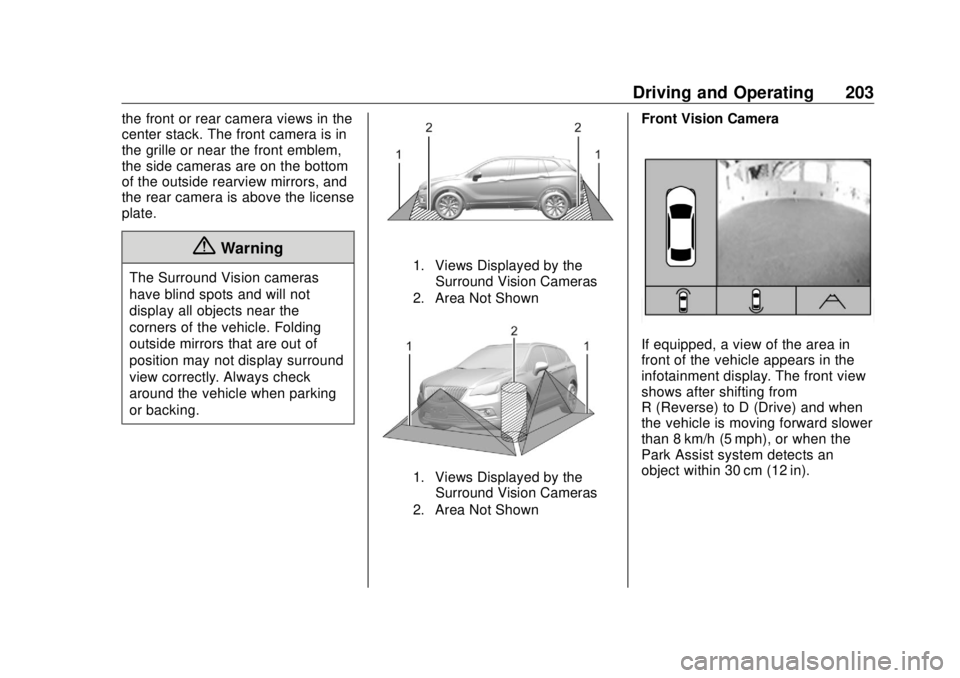
Surround Vision
If equipped, Surround Vision
displays an image of the area
surrounding the vehicle, along with
Page 204 of 363
Buick Envision Owner Manual (GMNA-Localizing-U.S./Canada/Mexico-
13555857) - 2020 - CRC - 2/25/19
Driving and Operating 203the front or rear camera views in the
center stack. The front camera is in
the grille or near the front emblem,
the side cameras are on the bottom
of the outside rearview mirrors, and
the rear camera is above the license
plate.
{ WarningThe Surround Vision cameras
have blind spots and will not
display all objects near the
corners of the vehicle. Folding
outside mirrors that are out of
position may not display surround
view correctly. Always check
around the vehicle when parking
or backing. 1. Views Displayed by the
Surround Vision Cameras
2. Area Not Shown
1. Views Displayed by the
Surround Vision Cameras
2. Area Not Shown Front Vision Camera
If equipped, a view of the area in
front of the vehicle appears in the
infotainment display. The front view
shows after shifting from
R (Reverse) to D (Drive) and when
the vehicle is moving forward slower
than 8 km/h (5 mph), or when the
Park Assist system detects an
object within 30 cm (12 in).
Page 206 of 363

Buick Envision Owner Manual (GMNA-Localizing-U.S./Canada/Mexico-
13555857) - 2020 - CRC - 2/25/19
Driving and Operating 205location, or both sides of the Safety
Alert Seat will pulse five times.
Beeps for FPA are higher pitched
than for RPA.
Rear Cross Traffic Alert (RCTA)
If equipped, when the vehicle is
shifted into R (Reverse), RCTA
displays a red warning triangle with
a left or right pointing arrow on the
infotainment display to warn of
traffic coming from the left or right.
This system detects objects coming
from up to 20 m (65 ft) from the left
or right side of the vehicle. When an
object is detected, either three
beeps sound from the left or right,
or three Safety Alert Seat pulses
occur on the left or right side,
depending on the direction of the
detected vehicle.
Turning the Features On or Off
Press
X on the center stack to
turn on or off the Front and Rear
Park Assist and the Rear Cross
Traffic Alert (RCTA). The indicator
light in the button comes on when the features are on and turns off
when the features have been
disabled.
RCTA can also be turned off
through vehicle personalization. See
“ Collision/Detection Systems ” under
Vehicle Personalization 0 133 .
To turn the RPA symbols or
guidance lines on or off, select the
guidance lines button on the
infotainment display, or on some
models, see “ Rear Camera ” under
Vehicle Personalization 0 133 .
Automatic Parking
Assist (APA) If equipped, APA searches for and
steers the vehicle into parallel and
perpendicular parking spots. When
using APA, you must still shift gears,
and control the brakes and
accelerator. A display and audible
beeps help to guide parking
maneuvers. { WarningAPA does not apply the brakes.
APA may not detect objects in the
parking space, objects that are
soft or narrow, objects high off the
ground such as flatbed trucks,
or objects below ground level
such as large potholes. Always
verify that the parking space is
appropriate for parking a vehicle.
APA does not respond to changes
in the parking space, such as
movement of an adjacent vehicle,
or a person or object entering the
parking space. APA does not
detect or avoid traffic that is
behind or alongside of the
vehicle. Always be prepared to
stop the vehicle during the
parking maneuver.
Press
O on the center stack to
enable the system to search for a
parking space that is large enough
and within 1.5 m (5 ft) of the vehicle.
Page 327 of 363
Buick Envision Owner Manual (GMNA-Localizing-U.S./Canada/Mexico-
13555857) - 2020 - CRC - 2/25/19
326 Customer Information
Customer
Information Customer Information Customer Satisfaction
Procedure . . . . . . . . . . . . . . . . . . . 326
Customer Assistance
Offices . . . . . . . . . . . . . . . . . . . . . . 328
Customer Assistance for Text
Telephone (TTY) Users . . . . . 329
Online Owner Center . . . . . . . . . 329
GM Mobility Reimbursement
Program . . . . . . . . . . . . . . . . . . . . 329
Roadside Assistance
Program . . . . . . . . . . . . . . . . . . . . 330
Scheduling Service
Appointments . . . . . . . . . . . . . . . 331
Courtesy Transportation
Program . . . . . . . . . . . . . . . . . . . . 332
Collision Damage Repair . . . . . 333
Publication Ordering
Information . . . . . . . . . . . . . . . . . . 335
Radio Frequency
Statement . . . . . . . . . . . . . . . . . . . 335 Reporting Safety Defects Reporting Safety Defects to
the United States
Government . . . . . . . . . . . . . . . . . 336
Reporting Safety Defects to
the Canadian
Government . . . . . . . . . . . . . . . . . 336
Reporting Safety Defects to
General Motors . . . . . . . . . . . . . 337
Vehicle Data Recording and
Privacy Vehicle Data Recording and
Privacy . . . . . . . . . . . . . . . . . . . . . . 337
Cybersecurity . . . . . . . . . . . . . . . . . 338
Event Data Recorders . . . . . . . . 338
OnStar . . . . . . . . . . . . . . . . . . . . . . . 339
Infotainment System . . . . . . . . . . 339 Customer Information Customer Satisfaction
Procedure Your satisfaction and goodwill are
important to your dealer and to
Buick. Normally, any concerns with
the sales transaction or the
operation of the vehicle will be
resolved by your dealer's sales or
service departments. Sometimes,
however, despite the best intentions
of all concerned, misunderstandings
can occur. If your concern has not
been resolved to your satisfaction,
the following steps should be taken:
STEP ONE : Discuss your concern
with a member of dealership
management. Normally, concerns
can be quickly resolved at that level.
If the matter has already been
reviewed with the sales, service,
or parts manager, contact the owner
of your dealership or the general
manager.
STEP TWO : If after contacting a
member of dealership management,
it appears your concern cannot be
Page 336 of 363

Buick Envision Owner Manual (GMNA-Localizing-U.S./Canada/Mexico-
13555857) - 2020 - CRC - 2/25/19
Customer Information 335repair facility of choice, take the
vehicle there, or have it towed there.
Specify to the facility that any
required replacement collision parts
be original equipment parts, either
new Genuine GM parts or recycled
original GM parts. Remember,
recycled parts will not be covered by
the GM vehicle warranty.
Insurance pays the bill for the repair,
but you must live with the repair.
Depending on your policy limits,
your insurance company may
initially value the repair using
aftermarket parts. Discuss this with
the repair professional, and insist on
Genuine GM parts. Remember,
if the vehicle is leased, you may be
obligated to have the vehicle
repaired with Genuine GM parts,
even if your insurance coverage
does not pay the full cost.
If another party's insurance
company is paying for the repairs,
you are not obligated to accept a
repair valuation based on that
insurance company's collision policy
repair limits, as you have no
contractual limits with that company. In such cases, you can have control
of the repair and parts choices as
long as the cost stays within
reasonable limits.
Publication Ordering
Information Service Manuals Service manuals have the diagnosis
and repair information on the
engine, transmission, axle,
suspension, brakes, electrical
system, steering system, body, etc.
Customer Literature Owner ’ s manuals are written
specifically for owners and are
intended to provide basic
operational information about the
vehicle. The owner ’ s manual
includes the Maintenance Schedule
for all models.
Customer literature publications
available for purchase include
owner ’ s manuals, warranty
manuals, infotainment manuals, and
portfolios. Portfolios include an owner ’ s manual, warranty manual,
infotainment manual, if applicable,
and zip lock bag or pouch.
Current and Past Models Service manuals and customer
literature are available for many
current and past model year GM
vehicles.
To order, call 1-800-551-4123
Monday – Friday, 8:00 a.m. – 6:00 p.m.
eastern time
For credit card orders only (VISA,
MasterCard, or Discover), see
Helm, Inc. at: www.helminc.com.
To order by mail, write to:
Helm, Incorporated
Attention: Customer Service
47911 Halyard Drive
Plymouth, MI 48170
Make checks payable in U.S. funds.
Radio Frequency
Statement This vehicle has systems that
operate on a radio frequency that
complies with Part 15/Part 18 of the
Page 340 of 363
Buick Envision Owner Manual (GMNA-Localizing-U.S./Canada/Mexico-
13555857) - 2020 - CRC - 2/25/19
Customer Information 339To read data recorded by an EDR,
special equipment is required, and
access to the vehicle or the EDR is
needed. In addition to the vehicle
manufacturer, other parties, such as
law enforcement, that have the
special equipment, can read the
information if they have access to
the vehicle or the EDR.
GM will not access these data or
share it with others except: with the
consent of the vehicle owner or,
if the vehicle is leased, with the
consent of the lessee; in response
to an official request by police or
similar government office; as part of
GM's defense of litigation through
the discovery process; or, as
required by law. Data that GM
collects or receives may also be
used for GM research needs or may
be made available to others for
research purposes, where a need is
shown and the data is not tied to a
specific vehicle or vehicle owner. OnStar If the vehicle is equipped with
OnStar and has an active service
plan, additional data may be
collected and transmitted through
the OnStar system. This includes
information about the vehicle ’ s
operation; collisions involving the
vehicle; the use of the vehicle and
its features, including infotainment;
and the location and approximate
GPS speed of the vehicle. Refer to
the OnStar Terms and Conditions
and Privacy Statement on the
OnStar website.
See OnStar Additional Information
0 342 . Infotainment System If the vehicle is equipped with a
navigation system as part of the
infotainment system, use of the
system may result in the storage of
destinations, addresses, telephone
numbers, and other trip information.
See the infotainment manual for
information on stored data and for
deletion instructions.
Page 342 of 363
Buick Envision Owner Manual (GMNA-Localizing-U.S./Canada/Mexico-
13555857) - 2020 - CRC - 2/25/19
OnStar 341Press
= to:
.
Open the OnStar app on the
infotainment display. See the
infotainment manual for
information on how to use the
OnStar app.
Or
.
Give OnStar Turn-by-Turn
Navigation voice commands.
.
Obtain and customize the Wi-Fi
hotspot name or SSID and
password, if equipped.
Press
Q to connect to an
Advisor to:
.
Verify account information or
update contact information.
.
Get driving directions.
.
Receive a Diagnostic check of
the vehicle's key operating
systems.
.
Receive Roadside Assistance.
.
Manage Wi-Fi Settings,
if equipped. Press
> to get a priority connection
to an OnStar Advisor available
24/7 to:
.
Get help for an emergency.
.
Be a Good Samaritan or
respond to an AMBER Alert.
.
Get assistance in severe
weather or other crisis situations
and find evacuation routes.
OnStar Services Emergency Emergency Services require an
active safety and security plan. With
Automatic Crash Response, built-in
sensors can automatically alert a
specially trained OnStar Advisor
who is immediately connected in to
the vehicle to help.
Press
> for a priority connection to
an OnStar Advisor who can contact
emergency service providers, direct
them to your exact location, and
relay important information.
With OnStar Crisis Assist, specially
trained Advisors are available
24 hours a day, 7 days a week, to
provide a central point of contact,
assistance, and information during a
crisis.
With Roadside Assistance, Advisors
can locate a nearby service provider
to help with a flat tire, a battery
jump, or an empty gas tank.
Page 344 of 363
Buick Envision Owner Manual (GMNA-Localizing-U.S./Canada/Mexico-
13555857) - 2020 - CRC - 2/25/19
OnStar 343.
Press
Q to speak with an
Advisor.
OnStar or connected services
cannot work unless the vehicle is in
a place where OnStar has an
agreement with a wireless service
provider for service in that area. The
wireless service provider must also
have coverage, network capacity,
reception, and technology
compatible with OnStar or
connected services. Service
involving location information about
the vehicle cannot work unless GPS
signals are available, unobstructed,
and compatible with the OnStar
hardware. OnStar or connected
services may not work if the OnStar
equipment is not properly installed
or it has not been properly
maintained. If equipment or software
is added, connected, or modified,
OnStar or connected services may
not work. Other problems beyond
the control of OnStar — such as
hills, tall buildings, tunnels, weather,
electrical system design and
architecture of the vehicle, damage to the vehicle in a crash, or wireless
phone network congestion or
jamming — may prevent service.
See Radio Frequency Statement
0 335 .
Services for People with
Disabilities Advisors provide services to help
with physical disabilities and
medical conditions.
Press
Q to help:
.
Locate a gas station with an
attendant to pump gas.
.
Find a hotel, restaurant, etc.,
that meets accessibility needs.
.
Provide directions to the closest
hospital or pharmacy in urgent
situations.
TTY Users
OnStar has the ability to
communicate to deaf,
hard-of-hearing, or speech-impaired
customers while in the vehicle. The
available dealer-installed TTY
system can provide in-vehicle access to all OnStar services,
except Virtual Advisor and OnStar
Turn-by-Turn Navigation.
If equipped, TTY mode can be
turned on or off by touching
Settings, then Apps, and then
Phone. When TTY mode is on,
phone calls can be made or
received with OnStar using the
infotainment display.
OnStar Personal Identification
Number (PIN) A PIN is needed to access some
OnStar services. The PIN will need
to be changed the first time when
speaking with an Advisor. To
change the OnStar PIN, contact an
OnStar Advisor by pressing
Q or
calling 1-888-4ONSTAR.
Warranty
OnStar equipment may be
warranted as part of the vehicle
warranty.