door lock BUICK ENVISION 2020 Owner's Guide
[x] Cancel search | Manufacturer: BUICK, Model Year: 2020, Model line: ENVISION, Model: BUICK ENVISION 2020Pages: 363, PDF Size: 7.26 MB
Page 147 of 363

Buick Envision Owner Manual (GMNA-Localizing-U.S./Canada/Mexico-
13555857) - 2020 - CRC - 2/25/19
146 Lighting .
The other vehicle's lamps are
missing, damaged, obstructed
from view, or otherwise
undetected.
.
The other vehicle's lamps are
covered with dirt, snow, and/or
road spray.
.
The other vehicle's lamps cannot
be detected due to dense
exhaust, smoke, fog, snow, road
spray, mist, or other airborne
obstructions.
.
The vehicle's windshield is dirty,
cracked, or obstructed by
something that blocks the view
of the light sensor.
.
The vehicle is loaded such that
the front end points upward,
causing the light sensor to aim
high and not detect headlamps
and taillamps.
.
Driving on winding or hilly roads.
The automatic high-beam
headlamps may need to be disabled
if any of the above conditions exist. Exterior Lamps Off
Reminder A warning chime sounds if the driver
door is opened while the ignition is
off and the exterior lamps are on.
Headlamp High/
Low-Beam Changer
3 : Push the turn signal lever away
from you and release, to turn the
high beams on. To return to low
beams, push the lever again or pull
it toward you and release.
This indicator light turns on in the
instrument cluster when the
high-beam headlamps are on. Flash-to-Pass To flash the high beams, pull the
turn signal lever toward you, and
release.
Daytime Running
Lamps (DRL) DRL can make it easier for others to
see the front of the vehicle during
the day. Fully functional DRL are
required on all vehicles first sold in
Canada.
The DRL system comes on when
the following conditions are met:
.
The ignition is on.
.
The exterior lamp control is
in AUTO.
.
The transmission is not in
P (Park).
.
The light sensor determines it is
daytime.
When the DRL system is on, only
the DRL are on. The taillamps,
sidemarker lamps, instrument panel
lights, and other lamps will not
be on.
Page 175 of 363
Buick Envision Owner Manual (GMNA-Localizing-U.S./Canada/Mexico-
13555857) - 2020 - CRC - 2/25/19
174 Driving and Operating Caution (Continued) breaking-in guideline every
time you get new brake
linings.
Following break-in, engine speed
and load can be gradually
increased.
Ignition Positions
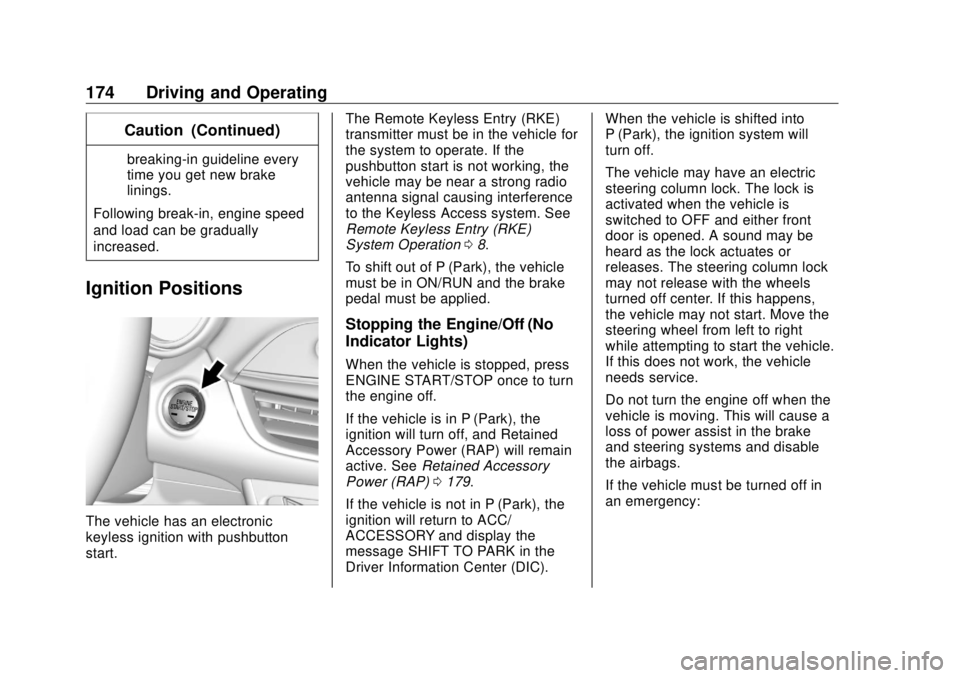
The vehicle has an electronic
keyless ignition with pushbutton
start. The Remote Keyless Entry (RKE)
transmitter must be in the vehicle for
the system to operate. If the
pushbutton start is not working, the
vehicle may be near a strong radio
antenna signal causing interference
to the Keyless Access system. See
Remote Keyless Entry (RKE)
System Operation 0 8 .
To shift out of P (Park), the vehicle
must be in ON/RUN and the brake
pedal must be applied.
Stopping the Engine/Off (No
Indicator Lights) When the vehicle is stopped, press
ENGINE START/STOP once to turn
the engine off.
If the vehicle is in P (Park), the
ignition will turn off, and Retained
Accessory Power (RAP) will remain
active. See Retained Accessory
Power (RAP) 0 179 .
If the vehicle is not in P (Park), the
ignition will return to ACC/
ACCESSORY and display the
message SHIFT TO PARK in the
Driver Information Center (DIC). When the vehicle is shifted into
P (Park), the ignition system will
turn off.
The vehicle may have an electric
steering column lock. The lock is
activated when the vehicle is
switched to OFF and either front
door is opened. A sound may be
heard as the lock actuates or
releases. The steering column lock
may not release with the wheels
turned off center. If this happens,
the vehicle may not start. Move the
steering wheel from left to right
while attempting to start the vehicle.
If this does not work, the vehicle
needs service.
Do not turn the engine off when the
vehicle is moving. This will cause a
loss of power assist in the brake
and steering systems and disable
the airbags.
If the vehicle must be turned off in
an emergency:
Page 262 of 363

Buick Envision Owner Manual (GMNA-Localizing-U.S./Canada/Mexico-
13555857) - 2020 - CRC - 3/12/19
Vehicle Care 261Relays Usage
K13 Low-beam
headlamps
K14 Run/Crank
K15 Rear window/Mirror
defogger
Instrument Panel Fuse
Block
The instrument panel fuse block is
in the glove box. To access the
fuses, open the fuse panel door
from the passenger side by pulling
it out. To reinstall the door, insert the tabs
on the top of the door into the
console first, then push the door
back into its original location.
The vehicle may not be equipped
with all of the fuses, relays, and
features shown.
Page 305 of 363
Buick Envision Owner Manual (GMNA-Localizing-U.S./Canada/Mexico-
13555857) - 2020 - CRC - 3/12/19
304 Vehicle Care disc brake pads for wear and rotors
for surface condition. Inspect all
other brake parts.
Steering, Suspension, and
Chassis Components Visually inspect steering,
suspension, and chassis
components for damaged, loose,
or missing parts or signs of wear at
least once a year.
Inspect power steering for proper
attachment, connections, binding,
leaks, cracks, chafing, etc.
Visually check constant velocity joint
boots and axle seals for leaks.
Body Component Lubrication Lubricate all key lock cylinders,
hood hinges, liftgate hinges, and the
steel fuel door hinge, unless the
components are plastic. Applying
silicone grease on weatherstrips
with a clean cloth will make them
last longer, seal better, and not stick
or squeak. Underbody Maintenance At least twice a year, spring and fall,
use plain water to flush any
corrosive materials from the
underbody. Take care to thoroughly
clean any areas where mud and
other debris can collect.
Do not directly power wash the
transfer case and/or front/rear axle
output seals. High pressure water
can overcome the seals and
contaminate the fluid. Contaminated
fluid will decrease the life of the
transfer case and/or axles and
should be replaced.
Sheet Metal Damage If the vehicle is damaged and
requires sheet metal repair or
replacement, make sure the body
repair shop applies anti-corrosion
material to parts repaired or
replaced to restore corrosion
protection.
Original manufacturer replacement
parts will provide the corrosion
protection while maintaining the
vehicle warranty. Finish Damage Quickly repair minor chips and
scratches with touch-up materials
available from your dealer to avoid
corrosion. Larger areas of finish
damage can be corrected in your
dealer's body and paint shop.
Chemical Paint Spotting Airborne pollutants can fall upon
and attack painted vehicle surfaces
causing blotchy, ring-shaped
discolorations, and small, irregular
dark spots etched into the paint
surface. See “ Finish Care ”
previously in this section.
Interior Care To prevent dirt particle abrasions,
regularly clean the vehicle's interior.
Immediately remove any soils.
Newspapers or dark garments can
transfer color to the vehicle ’ s
interior.
Use a soft bristle brush to remove
dust from knobs and crevices on the
instrument cluster. Using a mild
soap solution, immediately remove
Page 321 of 363
Buick Envision Owner Manual (GMNA-Localizing-U.S./Canada/Mexico-
13555857) - 2020 - CRC - 2/25/19
320 Service and Maintenance
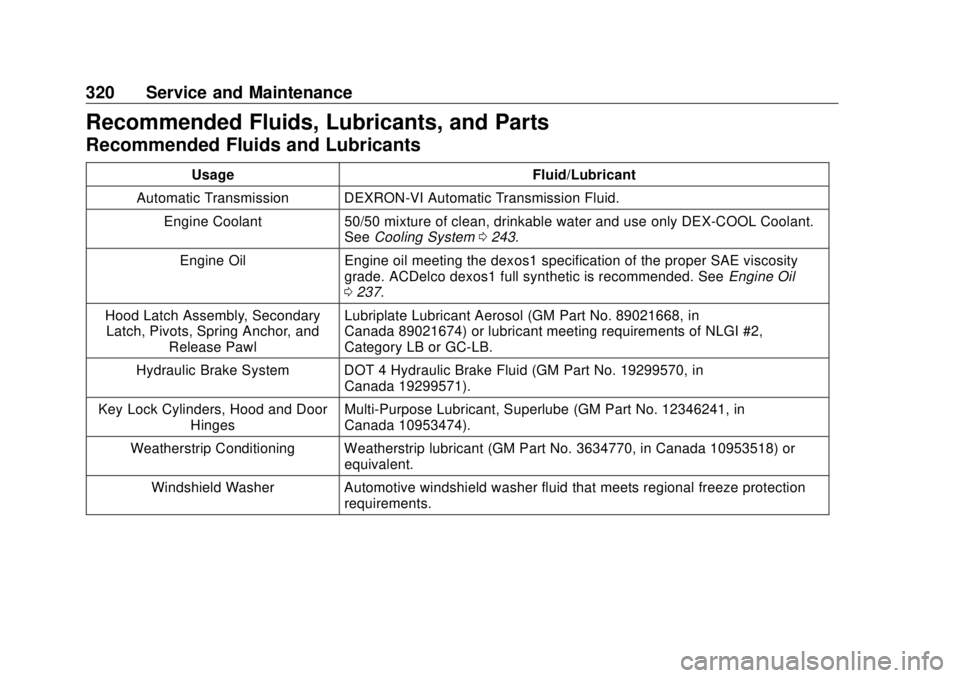
Recommended Fluids, Lubricants, and Parts Recommended Fluids and Lubricants Usage Fluid/Lubricant
Automatic Transmission DEXRON-VI Automatic Transmission Fluid.
Engine Coolant 50/50 mixture of clean, drinkable water and use only DEX-COOL Coolant.
See Cooling System 0 243 .
Engine Oil Engine oil meeting the dexos1 specification of the proper SAE viscosity
grade. ACDelco dexos1 full synthetic is recommended. See Engine Oil
0 237 .
Hood Latch Assembly, Secondary
Latch, Pivots, Spring Anchor, and
Release Pawl Lubriplate Lubricant Aerosol (GM Part No. 89021668, in
Canada 89021674) or lubricant meeting requirements of NLGI #2,
Category LB or GC-LB.
Hydraulic Brake System DOT 4 Hydraulic Brake Fluid (GM Part No. 19299570, in
Canada 19299571).
Key Lock Cylinders, Hood and Door
Hinges Multi-Purpose Lubricant, Superlube (GM Part No. 12346241, in
Canada 10953474).
Weatherstrip Conditioning Weatherstrip lubricant (GM Part No. 3634770, in Canada 10953518) or
equivalent.
Windshield Washer Automotive windshield washer fluid that meets regional freeze protection
requirements.
Page 343 of 363
Buick Envision Owner Manual (GMNA-Localizing-U.S./Canada/Mexico-
13555857) - 2020 - CRC - 2/25/19
342 OnStar
Security If equipped, OnStar provides these
services:
.
With Stolen Vehicle Assistance,
OnStar Advisors can use GPS to
pinpoint the vehicle and help
authorities quickly recover it.
.
With Remote Ignition Block,
if equipped, OnStar can block
the engine from being restarted.
.
With Stolen Vehicle Slowdown,
if equipped, OnStar can work
with law enforcement to
gradually slow the vehicle down.
Theft Alarm Notification If equipped, if the doors are locked
and the vehicle alarm sounds, a
notification by text, e-mail, or phone
call will be sent. If the vehicle is
stolen, an OnStar Advisor can work
with authorities to recover the
vehicle. OnStar Additional
Information In-Vehicle Audio Messages Audio messages may play important
information at the following times:
.
Prior to vehicle purchase. Press
Q to set up an account.
.
After change in ownership and
at 90 days.
Transferring Service Press
Q to request account transfer
eligibility information. The Advisor
can cancel or change account
information.
Selling/Transferring the
Vehicle Call 1-888-4ONSTAR
(1-888-466-7827) immediately to
terminate your OnStar or connected
services if the vehicle is disposed
of, sold, transferred, or if the
lease ends. Reactivation for Subsequent
Owners Press
Q and follow the prompts to
speak to an Advisor as soon as
possible. The Advisor will update
vehicle records and explain OnStar
or connected service options.
How OnStar Service Works Automatic Crash Response,
Emergency Services, Crisis Assist,
Stolen Vehicle Assistance, Remote
Services, and Roadside Assistance
are available on most vehicles. Not
all OnStar services are available
everywhere or on all vehicles. For
more information, a full description
of OnStar services, system
limitations, and OnStar User Terms,
Privacy Statement, and Software
Terms:
.
Call 1-888-4ONSTAR
(1-888-466-7827).
.
See www.onstar.com (U.S.).
.
See www.onstar.ca (Canada).
.
Call TTY 1-877-248-2080.
Page 345 of 363
Buick Envision Owner Manual (GMNA-Localizing-U.S./Canada/Mexico-
13555857) - 2020 - CRC - 2/25/19
344 OnStar Languages The vehicle can be programmed to
respond in multiple languages.
Press
Q and ask for an Advisor.
Advisors are available in English,
Spanish, and French. Available
languages may vary by country.
Potential Issues OnStar cannot perform Remote
Door Unlock or Stolen Vehicle
Assistance after the vehicle has
been off continuously for 10 days
without an ignition cycle. If the
vehicle has not been started for
10 days, OnStar can contact
Roadside Assistance or a locksmith
to help gain access to the vehicle.
Global Positioning
System (GPS) .
Obstruction of the GPS can
occur in a large city with tall
buildings; in parking garages;
around airports; in tunnels and
underpasses; or in an area with
very dense trees. If GPS signals
are not available, the OnStar
system should still operate to call OnStar. However, OnStar
could have difficulty identifying
the exact location.
.
In emergency situations, OnStar
can use the last stored GPS
location to send to emergency
responders.
A temporary loss of GPS can cause
loss of the ability to send a
Turn-by-Turn Navigation route. The
Advisor may give a verbal route or
may ask for a call back after the
vehicle is driven into an open area.
Cellular and GPS Antennas Cellular reception is required for
OnStar to send remote signals to
the vehicle. Do not place items over
or near the antenna to prevent
blocking cellular and GPS signal
reception.
Unable to Connect to OnStar
Message
If there is limited cellular coverage
or the cellular network has reached
maximum capacity, this message may come on. Press
Q to try the
call again or try again after driving a
few miles into another cellular area.
Vehicle and Power Issues OnStar services require a vehicle
electrical system, wireless service,
and GPS satellite technologies to be
available and operating for features
to function properly. These systems
may not operate if the battery is
discharged or disconnected.
Add-on Electrical Equipment The OnStar system is integrated
into the electrical architecture of the
vehicle. Do not add any electrical
equipment. See Add-On Electrical
Equipment 0 228 . Added electrical
equipment may interfere with the
operation of the OnStar system and
cause it to not operate.
Vehicle Software Updates
OnStar or GM may remotely deliver
software updates or changes to the
vehicle without further notice or
consent. These updates or changes
may enhance or maintain safety,
Page 351 of 363

Buick Envision Owner Manual (GMNA-Localizing-U.S./Canada/Mexico-
13555857) - 2020 - CRC - 2/25/19
350 Connected Services vehicles, the SSID and
password can be changed in
the Wi-Fi Hotspot menu.
After initial set-up, your vehicle ’ s
Wi-Fi hotspot will connect
automatically to your mobile
devices. Manage data usage by
turning Wi-Fi on or off on your
mobile device, by using the myBuick
mobile app, or by contacting an
OnStar Advisor. On some vehicles,
Wi-Fi can also be managed from the
Wi-Fi Hotspot menu.
MyBuick Mobile App (If Available)
Download the myBuick mobile app
to compatible Apple and Android
smartphones. Buick users can
access the following services from a
smartphone:
.
Remotely start/stop the vehicle,
if factory-equipped.
.
Lock/unlock doors, if equipped
with automatic locks.
.
Activate the horn and lamps. .
Check the vehicle ’ s fuel level,
oil life, or tire pressure,
if factory-equipped with the Tire
Pressure Monitor System.
.
Send destinations to the vehicle.
.
Locate the vehicle on a map
(U.S. market only).
.
Turn the vehicle's Wi-Fi hotspot
on/off, manage settings, and
monitor data consumption,
if equipped.
.
Locate a dealer and schedule
service.
.
Request roadside assistance.
.
Set a parking reminder with pin
drop, take a photo, make a note,
and set a timer.
.
Connect with Buick on social
media.
Features are subject to change. For
myBuick mobile app information and
compatibility, see my.buick.com.
An active OnStar or connected
service plan may be required.
A compatible device,
factory-installed remote start, and power locks are required. Data rates
apply. See www.onstar.com for
details and system limitations.
Remote Services Contact an OnStar Advisor to
unlock the doors or sound the horn
and flash the lamps.
Marketplace OnStar Advisors can provide offers
from restaurants and retailers on
your route, help locate hotels,
or book a room. These services
vary by market.
Diagnostics By monitoring and reporting on the
vehicle ’ s key systems, OnStar
Advanced Diagnostics, if equipped,
provides a way to keep up on
maintenance. Capabilities vary by
model. See www.onstar.com for
details and system limitations.
Features are subject to change. For
updates on feature capabilities, see
my.buick.com. Message and data
rates may apply.
Page 353 of 363

Buick Envision Owner Manual (GMNA-Localizing-U.S./Canada/Mexico-
13555857) - 2020 - CRC - 2/25/19
352 Index Assistance Systems for
Driving . . . . . . . . . . . . . . . . . . . . . . . . 207
Assistance Systems for
Parking and Backing . . . . . . . . . . 202
Auto Stop
Stop/Start System . . . . . . . . . . . . 176
Automatic
Dimming Mirrors . . . . . . . . . . . . . . . . 28
Door Locks . . . . . . . . . . . . . . . . . . . . . 18
Emergency Braking (AEB) . . . . 209
Headlamp System . . . . . . . . . . . . 147
Transmission . . . . . . . . . . . . . . . . . 182
Transmission Fluid . . . . . . . . . . . 240
Automatic Transmission
Manual Mode . . . . . . . . . . . . . . . . . 184
B Battery
Exterior Lighting Battery
Saver . . . . . . . . . . . . . . . . . . . . . . . 151
Load Management . . . . . . . . . . . . 150
Power Protection . . . . . . . . . . . . . 151
Battery - North America . . . . 251, 293
Blade Replacement, Wiper . . . . . 252
Brake
Parking, Electric . . . . . . . . . . . . . . 186
System Warning Light . . . . . . . . .117
Brakes . . . . . . . . . . . . . . . . . . . . . . . . . . 249 Brakes (cont'd)
Antilock . . . . . . . . . . . . . . . . . . . . . . . 185
Assist . . . . . . . . . . . . . . . . . . . . . . . . . 187
Fluid . . . . . . . . . . . . . . . . . . . . . . . . . . 250
Braking . . . . . . . . . . . . . . . . . . . . . . . . . 163
Automatic
Emergency (AEB) . . . . . . . . . . . 209
Break-In, New Vehicle . . . . . . . . . . 173
Bulb Replacement
Halogen Bulbs . . . . . . . . . . . . . . . . 256
Headlamp Aiming . . . . . . . . . . . . . 255
Headlamps . . . . . . . . . . . . . . . . . . . 256
High Intensity Discharge
(HID) Lighting . . . . . . . . . . . . . . . 256
License Plate Lamps . . . . . . . . . 256
Buying New Tires . . . . . . . . . . . . . . . 281
C Calibration . . . . . . . . . . . . . . . . . . . . . . . 98
California
Perchlorate Materials
Requirements . . . . . . . . . . . . . . . 231
California
Proposition
65 Warning . . . . . . . . . .230, 251, 293,
Back Cover
Canadian Vehicle Owners . . . . . . . . 2 Capacities and
Specifications . . . . . . . . . . . . . . . . . 324
Carbon Monoxide
Engine Exhaust . . . . . . . . . . . . . . . 181
Liftgate . . . . . . . . . . . . . . . . . . . . . . . . . 20
Winter Driving . . . . . . . . . . . . . . . . 167
Cargo
Cover . . . . . . . . . . . . . . . . . . . . . . . . . . . 90
Management System . . . . . . . . . . . 91
Tie-Downs . . . . . . . . . . . . . . . . . . . . . . 91
Caution, Danger, and Warning . . . . 3
Center Console Storage . . . . . . . . . 90
Chains, Tire . . . . . . . . . . . . . . . . . . . . 285
Charging
Wireless . . . . . . . . . . . . . . . . . . . . . . 101
Charging System Light . . . . . . . . . 115
Check
Engine Light (Malfunction
Indicator) . . . . . . . . . . . . . . . . . . . . .115
Child Restraints
Infants and Young Children . . . . . 68
Lower Anchors and Tethers
for Children . . . . . . . . . . . . . . . . . . . 73
Older Children . . . . . . . . . . . . . . . . . . 67
Securing . . . . . . . . . . . . . . . . . . . . 82, 84
Systems . . . . . . . . . . . . . . . . . . . . . . . . 71
Circuit Breakers . . . . . . . . . . . . . . . . 258
Page 354 of 363

Buick Envision Owner Manual (GMNA-Localizing-U.S./Canada/Mexico-
13555857) - 2020 - CRC - 2/25/19
Index 353Cleaning
Exterior Care . . . . . . . . . . . . . . . . . 300
Interior Care . . . . . . . . . . . . . . . . . . 304
Climate Control Systems
Dual Automatic . . . . . . . . . . . . . . . 153
Rear . . . . . . . . . . . . . . . . . . . . . . . . . . 156
Clock . . . . . . . . . . . . . . . . . . . . . . . . . . . . 99
Cluster, Instrument . . . . . . . . . . . . . 105
Collision Damage Repair . . . . . . . 333
Compact Spare Tire . . . . . . . . . . . . 292
Compartments
Storage . . . . . . . . . . . . . . . . . . . . . . . . . 87
Compass . . . . . . . . . . . . . . . . . . . . . . . . 98
Connected Services
Connections . . . . . . . . . . . . . . . . . . 349
Diagnostics . . . . . . . . . . . . . . . . . . . 350
Navigation . . . . . . . . . . . . . . . . . . . . 348
Connections
Connected Services . . . . . . . . . . 349
Control
Traction and Electronic
Stability . . . . . . . . . . . . . . . . . . . . . 188
Control of a Vehicle . . . . . . . . . . . . . 163
Convenience Net . . . . . . . . . . . . . . . . 92
Convex Mirrors . . . . . . . . . . . . . . . . . . 27
Coolant
Engine Temperature Gauge . . . 111 Coolant (cont'd)
Engine Temperature
Warning Light . . . . . . . . . . . . . . . 120
Cooling . . . . . . . . . . . . . . . . . . . . 153, 156
Cooling System . . . . . . . . . . . . . . . . . 243
Courtesy Lamps . . . . . . . . . . . . . . . . 149
Courtesy Transportation
Program . . . . . . . . . . . . . . . . . . . . . . . 332
Cover
Cargo . . . . . . . . . . . . . . . . . . . . . . . . . . . 90
Cruise Control . . . . . . . . . . . . . . . . . . 190
Light . . . . . . . . . . . . . . . . . . . . . . . . . . 123
Cruise Control, Adaptive . . . . . . . . 192
Cupholders . . . . . . . . . . . . . . . . . . . . . . 87
Customer Assistance . . . . . . . . . . . 329
Offices . . . . . . . . . . . . . . . . . . . . . . . . 328
Text Telephone (TTY)
Users . . . . . . . . . . . . . . . . . . . . . . . 329
Customer Information
Publications Ordering
Information . . . . . . . . . . . . . . . . . . 335
Customer Satisfaction
Procedure . . . . . . . . . . . . . . . . . . . . . 326
Cybersecurity . . . . . . . . . . . . . . . . . . . 338
D
Damage Repair, Collision . . . . . . . 333
Danger, Warning, and Caution . . . . 3 Data Collection
Infotainment System . . . . . . . . . . 339
OnStar . . . . . . . . . . . . . . . . . . . . . . . 339
Data Recorders, Event . . . . . . . . . 338
Daytime Running
Lamps (DRL) . . . . . . . . . . . . . . . . . . 146
Defensive Driving . . . . . . . . . . . . . . . 163
Delayed Locking . . . . . . . . . . . . . . . . . 18
Diagnostics
Connected Services . . . . . . . . . . 350
Distracted Driving . . . . . . . . . . . . . . . 162
Dome Lamps . . . . . . . . . . . . . . . . . . . 149
Door
Ajar Light . . . . . . . . . . . . . . . . . . . . . 123
Delayed Locking . . . . . . . . . . . . . . . . 18
Locks . . . . . . . . . . . . . . . . . . . . . . . . . . . 16
Power Locks . . . . . . . . . . . . . . . . . . . . 18
Drive Belt Routing, Engine . . . . . . 325
Drive Systems
All-Wheel Drive . . . . . . . . . . 185, 252
Driver Assistance Systems . . . . . 200
Driver Behavior . . . . . . . . . . . . . . . . . 161
Driver Information
Center (DIC) . . . . . . . . . . . . . 123, 126
Driving
Assistance Systems . . . . . . . . . . 207
Better Fuel Economy . . . . . . . . . 162