remove seats BUICK ENVISION 2020 Owners Manual
[x] Cancel search | Manufacturer: BUICK, Model Year: 2020, Model line: ENVISION, Model: BUICK ENVISION 2020Pages: 363, PDF Size: 7.26 MB
Page 11 of 363
Buick Envision Owner Manual (GMNA-Localizing-U.S./Canada/Mexico-
13555857) - 2020 - CRC - 3/26/19
10 Keys, Doors, and Windows If equipped with memory seats, RKE
transmitters 1 and 2 are linked to
seating positions of memory 1 or 2.
See Memory Seats 0 38 .
Keyless Unlocking/Locking from
the Driver Door
When the doors are locked and the
RKE transmitter is within 1 m (3 ft)
of the driver door handle, pressing
the lock/unlock button on the driver
door handle will unlock the driver
door. If the lock/unlock button is
pressed again within five seconds,
all passenger doors will unlock. Pull
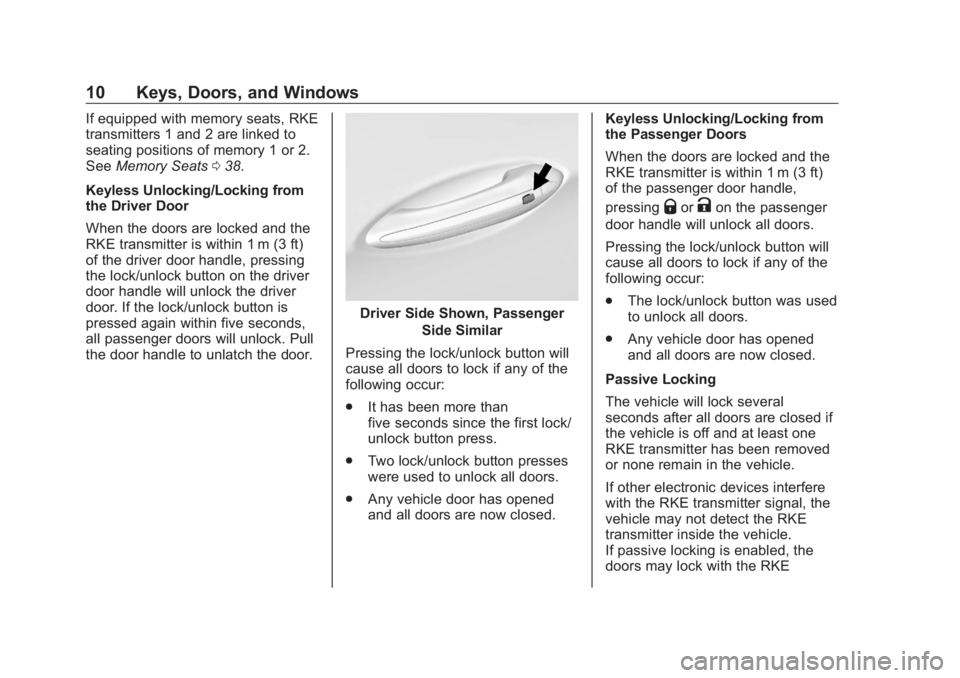
the door handle to unlatch the door. Driver Side Shown, Passenger
Side Similar
Pressing the lock/unlock button will
cause all doors to lock if any of the
following occur:
.
It has been more than
five seconds since the first lock/
unlock button press.
.
Two lock/unlock button presses
were used to unlock all doors.
.
Any vehicle door has opened
and all doors are now closed. Keyless Unlocking/Locking from
the Passenger Doors
When the doors are locked and the
RKE transmitter is within 1 m (3 ft)
of the passenger door handle,
pressing
Q or
K on the passenger
door handle will unlock all doors.
Pressing the lock/unlock button will
cause all doors to lock if any of the
following occur:
.
The lock/unlock button was used
to unlock all doors.
.
Any vehicle door has opened
and all doors are now closed.
Passive Locking
The vehicle will lock several
seconds after all doors are closed if
the vehicle is off and at least one
RKE transmitter has been removed
or none remain in the vehicle.
If other electronic devices interfere
with the RKE transmitter signal, the
vehicle may not detect the RKE
transmitter inside the vehicle.
If passive locking is enabled, the
doors may lock with the RKE
Page 15 of 363
Buick Envision Owner Manual (GMNA-Localizing-U.S./Canada/Mexico-
13555857) - 2020 - CRC - 3/26/19
14 Keys, Doors, and Windows CautionWhen replacing the battery, do
not touch any of the circuitry on
the transmitter. Static from your
body could damage the
transmitter.
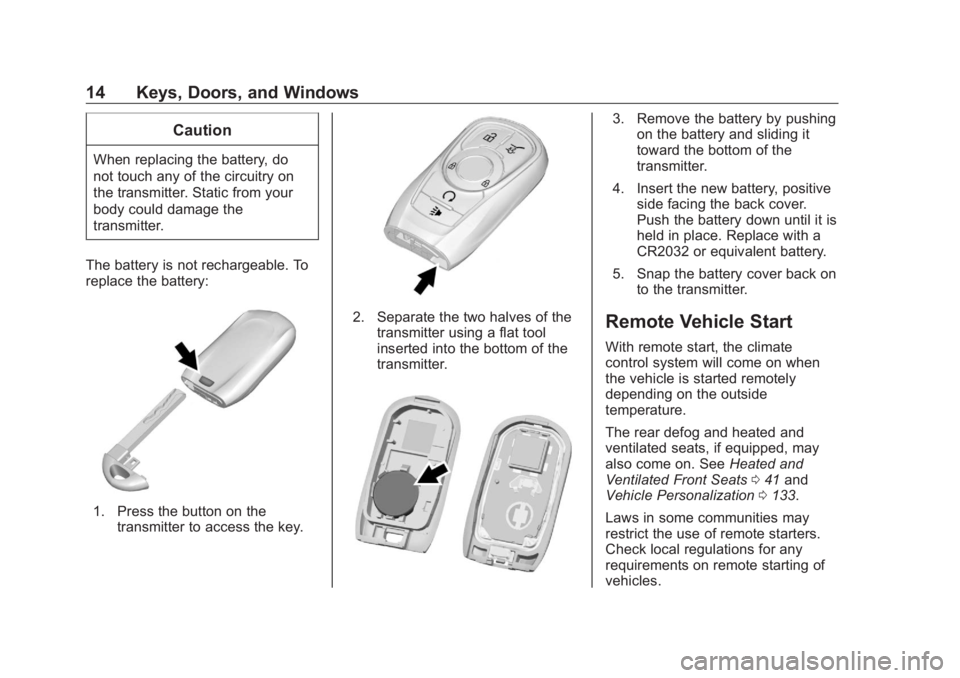
The battery is not rechargeable. To
replace the battery:
1. Press the button on the
transmitter to access the key. 2. Separate the two halves of the
transmitter using a flat tool
inserted into the bottom of the
transmitter. 3. Remove the battery by pushing
on the battery and sliding it
toward the bottom of the
transmitter.
4. Insert the new battery, positive
side facing the back cover.
Push the battery down until it is
held in place. Replace with a
CR2032 or equivalent battery.
5. Snap the battery cover back on
to the transmitter.
Remote Vehicle Start With remote start, the climate
control system will come on when
the vehicle is started remotely
depending on the outside
temperature.
The rear defog and heated and
ventilated seats, if equipped, may
also come on. See Heated and
Ventilated Front Seats 0 41 and
Vehicle Personalization 0 133 .
Laws in some communities may
restrict the use of remote starters.
Check local regulations for any
requirements on remote starting of
vehicles.
Page 40 of 363
Buick Envision Owner Manual (GMNA-Localizing-U.S./Canada/Mexico-
13555857) - 2020 - CRC - 3/25/19
Seats and Restraints 39Identifying Driver Number
To identify the driver number:
1. Move your RKE transmitter
away from the vehicle.
2. Start the vehicle with another
key or RKE transmitter. The
DIC should display the driver
number for the other RKE
transmitter. Turn the vehicle off
and remove the key or RKE
transmitter from the vehicle.
3. Start the vehicle with the initial
key or RKE transmitter. The
DIC should display the driver
number of your RKE
transmitter.
Saving Memory Positions
Read these instructions completely
before saving memory positions.
To save preferred driving positions
1 and 2:
1. Turn the vehicle on or to ACC/
ACCESSORY.
A DIC welcome message may
indicate driver number 1 or 2. 2. Adjust all available memory
features to the desired driving
position.
3. Press and release SET; a beep
will sound.
4. Immediately press and hold the
1 or 2 memory button matching
the above DIC welcome
message until two beeps
sound.
If too much time passes
between releasing SET and
pressing 1, the memory
position will not be saved and
two beeps will not sound.
Repeat Steps 3 and 4.
1 or 2 corresponds to the driver
number. See “ Identifying Driver
Number ” previously in this
section.
5. Repeat Steps 1 – 4 for a second
driver using 1 or 2. RKE
transmitters 3 – 8 will not save
memory positions. To save the position for
B and
Easy Exit Recall features, repeat
Steps 1 – 4 using
B . This saves the
position for getting out of the
vehicle.
Save preferred memory feature
positions to both 1 and 2 if you are
the only driver.
Manually Recalling Memory
Positions
Press and hold 1, 2, or
B to recall
the previously saved memory
positions if you are driver 1 or 2
identified in the DIC welcome
message. RKE transmitters 3 – 8 will
not recall memory positions.
To stop Manual Memory recall
movement, release 1, 2, or
B or
press any of the following controls:
.
Power seat
.
Memory SET
.
Power mirror, with the driver or
passenger side mirror selected
.
Power steering wheel,
if equipped
Page 41 of 363
Buick Envision Owner Manual (GMNA-Localizing-U.S./Canada/Mexico-
13555857) - 2020 - CRC - 3/25/19
40 Seats and Restraints Auto Memory Recall
The vehicle identifies the number of
the current driver ’ s RKE transmitter
(1 – 8). See Remote Keyless Entry
(RKE) System Operation 0 8 . If the
RKE transmitter is 1 or 2, and Auto
Memory Recall is enabled in vehicle
personalization, the positions saved
to the same memory button number
1 or 2 are automatically recalled
when the vehicle is turned on,
or turned from off to ACC/
ACCESSORY. RKE transmitters 3 – 8
will not provide automatic memory
recalls.
To turn Auto Memory Recall on or
off, see “ Vehicle Personalization
Settings ” previously in this section
and Vehicle Personalization 0 133 .
The shift lever must be in P (Park)
to start Auto Memory Recall. Auto
Memory Recall will complete if the
vehicle is shifted out of P (Park)
prior to reaching the saved memory
position.
To stop Auto Memory Recall
movement, turn the vehicle off or
press any of the following controls: .
Power seat
.
Memory SET, 1, 2, or
B.
Power mirror, with the driver or
passenger side mirror selected
.
Power steering wheel,
if equipped
If the saved memory seat position
does not automatically recall or
recalls to the wrong positions, the
driver ’ s RKE transmitter number (1
or 2) may not match the memory
button number that positions were
saved to. Try storing the position to
the other memory button or try the
other RKE transmitter.
Easy Exit Recall
Easy Exit Recall is not linked to an
RKE transmitter. The position saved
to
B is used for all drivers. To turn
Easy Exit Recall on or off, see
"Vehicle Personalization Settings"
previously in this section and
Vehicle Personalization 0 133 .
If turned on, the position saved to
B is automatically recalled when
one of the following occurs: .
The vehicle is turned off and the
driver door is opened within a
short time.
.
The vehicle is turned off with the
driver door open.
To stop Easy Exit Recall movement,
press any of the following memory
controls:
.
Power seat
.
Memory SET, 1, 2, or
B .
Power mirror, with the driver or
passenger side mirror selected
.
Power steering wheel,
if equipped
Obstructions
If something has blocked the driver
seat and/or power steering wheel
while recalling a memory position,
the recall may stop. Remove the
obstruction and try the recall again.
If the memory position still does not
recall, see your dealer.
Page 63 of 363

Buick Envision Owner Manual (GMNA-Localizing-U.S./Canada/Mexico-
13555857) - 2020 - CRC - 3/25/19
62 Seats and Restraints The passenger sensing system is
designed to turn off the front
outboard passenger frontal airbag
and knee airbag if:
.
The front outboard passenger
seat is unoccupied.
.
The system determines an infant
is present in a child restraint.
.
A front outboard passenger
takes his/her weight off of the
seat for a period of time.
.
There is a critical problem with
the airbag system or the
passenger sensing system.
When the passenger sensing
system has turned off the front
outboard passenger frontal airbag
and knee airbag, the OFF indicator
will light and stay lit as a reminder
that the airbags are off. See
Passenger Airbag Status Indicator
0 114 .
The passenger sensing system is
designed to turn on the front
outboard passenger frontal airbag
and knee airbag anytime the system senses that a person of adult size is
sitting properly in the front outboard
passenger seat.
When the passenger sensing
system has allowed the airbags to
be enabled, the ON indicator will
light and stay lit as a reminder that
the airbags are active.
For some children, including
children in child restraints, and for
very small adults, the passenger
sensing system may or may not turn
off the front outboard passenger
frontal airbag and knee airbag,
depending upon the person ’ s
seating posture and body build.
Everyone in the vehicle who has
outgrown child restraints should
wear a seat belt properly — whether
or not there is an airbag for that
person.
{ Warning
If the airbag readiness light ever
comes on and stays on, it means
that something may be wrong
(Continued) Warning (Continued) with the airbag system. To help
avoid injury to yourself or others,
have the vehicle serviced right
away. See Airbag Readiness
Light 0 113 for more information,
including important safety
information.
If the On Indicator Is Lit for a
Child Restraint The passenger sensing system is
designed to turn off the front
outboard passenger frontal airbag
and knee airbag if the system
determines that an infant is present
in a child restraint. If a child restraint
has been installed and the ON
indicator is lit:
1. Turn the vehicle off.
2. Remove the child restraint from
the vehicle.
3. Remove any additional items
from the seat such as blankets,
cushions, seat covers, seat
heaters, or seat massagers.
Page 65 of 363

Buick Envision Owner Manual (GMNA-Localizing-U.S./Canada/Mexico-
13555857) - 2020 - CRC - 3/25/19
64 Seats and Restraints 2. Remove any additional material
from the seat, such as
blankets, cushions, seat
covers, seat heaters, or seat
massagers.
3. Place the seatback in the fully
upright position.
4. Have the person sit upright in
the seat, centered on the seat
cushion, with legs comfortably
extended.
5. If the shoulder portion of the
belt is pulled out all the way,
the child restraint locking
feature will be engaged. This
may unintentionally cause the
passenger sensing system to
turn the airbags off for some
adult-sized occupants. If this
happens, unbuckle the belt, let
the belt go back all the way,
and then buckle the belt again
without pulling the belt out all
the way. 6. Restart the vehicle and have
the person remain in this
position for two to
three minutes after the ON
indicator is lit.
{ WarningIf the front outboard passenger
airbag is turned off for an
adult-sized occupant, the airbag
will not be able to inflate and help
protect that person in a crash,
resulting in an increased risk of
serious injury or even death. An
adult-sized occupant should not
ride in the front outboard
passenger seat, if the passenger
airbag OFF indicator is lit.
Additional Factors Affecting
System Operation
Seat belts help keep the passenger
in position on the seat during
vehicle maneuvers and braking,
which helps the passenger sensing
system maintain the passenger
airbag status. See “ Seat Belts ” and “ Child Restraints ” in the Index for
additional information about the
importance of proper restraint use.
A thick layer of additional material,
such as a blanket or cushion,
or aftermarket equipment such as
seat covers, seat heaters, and seat
massagers can affect how well the
passenger sensing system
operates. We recommend that you
not use seat covers or other
aftermarket equipment except when
approved by GM for your specific
vehicle. See Adding Equipment to
the Airbag-Equipped Vehicle 0 65
for more information about
modifications that can affect how
the system operates.
The ON indicator may be lit if an
object, such as a briefcase,
handbag, grocery bag, laptop,
or other electronic device, is put on
an unoccupied seat. If this is not
desired, remove the object from
the seat.
Page 80 of 363

Buick Envision Owner Manual (GMNA-Localizing-U.S./Canada/Mexico-
13555857) - 2020 - CRC - 3/25/19
Seats and Restraints 79Caution (Continued)Do not fold the rear seatback
when the seat is occupied. Do not
fold the empty rear seat with a
seat belt buckled. This could
damage the seat belt or the seat.
Unbuckle and return the seat belt
to its stowed position, before
folding the seat.
If you need to secure more than one
child restraint in the rear seat, see
Where to Put the Restraint 0 72 .
1. Attach and tighten the lower
attachments to the lower
anchors. If the child restraint
does not have lower
attachments or the desired
seating position does not have
lower anchors, secure the child
restraint with the top tether and
the seat belt. Refer to the child
restraint manufacturer
instructions and the
instructions in this manual. 1.1. Find the lower anchors
for the desired seating
position.
1.2. Put the child restraint on
the seat.
If the head restraint
interferes with the proper
installation of the child
restraint, the head
restraint may be
removed. See “ Head
Restraint Removal and
Reinstallation ” at the end
of this section.
1.3. Attach and tighten the
lower attachments on the
child restraint to the lower
anchors.
2. If the child restraint
manufacturer recommends that
the top tether be attached,
adjust the top tether to its full
length and attach it to the
anchor, if equipped. Refer to
the child restraint instructions
and the following steps:
2.1. Find the top tether
anchor. 2.2. If you have an adjustable
head restraint, raise the
head restraint.
2.3. Route, attach, and tighten
the top tether according
to your child restraint
instructions and the
following instructions:
If the position you are
using does not have a
headrest or head restraint
and you are using a
single tether, route the
tether over the seatback.
Page 81 of 363

Buick Envision Owner Manual (GMNA-Localizing-U.S./Canada/Mexico-
13555857) - 2020 - CRC - 3/25/19
80 Seats and Restraints
If the position you are
using does not have a
headrest or head restraint
and you are using a dual
tether, route the tether
over the seatback.
If the position you are
using has an adjustable
headrest or head restraint
and you are using a dual
tether, raise the headrest or head restraint and
route the tether under the
headrest or head restraint
and around the headrest
or head restraint posts.
If the position being used
has an adjustable
headrest or head restraint
and a single tether is
being used, route the
tether between the
headrest or head restraint
posts.
3. Before placing a child in the
child restraint, make sure it is
securely held in place. To
check, grasp the child restraint
at the LATCH path and attempt
to move it side to side and back and forth. There should
be no more than 2.5 cm (1 in) of
movement, for proper
installation.
Head Restraint Removal and
Reinstallation The second row outboard head
restraints can be removed if they
interfere with the proper installation
of the child restraint.
To remove the head restraint:
1. Partially fold the seatback
forward. See Rear Seats 0 42
for additional information.
Page 82 of 363

Buick Envision Owner Manual (GMNA-Localizing-U.S./Canada/Mexico-
13555857) - 2020 - CRC - 3/25/19
Seats and Restraints 812. Press both buttons on the head
restraint posts at the same
time, and pull up on the head
restraint.
3. Store the head restraint in the
cargo area of the vehicle.
4. When the child restraint is
removed, reinstall the head
restraint before the seating
position is used.
{ WarningWith head restraints that are not
installed and adjusted properly,
there is a greater chance that
occupants will suffer a neck/
spinal injury in a crash. Do not
drive until the head restraints for
all occupants are installed and
adjusted properly. To reinstall the head restraint:
1. Insert the head restraint posts
into the holes in the top of the
seatback. The notches on the
posts must face the driver side
of the vehicle.
2. Push the head restraint down.
3. Try to move the head restraint
to make sure that it is locked in
place. Replacing LATCH System
Parts After a Crash
{ WarningA crash can damage the LATCH
system in the vehicle. A damaged
LATCH system may not properly
secure the child restraint,
resulting in serious injury or even
death in a crash. To help make
sure the LATCH system is
working properly after a crash,
see your dealer to have the
system inspected and any
necessary replacements made as
soon as possible.
If the vehicle has the LATCH system
and it was being used during a
crash, new LATCH system parts
may be needed.
New parts and repairs may be
necessary even if the LATCH
system was not being used at the
time of the crash.
Page 83 of 363

Buick Envision Owner Manual (GMNA-Localizing-U.S./Canada/Mexico-
13555857) - 2020 - CRC - 3/25/19
82 Seats and Restraints
Securing Child Restraints
(With the Seat Belt in the
Rear Seat) When securing a child restraint with
the seat belts in a rear seat position,
study the instructions that came with
the child restraint to make sure it is
compatible with this vehicle.
If the child restraint has the LATCH
system, see Lower Anchors and
Tethers for Children (LATCH
System) 0 73 for how and where to
install the child restraint using
LATCH. If a child restraint is
secured in the vehicle using a seat
belt and it uses a top tether, see
Lower Anchors and Tethers for
Children (LATCH System) 0 73 for
top tether anchor locations.
Do not secure a child seat in a
position without a top tether anchor
if a national or local law requires
that the top tether be anchored, or if
the instructions that come with the
child restraint say that the top tether
must be anchored. In Canada, the law requires that
forward-facing child restraints have
a top tether, and that the tether be
attached.
If the child restraint or vehicle seat
position does not have the LATCH
system, you will be using the seat
belt to secure the child restraint. Be
sure to follow the instructions that
came with the child restraint.
If more than one child restraint
needs to be installed in the rear
seat, be sure to read Where to Put
the Restraint 0 72 .
1. Put the child restraint on
the seat.
If the head restraint interferes
with the proper installation of
the child restraint, the head
restraint may be removed. See
"Head Restraint Removal and
Reinstallation" under Lower
Anchors and Tethers for
Children (LATCH System) 0 73 .
2. Pick up the latch plate, and run
the lap and shoulder portions
of the vehicle seat belt through or around the child restraint.
The child restraint instructions
will show you how.
3. Push the latch plate into the
buckle until it clicks.
Position the release button on
the buckle, away from the child
restraint, so that the seat belt
could be quickly unbuckled if
necessary.