tire pressure BUICK ENVISION 2020 Owners Manual
[x] Cancel search | Manufacturer: BUICK, Model Year: 2020, Model line: ENVISION, Model: BUICK ENVISION 2020Pages: 363, PDF Size: 7.26 MB
Page 5 of 363
Buick Envision Owner Manual (GMNA-Localizing-U.S./Canada/Mexico-
13555857) - 2020 - CRC - 2/25/19
4 Introduction
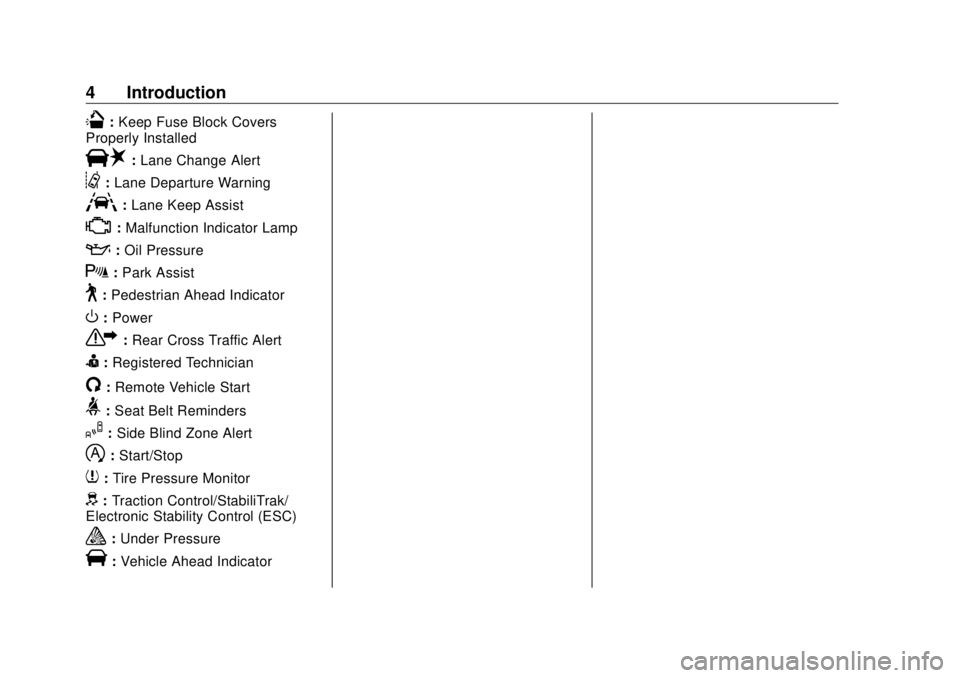
Q : Keep Fuse Block Covers
Properly Installed
| : Lane Change Alert
@ : Lane Departure Warning
A : Lane Keep Assist
* : Malfunction Indicator Lamp
: : Oil Pressure
X : Park Assist
~ : Pedestrian Ahead Indicator
O : Power
7 : Rear Cross Traffic Alert
I : Registered Technician
/ : Remote Vehicle Start
> : Seat Belt Reminders
I : Side Blind Zone Alert
h : Start/Stop
7 : Tire Pressure Monitor
d : Traction Control/StabiliTrak/
Electronic Stability Control (ESC)
a : Under Pressure
V : Vehicle Ahead Indicator
Page 95 of 363
Buick Envision Owner Manual (GMNA-Localizing-U.S./Canada/Mexico-
13555857) - 2020 - CRC - 2/25/19
94 Instruments and Controls
Instruments and
Controls Controls Steering Wheel Adjustment . . . . 95
Steering Wheel Controls . . . . . . . 95
Heated Steering Wheel . . . . . . . . 95
Horn . . . . . . . . . . . . . . . . . . . . . . . . . . . 95
Windshield Wiper/Washer . . . . . . 95
Rear Window Wiper/Washer . . . 97
Headlamp Washer . . . . . . . . . . . . . 98
Compass . . . . . . . . . . . . . . . . . . . . . . 98
Clock . . . . . . . . . . . . . . . . . . . . . . . . . . 99
Power Outlets . . . . . . . . . . . . . . . . . 99
Wireless Charging . . . . . . . . . . . . 101
Warning Lights, Gauges, and
Indicators Warning Lights, Gauges, and
Indicators . . . . . . . . . . . . . . . . . . . 104
Instrument Cluster . . . . . . . . . . . . 105
Speedometer . . . . . . . . . . . . . . . . . 108
Odometer . . . . . . . . . . . . . . . . . . . . . 108
Trip Odometer . . . . . . . . . . . . . . . . 108
Tachometer . . . . . . . . . . . . . . . . . . . 108
Fuel Gauge . . . . . . . . . . . . . . . . . . . 109
Engine Oil Temperature
Gauge . . . . . . . . . . . . . . . . . . . . . . 110 Engine Coolant Temperature
Gauge . . . . . . . . . . . . . . . . . . . . . . . 111
Voltmeter Gauge . . . . . . . . . . . . . . 112
Seat Belt Reminders . . . . . . . . . . 113
Airbag Readiness Light . . . . . . . 113
Passenger Airbag Status
Indicator . . . . . . . . . . . . . . . . . . . . . 114
Charging System Light . . . . . . . 115
Malfunction Indicator Lamp
(Check Engine Light) . . . . . . . . 115
Brake System Warning
Light . . . . . . . . . . . . . . . . . . . . . . . . 117
Electric Parking Brake
Light . . . . . . . . . . . . . . . . . . . . . . . . 117
Service Electric Parking Brake
Light . . . . . . . . . . . . . . . . . . . . . . . . 118
Antilock Brake System (ABS)
Warning Light . . . . . . . . . . . . . . . 118
Lane Keep Assist (LKA)
Light . . . . . . . . . . . . . . . . . . . . . . . . 119
Vehicle Ahead Indicator . . . . . . . 119
Traction Off Light . . . . . . . . . . . . . 119
StabiliTrak OFF Light . . . . . . . . . 120
Traction Control System (TCS)/
StabiliTrak Light . . . . . . . . . . . . . 120
Engine Coolant Temperature
Warning Light . . . . . . . . . . . . . . . 120
Tire Pressure Light . . . . . . . . . . . 121
Engine Oil Pressure Light . . . . 121
Low Fuel Warning Light . . . . . . 122 Security Light . . . . . . . . . . . . . . . . . 122
High-Beam On Light . . . . . . . . . . 122
Front Fog Lamp Light . . . . . . . . . 122
Lamps On Reminder . . . . . . . . . 123
Cruise Control Light . . . . . . . . . . 123
Door Ajar Light . . . . . . . . . . . . . . . 123
Information Displays Driver Information Center (DIC)
(Base Level) . . . . . . . . . . . . . . . . 123
Driver Information Center (DIC)
(Uplevel) . . . . . . . . . . . . . . . . . . . . 126
Head-Up Display (HUD) . . . . . . 129
Vehicle Messages Vehicle Messages . . . . . . . . . . . . 132
Engine Power Messages . . . . . 133
Vehicle Speed Messages . . . . . 133
Vehicle Personalization Vehicle Personalization . . . . . . . 133
Universal Remote System Universal Remote System . . . . 140
Universal Remote System
Programming . . . . . . . . . . . . . . . 140
Universal Remote System
Operation . . . . . . . . . . . . . . . . . . . 143
Page 122 of 363
Buick Envision Owner Manual (GMNA-Localizing-U.S./Canada/Mexico-
13555857) - 2020 - CRC - 2/25/19
Instruments and Controls 121Caution (Continued)engine and it may not be covered
by the vehicle warranty. See
Engine Overheating 0 247 .
The engine coolant temperature
warning light comes on when the
engine has overheated.
If this happens, pull over and turn
off the engine as soon as possible.
See Engine Overheating 0 247 .
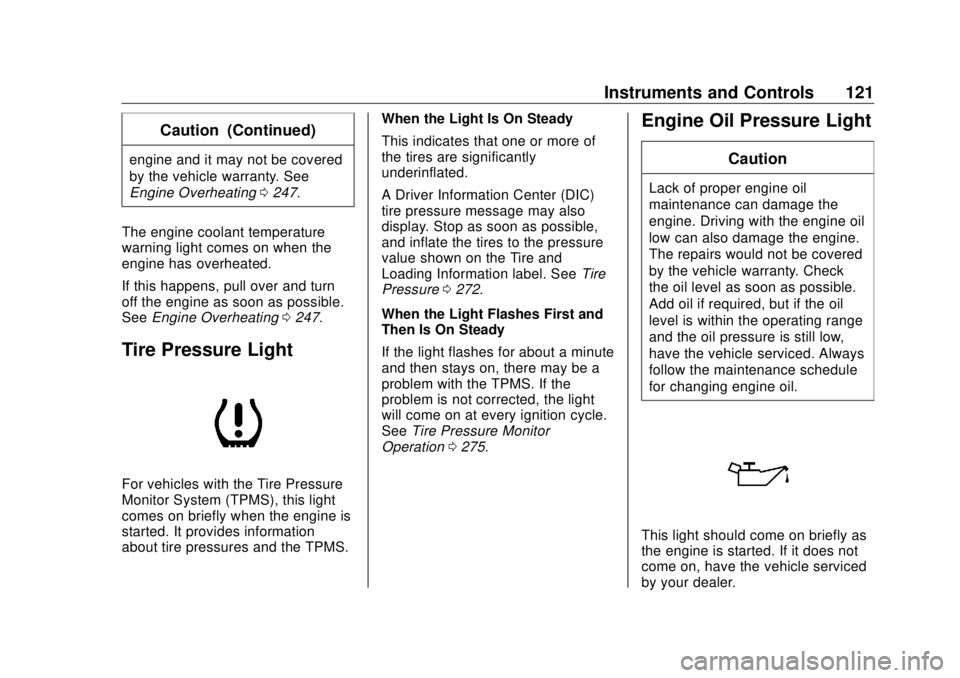
Tire Pressure Light
For vehicles with the Tire Pressure
Monitor System (TPMS), this light
comes on briefly when the engine is
started. It provides information
about tire pressures and the TPMS. When the Light Is On Steady
This indicates that one or more of
the tires are significantly
underinflated.
A Driver Information Center (DIC)
tire pressure message may also
display. Stop as soon as possible,
and inflate the tires to the pressure
value shown on the Tire and
Loading Information label. See Tire
Pressure 0 272 .
When the Light Flashes First and
Then Is On Steady
If the light flashes for about a minute
and then stays on, there may be a
problem with the TPMS. If the
problem is not corrected, the light
will come on at every ignition cycle.
See Tire Pressure Monitor
Operation 0 275 .Engine Oil Pressure Light CautionLack of proper engine oil
maintenance can damage the
engine. Driving with the engine oil
low can also damage the engine.
The repairs would not be covered
by the vehicle warranty. Check
the oil level as soon as possible.
Add oil if required, but if the oil
level is within the operating range
and the oil pressure is still low,
have the vehicle serviced. Always
follow the maintenance schedule
for changing engine oil.
This light should come on briefly as
the engine is started. If it does not
come on, have the vehicle serviced
by your dealer.
Page 126 of 363
Buick Envision Owner Manual (GMNA-Localizing-U.S./Canada/Mexico-
13555857) - 2020 - CRC - 2/25/19
Instruments and Controls 125economy over recent driving history
and the amount of fuel remaining in
the fuel tank.
Also displays the current fuel
economy in liters per
100 kilometers (L/100 km) or miles
per gallon (mpg). This number
reflects only the approximate fuel
economy that the vehicle has right
now and changes frequently as
driving conditions change.
Average Speed : Displays the
average speed of the vehicle in
kilometers per hour (km/h) or miles
per hour (mph). This average is
calculated based on the various
vehicle speeds recorded since the
last reset of this value. The average
speed can be reset by pressing and
holding
V while this display is
active.
Timer : To start the timer, press
Vwhile this display is active. The
display will show the amount of time
that has passed since the timer was
last reset. To stop the timer, press
Vbriefly while this display is active and the timer is running. To reset
the timer to zero, press and hold
Vwhile this display is active.
Oil Life : Displays an estimate of
the oil's remaining useful life.
If REMAINING OIL LIFE 99% is
displayed, that means 99% of the
current oil life remains.
When the remaining oil life is low,
the CHANGE ENGINE OIL SOON
message will appear on the display.
The oil should be changed as soon
as possible. See Engine Oil 0 237 .
In addition to the engine oil life
system monitoring the oil life,
additional maintenance is
recommended. See Maintenance
Schedule 0 311 .
The Oil Life display must be reset
after each oil change. It will not
reset itself. Do not reset the Oil Life
display accidentally at any time
other than when the oil has just
been changed. It cannot be reset
accurately until the next oil change.
To reset the engine oil life system,
press and hold
V for several seconds while the Oil Life display is
active. See Engine Oil Life System
0 239 .
Coolant Temperature : Displays
the coolant temperature in degrees
Celsius (°C) or degrees
Fahrenheit (°F).
Tire Pressure : Displays the
approximate pressures of all four
tires. Tire pressure is displayed in
kilopascal (kPa) or pounds per
square inch (psi). If the pressure is
low, the value for that tire is shown
in amber. See Tire Pressure Monitor
System 0 274 and
Tire Pressure Monitor Operation
0 275 .
Battery Voltage : Displays the
current battery voltage. The battery
voltage can fluctuate while viewing
this information on the DIC. This is
normal.
Follow Distance Indicator/Gap
Setting : The current follow time to
the vehicle ahead is displayed as a
time value on this page when ACC
is not engaged. When ACC has
been engaged, the Follow Distance
Page 129 of 363
Buick Envision Owner Manual (GMNA-Localizing-U.S./Canada/Mexico-
13555857) - 2020 - CRC - 2/25/19
128 Instruments and Controls Oil Life : Displays an estimate of
the oil's remaining useful life.
If REMAINING OIL LIFE 99% is
displayed, that means 99% of the
current oil life remains.
When the remaining oil life is low,
the CHANGE ENGINE OIL SOON
message will appear on the display.
The oil should be changed as soon
as possible. See Engine Oil 0 237 .
In addition to the engine oil life
system monitoring the oil life,
additional maintenance is
recommended. See Maintenance
Schedule 0 311 .
The Oil Life display must be reset
after each oil change. It will not
reset itself. Do not reset the Oil Life
display accidentally at any time
other than when the oil has just
been changed. It cannot be reset
accurately until the next oil change.
To reset the engine oil life system,
press and hold
V for several
seconds while the Oil Life display is
active. See Engine Oil Life System
0 239 . Tire Pressure : Displays the
approximate pressures of all four
tires. Tire pressure is displayed in
kilopascal (kPa) or pounds per
square inch (psi). If the pressure is
low, the value for that tire is shown
in amber. See Tire Pressure Monitor
System 0 274 and
Tire Pressure Monitor Operation
0 275 .
Fuel Economy : The right side
displays the best average fuel
economy (AFE) that is achieved for
a selected distance. The left side
displays a running average of fuel
economy for the most recently
traveled selected distance. The
center bar graph displays the
instantaneous fuel economy.
Quickly press
V to display a page
for selecting one of the distance
options. Move the up/down arrow to
choose the selection, and
V to
change the setting. When viewing
best AFE, a several second press
and hold of
V will reset the best
value. The best value will show “ - - - ” until the selected distance has
been traveled. The display provides
feedback on how current driving
behavior in the bar graph affects the
running average in the left display
and how well recent driving
compares to the best that has been
achieved.
Speed Limit : Displays sign
information, which comes from a
roadway database in the onboard
navigation.
Follow Distance Indicator/Gap
Setting : The current follow time to
the vehicle ahead is displayed as a
time value on this page when ACC
is not engaged. When ACC has
been engaged, the Follow Distance
Indicator page switches to the Gap
Setting page. This page shows the
current gap setting along with the
vehicle ahead indicator.
ECO Index : The bar graph on the
left side provides feedback on the
efficiency of current driving
behavior. The graph shows
a percentage value that is based on
Page 134 of 363
Buick Envision Owner Manual (GMNA-Localizing-U.S./Canada/Mexico-
13555857) - 2020 - CRC - 2/25/19
Instruments and Controls 133.
Brakes
.
Steering
.
Ride Control Systems
.
Driver Assistance Systems
.
Cruise Control
.
Lighting and Bulb Replacement
.
Wiper/Washer Systems
.
Doors and Windows
.
Seat Belts
.
Airbag Systems
.
Engine and Transmission
.
Tire Pressure
.
Battery
Engine Power Messages ENGINE POWER IS REDUCED
This message displays when the
vehicle's propulsion power is
reduced. A reduction in propulsion
power can affect the vehicle's ability
to accelerate. If this message is on,
but there is no observed reduction
in performance, proceed to your
destination. The performance may be reduced the next time the vehicle
is driven. The vehicle may be driven
while this message is on, but
maximum acceleration and speed
may be reduced. Anytime this
message stays on, or displays
repeatedly, the vehicle should be
taken to your dealer for service as
soon as possible.
Under certain operating conditions,
propulsion will be disabled. Try
restarting after the ignition has been
off for 30 seconds.
Vehicle Speed Messages SPEED LIMITED TO XXX KM/
H (MPH) This message shows that the
vehicle speed has been limited to
the speed displayed. The limited
speed is a protection for various
propulsion and vehicle systems,
such as lubrication, thermal, brakes,
suspension, Teen Driver if
equipped, or tires. Vehicle
Personalization The audio system controls are used
to access the personalization
menus for customizing vehicle
features. See “ Using the System ” in
the infotainment manual.
The following are all possible
personalization features. Depending
on the vehicle, some may not be
available.
To access the personalization
menus:
1. Select SETTINGS on the
Home Page of the infotainment
system display.
2. Select the desired feature to
display a list of available
options.
3. Select the desired option.
4. Select the desired option
setting.
5. Press
S BACK to return to the
previous menu.
Page 171 of 363

Buick Envision Owner Manual (GMNA-Localizing-U.S./Canada/Mexico-
13555857) - 2020 - CRC - 2/25/19
170 Driving and Operating Tire and Loading Information
Label
Example Label
A vehicle-specific Tire and
Loading Information label is
attached to the center pillar
(B-pillar). The tire and loading
information label shows the
number of occupant seating
positions (1), and the maximum
vehicle capacity weight (2) in
kilograms and pounds.
The Tire and Loading
Information label also shows the
size of the original equipment tires (3) and the recommended
cold tire inflation pressures (4).
For more information on tires
and inflation see Tires 0 265
and
Tire Pressure 0 272 .
There is also important loading
information on the vehicle
Certification/Tire label. It may
show the Gross Vehicle Weight
Rating (GVWR) and the Gross
Axle Weight Rating (GAWR) for
the front and rear axle. See
“ Certification/Tire Label ” later in
this section. “ Steps for Determining Correct
Load Limit –
1.
Locate the statement "The
combined weight of
occupants and cargo should
never exceed XXX kg or
XXX lbs." on your vehicle ’ s
placard. 2.
Determine the combined
weight of the driver and
passengers that will be
riding in your vehicle. 3.
Subtract the combined
weight of the driver and
passengers from XXX kg or
XXX lbs. 4.
The resulting figure equals
the available amount of
cargo and luggage load
capacity. For example, if the
"XXX" amount equals
1400 lbs. and there will be
five 150 lb passengers in
your vehicle, the amount of
available cargo and luggage
load capacity is 650 lbs.
(1400-750 (5 x 150) =
650 lbs.)
5.
Determine the combined
weight of luggage and cargo
being loaded on the vehicle.
That weight may not safely
Page 173 of 363

Buick Envision Owner Manual (GMNA-Localizing-U.S./Canada/Mexico-
13555857) - 2020 - CRC - 2/25/19
172 Driving and Operating
Example 3
1.
Vehicle Capacity Weight
for Example 3 = 453 kg
(1,000 lbs).2.
Subtract Occupant
Weight @ 91 kg
(200 lbs) × 5 = 453 kg
(1,000 lbs).3.
Available Cargo Weight
= 0 kg (0 lbs).
Refer to the vehicle's tire and
loading information label for
specific information about the
vehicle's capacity weight and
seating positions. The combined weight of the driver, passengers,
and cargo should never exceed
the vehicle's capacity weight. Certification/Tire Label
Label Example
A vehicle-specific Certification/
Tire label is attached to the
center pillar (B-pillar).
The label may show the size of
the vehicle's original tires and
the inflation pressures needed to
obtain the gross weight capacity
of the vehicle. The label shows
the gross weight capacity of the
vehicle. This is called the Gross Vehicle Weight Rating (GVWR).
The GVWR includes the weight
of the vehicle, all occupants,
fuel, and cargo.
The Certification/Tire label may
also show the maximum weights
for the front and rear axles,
called the Gross Axle Weight
Rating (GAWR). To find out the
actual loads on the front and
rear axles, weigh the vehicle at
a weigh station. Your dealer can
help with this. Be sure to spread
the load equally on both sides of
the centerline.
Caution
Overloading the vehicle may
cause damage. Repairs would not
be covered by the vehicle
warranty. Do not overload the
vehicle.
Page 228 of 363

Buick Envision Owner Manual (GMNA-Localizing-U.S./Canada/Mexico-
13555857) - 2020 - CRC - 2/25/19
Driving and Operating 227slack so the combination can turn.
Never allow safety chains to drag on
the ground.
Trailer Brakes Loaded trailers over 450 kg
(1,000 lb) must be equipped with
brake systems and with brakes for
each axle. Trailer braking equipment
conforming to Canadian Standards
Association (CSA) requirement
CAN3-D313, or its equivalent, is
recommended.
State or local regulations may
require trailers to have their own
braking system if the loaded weight
of the trailer exceeds certain
minimums that can vary from state
to state. Read and follow the
instructions for the trailer brakes so
they are installed, adjusted, and
maintained properly.
{ Warning
Never attempt to tap into your
vehicle's hydraulic brake system
when installing a trailer brake
(Continued) Warning (Continued) controller. If you do, both the
vehicle antilock brakes and the
trailer brakes may not function,
which could result in a crash. You
or others could be seriously
injured or killed.
Trailer Lamps Always check all trailer lamps are
working at the beginning of each
trip, and periodically on longer trips.
Turn Signals When Towing a
Trailer When properly connected, the trailer
turn signals will illuminate to indicate
the vehicle is turning, changing
lanes, or stopping. When towing a
trailer, the arrows on the instrument
cluster will illuminate even if the
trailer is not properly connected or
the bulbs are burned out. Trailer Tires Special Trailer (ST) tires differ from
vehicle tires. Trailer tires are
designed with stiff sidewalls to help
prevent sway and to support heavy
loads. These features can make it
difficult to determine if the trailer tire
pressures are low only based on a
visual inspection.
Always check all trailer tire
pressures before each trip when the
tires are cool. Low trailer tire
pressure is a leading cause of trailer
tire blowouts.
Trailer tires deteriorate over time.
The trailer tire sidewall will show the
week and year the tire was
manufactured. Many trailer tire
manufacturers recommend
replacing tires more than six
years old.
Overloading is another leading
cause of trailer tire blow-outs. Never
load your trailer with more weight
than the tires are designed to
support. The load rating is on the
trailer tire sidewall.
Page 230 of 363
Buick Envision Owner Manual (GMNA-Localizing-U.S./Canada/Mexico-
13555857) - 2020 - CRC - 3/12/19
Vehicle Care 229
Vehicle Care General Information General Information . . . . . . . . . . 230
California Proposition
65 Warning . . . . . . . . . . . . . . . . . 230
California Perchlorate
Materials Requirements . . . . . 231
Accessories and
Modifications . . . . . . . . . . . . . . . . 231
Vehicle Checks Doing Your Own
Service Work . . . . . . . . . . . . . . . 231
Hood . . . . . . . . . . . . . . . . . . . . . . . . . 232
Engine Compartment
Overview . . . . . . . . . . . . . . . . . . . . 234
Engine Oil . . . . . . . . . . . . . . . . . . . . 237
Engine Oil Life System . . . . . . . 239
Automatic Transmission
Fluid . . . . . . . . . . . . . . . . . . . . . . . . 240
Engine Air Cleaner/Filter . . . . . . 241
Cooling System . . . . . . . . . . . . . . 243
Engine Overheating . . . . . . . . . . 247
Washer Fluid . . . . . . . . . . . . . . . . . 248
Brakes . . . . . . . . . . . . . . . . . . . . . . . 249
Brake Fluid . . . . . . . . . . . . . . . . . . . 250
Battery - North America . . . . . . 251
All-Wheel Drive . . . . . . . . . . . . . . . 252 Starter Switch Check . . . . . . . . . 252
Park Brake and P (Park)
Mechanism Check . . . . . . . . . . 252
Wiper Blade Replacement . . . . 252
Windshield Replacement . . . . . 254
Gas Strut(s) . . . . . . . . . . . . . . . . . . 254
Headlamp Aiming Headlamp Aiming . . . . . . . . . . . . 255
Bulb Replacement Bulb Replacement . . . . . . . . . . . . 256
Halogen Bulbs . . . . . . . . . . . . . . . . 256
High Intensity Discharge (HID)
Lighting . . . . . . . . . . . . . . . . . . . . . 256
License Plate Lamp . . . . . . . . . . 256
Electrical System Electrical System Overload . . . 257
Fuses and Circuit Breakers . . . 258
Engine Compartment Fuse
Block . . . . . . . . . . . . . . . . . . . . . . . . 258
Instrument Panel Fuse
Block . . . . . . . . . . . . . . . . . . . . . . . . 261
Rear Compartment Fuse
Block . . . . . . . . . . . . . . . . . . . . . . . . 263
Wheels and Tires
Tires . . . . . . . . . . . . . . . . . . . . . . . . . . 265
All-Season Tires . . . . . . . . . . . . . . 266
Winter Tires . . . . . . . . . . . . . . . . . . 266
Summer Tires . . . . . . . . . . . . . . . . 267 Tire Sidewall Labeling . . . . . . . . 267
Tire Designations . . . . . . . . . . . . . 269
Tire Terminology and
Definitions . . . . . . . . . . . . . . . . . . 270
Tire Pressure . . . . . . . . . . . . . . . . . 272
Tire Pressure Monitor
System . . . . . . . . . . . . . . . . . . . . . . 274
Tire Pressure Monitor
Operation . . . . . . . . . . . . . . . . . . . 275
Tire Inspection . . . . . . . . . . . . . . . . 279
Tire Rotation . . . . . . . . . . . . . . . . . 279
When It Is Time for New
Tires . . . . . . . . . . . . . . . . . . . . . . . . 280
Buying New Tires . . . . . . . . . . . . . 281
Different Size Tires and
Wheels . . . . . . . . . . . . . . . . . . . . . . 282
Uniform Tire Quality
Grading . . . . . . . . . . . . . . . . . . . . . 283
Wheel Alignment and Tire
Balance . . . . . . . . . . . . . . . . . . . . . 284
Wheel Replacement . . . . . . . . . . 284
Tire Chains . . . . . . . . . . . . . . . . . . . 285
If a Tire Goes Flat . . . . . . . . . . . . 285
Tire Changing . . . . . . . . . . . . . . . . 287
Compact Spare Tire . . . . . . . . . . 292
Jump Starting
Jump Starting - North
America . . . . . . . . . . . . . . . . . . . . . 293