center console BUICK ENVISION 2021 User Guide
[x] Cancel search | Manufacturer: BUICK, Model Year: 2021, Model line: ENVISION, Model: BUICK ENVISION 2021Pages: 360, PDF Size: 10.4 MB
Page 204 of 360
Buick E2UB-N Owner Manual (GMNA-Localizing-U.S./Canada/Mexico-
14583509) - 2021 - CRC - 1/8/21
Driving and Operating 203
Engine Exhaust{
Warning
Engine exhaust contains carbon monoxide
(CO), which cannot be seen or smelled.
Exposure to CO can cause
unconsciousness and even death.
Exhaust may enter the vehicle if:
.The vehicle idles in areas with poor
ventilation (parking garages, tunnels,
deep snow that may block underbody
airflow or tail pipes).
.The exhaust smells or sounds strange
or different.
.The exhaust system leaks due to
corrosion or damage.
.The vehicle exhaust system has been
modified, damaged, or improperly
repaired.
.There are holes or openings in the
vehicle body from damage or
aftermarket modifications that are not
completely sealed. (Continued)
Warning (Continued)
If unusual fumes are detected or if it is
suspected that exhaust is coming into the
vehicle:
.Drive it only with the windows
completely down.
.Have the vehicle repaired immediately.
Never park the vehicle with the engine
running in an enclosed area such as a
garage or a building that has no fresh air
ventilation.
Running the Vehicle While Parked
It is better not to leave the engine running
while parked.
If the vehicle is left with the engine running,
follow the proper steps to be sure the
vehicle will not move. See Shifting Into Park
0 201 and
Engine Exhaust 0203.
Automatic Transmission
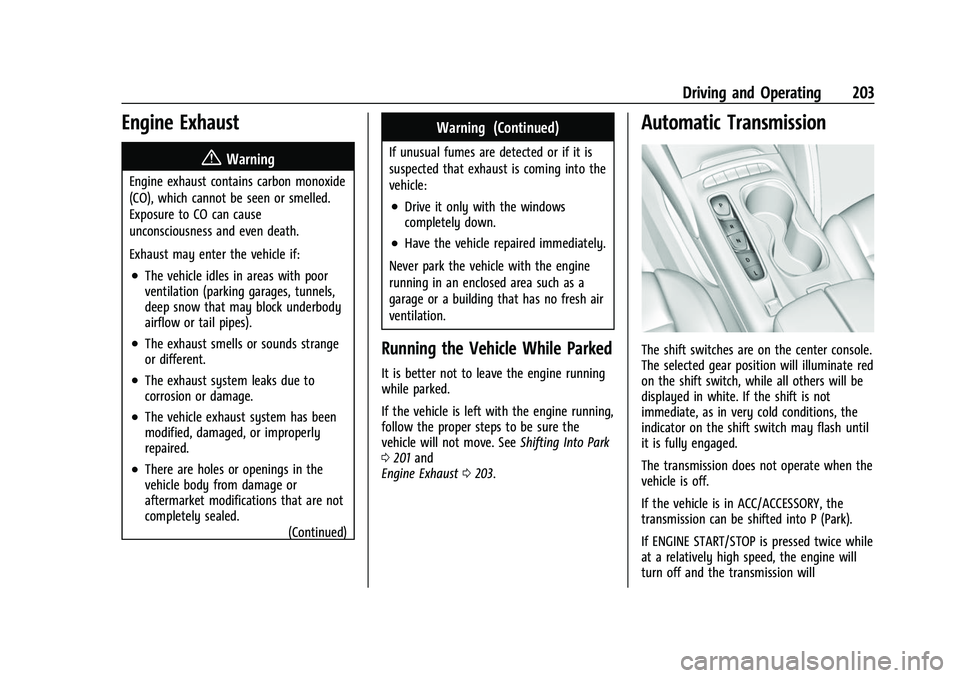
The shift switches are on the center console.
The selected gear position will illuminate red
on the shift switch, while all others will be
displayed in white. If the shift is not
immediate, as in very cold conditions, the
indicator on the shift switch may flash until
it is fully engaged.
The transmission does not operate when the
vehicle is off.
If the vehicle is in ACC/ACCESSORY, the
transmission can be shifted into P (Park).
If ENGINE START/STOP is pressed twice while
at a relatively high speed, the engine will
turn off and the transmission will
Page 205 of 360
Buick E2UB-N Owner Manual (GMNA-Localizing-U.S./Canada/Mexico-
14583509) - 2021 - CRC - 1/8/21
204 Driving and Operating
automatically shift into N (Neutral). Once
the vehicle is stopped, P (Park) can be
selected.
P :This position locks the drive wheels. Use
P (Park) when starting the vehicle to ensure
the vehicle does not move.
{Warning
It is dangerous to get out of the vehicle
if the transmission is not in P (Park) with
the parking brake set. The vehicle
can roll.
Do not leave the vehicle when the engine
is running. If the engine has been left
running, the vehicle can move suddenly.
You or others could be injured. To be
sure the vehicle will not move, even
when on fairly level ground, always set
the parking brake and place the
transmission into P (Park). See Shifting
Into Park 0201 and
Driving Characteristics and Towing Tips
0 243.
This vehicle is equipped with an
electronically controlled transmission. The
R (Reverse) and D (Drive) shift switches are designed to prevent inadvertent shifting out
of P (Park) unless the ignition is on, and the
brake pedal is applied.
When the vehicle is stopped, press ENGINE
START/STOP to turn off the vehicle. The
transmission will shift to P (Park)
automatically.
The vehicle will not shift into P (Park) if it is
moving too fast. Stop the vehicle and shift
into P (Park).
To shift in and out of P (Park), see
Shifting
Into Park 0201 and
Shifting out of Park 0202.
R : Use this gear to back up.
If the vehicle is shifted into R (Reverse)
while the speed is too high, the vehicle will
shift into N (Neutral). Reduce the vehicle
speed and try the shift again.
To shift into R (Reverse): 1. Bring the vehicle to a complete stop.
2. Pull the R (Reverse) switch on the center console.
To shift out of R (Reverse): 1. Bring the vehicle to a complete stop.
2. Shift to the desired gear. At low vehicle speeds, R (Reverse) can be
used to rock the vehicle back and forth to
get out of snow, ice, or sand without
damaging the transmission. See
If the
Vehicle Is Stuck 0193.
N : In this position, the engine does not
connect with the wheels. To restart the
engine when the vehicle is already moving,
use N (Neutral) only.
{Warning
Shifting into a drive gear while the
engine is running at high speed is
dangerous. Unless your foot is firmly on
the brake pedal, the vehicle could move
very rapidly. You could lose control and
hit people or objects. Do not shift into a
drive gear while the engine is running at
high speed.
Caution
Shifting out of P (Park) or N (Neutral) with
the engine running at high speed may
damage the transmission. The repairs
would not be covered by the vehicle
(Continued)
Page 207 of 360
Buick E2UB-N Owner Manual (GMNA-Localizing-U.S./Canada/Mexico-
14583509) - 2021 - CRC - 1/8/21
206 Driving and Operating
2. Apply the brake pedal.
3. Open the door.
4. Shift into N (Neutral), then release thebrake pedal.
5. The indicator should continue to show N. If it does not, repeat Steps 2–4.
6. Exit the vehicle and close the door. The vehicle is now ready for the car wash.
7. The vehicle may automatically shift into P (Park) upon re-entry.
Caution
A transmission hot message may display
if the automatic transmission fluid is too
hot. Driving under this condition can
damage the vehicle. Stop and idle the
engine to cool the automatic
transmission fluid. This message clears
when the transmission fluid has cooled
sufficiently.
D : This position is for normal driving.
If more power is needed for passing, press
the accelerator pedal down. If the vehicle is shifted into D (Drive) while
the speed is too high, the transmission will
get ready to engage D (Drive). Reduce the
vehicle speed, then the transmission will
engage D (Drive).
To shift into D (Drive):
1. Bring the vehicle to a complete stop.
2. Pull the D (Drive) switch on the center console.
To shift out of D (Drive): 1. Bring the vehicle to a complete stop.
2. Shift to the desired gear.
Downshifting the transmission in slippery
road conditions could result in skidding. See
“Skidding” underLoss of Control 0190.
Caution
Spinning the tires or holding the vehicle
in one place on a hill using only the
accelerator pedal may damage the
transmission. The repair will not be
covered by the vehicle warranty. If the
vehicle is stuck, do not spin the tires.
When stopping on a hill, use the brakes
to hold the vehicle in place.
Manual Mode
Tap Shift
Caution
Driving with the engine at a high rpm
without upshifting while using Tap Shift,
could damage the vehicle. Always upshift
when necessary while using Tap Shift.
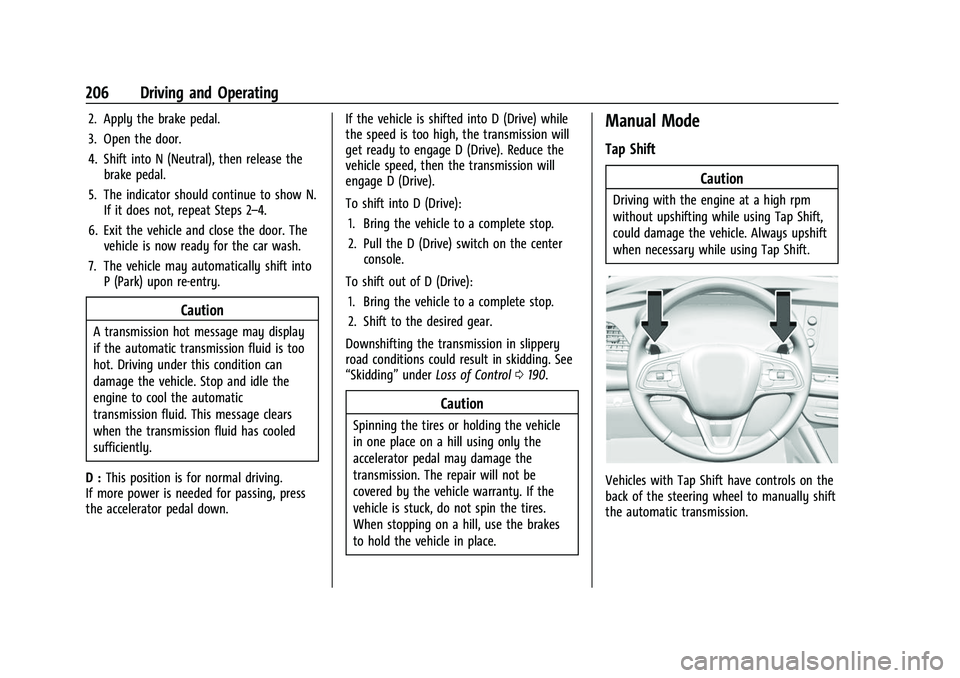
Vehicles with Tap Shift have controls on the
back of the steering wheel to manually shift
the automatic transmission.
Page 208 of 360
Buick E2UB-N Owner Manual (GMNA-Localizing-U.S./Canada/Mexico-
14583509) - 2021 - CRC - 1/8/21
Driving and Operating 207
Permanent Tap Shift Mode
To enter Permanent Tap Shift Mode:1. With the vehicle in D (Drive), press the M (Manual Mode) button.
2. Pull the steering wheel control toward you to shift. Pull the left control to
downshift, and the right control to
upshift.
To exit Permanent Tap Shift Mode, pull the
D (Drive) switch on the center console.
Temporary Tap Manual Shift Mode
To enter Temporary Tap Shift Mode: 1. With the transmission in D (Drive) and not in Permanent Tap Shift Mode, the
Tap Shift controls will activate a
Temporary Tap Shift Mode, allowing the
transmission to be manually shifted.
2. To deactivate, hold the right control briefly. Automatic shifts return after no
manual shifts have been done for seven
to 10 seconds.
While using Tap Shift, the vehicle will have
firmer, quicker shifting. This can be used for
sport driving or when climbing or
descending hills, to stay in gear longer,
or to downshift for more power or engine
braking. The transmission will only allow shifting
into gears appropriate for the vehicle speed
and engine revolutions per minute (rpm).
If shifting is prevented for any reason, the
M or D will flash in the instrument cluster.
The transmission will not automatically shift
to the next higher gear if the engine rpm is
too high. It will only automatically shift to
the next lower gear if the engine rpm is
much too low.
Drive Systems
All-Wheel Drive
Vehicles with this feature can operate in
All-Wheel Drive (AWD) Mode. When the
AWD feature is active, the system transfers
engine power, if required, to all four wheels.
The system is fully automatic and adjusts to
road conditions for improved traction and
control. In FWD Mode engine power is
transferred to the front wheels only, and
the AWD feature is off.
The AWD feature is automatically activated
when certain modes are selected using the
Driver Mode Control switch. When an AWD
mode change is requested the light will
flash briefly while the system is engaging
and the AWD light will be displayed when
the system is active. When a non-AWD
Mode is selected, the light will flash briefly
while the system disengages and a 2WD
light will be displayed when the AWD
system is off. See
Driver Mode Control 0212.
When a compact spare tire is installed on an
AWD vehicle, the system will automatically
detect the compact spare and reduce AWD
performance to protect the system. To
restore AWD operation and prevent
excessive wear on the system, replace the
compact spare with a full-size tire as soon as
possible. See Compact Spare Tire 0301.Brakes
Antilock Brake System (ABS)
The Antilock Brake System (ABS) helps
prevent a braking skid and maintain steering
while braking hard.
ABS performs a system check when the
vehicle is first driven. A momentary motor
or clicking noise may be heard while this
test is going on, and the brake pedal may
move slightly. This is normal.
Page 213 of 360
Buick E2UB-N Owner Manual (GMNA-Localizing-U.S./Canada/Mexico-
14583509) - 2021 - CRC - 1/8/21
212 Driving and Operating
When HDC is activated, the initial HDC
speed is set to the current driving speed.
It can be increased or decreased by pressing
+RES or–SET on the steering wheel or by
applying the accelerator or brake pedal. This
adjusted speed becomes the new set speed.
HDC will remain enabled between 22 and
60 km/h (14 and 37 mph); however vehicle
speed cannot be set or maintained in this
range. It will automatically disable if the
vehicle speed is above 80 km/h (50 mph) or
above 60 km/h (37 mph) for at least
30 seconds. Press
5again to re-enable HDC.
Driver Mode Control
Driver Mode Control (DMC) allows the driver
to adjust the overall driving experience to
better suit preference by adjusting multiple
subsystems. Driver Mode availability and
affected vehicle subsystems are dependent
upon vehicle trim level, region, and optional
features.
If the vehicle is in Tour Mode or AWD
Mode, it will stay in that mode through
future ignition cycles. If the vehicle is in any
other mode, it will return to Tour Mode
when the vehicle is restarted. When a mode
is selected, an indicator will come on in the
instrument cluster.
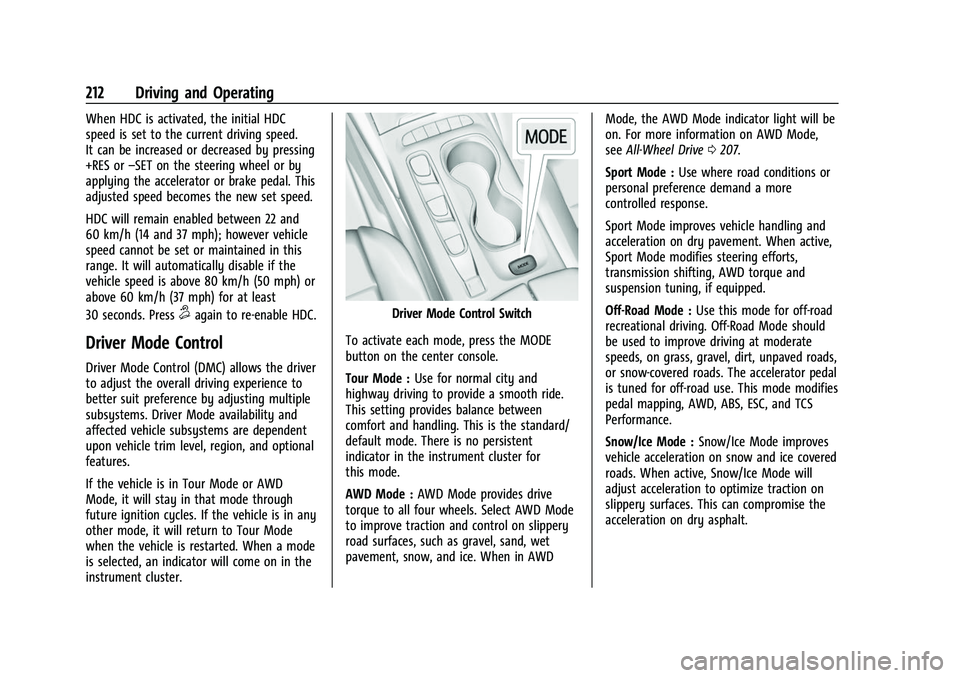
Driver Mode Control Switch
To activate each mode, press the MODE
button on the center console.
Tour Mode : Use for normal city and
highway driving to provide a smooth ride.
This setting provides balance between
comfort and handling. This is the standard/
default mode. There is no persistent
indicator in the instrument cluster for
this mode.
AWD Mode : AWD Mode provides drive
torque to all four wheels. Select AWD Mode
to improve traction and control on slippery
road surfaces, such as gravel, sand, wet
pavement, snow, and ice. When in AWD Mode, the AWD Mode indicator light will be
on. For more information on AWD Mode,
see
All-Wheel Drive 0207.
Sport Mode : Use where road conditions or
personal preference demand a more
controlled response.
Sport Mode improves vehicle handling and
acceleration on dry pavement. When active,
Sport Mode modifies steering efforts,
transmission shifting, AWD torque and
suspension tuning, if equipped.
Off-Road Mode : Use this mode for off-road
recreational driving. Off-Road Mode should
be used to improve driving at moderate
speeds, on grass, gravel, dirt, unpaved roads,
or snow-covered roads. The accelerator pedal
is tuned for off-road use. This mode modifies
pedal mapping, AWD, ABS, ESC, and TCS
Performance.
Snow/Ice Mode : Snow/Ice Mode improves
vehicle acceleration on snow and ice covered
roads. When active, Snow/Ice Mode will
adjust acceleration to optimize traction on
slippery surfaces. This can compromise the
acceleration on dry asphalt.
Page 240 of 360

Buick E2UB-N Owner Manual (GMNA-Localizing-U.S./Canada/Mexico-
14583509) - 2021 - CRC - 1/8/21
Driving and Operating 239
180 km/h (112 mph). It may assist by gently
turning the steering wheel if the vehicle
approaches a detected lane marking. It may
also provide a Lane Departure Warning
(LDW) alert if the vehicle crosses a detected
lane marking. LKA can be overridden by
turning the steering wheel. This system is
not intended to keep the vehicle centered in
the lane. LKA will not assist and alert if the
turn signal is active in the direction of lane
departure, or if it detects that you are
accelerating, braking or actively steering.
{Warning
The LKA system does not continuously
steer the vehicle. It may not keep the
vehicle in the lane or give a Lane
Departure Warning (LDW) alert, even if a
lane marking is detected.
The LKA and LDW systems may not:
.Provide an alert or enough steering
assist to avoid a lane departure or
crash.
.Detect lane markings under poor
weather or visibility conditions. This
can occur if the windshield or
headlamps are blocked by dirt, snow,(Continued)
Warning (Continued)
or ice; if they are not in proper
condition; or if the sun shines directly
into the camera.
.Detect road edges.
.Detect lanes on winding or hilly roads.
If LKA only detects lane markings on one
side of the road, it will only assist or
provide an LDW alert when approaching
the lane on the side where it has
detected a lane marking. Even with LKA
and LDW, you must steer the vehicle.
Always keep your attention on the road
and maintain proper vehicle position
within the lane, or vehicle damage,
injury, or death could occur. Always keep
the windshield, headlamps, and camera
sensors clean and in good repair. Do not
use LKA in bad weather conditions or on
roads with unclear lane markings, such as
construction zones.
{Warning
Using LKA while towing a trailer or on
slippery roads could cause loss of control
of the vehicle and a crash. Turn the
system off.
How the System Works
LKA uses a camera sensor installed on the
windshield ahead of the rearview mirror to
detect lane markings. It may provide brief
steering assist if it detects an unintended
lane departure. It may further provide an
audible alert or the driver seat may pulse
indicating that a lane marking has been
crossed.
To turn LKA on and off, press
Aon the
center console. If equipped, the indicator
light on the button comes on when LKA is
on and turns off when LKA is disabled.
When on,
Ais white, if equipped,
indicating that the system is not ready
to assist.
Ais green if LKA is ready to
assist. LKA may assist by gently turning the
steering wheel if the vehicle approaches a
detected lane marking.
Ais amber when
assisting. It may also provide a Lane
Departure Warning (LDW) alert by flashing
Page 279 of 360
Buick E2UB-N Owner Manual (GMNA-Localizing-U.S./Canada/Mexico-
14583509) - 2021 - CRC - 1/8/21
278 Vehicle Care
Fuses Amps UsageF34 10A Run crank for misc. 1 & 2 shifter
interface board
module/
Instrument panel
cluster/
Transmission
control module/
Sensing &
diagnostic
module/Headlamp
manual leveling
switch/Reflective
light auxiliary
display
F35 15A Run crank for engine control
module
F36 10A Electric park brake switch/ Shifter
interface board
F37 15A Radio/Center stack module/
Auxiliary jack
F38 – – Fuses Amps Usage
F39 2A Steering wheel clock spring
F40 20A Exterior lighting module 2
F41 7.5A Heated steering wheel module
F42 20A Direct current to alternate current
inverter module
CB1 – –
CB2 15A Auxiliary power outlet console
Relays Usage
K01 Retained accessory power accessory
K02 Run/crank
K03 –
K04 –
K05 –Wheels and Tires
Tires
Every new GM vehicle has high-quality
tires made by a leading tire
manufacturer. See the warranty manual
for information regarding the tire
warranty and where to get service. For
additional information refer to the tire
manufacturer.
{Warning
.Poorly maintained and improperly
used tires are dangerous.
.Overloading the tires can cause
overheating as a result of too
much flexing. There could be a
blowout and a serious crash. See
Vehicle Load Limits 0193.
.Underinflated tires pose the same
danger as overloaded tires. The
resulting crash could cause serious
injury. Check all tires frequently to
(Continued)
Page 350 of 360
Buick E2UB-N Owner Manual (GMNA-Localizing-U.S./Canada/Mexico-
14583509) - 2021 - CRC - 1/8/21
Index 349
Assistance Systems for Parking andBacking . . . . . . . . . . . . . . . . . . . . . . . . . . . . . . . . 223
Audio Bluetooth . . . . . . . . . . . . . . . . . . . . . . . . . . . . . . 136
Auto Stop Stop/Start System . . . . . . . . . . . . . . . . . . . . . 199
Automatic
Dimming Mirrors . . . . . . . . . . . . . . . . . . . . . . . 25
Door Locks . . . . . . . . . . . . . . . . . . . . . . . . . . . . . . . 15
Emergency Braking (AEB) . . . . . . . . . . . . . . 234
Headlamp System . . . . . . . . . . . . . . . . . . . . . 120
Transmission . . . . . . . . . . . . . . . . . . . . . . . . . . . 203
Transmission Fluid . . . . . . . . . . . . . . . . . . . . . 260
Automatic Transmission Manual Mode . . . . . . . . . . . . . . . . . . . . . . . . . 206
Avoiding Untrusted Media Devices . . . . . . . .134
B
Battery
Exterior Lighting Battery Saver . . . . . . . . 124
Load Management . . . . . . . . . . . . . . . . . . . . . 124
Power Protection . . . . . . . . . . . . . . . . . . . . . . 124
Battery - North America . . . . . . . . . . . . 268, 302
Blade Replacement, Wiper . . . . . . . . . . . . . . . 269
Bluetooth Overview . . . . . . . . . . . . . . . . . . . . . . . . . . 153, 154
Bluetooth Audio . . . . . . . . . . . . . . . . . . . . . . . . . 136 Brake
Parking, Electric . . . . . . . . . . . . . . . . . . . . . . . . 208
System Warning Light . . . . . . . . . . . . . . . . . . 96
Brakes . . . . . . . . . . . . . . . . . . . . . . . . . . . . . . . . . . . 266 Antilock . . . . . . . . . . . . . . . . . . . . . . . . . . . . . . . . 207
Assist . . . . . . . . . . . . . . . . . . . . . . . . . . . . . . . . . . 209
Fluid . . . . . . . . . . . . . . . . . . . . . . . . . . . . . . . . . . . 267
Braking . . . . . . . . . . . . . . . . . . . . . . . . . . . . . . . . . . 189 Automatic Emergency (AEB) . . . . . . . . . . . 234
Braking System Front Pedestrian (FPB) . . . . . . . . . . . . . . . . . 235
Break-In, New Vehicle . . . . . . . . . . . . . . . . . . . . 196
Buckle To Drive . . . . . . . . . . . . . . . . . . . . . . . . . . . 42
Bulb Replacement Headlamp Aiming . . . . . . . . . . . . . . . . . . . . . . 272
Headlamps . . . . . . . . . . . . . . . . . . . . . . . . . . . . 272
Buying New Tires . . . . . . . . . . . . . . . . . . . . . . . . 291C
California Perchlorate Materials Requirements . . . 254
California Proposition 65 Warning . . . . . . . . . . . . . . . . . . 254, 268, 302, Back Cover
Canadian Vehicle Owners . . . . . . . . . . . . . . . . . . . 1
Capacities and Specifications . . . . . . . . . . . . . 326
Carbon Monoxide Engine Exhaust . . . . . . . . . . . . . . . . . . . . . . . . 203 Carbon Monoxide (cont'd)
Liftgate . . . . . . . . . . . . . . . . . . . . . . . . . . . . . . . . . 16
Winter Driving . . . . . . . . . . . . . . . . . . . . . . . . . 192
Cargo Cover . . . . . . . . . . . . . . . . . . . . . . . . . . . . . . . . . . . 77
Management System . . . . . . . . . . . . . . . . . . . 78
Tie-Downs . . . . . . . . . . . . . . . . . . . . . . . . . . . . . . 78
Caution, Danger, and Warning . . . . . . . . . . . . . .2
Center Console Storage . . . . . . . . . . . . . . . . . . . .77
Chains, Tire . . . . . . . . . . . . . . . . . . . . . . . . . . . . . . 295
Charging Wireless . . . . . . . . . . . . . . . . . . . . . . . . . . . . . . . . 86
Charging System Light . . . . . . . . . . . . . . . . . . . . 95
Check Engine Light (Malfunction Indicator) . . . . 95
Child Restraints
Infants and Young Children . . . . . . . . . . . . . 60
Lower Anchors and Tethers forChildren . . . . . . . . . . . . . . . . . . . . . . . . . . . . . . . 65
Older Children . . . . . . . . . . . . . . . . . . . . . . . . . . 58
Securing . . . . . . . . . . . . . . . . . . . . . . . . . . . . . 71, 73
Systems . . . . . . . . . . . . . . . . . . . . . . . . . . . . . . . . 62
Circuit Breakers . . . . . . . . . . . . . . . . . . . . . . . . . . 273
Cleaning Exterior Care . . . . . . . . . . . . . . . . . . . . . . . . . . . 305
Interior Care . . . . . . . . . . . . . . . . . . . . . . . . . . . 309
Climate Control Systems . . . . . . . . . . . . . . . . . .178 Air Conditioning . . . . . . . . . . . . . . . . . . . . . . . 178
Page 357 of 360
Buick E2UB-N Owner Manual (GMNA-Localizing-U.S./Canada/Mexico-
14583509) - 2021 - CRC - 1/8/21
356 Index
Safety Defects Reporting (cont'd)General Motors . . . . . . . . . . . . . . . . . . . . . . . . 337
U.S. Government . . . . . . . . . . . . . . . . . . . . . . . 336
Safety Locks . . . . . . . . . . . . . . . . . . . . . . . . . . . . . . . 15
Safety System Check . . . . . . . . . . . . . . . . . . . . . 47
Satellite Radio . . . . . . . . . . . . . . . . . . . . . . . . . . . . 133
Scheduling Appointments . . . . . . . . . . . . . . . . 333
Seat Belts . . . . . . . . . . . . . . . . . . . . . . . . . . . . . . . . . .41 Buckle To Drive . . . . . . . . . . . . . . . . . . . . . . . . . 42
Care . . . . . . . . . . . . . . . . . . . . . . . . . . . . . . . . . . . . 48
Extender . . . . . . . . . . . . . . . . . . . . . . . . . . . . . . . . 47
How to Wear Seat Belts Properly . . . . . . . 43
Lap-Shoulder Belt . . . . . . . . . . . . . . . . . . . . . . . 44
Reminders . . . . . . . . . . . . . . . . . . . . . . . . . . . . . . 93
Replacing after a Crash . . . . . . . . . . . . . . . . . 48
Use During Pregnancy . . . . . . . . . . . . . . . . . . 47
Seats Adjustment, Front . . . . . . . . . . . . . . . . . . . . . . 33
Head Restraints . . . . . . . . . . . . . . . . . . . . . . . . . 32
Heated and Ventilated Front . . . . . . . . . . . . 39
Lumbar Adjustment, Front . . . . . . . . . . . . . . 34
Massage . . . . . . . . . . . . . . . . . . . . . . . . . . . . . . . . 35
Memory . . . . . . . . . . . . . . . . . . . . . . . . . . . . . . . . 36
Power Adjustment, Front . . . . . . . . . . . . . . . 34
Rear . . . . . . . . . . . . . . . . . . . . . . . . . . . . . . . . . . . . 40
Reclining Seatbacks . . . . . . . . . . . . . . . . . . . . . 35
Securing Child Restraints . . . . . . . . . . . . . . . 71, 73 Security
Light . . . . . . . . . . . . . . . . . . . . . . . . . . . . . . . . . . . 102
OnStar . . . . . . . . . . . . . . . . . . . . . . . . . . . . . . . . . 341
Vehicle . . . . . . . . . . . . . . . . . . . . . . . . . . . . . . . . . 23
Vehicle Alarm . . . . . . . . . . . . . . . . . . . . . . . . . . . 23
Service . . . . . . . . . . . . . . . . . . . . . . . . . . . . . . . . . . . .185 Accessories and Modifications . . . . . . . . . 254
Climate Control System . . . . . . . . . . . . . . . . 178
Doing Your Own Work . . . . . . . . . . . . . . . . . 255
Maintenance Records . . . . . . . . . . . . . . . . . . 324
Maintenance, General Information . . . . . 313
Parts Identification . . . . . . . . . . . . . . . . . . . . . 325
Scheduling Appointments . . . . . . . . . . . . . . 333
Service Electric Parking Brake Light . . . . . . . 97
Services Special Application . . . . . . . . . . . . . . . . . . . . . 319
Servicing System . . . . . . . . . . . . . . . . . . . . . . . . 148
Servicing the Airbag . . . . . . . . . . . . . . . . . . . . . . .57
Settings . . . . . . . . . . . . . . . . . . . . . . . . . . . . . . . . . . 159
Shifting Into Park . . . . . . . . . . . . . . . . . . . . . . . . . . . . . . 201
Out of Park . . . . . . . . . . . . . . . . . . . . . . . . . . . . 202
Side Blind Zone Alert (SBZA) . . . . . . . . . . . . . 237
Signals, Turn and Lane-Change . . . . . . . . . . . . 122
Software Updates . . . . . . . . . . . . . . . . . . . . . . . . 130
Spare Tire Compact . . . . . . . . . . . . . . . . . . . . . . . . . . . . . . . 301
Special Application Services . . . . . . . . . . . . . . 319 Specifications and Capacities . . . . . . . . . . . . . 326
Speedometer . . . . . . . . . . . . . . . . . . . . . . . . . . . . . 92
StabiliTrak
OFF Light . . . . . . . . . . . . . . . . . . . . . . . . . . . . . . . 99
Start Assist, Hill . . . . . . . . . . . . . . . . . . . . . . . . . . 209
Start Vehicle, Remote . . . . . . . . . . . . . . . . . . . . . . 12
Starting the Engine . . . . . . . . . . . . . . . . . . . . . . 198
Steering . . . . . . . . . . . . . . . . . . . . . . . . . . . . . . . . . 189 Heated Wheel . . . . . . . . . . . . . . . . . . . . . . . . . . 82
Wheel Adjustment . . . . . . . . . . . . . . . . . . . . . . 82
Wheel Controls . . . . . . . . . . . . . . . . . . . . . . . . . 82
Steering Wheel Controls . . . . . . . . . . . . . . . . . . 127
Stop/Start System . . . . . . . . . . . . . . . . . . . . . . . 199
Storage Areas Cargo Cover . . . . . . . . . . . . . . . . . . . . . . . . . . . . 77
Cargo Management System . . . . . . . . . . . . 78
Center Console . . . . . . . . . . . . . . . . . . . . . . . . . 77
Convenience Net . . . . . . . . . . . . . . . . . . . . . . . . 79
Front . . . . . . . . . . . . . . . . . . . . . . . . . . . . . . . . . . . 77
Glove Box . . . . . . . . . . . . . . . . . . . . . . . . . . . . . . 76
Roof Rack System . . . . . . . . . . . . . . . . . . . . . . . 79
Storage Compartments . . . . . . . . . . . . . . . . . . . 76
Struts Gas . . . . . . . . . . . . . . . . . . . . . . . . . . . . . . . . . . . . . 271
Stuck Vehicle . . . . . . . . . . . . . . . . . . . . . . . . . . . . 193
Sun Visors . . . . . . . . . . . . . . . . . . . . . . . . . . . . . . . . 30
Sunroof . . . . . . . . . . . . . . . . . . . . . . . . . . . . . . . . . . . 30
Symbols . . . . . . . . . . . . . . . . . . . . . . . . . . . . . . . . . . . .2